一、什么是Perforce
1.1定义
perforce是一个版本管理工具,用于取代git等传统版本管理工具
1.2 优点
ue中有模型,贴图等二进制文件占大头,代码只是一小部分,git只适合管理代码,对于二进制文件的支持非常差
ue内置perforce插件,官方推荐
可以单独检出(锁定)一个文件,同步颗粒度细,不会造成整个工程被检出
1.3 Perforce的构成
perforce由服务器和客户端构程
服务器可以部署在云端也可以部署在本地
客户端包含两部分,p4v和p4a,p4v是日常操作用的面板,p4a是给管理员用的面板,用来管理仓库
perforce是集中式版本控制,用户本地没有完整的历史记录
二、安装Perforce
3.1 安装服务器
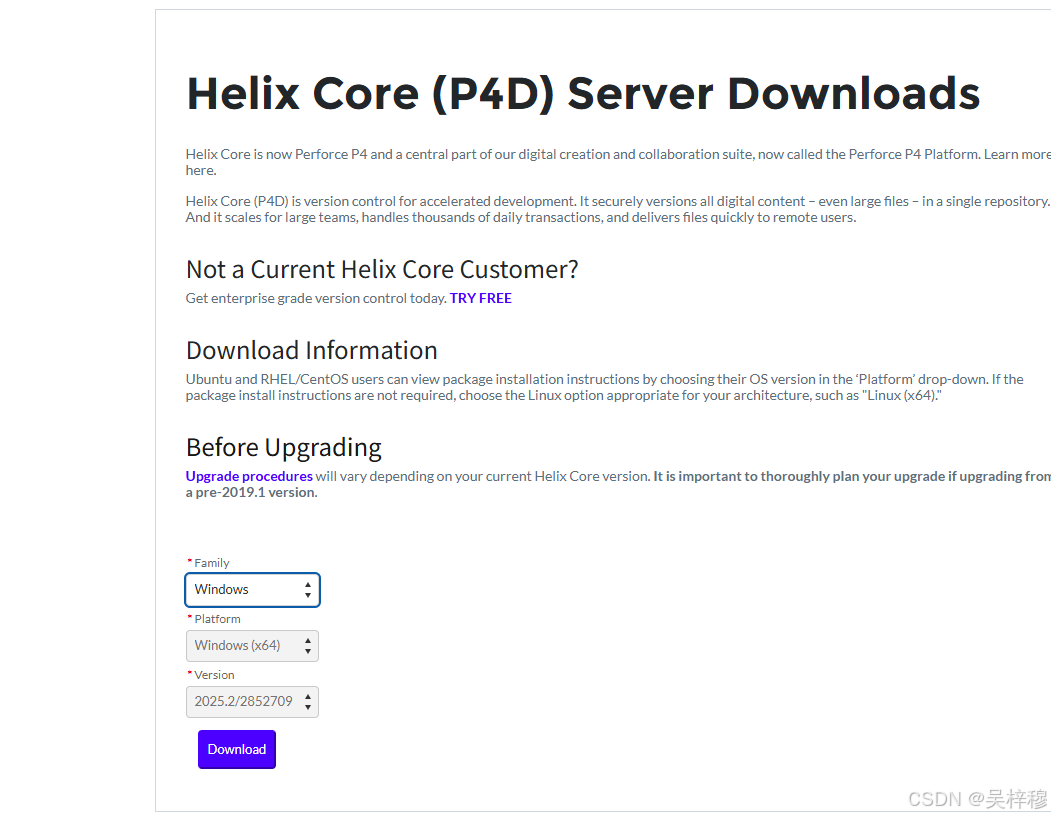
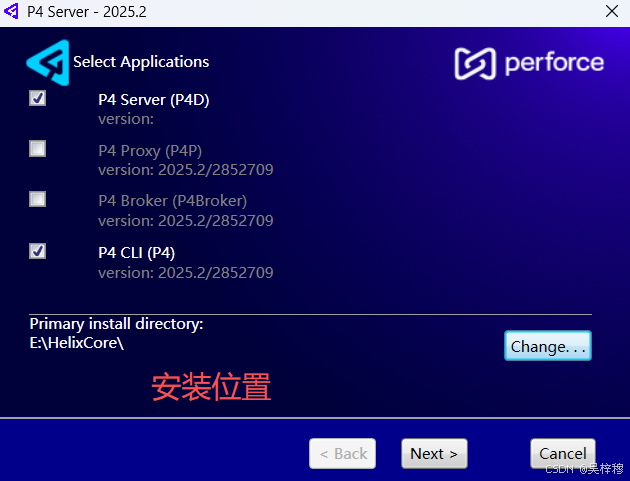
下载完成后,运行安装程序
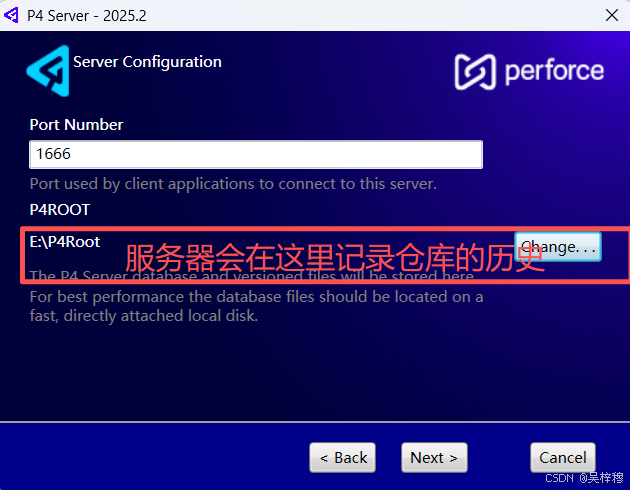
端口保持默认,选择一个服务器root目录
下一步UserName用来连接服务器,默认是电脑名,这个名字要记住
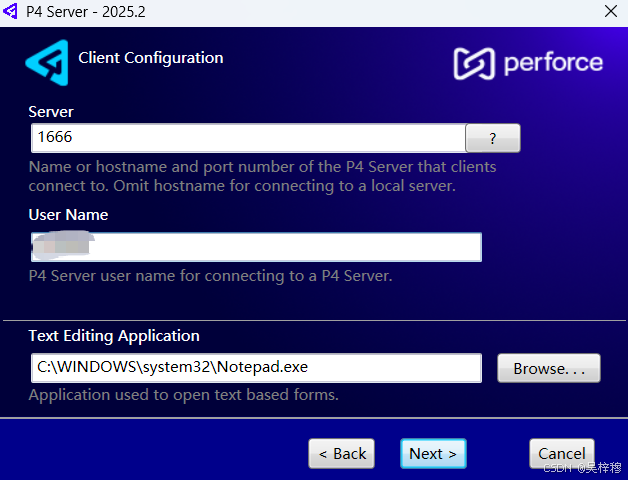
然后安装即可
3.2 为服务器配置中文支持
建议在安装好服务器后立刻设置中文,这样客户端在连接时,可以直接选择utf-8
进入p4v的安装目录,注意不是root文件夹,在地址栏里输入cmd,回车打开命令行

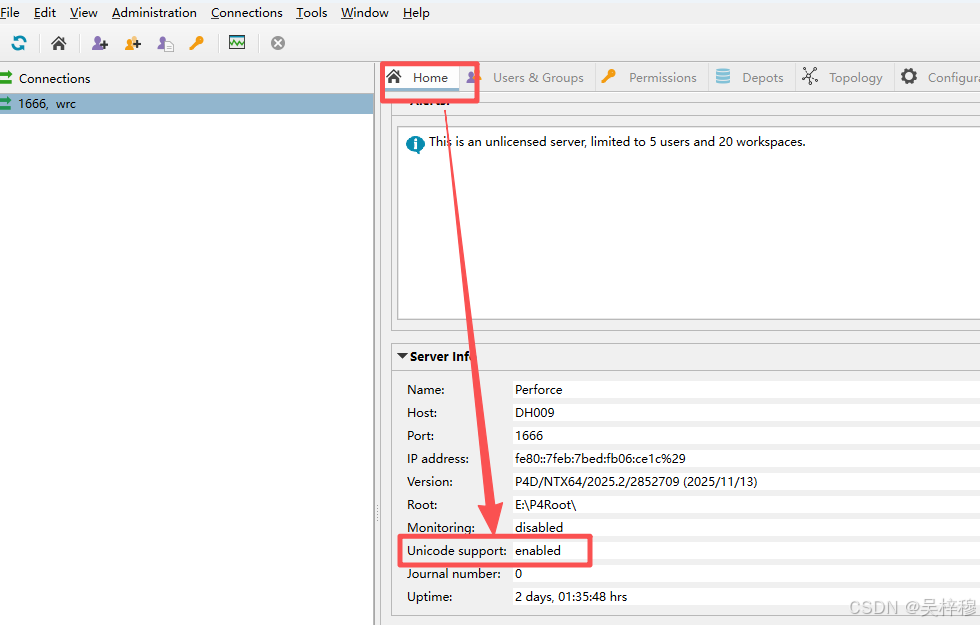
输入 p4d -xi,如果看到server switched to unicodemode,就说明切换成功

此时打开P4A,可以在Home,如果不成功,重启一次电脑试试
3.3 安装客户端
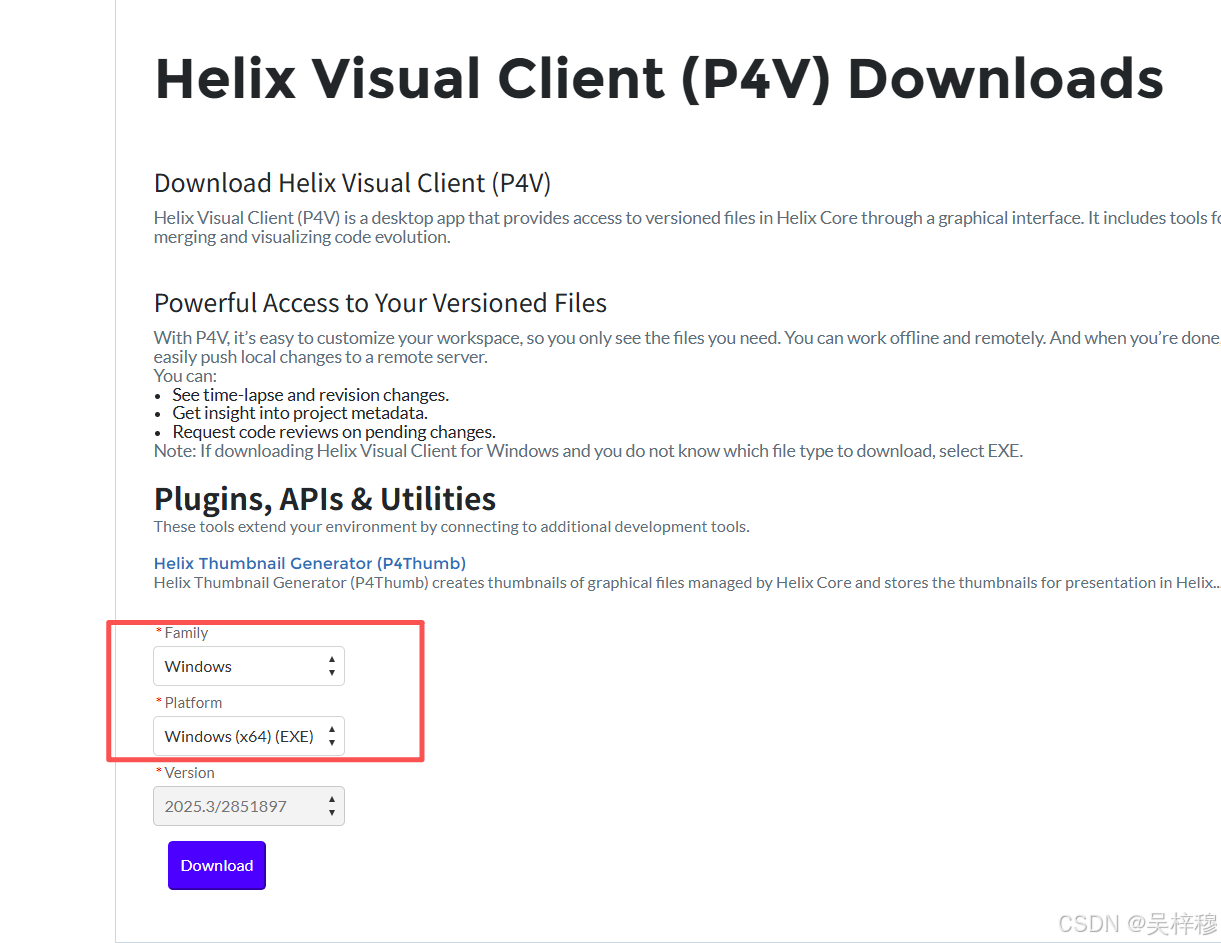
开始安装
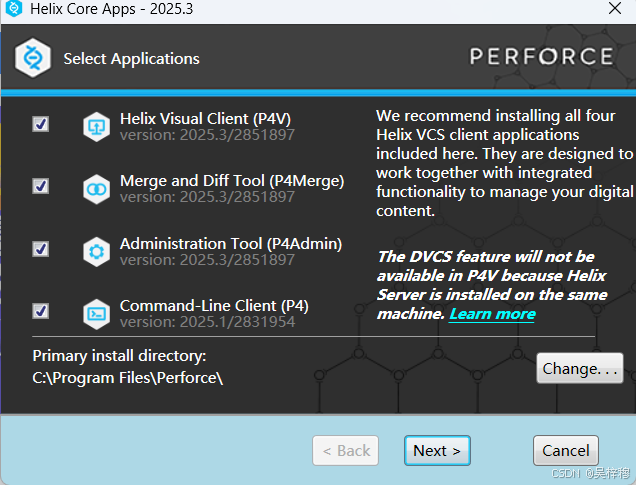
直接下一步,安装完成
首次运行时会让连接服务器
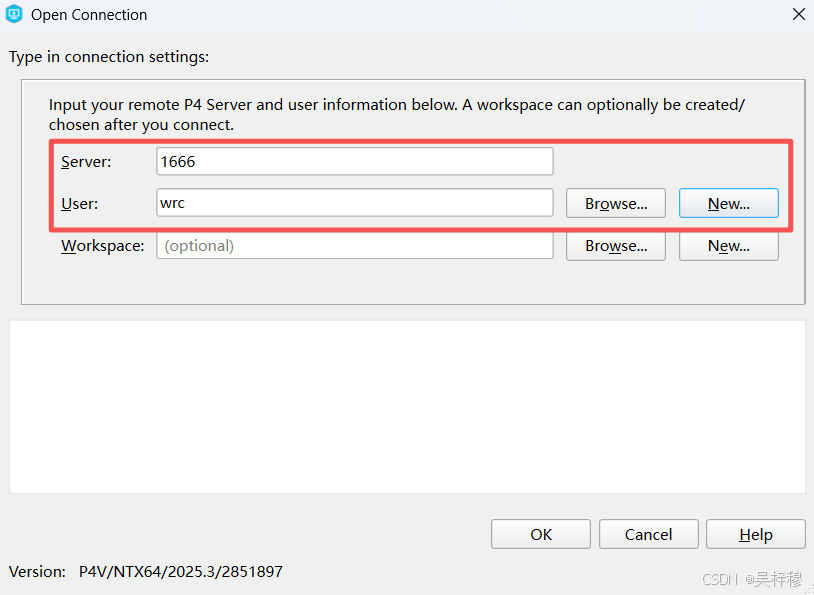
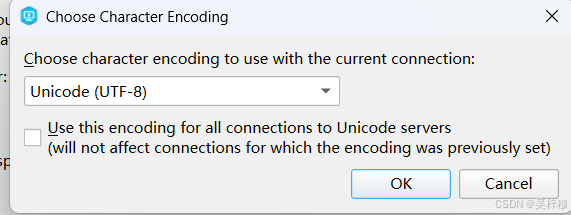
输入刚才的服务器地址,user可新建一个,或者选择一个服务器上已有的user,不需要选择workspace,点OK,让选择字符集,选择UTF-8,否则提交记录和文件名里不能有中文
三、新建一个仓库、流、工作区
对于仓库的管理需要在P4A中完成
新建仓库
首先在P4V中,如下选择,打开P4A
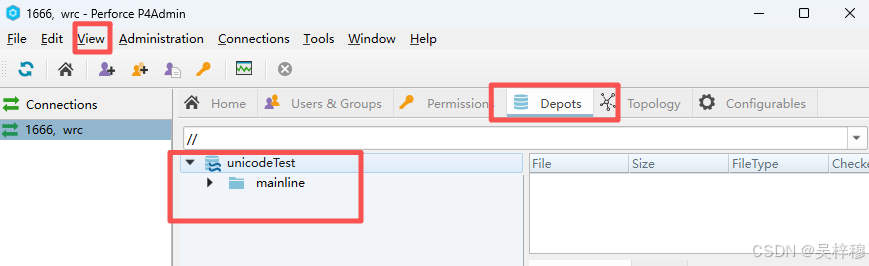
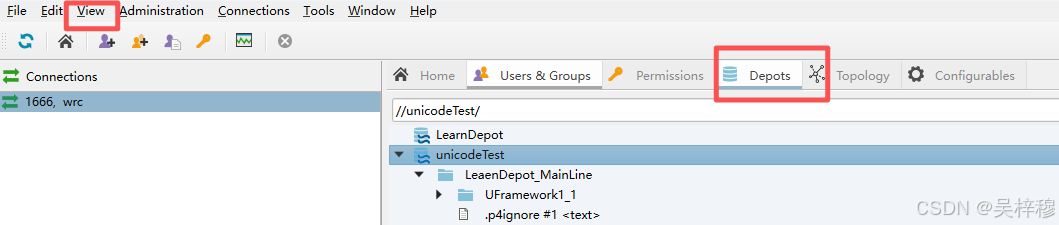
 P4A界面,Depots是仓库的列表,如果没有Depots选项卡,可以在View里打开
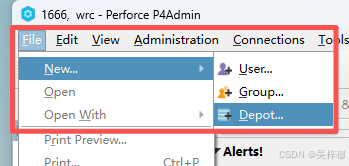
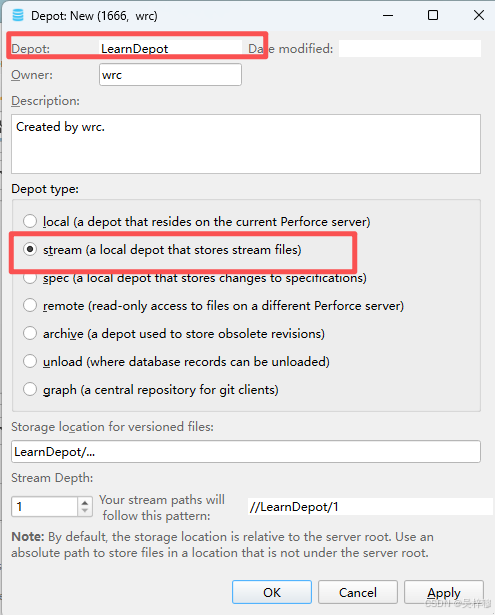
使用File-New/Deopt创建一个新仓库
为仓库起一个名字,Depottype必须选流式,其他的模式没用,直接ok
此时在Depots选项卡里可以看见新仓库
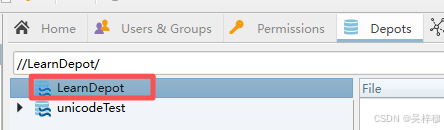
然后关闭p4v和p4a,重新启动p4v,否则虽然能刷新出仓库,但是无法新建流
新建流
重启P4V后可以在P4V的Depot界面看到新仓库
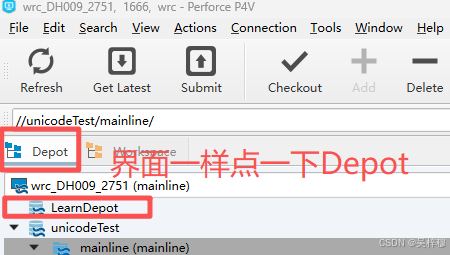
选中新建的仓库
左上角如下新建一个流
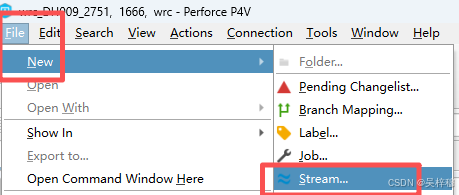
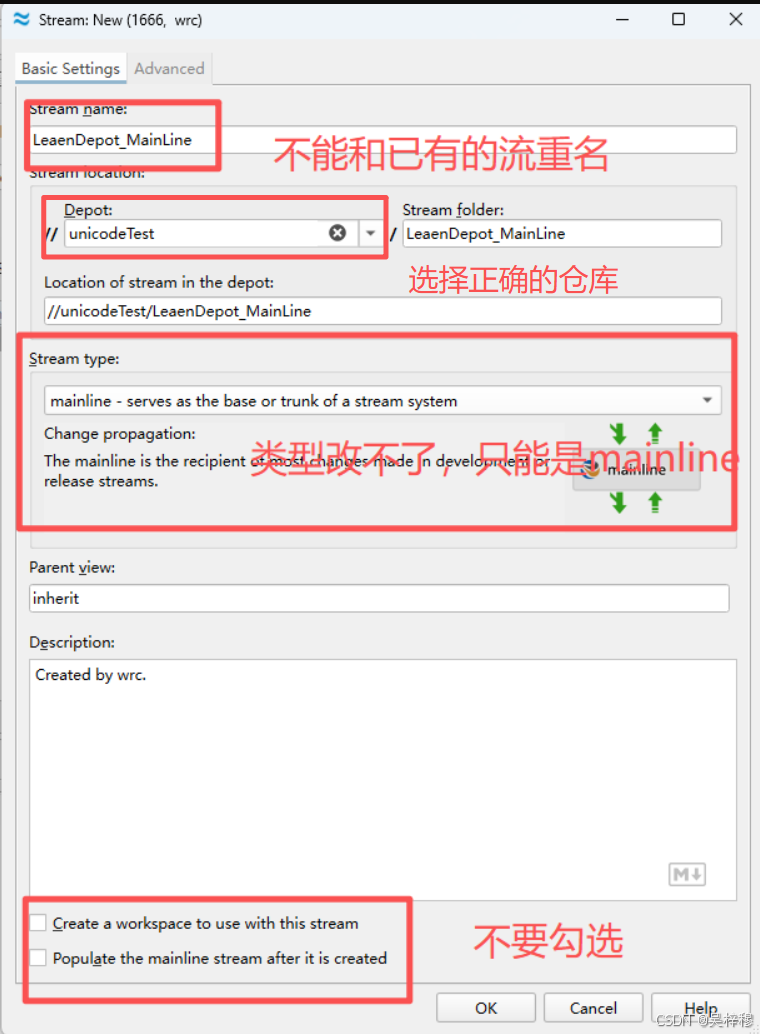
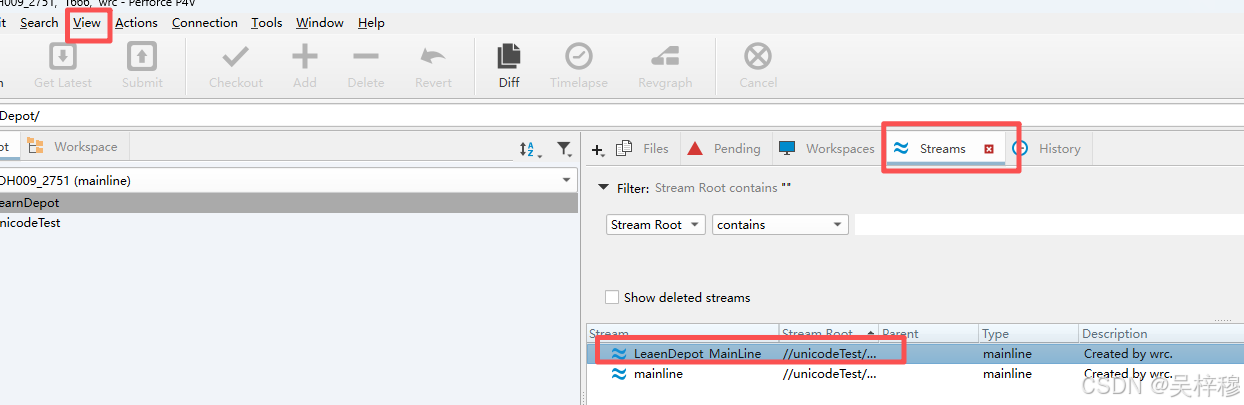
此时可以在streams选项卡看到新建的流,如果没有streams选项卡,在View中打开
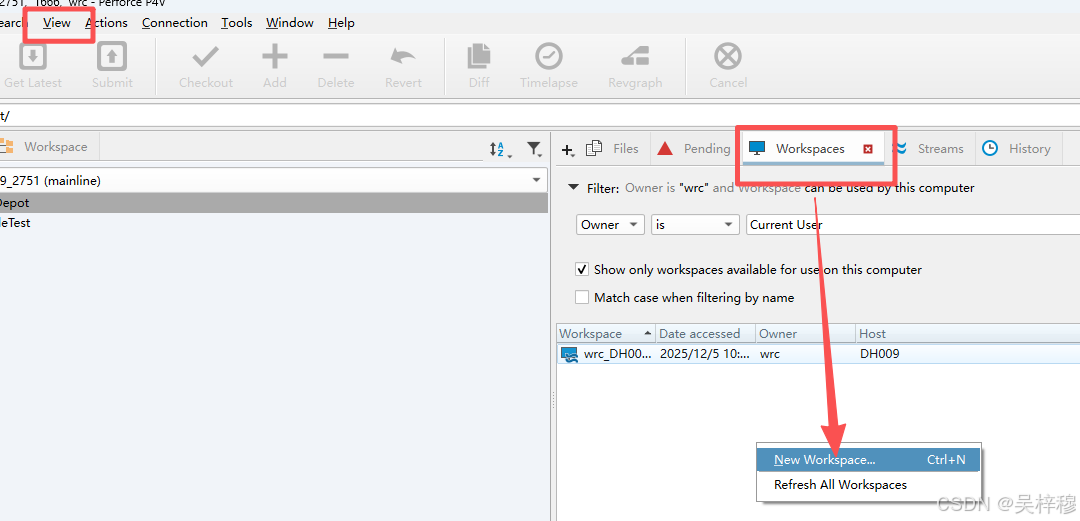
新建工作区
工作区是我们真正操作文件的地方,工程放在工作区下
首先切换到Workspace选项卡,如果没有,在view中打开
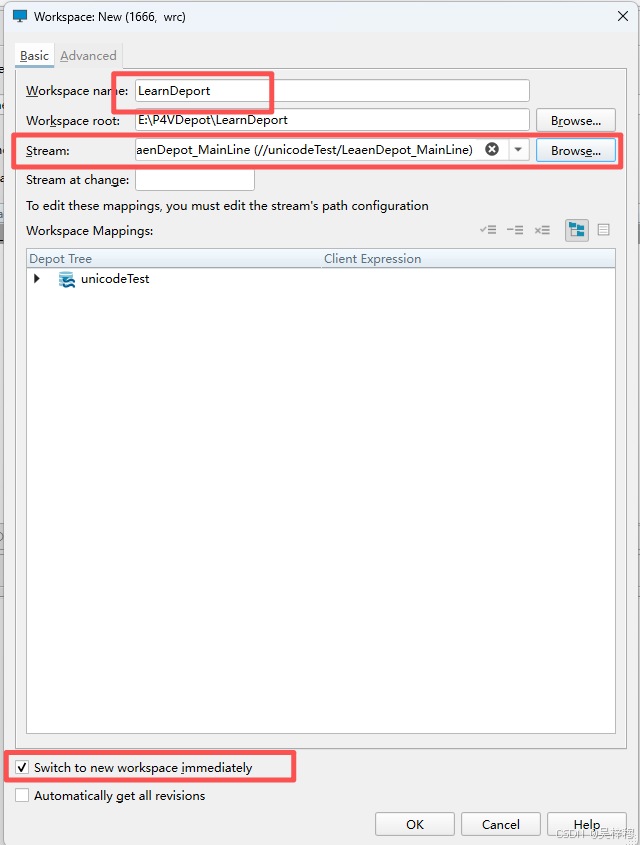
填好工作区的名字,选择刚才创建的流
此时切换到wrokspace,点击下拉界面,应该可以看到新的工作区,只是目前还没有文件

四 为仓库配置中文,映射规则,忽略规则
配置中文是为了让ue5推送时,可以直接让UE编辑器内的提交说明和中文资源文件名可以正常显示
为服务器配置中文
服务器的中文已经在安装章节配置,如果安装时没有设置,随时可以按安装章节中的方法重新设置utf8支持
为客户端配置中文支持
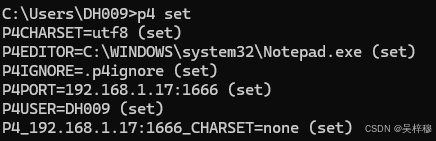
如果服务器已经配置了中文,在首次连接服务器时,可以选择UTF-8格式,如果服务器没有设置utf-8就已经打开了客户端,可以win+r运行,输入cmd打开命令行,在命令行里输入
p4 set P4CHARSET=utf8
来设置utf-8支持,可以输入p4 set来查看当前的状态
设置映射规则
这将告诉服务器如何处理UE文件,这个配置是全局的,配置一次就可以
在P4V中,找到一个已经建好的仓库,右键打开命令行
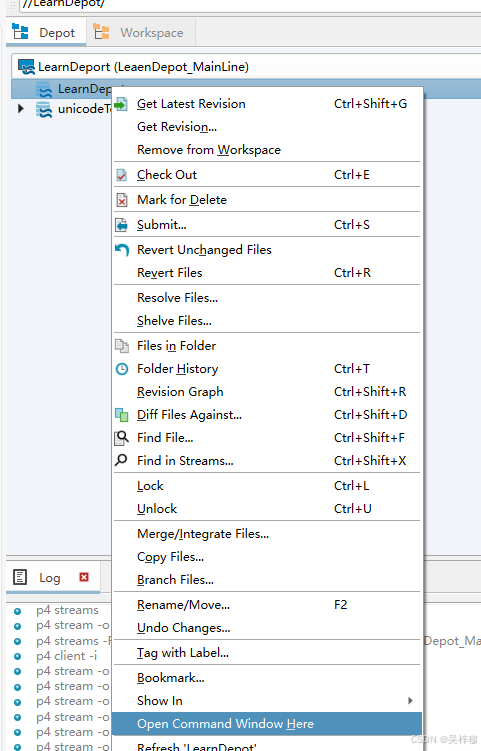
输入
p4 typemap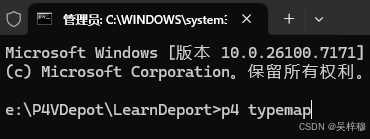
这将打开一个配置文件,在配置文件的typemap后追加
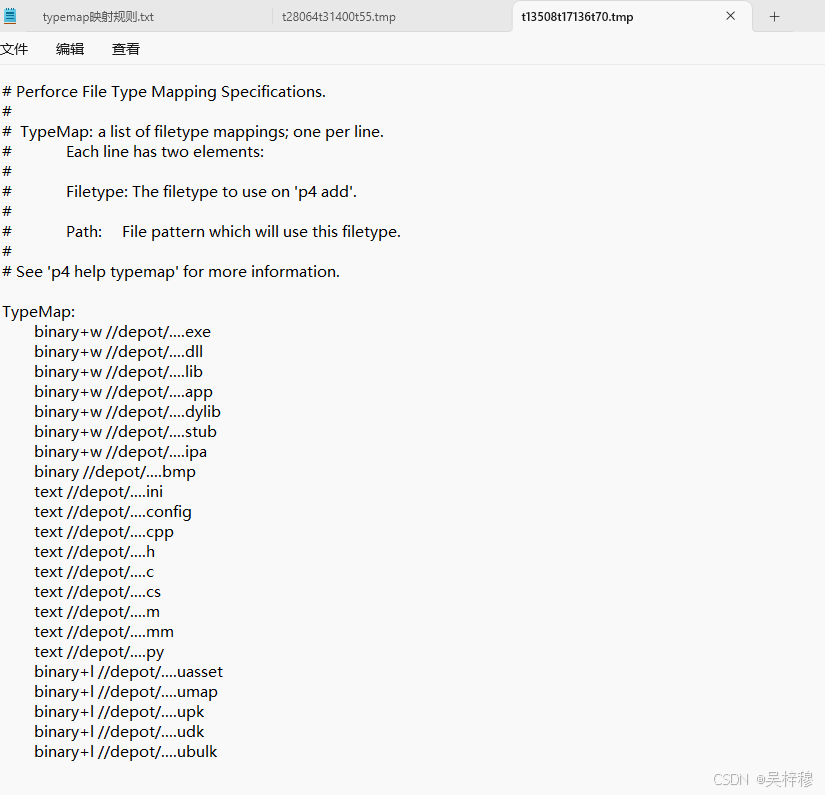
bash
	binary+w //depot/....exe
	binary+w //depot/....dll
	binary+w //depot/....lib
	binary+w //depot/....app
	binary+w //depot/....dylib
	binary+w //depot/....stub
	binary+w //depot/....ipa
	binary //depot/....bmp
	text //depot/....ini
	text //depot/....config
	text //depot/....cpp
	text //depot/....h
	text //depot/....c
	text //depot/....cs
	text //depot/....m
	text //depot/....mm
	text //depot/....py
	binary+l //depot/....uasset
	binary+l //depot/....umap
	binary+l //depot/....upk
	binary+l //depot/....udk
	binary+l //depot/....ubulk
设置忽略文件
perforce有服务器忽略和工作空间忽略两种模式,服务器忽略的级别高于工作空间本地忽略,建议只用本地忽略,本文也只介绍本地忽略
创建一个txt,粘贴如下内容
bash
## Universal P4IGNORE for Unreal Engine Projects and common DCC tools
## Works with both game projects and custom engine source
## Optimized pattern usage based on Perforce P4IGNORE documentation
## This p4ignore file should be named .p4ignore or p4ignore.txt and
## placed in the workspace root, which should be where the Engine and
## project folders are located.

# The syntax for P4IGNORE files is not the same as Perforce syntax.
# Key differences from .gitignore:
# - A / at the start means "relative to this p4ignore file"
# - A / at the end means "directories only"
# - * matches substrings but NOT path separators (like P4 wildcard)
# - ** matches substrings INCLUDING path separators (like P4 "..." wildcard)
# - ! at the start excludes the file specification

###############################################################################
# Visual Studio Solution and Project Files
###############################################################################

# Ignore root Visual Studio solution files only
/*.sln
/*/*.sln

# Visual Studio temp files (but exclude when .pdb is in folder path)
.vs/
*.pdb
!*.pdb/
*.suo
*.opensdf
*.sdf
*.tmp
*.mdb
obj/
*.vcxproj

# User-specific Visual Studio files
*.csproj.user
*.csproj.cache
*.csproj.nuget.*
*.csproj.AssemblyReference.cache
# Note: DO NOT ignore *.csproj.props - these are shared build configuration files

# Built binaries and temporary build files
obj/
*.csprojAssemblyReference.cache

###############################################################################
# Git Integration (if migrating from Git)
###############################################################################

.git/
.gitignore
.gitattributes
.gitmodules
.tgitconfig

###############################################################################
# JetBrains IDEs
###############################################################################

.idea/
!.idea/runConfigurations
.gradle/

###############################################################################
# Python
###############################################################################

__pycache__/
*.pyc
*.egg-info/

###############################################################################
# Unix/Mac Specific
###############################################################################

FileOpenOrder/
*.xcworkspace/xcuserdata/
*.xcodeproj/xcuserdata/
*.xcodeproj/project.xcworkspace/xcuserdata/
.ue4dependencies
*~
.DS_Store

###############################################################################
# Unreal Engine - Core Ignores
###############################################################################

# Samples, FeaturePacks, Templates at root only
/Samples/
/*/Samples/
/FeaturePacks/
/*/FeaturePacks/
/Templates/
/*/Templates/
# Saved and Intermediate directories (generated content)
# These can be at any depth, so use **/
**/Saved/
**/Intermediate/

# Derived Data Cache - use specific patterns to avoid matching source code
**/DerivedDataCache/Boot.ddc
**/DerivedDataCache/**/*.udd
**/DerivedDataCache/
!**/Source/**/DerivedDataCache/

# Personal workspace configuration
.p4config.txt
.p4sync.txt

# Crash reports
crashinfo--*

# Linux project files
*.pro
*.pri
*.kdev4

# Obj-C/Swift specific
*.hmap
*.ipa
*.dSYM.zip
Binaries/**/*.dSYM
Binaries/**/*.dsym

# VSCode workspace files
*.code-workspace

# UGS folder (per-workspace)
.ugs/

# Local builds
/LocalBuilds/
!ArchiveForUGS-Perforce/

###############################################################################
# Engine-Specific Paths
# Use **/ prefix so these work whether Engine is at root or nested
###############################################################################

# UnrealBuildTool logs and configuration
**/Engine/Programs/UnrealBuildTool/*.txt
*.uatbuildrecord

# Build receipts
**/Engine/Build/Receipts/

# C# program intermediates and saved folders
**/Engine/Source/Programs/*/obj/
**/Engine/Programs/*/Saved/

# Documentation tools output
**/Engine/Binaries/DotNET/UnrealBuildTool.xml
**/Engine/Binaries/DotNET/AutomationScripts/BuildGraph.Automation.xml

# Version files created by UBT
**/Engine/Binaries/**/*.version

# Export files (linker-generated, not source)
**/Engine/Binaries/**/*.exp

# Swarm local save files
**/Engine/Binaries/DotNET/SwarmAgent.DeveloperOptions.xml
**/Engine/Binaries/DotNET/SwarmAgent.Options.xml

# HoloLens WMRInterop autogenerated files
**/Engine/Source/ThirdParty/WindowsMixedRealityInterop/packages/
**/Engine/Source/ThirdParty/WindowsMixedRealityInterop/MixedRealityInteropHoloLens/Generated Files/
**/Engine/Source/ThirdParty/WindowsMixedRealityInterop/MixedRealityInteropHoloLens/x64/
**/Engine/Source/ThirdParty/WindowsMixedRealityInterop/MixedRealityInteropHoloLens/ARM64/
**/Engine/Source/ThirdParty/WindowsMixedRealityInterop/MixedRealityInterop/x64/
**/Engine/Source/ThirdParty/WindowsMixedRealityInterop/MixedRealityInterop/ARM64/

###############################################################################
# DCC Application Autosave and Temporary Files
# Using specific extensions and patterns to avoid catching legitimate files
###############################################################################

# Blender - specific extensions only
*.blend1
*.blend2
*.blend@
untitled.blend

# Autodesk Maya
*.ma.swatches
*.mb.swatches
*_incrementalSave_*.ma
*_incrementalSave_*.mb
incrementalSave/
scenes/edits/

# Autodesk 3ds Max
*.max.bak
autoback/
MaxStart.max

# Cinema 4D
*.c4d.zip
*.c4d~

# Houdini
*.hip.bak
*.hipnc.bak
*.hiplc.bak

# ZBrush
*.ZTL.bak
*.ZPR.bak
QuickSave*

# Substance Painter/Designer
*.spp.bak
*.sbs.bak
*.sbsar.bak

# Adobe Creative Suite - full extensions to avoid false matches
*.psd~
*.ai~
*.indd~
*.fla~
*.aep~
*.prproj~
Adobe After Effects Auto-Save/
Adobe Premiere Pro Auto-Save/
Photoshop Temp*

# Audio Applications

# Pro Tools
*.ptx~
*.ptf~
Session File Backups/

# Reaper
*.rpp-bak
*.rpp~

# Logic Pro
*.logic/Alternatives/
*.logic/Backups/

# Cubase/Nuendo
*.cpr.bak
*.npr.bak

# Ableton Live
*.als~

# FMOD
*.fspro.bak
*.fspro~

# Wwise
*.wproj.bak
*.wsettings.bak

# General DCC patterns (specific directory names only)
.mayaSwatches/
将txt修改名字为.p4ignore
把这个文件放在工作空间的根目录下
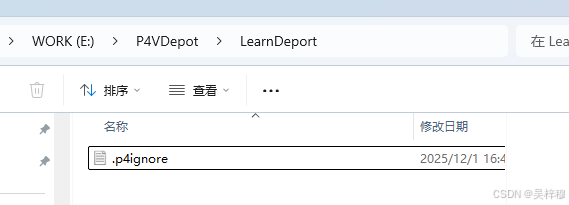
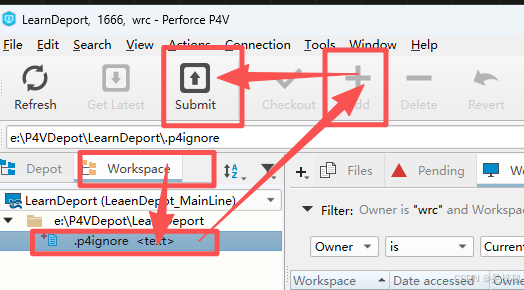
回到p4v,切换到工作空间目录,添加,并提交忽略文件
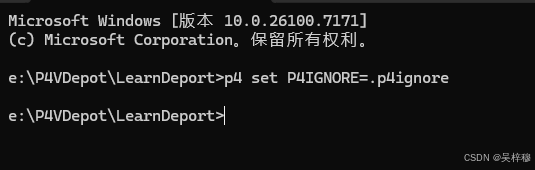
切换到Depot目录,右键仓库,打开命令行,默认打开的位置是工作空间根目录,输入
cpp
p4 set P4IGNORE=.p4ignore注意空格的位置
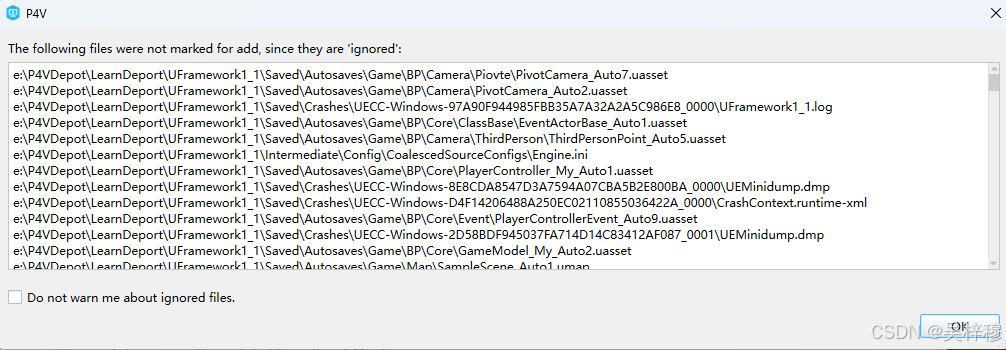
此时将工程文件放入工作目录,再add资源时,非必要文件将会被忽略
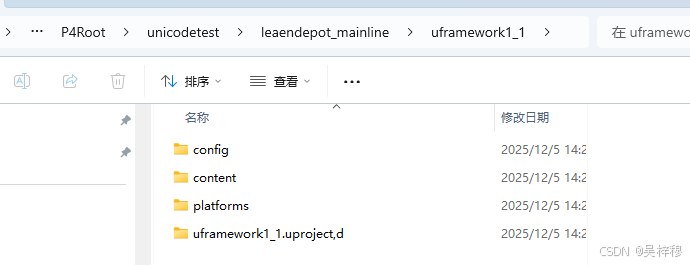
提交成功后,在workspace里依然会看到完整的工作目录,但是在p4root里,会发现被忽略的文件没有被纳入版本控制(如果不忽略,这里也会有build datacache intermediate saved等文件夹)
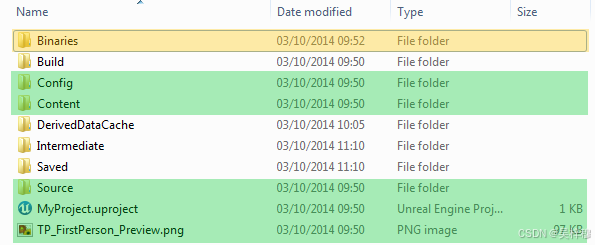
实际上需要被提交的文件只有标绿的这些,标黄的黄色,则取决于团队中是否有人要自己编译引擎,如果没有,应该被提交到版本控制
五、删除仓库
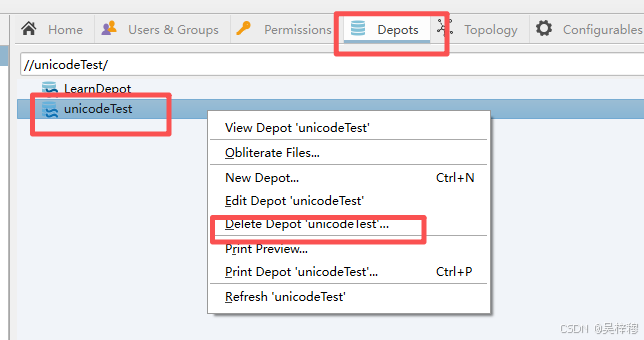
打开P4A(从windows直接搜索或者从p4v的tools里打开)
切换到depots选项卡,如果没有这个选项卡,从views选择
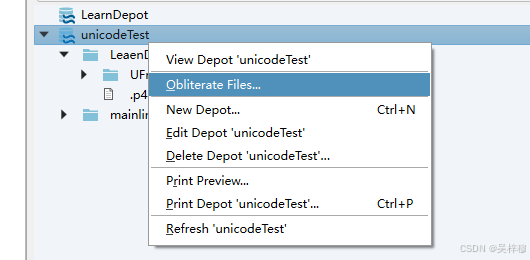
右键仓库,选择丢弃文件
回到p4v,切换到workspace选项卡
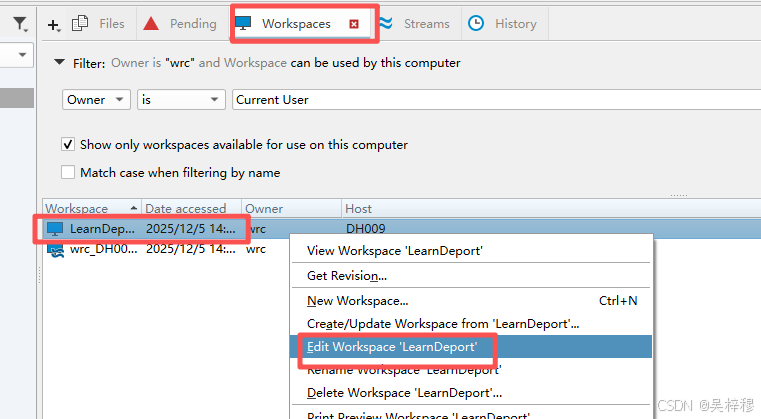
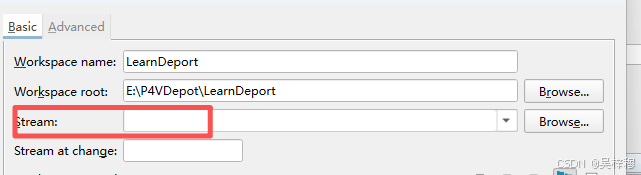
先移除对流的引用
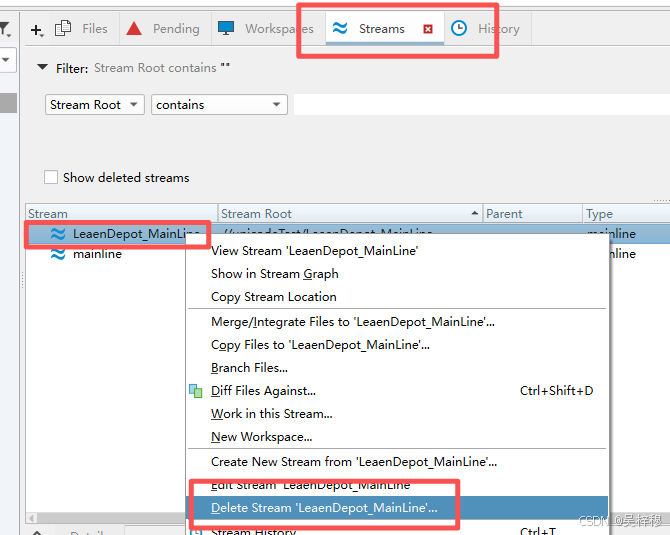
切换到stream选项卡,右键删除流
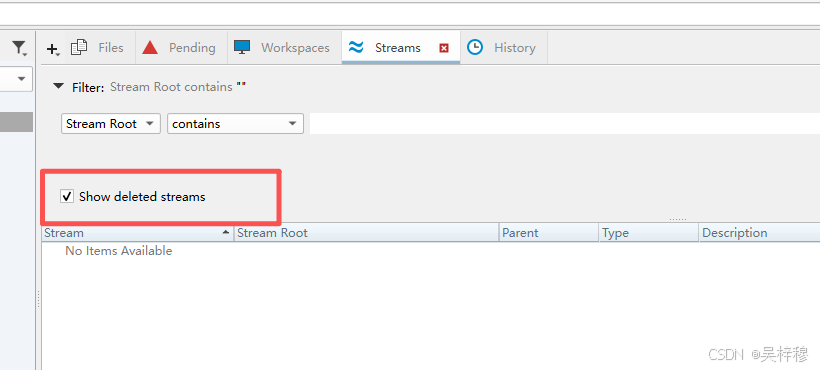
然后检查一下有没有删除的历史记录,如果有一并删掉
最后再回到P4A,切换到Depot,右键删除仓库即可,删除仓库要求仓库内没有任何流被引用