(49) 这是 async 函数的第一个参数 :
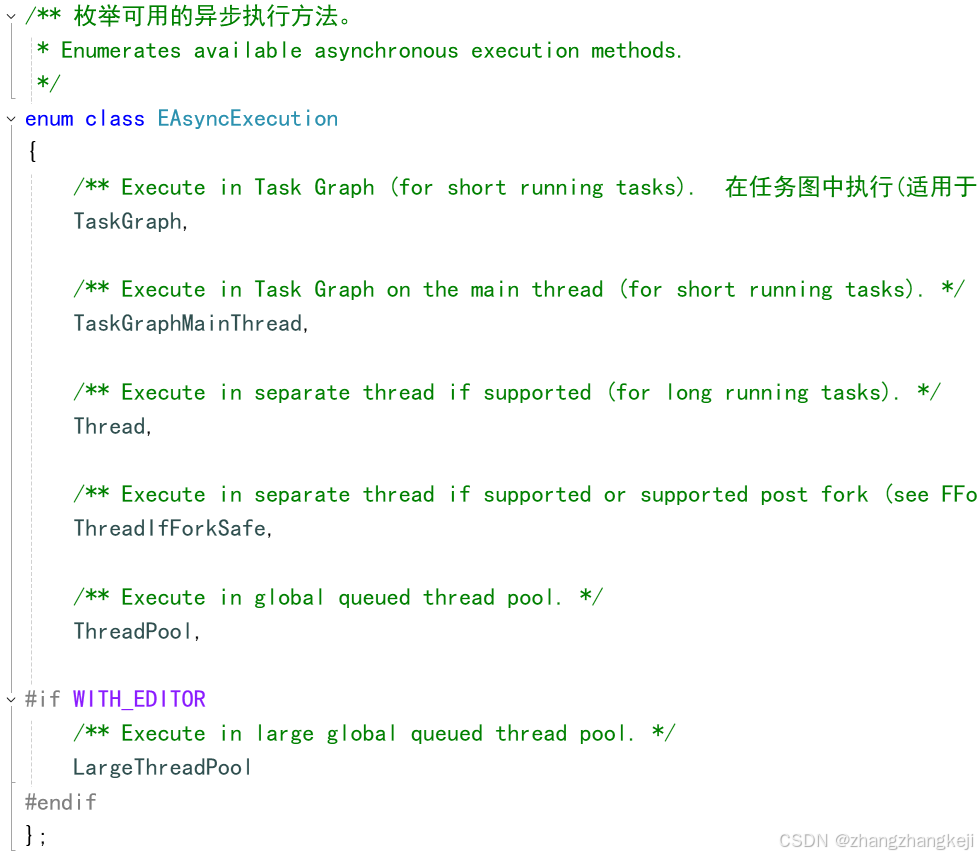
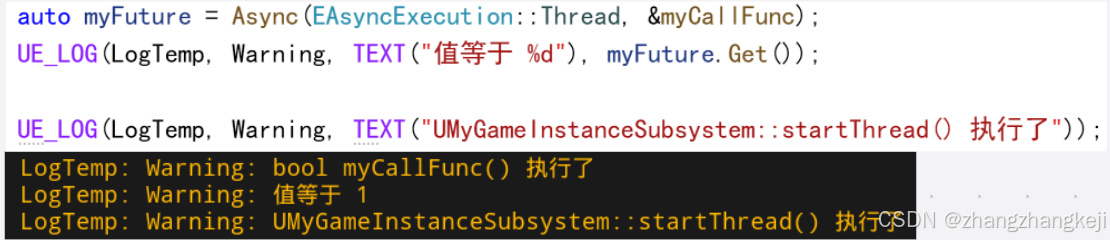
(50) 老师的举例讲解 :
(51)记录一些源代码 ,以下这俩全局函数的作用,是在单线程的操作系统上,启动任务函数的执行,并赋值 promise :
cpp
/**  对于不支持多线程的操作系统,由本函数完成 promise 的赋值
 * Template for setting a promise value from a callable.
 */
template<typename ResultType, typename CallableType>
inline void SetPromise(TPromise<ResultType>& Promise, CallableType&& Callable)
{
	Promise.SetValue(Forward<CallableType>(Callable)());
}

template<typename CallableType>
inline void SetPromise(TPromise<void>& Promise, CallableType&& Callable)
{
	Forward<CallableType>(Callable)();
	Promise.SetValue();
}
(52) 以下这个枚举类,也要用到,作为类 TAsyncGraphTask 的数据成员:
cpp
namespace ENamedThreads
{
	enum Type : int32
	{
		UnusedAnchor = -1,
		/** The always-present, named threads are listed next **/
		RHIThread,
		GameThread,
		// The render thread is sometimes the game thread and is sometimes the actual rendering thread
		ActualRenderingThread = GameThread + 1,
		// CAUTION ThreadedRenderingThread must be the last named thread, insert new named threads before it

		/** not actually a thread index. Means "Unknown Thread" or "Any Unnamed Thread" **/
		AnyThread = 0xff,

		/** High bits are used for a queue index and priority**/

		MainQueue =			0x000,
		LocalQueue =		0x100,

		NumQueues =			2,
		ThreadIndexMask =	0xff,
		QueueIndexMask =	0x100,
		QueueIndexShift =	8,

		/** High bits are used for a queue index task priority and thread priority**/

		NormalTaskPriority =	0x000,
		HighTaskPriority =		0x200,

		NumTaskPriorities =		2,
		TaskPriorityMask =		0x200,
		TaskPriorityShift =		9,

		NormalThreadPriority = 0x000,
		HighThreadPriority = 0x400,
		BackgroundThreadPriority = 0x800,

		NumThreadPriorities = 3,
		ThreadPriorityMask = 0xC00,
		ThreadPriorityShift = 10,

		/** Combinations **/
		GameThread_Local = GameThread | LocalQueue,
		ActualRenderingThread_Local = ActualRenderingThread | LocalQueue,

		AnyHiPriThreadNormalTask = AnyThread | HighThreadPriority | NormalTaskPriority,
		AnyHiPriThreadHiPriTask = AnyThread | HighThreadPriority | HighTaskPriority,

		AnyNormalThreadNormalTask = AnyThread | NormalThreadPriority | NormalTaskPriority,
		AnyNormalThreadHiPriTask = AnyThread | NormalThreadPriority | HighTaskPriority,

		AnyBackgroundThreadNormalTask = AnyThread | BackgroundThreadPriority | NormalTaskPriority,
		AnyBackgroundHiPriTask = AnyThread | BackgroundThreadPriority | HighTaskPriority,
	}; // 完结 enum Type : int32
	//.......
};
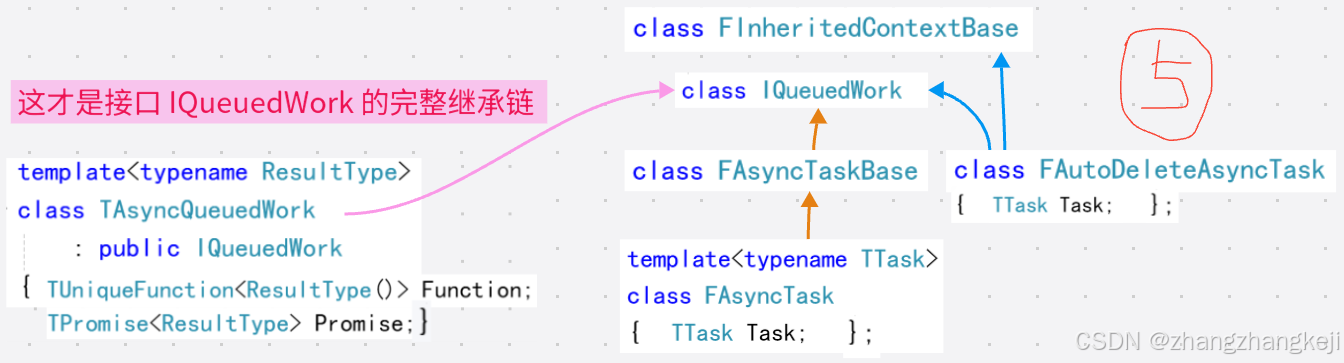
(53) 这些类都与 async 函数在同一个头文件,关系应该有关联 :
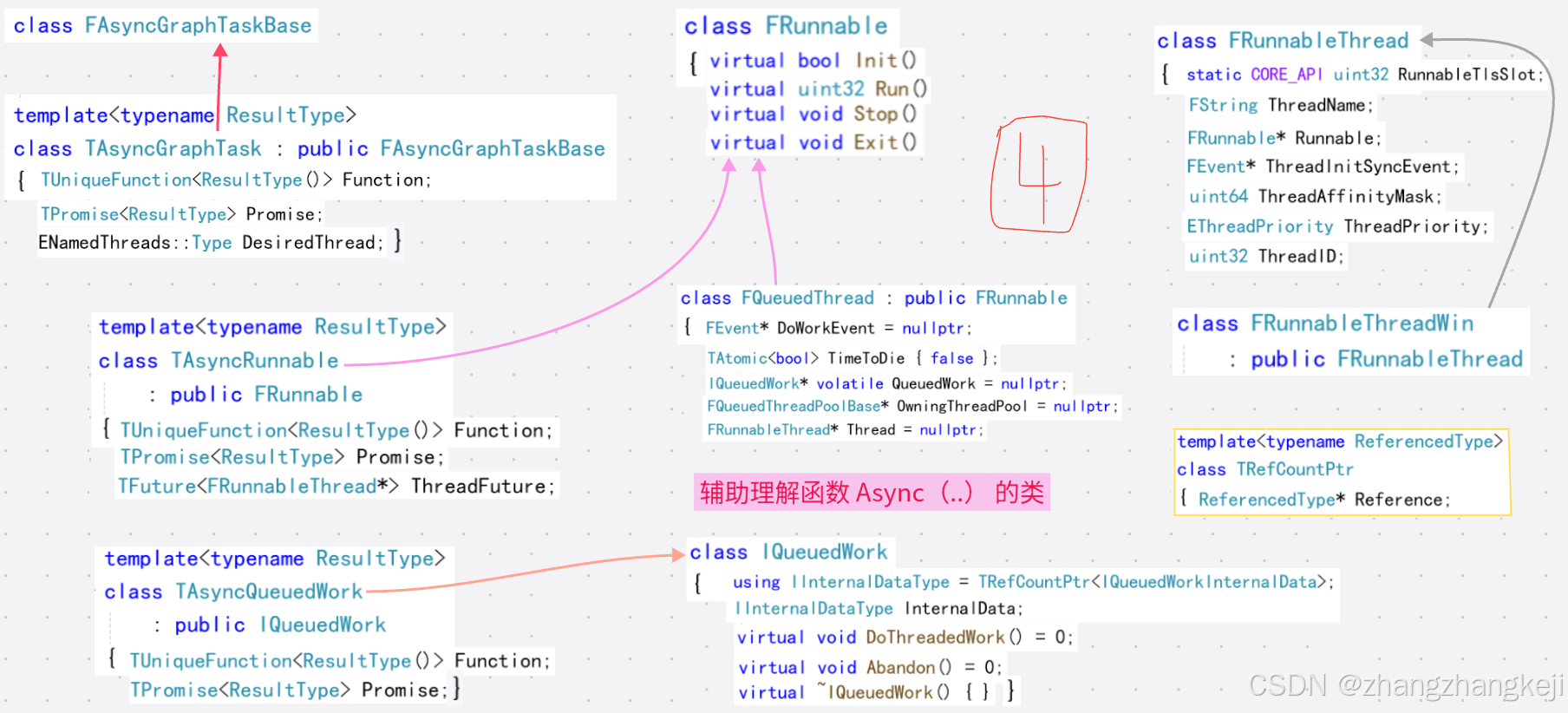
++ 给出 runnable 类的 Run ()函数的定义 :
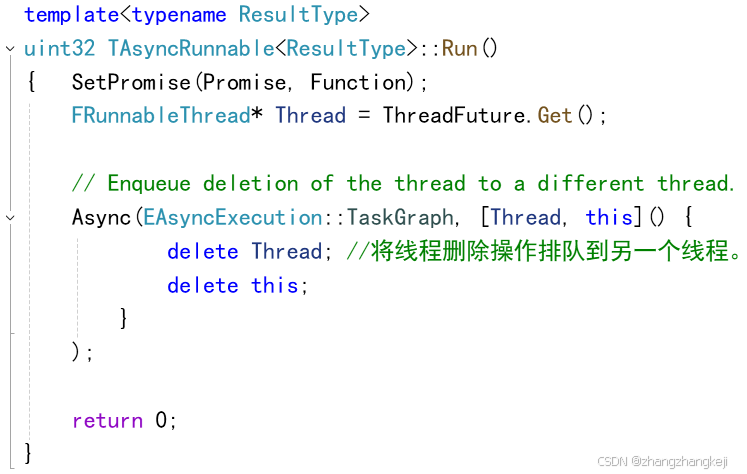
++ 补充 :
(54) 本 sync 函数的带注释的源码 :
cpp
/**
 * Execute a given function asynchronously.
 *
 * Usage examples:
 *
 *	// using global function
 *		int TestFunc()
 *		{
 *			return 123;
 *		}
 *
 *		TUniqueFunction<int()> Task = TestFunc();
 *		auto Result = Async(EAsyncExecution::Thread, Task);
 *
 *	// using lambda
 *		TUniqueFunction<int()> Task = []()
 *		{
 *			return 123;
 *		}
 *
 *		auto Result = Async(EAsyncExecution::Thread, Task);
 *
 *
 *	// using inline lambda
 *		auto Result = Async(EAsyncExecution::Thread, []() {
 *			return 123;
 *		}
 *
 * @param CallableType         The type of callable object.  本模板函数的模板参数
 * @param Execution            The execution method to use, i.e. on Task Graph or in a separate thread.
 * @param Function             The function to execute.
 * @param CompletionCallback   An optional callback function that is executed when the function completed execution.
 * @return A TFuture object that will receive the return value from the function.
 */
template<typename CallableType>
auto Async(EAsyncExecution Execution, CallableType&& Callable, TUniqueFunction<void()> CompletionCallback = nullptr)
-> TFuture<decltype(Forward<CallableType>(Callable)())>   // 可见,本函数的返回值是 TFuture<U> 类型
{
	using ResultType = decltype(Forward<CallableType>(Callable)());            // 函数的返回值
	TUniqueFunction<ResultType()> Function(Forward<CallableType>(Callable));   // 要在线程里执行的函数
	TPromise<ResultType>          Promise(MoveTemp(CompletionCallback));       // promise,并带上了回调函数
	TFuture<ResultType>           Future = Promise.GetFuture();                // 这就是本函数的返回值

	switch (Execution)
	{
	case EAsyncExecution::TaskGraphMainThread:
		// fallthrough
	case EAsyncExecution::TaskGraph:
		{
			TGraphTask<TAsyncGraphTask<ResultType>>::CreateTask().ConstructAndDispatchWhenReady(
				MoveTemp(Function), MoveTemp(Promise),
				Execution == EAsyncExecution::TaskGraph ? ENamedThreads::AnyThread : ENamedThreads::GameThread);
		}
		break;

	case EAsyncExecution::Thread:
		if (FPlatformProcess::SupportsMultithreading())  // 操作系统支持多线程
		{
			TPromise<FRunnableThread*> ThreadPromise;  // 本 TPromise 里封装了运行函数的线程的内存地址

			TAsyncRunnable<ResultType>* Runnable = new TAsyncRunnable<ResultType>(
					MoveTemp(Function), MoveTemp(Promise), ThreadPromise.GetFuture());
		//  TAsyncRunnable(TUniqueFunction<ResultType()>&& InFunction, TPromise<ResultType>&& InPromise,
		//					TFuture<FRunnableThread*>&& InThreadFuture)

			const FString TAsyncThreadName = FString::Printf(TEXT("TAsync %d"), FAsyncThreadIndex::GetNext());
			// 给线程生成一个不会重复的名字

			FRunnableThread* RunnableThread = FRunnableThread::Create(Runnable, *TAsyncThreadName);
			// 创建线程,任务函数要被执行了

			check(RunnableThread != nullptr);  // enum class FRunnableThread::ThreadType { Real, Fake, Forkable }
			check(RunnableThread->GetThreadType() == FRunnableThread::ThreadType::Real);

			ThreadPromise.SetValue(RunnableThread);
			// 给这个 promise 填写上面生成的新线程的地址。这是 TAsyncRunnable 的需要的参数
		}
		else
		{
			SetPromise(Promise, Function);
		}
		break;

	case EAsyncExecution::ThreadIfForkSafe:
		if (FPlatformProcess::SupportsMultithreading() || FForkProcessHelper::IsForkedMultithreadInstance())
		{
			TPromise<FRunnableThread*> ThreadPromise;
			TAsyncRunnable<ResultType>* Runnable = new TAsyncRunnable<ResultType>(MoveTemp(Function), MoveTemp(Promise), ThreadPromise.GetFuture());

			const FString TAsyncThreadName = FString::Printf(TEXT("TAsync %d"), FAsyncThreadIndex::GetNext());
			FRunnableThread* RunnableThread = FForkProcessHelper::CreateForkableThread(Runnable, *TAsyncThreadName);

			check(RunnableThread != nullptr);
			check(RunnableThread->GetThreadType() == FRunnableThread::ThreadType::Real);

			ThreadPromise.SetValue(RunnableThread);
		}
		else
		{
			SetPromise(Promise, Function);
		}
		break;

	case EAsyncExecution::ThreadPool:  // 看来是交给全局线程池 GThreadPool 来执行本作业
		if (FPlatformProcess::SupportsMultithreading())
		{
			check(GThreadPool != nullptr);
			GThreadPool->AddQueuedWork(new TAsyncQueuedWork<ResultType>(MoveTemp(Function), MoveTemp(Promise)));
		}
		else
		{
			SetPromise(Promise, Function);
		}
		break;

#if WITH_EDITOR
	case EAsyncExecution::LargeThreadPool:
		if (FPlatformProcess::SupportsMultithreading())
		{
			check(GLargeThreadPool != nullptr);
			GLargeThreadPool->AddQueuedWork(new TAsyncQueuedWork<ResultType>(MoveTemp(Function), MoveTemp(Promise)));
		}
		else
		{
			SetPromise(Promise, Function);
		}
		break;
#endif

	default:
		check(false); // not implemented yet!
	}

	return MoveTemp(Future); // TFuture(TFuture&&) = default; 移动构造函数,本 async 函数执行完毕后,未必拿到了函数结果
} // future.get() 会触发线程的睡眠等待。本函数只是触发了新线程的创建与执行。(55)这里总结下 UE 里创建多线程的,目前学到的 4 种方法 :
a- 继承 FRunnable 接口,再创建 FRunnableThread 的子类对象运行 FRunnable 中的 Run ( ... ) 函数;
b- 使用线程池 FQueuedThreadPool 创建线程,继承自 IQueuedWork 定义作业,并添加给线程池执行;
c- 不再显式使用线程,自定义作业 FMySimpleWork, 定义其中的 4 个函数,
作为 FAsyncTask 或 FAutoDeleteAsyncTask 的模板参数;
再用成员函数 StartBackgroundTask(...) 等启动作业的执行。
d- 使用 全局 Async(...) 函数,定义自己要执行的函数即可,还可以有要拿到的返回值。
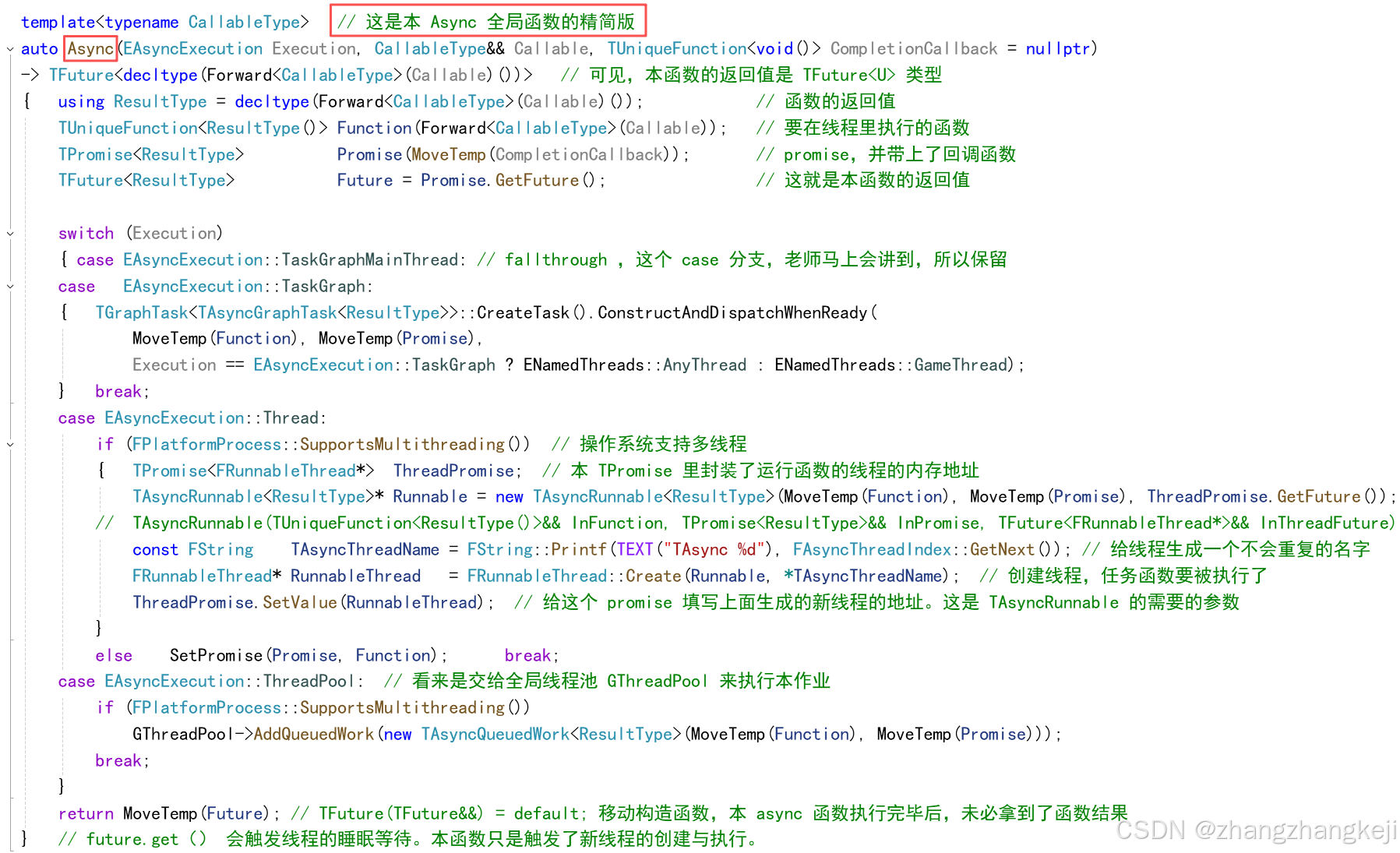
(56)全局 Async(...) 函数 的简化版定义 :
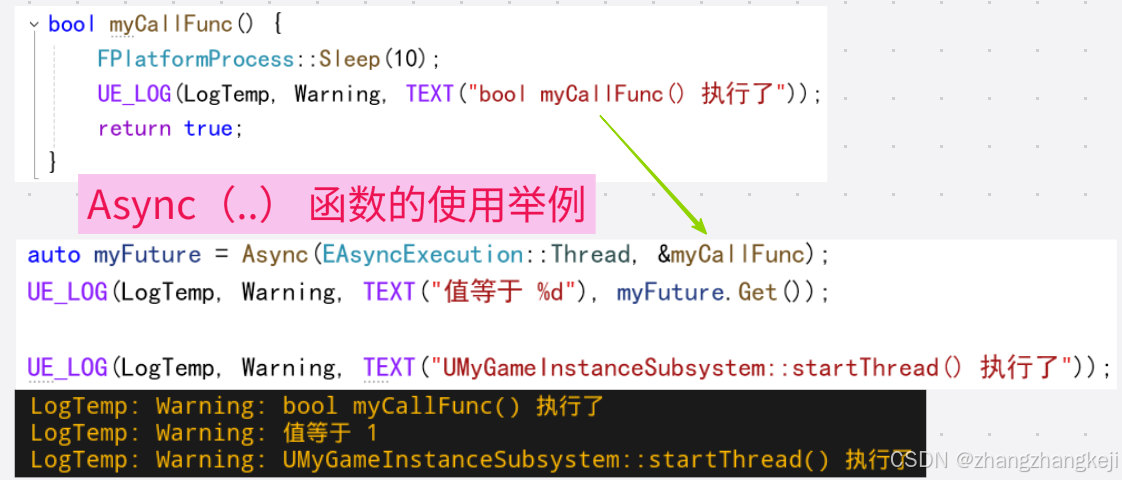
(57)本函数的使用举例 :
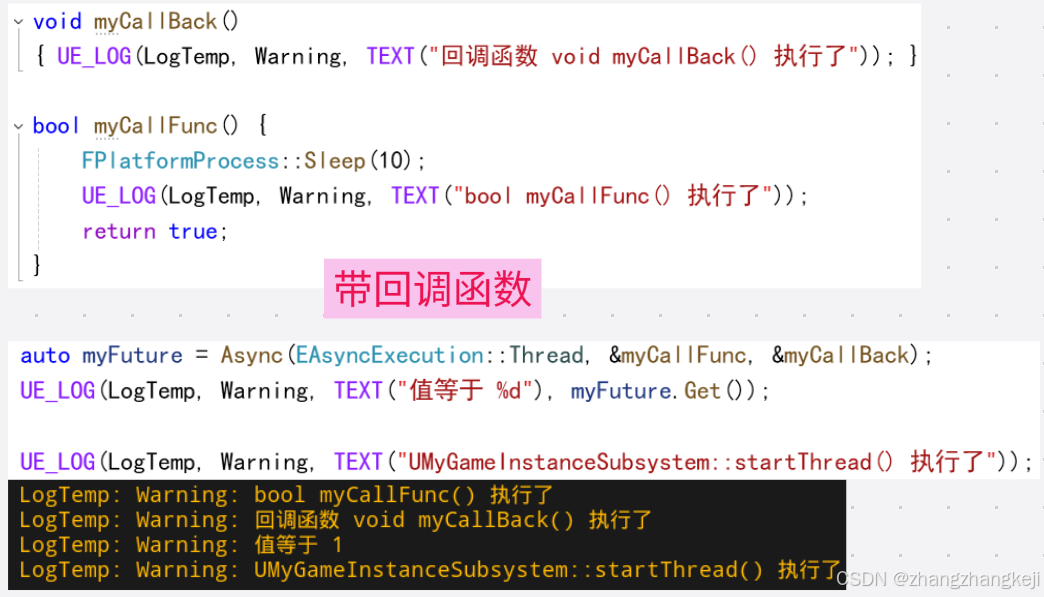
++ 演示回调函数 :
(58)
谢谢