单机 PyTorch 模型跑推理没什么问题,但数据量一旦上到万级、百万级,瓶颈就暴露出来了:内存不够、GPU 利用率低、I/O 拖后腿,更别说还要考虑容错和多机扩展。
传统做法是自己写多线程 DataLoader、管理批次队列、手动调度 GPU 资源,这哥工程量可不小,调试起来也麻烦。Ray Data 提供了一个更轻量的方案:在几乎不改动原有 PyTorch 代码的前提下,把单机推理扩展成分布式 pipeline。
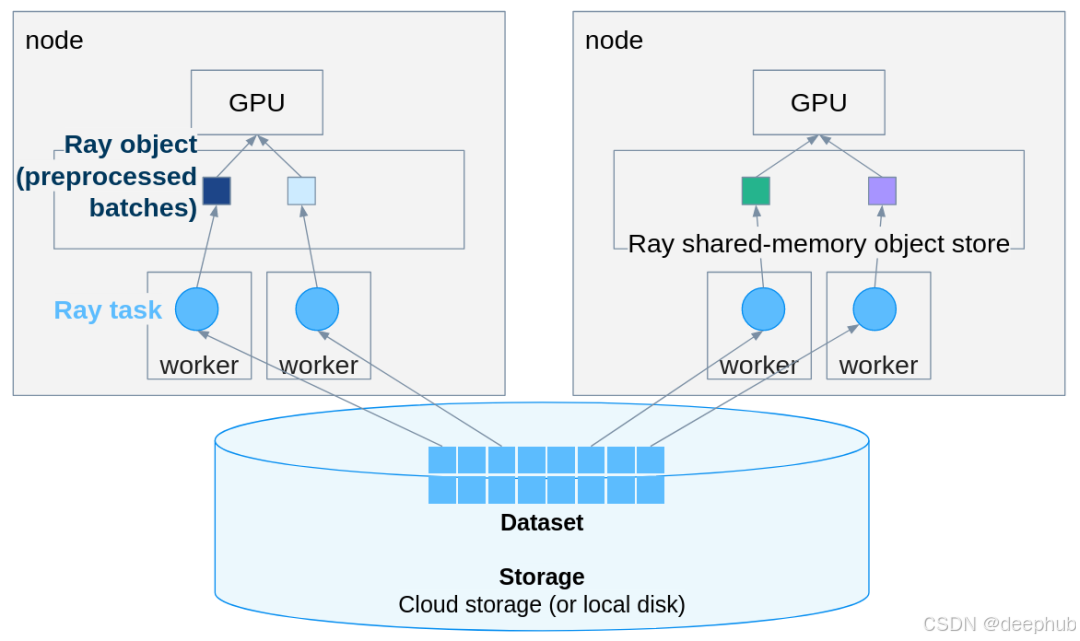
原始的 PyTorch 代码
典型的推理场景:模型加载、预处理、批量预测,一套下来大概长这样:
 import torch
import torchvision
from PIL import Image
from typing import List

class TorchPredictor:
    def __init__(self, model: torchvision.models, weights: torchvision.models):
        self.weights = weights
        self.model = model(weights=weights)
        self.model.eval()
        self.transform = weights.transforms()
        self.device = 'cuda' if torch.cuda.is_available() else 'cpu'
        self.model.to(self.device)
    def predict_batch(self, batch: List[Image.Image]) -> torch.Tensor:
        with torch.inference_mode():
            batch = torch.stack([
                self.transform(img.convert("RGB")) for img in batch
            ]).to(self.device)
            logits = self.model(batch)
            probs = torch.nn.functional.softmax(logits, dim=1)
             return probs
处理几张图片完全没问题:
 predictor = TorchPredictor(
    torchvision.models.resnet152,
    torchvision.models.ResNet152_Weights.DEFAULT
)

images = [
    Image.open('/content/corn.png').convert("RGB"),
    Image.open('/content/corn.png').convert("RGB")
]
 predictions = predictor.predict_batch(images)
大数据量
图片数量从几张变成几万张、几百万张,情况完全不一样了。
内存撑不住,不可能把所有图一股脑塞进去;GPU 利用率上不去,多卡场景下吞吐量优化是个棘手的问题;万一跑到一半挂了怎么办?分布式部署能不能用上集群资源?还有个容易被忽视的点:数据加载的 I/O 往往才是真正的瓶颈。
自己从头写一套健壮的 pipeline 处理这些问题,少说得折腾好几天。
Ray Data 的思路
Ray Data 是个分布式数据处理框架,跟 PyTorch 配合得很好。关键是改造成本极低,原有代码基本不用大动。
第一步:改造 Predictor 类
把
predict_batch方法换成
__call__,输入从 PIL Image 列表改成包含 numpy 数组的字典:
 import numpy as np
from typing import Dict

class TorchPredictor:
    def __init__(self, model: torchvision.models, weights: torchvision.models):
        self.weights = weights
        self.model = model(weights=weights)
        self.model.eval()
        self.transform = weights.transforms()
        self.device = 'cuda' if torch.cuda.is_available() else 'cpu'
        self.model.to(self.device)
    def __call__(self, batch: Dict[str, np.ndarray]):
        """Ray Data passes a dict batch with numpy arrays."""
        # Convert numpy arrays back to PIL Images
        images = [Image.fromarray(img_array) for img_array in batch["image"]]
        with torch.inference_mode():
            tensor_batch = torch.stack([
                self.transform(img.convert("RGB")) for img in images
            ]).to(self.device)
            logits = self.model(tensor_batch)
            probs = torch.nn.functional.softmax(logits, dim=1)

            # Get top prediction
            top_probs, top_indices = torch.max(probs, dim=1)
        return {
            "predicted_class_idx": top_indices.cpu().numpy(),
            "confidence": top_probs.cpu().numpy()
         }
改动点说明:
__call__替代
predict_batch;输入类型从
List[Image.Image]变成
Dict[str, np.ndarray];方法内部把 numpy 数组转回 PIL Image;输出改成 dict 格式;结果要搬回 CPU(数据在进程间的移动由 Ray 负责)。
还有个细节要注意,Ray Data 用 numpy 数组而非 PIL Image,因为 numpy 数组跨进程序列化效率更高。
第二步:构建 Ray Dataset
根据场景选择合适的创建方式,小数据集直接从内存构建:
 import ray
import numpy as np

ray.init()

# Convert PIL Images to numpy arrays
images = [
    Image.open("/path/to/image1.png").convert("RGB"),
    Image.open("/path/to/image2.png").convert("RGB")
]

# Create Ray Dataset from numpy arrays
 ds = ray.data.from_items([{"image": np.array(img)} for img in images])
中等规模数据集推荐从文件路径延迟加载:
 # Create dataset from paths
image_paths = ["/path/to/img1.png", "/path/to/img2.png"]
ds_paths = ray.data.from_items([{"path": path} for path in image_paths])

# Load images lazily
def load_image(batch):
    images = [np.array(Image.open(path).convert("RGB")) for path in batch["path"]]
    return {"image": images}

 ds = ds_paths.map_batches(load_image, batch_size=10)
生产环境首选
read_images(),Ray 全权接管:
 # Most efficient - Ray handles everything
 ds = ray.data.read_images("/path/to/image/directory/")
 # or with specific files
 ds = ray.data.read_images(["/path/img1.png", "/path/img2.png"])
第三步:跑分布式推理
核心代码如下:
 weights = torchvision.models.ResNet152_Weights.DEFAULT

# Distributed batch inference
results_ds = ds.map_batches(
    TorchPredictor,
    fn_constructor_args=(torchvision.models.resnet152, weights),
    batch_size=32,
    num_gpus=1,
    compute=ray.data.ActorPoolStrategy(size=4)  # 4 parallel actors
)
# Collect results
results = results_ds.take_all()
# Process results
for result in results:
    class_idx = result['predicted_class_idx']
    confidence = result['confidence']
     print(f"Predicted: {weights.meta['categories'][class_idx]} ({confidence:.2%})")
搞定了。新版 Ray 里
concurrency参数已经废弃,要换成
compute=ActorPoolStrategy(size=N)这种写法。
改动总结:
自动分批,Ray 自己决定最优 batch size;
分布式执行,多 worker 并行跑;
GPU 调度,自动把卡分配给 worker;
流式处理,数据在 pipeline 里流动,不用一次性全加载进内存;
容错机制,worker 挂了会自动重试。
生产环境
RAY还可以直接读云存储的数据,S3、GCS、Azure Blob 都支持:
 # Read directly from S3, GCS, or Azure Blob
ds = ray.data.read_images("s3://my-bucket/images/")

results = ds.map_batches(
    predictor,
    batch_size=64,
    num_gpus=1,
    concurrency=8  # 8 parallel GPU workers
 )
多节点集群也可以用同一套代码,10 台机器还是 100 台机器,根本不用改:
# Connect to your Ray cluster
ray.init("ray://my-cluster-head:10001")

# Same code as before
ds = ray.data.read_images("s3://my-bucket/million-images/")
results = ds.map_batches(predictor, batch_size=64, num_gpus=1)
进阶用法
每个 batch 都重新加载模型太浪费了,用 ActorPoolStrategy 让模型实例常驻内存:
from ray.data import ActorPoolStrategy

results = ds.map_batches(
    TorchPredictor,
    fn_constructor_args=(torchvision.models.resnet152, weights),
    batch_size=32,
    num_gpus=1,
    compute=ActorPoolStrategy(size=4)  # Keep 4 actors alive
)
这样吞吐量提升很明显。
CPU、GPU 资源可以细调
results = ds.map_batches(
    TorchPredictor,
    fn_constructor_args=(torchvision.models.resnet152, weights),
    batch_size=32,
    num_gpus=1,  # 1 GPU per actor
    num_cpus=4,  # 4 CPUs per GPU worker
    compute=ActorPoolStrategy(size=8)
)
推理完直接写到云存储:
results.write_parquet("s3://my-bucket/predictions/")几个容易踩的坑
Ray Data 没法直接序列化 PIL Image 对象,得先转成 numpy 数组:
# ❌ This will fail
ds = ray.data.from_items([{"image": pil_image}])

# ✅ This works
ds = ray.data.from_items([{"image": np.array(pil_image)}])

# ✅ Or use read_images() (best)
ds = ray.data.read_images("/path/to/images/")
Ray 2.51 之后
concurrency不能用了:
# ❌ Deprecated
ds.map_batches(predictor, concurrency=4)

# ✅ New way
ds.map_batches(predictor, compute=ActorPoolStrategy(size=4))
batch size 太大容易 OOM,保守起见可以从小的开始试:
# Monitor GPU memory and adjust batch_size accordingly
results = ds.map_batches(
    predictor,
    batch_size=16,  # Start conservative
    num_gpus=1
)
实践建议
batch size 可以从小往大试,观察 GPU 显存占用:
# Too small: underutilized GPU
batch_size=4

# Too large: OOM errors
batch_size=256

# Just right: depends on your model and GPU
# For ResNet152 on a single GPU, 32-64 works well
batch_size=32
ActorPoolStrategy 处理 20 张图大概要 9.7 秒,而原生 PyTorch 跑 2 张图几乎瞬间完成。所以图片量少的时候 Ray Data 的启动开销反而不划算,所以这个方案是几百上千张图的场景才能体现优势。
Ray 自带 dashboard,默认在 8265 端口:
# Check Ray dashboard at http://localhost:8265
ray.init(dashboard_host="0.0.0.0")
代码中可以包一层 try-except 防止单个样本出错拖垮整个任务:
def safe_predictor(batch: dict):
    try:
        return predictor(batch)
    except Exception as e:
        return {"error": str(e), "probs": None}
跑之前加个计时,可以进行性能 profiling:
import time

start = time.time()
results = ds.map_batches(predictor, batch_size=32)
results.take_all()
print(f"Processed in {time.time() - start:.2f} seconds")
总结
适合的场景:数据集太大内存放不下;需要多卡或多机并行;长时间任务需要容错;不想自己写分布式代码。
不太必要的场景:图片量在百张以内;数据集轻松塞进内存;只有一张卡而且短期内不打算扩展。
Ray Data 的好处在于迁移成本低。PyTorch 代码改动很小,换个方法签名、把数据包成 Ray Dataset,就能换来从单卡到多机的无痛扩展、自动 batching 和并行优化、内置容错、云存储无缝对接等功能。
如果你下次写多线程 data loader 或者手动管理 GPU pool 之前,可以先考虑一下这哥方法,把分布式系统的脏活累活交给 Ray,精力留给构建模型本身。
https://avoid.overfit.cn/post/6320b9b6e1a14e0ba4c3384c83d06986
作者:Moutasem Akkad