@state
用于当前视图的状态管理,@State的属性生命周期和当前视图保持一致
swift
struct ContentView: View {
    @State private var isPlaying: Bool = false
    var body: some View {
        VStack {
            Button {
                isPlaying.toggle()
            } label: {
                Image(systemName: isPlaying ? "pause.circle" : "play.circle")
            }
        }
        .padding()
@binding
主要用于父子视图之间共享状态

swift
// 子视图
struct PlayButton: View {

    @Binding var isPlaying: Bool

    var body: some View {
        Button(action: {
            self.isPlaying.toggle()
        }) {
            Image(systemName: isPlaying ? "pause.circle" : "play.circle")
        }
    }
}

// 父视图
struct ContentView: View {
    @State private var isPlaying: Bool = false
    var body: some View {
        VStack {
            Text("11111")
            Text("22222")
            PlayButton(isPlaying: $isPlaying)
        }
        .padding()
    }
}
@stateObject 和 @observedObject
先看一个例子:
主视图
点击button会更改视图的showRealName的状态,导致视图刷新
swift
struct ContentView: View {
    @State private var showRealName = false
    var body: some View {
        VStack {
            Button("Toggle name") {
                showRealName.toggle()
            }
            Text("current user: \(showRealName ? "Harris" : "yiyi")")
            ScorePlate().padding(.top, 20)
        }
        .padding()
    }
}
ScorePlate
点击button改变model的score属性值
swift
class Model: ObservableObject {
    init() {
        print("model created")
    }
    @Published var score: Int = 0
}
swift
struct ScorePlate: View {

    @ObservedObject var model = Model()
    @State private var niceScore = false

    var body: some View {
        VStack {
            Button("+1") {
                model.score += 1
                if model.score > 3 {
                    niceScore = true
                }
                print("model.score = \(model.score)")
            }
            Text("score: \(model.score)")
            Text("Nice? \(niceScore ? "YES" : "NO")")
            ScoreText(model: model).padding(.top, 20)
        }
    }
}
ScoreText: 接收从外部传入的model,根据model中score的值更新文本
swift
struct ScoreText: View {

    @ObservedObject var model: Model

    var body: some View {
        if model.score > 10 {
            return Text("fantastic")
        } else if model.score > 3 {
            return Text("Good")
        } else {
            return Text("mmmmm")
        }
    }
}
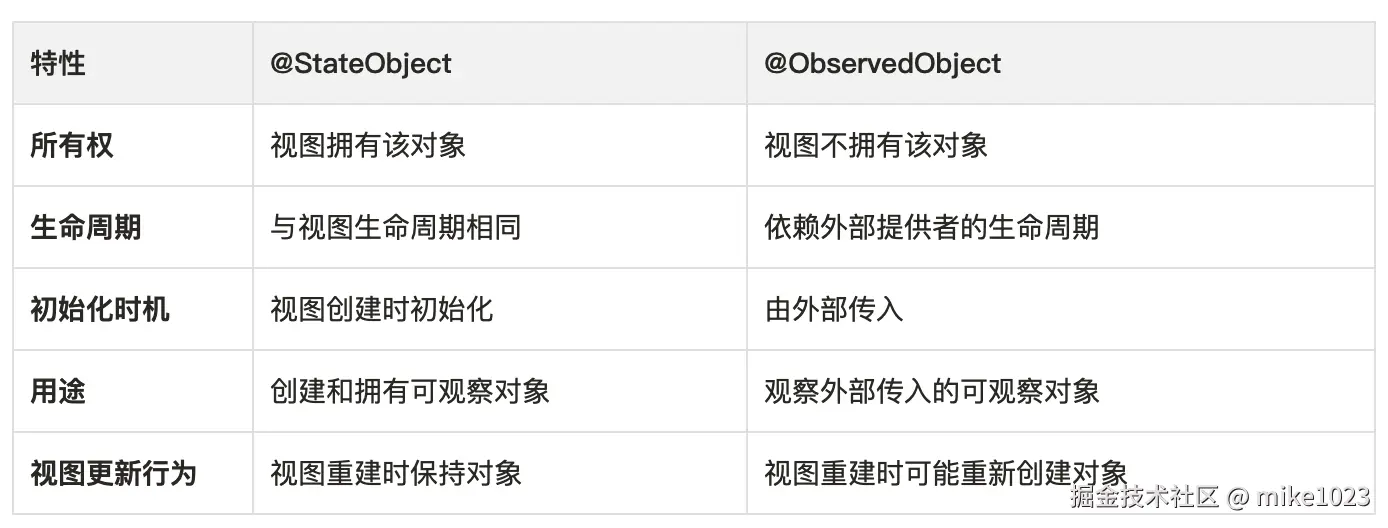
当多次点击+1 button时,score增加,ScorePlate和ScoreText都正常更新,但是当点击 Togglename 时,发现model的 init 方法再次执行,意味着model被重置了,score的值也被重置了,ScorePlate和ScoreText的状态都丢失了,这不是期望的结果。
原因:这是因为,和@state 这种底层存储被 SwiftUl"全面接管"的状态不同,@observedobject只是在View和Model之间添加订阅关系,而不影响存储。因此,当ContentView中的状态发生变化,ContentView.body 被重新求值时,ScorePlate就会被重新生成,其中的 model也一同重新生成,导致了状态的"丢失"。
解决办法:在ScorePlate中,把model的修饰符改为:@stateobject