一、后端代码
- 安装maven依赖
   <dependency>
            <groupId>org.bouncycastle</groupId>
            <artifactId>bcprov-jdk15to18</artifactId>
            <version>1.73</version>
        </dependency>
- 修复版AES加密工具类
@Slf4j
public class AESUtil {

    private static final String ALGORITHM = "AES";
    private static final String TRANSFORMATION = "AES/CBC/PKCS5Padding";

    private static final String KEY = "0123456789abcdef0123456789abcdef";
    private static final String IV = "0123456789abcdef";

    // Base64清理正则
    private static final Pattern BASE64_CLEAN_PATTERN = Pattern.compile("[\\s\\r\\n\\t]");

    static {
//        log.info("🔑 AES配置信息:");
//        log.info("  算法: {}", ALGORITHM);
//        log.info("  模式: CBC");
//        log.info("  填充: PKCS5Padding");
//        log.info("  密钥: {}", KEY);
//        log.info("  IV: {}", IV);
    }

    /**
     * 清理Base64字符串
     */
    private static String cleanBase64(String base64) {
        if (base64 == null) {
            return null;
        }
        return BASE64_CLEAN_PATTERN.matcher(base64).replaceAll("");
    }

    /**
     * AES加密
     */
    public static String encrypt(String data) throws Exception {
        try {
            log.debug("🔐 AES加密 - 原文长度: {}", data.length());

            SecretKeySpec secretKeySpec = new SecretKeySpec(KEY.getBytes(StandardCharsets.UTF_8), ALGORITHM);
            IvParameterSpec ivParameterSpec = new IvParameterSpec(IV.getBytes(StandardCharsets.UTF_8));

            Cipher cipher = Cipher.getInstance(TRANSFORMATION);
            cipher.init(Cipher.ENCRYPT_MODE, secretKeySpec, ivParameterSpec);

            byte[] encryptedBytes = cipher.doFinal(data.getBytes(StandardCharsets.UTF_8));
            String result = Base64.getEncoder().encodeToString(encryptedBytes);

            log.debug("✅ AES加密成功 - 密文长度: {}", result.length());
            return result;
        } catch (Exception e) {
            log.error("❌ AES加密失败: {}", e.getMessage(), e);
            throw new Exception("AES加密失败: " + e.getMessage(), e);
        }
    }

    /**
     * AES解密  增强日志版本
     */
    public static String decrypt(String encryptedData) throws Exception {
        try {
            log.info("🔓 AES解密启动 - 密文长度: {}", encryptedData.length());

            // 记录密文样本
            String preview = encryptedData.length() > 100 ? encryptedData.substring(0, 100) + "..." : encryptedData;
            log.debug("🔓 密文预览: {}", preview);

            // 清理Base64数据
            String cleanedData = cleanBase64(encryptedData);
            log.debug("🔧 清理后密文长度: {}", cleanedData.length());

            SecretKeySpec secretKeySpec = new SecretKeySpec(KEY.getBytes(StandardCharsets.UTF_8), ALGORITHM);
            IvParameterSpec ivParameterSpec = new IvParameterSpec(IV.getBytes(StandardCharsets.UTF_8));

            Cipher cipher = Cipher.getInstance(TRANSFORMATION);
            cipher.init(Cipher.DECRYPT_MODE, secretKeySpec, ivParameterSpec);

            byte[] encryptedBytes;
            try {
                encryptedBytes = Base64.getDecoder().decode(cleanedData);
                log.debug("🔧 Base64解码成功,字节长度: {}", encryptedBytes.length);
            } catch (IllegalArgumentException e) {
                log.error("❌ Base64解码失败: {}", e.getMessage());
                throw new Exception("Base64数据格式错误: " + e.getMessage(), e);
            }

            byte[] decryptedBytes = cipher.doFinal(encryptedBytes);
            String result = new String(decryptedBytes, StandardCharsets.UTF_8);

            log.info("✅ AES解密成功 - 原文长度: {}", result.length());

            // 🎯 详细记录解密结果
            String resultPreview = result.length() > 200 ? result.substring(0, 200) + "..." : result;
            log.info("🔓 解密结果预览: {}", resultPreview);

            // 检查是否为JSON格式
            String trimmedResult = result.trim();
            boolean isJson = trimmedResult.startsWith("{") || trimmedResult.startsWith("[");
            log.debug("🔍 解密结果JSON检测: {}", isJson ? "是" : "否");

            if (isJson) {
                try {
                    // 验证JSON格式
                    ObjectMapper objectMapper = new ObjectMapper();
                    Object jsonObject = objectMapper.readValue(result, Object.class);
                    log.debug("✅ 解密结果为有效JSON格式");

                    if (jsonObject instanceof Map) {
                        log.debug("📋 JSON对象键: {}", ((Map) jsonObject).keySet());
                    } else if (jsonObject instanceof List) {
                        log.debug("📋 JSON数组长度: {}", ((List) jsonObject).size());
                    }
                } catch (Exception e) {
                    log.warn("⚠️ 解密结果看起来像JSON但解析失败: {}", e.getMessage());
                }
            }

            return result;
        } catch (Exception e) {
            log.error("❌ AES解密失败: {}", e.getMessage());
            log.error("❌ 解密失败详情 - 输入数据长度: {}", encryptedData != null ? encryptedData.length() : 0);
            if (encryptedData != null) {
                log.error("❌ 输入数据预览: {}", encryptedData.length() > 100 ?
                        encryptedData.substring(0, 100) + "..." : encryptedData);
            }
            throw new Exception("AES解密失败: " + e.getMessage(), e);
        }
    }

    /**
     * 测试复杂数据结构
     */
    public static void testComplexData() {
        log.info("🧪 测试AES复杂数据结构处理能力...");

        // 模拟复杂数据结构
        String complexJson = "{\"doctorType\":0,\"isCenterHos\":true,\"shareCheckTimeOutList\":[{\"name\":\"1天内有效\",\"value\":\"1440\"},{\"name\":\"30分钟内有效\",\"value\":\"30\"}],\"checkTypeList\":[{\"name\":\"SR\",\"value\":\"1\"},{\"name\":\"MR\",\"value\":\"2\"}]}";

        try {
            log.info("测试数据长度: {}", complexJson.length());

            String encrypted = encrypt(complexJson);
            log.info("加密成功,密文长度: {}", encrypted);

            String decrypted = decrypt(encrypted);
            log.info("解密成功,原文长度: {}", decrypted);

            boolean success = complexJson.equals(decrypted);
            log.info("复杂数据测试: {}", success ? "✅ 成功" : "❌ 失败");

        } catch (Exception e) {
            log.error("❌ 复杂数据测试失败: {}", e.getMessage(), e);
        }
    }
    public static void main(String[] args) {
        testComplexData();
    }
}
- 加密请求包装类
@Data
@JsonIgnoreProperties(ignoreUnknown = true)
public class EncryptedRequest implements Serializable {
    private static final long serialVersionUID = 1L;

    /**
     * 加密后的数据
     */
    private String data;

    /**
     * 时间戳
     */
    private Long timestamp;

    public EncryptedRequest() {
    }

    public EncryptedRequest(String data) {
        this.data = data;
        this.timestamp = System.currentTimeMillis();
    }
}
- 加密响应包装类
@Data
public class EncryptedResponse<T> implements Serializable {
    private static final long serialVersionUID = 1L;

    /**
     * 加密后的数据
     */
    private String data;

    /**
     * 时间戳
     */
    private Long timestamp;

    public EncryptedResponse() {
        this.timestamp = System.currentTimeMillis();
    }

    public EncryptedResponse(String data) {
        this();
        this.data = data;
    }

    public static <T> EncryptedResponse<T> success(String encryptedData) {
        return new EncryptedResponse<>(encryptedData);
    }
}
- 加密请求包装器
@Slf4j
public class EncryptHttpServletRequestWrapper extends HttpServletRequestWrapper {

    private String requestBody;
    private String decryptedBody;
    private boolean isEncryptedRequest = false;
    private boolean isDecrypted = false;

    public EncryptHttpServletRequestWrapper(HttpServletRequest request) throws IOException {
        super(request);
        this.requestBody = StreamUtils.copyToString(request.getInputStream(), StandardCharsets.UTF_8);

        String isEncrypted = request.getHeader("X-Request-Encrypted");
        this.isEncryptedRequest = "true".equals(isEncrypted);

        logRequestInfo(request);
    }

    /**
     * 记录请求详细信息
     */
    private void logRequestInfo(HttpServletRequest request) {
        String method = request.getMethod();
        String uri = request.getRequestURI();
        String encryptedHeader = request.getHeader("X-Request-Encrypted");
        String contentType = request.getContentType();

        log.info("📥 请求包装器初始化 - {} {} [加密头: {}, Content-Type: {}]",
                method, uri, encryptedHeader, contentType);
        log.debug("📥 原始请求体长度: {}", requestBody.length());

        if (isEncryptedRequest && requestBody != null && !requestBody.trim().isEmpty()) {
            log.debug("📥 加密请求体预览: {}",
                    requestBody.length() > 200 ? requestBody.substring(0, 200) + "..." : requestBody);

            try {
                decryptAndLogRequestBody();
            } catch (Exception e) {
                log.error("❌ 请求解密失败: {}", e.getMessage());
            }
        } else {
            log.debug("📥 普通请求体: {}", requestBody);
            this.decryptedBody = this.requestBody;
        }
    }

    /**
     * 解密并记录请求体
     */
    private void decryptAndLogRequestBody() throws Exception {
        if (isDecrypted) {
            return;
        }

        ObjectMapper objectMapper = new ObjectMapper();

        try {
            // 解析加密请求结构
            Map<String, Object> requestMap = objectMapper.readValue(requestBody, Map.class);
            String encryptedData = (String) requestMap.get("data");

            if (encryptedData != null && !encryptedData.trim().isEmpty()) {
                log.info("🔓 开始解密请求数据 - 密文长度: {}", encryptedData.length());

                // 执行解密
                this.decryptedBody = AESUtil.decrypt(encryptedData);
                this.isDecrypted = true;

                log.info("✅ 请求解密成功 - 原文长度: {}", decryptedBody.length());
                log.info("🔓 解密后请求数据: {}", decryptedBody);

            } else {
                log.warn("⚠️ 加密请求但data字段为空");
                this.decryptedBody = this.requestBody;
            }
        } catch (Exception e) {
            log.error("❌ 解析加密请求结构失败: {}", e.getMessage());
            this.decryptedBody = this.requestBody;
            throw e;
        }
    }

    // 🎯 关键修复:重写getContentType方法
    @Override
    public String getContentType() {
        // 如果是加密请求,解密后的数据是JSON,强制返回application/json
        if (isEncryptedRequest && isDecrypted) {
            log.debug("🔧 强制设置Content-Type为application/json");
            return "application/json";
        }
        return super.getContentType();
    }

    // 🎯 关键修复:重写getHeader方法,确保Content-Type正确
    @Override
    public String getHeader(String name) {
        if ("content-type".equalsIgnoreCase(name) && isEncryptedRequest && isDecrypted) {
            return "application/json";
        }
        return super.getHeader(name);
    }

    @Override
    public ServletInputStream getInputStream() {
        final ByteArrayInputStream byteArrayInputStream;

        if (decryptedBody != null) {
            byteArrayInputStream = new ByteArrayInputStream(decryptedBody.getBytes(StandardCharsets.UTF_8));
            log.debug("🔓 返回解密后的输入流,长度: {}", decryptedBody.length());
        } else {
            byteArrayInputStream = new ByteArrayInputStream(requestBody.getBytes(StandardCharsets.UTF_8));
            log.debug("📝 返回原始输入流,长度: {}", requestBody.length());
        }

        return new ServletInputStream() {
            @Override
            public boolean isFinished() {
                return byteArrayInputStream.available() == 0;
            }

            @Override
            public boolean isReady() {
                return true;
            }

            @Override
            public void setReadListener(ReadListener readListener) {
                // 不需要实现
            }

            @Override
            public int read() {
                return byteArrayInputStream.read();
            }
        };
    }

    @Override
    public BufferedReader getReader() {
        return new BufferedReader(new InputStreamReader(this.getInputStream(), StandardCharsets.UTF_8));
    }
}
- 加密响应包装器
public class EncryptHttpServletResponseWrapper extends HttpServletResponseWrapper {

    private final ByteArrayOutputStream buffer;
    private final ServletOutputStream outputStream;
    private final PrintWriter writer;

    public EncryptHttpServletResponseWrapper(HttpServletResponse response) {
        super(response);
        buffer = new ByteArrayOutputStream();
        outputStream = new WrapperOutputStream(buffer);
        writer = new PrintWriter(outputStream);
    }

    @Override
    public ServletOutputStream getOutputStream() {
        return outputStream;
    }

    @Override
    public PrintWriter getWriter() {
        return writer;
    }

    @Override
    public void flushBuffer() throws IOException {
        if (writer != null) {
            writer.flush();
        }
        if (outputStream != null) {
            outputStream.flush();
        }
    }

    public byte[] getResponseData() throws IOException {
        flushBuffer();
        return buffer.toByteArray();
    }

    private static class WrapperOutputStream extends ServletOutputStream {
        private final ByteArrayOutputStream buffer;

        public WrapperOutputStream(ByteArrayOutputStream buffer) {
            this.buffer = buffer;
        }

        @Override
        public void write(int b) {
            buffer.write(b);
        }

        @Override
        public boolean isReady() {
            return true;
        }

        @Override
        public void setWriteListener(WriteListener writeListener) {
            // 不需要实现
        }
    }
}
- 全局加解密过滤器
@Slf4j
public class GlobalEncryptDecryptFilter implements Filter {

    private final ObjectMapper objectMapper = new ObjectMapper();

    // 添加请求标记,避免重复处理
    private static final String FILTER_APPLIED_ATTRIBUTE = GlobalEncryptDecryptFilter.class.getName() + ".APPLIED";
    // 排除加密的接口
    private static final String[] EXCLUDE_ENCRYPT_URIS = {
            "/static",
            "/error",
    };

    @Override
    public void doFilter(ServletRequest request, ServletResponse response, FilterChain chain)
            throws IOException, ServletException {

        HttpServletRequest httpRequest = (HttpServletRequest) request;
        HttpServletResponse httpResponse = (HttpServletResponse) response;

        String requestURI = httpRequest.getRequestURI();
        String method = httpRequest.getMethod();

        // 🎯 只使用请求属性检查
        if (httpRequest.getAttribute(FILTER_APPLIED_ATTRIBUTE) != null) {
//            log.debug("⏩ 跳过已处理的请求: {} {}", method, requestURI);
            chain.doFilter(request, response);
            return;
        }

        log.info("🔐 全局加解密过滤器处理请求: {} {}", method, requestURI);

        // 标记请求已处理
        httpRequest.setAttribute(FILTER_APPLIED_ATTRIBUTE, Boolean.TRUE);

        try {

            // 🎯 新增:检查是否是Multipart请求(文件上传)
            if (isMultipartRequest(httpRequest)) {
                log.info("📎 跳过Multipart文件上传请求: {}", requestURI);
                chain.doFilter(request, response);
                return;
            }

            // 检查是否在排除列表中
            if (shouldExcludeEncrypt(requestURI)) {
                log.info("✅ 跳过加解密: {}", requestURI);
                chain.doFilter(request, response);
                return;
            }

            // 🎯 重构:根据请求类型选择处理方式
            boolean isEncryptedRequest = "true".equals(httpRequest.getHeader("X-Request-Encrypted"));
            String contentType = httpRequest.getContentType();
            boolean isPostMethod = "POST".equalsIgnoreCase(method);

            log.debug("🔍 请求分析 - 加密头: {}, Content-Type: {}, 方法: {}", isEncryptedRequest, contentType, method);

            if (isEncryptedRequest && isPostMethod) {
                // 🎯 加密的POST请求:使用专门的加密请求处理
                handleEncryptedRequest(httpRequest, httpResponse, chain);
            } else {
                // 🎯 非加密请求或GET请求:使用普通处理
                EncryptHttpServletResponseWrapper responseWrapper = new EncryptHttpServletResponseWrapper(httpResponse);
                chain.doFilter(request, responseWrapper);
                processResponseEncryption(requestURI, responseWrapper, httpResponse);
            }

        } catch (Exception e) {
            log.error("❌ 加解密处理异常, URI: {}", requestURI, e);
            handleEncryptError(response, e);
        }
    }

    /**
     * 处理加密请求 - 执行解密并继续过滤器链
     */
    private void handleEncryptedRequest(HttpServletRequest request, HttpServletResponse response, FilterChain chain)
            throws Exception {

        log.info("🔐 处理加密请求: {} {}", request.getMethod(), request.getRequestURI());

        // 使用深度集成包装器
//        SpringMvcCompatibleRequestWrapper requestWrapper = new SpringMvcCompatibleRequestWrapper(request);
        UniversalRequestWrapper requestWrapper = new UniversalRequestWrapper(request);
        EncryptHttpServletResponseWrapper responseWrapper = new EncryptHttpServletResponseWrapper(response);

        // 🎯 关键:将解密内容存储为请求属性,供后续参数绑定使用
        if (requestWrapper.isEncryptedRequest()) {
            String decryptedContent = requestWrapper.getDecryptedContent();
            // 存储解密内容到请求属性,确保后续流程可以获取
            request.setAttribute("DECRYPTED_REQUEST_BODY", decryptedContent);
            log.info("🎯 解密内容已存储到请求属性,长度: {}", decryptedContent.length());
            log.debug("🔓 解密内容预览: {}",
                    decryptedContent.length() > 200 ? decryptedContent.substring(0, 200) + "..." : decryptedContent);
        }

        // 继续过滤器链
        chain.doFilter(requestWrapper, responseWrapper);

        // 处理响应加密
        processResponseEncryption(request.getRequestURI(), responseWrapper, response);
    }

    /**
     * 🎯 新增:检查是否是Multipart请求(文件上传)
     */
    private boolean isMultipartRequest(HttpServletRequest request) {
        String contentType = request.getContentType();
        boolean isMultipart = contentType != null && contentType.toLowerCase().startsWith("multipart/");

        if (isMultipart) {
            log.debug("📎 检测到Multipart请求,Content-Type: {}", contentType);
        }

        return isMultipart;
    }


    /**
     * 检查是否应该排除加密 - 支持通配符匹配
     */
    private boolean shouldExcludeEncrypt(String uri) {
        for (String excludeUri : EXCLUDE_ENCRYPT_URIS) {
            // 如果排除项以 * 结尾,使用前缀匹配
            if (excludeUri.endsWith("/*")) {
                String prefix = excludeUri.substring(0, excludeUri.length() - 1);
                if (uri.startsWith(prefix)) {
                    log.debug("✅ 前缀匹配排除: {} -> {}", excludeUri, uri);
                    return true;
                }
            }
            // 精确匹配
            else if (uri.equals(excludeUri)) {
                log.debug("✅ 精确匹配排除: {}", uri);
                return true;
            }
            // 路径前缀匹配(原有逻辑保持)
            else if (uri.startsWith(excludeUri)) {
                log.debug("✅ 路径匹配排除: {} -> {}", excludeUri, uri);
                return true;
            }
        }
        return false;
    }

    /**
     * 处理响应加密
     */
    private void processResponseEncryption(String requestURI,
                                           EncryptHttpServletResponseWrapper responseWrapper,
                                           HttpServletResponse originalResponse) throws Exception {

        byte[] responseData = responseWrapper.getResponseData();
        if (responseData.length > 0) {
            String responseBody = new String(responseData, StandardCharsets.UTF_8);

            log.info("🔐 处理响应加密, URI: {}", requestURI);

            if (isJsonResponse(responseWrapper) && !responseBody.trim().isEmpty()) {
                try {
                    // 解析原始响应
                    Map<String, Object> responseMap = objectMapper.readValue(responseBody, Map.class);
                    Integer code = (Integer) responseMap.get("code");
                    Object data = responseMap.get("data");

                    // 🎯 关键修复:检查数据是否已经是加密字符串
                    boolean isAlreadyEncrypted = isEncryptedData(data);

                    // 只对成功的业务响应且未加密的数据进行加密
                    if (code != null && code == 200 && data != null && !isAlreadyEncrypted) {
                        log.info("✅ 开始AES加密响应数据");

                        // 加密数据
                        String dataJson = objectMapper.writeValueAsString(data);
                        String encryptedData = AESUtil.encrypt(dataJson);

                        // 构建加密响应
                        Map<String, Object> encryptedResponse = new HashMap<>();
                        encryptedResponse.put("code", 200);
                        encryptedResponse.put("msg", responseMap.get("msg"));
                        encryptedResponse.put("data", encryptedData);
                        encryptedResponse.put("timestamp", System.currentTimeMillis());

                        String finalResponse = objectMapper.writeValueAsString(encryptedResponse);
                        byte[] finalResponseBytes = finalResponse.getBytes(StandardCharsets.UTF_8);

                        // 设置响应头
                        originalResponse.setHeader("X-Response-Encrypted", "true");
                        originalResponse.setContentType(MediaType.APPLICATION_JSON_VALUE);
                        originalResponse.setContentLength(finalResponseBytes.length);

                        // 清空可能已写入的数据
                        originalResponse.resetBuffer();

                        // 写入加密后的数据
                        originalResponse.getOutputStream().write(finalResponseBytes);
                        originalResponse.getOutputStream().flush();

                        log.info("✅ 响应AES加密成功, URI: {}, 数据长度: {}", requestURI, encryptedData.length());
                        return;
                    } else if (isAlreadyEncrypted) {
                        log.info("⚠️ 数据已经是加密状态,跳过重复加密, URI: {}", requestURI);
                    } else {
                        log.debug("响应不符合加密条件, code: {}, data: {}", code, data != null);
                    }
                } catch (Exception e) {
                    log.error("❌ 响应AES加密失败,返回原始数据: {}", e.getMessage(), e);
                }
            }

            // 返回原始数据
            originalResponse.resetBuffer();
            originalResponse.getOutputStream().write(responseData);
            log.info("📝 返回原始响应数据, URI: {}", requestURI);
        }
    }

    /**
     * 判断数据是否已经是加密字符串
     */
    private boolean isEncryptedData(Object data) {
        if (!(data instanceof String)) {
            return false;
        }

        String dataStr = (String) data;

        // 加密数据通常的特征:
        // 1. 长度较长(至少100字符以上)
        // 2. 只包含Base64字符(A-Z, a-z, 0-9, +, /, =)
        // 3. 不包含JSON特征字符({, }, :, "等)
        if (dataStr.length() < 100) {
            return false;
        }

        // 检查是否是Base64格式
        String base64Pattern = "^[A-Za-z0-9+/]*={0,2}$";
        boolean isBase64 = dataStr.matches(base64Pattern);

        // 检查是否包含JSON特征
        boolean hasJsonChars = dataStr.contains("{") || dataStr.contains("}") ||
                dataStr.contains("\"") || dataStr.contains(":");

        log.debug("🔍 加密数据检测 - 长度: {}, Base64格式: {}, 包含JSON字符: {}",
                dataStr.length(), isBase64, hasJsonChars);

        return isBase64 && !hasJsonChars;
    }

    private boolean isJsonResponse(HttpServletResponse response) {
        String contentType = response.getContentType();
        return contentType != null && contentType.contains(MediaType.APPLICATION_JSON_VALUE);
    }

    private void handleEncryptError(ServletResponse response, Exception e) throws IOException {
        HttpServletResponse httpResponse = (HttpServletResponse) response;
        httpResponse.setStatus(HttpServletResponse.SC_INTERNAL_SERVER_ERROR);
        httpResponse.setContentType(MediaType.APPLICATION_JSON_VALUE);

        Map<String, Object> errorResult = new HashMap<>();
        errorResult.put("code", 500);
        errorResult.put("msg", "系统加解密异常: " + e.getMessage());
        String errorResponse = objectMapper.writeValueAsString(errorResult);

        // 确保错误响应不设置加密头
        response.getWriter().write(errorResponse);

        log.error("💥 加解密异常处理完成");
    }
}
- 通用请求包装器 - 自动处理加密请求的参数绑定
@Slf4j
public class UniversalRequestWrapper extends HttpServletRequestWrapper {
    private final byte[] originalBodyBytes;
    private byte[] decryptedBodyBytes;
    private final boolean isEncryptedRequest;
    private boolean isDecrypted = false;

    // 🎯 关键:参数映射,用于支持参数绑定
    private Map<String, String[]> parameterMap;
    private boolean parametersExtracted = false;
    private final ObjectMapper objectMapper = new ObjectMapper();

    // 🎯 关键:使用CaseInsensitiveMap确保头部不区分大小写
    private final Map<String, String> headers = new TreeMap<>(String.CASE_INSENSITIVE_ORDER);

    public UniversalRequestWrapper(HttpServletRequest request) throws IOException {
        super(request);

        // 🎯 保存所有原始头部信息
        Enumeration<String> headerNames = request.getHeaderNames();
        while (headerNames.hasMoreElements()) {
            String headerName = headerNames.nextElement();
            String headerValue = request.getHeader(headerName);
            headers.put(headerName, headerValue);
        }

        this.originalBodyBytes = StreamUtils.copyToByteArray(request.getInputStream());
        this.isEncryptedRequest = "true".equals(request.getHeader("X-Request-Encrypted"));

        log.info("🔄 通用请求包装器 - {} {} [加密: {}]",
                request.getMethod(), request.getRequestURI(), isEncryptedRequest);

        if (this.isEncryptedRequest) {
            try {
                decryptRequestBody();
                // 🎯 关键:解密后自动提取参数
                extractParametersFromJson();
            } catch (Exception e) {
                log.error("❌ 请求解密失败: {}", e.getMessage());
                this.decryptedBodyBytes = this.originalBodyBytes;
            }
        } else {
            this.decryptedBodyBytes = this.originalBodyBytes;
        }
    }

    /**
     * 解密请求体
     */
    private void decryptRequestBody() throws Exception {
        if (isDecrypted) {
            return;
        }

        try {
            String originalRequestBody = new String(originalBodyBytes, StandardCharsets.UTF_8);
            log.debug("📥 加密请求体字符串长度: {}", originalRequestBody.length());

            // 解析加密请求结构
            Map<String, Object> requestMap = objectMapper.readValue(originalRequestBody, Map.class);
            String encryptedData = (String) requestMap.get("data");

            if (encryptedData != null && !encryptedData.trim().isEmpty()) {
                log.info("🔓 开始解密请求数据 - 密文长度: {}", encryptedData.length());

                // 执行解密
                String decryptedBody = AESUtil.decrypt(encryptedData);
                this.decryptedBodyBytes = decryptedBody.getBytes(StandardCharsets.UTF_8);
                this.isDecrypted = true;

                log.info("✅ 请求解密成功 - 原文字节长度: {}", decryptedBodyBytes.length);
                log.debug("🔓 解密后请求数据: {}", decryptedBody);

                // 验证JSON格式
                try {
                    objectMapper.readValue(decryptedBody, Object.class);
                    log.debug("✅ 解密数据是有效的JSON格式");
                } catch (Exception e) {
                    log.error("❌ 解密后的数据不是有效的JSON: {}", e.getMessage());
                    throw new RuntimeException("解密后的数据不是有效的JSON格式");
                }
            } else {
                log.warn("⚠️ 加密请求但data字段为空");
                this.decryptedBodyBytes = this.originalBodyBytes;
            }
        } catch (Exception e) {
            log.error("❌ 解析加密请求结构失败: {}", e.getMessage());
            this.decryptedBodyBytes = this.originalBodyBytes;
            throw e;
        }
    }

    /**
     * 🎯 关键方法:从JSON中提取参数
     */
    private void extractParametersFromJson() {
        if (parametersExtracted) {
            return;
        }

        try {
            String decryptedContent = getDecryptedContent();
            if (decryptedContent != null && !decryptedContent.trim().isEmpty()) {
                Map<String, Object> jsonMap = objectMapper.readValue(decryptedContent, Map.class);
                this.parameterMap = new HashMap<>();

                for (Map.Entry<String, Object> entry : jsonMap.entrySet()) {
                    String key = entry.getKey();
                    Object value = entry.getValue();

                    if (value == null) {
                        parameterMap.put(key, new String[]{null});
                    } else if (value instanceof List) {
                        // 处理数组
                        List<?> list = (List<?>) value;
                        String[] array = list.stream()
                                .map(item -> item != null ? item.toString() : null)
                                .toArray(String[]::new);
                        parameterMap.put(key, array);
                    } else {
                        // 处理单个值
                        parameterMap.put(key, new String[]{value.toString()});
                    }
                }

                log.info("🎯 从JSON提取参数: {}", parameterMap.keySet());
                log.debug("📋 参数详情: {}", parameterMap);
            }
        } catch (Exception e) {
            log.warn("⚠️ JSON参数提取失败: {}", e.getMessage());
        } finally {
            parametersExtracted = true;
        }
    }

    // 🎯 关键:重写参数相关方法,支持参数绑定
    @Override
    public String getParameter(String name) {
        // 优先返回从JSON提取的参数
        if (parameterMap != null && parameterMap.containsKey(name)) {
            String[] values = parameterMap.get(name);
            String result = values != null && values.length > 0 ? values[0] : null;
            log.debug("🔍 获取参数 {}: {}", name, result);
            return result;
        }
        return super.getParameter(name);
    }

    @Override
    public Map<String, String[]> getParameterMap() {
        // 合并原始参数和JSON参数(JSON参数优先)
        if (parameterMap != null && !parameterMap.isEmpty()) {
            Map<String, String[]> merged = new HashMap<>(super.getParameterMap());
            merged.putAll(parameterMap);
            return merged;
        }
        return super.getParameterMap();
    }

    @Override
    public Enumeration<String> getParameterNames() {
        if (parameterMap != null && !parameterMap.isEmpty()) {
            Set<String> names = new HashSet<>(Collections.list(super.getParameterNames()));
            names.addAll(parameterMap.keySet());
            return Collections.enumeration(names);
        }
        return super.getParameterNames();
    }

    @Override
    public String[] getParameterValues(String name) {
        if (parameterMap != null && parameterMap.containsKey(name)) {
            String[] values = parameterMap.get(name);
            log.debug("🔍 获取参数值 {}: {}", name, Arrays.toString(values));
            return values;
        }
        return super.getParameterValues(name);
    }

    // 🎯 关键:确保Authorization头正确返回
    @Override
    public String getHeader(String name) {
        if ("content-type".equalsIgnoreCase(name)) {
            return "application/json;charset=UTF-8";
        }

        if ("authorization".equalsIgnoreCase(name)) {
            String authHeader = headers.get(name);
            if (authHeader != null) {
                return authHeader;
            }
        }

        String headerValue = headers.get(name);
        if (headerValue != null) {
            return headerValue;
        }

        return super.getHeader(name);
    }

    @Override
    public Enumeration<String> getHeaderNames() {
        Set<String> headerNames = new HashSet<>(headers.keySet());
        String authHeader = super.getHeader("Authorization");
        if (authHeader != null && !headers.containsKey("Authorization")) {
            headers.put("Authorization", authHeader);
            headerNames.add("Authorization");
        }
        return Collections.enumeration(headerNames);
    }

    @Override
    public Enumeration<String> getHeaders(String name) {
        if ("content-type".equalsIgnoreCase(name)) {
            return Collections.enumeration(Collections.singletonList("application/json;charset=UTF-8"));
        }

        String headerValue = headers.get(name);
        if (headerValue != null) {
            return Collections.enumeration(Collections.singletonList(headerValue));
        }

        return super.getHeaders(name);
    }

    // 🎯 关键:重写输入流方法,确保返回解密后的数据
    @Override
    public ServletInputStream getInputStream() throws IOException {
        log.debug("🔓 返回解密后的输入流,字节长度: {}", decryptedBodyBytes.length);

        final ByteArrayInputStream byteArrayInputStream = new ByteArrayInputStream(decryptedBodyBytes);

        return new ServletInputStream() {
            @Override
            public boolean isFinished() {
                return byteArrayInputStream.available() == 0;
            }

            @Override
            public boolean isReady() {
                return true;
            }

            @Override
            public void setReadListener(ReadListener readListener) {
                // 不需要实现
            }

            @Override
            public int read() {
                return byteArrayInputStream.read();
            }

            @Override
            public int read(byte[] b, int off, int len) throws IOException {
                return byteArrayInputStream.read(b, off, len);
            }
        };
    }

    @Override
    public BufferedReader getReader() throws IOException {
        return new BufferedReader(new InputStreamReader(this.getInputStream(), StandardCharsets.UTF_8));
    }

    // 🎯 关键:重写内容长度相关方法
    @Override
    public int getContentLength() {
        return decryptedBodyBytes.length;
    }

    @Override
    public long getContentLengthLong() {
        return decryptedBodyBytes.length;
    }

    @Override
    public String getCharacterEncoding() {
        return "UTF-8";
    }

    /**
     * 获取解密后的请求体内容(用于调试)
     */
    public String getDecryptedContent() {
        return new String(decryptedBodyBytes, StandardCharsets.UTF_8);
    }

    public boolean isEncryptedRequest() {
        return isEncryptedRequest;
    }
}
- 注意,全局过滤器需要配置自己框架所有过滤器的最前面,比如Security配置类configure方法中
- 代码只是把data数据加密了,所有全部数据加密,需要根据需要调整响应的响应返回参数,需要根据实际业务操作进行调整,代码仅供参考,可以根据自己的想法和思路进行相应调整
二、前端代码
- 安装依赖 npm install crypto-js
- 创建AES加密工具类 aes.js
// src/utils/aes.js
import CryptoJS from 'crypto-js'

/**
 * AES加密工具类 - 解决数据类型问题
 */
class AESUtil {
    constructor() {
        this.key = CryptoJS.enc.Utf8.parse('0123456789abcdef0123456789abcdef')
        this.iv = CryptoJS.enc.Utf8.parse('0123456789abcdef')
        this.mode = CryptoJS.mode.CBC
        this.padding = CryptoJS.pad.Pkcs7
    }

    /**
     * 智能数据类型处理
     */
    processDataForEncryption(data) {
        // 如果是字符串,直接返回(不进行JSON.stringify)
        if (typeof data === 'string') {
            return {
                data: data,
                type: 'string'
            }
        }
        // 如果是对象或数组,进行JSON序列化
        else if (typeof data === 'object' && data !== null) {
            return {
                data: JSON.stringify(data),
                type: 'json'
            }
        }
        // 其他类型转换为字符串
        else {
            return {
                data: String(data),
                type: 'string'
            }
        }
    }

    /**
     * 根据类型处理解密结果
     */
    processDecryptedData(decryptedStr, originalType) {
        if (originalType === 'json') {
            try {
                return JSON.parse(decryptedStr)
            } catch (e) {
                console.warn('⚠️ JSON解析失败,返回原始字符串:', e.message)
                return decryptedStr
            }
        } else {
            return decryptedStr
        }
    }

    /**
     * AES加密
     */
    encrypt(data) {
        try {
            // 智能处理数据类型
            const processed = this.processDataForEncryption(data)
            // console.log('🔐 AES加密 - 数据类型:', processed.type, '原始长度:', data.length, '处理后长度:', processed.data.length)

            const encrypted = CryptoJS.AES.encrypt(processed.data, this.key, {
                iv: this.iv,
                mode: this.mode,
                padding: this.padding
            })

            const result = encrypted.toString()

            // 返回包含类型信息的加密结果
            return {
                encryptedData: result,
                dataType: processed.type
            }
        } catch (error) {
            console.error('❌ AES加密失败:', error)
            throw new Error(`AES加密失败: ${error.message}`)
        }
    }

    /**
     * AES解密
     */
    decrypt(encryptedData, dataType = 'auto') {
        try {
            if (!encryptedData || typeof encryptedData !== 'string') {
                throw new Error('解密数据必须是字符串')
            }

            // console.log('🔓 AES开始解密,密文长度:', encryptedData.length, '数据类型:', dataType)

            const decrypted = CryptoJS.AES.decrypt(encryptedData, this.key, {
                iv: this.iv,
                mode: this.mode,
                padding: this.padding
            })

            const resultStr = decrypted.toString(CryptoJS.enc.Utf8)

            if (!resultStr) {
                throw new Error('解密结果为空,可能是密钥或数据格式错误')
            }

            // console.log('✅ AES解密成功,原始字符串长度:', resultStr.length)
            // console.log('🔍 解密后的原始内容:', resultStr)

            // 🎯 关键修复:强制尝试JSON解析
            let finalResult
            if (dataType === 'json' || dataType === 'auto') {
                // 对于接口响应数据,强制尝试JSON解析
                try {
                    finalResult = JSON.parse(resultStr)
                    // console.log('✅ JSON解析成功')
                } catch (e) {
                    // JSON解析失败,检查是否真的是JSON格式但有小问题
                    const trimmed = resultStr.trim()
                    if ((trimmed.startsWith('{') && trimmed.endsWith('}')) ||
                        (trimmed.startsWith('[') && trimmed.endsWith(']'))) {
                        console.warn('⚠️ JSON格式有误,但看起来是JSON,尝试修复...')
                        try {
                            // 尝试修复常见的JSON格式问题
                            const fixedJson = trimmed
                                .replace(/(\w+):/g, '"$1":') // 修复无引号的key
                                .replace(/'/g, '"') // 单引号转双引号
                            finalResult = JSON.parse(fixedJson)
                            // console.log('✅ 修复后JSON解析成功')
                        } catch (fixError) {
                            // console.error('❌ JSON修复失败,返回原始字符串')
                            finalResult = resultStr
                        }
                    } else {
                        // console.log('📝 不是JSON格式,返回字符串')
                        finalResult = resultStr
                    }
                }
            } else {
                finalResult = resultStr
                // console.log('📝 作为字符串返回')
            }

            // console.log('🎯 最终解密结果类型:', typeof finalResult)
            if (typeof finalResult === 'object') {
                // console.log('🎯 解密对象键名:', Object.keys(finalResult))
            }

            return finalResult
        } catch (error) {
            console.error('❌ AES解密失败:', error)
            throw new Error(`AES解密失败: ${error.message}`)
        }
    }
    /**
     * 兼容性封装函数 - 用于HTTP拦截器
     */
    encryptForRequest(data) {
        const result = this.encrypt(data)
        // 对于请求,我们只返回加密字符串,类型信息通过其他方式传递
        return result.encryptedData
    }

    /**
     * 修复的测试用例
     */
    testComplexData() {
        // console.group('🧪 修复版AES兼容性测试')

        const testCases = [
            {
                name: '简单对象',
                data: { test: "简单测试", number: 123 },
                expectedType: 'json'
            },
            {
                name: '复杂对象',
                data: {
                    list: Array(10).fill().map((_, i) => ({ id: i, name: `项目${i}` })),
                    config: { enabled: true, timeout: 5000 }
                },
                expectedType: 'json'
            },
            {
                name: '纯字符串',
                data: "这是一个纯文本字符串,没有JSON格式",
                expectedType: 'string'
            },
            {
                name: 'JSON格式字符串',
                data: '{"name": "test", "value": 123}',
                expectedType: 'string' // 注意:这是字符串,不是对象
            },
            {
                name: '超长字符串',
                data: "这是一个很长的测试字符串".repeat(100),
                expectedType: 'string'
            }
        ]

        let allPassed = true
        const results = []

        for (const testCase of testCases) {
            try {
                // console.log(`\n📋 测试用例: ${testCase.name}`)
                // console.log('输入数据类型:', typeof testCase.data)
                // console.log('输入数据长度:', typeof testCase.data === 'string' ? testCase.data.length : JSON.stringify(testCase.data).length)

                // 加密
                const encryptedResult = this.encrypt(testCase.data)
                // console.log('加密结果长度:', encryptedResult.encryptedData.length)
                // console.log('加密数据类型:', encryptedResult.dataType)

                // 解密 - 根据加密时的类型信息
                const decrypted = this.decrypt(encryptedResult.encryptedData, encryptedResult.dataType)
                // console.log('解密结果类型:', decrypted)

                // 验证
                let expected
                if (testCase.expectedType === 'json') {
                    expected = testCase.data
                } else {
                    expected = testCase.data
                }

                const success = JSON.stringify(decrypted) === JSON.stringify(expected)


                // console.log(`测试结果: ${success ? '✅ 通过' : '❌ 失败'}`)
                // console.log('解密结果类型:', typeof decrypted)

                if (!success) {
                    // console.error('数据不匹配:')
                    // console.error('  预期:', JSON.stringify(expected).substring(0, 100))
                    // console.error('  实际:', JSON.stringify(decrypted).substring(0, 100))
                }

                results.push({
                    name: testCase.name,
                    success: success,
                    inputType: typeof testCase.data,
                    encryptedType: encryptedResult.dataType,
                    decryptedType: typeof decrypted,
                    inputLength: typeof testCase.data === 'string' ? testCase.data.length : JSON.stringify(testCase.data).length,
                    encryptedLength: encryptedResult.encryptedData.length,
                    decryptedLength: typeof decrypted === 'string' ? decrypted.length : JSON.stringify(decrypted).length
                })

                allPassed = allPassed && success

            } catch (error) {
                // console.error(`❌ 测试用例"${testCase.name}"执行失败:`, error.message)
                results.push({
                    name: testCase.name,
                    success: false,
                    error: error.message
                })
                allPassed = false
            }
        }

        // console.log('\n📊 测试总结:')
        results.forEach(result => {
            const status = result.success ? '✅' : '❌'
            const text = result.success ? '通过' : '失败'
            // console.log(`  ${result.name}: ${status} ${text}`)
            // console.log(`    输入: ${result.inputType}, 加密: ${result.encryptedType}, 解密: ${result.decryptedType}`)
            if (result.error) {
                // console.log(`    错误: ${result.error}`)
            }
        })

        // console.log(`\n🎯 总体结果: ${allPassed ? '✅ 所有测试通过' : '❌ 存在失败测试'}`)
        console.groupEnd()

        return allPassed
    }
}

// 创建单例实例
const aesUtil = new AESUtil()

// 导出工具函数 - 保持向后兼容
export const encrypt = (data) => {
    const result = aesUtil.encrypt(data)
    return result.encryptedData
}

export const decrypt = (encryptedData) => aesUtil.decrypt(encryptedData, 'auto')
export const testComplexData = () => aesUtil.testComplexData()

export default aesUtil
- 在前端vue统一请求响应方法中添加加密和解密过滤
//添加aes方法
import { encrypt, decrypt} from '../utils/aes'
- 在request 拦截器添加方法
// request 拦截器
axios.interceptors.request.use(
    (req) => {
        console.log('🔐 请求拦截器 - URL:', req.url, '方法:', req.method)
  // 加密处理逻辑
        const isPostMethod = req.method && req.method.toLowerCase() === 'post'
        const isNotFormData = !(req.data instanceof FormData)
        const shouldEncryptThisRequest = shouldEncrypt(url)

        // console.log('🔐 加密检查 - POST:', isPostMethod, '非FormData:', isNotFormData, '需要加密:', shouldEncryptThisRequest)

        if (isPostMethod && shouldEncryptThisRequest && req.data && isNotFormData) {
            try {
                // 使用修复版的加密
                const encryptedData = encrypt(req.data)

                const encryptedRequest = {
                    data: encryptedData,
                    timestamp: Date.now()
                }
                req.data = encryptedRequest
                req.headers['X-Request-Encrypted'] = 'true'
                req.headers['Content-Type'] = 'application/json'
                // console.log('✅ 请求AES加密成功')
            } catch (error) {
                console.error('❌ 请求AES加密失败:', error)
                req.data = qs.stringify(req.data)
                req.headers['Content-Type'] = 'application/x-www-form-urlencoded'
            }
        } else if (isPostMethod && !shouldEncryptThisRequest && isNotFormData) {
            req.data = qs.stringify(req.data)
            req.headers['Content-Type'] = 'application/x-www-form-urlencoded'
            // console.log('📝 使用表单格式,不加密')
        }

        return req
    },
    (error) => {
        console.error('❌ 请求拦截器错误:', error)
        return Promise.reject(error)
    }
)
 /**
 * 检查URL是否需要加密 - 支持动态参数和通配符
 */
function shouldEncrypt(url) {
    if (!url) return false

    return !EXCLUDE_ENCRYPT_URLS.some(excludeUrl => {
        // 🎯 新增:如果排除项以 /* 结尾,使用前缀匹配
        if (excludeUrl.endsWith('/*')) {
            const prefix = excludeUrl.substring(0, excludeUrl.length - 2); // 去掉 /*
            if (url.startsWith(prefix)) {
                // console.log(`🔕 通配符匹配排除加密: ${url} -> ${excludeUrl}`);
                return true;
            }
        }
        // 如果排除项以 / 结尾,使用前缀匹配(处理动态参数)
        else if (excludeUrl.endsWith('/')) {
            if (url.startsWith(excludeUrl)) {
                // console.log(`🔕 前缀匹配排除加密: ${url} -> ${excludeUrl}`);
                return true;
            }
        }
        // 精确匹配
        else if (url === excludeUrl) {
            // console.log(`🔕 精确匹配排除加密: ${url}`);
            return true;
        }
        // 包含匹配(原有逻辑)
        else if (url.includes(excludeUrl)) {
            // console.log(`🔕 包含匹配排除加密: ${url} -> ${excludeUrl}`);
            return true;
        }
        return false;
    });
}
// response 拦截器 - 使用AES解密
axios.interceptors.response.use(
    (response) => {
      // 如果AES测试失败,禁用解密
        if (window.AES_DISABLED) {
            console.warn('⚠️ AES解密已禁用,直接返回原始数据')
            return handleBusinessLogic(response.data)
        }
                const url = response.config.url
        const isEncryptedResponse = response.headers['x-response-encrypted'] === 'true'
        const shouldEncryptThisResponse = shouldEncrypt(url)
    let finalData = response.data

        // 处理加密响应
        if ((isEncryptedResponse || shouldEncryptThisResponse) && response.data) {
            try {
                console.group('🔐 加密响应处理流程 - URL: ' + url)

                let encryptedData = null
                let responseStructure = null

                if (response.data.data && typeof response.data.data === 'string') {
                    encryptedData = response.data.data
                    responseStructure = 'standard'
                    // console.log('🔓 标准加密格式,加密数据长度:', encryptedData.length)
                } else if (typeof response.data === 'string') {
                    encryptedData = response.data
                    responseStructure = 'direct'
                    // console.log('🔓 直接加密格式,加密数据长度:', encryptedData.length)
                } else {
                    // console.warn('⚠️ 无法识别的加密格式,跳过解密')
                    console.groupEnd()
                }

                if (encryptedData) {
                    // console.log('🔐 原始加密数据预览:', encryptedData.substring(0, 100) + '...')

                    try {
                        // 使用修复版的解密(自动检测类型)
                        const decryptedResult = decrypt(encryptedData)
                        // console.log('✅ AES解密成功!')
                        // console.log('📊 解密结果类型:', typeof decryptedResult)
                        // console.log('📏 解密结果长度:', typeof decryptedResult === 'string' ? decryptedResult.length : JSON.stringify(decryptedResult).length)

                        // 🎯 关键位置:打印每个接口的完整解密数据
                        // console.log('🔓 完整解密数据:')
                        if (typeof decryptedResult === 'string') {
                            // 如果是字符串,直接输出
                            // console.log('  字符串内容:', decryptedResult)
                        } else {
                            // 如果是对象,格式化输出
                            // console.log('  JSON对象:', JSON.stringify(decryptedResult, null, 2))
                        }

                        // 检查数据结构
                        if (typeof decryptedResult === 'object' && decryptedResult !== null) {
                            // console.log('📋 对象键名:', Object.keys(decryptedResult))
                            if (Array.isArray(decryptedResult)) {
                                // console.log('📋 数组长度:', decryptedResult.length)
                                if (decryptedResult.length > 0) {
                                    // console.log('📋 数组第一项:', decryptedResult[0])
                                }
                            }
                        }

                        // 根据响应结构构建最终数据
                        if (responseStructure === 'standard') {
                            finalData = {
                                ...response.data,
                                data: decryptedResult
                            }
                        } else {
                            finalData = decryptedResult
                        }

                        // console.log('🎯 最终返回给业务的数据结构:', typeof finalData)
                        if (typeof finalData === 'object' && finalData !== null) {
                            // console.log('🎯 最终数据包含的字段:', Object.keys(finalData))
                        }

                    } catch (decryptError) {
                        console.error('❌ AES解密失败:', decryptError.message)
                        console.error('❌ 解密失败详情:', {
                            url: url,
                            encryptedDataLength: encryptedData.length,
                            error: decryptError.message,
                            stack: decryptError.stack
                        })
                        // 解密失败时保持原始数据
                    }
                }
                console.groupEnd()
            } catch (error) {
                console.groupEnd()
                console.error('❌ 响应解密处理异常 - URL: ' + url, error)
                console.error('❌ 异常详情:', {
                    url: url,
                    error: error.message,
                    stack: error.stack
                })
            }
        }
    }
)
// 代码仅供参考、需要根据实际业务场景进行判断和使用AES加密方法
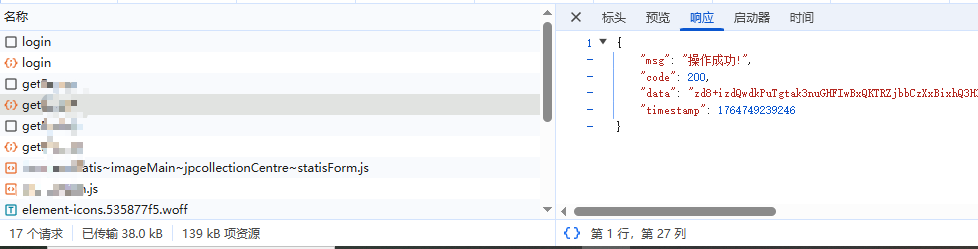
- 前端效果,可以看到前后端data的请求响应参数就加密完成