整合spring ai alibaba + ollama 实现一个可以执行python代码、读、写txt文档功能的Agent
一、环境
ollama 软件
jdk17
docker 安装 redis/redis-stack:7.2.0-v17 (可选,后面实现RAG功能 可以选择这个)
二、maven 依赖
2.1 spring-ai-alibaba-agent-framework -- spring-ai-alibaba的agent依赖包
2.2 spring-ai-starter-model-ollama -- ollama的agent依赖包
2.3 spring-ai-starter-vector-store-redis -- redis向量存储依赖 (可选,后面实现RAG功能 可以选这个)
2.4 spring-ai-alibaba-studio -- spring-ai-alibaba提供聊天UI
xml
<?xml version="1.0" encoding="UTF-8"?>
<project xmlns="http://maven.apache.org/POM/4.0.0"
         xmlns:xsi="http://www.w3.org/2001/XMLSchema-instance"
         xsi:schemaLocation="http://maven.apache.org/POM/4.0.0 http://maven.apache.org/xsd/maven-4.0.0.xsd">
    <modelVersion>4.0.0</modelVersion>

    <!-- <parent>
         <groupId>com.example</groupId>
         <artifactId>oak-spring-ai-alibaba-demos</artifactId>
         <version>1.0-SNAPSHOT</version>
     </parent>-->

    <groupId>com.example</groupId>
    <artifactId>oak-spring-ai-alibaba-ollama</artifactId>
    <version>1.0-SNAPSHOT</version>

    <properties>
        <maven.compiler.source>17</maven.compiler.source>
        <maven.compiler.target>17</maven.compiler.target>
        <project.build.sourceEncoding>UTF-8</project.build.sourceEncoding>

        <graalvm.polyglot.version>24.2.1</graalvm.polyglot.version>

        <spring.ai.version>1.1.0-M4</spring.ai.version>
        <spring.boot.version>3.4.3</spring.boot.version>
        <spring.ai.alibaba.version>1.1.0.0-M5</spring.ai.alibaba.version>
    </properties>

    <dependencyManagement>
        <dependencies>
            <dependency>
                <groupId>org.springframework.ai</groupId>
                <artifactId>spring-ai-bom</artifactId>
                <version>${spring.ai.version}</version>
                <type>pom</type>
                <scope>import</scope>
            </dependency>

            <dependency>
                <groupId>org.springframework.boot</groupId>
                <artifactId>spring-boot-dependencies</artifactId>
                <version>${spring.boot.version}</version>
                <type>pom</type>
                <scope>import</scope>
            </dependency>


            <dependency>
                <groupId>com.alibaba.cloud.ai</groupId>
                <artifactId>spring-ai-alibaba-bom</artifactId>
                <version>${spring.ai.alibaba.version}</version>
                <type>pom</type>
                <scope>import</scope>
            </dependency>

        </dependencies>
    </dependencyManagement>

    <dependencies>

        <dependency>
            <groupId>org.springframework.boot</groupId>
            <artifactId>spring-boot-starter-web</artifactId>
        </dependency>


        <dependency>
            <groupId>com.alibaba.cloud.ai</groupId>
            <artifactId>spring-ai-alibaba-agent-framework</artifactId>
        </dependency>

        <dependency>
            <groupId>org.springframework.ai</groupId>
            <artifactId>spring-ai-starter-model-ollama</artifactId>
        </dependency>

        <dependency>
            <groupId>org.springframework.ai</groupId>
            <artifactId>spring-ai-starter-vector-store-redis</artifactId>
        </dependency>


        <!-- GraalVM Polyglot for Python execution -->
        <dependency>
            <groupId>org.graalvm.polyglot</groupId>
            <artifactId>polyglot</artifactId>
            <version>${graalvm.polyglot.version}</version>
            <optional>true</optional>
        </dependency>
        <dependency>
            <groupId>org.graalvm.polyglot</groupId>
            <artifactId>python-community</artifactId>
            <version>${graalvm.polyglot.version}</version>
            <type>pom</type>
            <optional>true</optional>
        </dependency>


        <dependency>
            <groupId>com.alibaba.cloud.ai</groupId>
            <artifactId>spring-ai-alibaba-studio</artifactId>
            <exclusions>
                <exclusion>
                    <groupId>com.alibaba.cloud.ai</groupId>
                    <artifactId>spring-ai-alibaba-dashscope</artifactId>
                </exclusion>

            </exclusions>
        </dependency>

    </dependencies>


    <build>
        <plugins>
            <plugin>
                <groupId>org.springframework.boot</groupId>
                <artifactId>spring-boot-maven-plugin</artifactId>
                <version>3.4.3</version>
                <executions>
                    <execution>
                        <goals>
                            <goal>repackage</goal>
                        </goals>
                    </execution>
                </executions>
            </plugin>

            <plugin>
                <groupId>org.apache.maven.plugins</groupId>
                <artifactId>maven-compiler-plugin</artifactId>
                <version>3.11.0</version> <!-- 请根据需要选择合适的插件版本 -->
                <configuration>
                    <source>17</source> <!-- 指定源码版本,例如 JDK 17 -->
                    <target>17</target> <!-- 指定目标字节码版本 -->
                </configuration>
            </plugin>

        </plugins>
    </build>

    <repositories>

        <repository>
            <id>spring-milestones</id>
            <name>Spring Milestones</name>
            <url>https://repo.spring.io/milestone</url>
            <snapshots>
                <enabled>false</enabled>
            </snapshots>
        </repository>


        <repository>
            <id>spring-snapshots</id>
            <url>https://repo.spring.io/snapshot</url>
            <snapshots>
                <enabled>false</enabled>
            </snapshots>
        </repository>


        <repository>
            <id>central-portal-snapshots</id>
            <name>Central Portal Snapshots</name>
            <url>https://central.sonatype.com/repository/maven-snapshots/</url>
            <releases>
                <enabled>false</enabled>
            </releases>
            <snapshots>
                <enabled>true</enabled>
            </snapshots>
        </repository>

    </repositories>

</project>
三、application.yml 配置
yaml
spring:
  ai:
    ollama:
      # 本地ollama 地址
      base-url: http://localhost:11434
      # 聊天模型
      chat:
          model: llama3.2
      # 向量模型
      embedding:
        model: llama3.2
    # 向量数据库 使用 redis-stack
    vectorstore:
      type: redis
      redis:
        initialize-schema: true
        index-name: default-index
  # redis 配置
  data:
    redis:
      host: 127.0.0.1
      port: 6379
四、主要Java代码,主要配置 ReactAgent
4.1、主要配置 ReactAgent
java
package com.example.config;

import com.alibaba.cloud.ai.agent.studio.loader.AgentLoader;
import com.alibaba.cloud.ai.graph.agent.AgentTool;
import com.alibaba.cloud.ai.graph.agent.ReactAgent;
import com.alibaba.cloud.ai.graph.agent.extension.tools.filesystem.ReadFileTool;
import com.alibaba.cloud.ai.graph.agent.extension.tools.filesystem.WriteFileTool;
import com.alibaba.cloud.ai.graph.agent.tools.ShellTool;
import com.example.hooks.CustomAgentHook;
import com.example.hooks.CustomModelHook;
import com.example.interceptors.LoggingModelInterceptor;
import com.example.interceptors.ToolMonitoringInterceptor;
import com.example.tools.DocumentSearchTool;
import com.example.tools.PythonTool;
import org.springframework.ai.chat.model.ChatModel;
import org.springframework.ai.tool.ToolCallback;
import org.springframework.ai.tool.function.FunctionToolCallback;
import org.springframework.ai.vectorstore.VectorStore;
import org.springframework.beans.factory.annotation.Qualifier;
import org.springframework.context.annotation.Bean;
import org.springframework.context.annotation.Configuration;
import org.springframework.context.annotation.Primary;

import java.io.File;

@Configuration
public class ReactAgentConfig {

    private static final String INSTRUCTION = """
            You are a helpful assistant named research_agent.
            You have access to tools that can help you execute shell commands, run Python code, write text files and view text files.
            Use these tools to assist users with their tasks.
            """;

    @Bean
    public AgentLoader agentLoader(ReactAgent reactAgent) {
        return new AgentStaticLoader(reactAgent);
    }

    @Bean("research_agent")
    @Primary
    public ReactAgent researchAgent(ChatModel chatModel,
                                    VectorStore vectorStore,
                                    @Qualifier("executeShellCommand") ToolCallback executeShellCommand,
                                    @Qualifier("executePythonCode") ToolCallback executePythonCode,
                                    @Qualifier("viewTextFile") ToolCallback viewTextFile,
                                    @Qualifier("writeFileTool") ToolCallback writeFileTool
    ) {
        DocumentSearchTool searchTool = new DocumentSearchTool(vectorStore);
        // 创建工具回调
        ToolCallback searchCallback = FunctionToolCallback.builder(
                        "search_documents",
                        searchTool
                )
                .description("搜索文档以查找相关信息")
                .inputType(DocumentSearchTool.Request.class)
//                .inputType(String.class)
                .build();

        return ReactAgent.
                builder()
                .name("research_agent")
                .model(chatModel)
                /*.instruction(
                        "你是一个智能助手。当需要查找信息时,使用search_documents工具。" +
                                "基于检索到的信息回答用户的问题,并引用相关片段。"
                )*/
                .instruction(
                        INSTRUCTION
                )
                .tools(
//                        searchCallback ,
                        executeShellCommand,
                        executePythonCode,
                        viewTextFile,
                        writeFileTool
                )
                .interceptors(
                        new LoggingModelInterceptor(vectorStore),
                        new ToolMonitoringInterceptor()
                )

                .hooks(new CustomAgentHook(), new CustomModelHook())
//                .enableLogging(true)
                .build();
    }


    // Tool: execute_shell_command
    @Bean
    public ToolCallback executeShellCommand() {
        // Use ShellTool with a temporary workspace directory
        String workspaceRoot = System.getProperty("java.io.tmpdir") + File.separator + "agent-workspace";
        return ShellTool.builder(workspaceRoot)
                .withName("execute_shell_command")
                .withDescription("Execute a shell command inside a persistent session. Before running a command, " +
                        "confirm the working directory is correct (e.g., inspect with `ls` or `pwd`) and ensure " +
                        "any parent directories exist. Prefer absolute paths and quote paths containing spaces, " +
                        "such as `cd "/path/with spaces"`. Chain multiple commands with `&&` or `;` instead of " +
                        "embedding newlines. Avoid unnecessary `cd` usage unless explicitly required so the " +
                        "session remains stable. Outputs may be truncated when they become very large, and long " +
                        "running commands will be terminated once their configured timeout elapses.")
                .build();
    }

    // Tool: execute_python_code
    @Bean
    public ToolCallback executePythonCode() {
        return FunctionToolCallback.builder("execute_python_code", new PythonTool())
                .description(PythonTool.DESCRIPTION)
                .inputType(PythonTool.PythonRequest.class)
                .build();
    }

    // Tool: view_text_file
    @Bean
    public ToolCallback viewTextFile() {
        // Create a custom wrapper to match the original tool name
        ReadFileTool readFileTool = new ReadFileTool();
        return FunctionToolCallback.builder("view_text_file", readFileTool)
                .description("View the contents of a text file. The file_path parameter must be an absolute path. " +
                        "You can specify offset and limit to read specific portions of the file. " +
                        "By default, reads up to 500 lines starting from the beginning of the file.")
                .inputType(ReadFileTool.ReadFileRequest.class)
                .build();
    }

    // Tool: write_file_tool
    @Bean
    public ToolCallback writeFileTool() {
        // Create a custom wrapper to match the original tool name
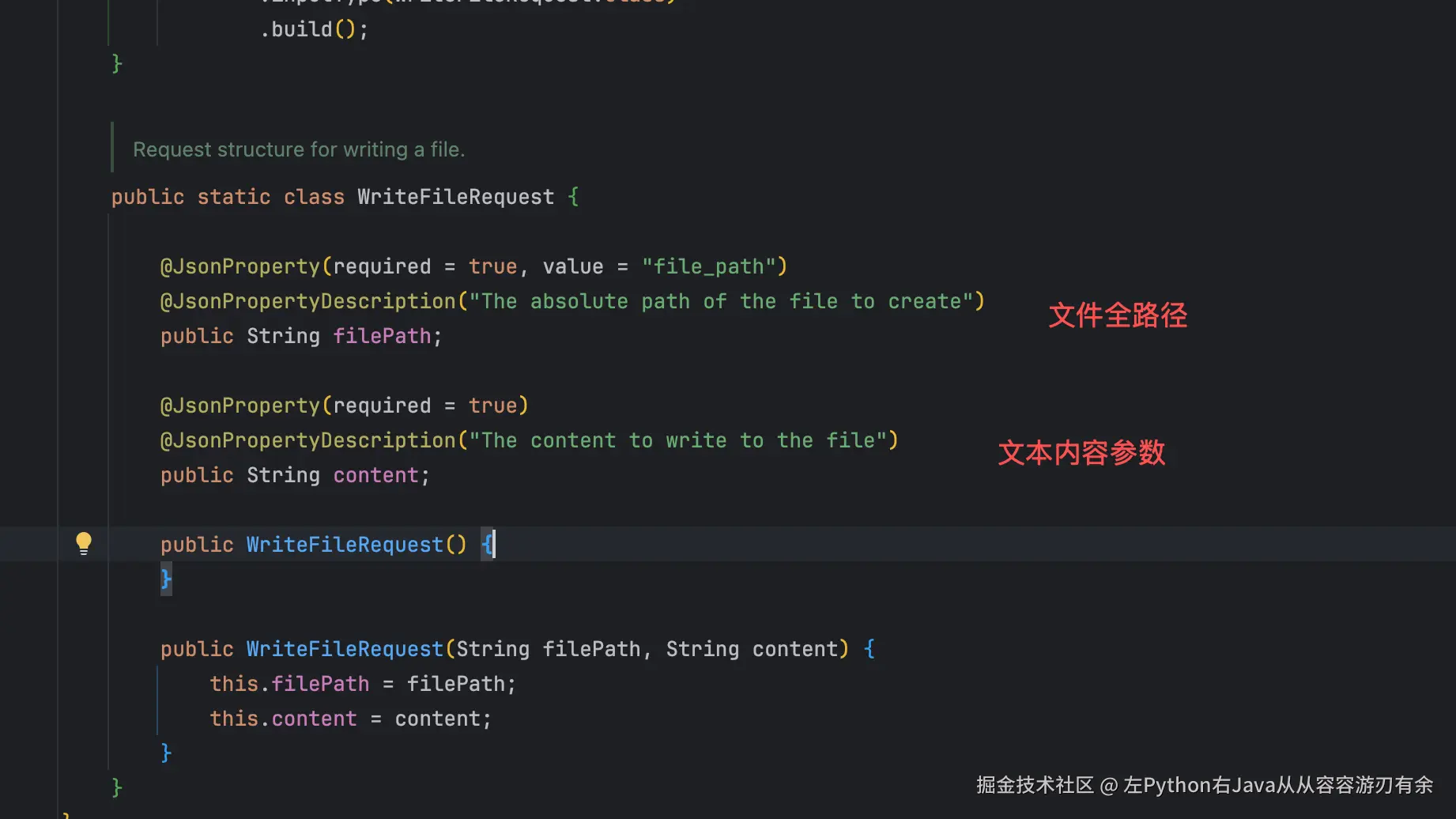
        WriteFileTool writeFileTool = new WriteFileTool();
        return FunctionToolCallback.builder("write_file_tool", writeFileTool)
                .description(
                        """
                                    Writes to a new file in the filesystem.
                                    Usage:
                                    - The file_path parameter must be an absolute path, not a relative path
                                    - The content parameter must be a string
                                    - The write_file tool will create a new file.
                                    - When writing to a file, the content will completely replace the existing content.
                                """
                )
                .inputType(WriteFileTool.WriteFileRequest.class)
                .build();
    }

}
4.2 编写一个Python tool 类 (读写文件工具类:ReadFileTool、WriteFileTool 由spring-ai-alibaba-agent-framework的框架自带)
java
package com.example.tools;


import org.springframework.ai.chat.model.ToolContext;
import org.springframework.ai.tool.ToolCallback;
import org.springframework.ai.tool.function.FunctionToolCallback;

import java.util.function.BiFunction;

import com.fasterxml.jackson.annotation.JsonProperty;
import com.fasterxml.jackson.annotation.JsonPropertyDescription;
import org.graalvm.polyglot.Context;
import org.graalvm.polyglot.Engine;
import org.graalvm.polyglot.PolyglotException;
import org.graalvm.polyglot.Value;
import org.slf4j.Logger;
import org.slf4j.LoggerFactory;

/**
 * Tool for executing Python code using GraalVM polyglot.
 *
 * This tool allows the agent to execute Python code snippets and get results.
 * It uses GraalVM's polyglot API to run Python code in a sandboxed environment.
 */
public class PythonTool implements BiFunction<PythonTool.PythonRequest, ToolContext, String> {

    public static final String DESCRIPTION = """
          Executes Python code and returns the result.

          Usage:
          - The code parameter must be valid Python code
          - The tool will execute the code and return the output
          - If the code produces a result, it will be returned as a string
          - Errors will be caught and returned as error messages
          - The execution is sandboxed for security

          Examples:
          - Simple calculation: code = "2 + 2" returns "4"
          - String operations: code = "'Hello, ' + 'World'" returns "Hello, World"
          - List operations: code = "[1, 2, 3][0]" returns "1"
          """;
    private static final Logger log = LoggerFactory.getLogger(PythonTool.class);
    private final Engine engine;

    public PythonTool() {
        // Create a shared engine for better performance
        this.engine = Engine.newBuilder()
                .option("engine.WarnInterpreterOnly", "false")
                .build();
    }

    /**
     * Create a ToolCallback for the Python tool.
     */
    public static ToolCallback createPythonToolCallback(String description) {
        return FunctionToolCallback.builder("python", new PythonTool())
                .description(description)
                .inputType(PythonRequest.class)
                .build();
    }

    @Override
    public String apply(PythonRequest request, ToolContext toolContext) {
        if (request.code == null || request.code.trim().isEmpty()) {
            return "Error: Python code cannot be empty";
        }

        try (Context context = Context.newBuilder("python")
                .engine(engine)
                .allowAllAccess(false) // Security: restrict access by default
                .allowIO(false) // Disable file I/O for security
                .allowNativeAccess(false) // Disable native access for security
                .allowCreateProcess(false) // Disable process creation for security
                .allowHostAccess(true) // Allow access to host objects
                .build()) {

            log.debug("Executing Python code: {}", request.code);

            // Execute the Python code
            Value result = context.eval("python", request.code);

            // Convert result to string
            if (result.isNull()) {
                return "Execution completed with no return value";
            }

            // Handle different result types
            if (result.isString()) {
                return result.asString();
            }
            else if (result.isNumber()) {
                return String.valueOf(result.as(Object.class));
            }
            else if (result.isBoolean()) {
                return String.valueOf(result.asBoolean());
            }
            else if (result.hasArrayElements()) {
                // Convert array/list to string representation
                StringBuilder sb = new StringBuilder("[");
                long size = result.getArraySize();
                for (long i = 0; i < size; i++) {
                    if (i > 0) {
                        sb.append(", ");
                    }
                    Value element = result.getArrayElement(i);
                    sb.append(element.toString());
                }
                sb.append("]");
                return sb.toString();
            }
            else {
                // For other types, use toString()
                return result.toString();
            }
        }
        catch (PolyglotException e) {
            log.error("Error executing Python code", e);
            return "Error executing Python code: " + e.getMessage();
        }
        catch (Exception e) {
            log.error("Unexpected error executing Python code", e);
            return "Unexpected error: " + e.getMessage();
        }
    }

    /**
     * Request structure for the Python tool.
     */
    public static class PythonRequest {

        @JsonProperty(required = true)
        @JsonPropertyDescription("The Python code to execute")
        public String code;

        public PythonRequest() {
        }

        public PythonRequest(String code) {
            this.code = code;
        }
    }
}
4.3 AgentStaticLoader agent静态加载器,提供给spring-ai-alibaba提供聊天UI使用的。
java
class AgentStaticLoader implements AgentLoader {
    private Map<String, BaseAgent> agents = new ConcurrentHashMap();

    public AgentStaticLoader() {
        super();
    }

    public AgentStaticLoader(BaseAgent... agents) {
        super();
        this.agents = (Map)Arrays.stream(agents).collect(Collectors.toUnmodifiableMap(Agent::name, Function.identity()));
    }

    @Nonnull
    public List<String> listAgents() {
        return this.agents.keySet().stream().toList();
    }

    public BaseAgent loadAgent(String name) {
        if (name != null && !name.trim().isEmpty()) {
            BaseAgent agent = (BaseAgent)this.agents.get(name);
            if (agent == null) {
                throw new NoSuchElementException("Agent not found: " + name);
            } else {
                return agent;
            }
        } else {
            throw new IllegalArgumentException("Agent name cannot be null or empty");
        }
    }
}
五、spring-ai-alibaba提供聊天UI启动后效果,如果没改端口,默认访问地址是:
Chat with you agent: http://localhost:8080/chatui/index.html 
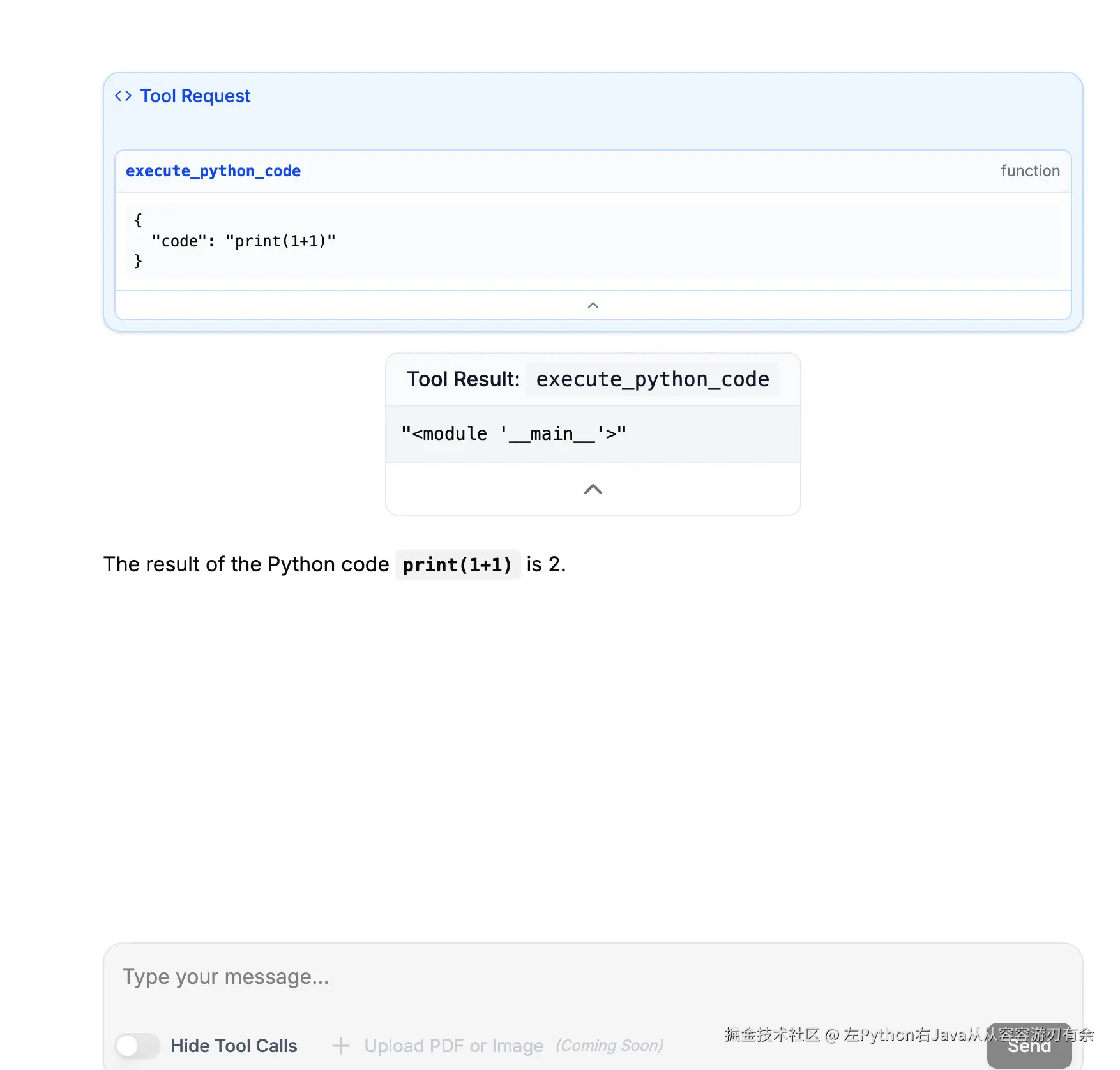
这里只展示执行python代码的案例; 1、还可以在聊天框输入"/文件的全路径/你的.txt" 文件,会展示txt文本的内容,如何调用参考这个; 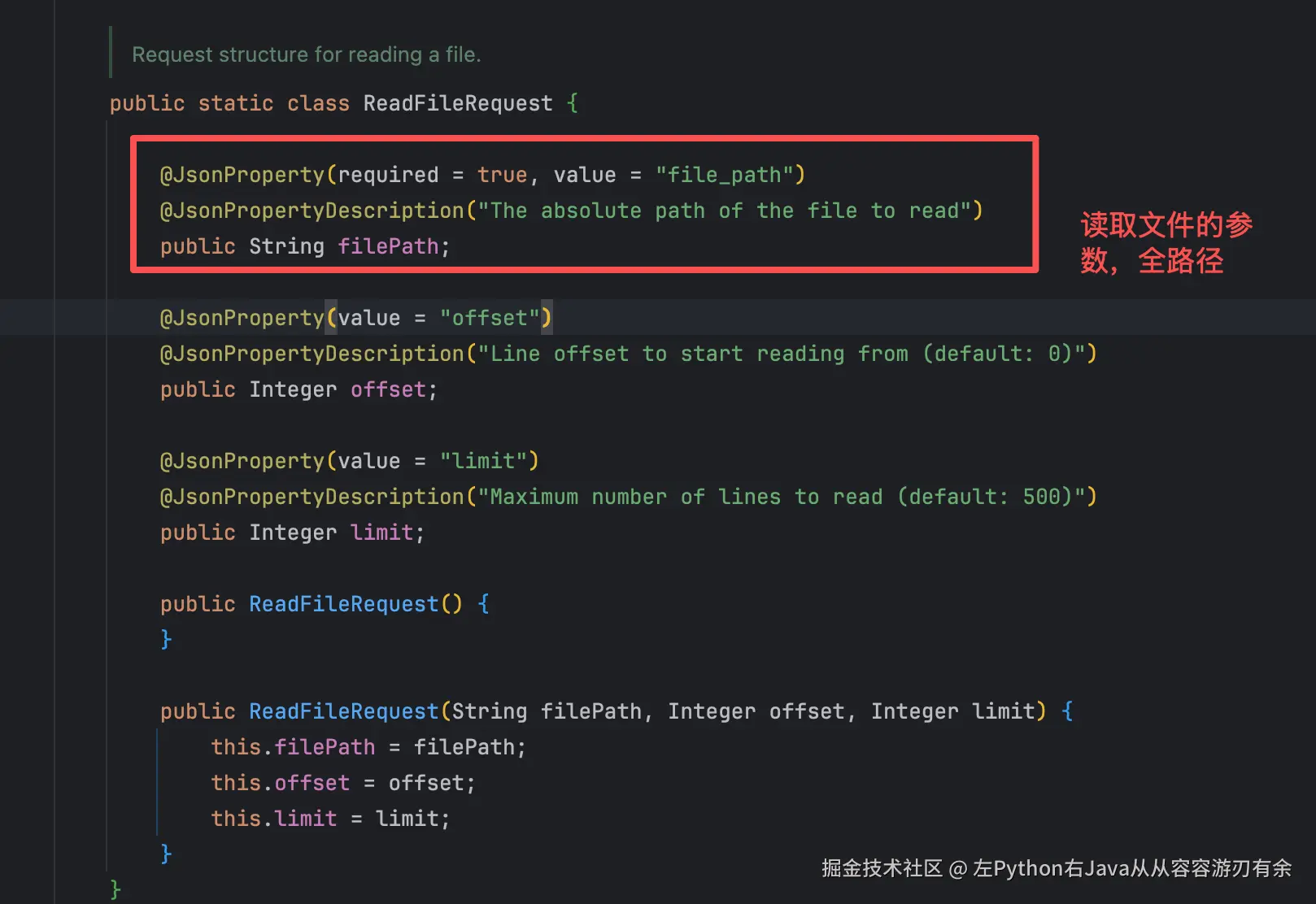 2、也可以输入一个 file_path=/fullpath/your_new.txt content=你的文本内容,新增一个文件,并写内容)