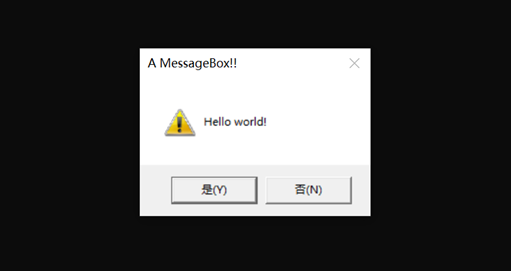
; 32位x86 MASM汇编(VS2019适配,带警告图标+是/否按钮的消息框)
.386                    ; 指定386指令集
.model flat, stdcall    ; 平坦内存模型+stdcall调用约定(Win32 API默认)
option casemap:none     ; 区分大小写

; 1. 补充Win32 API核心常量(值来自微软官方Win32参考文档)
NULL              equ 0                ; 空句柄/指针
MB_ICONWARNING    equ 00000030h        ; 警告图标(黄色感叹号)
MB_YESNO          equ 00000004h        ; 是/否按钮(替代默认OK按钮)

; 2. 补充Windows API函数原型声明
MessageBoxA proto :dword, :dword, :dword, :dword  ; HWND, LPCSTR, LPCSTR, UINT
ExitProcess proto :dword                          ; UINT

; 已初始化数据段(字符串常量必须放.data)
.data
    szCaption db 'A MessageBox!!', 0  ; 标题适配警告图标
    szText    db 'Hello world!', 0   ; 内容适配是/否按钮

; 代码段
.code
_main proc
    ; 调用MessageBoxA:NULL(无父窗口) + 文本 + 标题 + 警告图标+是/否按钮
    invoke MessageBoxA, NULL, offset szText, offset szCaption, MB_ICONWARNING or MB_YESNO

    ; 退出程序(正常退出码0)
    invoke ExitProcess, 0
_main endp

end _main
64位汇编语言的编程艺术_1.6 运行第一个MASM和C++的混合程序在线阅读-QQ阅读
一、通过 VS2019 开发者命令提示符(x64)启动环境
按下Win键,搜索:x64 Native Tools Command Prompt for VS 2019(中文:适用于 VS 2019 的 x64 本机工具命令提示符),必须选择 x64 版本(ml64 是 x64 汇编器,x86 的开发者提示符默认不加载 x64 工具链);
打开后,先执行cd C:\Users\lenovo\Desktop\x86_asm_demo切换到你的代码目录;
再执行ml64 /c listing1-3.asm,此时应能正常识别 ml64 命令

二、指定 obj 文件输出路径(适合不想切换目录的场景)
直接在汇编命令中用/Fo参数指定 obj 文件的输出路径(需确保路径有写入权限):
C:\Program Files (x86)\Microsoft Visual Studio\2019\Enterprise>ml64 /c \Users\lenovo\Desktop\asm64\listing1-3.asm
Microsoft (R) Macro Assembler (x64) Version 14.29.30159.0
Copyright (C) Microsoft Corporation.  All rights reserved.
/Fo:是 ml64 指定输出 obj 文件路径的参数,需紧跟目标路径(无空格);
该命令会强制将 obj 文件生成到你有权限的桌面 asm64 文件夹,避开 VS 安装目录的权限限制。

三、指定输出目录(不切换目录的场景)
用 cl 的/Fo(指定 obj 输出路径)和/Fe(指定 exe 输出路径)参数,强制将生成文件放到有权限的 asm64 文件夹:
C:\Program Files (x86)\Microsoft Visual Studio\2019\Enterprise>cl /FoC:\Users\lenovo\Desktop\asm64\ /FeC:\Users\lenovo\Desktop\asm64\listing1-2.exe C:\Users\lenovo\Desktop\asm64\listing1-3.obj C:\Users\lenovo\Desktop\asm64\listing1-2.cpp
用于 x64 的 Microsoft (R) C/C++ 优化编译器 19.29.30159 版
版权所有(C) Microsoft Corporation。保留所有权利。

listing1-2.cpp
Microsoft (R) Incremental Linker Version 14.29.30159.0
Copyright (C) Microsoft Corporation.  All rights reserved.

/out:C:\Users\lenovo\Desktop\asm64\listing1-2.exe
C:\Users\lenovo\Desktop\asm64\listing1-3.obj
C:\Users\lenovo\Desktop\asm64\listing1-2.obj
•	/Fo:指定所有 obj 文件的输出目录(末尾加反斜杠);
•	/Fe:指定最终生成的可执行文件路径 + 文件名;
•	该命令会把编译 / 链接产生的所有文件都放到 asm64 文件夹,避开 VS 安装目录的权限限制。

四、输出
C:\Users\lenovo\Desktop\asm64>listing1-2
Calling asmMain:
Returned from asmMain

五、永久配置系统环境变量(关键)
1.	按下Win + R,输入sysdm.cpl,回车打开「系统属性」窗口;
2.	切换到「高级」选项卡,点击「环境变量」;
3.	在「系统变量」区域找到Path变量,点击「编辑」;
4.	点击「新建」,粘贴第一步确认的 ml64 所在文件夹路径(仅文件夹路径,不要带 ml64.exe):
plaintext
5.	C:\Program Files (x86)\Microsoft Visual Studio\2019\Enterprise\VC\Tools\MSVC\14.29.30037\bin\HostX64\x64
点击「确定」保存(需连续点击 3 次「确定」,关闭所有属性窗口);
C:\Users\lenovo>ml64 /?
Microsoft (R) Macro Assembler (x64) Version 14.29.30040.0
Copyright (C) Microsoft Corporation.  All rights reserved.

        ML64 [ /options ] filelist [ /link linkoptions ]

/Bl<linker> Use alternate linker          /Sf Generate first pass listing
/c Assemble without linking               /Sl<width> Set line width
/Cp Preserve case of user identifiers     /Sn Suppress symbol-table listing
/Cx Preserve case in publics, externs     /Sp<length> Set page length
/D<name>[=text] Define text macro         /Ss<string> Set subtitle
/EP Output preprocessed listing to stdout /St<string> Set title
/F <hex> Set stack size (bytes)           /Sx List false conditionals
/Fe<file> Name executable                 /Ta<file> Assemble non-.ASM file
/Fl[file] Generate listing                /w Same as /W0 /WX
/Fm[file] Generate map                    /WX Treat warnings as errors
/Fo<file> Name object file                /W<number> Set warning level
/Fr[file] Generate limited browser info   /X Ignore INCLUDE environment path
/FR[file] Generate full browser info      /Zd Add line number debug info
/I<name> Add include path                 /Zf Make all symbols public
/link <linker options and libraries>      /Zi Add symbolic debug info
/nologo Suppress copyright message        /Zp[n] Set structure alignment
/Sa Maximize source listing               /Zs Perform syntax check only
/ZH:SHA_256 Use SHA256 for checksum
    in debug info (experimental)
/Gy[-] separate functions for linker
/errorReport:<option> Deprecated. Report internal assembler errors to Microsoft
    none - do not send report
    prompt - prompt to immediately send report
    queue - at next admin logon, prompt to send report
send - send report automatically


C:\Users\lenovo\Desktop\asm64>ml64 /c listing1-3.asm
Microsoft (R) Macro Assembler (x64) Version 14.29.30040.0
Copyright (C) Microsoft Corporation.  All rights reserved.

 Assembling: listing1-3.asm

C:\Users\lenovo\Desktop\asm64>cl listing1-2.cpp listing1-3.obj
用于 x64 的 Microsoft (R) C/C++ 优化编译器 19.29.30040 版
版权所有(C) Microsoft Corporation。保留所有权利。

listing1-2.cpp
listing1-2.cpp(1): fatal error C1034: stdio.h: 不包括路径集

C:\Users\lenovo\Desktop\asm64>listing1-2
Calling asmMain:
Returned from asmMain


Listing1-4.asm
.code
myProc proc
    ret
myProc endp

main PROC
    call myProc
    ; x64控制台程序退出需调用ExitProcess,避免崩溃
    mov rcx, 0          ; 退出码0(正常退出)
    call ExitProcess    ; Windows API,需导入
main endp

; 导入ExitProcess函数声明+对应的系统库
ExitProcess proto :dword
includelib kernel32.lib  ; 新增:指定链接kernel32.lib
end
方案一:用 VS x64 本机工具提示符(无需找路径,一键成功)
这是最省心的方式,工具提示符会自动加载 Windows SDK 的 x64 库路径,步骤:
关闭当前所有命令提示符;
按Win键搜索:x64 Native Tools Command Prompt for VS 2019(中文:适用于 VS 2019 的 x64 本机工具命令提示符),打开;
切换到 asm64 目录:
cmd
cd C:\Users\lenovo\Desktop\asm64
执行简化命令(无需手动指定 kernel32.lib 路径):
cmd
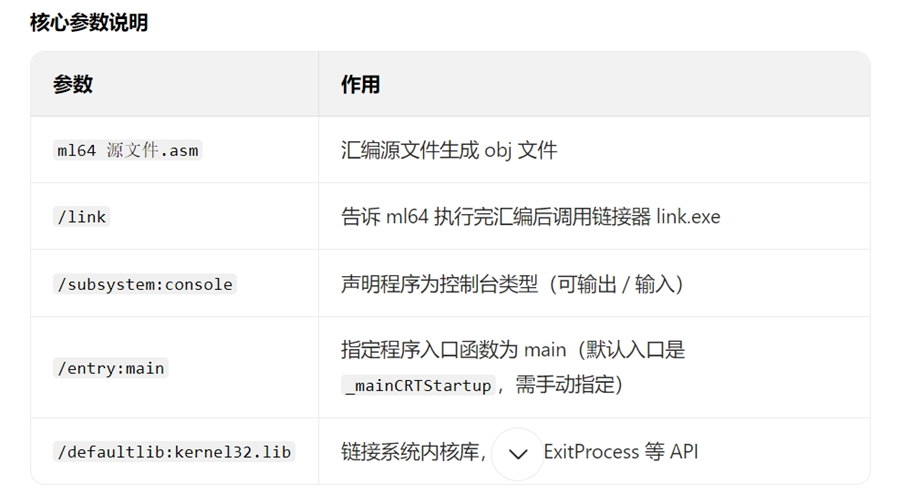
ml64 listing1-4.asm /link /subsystem:console /entry:main /defaultlib:kernel32.lib
此时链接器会自动找到 Windows SDK 里的 x64 版kernel32.lib,直接编译成功。

https://book.qq.com/book-read/51906001/21
C:\Users\lenovo\Desktop\asm64>ml64 /c listing1-5.asm
Microsoft (R) Macro Assembler (x64) Version 14.29.30159.0
Copyright (C) Microsoft Corporation.  All rights reserved.

 Assembling: listing1-5.asm

C:\Users\lenovo\Desktop\asm64>cl listing1-6.cpp listing1-5.obj
用于 x64 的 Microsoft (R) C/C++ 优化编译器 19.29.30159 版
版权所有(C) Microsoft Corporation。保留所有权利。

listing1-6.cpp
Microsoft (R) Incremental Linker Version 14.29.30159.0
Copyright (C) Microsoft Corporation.  All rights reserved.

/out:listing1-6.exe
listing1-6.obj
listing1-5.obj

C:\Users\lenovo\Desktop\asm64>listing1-6
Calling asmFunc:
Hello, world!
Returned from asmFunc

区分普通的 "Visual Studio 2019 Developer Command Prompt" 和 "x64 本机工具命令提示符",可以从名称、启动入口、环境加载内容这 3 个维度快速识别:
1. 从名称区分(最直接)
普通版:名称固定为 Visual Studio 2019 Developer Command Prompt(中文:Visual Studio 2019 开发者命令提示符),无 "x64""Native Tools" 等关键词;
x64 本机版:名称包含 x64 和 Native Tools,完整名称是 x64 Native Tools Command Prompt for VS 2019(中文:适用于 VS 2019 的 x64 本机工具命令提示符)。
2. 从启动入口区分
按下Win键搜索时:
搜 "Developer Command Prompt",出现的是普通版;
搜 "x64 Native Tools",出现的是x64 本机版。
3. 从环境加载内容区分(验证用)
打开命令提示符后,看窗口顶部的提示:
普通版:仅显示 Visual Studio 2019 Developer Command Prompt v16.xxx,且不会提示 "Environment initialized for: 'x64'";
x64 本机版:打开后会额外显示 [vcvarsall.bat] Environment initialized for: 'x64'(表示已加载 x64 架构的编译环境)。
简单总结:名称里带 "x64" 和 "Native Tools" 的,就是能编译 x64 汇编 / C++ 的版本。
.386
.model flat, stdcall
option casemap:none

; 引入必要库和函数原型(保证程序正常退出)
includelib kernel32.lib
ExitProcess PROTO :DWORD

; 数据段:明确标注每个数据的内存偏移
.data
; myBytes: 偏移0:10h, 偏移1:20h, 偏移2:30h, 偏移3:40h
myBytes BYTE 10h, 20h, 30h, 40h

; myWords: 偏移0:8Ah, 偏移2:3Bh, 偏移4:72h, 偏移6:44h, 偏移8:66h
; (WORD占2字节,所以每个元素偏移+2)
myWords WORD 8Ah, 3Bh, 72h,44h, 66h

; myDoubles: 偏移0:1, 偏移4:2, 偏移8:3, 偏移12:4, 偏移16:5
; (DWORD占4字节,每个元素偏移+4)
myDoubles DWORD 1, 2, 3, 4, 5

; myPointer = myDoubles的起始偏移(即指向myDoubles[0])
myPointer DWORD myDoubles

.code
_main proc
    ; 保存非易失寄存器(避免调试断点)
    push esi
    push edi
    push ebx

    ; ------------------- 原指令 + 详细注释 -------------------
    mov esi, OFFSET myBytes       ; esi = myBytes起始地址(偏移0)
    mov al, [esi]                 ; al = [myBytes+0] = 10h
    mov al, [esi + 3]             ; al = [myBytes+3] = 40h

    ; 核心解析:myWords+2 的寻址逻辑
    mov esi, OFFSET myWords+2     ; esi = myWords起始地址 + 2字节
                                  ; myWords[0] = 8Ah(偏移0-1),myWords[1] = 3Bh(偏移2-3)
    mov ax, [esi]                 ; ax = [myWords+2] = 3Bh(验证你的标注正确!)

    mov edi, 8                    ; edi = 8(DWORD偏移单位,对应myDoubles[2])
    mov edx, [myDoubles + edi]    ; edx = [myDoubles+8] = 3(myDoubles[2])
    mov edx, myDoubles[edi]       ; 等价上一行,edx = 3
    mov ebx, myPointer            ; ebx = myDoubles起始地址
    mov eax, [ebx + 4]            ; eax = [myDoubles+4] = 2(myDoubles[1])

    ; 恢复寄存器
    pop ebx
    pop edi
    pop esi

    ; 正常退出
    invoke ExitProcess, 0
_main endp

end _main