实验八 基于 Deep Web 爬虫的当当网图书信息采集
一、实验目的
1.掌握Deep Web爬虫的基本概念。
2.综合掌握Deep Web爬虫提取当当网图书信息和图书信息保存的过程。
二、实验内容
网址为:url=' http://search.dangdang.com/advsearch', 爬取当当网中"清华大学出版社"图书信息,并进行保存。
三、程序代码及分步功能解析
python
# -*- coding: utf-8 -*-

import requests

from bs4 import BeautifulSoup

import traceback

import os

import urllib.parse

from pathlib import Path

import warnings


# 忽略无关警告

warnings.filterwarnings('ignore')


# 配置请求头(模拟浏览器,降低反爬概率)

HEADERS = {

    'User-Agent': 'Mozilla/5.0 (Windows NT 10.0; Win64; x64) AppleWebKit/537.36 (KHTML, like Gecko) Chrome/120.0.0.0 Safari/537.36',

    'Accept': 'text/html,application/xhtml+xml,application/xml;q=0.9,image/webp,*/*;q=0.8',

    'Accept-Language': 'zh-CN,zh;q=0.9',

    'Connection': 'keep-alive'

}


def read_list(txt_path):

    """读取出版社列表(修复编码问题 + 异常处理)"""

    press_list = []

    try:

        # 显式指定 UTF-8 编码读取,解决 GBK 解码失败问题

        with open(txt_path, 'r', encoding='utf-8') as f:

            for line in f.readlines():

                line = line.strip('\n').strip()  # 额外去除首尾空格

                if line:  # 跳过空行

                    press_list.append(line)

        print(f"成功读取 {len(press_list)} 个出版社名称")

    except FileNotFoundError:

        print(f"错误:未找到文件 {txt_path}")

        traceback.print_exc()

    except PermissionError:

        print(f"错误:无权限读取文件 {txt_path}")

        traceback.print_exc()

    except Exception as e:

        print(f"读取出版社列表失败:{e}")

        traceback.print_exc()

    return press_list


def build_form(press_name):

    """定位input标签,拼接URL(优化编码 + 容错)"""

    try:

        res = requests.get('http://search.dangdang.com/advsearch', headers=HEADERS, timeout=10)

        res.encoding = 'gbk'  # 当当网页面实际编码为 GBK(GB2312 超集)

        soup = BeautifulSoup(res.text, 'html.parser')


        # 定位出版社对应的input标签(优化选择器,提高稳定性)

        input_tag_name = ''

        conditions = soup.select('.detail_condition label')

        print(f'共找到{len(conditions)}项基本条件,正在寻找出版社input标签')


        for item in conditions:

            span_text = item.find('span')

            if span_text and '出版社' in span_text.get_text(strip=True):

                input_tag = item.find('input')

                if input_tag and input_tag.get('name'):

                    input_tag_name = input_tag.get('name')

                    print(f'找到出版社input标签,name: {input_tag_name}')

                    break


        if not input_tag_name:

            print("警告:未找到出版社对应的input标签,使用默认值 'press'")

            input_tag_name = 'press'  # 兜底默认值


        # 拼接URL(优化编码逻辑,避免GB2312编码失败)

        keyword = {

            'medium': '01',

            input_tag_name: press_name,  # 交由urlencode自动处理编码

            'category_path': '01.00.00.00.00.00',

            'sort_type': 'sort_pubdate_desc'

        }

        # 使用GBK编码URL参数(适配当当网)

        url = 'http://search.dangdang.com/?' + urllib.parse.urlencode(keyword, encoding='gbk')

        print(f'入口地址: {url}')

        return url

    except Exception as e:

        print(f"构建URL失败:{e}")

        traceback.print_exc()

        return ''


def get_info(entry_url):

    """抓取图书信息(增强容错 + 元素定位优化)"""

    if not entry_url:

        print("入口URL为空,跳过抓取")

        return {'title': [], 'price': [], 'date': [], 'comment': []}


    books_title = []

    books_price = []

    books_date = []

    books_comment = []


    try:

        res = requests.get(entry_url, headers=HEADERS, timeout=10)

        res.encoding = 'gbk'

        soup = BeautifulSoup(res.text, 'html.parser')


        # 获取页数(优化选择器,避免索引越界)

        page_elem = soup.select('.data > span')

        page_num = 1

        if len(page_elem) >= 2:

            try:

                page_num = int(page_elem[1].get_text(strip=True).strip('/'))

            except ValueError:

                page_num = 1

        print(f'共 {page_num} 页待抓取,测试采集1页')

        page_num = 1  # 测试仅抓1页


        for i in range(1, page_num + 1):

            now_url = f"{entry_url}&page_index={i}"

            print(f'正在获取第{i}页, URL: {now_url}')


            res = requests.get(now_url, headers=HEADERS, timeout=10)

            res.encoding = 'gbk'

            soup = BeautifulSoup(res.text, 'html.parser')


            # 定位图书列表项(优化选择器)

            book_items = soup.select('ul.bigimg > li[ddt-pit]')

            if not book_items:

                print("未找到图书列表项,跳过当前页")

                continue


            for item in book_items:

                # 书名

                title_elem = item.find('a', attrs={'title': True})

                title = title_elem.get('title', '未知书名') if title_elem else '未知书名'

                books_title.append(title)


                # 价格

                price_elem = item.select_one('p.price > span.search_now_price')

                price = price_elem.get_text(strip=True) if price_elem else '未知价格'

                books_price.append(price)


                # 评论数

                comment_elem = item.select_one('p.search_star_line > a')

                comment = comment_elem.get_text(strip=True) if comment_elem else '0条评论'

                books_comment.append(comment)


                # 出版日期(优化索引容错)

                date_elems = item.select('p.search_book_author > span')

                date = '未知日期'

                if len(date_elems) >= 2:

                    date_text = date_elems[1].get_text(strip=True)

                    date = date_text[2:] if len(date_text) >= 2 else date_text

                books_date.append(date)


        print(f"成功抓取 {len(books_title)} 本图书信息")

    except Exception as e:

        print(f"抓取信息失败:{e}")

        traceback.print_exc()


    return {'title': books_title, 'price': books_price, 'date': books_date, 'comment': books_comment}


def save_info(file_dir, press_name, books_dict):

    """保存数据(自动创建目录 + 异常处理)"""

    # 自动创建保存目录(不存在则创建)

    Path(file_dir).mkdir(parents=True, exist_ok=True)


    res = ''

    try:

        # 容错:取最短列表长度,避免索引越界

        max_len = min(len(books_dict['title']), len(books_dict['price']),

                      len(books_dict['date']), len(books_dict['comment']))


        for i in range(max_len):

            res += (f"{i+1}.书名: {books_dict['title'][i]}\r\n"

                    f"价格: {books_dict['price'][i]}\r\n"

                    f"出版日期: {books_dict['date'][i]}\r\n"

                    f"评论数量: {books_dict['comment'][i]}\r\n\r\n")

    except Exception as e:

        print(f"拼接数据出错:{e}")

        traceback.print_exc()

    finally:

        # 处理出版社名称中的非法文件名字符

        safe_press_name = press_name.replace('/', '_').replace('\\', '_').replace(':', '_')

        file_path = os.path.join(file_dir, f"{safe_press_name}.txt")

        try:

            with open(file_path, "w", encoding="utf-8") as f:

                f.write(res)

            print(f"数据已保存至:{file_path}")

        except Exception as e:

            print(f"保存文件失败:{e}")

            traceback.print_exc()


def start_spider(press_path, saved_file_dir):

    """入口函数(批量处理出版社)"""

    press_list = read_list(press_path)

    if not press_list:

        print("无有效出版社列表,终止爬取")

        return


    for press_name in press_list:

        print(f"\n------ 开始抓取 {press_name} ------")

        press_page_url = build_form(press_name)

        books_dict = get_info(press_page_url)

        save_info(saved_file_dir, press_name, books_dict)

        print(f"------- 出版社: {press_name} 抓取完毕 -------")


if __name__ == '__main__':

    # 出版社名列表所在文件路径

    press_txt_path = r'C:\Users\Administrator\Desktop\press.txt'

    # 抓取信息保存路径

    saved_file_dir = r'C:\Users\Administrator\Desktop\图书信息采集'

    # 启动

    start_spider(press_txt_path, saved_file_dir)
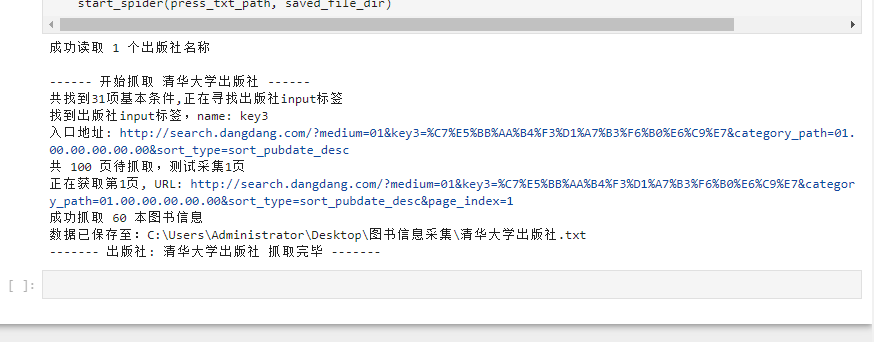
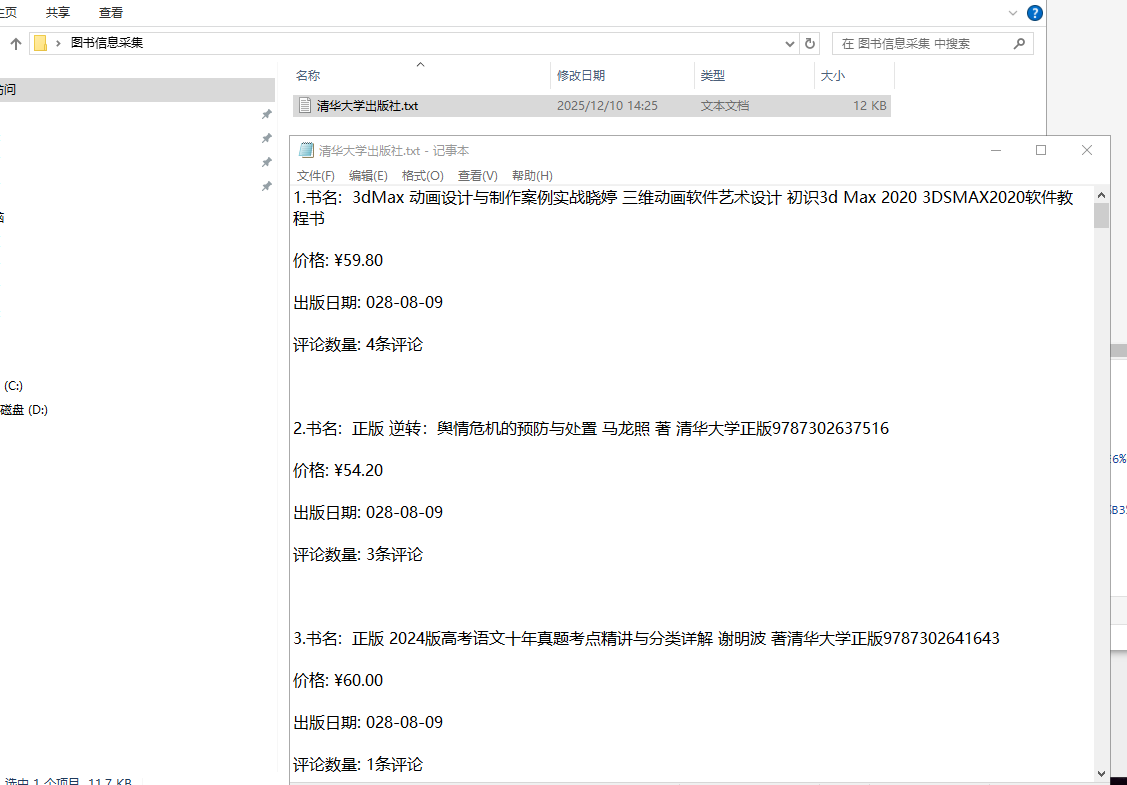
四、程序调试结果(要求截取详细步骤)
五、实验总结
实验成功爬取目标出版社图书信息,验证了 Deep Web 爬虫通过模拟表单请求访问隐藏数据的核心逻辑。过程中需注意页面编码适配、HTML 元素定位容错性,以及反爬策略规避,加深了对爬虫请求构造、数据解析和持久化的综合应用能力。