文章目录
错误原因分析
这个错误表明服务器返回的 Content-Type 头部格式不正确,只包含了字符集信息而没有MIME类型。
错误信息springframework.http.InvalidMediaTypeException: Invalid mime type "charset=utf-8": does not contain '/' 表明服务器返回的 Content-Type 头部只包含了 "charset=utf-8" 而不是完整的 MIME 类型(如 "application/json;charset=utf-8")。
校验:
用post调用接口,查看header,发现 Content-Type = "charset=utf-8" 而不是 Content-Type = "application/json;charset=utf-8"
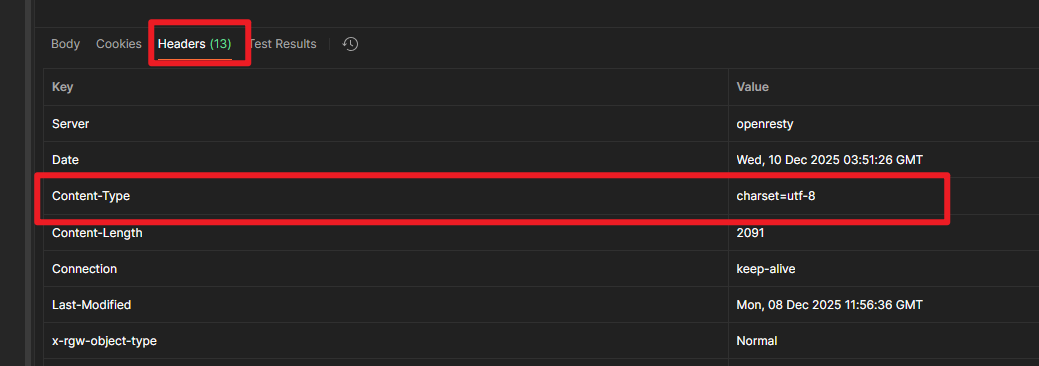
在 Spring 的 RestTemplate 中,当它尝试解析 HTTP 响应时,会检查 Content-Type 头部。如果该头部不是一个有效的 MIME 类型格式(缺少斜杠/),就会抛出 InvalidMediaTypeException 异常。
解决方案:
方案一:添加请求头_ACCEPT_头
通过显式设置接受的媒体类型,可以避免因服务器返回不完整 Content-Type 而导致的问题。
java
HttpHeaders headers = new HttpHeaders();
headers.setAccept(Arrays.asList(MediaType.APPLICATION_JSON));
HttpEntity<?> entity = new HttpEntity<>(headers);

ResponseEntity<String> response = restTemplate.exchange(url, HttpMethod.GET, entity, String.class);
if (response.getStatusCode() == HttpStatus.OK) {
    // 其他逻辑
} else {
    throw new IOException("读取内容失败, code: " + response.getStatusCodeValue());
}
方法二:自定义RequestCallback和ResponseExtractor来绕过Content-Type检查
java
 // 使用自定义RequestCallback和ResponseExtractor来绕过Content-Type检查
restTemplate.execute(url, HttpMethod.GET,
         request -> {
             // 设置Accept头
             request.getHeaders().setAccept(Arrays.asList(MediaType.APPLICATION_JSON));
         },
         response -> {
             // 手动读取响应体,忽略Content-Type
             String body = StreamUtils.copyToString(response.getBody(), StandardCharsets.UTF_8);
             if (response.getStatusCode() == HttpStatus.OK) {
                 // 其他逻辑
             } else {
                 throw new IOException("读取文件内容失败, code: " + response.getStatusCode());
             }
         });
方案三:使用HttpURLConnection
java
URL url = new URL(url);
HttpURLConnection conn = (HttpURLConnection) url.openConnection();
conn.setRequestMethod("GET");
conn.setConnectTimeout(5000);  // 连接超时时间
conn.setReadTimeout(10000);    // 读取超时时间
conn.connect();
int responseCode = conn.getResponseCode();
if (responseCode != HttpURLConnection.HTTP_OK) {
    throw new IOException("读取文件内容失败,code : " + responseCode);
}
// 其他逻辑