🎯 案例集合List:多列表相互拖拽(删除/插入,偏移动效)(微暇)
🌍 案例集合List
🚪 最近开启了学员班级点我欢迎加入(学习相关知识可获得定制礼盒)
🏷️ 效果图
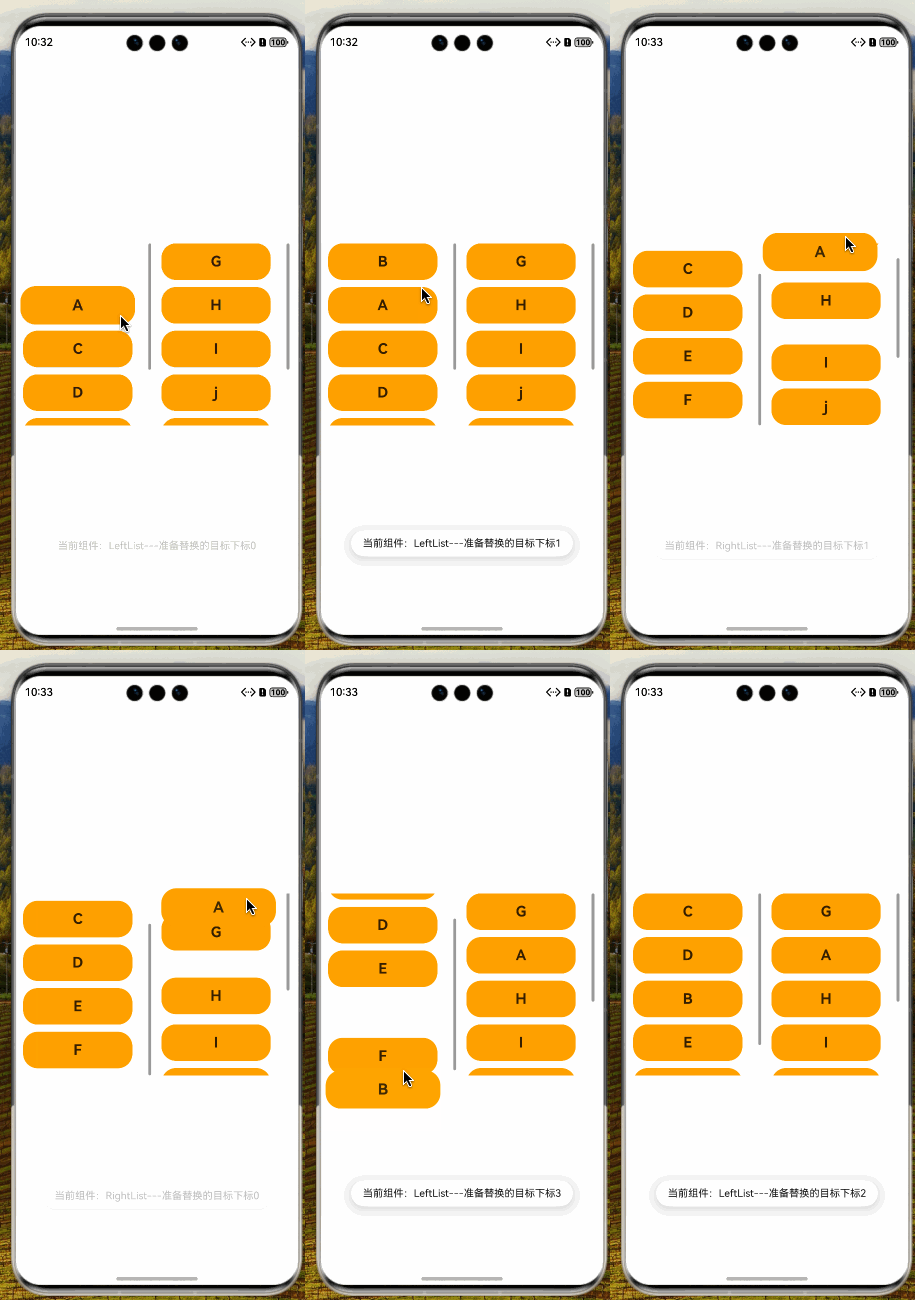
✅ 已实现
- 不同列表交换
- 同列表交换
- 组件边缘滑动 (原生自带)
- 组件检测偏移动效
- 拖出/插入过渡动画
📖 参考
🧩 拆解
javascript
import { curves } from "@kit.ArkUI"

/**
 * 组件在拖拽中需要用到的额外信息
 */
interface extraParamsObj {
  insertIndex: number // 插入项下标
  selectedIndex: number // 选中项下标
}

/**
 * mockData
 */
class ItemData {
  id: number = 0
  content: string = ''
}

/**
 * 组件标识
 */
enum CompType {
  LeftList = 'LeftList',
  RightList = 'RightList',
}

@Component
export struct MultipleListsForMutualDelAndIns {
  /**
   * mock数据1
   */
  @State leftList: ItemData[] =
    [
      { id: 1, content: "A" },
      { id: 2, content: "B" },
      { id: 3, content: "C" },
      { id: 4, content: "D" },
      { id: 5, content: "E" },
      { id: 6, content: "F" },
      { id: 111, content: "" },// 用于拖拽到底部无法位移
    ]
  /**
   * mock数据2
   */
  @State rightList: ItemData[] =
    [
      { id: 7, content: "G" },
      { id: 8, content: "H" },
      { id: 9, content: "I" },
      { id: 10, content: "j" },
      { id: 11, content: "K" },
      { id: 12, content: "L" },
      { id: 222, content: "" },// 用于拖拽到底部无法位移
    ]
  /**
   * 当前悬停在那个组件上方的下标
   */
  @State hoverIdx: number = -1
  /**
   * 当前悬停在那个组件上方
   */
  @State hoverComp: CompType | undefined = undefined
  /**
   * 拖拽的item
   */
  @State scaleItem: ItemData = new ItemData()

  /**
   * 拖拽项视图
   * @param item
   */
  @Builder
  private dragBuilder(item: ItemData) {
    Text(item.content)
      .width(150)
      .height(50)
      .fontSize(20)
      .fontWeight(FontWeight.Bold)
      .backgroundColor(Color.Orange)
      .textAlign(TextAlign.Center)
      .borderRadius(20)
      .scale({ x: 1.15, y: 1.15 })
  }

  /**
   * 拖拽开始统一方法
   * @param compType
   * @param extraParams
   */
  private itemDragAndDropToStart(compType: CompType, idx: number, item: ItemData) {
    this.scaleItem = item
    this.hoverComp = compType
    this.hoverIdx = idx
    this.listDataType(compType).splice(idx, 1)
  }

  /**
   * 拖拽释放统一方法
   * @param compType
   * @param extraParams
   */
  private itemDragAndDropEnds(compType: CompType) {
    this.listDataType(compType).splice(this.hoverIdx, 0, this.scaleItem)

    // 重置当前悬停在那个组件上方的下标
    this.hoverIdx = -1
    // 重置组件标识
    this.hoverComp = undefined
  }

  /**
   * 悬停组件过渡
   * @param compType
   * @param extraParams
   */
  private itemDragMove(compType: CompType, extraParams: string) {
    this.hoverComp = compType
    this.hoverIdx = (JSON.parse(extraParams) as extraParamsObj)?.insertIndex

    this.getUIContext()
      .getPromptAction()
      .showToast({ message: `当前组件:${this.hoverComp}---准备替换的目标下标${this.hoverIdx}` })
  }

  /**
   * 数据类型
   * @param dragType
   * @returns
   */
  private listDataType(dragType: CompType) {
    switch (dragType) {
      case CompType.LeftList:
        return this.leftList

      case CompType.RightList:
        return this.rightList
    }
  }

  build() {
    Row({ space: 10 }) {
      // 左列表
      List({ space: 10 }) {
        ForEach(this.leftList, (item: ItemData, idx: number) => {
          if (this.leftList.length - 1 !== idx) {
            ListItem() {
              ListItemCase({
                item,
                itemIdx: idx,
                hoverIdx: this.hoverIdx,
                defCompType: CompType.LeftList,
                curCompType: this.hoverComp,
              })
            }
            .onDragStart((event: DragEvent, extraParams: string) => {
              this.itemDragAndDropToStart(CompType.LeftList, idx, item)
              return this.dragBuilder(item)
            })
          } else {
            // 处理拖拽到最后一个元素无法换位置
            ListItem()
              .margin({
                top: this.leftList.length - 1 === this.hoverIdx && this.hoverComp === CompType.LeftList ? 60 : 0
              })
              .animation({ curve: curves.interpolatingSpring(0, 1, 400, 38), duration: 100 })
          }
        }, (item: ItemData) => item.id.toString())
      }
      .onDragMove((event: DragEvent, extraParams: string) => {
        this.itemDragMove(CompType.LeftList, extraParams)
      })
      .onDrop((event: DragEvent, extraParams: string) => {
        this.itemDragAndDropEnds(CompType.LeftList)
        event.useCustomDropAnimation = true // 落入没有动效
      })
      .width(180)
      .height(250)
      .scrollBar(BarState.On)
      .edgeEffect(EdgeEffect.None)

      // 右列表
      List({ space: 10 }) {
        ForEach(this.rightList, (item: ItemData, idx: number) => {
          if (this.rightList.length - 1 !== idx) {
            ListItem() {
              ListItemCase({
                item,
                itemIdx: idx,
                hoverIdx: this.hoverIdx,
                defCompType: CompType.RightList,
                curCompType: this.hoverComp
              })
            }
            .onDragStart((event: DragEvent, extraParams: string) => {
              this.itemDragAndDropToStart(CompType.RightList, idx, item)
              return this.dragBuilder(item)
            })
          } else {
            // 处理拖拽到最后一个元素无法换位置
            ListItem()
              .margin({
                top: this.rightList.length - 1 === this.hoverIdx && this.hoverComp === CompType.RightList ? 60 : 0
              })
              .animation({ curve: curves.interpolatingSpring(0, 1, 400, 38), duration: 100 })
          }
        }, (item: ItemData) => item.id.toString())
      }
      .onDragMove((event: DragEvent, extraParams: string) => {
        this.itemDragMove(CompType.RightList, extraParams)
      })
      .onDrop((event: DragEvent, extraParams: string) => {
        this.itemDragAndDropEnds(CompType.RightList)
        event.useCustomDropAnimation = true // 落入没有动效
      })
      .width(180)
      .height(250)
      .scrollBar(BarState.On)
      .edgeEffect(EdgeEffect.None)
    }
    .width('100%')
    .height('100%')
    .padding({ left: 10, right: 10 })
    .justifyContent(FlexAlign.Center)
  }
}

@Component
export struct ListItemCase {
  /**
   * 当前项
   */
  @Prop item: ItemData
  /**
   * 当前项下标
   */
  @Prop itemIdx: number
  /**
   * 当前悬停在某个项的下标
   */
  @Prop hoverIdx: number
  /**
   * 默认组件类型 (标识)
   */
  @Prop defCompType: CompType
  /**
   * 当前组件类型
   */
  @Prop curCompType: CompType

  /**
   * 添加外边距top
   * @returns
   */
  private itemMarTop() {
    return this.hoverIdx === this.itemIdx && this.defCompType === this.curCompType ? 60 : 0
  }

  build() {
    Text(this.item.content)
      .width(150)
      .height(50)
      .fontSize(20)
      .fontWeight(FontWeight.Bold)
      .backgroundColor(Color.Orange)
      .textAlign(TextAlign.Center)
      .borderRadius(20)
      .margin({ top: this.itemMarTop() })
      .animation({ curve: curves.interpolatingSpring(0, 1, 400, 38), duration: 100 })
  }
}
🌸🌼🌺