文章目录
mysql
4. mysql 5.x源码安装
环境准备:
使用CentOS-7-template模板克隆mysql01
bash
#设置主机名
[root@localhost ~]# hostnamectl set-hostname mysql01

#关闭防火墙
[root@localhost ~]# systemctl disable firewalld.service --now
systemctl disable firewalld.service --now
Removed symlink /etc/systemd/system/multi-user.target.wants/firewalld.service.
Removed symlink /etc/systemd/system/dbus-org.fedoraproject.FirewallD1.service.
mysql5.7稳定版安装
bash
#安装依赖包,ncurses(基础运行时库) ncurses-devel(可操作终端)bison(解析语法) cmake(源码编译工具) gcc,gcc-c++(编译器)
[root@localhost ~]# yum -y install ncurses ncurses-devel bison cmake gcc gcc-c++

#配置程序用户(不允许终端登录)
[root@localhost ~]# useradd -s /sbin/nologin mysql

#解压mysql和boost包到指定目录,boost是支持mysql底层c++运行的仓库
[root@mysql01 ~]# ls
anaconda-ks.cfg  Documents  initial-setup-ks.cfg  Pictures  Templates
Desktop          Downloads  Music                 Public    Videos
[root@mysql01 ~]# ls
anaconda-ks.cfg      Documents             Music                Public
boost_1_59_0.tar.gz  Downloads             mysql-5.7.17.tar.gz  Templates
Desktop              initial-setup-ks.cfg  Pictures             Videos

[root@mysql01 ~]# tar zxvf mysql-5.7.17.tar.gz -C /opt/

[root@mysql01 ~]# tar zxvf boost_1_59_0.tar.gz -C /usr/local/

[root@mysql01 mysql-5.7.17]# cd /usr/local/
[root@mysql01 local]# mv boost_1_59_0/ boost

#配置安装环境
[root@mysql01 mysql-5.7.17]# cd /opt/mysql-5.7.17/

[root@mysql01 mysql-5.7.17]# cmake \
-DCMAKE_INSTALL_PREFIX=/usr/local/mysql \
-DMYSQL_UNIX_ADDR=/usr/local/mysql/mysql.sock -DSYSCONFDIR=/etc \
-DSYSTEMD_PID_DIR=/usr/local/mysql -DDEFAULT_CHARSET=utf8 \
-DDEFAULT_COLLATION=utf8_general_ci -DWITH_INNOBASE_STORAGE_ENGINE=1 \
-DWITH_ARCHIVE_STORAGE_ENGINE=1 -DWITH_BLACKHOLE_STORAGE_ENGINE=1 \
-DWITH_PERFSCHEMA_STORAGE_ENGINE=1 -DMYSQL_DATADIR=/usr/local/mysql/data \
-DWITH_BOOST=/usr/local/boost \
-DWITH_SYSTEMD=1


#注释
cmake \
-DCMAKE_INSTALL_PREFIX=/usr/local/mysql \ #安装路径
-DMYSQL_UNIX_ADDR=/usr/local/mysql/mysql.sock \ #客户端连服务的通讯文件
-DSYSCONFDIR=/etc \ #mysql的配置文件
-DSYSTEMD_PID_DIR=/usr/local/mysql \ #pid进程文件存放位置
-DDEFAULT_CHARSET=utf8  \	#字符集格式
-DDEFAULT_COLLATION=utf8_general_ci \	#字符集位置
-DWITH_INNOBASE_STORAGE_ENGINE=1 \	#开启支持的存储引擎
-DWITH_ARCHIVE_STORAGE_ENGINE=1 \
-DWITH_BLACKHOLE_STORAGE_ENGINE=1 \
-DWITH_PERFSCHEMA_STORAGE_ENGINE=1 \
-DMYSQL_DATADIR=/usr/local/mysql/data \  #数据存放位置
-DWITH_BOOST=/usr/local/boost \		#底层的c++支持库位置
-DWITH_SYSTEMD=1	#id号
------注意:如果在CMAKE的过程中有报错,当报错解决后,需要把源码目录中的CMakeCache.txt文件删除,然后再重新CMAKE,否则错误依旧------------

#编译和安装
[root@mysql01 mysql-5.7.17]# make && make install

#递归配置目录所属主和组
[root@mysql01 mysql-5.7.17]# chown -R mysql.mysql /usr/local/mysql/

#编辑mysql的配置文件,直接全替换
[root@mysql01 mysql-5.7.17]# vim /etc/my.cnf
[root@mysql01 mysql-5.7.17]# cat /etc/my.cnf
[client]
port = 3306
default-character-set=utf8
socket = /usr/local/mysql/mysql.sock

[mysql]
port = 3306
default-character-set=utf8
socket = /usr/local/mysql/mysql.sock

[mysqld]
user = mysql
basedir = /usr/local/mysql
datadir = /usr/local/mysql/data
port = 3306
character_set_server=utf8
pid-file = /usr/local/mysql/mysqld.pid
socket = /usr/local/mysql/mysql.sock
server-id = 1

sql_mode=NO_ENGINE_SUBSTITUTION,STRICT_TRANS_TABLES,NO_AUTO_CREATE_USER,NO_AUTO_VALUE_ON_ZERO,NO_ZERO_IN_DATE,NO_ZERO_DATE,ERROR_FOR_DIVISION_BY_ZERO,PIPES_AS_CONCAT,ANSI_QUOTES

#配置文件所属主和组
[root@mysql01 mysql-5.7.17]# chown mysql:mysql /etc/my.cnf

#配置环境变量
[root@mysql01 mysql-5.7.17]# echo 'PATH=/usr/local/mysql/bin:/usr/local/mysql/lib:$PATH' >> /etc/profile
[root@mysql01 mysql-5.7.17]# echo 'export PATH' >> /etc/profile

#加载修改过的配置
[root@mysql01 mysql-5.7.17]# source /etc/profile

#数据库初始化
[root@mysql01 mysql-5.7.17]# cd /usr/local/mysql/
[root@mysql01 mysql]# bin/mysqld \
 --initialize-insecure \
 --user=mysql \
 --basedir=/usr/local/mysql \
 --datadir=/usr/local/mysql/data

2025-12-08T08:16:18.818356Z 0 [Warning] TIMESTAMP with implicit DEFAULT value is deprecated. Please use --explicit_defaults_for_timestamp server option (see documentation for more details).
2025-12-08T08:16:18.937592Z 0 [Warning] InnoDB: New log files created, LSN=45790
2025-12-08T08:16:18.957216Z 0 [Warning] InnoDB: Creating foreign key constraint system tables.
2025-12-08T08:16:19.012791Z 0 [Warning] No existing UUID has been found, so we assume that this is the first time that this server has been started. Generating a new UUID: 2c867e6e-d40e-11f0-95b6-000c29c02be2.
2025-12-08T08:16:19.013555Z 0 [Warning] Gtid table is not ready to be used. Table 'mysql.gtid_executed' cannot be opened.
2025-12-08T08:16:19.013967Z 1 [Warning] root@localhost is created with an empty password ! Please consider switching off the --initialize-insecure option.

[root@mysql01 mysql]# cp /usr/local/mysql/usr/lib/systemd/system/mysqld.service /usr/lib/systemd/system/
[root@mysql01 mysql]# systemctl daemon-reload
[root@mysql01 mysql]# systemctl start mysqld
[root@mysql01 mysql]# netstat -anpt | grep 3306
tcp6       0      0 :::3306                 :::*                    LISTEN      11779/mysqld
[root@mysql01 mysql]# systemctl enable mtsqld
Failed to execute operation: No such file or directory
[root@mysql01 mysql]# systemctl enable mysqld
Created symlink from /etc/systemd/system/multi-user.target.wants/mysqld.service to /usr/lib/systemd/system/mysqld.service.

#给root账号设置密码为huawei,提示输入的是原始密码(密码为空)。
[root@mysql01 mysql]# mysqladmin -u root -p password "123"
Enter password:
mysqladmin: [Warning] Using a password on the command line interface can be insecure.
Warning: Since password will be sent to server in plain text, use ssl connection to ensure password safety.

#登录mysql
[root@mysql01 mysql]# mysql -u root -p
Enter password:
Welcome to the MySQL monitor.  Commands end with ; or \g.
Your MySQL connection id is 4
Server version: 5.7.17 Source distribution

Copyright (c) 2000, 2016, Oracle and/or its affiliates. All rights reserved.

Oracle is a registered trademark of Oracle Corporation and/or its
affiliates. Other names may be trademarks of their respective
owners.

Type 'help;' or '\h' for help. Type '\c' to clear the current input statement.

#授权远程登录
mysql> grant all privileges on *.* to 'root'@'%' identified by 'huawei' with grant option;
Query OK, 0 rows affected, 1 warning (0.00 sec)

mysql> quit
Bye
[root@mysql01 mysql]# poweroff
做完,拍摄快照
基础SQL-DDL语句
-
查询数据库
bash[root@mysql01 ~]# mysql -uroot -p123 mysql: [Warning] Using a password on the command line interface can be insecure. Welcome to the MySQL monitor. Commands end with ; or \g. Your MySQL connection id is 3 Server version: 5.7.17 Source distribution Copyright (c) 2000, 2016, Oracle and/or its affiliates. All rights reserved. Oracle is a registered trademark of Oracle Corporation and/or its affiliates. Other names may be trademarks of their respective owners. Type 'help;' or '\h' for help. Type '\c' to clear the current input statement. #查看数据库 mysql> show databases; +--------------------+ | Database | +--------------------+ | information_schema | | mysql | | performance_schema | | sys | +--------------------+ 4 rows in set (0.00 sec) -
创建和使用数据库
bash#创建数据库school mysql> create database school; Query OK, 1 row affected (0.00 sec) #查看数据库,看到新建的数据库school mysql> show databases; +--------------------+ | Database | +--------------------+ | information_schema | | mysql | | performance_schema | | school | | sys | +--------------------+ 5 rows in set (0.00 sec) #使用数据库school mysql> use school; Database changed #查看表 mysql> show tables; Empty set (0.00 sec) -
创建表结构
bashmysql> create table info ( id int not null primary key auto_increment, name char(10) not null, score decimal(5,2), address char(50) default '南京', hobby int not null ); Query OK, 0 rows affected (0.01 sec) mysql> show tables; +------------------+ | Tables_in_school | +------------------+ | info | +------------------+ 1 row in set (0.00 sec) mysql> desc info; +---------+--------------+------+-----+---------+----------------+ | Field | Type | Null | Key | Default | Extra | +---------+--------------+------+-----+---------+----------------+ | id | int(11) | NO | PRI | NULL | auto_increment | | name | char(10) | NO | | NULL | | | score | decimal(5,2) | YES | | NULL | | | address | char(50) | YES | | 南京 | | | hobby | int(11) | NO | | NULL | | +---------+--------------+------+-----+---------+----------------+ 5 rows in set (0.02 sec) -
添加表信息
bashmysql> insert into info (name,score,address,hobby) values ('唐三',90,'广州',1); Query OK, 1 row affected (0.00 sec) mysql> select * from info; +----+--------+-------+---------+-------+ | id | name | score | address | hobby | +----+--------+-------+---------+-------+ | 1 | 唐三 | 90.00 | 广州 | 1 | +----+--------+-------+---------+-------+ 1 row in set (0.00 sec) mysql> insert into info (name,score,address,hobby) values ('叶凡',91,'伦敦',2); Query OK, 1 row affected (0.00 sec) mysql> insert into info (name,score,address,hobby) values ('喜羊羊',92,'',3); Query OK, 1 row affected (0.00 sec) mysql> select * from info; +----+-----------+-------+---------+-------+ | id | name | score | address | hobby | +----+-----------+-------+---------+-------+ | 1 | 唐三 | 90.00 | 广州 | 1 | | 2 | 叶凡 | 91.00 | 伦敦 | 2 | | 3 | 喜羊羊 | 92.00 | | 3 | +----+-----------+-------+---------+-------+ 3 rows in set (0.00 sec) mysql> insert into info (name,score,address,hobby) values ('曹操',93,default,4); Query OK, 1 row affected (0.01 sec) mysql> select * from info; +----+-----------+-------+---------+-------+ | id | name | score | address | hobby | +----+-----------+-------+---------+-------+ | 1 | 唐三 | 90.00 | 广州 | 1 | | 2 | 叶凡 | 91.00 | 伦敦 | 2 | | 3 | 喜羊羊 | 92.00 | | 3 | | 4 | 曹操 | 93.00 | 南京 | 4 | +----+-----------+-------+---------+-------+ 4 rows in set (0.00 sec) mysql> update info set address='华盛顿' where name='喜洋洋'; Query OK, 0 rows affected (0.00 sec) Rows matched: 0 Changed: 0 Warnings: 0 mysql> select * from info; +----+-----------+-------+---------+-------+ | id | name | score | address | hobby | +----+-----------+-------+---------+-------+ | 1 | 唐三 | 90.00 | 广州 | 1 | | 2 | 叶凡 | 91.00 | 伦敦 | 2 | | 3 | 喜羊羊 | 92.00 | | 3 | | 4 | 曹操 | 93.00 | 南京 | 4 | +----+-----------+-------+---------+-------+ 4 rows in set (0.00 sec) mysql> update info set address='华盛顿' where name='喜羊羊'; Query OK, 1 row affected (0.00 sec) Rows matched: 1 Changed: 1 Warnings: 0 mysql> select * from info; +----+-----------+-------+-----------+-------+ | id | name | score | address | hobby | +----+-----------+-------+-----------+-------+ | 1 | 唐三 | 90.00 | 广州 | 1 | | 2 | 叶凡 | 91.00 | 伦敦 | 2 | | 3 | 喜羊羊 | 92.00 | 华盛顿 | 3 | | 4 | 曹操 | 93.00 | 南京 | 4 | +----+-----------+-------+-----------+-------+ 4 rows in set (0.00 sec) -
修改表内容
bashmysql> update info set address='巴黎' where name='曹操'; Query OK, 1 row affected (0.00 sec) Rows matched: 1 Changed: 1 Warnings: 0 mysql> select * from info; +----+-----------+-------+-----------+-------+ | id | name | score | address | hobby | +----+-----------+-------+-----------+-------+ | 1 | 唐三 | 90.00 | 广州 | 1 | | 2 | 叶凡 | 91.00 | 伦敦 | 2 | | 3 | 喜羊羊 | 92.00 | 华盛顿 | 3 | | 4 | 曹操 | 93.00 | 巴黎 | 4 | +----+-----------+-------+-----------+-------+ 4 rows in set (0.00 sec) mysql> update info set score=66.5,address='合肥' where id=4; Query OK, 1 row affected (0.01 sec) Rows matched: 1 Changed: 1 Warnings: 0 mysql> select * from info; +----+-----------+-------+-----------+-------+ | id | name | score | address | hobby | +----+-----------+-------+-----------+-------+ | 1 | 唐三 | 90.00 | 广州 | 1 | | 2 | 叶凡 | 91.00 | 伦敦 | 2 | | 3 | 喜羊羊 | 92.00 | 华盛顿 | 3 | | 4 | 曹操 | 66.50 | 合肥 | 4 | +----+-----------+-------+-----------+-------+ 4 rows in set (0.00 sec) mysql> select * from info where name='喜羊羊' ; +----+-----------+-------+-----------+-------+ | id | name | score | address | hobby | +----+-----------+-------+-----------+-------+ | 3 | 喜羊羊 | 92.00 | 华盛顿 | 3 | +----+-----------+-------+-----------+-------+ 1 row in set (0.00 sec) mysql> select * from info; +----+-----------+-------+-----------+-------+ | id | name | score | address | hobby | +----+-----------+-------+-----------+-------+ | 1 | 唐三 | 90.00 | 广州 | 1 | | 2 | 叶凡 | 91.00 | 伦敦 | 2 | | 3 | 喜羊羊 | 92.00 | 华盛顿 | 3 | | 4 | 曹操 | 66.50 | 合肥 | 4 | +----+-----------+-------+-----------+-------+ 4 rows in set (0.00 sec) -
删除表内容
bashmysql> delete from info where id=3; Query OK, 1 row affected (0.00 sec) mysql> select * from info; +----+--------+-------+---------+-------+ | id | name | score | address | hobby | +----+--------+-------+---------+-------+ | 1 | 唐三 | 90.00 | 广州 | 1 | | 2 | 叶凡 | 91.00 | 伦敦 | 2 | | 4 | 曹操 | 66.50 | 合肥 | 4 | +----+--------+-------+---------+-------+ 3 rows in set (0.00 sec)
python导出表
先配置pip源:
Windows系统:
在用户目录下(如 C:\Users\你的用户名\)创建一个名为 pip 的文件夹。
以我举例
C:\Users\69466
在 pip 文件夹内创建一个名为 pip.ini 的文件。
用记事本打开 pip.ini,输入以下内容并保存:
bash
[global]
index-url = https://pypi.tuna.tsinghua.edu.cn/simple
trusted-host = pypi.tuna.tsinghua.edu.cn
pycharm下载软件包
bash
pip install pandas
pip install sqlalchemy
pip install pymysql
pip install openpyxl
代码如下
bash
import pandas as pd
from sqlalchemy import create_engine

#创建数据连接
engine = create_engine('mysql+pymysql://root:huawei@192.168.108.141:3306/school')

#执行获取数据
df = pd.read_sql('select * from info', engine)
print(df)

#导出到excel表格
df.to_excel('info.xlsx', index=False)
print('excel 导出成功!')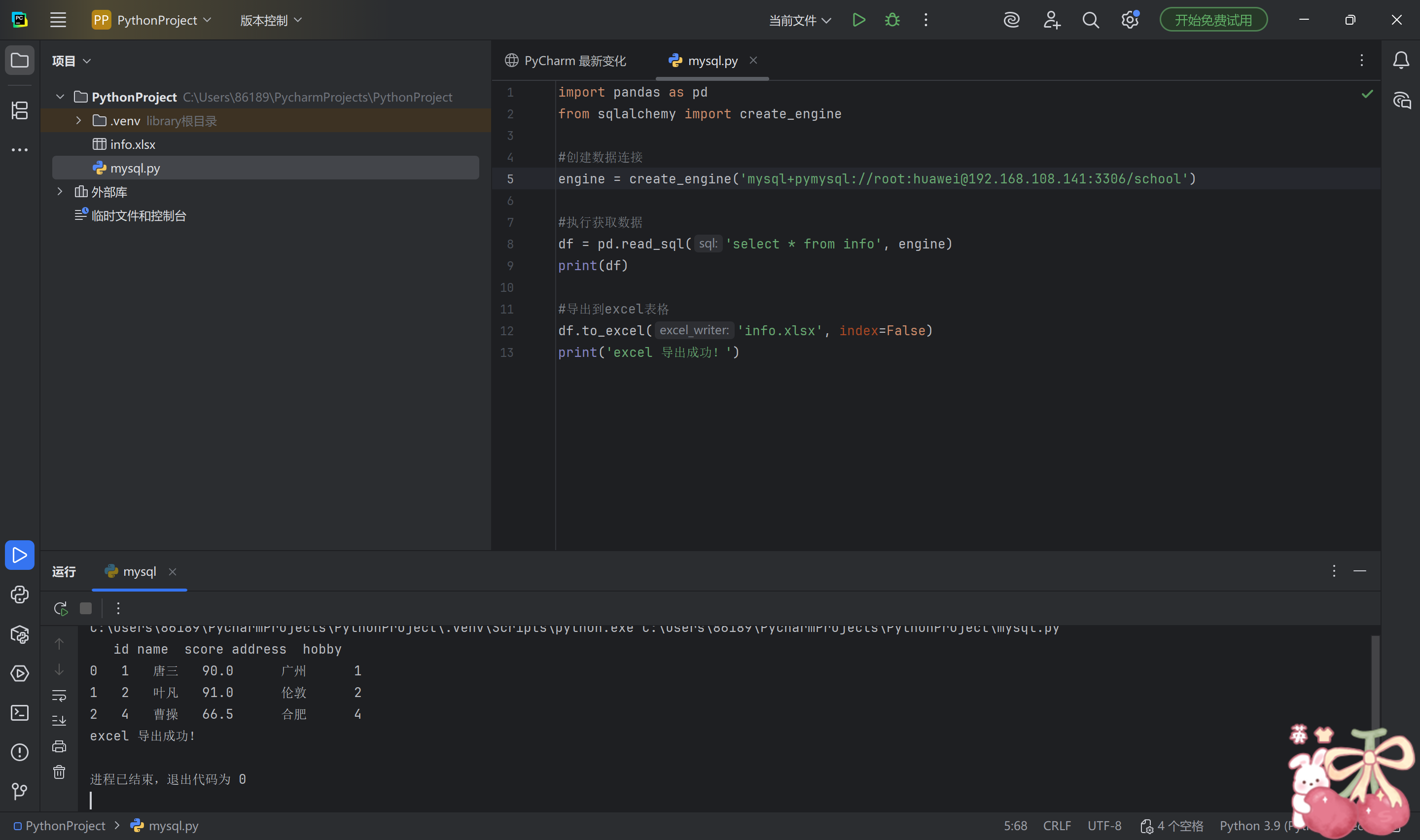
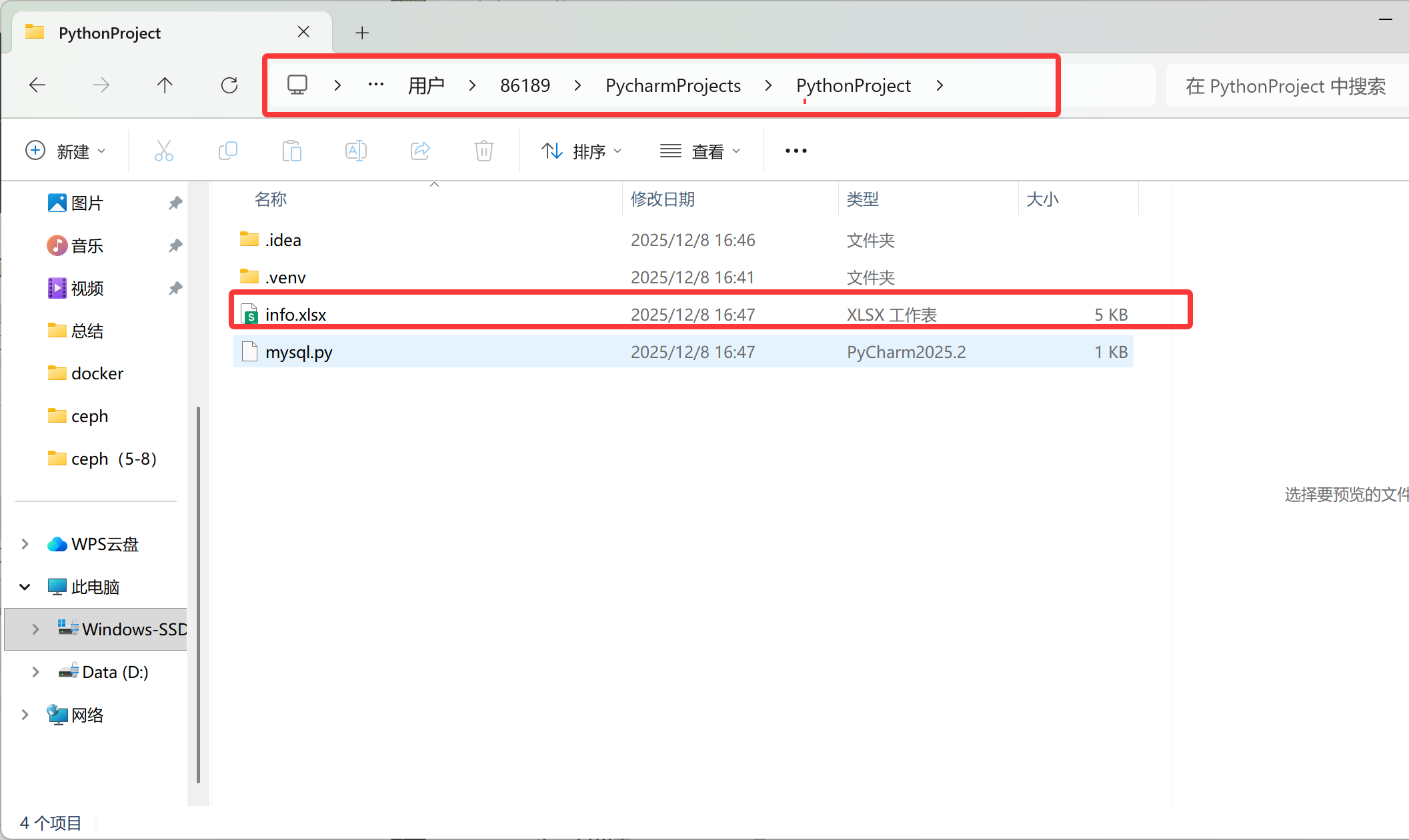
根据项目位置找到,输出的excel
5.mysql的备份与恢复
数据备份的重要性
-
在生产环境中,数据的安全性至关重要
-
任何数据的丢失都可能产生严重的后果
-
造成数据丢失的原因
-
程序错误
-
人为操作错误
-
运算错误
-
磁盘故障
-
灾难(如火灾、地震)和盗窃
-
数据库备份的分类
从物理与逻辑的角度,备份可分为
- 物理备份:对数据库操作系统的物理文件(如数据文件、日志文件等)的备份
- 物理备份方法
- 冷备份(脱机备份):是在关闭数据库的时候进行的
- 热备份(联机备份):数据库处于运行状态,依赖于数据库的日志文件
- 温备份:数据库锁定表格(不可写入但可读)的状态下进行备份操作
- 物理备份方法
- ·逻辑备份:对数据库逻辑组件(如:表等数据库对象)的备份
常见的备份方法
- 物理冷备
- 备份时数据库处于关闭状态,直接打包数据库文件
- 备份速度快,恢复时也是最简单的
- 专用备份工具mydump或mysqlhotcopy
- mysqldump常用的逻辑备份工具
- mysqlhotcopy仅拥有备份MylSAM和ARCHIVE表
- 启用二进制日志进行增量备份
- 进行增量备份,需要刷新二进制日志
- 第三方工具备份
- 免费的MvSQL热备份软件PerconaXtraBackup
冷备份
bash
#查看数据库里的内容
[root@mysql01 ~]# mysql -uroot -p123
mysql: [Warning] Using a password on the command line interface can be insecure.
Welcome to the MySQL monitor.  Commands end with ; or \g.
Your MySQL connection id is 4
Server version: 5.7.17 Source distribution

Copyright (c) 2000, 2016, Oracle and/or its affiliates. All rights reserved.

Oracle is a registered trademark of Oracle Corporation and/or its
affiliates. Other names may be trademarks of their respective
owners.

Type 'help;' or '\h' for help. Type '\c' to clear the current input statement.

mysql> show databases;
+--------------------+
| Database           |
+--------------------+
| information_schema |
| mysql              |
| performance_schema |
| school             |
| sys                |
+--------------------+
5 rows in set (0.00 sec)

mysql> use school;
Reading table information for completion of table and column names
You can turn off this feature to get a quicker startup with -A

Database changed
mysql> show tables;
+------------------+
| Tables_in_school |
+------------------+
| info             |
+------------------+
1 row in set (0.00 sec)

mysql> select * from info;
+----+--------+-------+---------+-------+
| id | name   | score | address | hobby |
+----+--------+-------+---------+-------+
|  1 | 唐三   | 90.00 | 广州    |     1 |
|  2 | 叶凡   | 91.00 | 伦敦    |     2 |
|  4 | 曹操   | 66.50 | 合肥    |     4 |
+----+--------+-------+---------+-------+
3 rows in set (0.00 sec)

mysql> quit
Bye

# 备份(推荐写法)
 # 先停止服务
[root@mysql01 ~]# systemctl stop mysql
Failed to stop mysql.service: Unit mysql.service not loaded.
[root@mysql01 ~]# systemctl stop mysqld
[root@mysql01 ~]# cd /usr/local/mysql/data/
[root@mysql01 data]# ls
auto.cnf        ibdata1      ib_logfile1  performance_schema  sys
ib_buffer_pool  ib_logfile0  mysql        school
[root@mysql01 data]# mkdir /mysql_bak
[root@mysql01 data]# tar czf /mysql_bak/-backup-$(date +%F).tar.gz *
[root@mysql01 data]# cd /mysql_bak/
[root@mysql01 mysql_bak]# ls
-backup-2025-12-09.tar.gz

# 备份完成后启动服务
[root@mysql01 mysql_bak]# systemctl start mysqld

#测试服务正常
[root@mysql01 mysql_bak]# mysql -uroot -p123
mysql: [Warning] Using a password on the command line interface can be insecure.
Welcome to the MySQL monitor.  Commands end with ; or \g.
Your MySQL connection id is 3
Server version: 5.7.17 Source distribution

Copyright (c) 2000, 2016, Oracle and/or its affiliates. All rights reserved.

Oracle is a registered trademark of Oracle Corporation and/or its
affiliates. Other names may be trademarks of their respective
owners.

Type 'help;' or '\h' for help. Type '\c' to clear the current input statement.

mysql> show databases;
+--------------------+
| Database           |
+--------------------+
| information_schema |
| mysql              |
| performance_schema |
| school             |
| sys                |
+--------------------+
5 rows in set (0.00 sec)

mysql> use school;
Reading table information for completion of table and column names
You can turn off this feature to get a quicker startup with -A

Database changed
mysql> show tables;
+------------------+
| Tables_in_school |
+------------------+
| info             |
+------------------+
1 row in set (0.00 sec)

mysql> select * from info;
+----+--------+-------+---------+-------+
| id | name   | score | address | hobby |
+----+--------+-------+---------+-------+
|  1 | 唐三   | 90.00 | 广州    |     1 |
|  2 | 叶凡   | 91.00 | 伦敦    |     2 |
|  4 | 曹操   | 66.50 | 合肥    |     4 |
+----+--------+-------+---------+-------+
3 rows in set (0.00 sec)

mysql> quit
Bye

# 删除数据
# 先停止服务

[root@mysql01 mysql_bak]# systemctl stop mysqld

# 清空数据目录(谨慎操作!)
[root@mysql01 mysql_bak]# rm -rf /usr/local/mysql/data/*

#再次开启测试,发现数据库坏了
[root@mysql01 mysql_bak]# systemctl start mysqld
[root@mysql01 mysql_bak]# mysql -uroot -p123
mysql: [Warning] Using a password on the command line interface can be insecure.
ERROR 1045 (28000): Access denied for user 'root'@'localhost' (using password: YES)

#停止数据库,恢复数据库
[root@mysql01 mysql_bak]# systemctl stop mysqld
[root@mysql01 mysql_bak]# tar xzf /mysql_bak/-backup-2025-12-09.tar.gz -C /usr/local/mysql/data/

# 恢复权限
[root@mysql01 mysql_bak]# chown -R mysql:mysql /usr/local/mysql/data/

#启动服务
[root@mysql01 mysql_bak]# systemctl start mysqld

#测试
[root@mysql01 mysql_bak]# mysql -uroot -p123
mysql: [Warning] Using a password on the command line interface can be insecure.
Welcome to the MySQL monitor.  Commands end with ; or \g.
Your MySQL connection id is 3
Server version: 5.7.17 Source distribution

Copyright (c) 2000, 2016, Oracle and/or its affiliates. All rights reserved.

Oracle is a registered trademark of Oracle Corporation and/or its
affiliates. Other names may be trademarks of their respective
owners.

Type 'help;' or '\h' for help. Type '\c' to clear the current input statement.

mysql> show databases;
+--------------------+
| Database           |
+--------------------+
| information_schema |
| mysql              |
| performance_schema |
| school             |
| sys                |
+--------------------+
5 rows in set (0.00 sec)

mysql> use school;
Reading table information for completion of table and column names
You can turn off this feature to get a quicker startup with -A

Database changed
mysql> show tables;
+------------------+
| Tables_in_school |
+------------------+
| info             |
+------------------+
1 row in set (0.00 sec)

mysql> select * from info;
+----+--------+-------+---------+-------+
| id | name   | score | address | hobby |
+----+--------+-------+---------+-------+
|  1 | 唐三   | 90.00 | 广州    |     1 |
|  2 | 叶凡   | 91.00 | 伦敦    |     2 |
|  4 | 曹操   | 66.50 | 合肥    |     4 |
+----+--------+-------+---------+-------+
3 rows in set (0.00 sec)

#数据恢复
逻辑备份
bash
#备份数据库
[root@mysql01 ~]# systemctl start mysqld
[root@mysql01 ~]# mysqldump -uroot -p school > /mysql_bak/school.sql
Enter password:`123`
[root@mysql01 ~]# ls /mysql_bak/
-backup-2025-12-09.tar.gz  school.sql
[root@mysql01 ~]# cat /mysql_bak/school.sql
-- MySQL dump 10.13  Distrib 5.7.17, for Linux (x86_64)
--
-- Host: localhost    Database: school
-- ------------------------------------------------------
-- Server version       5.7.17

/*!40101 SET @OLD_CHARACTER_SET_CLIENT=@@CHARACTER_SET_CLIENT */;
/*!40101 SET @OLD_CHARACTER_SET_RESULTS=@@CHARACTER_SET_RESULTS */;
/*!40101 SET @OLD_COLLATION_CONNECTION=@@COLLATION_CONNECTION */;
/*!40101 SET NAMES utf8 */;
/*!40103 SET @OLD_TIME_ZONE=@@TIME_ZONE */;
/*!40103 SET TIME_ZONE='+00:00' */;
/*!40014 SET @OLD_UNIQUE_CHECKS=@@UNIQUE_CHECKS, UNIQUE_CHECKS=0 */;
/*!40014 SET @OLD_FOREIGN_KEY_CHECKS=@@FOREIGN_KEY_CHECKS, FOREIGN_KEY_CHECKS=0 */;
/*!40101 SET @OLD_SQL_MODE=@@SQL_MODE, SQL_MODE='NO_AUTO_VALUE_ON_ZERO' */;
/*!40111 SET @OLD_SQL_NOTES=@@SQL_NOTES, SQL_NOTES=0 */;

--
-- Table structure for table `info`
--

DROP TABLE IF EXISTS `info`;
/*!40101 SET @saved_cs_client     = @@character_set_client */;
/*!40101 SET character_set_client = utf8 */;
CREATE TABLE `info` (
  `id` int(11) NOT NULL AUTO_INCREMENT,
  `name` char(10) NOT NULL,
  `score` decimal(5,2) DEFAULT NULL,
  `address` char(50) DEFAULT '南京',
  `hobby` int(11) NOT NULL,
  PRIMARY KEY (`id`)
) ENGINE=InnoDB AUTO_INCREMENT=5 DEFAULT CHARSET=utf8;
/*!40101 SET character_set_client = @saved_cs_client */;

--
-- Dumping data for table `info`
--

LOCK TABLES `info` WRITE;
/*!40000 ALTER TABLE `info` DISABLE KEYS */;
INSERT INTO `info` VALUES (1,'唐三',90.00,'广州',1),(2,'叶凡',91.00,'伦敦',2),(4,'曹操',66.50,'合肥',4);
/*!40000 ALTER TABLE `info` ENABLE KEYS */;
UNLOCK TABLES;
/*!40103 SET TIME_ZONE=@OLD_TIME_ZONE */;

/*!40101 SET SQL_MODE=@OLD_SQL_MODE */;
/*!40014 SET FOREIGN_KEY_CHECKS=@OLD_FOREIGN_KEY_CHECKS */;
/*!40014 SET UNIQUE_CHECKS=@OLD_UNIQUE_CHECKS */;
/*!40101 SET CHARACTER_SET_CLIENT=@OLD_CHARACTER_SET_CLIENT */;
/*!40101 SET CHARACTER_SET_RESULTS=@OLD_CHARACTER_SET_RESULTS */;
/*!40101 SET COLLATION_CONNECTION=@OLD_COLLATION_CONNECTION */;
/*!40111 SET SQL_NOTES=@OLD_SQL_NOTES */;

-- Dump completed on 2025-12-09  9:55:45

#备份多个数据
[root@mysql01 ~]# mysqldump -uroot -p --databases school mysql > /mysql_bak/school-mysql.sql
Enter password:`123`
[root@mysql01 ~]# cat /mysql_bak/school-mysql.sql
-- MySQL dump 10.13  Distrib 5.7.17, for Linux (x86_64)
--
-- Host: localhost    Database: school
-- ------------------------------------------------------
-- Server version       5.7.17

/*!40101 SET @OLD_CHARACTER_SET_CLIENT=@@CHARACTER_SET_CLIENT */;
/*!40101 SET @OLD_CHARACTER_SET_RESULTS=@@CHARACTER_SET_RESULTS */;
/*!40101 SET @OLD_COLLATION_CONNECTION=@@COLLATION_CONNECTION */;
/*!40101 SET NAMES utf8 */;
/*!40103 SET @OLD_TIME_ZONE=@@TIME_ZONE */;
/*!40103 SET TIME_ZONE='+00:00' */;
/*!40014 SET @OLD_UNIQUE_CHECKS=@@UNIQUE_CHECKS, UNIQUE_CHECKS=0 */;
/*!40014 SET @OLD_FOREIGN_KEY_CHECKS=@@FOREIGN_KEY_CHECKS, FOREIGN_KEY_CHECKS=0 */;
/*!40101 SET @OLD_SQL_MODE=@@SQL_MODE, SQL_MODE='NO_AUTO_VALUE_ON_ZERO' */;
/*!40111 SET @OLD_SQL_NOTES=@@SQL_NOTES, SQL_NOTES=0 */;

--
-- Current Database: `school`
--

CREATE DATABASE /*!32312 IF NOT EXISTS*/ `school` /*!40100 DEFAULT CHARACTER SET utf8 */;

USE `school`;

--
-- Table structure for table `info`
--

DROP TABLE IF EXISTS `info`;
/*!40101 SET @saved_cs_client     = @@character_set_client */;
/*!40101 SET character_set_client = utf8 */;
CREATE TABLE `info` (
  `id` int(11) NOT NULL AUTO_INCREMENT,
  `name` char(10) NOT NULL,
  `score` decimal(5,2) DEFAULT NULL,
  `address` char(50) DEFAULT '南京',
  `hobby` int(11) NOT NULL,
  PRIMARY KEY (`id`)
) ENGINE=InnoDB AUTO_INCREMENT=5 DEFAULT CHARSET=utf8;
/*!40101 SET character_set_client = @saved_cs_client */;

--
-- Dumping data for table `info`
--

LOCK TABLES `info` WRITE;
/*!40000 ALTER TABLE `info` DISABLE KEYS */;
INSERT INTO `info` VALUES (1,'唐三',90.00,'广州',1),(2,'叶凡',91.00,'伦敦',2),(4,'曹操',66.50,'合肥',4);
/*!40000 ALTER TABLE `info` ENABLE KEYS */;
UNLOCK TABLES;

#备份所有数据库
[root@mysql01 ~]# mysqldump -uroot -p --opt --all-dattabases >/mysql_bak/all.sql
mysqldump: [ERROR] unknown option '--all-dattabases'
[root@mysql01 ~]# mysqldump -uroot -p --opt --all-databases >/mysql_bak/all.sql
Enter password:`123`

#备份整个表
[root@mysql01 ~]# mysqldump -uroot -p school info > /mysql_bak/info.sql
Enter password:`123`
恢复数据
bash
[root@mysql01 ~]# mysql -uroot -p123
mysql: [Warning] Using a password on the command line interface can be insecure.
Welcome to the MySQL monitor.  Commands end with ; or \g.
Your MySQL connection id is 8
Server version: 5.7.17 Source distribution

Copyright (c) 2000, 2016, Oracle and/or its affiliates. All rights reserved.

Oracle is a registered trademark of Oracle Corporation and/or its
affiliates. Other names may be trademarks of their respective
owners.

Type 'help;' or '\h' for help. Type '\c' to clear the current input statement.

mysql> use school;
Reading table information for completion of table and column names
You can turn off this feature to get a quicker startup with -A

Database changed

mysql> show tables;
+------------------+
| Tables_in_school |
+------------------+
| info             |
+------------------+
1 row in set (0.00 sec)

mysql> drop table info;
Query OK, 0 rows affected (0.01 sec)

mysql> source /mysql_bak/info.sql;
Query OK, 0 rows affected (0.00 sec)

Query OK, 0 rows affected (0.00 sec)

Query OK, 0 rows affected (0.00 sec)

Query OK, 0 rows affected (0.00 sec)

Query OK, 0 rows affected (0.00 sec)

Query OK, 0 rows affected (0.00 sec)

Query OK, 0 rows affected (0.00 sec)

Query OK, 0 rows affected (0.00 sec)

Query OK, 0 rows affected, 1 warning (0.00 sec)

Query OK, 0 rows affected (0.00 sec)

Query OK, 0 rows affected (0.00 sec)

Query OK, 0 rows affected (0.00 sec)

Query OK, 0 rows affected (0.00 sec)

Query OK, 0 rows affected (0.01 sec)

Query OK, 0 rows affected (0.00 sec)

Query OK, 0 rows affected (0.00 sec)

Query OK, 0 rows affected (0.00 sec)

Query OK, 3 rows affected (0.00 sec)
Records: 3  Duplicates: 0  Warnings: 0

Query OK, 0 rows affected (0.00 sec)

Query OK, 0 rows affected (0.00 sec)

Query OK, 0 rows affected (0.00 sec)

Query OK, 0 rows affected, 1 warning (0.00 sec)

Query OK, 0 rows affected (0.00 sec)

Query OK, 0 rows affected (0.00 sec)

Query OK, 0 rows affected (0.00 sec)

Query OK, 0 rows affected (0.00 sec)

Query OK, 0 rows affected (0.00 sec)

Query OK, 0 rows affected (0.00 sec)

mysql> show tables;
+------------------+
| Tables_in_school |
+------------------+
| info             |
+------------------+
1 row in set (0.00 sec)

mysql> select * from info;
+----+--------+-------+---------+-------+
| id | name   | score | address | hobby |
+----+--------+-------+---------+-------+
|  1 | 唐三   | 90.00 | 广州    |     1 |
|  2 | 叶凡   | 91.00 | 伦敦    |     2 |
|  4 | 曹操   | 66.50 | 合肥    |     4 |
+----+--------+-------+---------+-------+
3 rows in set (0.00 sec)
增量备份
bash
[root@mysql01 ~]# vim /etc/my.cnf
[root@mysql01 ~]# cat /etc/my.cnf
[client]
port = 3306
default-character-set=utf8
socket = /usr/local/mysql/mysql.sock

[mysql]
port = 3306
default-character-set=utf8
socket = /usr/local/mysql/mysql.sock

[mysqld]
user = mysql
basedir = /usr/local/mysql
datadir = /usr/local/mysql/data
port = 3306
character_set_server=utf8
pid-file = /usr/local/mysql/mysqld.pid
socket = /usr/local/mysql/mysql.sock
server-id = 1
#这段下面最后加一行
log-bin=mysql-bin

sql_mode=NO_ENGINE_SUBSTITUTION,STRICT_TRANS_TABLES,NO_AUTO_CREATE_USER,NO_AUTO_VALUE_ON_ZERO,NO_ZERO_IN_DATE,NO_ZERO_DATE,ERROR_FOR_DIVISION_BY_ZERO,PIPES_AS_CONCAT,ANSI_QUOTES

[root@mysql01 ~]# systemctl restart mysqld

[root@mysql01 ~]# ls /usr/local/mysql/data/
auto.cnf         client-key.pem  ib_logfile1       mysql-bin.index     school
ca-key.pem       ib_buffer_pool  ibtmp1            performance_schema  server-cert.pem
ca.pem           ibdata1         mysql             private_key.pem     server-key.pem
client-cert.pem  ib_logfile0     `mysql-bin.000001`  public_key.pem      sys

#先进行完整性备份
[root@mysql01 ~]# mysqldump -uroot -p school > /opt/school.sql
Enter password:`123`

#保存前面做过的到00001,#日志刷新生效
[root@mysql01 ~]# mysqladmin -uroot -p flush-logs
Enter password:`123`

#新产生的mysql-bin.000002只记录上次刷新后的操作
[root@mysql01 ~]# ls /usr/local/mysql/data/
auto.cnf         ib_buffer_pool  mysql               private_key.pem  sys
ca-key.pem       ibdata1         mysql-bin.000001    public_key.pem
ca.pem           ib_logfile0     `mysql-bin.000002 `   school
client-cert.pem  ib_logfile1     mysql-bin.index     server-cert.pem
client-key.pem   ibtmp1          performance_schema  server-key.pem

[root@mysql01 ~]# mysql -uroot -p123
mysql: [Warning] Using a password on the command line interface can be insecure.
Welcome to the MySQL monitor.  Commands end with ; or \g.
Your MySQL connection id is 5
Server version: 5.7.17-log Source distribution

Copyright (c) 2000, 2016, Oracle and/or its affiliates. All rights reserved.

Oracle is a registered trademark of Oracle Corporation and/or its
affiliates. Other names may be trademarks of their respective
owners.

Type 'help;' or '\h' for help. Type '\c' to clear the current input statement.

mysql> use school;
Reading table information for completion of table and column names
You can turn off this feature to get a quicker startup with -A

Database changed
mysql> select * from info;
+----+--------+-------+---------+-------+
| id | name   | score | address | hobby |
+----+--------+-------+---------+-------+
|  1 | 唐三   | 90.00 | 广州    |     1 |
|  2 | 叶凡   | 91.00 | 伦敦    |     2 |
|  4 | 曹操   | 66.50 | 合肥    |     4 |
+----+--------+-------+---------+-------+
3 rows in set (0.00 sec)

#再次插入数据生产增量备份
mysql> insert into info(name,score,address,hobby) values ('美猴王',75,'武汉',1);
Query OK, 1 row affected (0.00 sec)

mysql> select * from info;
+----+-----------+-------+---------+-------+
| id | name      | score | address | hobby |
+----+-----------+-------+---------+-------+
|  1 | 唐三      | 90.00 | 广州    |     1 |
|  2 | 叶凡      | 91.00 | 伦敦    |     2 |
|  4 | 曹操      | 66.50 | 合肥    |     4 |
|  5 | 美猴王    | 75.00 | 武汉    |     1 |
+----+-----------+-------+---------+-------+
4 rows in set (0.00 sec)

mysql> exit
Bye

[root@mysql01 ~]# mysqladmin -uroot -p flush-logs
Enter password:`123`

#新产生mysql-bin.000003日志记录insert操作
[root@mysql01 ~]# ls /usr/local/mysql/data/
auto.cnf         ib_buffer_pool  mysql             performance_schema  server-key.pem
ca-key.pem       ibdata1         mysql-bin.000001  private_key.pem     sys
ca.pem           ib_logfile0     `mysql-bin.000002`  public_key.pem
client-cert.pem  ib_logfile1     `mysql-bin.000003 ` school
client-key.pem   ibtmp1          mysql-bin.index   server-cert.pem


[root@mysql01 ~]# mysql -uroot -p123
mysql: [Warning] Using a password on the command line interface can be insecure.
Welcome to the MySQL monitor.  Commands end with ; or \g.
Your MySQL connection id is 10
Server version: 5.7.17-log Source distribution

Copyright (c) 2000, 2016, Oracle and/or its affiliates. All rights reserved.

Oracle is a registered trademark of Oracle Corporation and/or its
affiliates. Other names may be trademarks of their respective
owners.

Type 'help;' or '\h' for help. Type '\c' to clear the current input statement.

mysql> use school;
Reading table information for completion of table and column names
You can turn off this feature to get a quicker startup with -A

Database changed
mysql> select * from info;
+----+-----------+-------+---------+-------+
| id | name      | score | address | hobby |
+----+-----------+-------+---------+-------+
|  1 | 唐三      | 90.00 | 广州    |     1 |
|  2 | 叶凡      | 91.00 | 伦敦    |     2 |
|  4 | 曹操      | 66.50 | 合肥    |     4 |
|  5 | 美猴王    | 75.00 | 武汉    |     1 |
+----+-----------+-------+---------+-------+
4 rows in set (0.00 sec)

mysql> insert into info(name,score,address,hobby) values ('超人',83,'上海',2);
Query OK, 1 row affected (0.01 sec)

mysql> select * from info;
+----+-----------+-------+---------+-------+
| id | name      | score | address | hobby |
+----+-----------+-------+---------+-------+
|  1 | 唐三      | 90.00 | 广州    |     1 |
|  2 | 叶凡      | 91.00 | 伦敦    |     2 |
|  4 | 曹操      | 66.50 | 合肥    |     4 |
|  5 | 美猴王    | 75.00 | 武汉    |     1 |
|  6 | 超人      | 83.00 | 上海    |     2 |
+----+-----------+-------+---------+-------+
5 rows in set (0.00 sec)

mysql> exit
Bye

#刷新日志生效
[root@mysql01 ~]# mysqladmin -uroot -p flush-logs
Enter password:
[root@mysql01 ~]# mysql -uroot -p123
mysql: [Warning] Using a password on the command line interface can be insecure.
Welcome to the MySQL monitor.  Commands end with ; or \g.
Your MySQL connection id is 12
Server version: 5.7.17-log Source distribution

Copyright (c) 2000, 2016, Oracle and/or its affiliates. All rights reserved.

Oracle is a registered trademark of Oracle Corporation and/or its
affiliates. Other names may be trademarks of their respective
owners.

Type 'help;' or '\h' for help. Type '\c' to clear the current input statement.

mysql> use school;
Reading table information for completion of table and column names
You can turn off this feature to get a quicker startup with -A

Database changed
mysql> select * from info;
+----+-----------+-------+---------+-------+
| id | name      | score | address | hobby |
+----+-----------+-------+---------+-------+
|  1 | 唐三      | 90.00 | 广州    |     1 |
|  2 | 叶凡      | 91.00 | 伦敦    |     2 |
|  4 | 曹操      | 66.50 | 合肥    |     4 |
|  5 | 美猴王    | 75.00 | 武汉    |     1 |
|  6 | 超人      | 83.00 | 上海    |     2 |
+----+-----------+-------+---------+-------+
5 rows in set (0.00 sec)

mysql> delete from info where id=6;
Query OK, 1 row affected (0.00 sec)

mysql> delete from info where id=5;
Query OK, 1 row affected (0.00 sec)

mysql> delete from info where id=6;
Query OK, 0 rows affected (0.00 sec)

mysql> select * from info;
+----+--------+-------+---------+-------+
| id | name   | score | address | hobby |
+----+--------+-------+---------+-------+
|  1 | 唐三   | 90.00 | 广州    |     1 |
|  2 | 叶凡   | 91.00 | 伦敦    |     2 |
|  4 | 曹操   | 66.50 | 合肥    |     4 |
+----+--------+-------+---------+-------+
3 rows in set (0.00 sec)

mysql> exit
Bye
[root@mysql01 ~]# ls /usr/local/mysql/data/
auto.cnf         ib_buffer_pool  mysql             mysql-bin.index     server-cert.pem
ca-key.pem       ibdata1         mysql-bin.000001  performance_schema  server-key.pem
ca.pem           ib_logfile0     mysql-bin.000002  private_key.pem     sys
client-cert.pem  ib_logfile1     mysql-bin.000003  public_key.pem
client-key.pem   ibtmp1          mysql-bin.000004  school

#查看日志文件,vim看日志是乱码
[root@mysql01 ~]# mysqlbinlog --no-defaults --base64-output=decode-rows -v /usr/local/mysql/data/mysql-bin.000003
/*!50530 SET @@SESSION.PSEUDO_SLAVE_MODE=1*/;
/*!50003 SET @OLD_COMPLETION_TYPE=@@COMPLETION_TYPE,COMPLETION_TYPE=0*/;
DELIMITER /*!*/;
# at 4
#251209 10:34:44 server id 1  end_log_pos 123 CRC32 0x5cf45371  Start: binlog v 4, server v 5.7.17-log created 251209 10:34:44
# at 123
#251209 10:34:44 server id 1  end_log_pos 154 CRC32 0x92440d11  Previous-GTIDs
# [empty]
# at 154
#251209 10:36:00 server id 1  end_log_pos 219 CRC32 0xb4b8fb0c  Anonymous_GTID  last_committed=0   sequence_number=1
SET @@SESSION.GTID_NEXT= 'ANONYMOUS'/*!*/;
# at 219
#251209 10:36:00 server id 1  end_log_pos 293 CRC32 0xea02bb40  Query   thread_id=10    exec_time=0        error_code=0
SET TIMESTAMP=1765247760/*!*/;
SET @@session.pseudo_thread_id=10/*!*/;
SET @@session.foreign_key_checks=1, @@session.sql_auto_is_null=0, @@session.unique_checks=1, @@session.autocommit=1/*!*/;
SET @@session.sql_mode=1437073414/*!*/;
SET @@session.auto_increment_increment=1, @@session.auto_increment_offset=1/*!*/;
/*!\C utf8 *//*!*/;
SET @@session.character_set_client=33,@@session.collation_connection=33,@@session.collation_server=33/*!*/;
SET @@session.lc_time_names=0/*!*/;
SET @@session.collation_database=DEFAULT/*!*/;
BEGIN
/*!*/;
# at 293
#251209 10:36:00 server id 1  end_log_pos 352 CRC32 0x047685d0  Table_map: `school`.`info` mapped to number 118
# at 352
#251209 10:36:00 server id 1  end_log_pos 413 CRC32 0xfb66ec92  Write_rows: table id 118 flags: STMT_END_F
### INSERT INTO `school`.`info`
### SET
###   @1=6
###   @2='超人'
###   @3=83.00
###   @4='上海'
###   @5=2
# at 413
#251209 10:36:00 server id 1  end_log_pos 444 CRC32 0x88739396  Xid = 48
COMMIT/*!*/;
# at 444
#251209 10:36:11 server id 1  end_log_pos 491 CRC32 0x467b42a4  Rotate to mysql-bin.000004  pos: 4
SET @@SESSION.GTID_NEXT= 'AUTOMATIC' /* added by mysqlbinlog */ /*!*/;
DELIMITER ;
# End of log file
/*!50003 SET COMPLETION_TYPE=@OLD_COMPLETION_TYPE*/;
/*!50530 SET @@SESSION.PSEUDO_SLAVE_MODE=0*/;
[root@mysql01 ~]# mysqlbinlog --no-defaults --base64-output=decode-rows -v /usr/local/mysql/data/mysql-bin.000004
/*!50530 SET @@SESSION.PSEUDO_SLAVE_MODE=1*/;
/*!50003 SET @OLD_COMPLETION_TYPE=@@COMPLETION_TYPE,COMPLETION_TYPE=0*/;
DELIMITER /*!*/;
# at 4
#251209 10:36:11 server id 1  end_log_pos 123 CRC32 0x8f1323ac  Start: binlog v 4, server v 5.7.17-log created 251209 10:36:11
# Warning: this binlog is either in use or was not closed properly.
# at 123
#251209 10:36:11 server id 1  end_log_pos 154 CRC32 0x07ef6ba1  Previous-GTIDs
# [empty]
# at 154
#251209 10:36:45 server id 1  end_log_pos 219 CRC32 0x04e9725d  Anonymous_GTID  last_committed=0   sequence_number=1
SET @@SESSION.GTID_NEXT= 'ANONYMOUS'/*!*/;
# at 219
#251209 10:36:45 server id 1  end_log_pos 293 CRC32 0x8d22a25b  Query   thread_id=12    exec_time=0        error_code=0
SET TIMESTAMP=1765247805/*!*/;
SET @@session.pseudo_thread_id=12/*!*/;
SET @@session.foreign_key_checks=1, @@session.sql_auto_is_null=0, @@session.unique_checks=1, @@session.autocommit=1/*!*/;
SET @@session.sql_mode=1437073414/*!*/;
SET @@session.auto_increment_increment=1, @@session.auto_increment_offset=1/*!*/;
/*!\C utf8 *//*!*/;
SET @@session.character_set_client=33,@@session.collation_connection=33,@@session.collation_server=33/*!*/;
SET @@session.lc_time_names=0/*!*/;
SET @@session.collation_database=DEFAULT/*!*/;
BEGIN
/*!*/;
# at 293
#251209 10:36:45 server id 1  end_log_pos 352 CRC32 0xfe4713c7  Table_map: `school`.`info` mapped to number 118
# at 352
#251209 10:36:45 server id 1  end_log_pos 413 CRC32 0x21acac74  Delete_rows: table id 118 flags: STMT_END_F
### DELETE FROM `school`.`info`
### WHERE
###   @1=6
###   @2='超人'
###   @3=83.00
###   @4='上海'
###   @5=2
# at 413
#251209 10:36:45 server id 1  end_log_pos 444 CRC32 0xae7a76fd  Xid = 60
COMMIT/*!*/;
# at 444
#251209 10:36:49 server id 1  end_log_pos 509 CRC32 0xce76288f  Anonymous_GTID  last_committed=1   sequence_number=2
SET @@SESSION.GTID_NEXT= 'ANONYMOUS'/*!*/;
# at 509
#251209 10:36:49 server id 1  end_log_pos 583 CRC32 0xe9573c1c  Query   thread_id=12    exec_time=0        error_code=0
SET TIMESTAMP=1765247809/*!*/;
BEGIN
/*!*/;
# at 583
#251209 10:36:49 server id 1  end_log_pos 642 CRC32 0x0f416065  Table_map: `school`.`info` mapped to number 118
# at 642
#251209 10:36:49 server id 1  end_log_pos 706 CRC32 0x7f97d7c5  Delete_rows: table id 118 flags: STMT_END_F
### DELETE FROM `school`.`info`
### WHERE
###   @1=5
###   @2='美猴王'
###   @3=75.00
###   @4='武汉'
###   @5=1
# at 706
#251209 10:36:49 server id 1  end_log_pos 737 CRC32 0xac164a4e  Xid = 61
COMMIT/*!*/;
SET @@SESSION.GTID_NEXT= 'AUTOMATIC' /* added by mysqlbinlog */ /*!*/;
DELIMITER ;
# End of log file
/*!50003 SET COMPLETION_TYPE=@OLD_COMPLETION_TYPE*/;
/*!50530 SET @@SESSION.PSEUDO_SLAVE_MODE=0*/;

#恢复操作,恢复时如果被拒绝,是有其他mysql进程占用了
[root@mysql01 ~]# mysqlbinlog --no-defaults /usr/local/mysql/data/mysql-bin.000003 |mysql -uroot -p123
mysql: [Warning] Using a password on the command line interface can be insecure.

#验证
[root@mysql01 ~]# mysql -uroot -p123                               mysql: [Warning] Using a password on the command line interface can be insecure.
Welcome to the MySQL monitor.  Commands end with ; or \g.
Your MySQL connection id is 14
Server version: 5.7.17-log Source distribution

Copyright (c) 2000, 2016, Oracle and/or its affiliates. All rights reserved.

Oracle is a registered trademark of Oracle Corporation and/or its
affiliates. Other names may be trademarks of their respective
owners.

Type 'help;' or '\h' for help. Type '\c' to clear the current input statement.

mysql> use school;
Reading table information for completion of table and column names
You can turn off this feature to get a quicker startup with -A

Database changed
mysql> select * from info;
+----+--------+-------+---------+-------+
| id | name   | score | address | hobby |
+----+--------+-------+---------+-------+
|  1 | 唐三   | 90.00 | 广州    |     1 |
|  2 | 叶凡   | 91.00 | 伦敦    |     2 |
|  4 | 曹操   | 66.50 | 合肥    |     4 |
|  6 | 超人   | 83.00 | 上海    |     2 |
+----+--------+-------+---------+-------+
4 rows in set (0.00 sec)
6.主从复制和读写分离
使用目标:数据冗余和灾难恢复;提升并发能力、避免锁冲突。
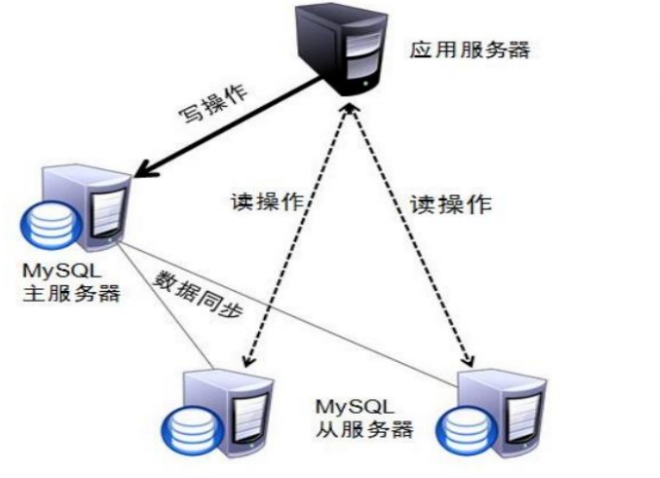
MySQL读写分离原理
-
只在主服务器上写,只在从服务器上读
-
主数据库处理事务性查询,从数据库处理SELECT查询
-
数据库复制用于将事务性查询的变更同步到集群中的从数据库
-
读写分离方案
- 基于程序代码内部实现
- 基于中间代理层实现
- MySQL-Proxy
- Amoeba
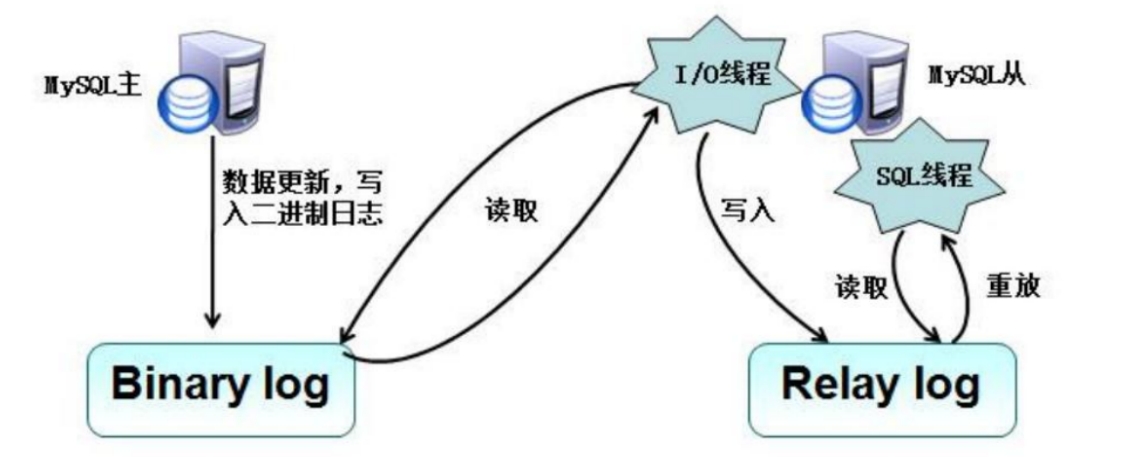
- 在每个事务更新数据完成之前,Master将这些改变记录进二进制日志。写入二进制日志完成后,Master通知存储引擎提交事务。
- Slave将Master 的 Binary log复制到其中继日志(Relay log)。首先,Slave开始一个工作线程-1I/0线程,I/0线程在Master上打开一个普通的连接,然后开始Binlog dump process。Binlog dump process从Master 的二进制日志中读取事件,如果已经跟上Master,它会睡眠并等待Master产生新的事件。I/0线程将这些事件写入中继日志。
- SQLslavethread(SQ从线程)处理该过程的最后一步。SQL线程从中继日志读取事件,并重放其中的事件而更新Slave数据,使其与Master中的数据保持一致。只要该线程与I/0线程保持一致,中继日志通常会位于0S的缓存中,所以中继日志的开销很小。复制过程有一个很重要的限制,即复制在S1ave上是串行化的,也就是说Master上的并行更新操作不能在Slave上并行操作。
实验拓扑图
使用centos模板克隆产生应用客户端和amoeba
使用mysql模板克隆产生mysql主服务器,mysql从节点1,mysql从节点2
根据下表,将IP地址,主机名更改好
| 主机名 | IP地址 | 作用 |
|---|---|---|
| mysql-master | 192.168.108.101 | mysql主服务器 |
| mysql-slave01 | 192.168.108.102 | mysql从节点1 |
| mysql-slave02 | 192.168.108.103 | mysql从节点2 |
| amoeba | 192.168.108.110 | amoeba |
| mysql-client | 192.168.108.111 | 应用客户端 |
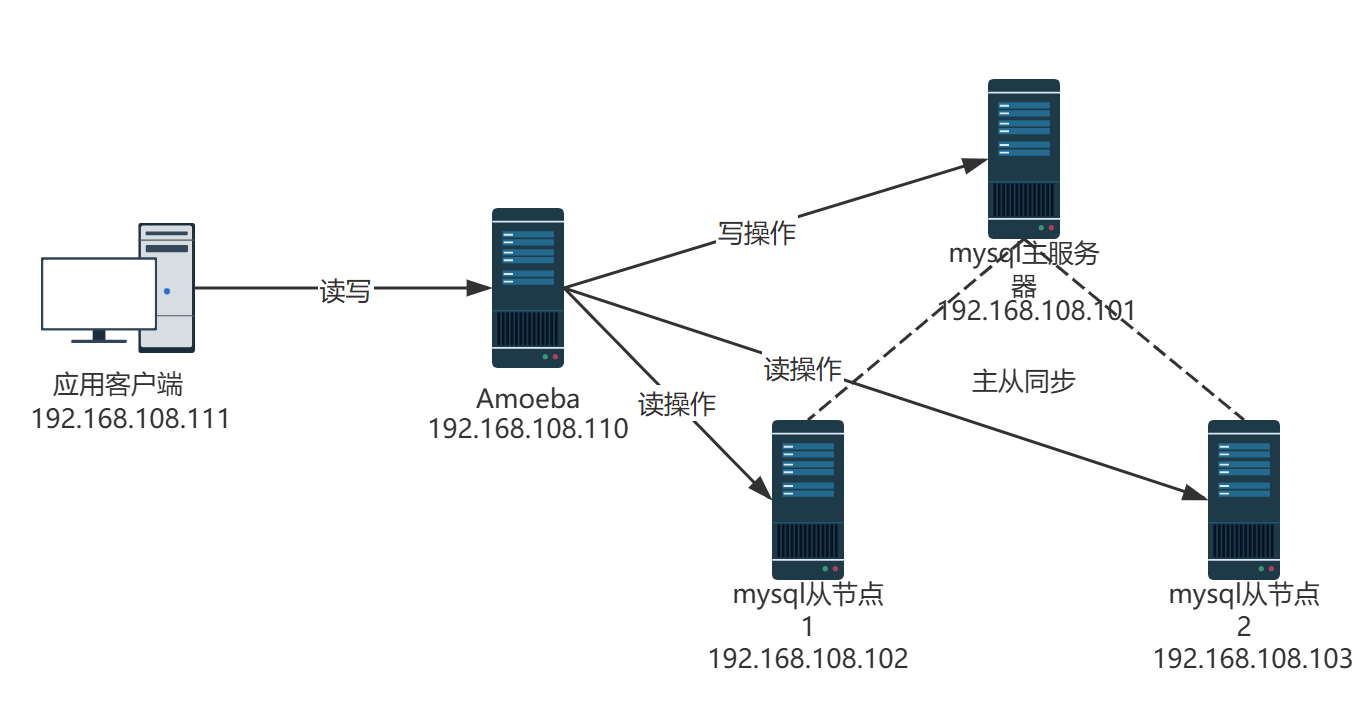
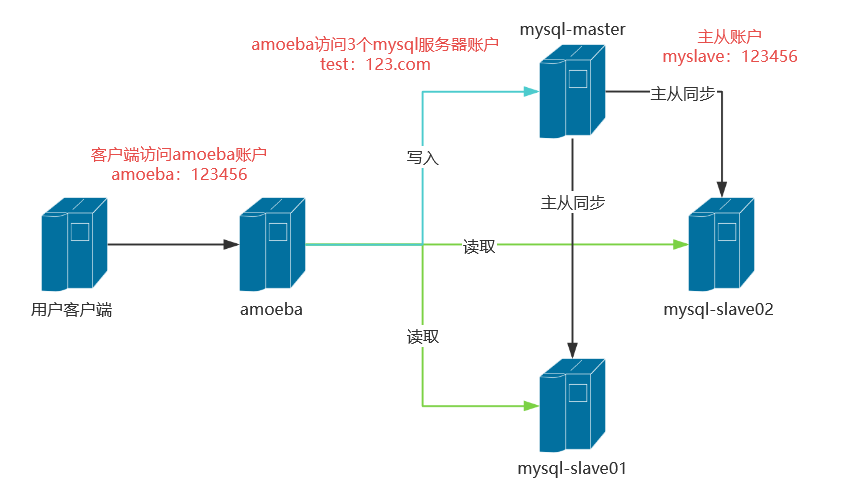
时间同步
通过时间戳实现业务的一致性
bash
# 所有节点
[root@mysql-master ~]# ntpdate ntp1.aliyun.com
 9 Dec 11:33:41 ntpdate[3030]: adjust time server 118.31.3.89 offset -0.247978 sec
[root@mysql-master ~]# date -R
Tue, 09 Dec 2025 11:33:41 +0800
[root@mysql-master ~]#
[root@mysql-master ~]# systemctl disable firewalld --now
[root@mysql-master ~]# setenforce 0
setenforce: SELinux is disabled

[root@mysql-slave01 ~]# ntpdate ntp1.aliyun.com
 9 Dec 11:33:38 ntpdate[2932]: adjust time server 118.31.3.89 offset 0.247038 sec
[root@mysql-slave01 ~]# date -R
Tue, 09 Dec 2025 11:33:38 +0800
[root@mysql-slave01 ~]#
[root@mysql-slave01 ~]# systemctl disable firewalld --now
[root@mysql-slave01 ~]# setenforce 0
setenforce: SELinux is disabled

[root@mysql-slave02 ~]# ntpdate ntp1.aliyun.com
 9 Dec 11:33:30 ntpdate[3000]: adjust time server 223.4.249.80 offset 0.028585 sec
[root@mysql-slave02 ~]# date -R
Tue, 09 Dec 2025 11:33:30 +0800
[root@mysql-slave02 ~]#
[root@mysql-slave02 ~]# systemctl disable firewalld --now
[root@mysql-slave02 ~]# setenforce 0
setenforce: SELinux is disabled

[root@amoeba ~]# ntpdate ntp1.aliyun.com
 9 Dec 11:33:27 ntpdate[2904]: adjust time server 116.62.13.223 offset 0.450936 sec
[root@amoeba ~]# date -R
Tue, 09 Dec 2025 11:33:27 +0800
[root@amoeba ~]#
[root@amoeba ~]# systemctl disable firewalld --now
Removed symlink /etc/systemd/system/multi-user.target.wants/firewalld.service.
Removed symlink /etc/systemd/system/dbus-org.fedoraproject.FirewallD1.service.
[root@amoeba ~]# setenforce 0
setenforce: SELinux is disabled


[root@mysql-client ~]# ntpdate ntp1.aliyun.com
 9 Dec 11:33:16 ntpdate[3012]: adjust time server 118.31.3.89 offset 0.480504 sec
[root@mysql-client ~]# date -R
Tue, 09 Dec 2025 11:33:16 +0800
[root@mysql-client ~]#
[root@mysql-client ~]# systemctl disable firewalld --now
Removed symlink /etc/systemd/system/multi-user.target.wants/firewalld.service.
Removed symlink /etc/systemd/system/dbus-org.fedoraproject.FirewallD1.service.
[root@mysql-client ~]# setenforce 0
setenforce: SELinux is disabled
故障:使用此方法,对时完成后,无法重启mysqld服务
原因:之前在windows端使用navicat连接过mysql
解决:pkill -9 mysql;systemctl restart mysqld
mysql主服务器配置
bash
[root@mysql-master ~]# vim /etc/my.cnf
[root@mysql-master ~]# cat /etc/my.cnf
[client]
port = 3306
default-character-set=utf8
socket = /usr/local/mysql/mysql.sock

[mysql]
port = 3306
default-character-set=utf8
socket = /usr/local/mysql/mysql.sock

[mysqld]
user = mysql
basedir = /usr/local/mysql
datadir = /usr/local/mysql/data
port = 3306
character_set_server=utf8
pid-file = /usr/local/mysql/mysqld.pid
socket = /usr/local/mysql/mysql.sock
`server-id = 11`
`log-bin = master-bin`
`log-slave-updates = true`

sql_mode=NO_ENGINE_SUBSTITUTION,STRICT_TRANS_TABLES,NO_AUTO_CREATE_USER,NO_AUTO_VALUE_ON_ZERO,NO_ZERO_IN_DATE,NO_ZERO_DATE,ERROR_FOR_DIVISION_BY_ZERO,PIPES_AS_CONCAT,ANSI_QUOTES

[root@mysql-master ~]# systemctl restart mysqld

[root@mysql-master ~]# mysql -uroot -p123
mysql: [Warning] Using a password on the command line interface can be insecure.
Welcome to the MySQL monitor.  Commands end with ; or \g.
Your MySQL connection id is 3
Server version: 5.7.17-log Source distribution

Copyright (c) 2000, 2016, Oracle and/or its affiliates. All rights reserved.

Oracle is a registered trademark of Oracle Corporation and/or its
affiliates. Other names may be trademarks of their respective
owners.

Type 'help;' or '\h' for help. Type '\c' to clear the current input statement.

mysql> grant replicattion slave on *.* to 'myslave'@'192.168.108.%' identified by '123';
ERROR 1064 (42000): You have an error in your SQL syntax; check the manual that corresponds to your MySQL server version for the right syntax to use near 'replicattion slave on *.* to 'myslave'@'192.168.108.%' identified by '123'' at line 1
mysql> grant replication slave on *.* to 'myslave'@'192.168.108.%' identified by '123';
Query OK, 0 rows affected, 1 warning (0.01 sec)

mysql> flush privileges;
Query OK, 0 rows affected (0.01 sec)

mysql> show master status;
+-------------------+----------+--------------+------------------+-------------------+
| File              | Position | Binlog_Do_DB | Binlog_Ignore_DB | Executed_Gtid_Set |
+-------------------+----------+--------------+------------------+-------------------+
| master-bin.000001 |      604 |              |                  |                   |
+-------------------+----------+--------------+------------------+-------------------+
1 row in set (0.00 sec)

mysql> quit
Bye

#检查有没有master-bin.000001
[root@mysql-master ~]# ls /usr/local/mysql/data/
auto.cnf        ibdata1      ib_logfile1  `master-bin.000001 ` mysql               sys
ib_buffer_pool  ib_logfile0  ibtmp1       master-bin.index   performance_schema
mysql从服务器配置,mysql-slave01,mysql-slave02都要做如下操作
bash
#主从是克隆的要做这个操作,否则UUID一致
[root@mysql-slave01 ~]# systemctl stop mysqld
[root@mysql-slave01 ~]# rm -f /usr/local/mysql/data/auto.cnf
[root@mysql-slave01 ~]# systemctl start mysqld

[root@mysql-slave01 ~]# vim /etc/my.cnf
[root@mysql-slave01 ~]# cat /etc/my.cnf
[client]
port = 3306
default-character-set=utf8
socket = /usr/local/mysql/mysql.sock

[mysql]
port = 3306
default-character-set=utf8
socket = /usr/local/mysql/mysql.sock

[mysqld]
user = mysql
basedir = /usr/local/mysql
datadir = /usr/local/mysql/data
port = 3306
character_set_server=utf8
pid-file = /usr/local/mysql/mysqld.pid
socket = /usr/local/mysql/mysql.sock
`server-id = 22`
#定义relay-log的位置和名称
`relay-log-index = slave-relay-bin.index`
#从主服务器上同步日志文件记录到本地
`relay-log = relay-log-bin`

sql_mode=NO_ENGINE_SUBSTITUTION,STRICT_TRANS_TABLES,NO_AUTO_CREATE_USER,NO_AUTO_VALUE_ON_ZERO,NO_ZERO_IN_DATE,NO_ZERO_DATE,ERROR_FOR_DIVISION_BY_ZERO,PIPES_AS_CONCAT,ANSI_QUOTES

[root@mysql-slave01 ~]# systemctl restart mysqld
[root@mysql-slave01 ~]# mysql -uroot -p123
mysql: [Warning] Using a password on the command line interface can be insecure.
Welcome to the MySQL monitor.  Commands end with ; or \g.
Your MySQL connection id is 3
Server version: 5.7.17 Source distribution

Copyright (c) 2000, 2016, Oracle and/or its affiliates. All rights reserved.

Oracle is a registered trademark of Oracle Corporation and/or its
affiliates. Other names may be trademarks of their respective
owners.

Type 'help;' or '\h' for help. Type '\c' to clear the current input statement.

#master_log_file,master_log_pos与前面查询的相同
mysql> change master to master_host='192.168.108.101',master_user='myslave',master_password='123',master_log_file='master-bin.000001',master_log_pos=604;
Query OK, 0 rows affected, 2 warnings (0.02 sec)

mysql> start slave;
Query OK, 0 rows affected (0.00 sec)

mysql> show slave status\G
*************************** 1. row ***************************
               Slave_IO_State: Waiting for master to send event
                  Master_Host: 192.168.108.101
                  Master_User: myslave
                  Master_Port: 3306
                Connect_Retry: 60
              Master_Log_File: master-bin.000001
          Read_Master_Log_Pos: 604
               Relay_Log_File: mysql-slave01-relay-bin.000002
                Relay_Log_Pos: 321
        Relay_Master_Log_File: master-bin.000001
             `Slave_IO_Running: Yes`
            `Slave_SQL_Running: Yes`
              Replicate_Do_DB:
          Replicate_Ignore_DB:
           Replicate_Do_Table:
       Replicate_Ignore_Table:
      Replicate_Wild_Do_Table:
  Replicate_Wild_Ignore_Table:
                   Last_Errno: 0
                   Last_Error:
                 Skip_Counter: 0
          Exec_Master_Log_Pos: 604
              Relay_Log_Space: 536
              Until_Condition: None
               Until_Log_File:
                Until_Log_Pos: 0
           Master_SSL_Allowed: No
           Master_SSL_CA_File:
           Master_SSL_CA_Path:
              Master_SSL_Cert:
            Master_SSL_Cipher:
               Master_SSL_Key:
        Seconds_Behind_Master: 0
Master_SSL_Verify_Server_Cert: No
                Last_IO_Errno: 0
                Last_IO_Error:
               Last_SQL_Errno: 0
               Last_SQL_Error:
  Replicate_Ignore_Server_Ids:
             Master_Server_Id: 11
                  Master_UUID: 2c867e6e-d40e-11f0-95b6-000c29c02be2
             Master_Info_File: /usr/local/mysql/data/master.info
                    SQL_Delay: 0
          SQL_Remaining_Delay: NULL
      Slave_SQL_Running_State: Slave has read all relay log; waiting for more updates
           Master_Retry_Count: 86400
                  Master_Bind:
      Last_IO_Error_Timestamp:
     Last_SQL_Error_Timestamp:
               Master_SSL_Crl:
           Master_SSL_Crlpath:
           Retrieved_Gtid_Set:
            Executed_Gtid_Set:
                Auto_Position: 0
         Replicate_Rewrite_DB:
                 Channel_Name:
           Master_TLS_Version:
1 row in set (0.00 sec)
mysql-slave02
bash
[root@mysql-slave02 ~]# systemctl stop mysqld
[root@mysql-slave02 ~]# rm -f /usr/local/mysql/data/auto.cnf
[root@mysql-slave02 ~]# systemctl start mysqld

[root@mysql-slave02 ~]# vim /etc/my.cnf
[root@mysql-slave02 ~]# cat /etc/my.cnf
[client]
port = 3306
default-character-set=utf8
socket = /usr/local/mysql/mysql.sock

[mysql]
port = 3306
default-character-set=utf8
socket = /usr/local/mysql/mysql.sock

[mysqld]
user = mysql
basedir = /usr/local/mysql
datadir = /usr/local/mysql/data
port = 3306
character_set_server=utf8
pid-file = /usr/local/mysql/mysqld.pid
socket = /usr/local/mysql/mysql.sock
`server-id = 23`
`relay-log =relay-log-bin`
`relay-log-index = slave-relay-bin.index`


sql_mode=NO_ENGINE_SUBSTITUTION,STRICT_TRANS_TABLES,NO_AUTO_CREATE_USER,NO_AUTO_VALUE_ON_ZERO,NO_ZERO_IN_DATE,NO_ZERO_DATE,ERROR_FOR_DIVISION_BY_ZERO,PIPES_AS_CONCAT,ANSI_QUOTES

[root@mysql-slave02 ~]# systemctl restart mysqld

[root@mysql-slave02 ~]# mysql -u root -p123
mysql: [Warning] Using a password on the command line interface can be insecure.
Welcome to the MySQL monitor.  Commands end with ; or \g.
Your MySQL connection id is 3
Server version: 5.7.17 Source distribution

Copyright (c) 2000, 2016, Oracle and/or its affiliates. All rights reserved.

Oracle is a registered trademark of Oracle Corporation and/or its
affiliates. Other names may be trademarks of their respective
owners.

Type 'help;' or '\h' for help. Type '\c' to clear the current input statement.

mysql> change master to master_host='192.168.108.101',master_user='myslave',master_password='123',master_log_file='master-bin.000001',master_log_pos=604;
Query OK, 0 rows affected, 2 warnings (0.01 sec)

mysql> start slave;
Query OK, 0 rows affected (0.01 sec)

mysql> show slave status\G
*************************** 1. row ***************************
               Slave_IO_State: Waiting for master to send event
                  Master_Host: 192.168.108.101
                  Master_User: myslave
                  Master_Port: 3306
                Connect_Retry: 60
              Master_Log_File: master-bin.000001
          Read_Master_Log_Pos: 604
               Relay_Log_File: relay-log-bin.000002
                Relay_Log_Pos: 321
        Relay_Master_Log_File: master-bin.000001
            ` Slave_IO_Running: Yes`
            `Slave_SQL_Running: Yes`
              Replicate_Do_DB:
          Replicate_Ignore_DB:
           Replicate_Do_Table:
       Replicate_Ignore_Table:
      Replicate_Wild_Do_Table:
  Replicate_Wild_Ignore_Table:
                   Last_Errno: 0
                   Last_Error:
                 Skip_Counter: 0
          Exec_Master_Log_Pos: 604
              Relay_Log_Space: 526
              Until_Condition: None
               Until_Log_File:
                Until_Log_Pos: 0
           Master_SSL_Allowed: No
           Master_SSL_CA_File:
           Master_SSL_CA_Path:
              Master_SSL_Cert:
            Master_SSL_Cipher:
               Master_SSL_Key:
        Seconds_Behind_Master: 0
Master_SSL_Verify_Server_Cert: No
                Last_IO_Errno: 0
                Last_IO_Error:
               Last_SQL_Errno: 0
               Last_SQL_Error:
  Replicate_Ignore_Server_Ids:
             Master_Server_Id: 11
                  Master_UUID: 2c867e6e-d40e-11f0-95b6-000c29c02be2
             Master_Info_File: /usr/local/mysql/data/master.info
                    SQL_Delay: 0
          SQL_Remaining_Delay: NULL
      Slave_SQL_Running_State: Slave has read all relay log; waiting for more updates
           Master_Retry_Count: 86400
                  Master_Bind:
      Last_IO_Error_Timestamp:
     Last_SQL_Error_Timestamp:
               Master_SSL_Crl:
           Master_SSL_Crlpath:
           Retrieved_Gtid_Set:
            Executed_Gtid_Set:
                Auto_Position: 0
         Replicate_Rewrite_DB:
                 Channel_Name:
           Master_TLS_Version:
1 row in set (0.00 sec)
验证主从同步
mysql
# 主服务器上:
[root@mysql-master ~]# mysql -uroot -p123
mysql: [Warning] Using a password on the command line interface can be insecure.
Welcome to the MySQL monitor.  Commands end with ; or \g.
Your MySQL connection id is 6
Server version: 5.7.17-log Source distribution

Copyright (c) 2000, 2016, Oracle and/or its affiliates. All rights reserved.

Oracle is a registered trademark of Oracle Corporation and/or its
affiliates. Other names may be trademarks of their respective
owners.

Type 'help;' or '\h' for help. Type '\c' to clear the current input statement.

mysql> create database school;
Query OK, 1 row affected (0.00 sec)

mysql> use school;
Database changed
mysql> CREATE TABLE student (
    -> id int UNSIGNED AUTO_INCREMENT PRIMARY KEY,
    -> name VARCHAR(20) NOT NULL,
    -> age tinyint UNSIGNED,
    -> #height DECIMAL(5,2),
    -> gender ENUM('M','F') default 'M'
    -> )ENGINE=InnoDB AUTO_INCREMENT=10 DEFAULT CHARSET=utf8mb4;
Query OK, 0 rows affected (0.01 sec)

mysql> insert student (name,age)values('路飞',20);
Query OK, 1 row affected (0.03 sec)

mysql>


# 去从服务器上 show databases;
#mysql-slave01
mysql> select * from school.student;
+----+--------+------+--------+
| id | name   | age  | gender |
+----+--------+------+--------+
| 10 | 路飞   |   20 | M      |
+----+--------+------+--------+
1 row in set (0.00 sec)

mysql>

#mysql-slave02
mysql> select * from school.student;
+----+--------+------+--------+
| id | name   | age  | gender |
+----+--------+------+--------+
| 10 | 路飞   |   20 | M      |
+----+--------+------+--------+
1 row in set (0.00 sec)

mysql>
amoeba服务器
bash
#普通linux克隆
[root@amoeba ~]# hostnamectl set-hostname amoeba
[root@amoeba ~]# systemctl stop firewalld.service
[root@amoeba ~]# setenforce 0

[root@amoeba ~]# chmod +x jdk-6u14-linux-x64.bin
[root@amoeba ~]# ./jdk-6u14-linux-x64.bin
#到yes的时候,输入yes按enter

[root@amoeba ~]# mv jdk1.6.0_14/ /usr/local/jdk1.6

#加在最下面
[root@amoeba ~]# vim /etc/profile
[root@amoeba ~]# tail -n 5 /etc/profile
export JAVA_HOME=/usr/local/jdk1.6                   #java家目录
export CLASSPATH=$CLASSPATH:$JAVA_HOME/lib:$JAVA_HOME/jre/lib             #类环境和jre
export PATH=$JAVA_HOME/lib:$JAVA_HOME/jre/bin/:$PATH:$HOME/bin
export AMOEBA_HOME=/usr/local/amoeba                  #指定amoeba路径
export PATH=$PATH:$AMOEBA_HOME/bin

[root@amoeba ~]# source /etc/profile

[root@amoeba ~]# mkdir /usr/local/amoeba

[root@amoeba ~]# tar zxvf amoeba-mysql-binary-2.2.0.tar.gz -C /usr/local/amoeba/
bin/
bin/amoeba
... ...

[root@amoeba ~]# chmod -R 755 /usr/local/amoeba/

#执行结果显示amoeba start|stop说明安装成功
[root@amoeba ~]# /usr/local/amoeba/bin/amoeba
amoeba start|stop
在三台mysql上添加权限开放给amoeba访问
bash
#amooba访问数据库的账号
[root@mysql-master ~]# mysql -uroot -p123
mysql: [Warning] Using a password on the command line interface can be insecure.
Welcome to the MySQL monitor.  Commands end with ; or \g.
Your MySQL connection id is 6
Server version: 5.7.17-log Source distribution

Copyright (c) 2000, 2016, Oracle and/or its affiliates. All rights reserved.

Oracle is a registered trademark of Oracle Corporation and/or its
affiliates. Other names may be trademarks of their respective
owners.

Type 'help;' or '\h' for help. Type '\c' to clear the current input statement.

mysql> grant all on *.* to test@'192.168.108.%' identified by '123.com';
Query OK, 0 rows affected, 1 warning (0.01 sec)


[root@mysql-slave01 ~]# mysql -uroot -p123
mysql: [Warning] Using a password on the command line interface can be insecure.
Welcome to the MySQL monitor.  Commands end with ; or \g.
Your MySQL connection id is 5
Server version: 5.7.17 Source distribution

Copyright (c) 2000, 2016, Oracle and/or its affiliates. All rights reserved.

Oracle is a registered trademark of Oracle Corporation and/or its
affiliates. Other names may be trademarks of their respective
owners.

Type 'help;' or '\h' for help. Type '\c' to clear the current input statement.

mysql> grant all on *.* to test@'192.168.108.%' identified by '123.com';
Query OK, 0 rows affected, 1 warning (0.00 sec)


[root@mysql-slave02 ~]# mysql -uroot -p123
mysql: [Warning] Using a password on the command line interface can be insecure.
Welcome to the MySQL monitor.  Commands end with ; or \g.
Your MySQL connection id is 5
Server version: 5.7.17 Source distribution

Copyright (c) 2000, 2016, Oracle and/or its affiliates. All rights reserved.

Oracle is a registered trademark of Oracle Corporation and/or its
affiliates. Other names may be trademarks of their respective
owners.

Type 'help;' or '\h' for help. Type '\c' to clear the current input statement.

mysql> grant all on *.* to test@'192.168.108.%' identified by '123.com';
Query OK, 0 rows affected, 1 warning (0.00 sec)
回到amoeba服务器
bash
[root@amoeba ~]# cd /usr/local/amoeba/

[root@amoeba amoeba]# vim conf/amoeba.xml

---30行--
 <property name="user">amoeba</property           #客户端访问amoeba账号
----32行---------
 <property name="password">123</property>        #客户端访问ameoba密码

---117和120-去掉注释-
 115行 <property name="defaultPool">master</property>
 118行<property name="writePool">master</property>
 119行<property name="readPool">slaves</property>

[root@amoeba amoeba]# vim conf/dbServers.xml
#数据库配置
---23--注意!!!(mysql5.7,默认没有test数据库所以需要修改为mysql数据库)-(mysql5.5直接忽略)--
<!-- mysql schema -->
<property name="schema">mysql</property>

--26行到30行
 25                         <!-- mysql user -->
 26                         <property name="user">test</property>
 27
 28                         <!--  mysql password -->
 29                         <property name="password">123.com</property>
 30

-----45到50行主服务器地址---
45行<dbServer name="master"  parent="abstractServer">
48行<property name="ipAddress">192.168.108.101</property>
--52到57行从服务器主机名-
52行<dbServer name="slave1"  parent="abstractServer">
--55-从服务器地址-
 <property name="ipAddress">192.168.100.102</property>
 ---52到57行复制一份在58行后面
52行<dbServer name="slave2"  parent="abstractServer">
--55-从服务器地址-
 <property name="ipAddress">192.168.100.103</property>

 ---仅跟在上面的配置后面,multiPool行(本来就有,修改)
 <dbServer name="slaves" virtual="true">
 <poolConfig class="com.meidusa.amoeba.server.MultipleServerPool   #不改

<property name="poolNames">slave1,slave2</property>
 </poolConfig>           #不改

[root@amoeba amoeba]# /usr/local/amoeba/bin/amoeba start&
[1] 2719
[root@amoeba amoeba]# log4j:WARN log4j config load completed from file:/usr/local/amoeba/conf/log4j.xml
2025-12-09 14:28:04,067 INFO  context.MysqlRuntimeContext - Amoeba for Mysql current versoin=5.1.45-mysql-amoeba-proxy-2.2.0
log4j:WARN ip access config load completed from file:/usr/local/amoeba/conf/access_list.conf
2025-12-09 14:28:05,422 INFO  net.ServerableConnectionManager - Amoeba for Mysql listening on 0.0.0.0/0.0.0.0:8066.
2025-12-09 14:28:05,423 INFO  net.ServerableConnectionManager - Amoeba Monitor Server listening on /127.0.0.1:22783.
^C
[root@amoeba amoeba]# netstat -anpt |grep java
tcp6       0      0 127.0.0.1:22783         :::*                    LISTEN      2719/java
tcp6       0      0 :::8066                 :::*                    LISTEN      2719/java
tcp6       0      0 192.168.108.110:55256   192.168.108.103:3306    ESTABLISHED 2719/java
tcp6       0      0 192.168.108.110:51894   192.168.108.102:3306    ESTABLISHED 2719/java
tcp6       0      0 192.168.108.110:43658   192.168.108.101:3306    ESTABLISHED 2719/java
[root@amoeba amoeba]#
测试客户端
bash
[root@mysql-client ~]# yum install -y mysql

#连接amoeba服务器,8086端口在amoeba上执行netstat -anpt|grep java看
[root@mysql-client ~]# mysql -u amoeba -p123 -h 192.168.108.110 -P8066
Welcome to the MariaDB monitor.  Commands end with ; or \g.
Your MySQL connection id is 1028854205
Server version: 5.1.45-mysql-amoeba-proxy-2.2.0 Source distribution

Copyright (c) 2000, 2018, Oracle, MariaDB Corporation Ab and others.

Type 'help;' or '\h' for help. Type '\c' to clear the current input statement.在MASTER上
bash
mysql> insert student (name,age) values ('鸣人',20);
Query OK, 1 row affected (0.01 sec)

mysql> select * from student;
+----+--------+------+--------+
| id | name   | age  | gender |
+----+--------+------+--------+
| 10 | 路飞   |   20 | M      |
| 11 | 鸣人   |   20 | M      |
+----+--------+------+--------+
2 rows in set (0.00 sec)

#此时会同步
mysql> select * from student;
+----+--------+------+--------+
| id | name   | age  | gender |
+----+--------+------+--------+
| 10 | 路飞   |   20 | M      |
| 11 | 鸣人   |   20 | M      |
+----+--------+------+--------+
2 rows in set (0.00 sec)
在两台从上
bash
# mysql-slave01
mysql> stop slave;
Query OK, 0 rows affected (0.01 sec)

# mysql-slave02
mysql> stop slave;
Query OK, 0 rows affected (0.00 sec)
在客户端主上,内容不会同步
bash
#mysql-client上添加,由于不会同步,只有mysql-master192.168.108.101节点有该记录
MySQL [(none)]> use school;
Reading table information for completion of table and column names
You can turn off this feature to get a quicker startup with -A

Database changed
MySQL [school]> insert student (name,age)values('卡卡西',30);
Query OK, 1 row affected (0.02 sec)
在mysql-slave01上
bash
mysql> insert student (name,age) values('卡卡西',31);
Query OK, 1 row affected (0.01 sec)
mysql-slave02上
bash
mysql> insert student (name,age)values('卡卡西',32);
Query OK, 1 row affected (0.01 sec)
验证主从复制
在mysql-slave01和mysql-slave02上查看
bash
# mysql-slave01
mysql> select * from student;
+----+-----------+------+--------+
| id | name      | age  | gender |
+----+-----------+------+--------+
| 10 | 路飞      |   20 | M      |
| 11 | 鸣人      |   20 | M      |
| 12 | 卡卡西    |   31 | M      |
+----+-----------+------+--------+
3 rows in set (0.00 sec)

#mysql-slave02
mysql> select * from student;
+----+-----------+------+--------+
| id | name      | age  | gender |
+----+-----------+------+--------+
| 10 | 路飞      |   20 | M      |
| 11 | 鸣人      |   20 | M      |
| 12 | 卡卡西    |   32 | M      |
+----+-----------+------+--------+
3 rows in set (0.00 sec)
并没有将客户端写入的insert student (name,age)values('卡卡西',30);同步
在mysq-master上查看内容发现写入成功:
bash
# mysql-master
mysql> select * from student;
+----+-----------+------+--------+
| id | name      | age  | gender |
+----+-----------+------+--------+
| 10 | 路飞      |   20 | M      |
| 11 | 鸣人      |   20 | M      |
| 12 | 卡卡西    |   30 | M      |
+----+-----------+------+--------+
3 rows in set (0.00 sec)
验证读写分离
在客户端上测试,第一次会向从服务器1读数据-第二次会各从2读取
bash
#mysql-client
Mysql> select * from student;
+----+-----------+------+--------+
| id | name      | age  | gender |
+----+-----------+------+--------+
| 10 | 路飞      |   20 | M      |
| 11 | 鸣人      |   20 | M      |
| 12 | 卡卡西    |   31 | M      |
+----+-----------+------+--------+
3 rows in set (0.00 sec)

MySQL [school]> select * from student;
+----+-----------+------+--------+
| id | name      | age  | gender |
+----+-----------+------+--------+
| 10 | 路飞      |   20 | M      |
| 11 | 鸣人      |   20 | M      |
| 12 | 卡卡西    |   32 | M      |
+----+-----------+------+--------+
3 rows in set (0.00 sec)

#都是从从节点读取的,读写分离,由实验结果可知:客户端的读取内容,上从mysql-slave01和mysql-slave02上轮询得到的。
7.MHA高可用
- 传统的MySQL主从架构存在的问题
- 单点故障
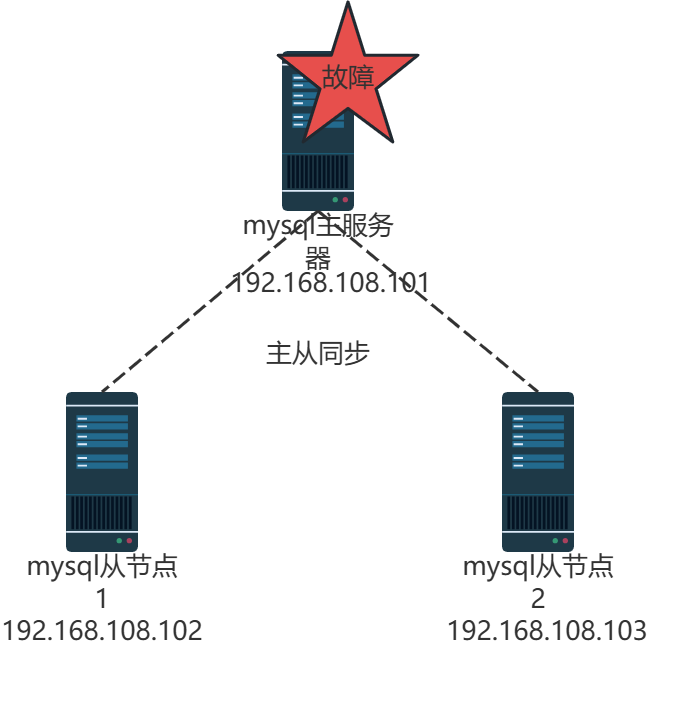
案例前置知识点
-
MHA概述
- 一套优秀的MySQL高可用环境下故障切换和主从复制的软件
- MySQL故障过程中,MHA能做到O-30秒内自动完成故障切换
-
MHA的组成
- MHA Manager(管理节点)
- MHA Node(数据节点)
-
MHA特点
- 自动故障切换过程中,MHA试图从宕机的主服务器上保存
- 二进制日志,最大程度的保证数据不丢失
- 使用半同步复制,可以大大降低数据丢失的风险
- 目前MHA支持一主多从架构,最少三台服务,即一主两从
使用场景:自动故障转移(Failover)和主从切换(Switchover)
实验拓扑图
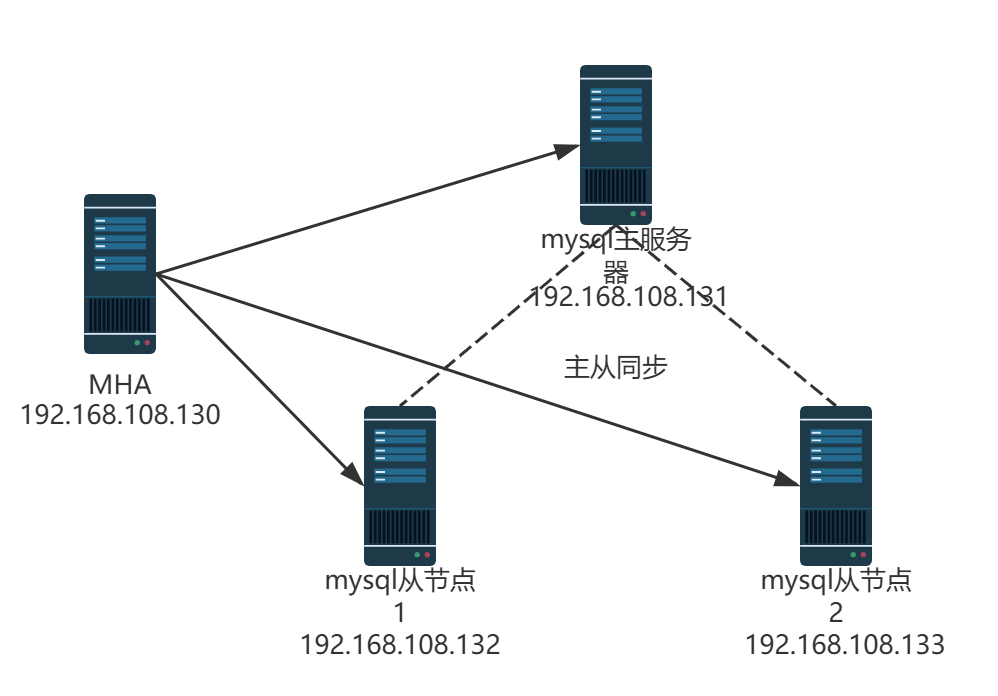
实验思路
1.MHA架构
1)数据库安装
2)一主两从
3)MHA搭建
2.故障模拟
1)主库失效
2)备选主库成为主库
3)从库2将备选主库指向为主库
案例环境
- 本案例环境
使用centos模板克隆产生mha节点
使用mysql模板克隆产生mysql-master,mysql-slave01,mysql-slave02
根据下表,将IP地址,主机名更改好
| 主机名 | IP地址 | 作用 |
|---|---|---|
| mysql-master | 192.168.108.131 | mysql主服务器,安装node组件 |
| mysql-slave01 | 192.168.108.132 | mysql从节点1,安装node组件 |
| mysql-slave02 | 192.168.108.133 | mysql从节点2,安装node组件 |
| mha | 192.168.108.130 | amoeba,安装node组件、manager组件 |
这里操作系统是 CentOS7 版本,所以这里下载 MHA 版本是 0.57 版本。
- 案例需求
本案例要求通过 MHA 监控 MySQL 数据库在故障时进行自动切换,不影响业务。 - 案例实现思路
1) 安装 MySQL 数据库
2) 配置 MySQL 一主两从
3) 安装 MHA 软件
4) 配置无密码认证
5) 配置 MySQL MHA 高可用
6) 模拟 master 故障切换
在三台 MySQL 节点上分别安装前置环境
bash
#主从是克隆的要做这个操作,否则UUID一致
[root@mysql-slave01 ~]# systemctl stop mysqld
[root@mysql-slave01 ~]# rm -f /usr/local/mysql/data/auto.cnf
[root@mysql-slave01 ~]# systemctl start mysqld

[root@mysql-slave02 ~]# systemctl stop mysqld
[root@mysql-slave02 ~]# rm -f /usr/local/mysql/data/auto.cnf
[root@mysql-slave02 ~]# systemctl start mysqld
安装编译依赖的环境
bash
#mysql-master,mysql-slave01,mysql-slave02配置
[root@mysql-master ~]# yum -y install perl-Module-Install

[root@mysql-slave01 ~]# yum install -y perl-Module-Install

[root@mysql-slave02 ~]# yum install -y perl-Module-Install
修改 Master 的主配置文件/etc/my.cnf 文件
bash
[root@mysql-master ~]# vim /etc/my.cnf
[root@mysql-master ~]# cat /etc/my.cnf
[client]
port = 3306
default-character-set=utf8
socket = /usr/local/mysql/mysql.sock
[mysql]
port = 3306
default-character-set=utf8
socket = /usr/local/mysql/mysql.sock
[mysqld]
user = mysql
basedir = /usr/local/mysql
datadir = /usr/local/mysql/data
port = 3306
character_set_server=utf8
pid-file = /usr/local/mysql/mysqld.pid
socket = /usr/local/mysql/mysql.sock
`server-id = 1`
`log-bin = master-bin`
`log-slave-updates = true`

sql_mode=NO_ENGINE_SUBSTITUTION,STRICT_TRANS_TABLES,NO_AUTO_CREATE_USER,NO_AUTO_VALUE_ON_ZERO,NO_ZERO_IN_DATE,NO_ZERO_DATE,ERROR_FOR_DIVISION_BY_ZERO,PIPES_AS_CONCAT,ANSI_QUOTES
配置从服务器:
在/etc/my.cnf 中修改或者增加下面内容。
bash
#mysql-slave01,请注释/etc/my.cnf 中 [client]下 #default-character-set=utf8
[root@mysql-slave01 ~]# vim /etc/my.cnf
[root@mysql-slave01 ~]# cat /etc/my.cnf
[client]
port = 3306
`#default-character-set=utf8`
socket = /usr/local/mysql/mysql.sock
[mysql]
port = 3306
default-character-set=utf8
socket = /usr/local/mysql/mysql.sock
[mysqld]
user = mysql
basedir = /usr/local/mysql
datadir = /usr/local/mysql/data
port = 3306
character_set_server=utf8
pid-file = /usr/local/mysql/mysqld.pid
socket = /usr/local/mysql/mysql.sock
`server-id = 2`
`log-bin = master-bin`
`relay-log = relay-log-bin`
`relay-log-index= slave-relay-bin.index`


sql_mode=NO_ENGINE_SUBSTITUTION,STRICT_TRANS_TABLES,NO_AUTO_CREATE_USER,NO_AUTO_VALUE_ON_ZERO,NO_ZERO_IN_DATE,NO_ZERO_DATE,ERROR_FOR_DIVISION_BY_ZERO,PIPES_AS_CONCAT,ANSI_QUOTES


[root@mysql-slave02 ~]# vim /etc/my.cnf
[client]
port = 3306
`#default-character-set=utf8`
socket = /usr/local/mysql/mysql.sock
[mysql]
port = 3306
default-character-set=utf8
socket = /usr/local/mysql/mysql.sock
[mysqld]
user = mysql
basedir = /usr/local/mysql
datadir = /usr/local/mysql/data
port = 3306
character_set_server=utf8
pid-file = /usr/local/mysql/mysqld.pid
socket = /usr/local/mysql/mysql.sock
`server-id = 3`
`relay-log = relay-log-bin`
`relay-log-index= slave-relay-bin.index`


sql_mode=NO_ENGINE_SUBSTITUTION,STRICT_TRANS_TABLES,NO_AUTO_CREATE_USER,NO_AUTO_VALUE_ON_ZERO,NO_ZERO_IN_DATE,NO_ZERO_DATE,ERROR_FOR_DIVISION_BY_ZERO,PIPES_AS_CONCAT,ANSI_QUOTES
三节点都要操作
bash
[root@mysql-master ~]# ln -s /usr/local/mysql/bin/mysqlbinlog /usr/bin/
[root@mysql-master ~]# ln -s /usr/local/mysql/bin/mysql /usr/bin/
[root@mysql-master ~]# systemctl restart mysqld

[root@mysql-slave01 ~]# ln -s /usr/local/mysql/bin/mysqlbinlog /usr/bin/
[root@mysql-slave01 ~]# ln -s /usr/local/mysql/bin/mysql /usr/bin/
[root@mysql-slave01 ~]# systemctl restart mysqld

[root@mysql-slave02 ~]# ln -s /usr/local/mysql/bin/mysqlbinlog /usr/bin/
[root@mysql-slave02 ~]# ln -s /usr/local/mysql/bin/mysql /usr/bin/
[root@mysql-slave02 ~]# systemctl restart mysqld
!IMPORTANT
mysql5.7注意
请注释/etc/my.cnf 中 【client】下 #default-character-set=utf8
一定要注释,否则报错
ln -s /usr/local/mysql/bin/mysqlbinlog /usr/bin/
ln -s /usr/local/mysql/bin/mysql /usr/bin/
配置 MySQL 一主两从
MySQL 主从配置相对比较简单。需要注意的是授权。步骤如下:
在所有数据库节点上授权两个用户,一个是从库同步使用,另外一个是 manager 使用。
mysql
[root@mysql-master ~]# mysql -uroot -p123
mysql: [Warning] Using a password on the command line interface can be insecure.
Welcome to the MySQL monitor.  Commands end with ; or \g.
Your MySQL connection id is 3
Server version: 5.7.17-log Source distribution

Copyright (c) 2000, 2016, Oracle and/or its affiliates. All rights reserved.

Oracle is a registered trademark of Oracle Corporation and/or its
affiliates. Other names may be trademarks of their respective
owners.

Type 'help;' or '\h' for help. Type '\c' to clear the current input statement.

mysql> grant replication slave on *.* to 'mysalve'@'192.168.108.%' identified by '123';
Query OK, 0 rows affected, 1 warning (0.06 sec)

mysql> grant all privileges on *.* to 'mha'@'192.168.108.%' identified by 'manager';
Query OK, 0 rows affected, 1 warning (0.01 sec)

mysql> flush privileges;
Query OK, 0 rows affected (0.01 sec)

#mysql-slave01
[root@mysql-slave01 ~]# mysql -uroot -p123
mysql: [Warning] Using a password on the command line interface can be insecure.
Welcome to the MySQL monitor.  Commands end with ; or \g.
Your MySQL connection id is 3
Server version: 5.7.17-log Source distribution

Copyright (c) 2000, 2016, Oracle and/or its affiliates. All rights reserved.

Oracle is a registered trademark of Oracle Corporation and/or its
affiliates. Other names may be trademarks of their respective
owners.

Type 'help;' or '\h' for help. Type '\c' to clear the current input statement.

mysql> grant replication slave on *.* to 'myslave'@'192.168.108.%' identified by '123';
Query OK, 0 rows affected, 1 warning (0.01 sec)

mysql> grant all privileges on *.* to 'mha'@'192.168.108.%' identified by 'manager';
Query OK, 0 rows affected, 1 warning (0.00 sec)

mysql> flush privileges;
Query OK, 0 rows affected (0.00 sec)

#mysql-slave02
[root@mysql-slave02 ~]# mysql -uroot -p123
mysql: [Warning] Using a password on the command line interface can be insecure.
Welcome to the MySQL monitor.  Commands end with ; or \g.
Your MySQL connection id is 3
Server version: 5.7.17 Source distribution

Copyright (c) 2000, 2016, Oracle and/or its affiliates. All rights reserved.

Oracle is a registered trademark of Oracle Corporation and/or its
affiliates. Other names may be trademarks of their respective
owners.

Type 'help;' or '\h' for help. Type '\c' to clear the current input statement.

mysql> grant replication slave on *.* to 'myslave'@'192.168.108.%' identified by '123';
Query OK, 0 rows affected, 1 warning (0.01 sec)

mysql> grant all privileges on *.* to 'mha'@'192.168.108.%' identified by 'manager';
Query OK, 0 rows affected, 1 warning (0.00 sec)

mysql> flush privileges;
Query OK, 0 rows affected (0.00 sec)
下面三条授权按理论是不用添加的,但是做案例实验环境时候通过 MHA 检查MySQL 主从有报错,
报两个从库通过主机名连接不上主库,所以所有数据库加上下面的授权。
mysql
#mysql-master配置(mha@mysql-master与主机名相同)
mysql> grant all privileges on *.* to 'mha'@'mysql-master' identified by 'manager';
Query OK, 0 rows affected, 1 warning (0.00 sec)

mysql> grant all privileges on *.* to 'mha'@'mysql-slave01' identified by 'manager';
Query OK, 0 rows affected, 1 warning (0.00 sec)

mysql> grant all privileges on *.* to 'mha'@'mysql-slave01' identified by 'manager';
Query OK, 0 rows affected, 1 warning (0.01 sec)

mysql> flush privileges;
Query OK, 0 rows affected (0.00 sec)

#mysql-slave01配置(mha@mysql-master与主机名相同)
mysql> grant all privileges on *.* to 'mha'@'mysql-master' identified by 'manager';
Query OK, 0 rows affected, 1 warning (0.00 sec)

mysql> grant all privileges on *.* to 'mha'@'mysql-slave01' identified by 'manager';
Query OK, 0 rows affected, 1 warning (0.00 sec)

mysql> grant all privileges on *.* to 'mha'@'mysql-slave02' identified by 'manager';
Query OK, 0 rows affected, 1 warning (0.00 sec)

mysql> flush privileges;
Query OK, 0 rows affected (0.00 sec)

#mysql-slave02配置(mha@mysql-master与主机名相同)
mysql> grant all privileges on *.* to 'mha'@'mysql-master' identified by 'manager';
Query OK, 0 rows affected, 1 warning (0.00 sec)

mysql> grant all privileges on *.* to 'mha'@'mysql-slave01' identified by 'manager';
Query OK, 0 rows affected, 1 warning (0.00 sec)

mysql> grant all privileges on *.* to 'mha'@'mysql-slave02' identified by 'manager';
Query OK, 0 rows affected, 1 warning (0.00 sec)

mysql> flush privileges;
Query OK, 0 rows affected (0.00 sec)
在mysql-master主机上查看二进制文件和同步点
mysql
[root@mysql-master ~]# mysql -uroot -p123
mysql> show master status;
+-------------------+----------+--------------+------------------+-------------------+
| File              | Position | Binlog_Do_DB | Binlog_Ignore_DB | Executed_Gtid_Set |
+-------------------+----------+--------------+------------------+-------------------+
| `master-bin.000002 |      621` |              |                  |                   |
+-------------------+----------+--------------+------------------+-------------------+
1 row in set (0.00 sec)
接下来在 mysql-slave01 和 mysql-slave02分别执行同步。
mysql
#mysql-slave01
mysql> change master to master_host='192.168.108.131',master_user='myslave',master_passwo
Query OK, 0 rows affected, 2 warnings (0.00 sec)

mysql> start slave;
Query OK, 0 rows affected (0.00 sec)

#mysql-slave02
mysql> change master to master_host='192.168.108.131',master_user='myslave',master_passwo
Query OK, 0 rows affected, 2 warnings (0.01 sec)
mysql> start slave;
Query OK, 0 rows affected (0.00 sec)
查看 IO 和 SQL 线程都是 yes 代表同步是否正常
bash
#mysql-slave01
mysql> show slave status\G
*************************** 1. row ***************************
               Slave_IO_State: Waiting for master to send event
                  Master_Host: 192.168.108.131
                  Master_User: myslave
                  Master_Port: 3306
                Connect_Retry: 60
              Master_Log_File: master-bin.000002
          Read_Master_Log_Pos: 621
               Relay_Log_File: relay-log-bin.000002
                Relay_Log_Pos: 321
        Relay_Master_Log_File: master-bin.000002
             `Slave_IO_Running: Yes`
            `Slave_SQL_Running: Yes`
              Replicate_Do_DB:
          Replicate_Ignore_DB:
           Replicate_Do_Table:
       Replicate_Ignore_Table:
      Replicate_Wild_Do_Table:
  Replicate_Wild_Ignore_Table:
                   Last_Errno: 0
                   Last_Error:
                 Skip_Counter: 0
          Exec_Master_Log_Pos: 621
              Relay_Log_Space: 526
              Until_Condition: None
               Until_Log_File:
                Until_Log_Pos: 0
           Master_SSL_Allowed: No
           Master_SSL_CA_File:
           Master_SSL_CA_Path:
              Master_SSL_Cert:
            Master_SSL_Cipher:
               Master_SSL_Key:
        Seconds_Behind_Master: 0
Master_SSL_Verify_Server_Cert: No
                Last_IO_Errno: 0
                Last_IO_Error:
               Last_SQL_Errno: 0
               Last_SQL_Error:
  Replicate_Ignore_Server_Ids:
             Master_Server_Id: 1
                  Master_UUID: 2c867e6e-d40e-11f0-95b6-000c29c02be2
             Master_Info_File: /usr/local/mysql/data/master.info
                    SQL_Delay: 0
          SQL_Remaining_Delay: NULL
      Slave_SQL_Running_State: Slave has read all relay log; waiting for more updates
           Master_Retry_Count: 86400
                  Master_Bind:
      Last_IO_Error_Timestamp:
     Last_SQL_Error_Timestamp:
               Master_SSL_Crl:
           Master_SSL_Crlpath:
           Retrieved_Gtid_Set:
            Executed_Gtid_Set:
                Auto_Position: 0
         Replicate_Rewrite_DB:
                 Channel_Name:
           Master_TLS_Version:
1 row in set (0.00 sec)

#mysql-slave02
mysql> show slave status\G
*************************** 1. row ***************************
               Slave_IO_State: Waiting for master to send event
                  Master_Host: 192.168.108.131
                  Master_User: myslave
                  Master_Port: 3306
                Connect_Retry: 60
              Master_Log_File: master-bin.000002
          Read_Master_Log_Pos: 621
               Relay_Log_File: relay-log-bin.000002
                Relay_Log_Pos: 321
        Relay_Master_Log_File: master-bin.000002
             `Slave_IO_Running: Yes`
            `Slave_SQL_Running: Yes`
              Replicate_Do_DB:
          Replicate_Ignore_DB:
           Replicate_Do_Table:
       Replicate_Ignore_Table:
      Replicate_Wild_Do_Table:
  Replicate_Wild_Ignore_Table:
                   Last_Errno: 0
                   Last_Error:
                 Skip_Counter: 0
          Exec_Master_Log_Pos: 621
              Relay_Log_Space: 526
              Until_Condition: None
               Until_Log_File:
                Until_Log_Pos: 0
           Master_SSL_Allowed: No
           Master_SSL_CA_File:
           Master_SSL_CA_Path:
              Master_SSL_Cert:
            Master_SSL_Cipher:
               Master_SSL_Key:
        Seconds_Behind_Master: 0
Master_SSL_Verify_Server_Cert: No
                Last_IO_Errno: 0
                Last_IO_Error:
               Last_SQL_Errno: 0
               Last_SQL_Error:
  Replicate_Ignore_Server_Ids:
             Master_Server_Id: 1
                  Master_UUID: 2c867e6e-d40e-11f0-95b6-000c29c02be2
             Master_Info_File: /usr/local/mysql/data/master.info
                    SQL_Delay: 0
          SQL_Remaining_Delay: NULL
      Slave_SQL_Running_State: Slave has read all relay log; waiting for more updates
           Master_Retry_Count: 86400
                  Master_Bind:
      Last_IO_Error_Timestamp:
     Last_SQL_Error_Timestamp:
               Master_SSL_Crl:
           Master_SSL_Crlpath:
           Retrieved_Gtid_Set:
            Executed_Gtid_Set:
                Auto_Position: 0
         Replicate_Rewrite_DB:
                 Channel_Name:
           Master_TLS_Version:
1 row in set (0.00 sec)
必须设置两个从库为只读模式:
bash
#mysql-slave01
mysql> set global read_only=1;
Query OK, 0 rows affected (0.00 sec)

#mysql-slave02
mysql> set global read_only=1;
Query OK, 0 rows affected (0.01 sec)
注意:设置完成直接验证主从复制功能
安装 MHA 软件
所有服务器上都安装 MHA 依赖的环境,首先安装 epel 源。
bash
#4个节点
[root@mysql-master ~]# rm -rf /etc/yum.repos.d/*.repo
[root@mysql-master ~]# wget -O /etc/yum.repos.d/CentOS-Base.repo   https://mirrors.huaweicloud.com/artifactory/os-conf/centos/centos-7.repo

[root@mysql-master ~]# yum install epel-release --nogpgcheck -y
[root@mysql-master ~]# yum install -y perl-DBD-MySQL \
 perl-Config-Tiny \
 perl-Log-Dispatch \
 perl-Parallel-ForkManager \
 perl-ExtUtils-CBuilder \
 perl-ExtUtils-MakeMaker \
 perl-CPAN

#mysql-slave01
 [root@mysql-slave01 ~]# rm -rf /etc/yum.repos.d/*.repo
[root@mysql-slave01 ~]# wget -O /etc/yum.repos.d/CentOS-Base.repo   https://mirrors.huaweicloud.com/artifactory/os-conf/centos/centos-7.repo
--2025-12-10 11:21:27--  https://mirrors.huaweicloud.com/artifactory/os-conf/centos/centos-7.repo
[root@mysql-slave01 ~]# yum install epel-release --nogpgcheck -y
[root@mysql-slave01 ~]# yum install -y perl-DBD-MySQL \
 perl-Config-Tiny \
 perl-Log-Dispatch \
 perl-Parallel-ForkManager \
 perl-ExtUtils-CBuilder \
 perl-ExtUtils-MakeMaker \
 perl-CPAN

[root@mysql-slave02 ~]# rm -rf /etc/yum.repos.d/*.repo
[root@mysql-slave02 ~]# wget -O /etc/yum.repos.d/CentOS-Base.repo   https://mirrors.huaweicloud.com/artifactory/os-conf/centos/centos-7.repo
--2025-12-10 11:21:25--  https://mirrors.huaweicloud.com/artifactory/os-conf/centos/centos-7.repo
[root@mysql-slave02 ~]# yum install epel-release --nogpgcheck -y
[root@mysql-slave02 ~]# yum install -y perl-DBD-MySQL \
 perl-Config-Tiny \
 perl-Log-Dispatch \
 perl-Parallel-ForkManager \
 perl-ExtUtils-CBuilder \
 perl-ExtUtils-MakeMaker \
 perl-CPAN

#mha
[root@mha ~]# rm -rf /etc/yum.repos.d/*.repo
[root@mha ~]# wget -O /etc/yum.repos.d/CentOS-Base.repo   https://mirrors.huaweicloud.com/artifactory/os-conf/centos/centos-7.repo

[root@mha ~]# yum install epel-release --nogpgcheck -y

[root@mha ~]# yum install -y perl-DBD-MySQL \
 perl-Config-Tiny \
 perl-Log-Dispatch \
 perl-Parallel-ForkManager \
 perl-ExtUtils-CBuilder \
 perl-ExtUtils-MakeMaker \
 perl-CPAN
MHA 软件包对于每个操作系统版本不一样,这里 CentOS7.4 必须选择 0.57 版本,
在<注意:所有服务器>上必须先安装 node 组件,最后在 MHA 节点上安装 manager 组件,
因为 manager 依赖 node 组件。
bash
#mysql-master
[root@mysql-master ~]# tar zxvf mha4mysql-node-0.57.tar.gz
[root@mysql-master ~]# cd mha4mysql-node-0.57
[root@mysql-master mha4mysql-node-0.57]# perl Makefile.PL

[root@mysql-master mha4mysql-node-0.57]# make
[root@mysql-master mha4mysql-node-0.57]# make install

#mysql-slave01
[root@mysql-slave01 ~]# tar zxvf mha4mysql-node-0.57.tar.gz
[root@mysql-slave01 ~]# cd mha4mysql-node-0.57
[root@mysql-slave01 mha4mysql-node-0.57]# perl Makefile.PL
[root@mysql-slave01 mha4mysql-node-0.57]# make
[root@mysql-slave01 mha4mysql-node-0.57]# make install

#mysql-slave02
[root@mysql-slave02 ~]# tar zxvf mha4mysql-node-0.57.tar.gz
[root@mysql-slave02 ~]# cd mha4mysql-node-0.57
[root@mysql-slave02 mha4mysql-node-0.57]# perl Makefile.PL
[root@mysql-slave02 mha4mysql-node-0.57]# make
[root@mysql-slave02 mha4mysql-node-0.57]# make install

#mha
[root@mha ~]# tar zxvf mha4mysql-node-0.57.tar.gz
[root@mha ~]# cd mha4mysql-node-0.57
[root@mha mha4mysql-node-0.57]# perl Makefile.PL

[root@mha mha4mysql-node-0.57]# make

[root@mha mha4mysql-node-0.57]# make install
在 MHA上安装 manager 组件(!注意:一定要先安装node 组件才能安装manager 组件)
bash
[root@mha mha4mysql-node-0.57]# cd
[root@mha ~]# tar zxvf mha4mysql-manager-0.57.tar.gz
[root@mha ~]# cd mha4mysql-manager-0.57
[root@mha mha4mysql-manager-0.57]# perl Makefile.PL

[root@mha mha4mysql-manager-0.57]# make
[root@mha mha4mysql-manager-0.57]# make install
manager 安装后在/usr/local/bin 下面会生成几个工具,主要包括以下几个:
masterha_check_ssh 检查 MHA 的 SSH 配置状况
masterha_check_repl 检查 MySQL 复制状况
masterha_manger 启动 manager的脚本
masterha_check_status 检测当前 MHA 运行状态
masterha_master_monitor 检测 master 是否宕机
masterha_master_switch 控制故障转移(自动或者手动)
masterha_conf_host 添加或删除配置的 server 信息
masterha_stop 关闭manager
node 安装后也会在/usr/local/bin 下面会生成几个脚本(这些工具通常由 MHAManager 的脚本触发,无需人为操作)主要如下:
save_binary_logs 保存和复制 master 的二进制日志
apply_diff_relay_logs 识别差异的中继日志事件并将其差异的事件应用于其他的 slave
filter_mysqlbinlog 去除不必要的 ROLLBACK 事件(MHA 已不再使用这个工具)
purge_relay_logs 清除中继日志(不会阻塞 SQL 线程)
配置无密码认证
在 manager 上配置到所有数据库节点的无密码认证
bash
[root@mha ~]# ssh-keygen -t rsa
Generating public/private rsa key pair.
Enter file in which to save the key (/root/.ssh/id_rsa):`回车`
Created directory '/root/.ssh'.
Enter passphrase (empty for no passphrase):`回车`
Enter same passphrase again:`回车`
Your identification has been saved in /root/.ssh/id_rsa.
Your public key has been saved in /root/.ssh/id_rsa.pub.
The key fingerprint is:`回车`
SHA256:0dHJ/ScoesDqjMIpZt+kpK1dZQLVlsyfU8TAbxrDszI root@mha
The key's randomart image is:
+---[RSA 2048]----+
|     .+ o.=+ o   |
|    .  * o ++ .  |
|   .  ..+ =  . . |
|    .   oX.o. . o|
|     . +SoO.   ..|
|      =E.o.      |
| . o *  o.       |
|.oO * o          |
|o+o* .           |
+----[SHA256]-----+
[root@mha ~]# ssh-copy-id 192.168.108.131
/usr/bin/ssh-copy-id: INFO: Source of key(s) to be installed: "/root/.ssh/id_rsa.pub"
The authenticity of host '192.168.108.131 (192.168.108.131)' can't be established.
ECDSA key fingerprint is SHA256:J7QaKDMkzAXw6cH5VFRspkFngFHJ5TQFSKZDZdtWSNQ.
ECDSA key fingerprint is MD5:2d:97:91:73:ca:2f:df:3d:91:78:08:24:34:df:04:a2.
Are you sure you want to continue connecting (yes/no)? `yes`
/usr/bin/ssh-copy-id: INFO: attempting to log in with the new key(s), to filter out any that are already installed
/usr/bin/ssh-copy-id: INFO: 1 key(s) remain to be installed -- if you are prompted now it is to install the new keys
root@192.168.108.131's password:`123`

Number of key(s) added: 1

Now try logging into the machine, with:   "ssh '192.168.108.131'"
and check to make sure that only the key(s) you wanted were added.

[root@mha ~]# ssh-copy-id 192.168.108.132
/usr/bin/ssh-copy-id: INFO: Source of key(s) to be installed: "/root/.ssh/id_rsa.pub"
The authenticity of host '192.168.108.132 (192.168.108.132)' can't be established.
ECDSA key fingerprint is SHA256:J7QaKDMkzAXw6cH5VFRspkFngFHJ5TQFSKZDZdtWSNQ.
ECDSA key fingerprint is MD5:2d:97:91:73:ca:2f:df:3d:91:78:08:24:34:df:04:a2.
Are you sure you want to continue connecting (yes/no)? `yes`
/usr/bin/ssh-copy-id: INFO: attempting to log in with the new key(s), to filter out any that are already installed
/usr/bin/ssh-copy-id: INFO: 1 key(s) remain to be installed -- if you are prompted now it is to install the new keys
root@192.168.108.132's password:`123`

Number of key(s) added: 1

Now try logging into the machine, with:   "ssh '192.168.108.132'"
and check to make sure that only the key(s) you wanted were added.

[root@mha ~]# ssh-copy-id 192.168.108.133
/usr/bin/ssh-copy-id: INFO: Source of key(s) to be installed: "/root/.ssh/id_rsa.pub"
The authenticity of host '192.168.108.133 (192.168.108.133)' can't be established.
ECDSA key fingerprint is SHA256:J7QaKDMkzAXw6cH5VFRspkFngFHJ5TQFSKZDZdtWSNQ.
ECDSA key fingerprint is MD5:2d:97:91:73:ca:2f:df:3d:91:78:08:24:34:df:04:a2.
Are you sure you want to continue connecting (yes/no)? `yes`
/usr/bin/ssh-copy-id: INFO: attempting to log in with the new key(s), to filter out any that are already installed
/usr/bin/ssh-copy-id: INFO: 1 key(s) remain to be installed -- if you are prompted now it is to install the new keys
root@192.168.108.133's password:`123`

Number of key(s) added: 1

Now try logging into the machine, with:   "ssh '192.168.108.133'"
and check to make sure that only the key(s) you wanted were added.
在 mysql-master 上配置到数据库节点mysql-slave01和mysql-slave02的无密码认证
bash
[root@mysql-master ~]# ssh-keygen -t rsa
Generating public/private rsa key pair.
Enter file in which to save the key (/root/.ssh/id_rsa):`回车`
Enter passphrase (empty for no passphrase):`回车`
Enter same passphrase again:`回车`
Your identification has been saved in /root/.ssh/id_rsa.
Your public key has been saved in /root/.ssh/id_rsa.pub.
The key fingerprint is:
SHA256:XWBPivmdQUsP1oZnW7gwQjCXcM/pwEmqKwCpVvWRras root@mysql-master
The key's randomart image is:
+---[RSA 2048]----+
|     . .*+B.*o . |
| .  . ...%o%+=* .|
|o  .   .= =.O*.+ |
|...    o o = oo  |
|...   . S o +    |
|.  .   o         |
|    . o          |
|     E           |
|                 |
+----[SHA256]-----+
[root@mysql-master ~]# ssh-copy-id 192.168.108.132
/usr/bin/ssh-copy-id: INFO: Source of key(s) to be installed: "/root/.ssh/id_rsa.pub"
The authenticity of host '192.168.108.132 (192.168.108.132)' can't be established.
ECDSA key fingerprint is SHA256:J7QaKDMkzAXw6cH5VFRspkFngFHJ5TQFSKZDZdtWSNQ.
ECDSA key fingerprint is MD5:2d:97:91:73:ca:2f:df:3d:91:78:08:24:34:df:04:a2.
Are you sure you want to continue connecting (yes/no)? `yes`
/usr/bin/ssh-copy-id: INFO: attempting to log in with the new key(s), to filter out any that are already installed
/usr/bin/ssh-copy-id: INFO: 1 key(s) remain to be installed -- if you are prompted now it is to install the new keys
root@192.168.108.132's password:`123`

Number of key(s) added: 1

Now try logging into the machine, with:   "ssh '192.168.108.132'"
and check to make sure that only the key(s) you wanted were added.

[root@mysql-master ~]# ssh-copy-id 192.168.108.133
/usr/bin/ssh-copy-id: INFO: Source of key(s) to be installed: "/root/.ssh/id_rsa.pub"
The authenticity of host '192.168.108.133 (192.168.108.133)' can't be established.
ECDSA key fingerprint is SHA256:J7QaKDMkzAXw6cH5VFRspkFngFHJ5TQFSKZDZdtWSNQ.
ECDSA key fingerprint is MD5:2d:97:91:73:ca:2f:df:3d:91:78:08:24:34:df:04:a2.
Are you sure you want to continue connecting (yes/no)? `yes`
/usr/bin/ssh-copy-id: INFO: attempting to log in with the new key(s), to filter out any that are already installed
/usr/bin/ssh-copy-id: INFO: 1 key(s) remain to be installed -- if you are prompted now it is to install the new keys
root@192.168.108.133's password:`123`

Number of key(s) added: 1

Now try logging into the machine, with:   "ssh '192.168.108.133'"
and check to make sure that only the key(s) you wanted were added.
在 mysql-slave01 上配置到数据库节点mysql-master和mysql-slave02的无密码认证
bash
[root@mysql-slave01 ~]# ssh-keygen -t rsa
Generating public/private rsa key pair.
Enter file in which to save the key (/root/.ssh/id_rsa):`回车`
Enter passphrase (empty for no passphrase):`回车`
Enter same passphrase again:`回车`
Your identification has been saved in /root/.ssh/id_rsa.
Your public key has been saved in /root/.ssh/id_rsa.pub.
The key fingerprint is:
SHA256:5g08bPeWgyLrN8a6/b+8GtPz98uoFcncMItMJZFvinE root@mysql-slave01
The key's randomart image is:
+---[RSA 2048]----+
|           oo.   |
|           .o    |
|           ..o   |
|       o .oE+o*  |
|        S =oo* . |
|       + * = ..  |
|      ..o = B.   |
|       +=. =.+o .|
|     .==.oo+*+.++|
+----[SHA256]-----+
[root@mysql-slave01 ~]# ssh-copy-id 192.168.108.131
/usr/bin/ssh-copy-id: INFO: Source of key(s) to be installed: "/root/.ssh/id_rsa.pub"
The authenticity of host '192.168.108.131 (192.168.108.131)' can't be established.
ECDSA key fingerprint is SHA256:J7QaKDMkzAXw6cH5VFRspkFngFHJ5TQFSKZDZdtWSNQ.
ECDSA key fingerprint is MD5:2d:97:91:73:ca:2f:df:3d:91:78:08:24:34:df:04:a2.
Are you sure you want to continue connecting (yes/no)? `yes`
/usr/bin/ssh-copy-id: INFO: attempting to log in with the new key(s), to filter out any that are already installed
/usr/bin/ssh-copy-id: INFO: 1 key(s) remain to be installed -- if you are prompted now it is to install the new keys
root@192.168.108.131's password:`123`

Number of key(s) added: 1

Now try logging into the machine, with:   "ssh '192.168.108.131'"
and check to make sure that only the key(s) you wanted were added.

[root@mysql-slave01 ~]# ssh-copy-id 192.168.108.133
/usr/bin/ssh-copy-id: INFO: Source of key(s) to be installed: "/root/.ssh/id_rsa.pub"
The authenticity of host '192.168.108.133 (192.168.108.133)' can't be established.
ECDSA key fingerprint is SHA256:J7QaKDMkzAXw6cH5VFRspkFngFHJ5TQFSKZDZdtWSNQ.
ECDSA key fingerprint is MD5:2d:97:91:73:ca:2f:df:3d:91:78:08:24:34:df:04:a2.
Are you sure you want to continue connecting (yes/no)? `yes`
/usr/bin/ssh-copy-id: INFO: attempting to log in with the new key(s), to filter out any that are already installed
/usr/bin/ssh-copy-id: INFO: 1 key(s) remain to be installed -- if you are prompted now it is to install the new keys
root@192.168.108.133's password:`123`

Number of key(s) added: 1

Now try logging into the machine, with:   "ssh '192.168.108.133'"
and check to make sure that only the key(s) you wanted were added.
在 mysql-slave02 上配置到数据库节点mysql-master和mysql-slave01的无密码认证
bash
[root@mysql-slave02 ~]# ssh-keygen -t rsa
Generating public/private rsa key pair.
Enter file in which to save the key (/root/.ssh/id_rsa):`回车`
Enter passphrase (empty for no passphrase):`回车`
Enter same passphrase again:`回车`
Your identification has been saved in /root/.ssh/id_rsa.
Your public key has been saved in /root/.ssh/id_rsa.pub.
The key fingerprint is:
SHA256:jy/Dd/3Yo50oLZLVgsM8iKB2dcyMOF4CD5eJHRc/Btk root@mysql-slave02
The key's randomart image is:
+---[RSA 2048]----+
|  o.+++          |
| + =..oE         |
|  = . =+         |
|   * +.=.        |
|  o * o S . .    |
| o o . . O o .   |
|. .    .. * o.   |
|        ++.o..++.|
|         +o.ooo++|
+----[SHA256]-----+
[root@mysql-slave02 ~]#  ssh-copy-id 192.168.108.131
/usr/bin/ssh-copy-id: INFO: Source of key(s) to be installed: "/root/.ssh/id_rsa.pub"
The authenticity of host '192.168.108.131 (192.168.108.131)' can't be established.
ECDSA key fingerprint is SHA256:J7QaKDMkzAXw6cH5VFRspkFngFHJ5TQFSKZDZdtWSNQ.
ECDSA key fingerprint is MD5:2d:97:91:73:ca:2f:df:3d:91:78:08:24:34:df:04:a2.
Are you sure you want to continue connecting (yes/no)? `yes`
/usr/bin/ssh-copy-id: INFO: attempting to log in with the new key(s), to filter out any that are already installed
/usr/bin/ssh-copy-id: INFO: 1 key(s) remain to be installed -- if you are prompted now it is to install the new keys
root@192.168.108.131's password:`123`

Number of key(s) added: 1

Now try logging into the machine, with:   "ssh '192.168.108.131'"
and check to make sure that only the key(s) you wanted were added.

[root@mysql-slave02 ~]#  ssh-copy-id 192.168.108.132
/usr/bin/ssh-copy-id: INFO: Source of key(s) to be installed: "/root/.ssh/id_rsa.pub"
The authenticity of host '192.168.108.132 (192.168.108.132)' can't be established.
ECDSA key fingerprint is SHA256:J7QaKDMkzAXw6cH5VFRspkFngFHJ5TQFSKZDZdtWSNQ.
ECDSA key fingerprint is MD5:2d:97:91:73:ca:2f:df:3d:91:78:08:24:34:df:04:a2.
Are you sure you want to continue connecting (yes/no)? `yes`
/usr/bin/ssh-copy-id: INFO: attempting to log in with the new key(s), to filter out any that are already installed
/usr/bin/ssh-copy-id: INFO: 1 key(s) remain to be installed -- if you are prompted now it is to install the new keys
root@192.168.108.132's password:`123`

Number of key(s) added: 1

Now try logging into the machine, with:   "ssh '192.168.108.132'"
and check to make sure that only the key(s) you wanted were added.
配置 MHA
在 manager 节点上复制相关脚本到/usr/local/bin 目录。
bash
[root@mha ~]# ls
anaconda-ks.cfg  initial-setup-ks.cfg           mha4mysql-node-0.57.tar.gz  Templates
Desktop          mha4mysql-manager-0.57         Music                       Videos
Documents        mha4mysql-manager-0.57.tar.gz  Pictures
Downloads        mha4mysql-node-0.57            Public
[root@mha ~]# cp -ra /root/mha4mysql-manager-0.57/samples/scripts /usr/local/bin
[root@mha ~]# ll /usr/local/bin/scripts/
total 32
#自动切换时 VIP 管理的脚本
-rwxr-xr-x 1 1001 1001  3648 May 31  2015 master_ip_failover
#在线切换时 vip 的管理
-rwxr-xr-x 1 1001 1001  9870 May 31  2015 master_ip_online_change
#故障发生后关闭主机的脚本
-rwxr-xr-x 1 1001 1001 11867 May 31  2015 power_manager
#因故障切换后发送报警的脚本
-rwxr-xr-x 1 1001 1001  1360 May 31  2015 send_report
复制上述的自动切换时 VIP 管理的脚本到/usr/local/bin 目录,这里使用脚本管理 VIP,
bash
[root@mha ~]# cp /usr/local/bin/scripts/master_ip_failover /usr/local/bin修改内容如下:(删除原有内容,直接复制)
bash
[root@mha ~]# vim /usr/local/bin/master_ip_failover
[root@mha ~]# cat /usr/local/bin/master_ip_failover
#!/usr/bin/env perl
use strict;
use warnings FATAL => 'all';

use Getopt::Long;

my (
$command, $ssh_user, $orig_master_host, $orig_master_ip,
$orig_master_port, $new_master_host, $new_master_ip, $new_master_port
);
#############################添加内容部分#########################################
my $vip = '192.168.108.200';
my $brdc = '192.168.108.255';
my $ifdev = 'ens33';
my $key = '1';
my $ssh_start_vip = "/sbin/ifconfig ens33:$key $vip";
my $ssh_stop_vip = "/sbin/ifconfig ens33:$key down";
my $exit_code = 0;
#my $ssh_start_vip = "/usr/sbin/ip addr add $vip/24 brd $brdc dev $ifdev label $ifdev:$key;/usr/sbin/arping -q -A -c 1 -I $ifdev $vip;iptables -F;";
##my $ssh_stop_vip = "/usr/sbin/ip addr del $vip/24 dev $ifdev label $ifdev:$key";
###################################################################################
GetOptions(
'command=s' => \$command,
'ssh_user=s' => \$ssh_user,
'orig_master_host=s' => \$orig_master_host,
'orig_master_ip=s' => \$orig_master_ip,
'orig_master_port=i' => \$orig_master_port,
'new_master_host=s' => \$new_master_host,
'new_master_ip=s' => \$new_master_ip,
'new_master_port=i' => \$new_master_port,
);

exit &main();

sub main {

print "\n\nIN SCRIPT TEST====$ssh_stop_vip==$ssh_start_vip===\n\n";

if ( $command eq "stop" || $command eq "stopssh" ) {

my $exit_code = 1;
eval {
print "Disabling the VIP on old master: $orig_master_host \n";
&stop_vip();
$exit_code = 0;
};
if ($@) {
warn "Got Error: $@\n";
exit $exit_code;
}
exit $exit_code;
}
elsif ( $command eq "start" ) {

my $exit_code = 10;
eval {
print "Enabling the VIP - $vip on the new master - $new_master_host \n";
&start_vip();
$exit_code = 0;
};
if ($@) {
warn $@;
exit $exit_code;
}
exit $exit_code;
}
elsif ( $command eq "status" ) {
print "Checking the Status of the script.. OK \n";
exit 0;
}
else {
&usage();
exit 1;
}
}
sub start_vip() {
`ssh $ssh_user\@$new_master_host \" $ssh_start_vip \"`;
}
# A simple system call that disable the VIP on the old_master
sub stop_vip() {
`ssh $ssh_user\@$orig_master_host \" $ssh_stop_vip \"`;
}

sub usage {
print
"Usage: master_ip_failover --command=start|stop|stopssh|status --orig_master_host=host --orig_master_ip=ip --orig_master_port=port --new_master_host=host --new_master_ip=ip --new_master_port=port\n";
}
创建 MHA 软件目录并拷贝配置文件。
bash
[root@mha ~]# mkdir /etc/masterha
[root@mha ~]# cp /root/mha4mysql-manager-0.57/samples/conf/app1.cnf /etc/masterha/
[root@mha ~]# vim /etc/masterha/app1.cnf
[root@mha ~]# cat /etc/masterha/app1.cnf
[server default]
manager_log=/var/log/masterha/app1/manager.log
manager_workdir=/var/log/masterha/app1
master_binlog_dir=/usr/local/mysql/data
master_ip_failover_script=/usr/local/bin/master_ip_failover
master_ip_online_change_script=/usr/local/bin/master_ip_online_change
password=manager
ping_interval=1
remote_workdir=/tmp
repl_password=123
repl_user=myslave
secondary_check_script=/usr/local/bin/masterha_secondary_check -s 192.168.108.132 -s 192.168.108.133
shutdown_script=""
ssh_user=root
user=mha

[server1]
hostname=192.168.108.131
port=3306

[server2]
candidate_master=1
check_repl_delay=0
hostname=192.168.108.132
port=3306

[server3]
hostname=192.168.108.133
port=3306
配置文件解析
bash
[server default]
manager_workdir=/var/log/masterha/app1.log               ##manager工作目录
manager_log=/var/log/masterha/app1/manager.log            #manager日志
master_binlog_dir=/usr/local/mysql/data/                #master保存binlog的位置,这里的路径要与master里配置的binlog的路径一致,以便mha能找到
#master_ip_failover_script= /usr/local/bin/master_ip_failover    #设置自动failover时候的切换脚本,也就是上边的哪个脚本
master_ip_online_change_script= /usr/local/bin/master_ip_online_change  #设置手动切换时候的切换脚本
password=manager      #设置mysql中root用户的密码,这个密码是前文中创建监控用户的那个密码
user=mha        #设置监控用户root
ping_interval=1      #设置监控主库,发送ping包的时间间隔,默认是3秒,尝试三次没有回应的时候自动进行railover
remote_workdir=/tmp    #设置远端mysql在发生切换时binlog的保存位置
repl_password=123        #设置复制用户的密码
repl_user=myslave           #设置复制用户的用户
report_script=/usr/local/send_report      //设置发生切换后发送的报警的脚本
secondary_check_script=/usr/local/bin/masterha_secondary_check -s 192.168.108.132 -s 192.168.108.133
shutdown_script=""  #设置故障发生后关闭故障主机脚本(该脚本的主要作用是关闭主机放在发生脑裂,这里没有使用)
ssh_user=root      #设置ssh的登录用户名

[server1]
hostname=192.168.108.131
port=3306

[server2]
hostname=192.168.108.132
port=3306
candidate_master=1    #//设置为候选master,如果设置该参数以后,发生主从切换以后将会将此从库提升为主库,即使这个主库不是集群中事件最新的slave
check_repl_delay=0    #默认情况下如果一个slave落后master 100M的relay logs的话,MHA将不会选择该slave作为一个新的master,因为对于这个slave的恢复需要花费很长时间,通过设置check_repl_delay=0,MHA触发切换在选择一个新的master的时候将会忽略复制延时,这个参数对于设置了candidate_master=1的主机非常有用,因为这个候选主在切换的过程中一定是新的master

[server3]
hostname=192.168.108.133
port=3306
验证配置
测试 ssh 无密码认证,如果正常最后会输出 successfully,如下所示。
bash
#检测SSH无密码认证
[root@mha ~]# masterha_check_ssh -conf=/etc/masterha/app1.cnf
Wed Dec 10 14:19:13 2025 - [warning] Global configuration file /etc/masterha_default.cnf not found. Skipping.
Wed Dec 10 14:19:13 2025 - [info] Reading application default configuration from /etc/masterha/app1.cnf..
Wed Dec 10 14:19:13 2025 - [info] Reading server configuration from /etc/masterha/app1.cnf..
Wed Dec 10 14:19:13 2025 - [info] Starting SSH connection tests..
Wed Dec 10 14:19:14 2025 - [debug]
Wed Dec 10 14:19:13 2025 - [debug]  Connecting via SSH from root@192.168.108.131(192.168.108.131:22) to root@192.168.108.132(192.168.108.132:22)..
Wed Dec 10 14:19:13 2025 - [debug]   ok.
Wed Dec 10 14:19:13 2025 - [debug]  Connecting via SSH from root@192.168.108.131(192.168.108.131:22) to root@192.168.108.133(192.168.108.133:22)..
Wed Dec 10 14:19:14 2025 - [debug]   ok.
Wed Dec 10 14:19:15 2025 - [debug]
Wed Dec 10 14:19:14 2025 - [debug]  Connecting via SSH from root@192.168.108.132(192.168.108.132:22) to root@192.168.108.131(192.168.108.131:22)..
Wed Dec 10 14:19:14 2025 - [debug]   ok.
Wed Dec 10 14:19:14 2025 - [debug]  Connecting via SSH from root@192.168.108.132(192.168.108.132:22) to root@192.168.108.133(192.168.108.133:22)..
Wed Dec 10 14:19:14 2025 - [debug]   ok.
Wed Dec 10 14:19:16 2025 - [debug]
Wed Dec 10 14:19:14 2025 - [debug]  Connecting via SSH from root@192.168.108.133(192.168.108.133:22) to root@192.168.108.131(192.168.108.131:22)..
Wed Dec 10 14:19:14 2025 - [debug]   ok.
Wed Dec 10 14:19:14 2025 - [debug]  Connecting via SSH from root@192.168.108.133(192.168.108.133:22) to root@192.168.108.132(192.168.108.132:22)..
Wed Dec 10 14:19:15 2025 - [debug]   ok.
Wed Dec 10 14:19:16 2025 - [info] All SSH connection tests passed successfully.
[root@mha ~]# masterha_check_repl -conf=/etc/masterha/app1.cnf
Wed Dec 10 14:19:23 2025 - [warning] Global configuration file /etc/masterha_default.cnf not found. Skipping.
Wed Dec 10 14:19:23 2025 - [info] Reading application default configuration from /etc/masterha/app1.cnf..
Wed Dec 10 14:19:23 2025 - [info] Reading server configuration from /etc/masterha/app1.cnf..
Wed Dec 10 14:19:23 2025 - [info] MHA::MasterMonitor version 0.57.
Creating directory /var/log/masterha/app1.. done.
Wed Dec 10 14:19:24 2025 - [info] GTID failover mode = 0
Wed Dec 10 14:19:24 2025 - [info] Dead Servers:
Wed Dec 10 14:19:24 2025 - [info] Alive Servers:
Wed Dec 10 14:19:24 2025 - [info]   192.168.108.131(192.168.108.131:3306)
Wed Dec 10 14:19:24 2025 - [info]   192.168.108.132(192.168.108.132:3306)
Wed Dec 10 14:19:24 2025 - [info]   192.168.108.133(192.168.108.133:3306)
Wed Dec 10 14:19:24 2025 - [info] Alive Slaves:
Wed Dec 10 14:19:24 2025 - [info]   192.168.108.132(192.168.108.132:3306)  Version=5.7.17-log (oldest major version between slaves) log-bin:enabled
Wed Dec 10 14:19:24 2025 - [info]     Replicating from 192.168.108.131(192.168.108.131:3306)
Wed Dec 10 14:19:24 2025 - [info]     Primary candidate for the new Master (candidate_master is set)
Wed Dec 10 14:19:24 2025 - [info]   192.168.108.133(192.168.108.133:3306)  Version=5.7.17 (oldest major version between slaves) log-bin:disabled
Wed Dec 10 14:19:24 2025 - [info]     Replicating from 192.168.108.131(192.168.108.131:3306)
Wed Dec 10 14:19:24 2025 - [info] Current Alive Master: 192.168.108.131(192.168.108.131:3306)
Wed Dec 10 14:19:24 2025 - [info] Checking slave configurations..
Wed Dec 10 14:19:24 2025 - [warning]  relay_log_purge=0 is not set on slave 192.168.108.132(192.168.108.132:3306).
Wed Dec 10 14:19:24 2025 - [warning]  relay_log_purge=0 is not set on slave 192.168.108.133(192.168.108.133:3306).
Wed Dec 10 14:19:24 2025 - [warning]  log-bin is not set on slave 192.168.108.133(192.168.108.133:3306). This host cannot be a master.
Wed Dec 10 14:19:24 2025 - [info] Checking replication filtering settings..
Wed Dec 10 14:19:24 2025 - [info]  binlog_do_db= , binlog_ignore_db=
Wed Dec 10 14:19:24 2025 - [info]  Replication filtering check ok.
Wed Dec 10 14:19:24 2025 - [info] GTID (with auto-pos) is not supported
Wed Dec 10 14:19:24 2025 - [info] Starting SSH connection tests..
Wed Dec 10 14:19:27 2025 - [info] All SSH connection tests passed successfully.
Wed Dec 10 14:19:27 2025 - [info] Checking MHA Node version..
Wed Dec 10 14:19:27 2025 - [info]  Version check ok.
Wed Dec 10 14:19:27 2025 - [info] Checking SSH publickey authentication settings on the current master..
Wed Dec 10 14:19:27 2025 - [info] HealthCheck: SSH to 192.168.108.131 is reachable.
Wed Dec 10 14:19:28 2025 - [info] Master MHA Node version is 0.57.
Wed Dec 10 14:19:28 2025 - [info] Checking recovery script configurations on 192.168.108.131(192.168.108.131:3306)..
Wed Dec 10 14:19:28 2025 - [info]   Executing command: save_binary_logs --command=test --start_pos=4 --binlog_dir=/usr/local/mysql/data --output_file=/tmp/save_binary_logs_test --manager_version=0.57 --start_file=master-bin.000002
Wed Dec 10 14:19:28 2025 - [info]   Connecting to root@192.168.108.131(192.168.108.131:22)..
  Creating /tmp if not exists..    ok.
  Checking output directory is accessible or not..
   ok.
  Binlog found at /usr/local/mysql/data, up to master-bin.000002
Wed Dec 10 14:19:28 2025 - [info] Binlog setting check done.
Wed Dec 10 14:19:28 2025 - [info] Checking SSH publickey authentication and checking recovery script configurations on all alive slave servers..
Wed Dec 10 14:19:28 2025 - [info]   Executing command : apply_diff_relay_logs --command=test --slave_user='mha' --slave_host=192.168.108.132 --slave_ip=192.168.108.132 --slave_port=3306 --workdir=/tmp --target_version=5.7.17-log --manager_version=0.57 --relay_log_info=/usr/local/mysql/data/relay-log.info  --relay_dir=/usr/local/mysql/data/  --slave_pass=xxx
Wed Dec 10 14:19:28 2025 - [info]   Connecting to root@192.168.108.132(192.168.108.132:22)..
  Checking slave recovery environment settings..
    Opening /usr/local/mysql/data/relay-log.info ... ok.
    Relay log found at /usr/local/mysql/data, up to relay-log-bin.000002
    Temporary relay log file is /usr/local/mysql/data/relay-log-bin.000002
    Testing mysql connection and privileges..mysql: [Warning] Using a password on the command line interface can be insecure.
 done.
    Testing mysqlbinlog output.. done.
    Cleaning up test file(s).. done.
Wed Dec 10 14:19:28 2025 - [info]   Executing command : apply_diff_relay_logs --command=test --slave_user='mha' --slave_host=192.168.108.133 --slave_ip=192.168.108.133 --slave_port=3306 --workdir=/tmp --target_version=5.7.17 --manager_version=0.57 --relay_log_info=/usr/local/mysql/data/relay-log.info  --relay_dir=/usr/local/mysql/data/  --slave_pass=xxx
Wed Dec 10 14:19:28 2025 - [info]   Connecting to root@192.168.108.133(192.168.108.133:22)..
  Checking slave recovery environment settings..
    Opening /usr/local/mysql/data/relay-log.info ... ok.
    Relay log found at /usr/local/mysql/data, up to relay-log-bin.000002
    Temporary relay log file is /usr/local/mysql/data/relay-log-bin.000002
    Testing mysql connection and privileges..mysql: [Warning] Using a password on the command line interface can be insecure.
 done.
    Testing mysqlbinlog output.. done.
    Cleaning up test file(s).. done.
Wed Dec 10 14:19:28 2025 - [info] Slaves settings check done.
Wed Dec 10 14:19:28 2025 - [info]
192.168.108.131(192.168.108.131:3306) (current master)
 +--192.168.108.132(192.168.108.132:3306)
 +--192.168.108.133(192.168.108.133:3306)

Wed Dec 10 14:19:28 2025 - [info] Checking replication health on 192.168.108.132..
Wed Dec 10 14:19:28 2025 - [info]  ok.
Wed Dec 10 14:19:28 2025 - [info] Checking replication health on 192.168.108.133..
Wed Dec 10 14:19:28 2025 - [info]  ok.
Wed Dec 10 14:19:28 2025 - [info] Checking master_ip_failover_script status:
Wed Dec 10 14:19:28 2025 - [info]   /usr/local/bin/master_ip_failover --command=status --ssh_user=root --orig_master_host=192.168.108.131 --orig_master_ip=192.168.108.131 --orig_master_port=3306


IN SCRIPT TEST====/sbin/ifconfig ens33:1 down==/sbin/ifconfig ens33:1 192.168.108.200===

Checking the Status of the script.. OK
Wed Dec 10 14:19:28 2025 - [info]  OK.
Wed Dec 10 14:19:28 2025 - [warning] shutdown_script is not defined.
Wed Dec 10 14:19:28 2025 - [info] Got exit code 0 (Not master dead).

MySQL Replication Health is OK.
第一次配置需要去master上手动开启虚拟IP
bash
[root@mysql-master ~]# /sbin/ifconfig ens33:1 192.168.108.200/24
[root@mysql-master ~]# ip a
1: lo: <LOOPBACK,UP,LOWER_UP> mtu 65536 qdisc noqueue state UNKNOWN group default qlen 1000
    link/loopback 00:00:00:00:00:00 brd 00:00:00:00:00:00
    inet 127.0.0.1/8 scope host lo
       valid_lft forever preferred_lft forever
    inet6 ::1/128 scope host
       valid_lft forever preferred_lft forever
2: ens33: <BROADCAST,MULTICAST,UP,LOWER_UP> mtu 1500 qdisc pfifo_fast state UP group default qlen 1000
    link/ether 00:0c:29:05:7f:1e brd ff:ff:ff:ff:ff:ff
    inet 192.168.108.131/24 brd 192.168.108.255 scope global noprefixroute ens33
       valid_lft forever preferred_lft forever
   ` inet 192.168.108.200/24 brd `192.168.108.255 scope global secondary ens33:1
       valid_lft forever preferred_lft forever
    inet6 fe80::9f3f:8d41:73d1:d531/64 scope link noprefixroute
       valid_lft forever preferred_lft forever
    inet6 fe80::af36:4fe7:4616:f9d6/64 scope link tentative noprefixroute dadfailed
       valid_lft forever preferred_lft forever
3: virbr0: <NO-CARRIER,BROADCAST,MULTICAST,UP> mtu 1500 qdisc noqueue state DOWN group default qlen 1000
    link/ether 52:54:00:08:d0:68 brd ff:ff:ff:ff:ff:ff
    inet 192.168.122.1/24 brd 192.168.122.255 scope global virbr0
       valid_lft forever preferred_lft forever
4: virbr0-nic: <BROADCAST,MULTICAST> mtu 1500 qdisc pfifo_fast master virbr0 state DOWN group default qlen 1000
    link/ether 52:54:00:08:d0:68 brd ff:ff:ff:ff:ff:ff
启动 MHA
bash
[root@mha ~]# nohup masterha_manager --conf=/etc/masterha/app1.cnf --remove_dead_master_conf --ignore_last_failover < /dev/null > /var/log/masterha/app1/manager.log 2>&1 &
[1] 6185
--remove_dead_master_conf 该参数代表当发生主从切换后,老的主库的 ip 将会从配置文件中移除。
--manger_log 日志存放位置。
--ignore_last_failover 在缺省情况下,如果 MHA 检测到连续发生宕机,且两次宕机间
隔不足 8 小时的话,则不会进行 Failover,之所以这样限制是为了避免 ping-pong 效应。该
参数代表忽略上次 MHA 触发切换产生的文件,默认情况下,MHA 发生切换后会在日志记
目录,也就是上面设置的日志 app1.failover.complete 文件,下次再次切换的时候如果发现
该目录下存在该文件将不允许触发切换,除非在第一次切换后收到删除该文件,为了方便,
这里设置为--ignore_last_failover。
查看 MHA 状态,可以看到当前的 master 是 mysql-master 节点。
bash
[root@mha ~]# masterha_check_status --conf=/etc/masterha/app1.cnf
app1 (pid:6186) is running(0:PING_OK), master:192.168.108.131
查看 MHA 日志,也以看到当前的 master 是 192.168.108.131,如下所示。
bash
[root@mha ~]# cat /var/log/masterha/app1/manager.log
Wed Dec 10 14:54:01 2025 - [info] GTID failover mode = 0
Wed Dec 10 14:54:01 2025 - [info] Current Alive Master: 192.168.108.131(192.168.108.131:3306)
Wed Dec 10 14:54:01 2025 - [info] Checking slave configurations..
Wed Dec 10 14:54:01 2025 - [warning]  relay_log_purge=0 is not set on slave 192.168.108.132(192.168.108.132:3306).
Wed Dec 10 14:54:01 2025 - [warning]  relay_log_purge=0 is not set on slave 192.168.108.133(192.168.108.133:3306).
Wed Dec 10 14:54:01 2025 - [warning]  log-bin is not set on slave 192.168.108.133(192.168.108.133:3306). This host cannot be a master.
Wed Dec 10 14:54:01 2025 - [info] Checking replication filtering settings..
Wed Dec 10 14:54:01 2025 - [info] Dead Servers:
Wed Dec 10 14:54:01 2025 - [info]  binlog_do_db= , binlog_ignore_db=
Wed Dec 10 14:54:01 2025 - [info]  Replication filtering check ok.
Wed Dec 10 14:54:01 2025 - [info] Alive Servers:
Wed Dec 10 14:54:01 2025 - [info]   192.168.108.131(192.168.108.131:3306)
Wed Dec 10 14:54:01 2025 - [info]   192.168.108.132(192.168.108.132:3306)
Wed Dec 10 14:54:01 2025 - [info]   192.168.108.133(192.168.108.133:3306)
Wed Dec 10 14:54:01 2025 - [info] Alive Slaves:
Wed Dec 10 14:54:01 2025 - [info]   192.168.108.132(192.168.108.132:3306)  Version=5.7.17-log (oldest major version between slaves) log-bin:enabled
Wed Dec 10 14:54:01 2025 - [info]     Replicating from 192.168.108.131(192.168.108.131:3306)
Wed Dec 10 14:54:01 2025 - [info]     Primary candidate for the new Master (candidate_master is set)
Wed Dec 10 14:54:01 2025 - [info]   192.168.108.133(192.168.108.133:3306)  Version=5.7.17 (oldest major version between slaves) log-bin:disabled
Wed Dec 10 14:54:01 2025 - [info]     Replicating from 192.168.108.131(192.168.108.131:3306)
Wed Dec 10 14:54:01 2025 - [info] Current Alive Master: 192.168.108.131(192.168.108.131:3306)
Wed Dec 10 14:54:01 2025 - [info] Checking slave configurations..
Wed Dec 10 14:54:01 2025 - [warning]  relay_log_purge=0 is not set on slave 192.168.108.132(192.168.108.132:3306).
查看 mysql-master 的 VIP 地址 192.168.108.200 是否存在?,这个 VIP 地址不会因为
manager 节点停止 MHA 服务而消失。
bash
[root@mysql-master ~]# ifconfig
ens33: flags=4163<UP,BROADCAST,RUNNING,MULTICAST>  mtu 1500
        inet 192.168.108.131  netmask 255.255.255.0  broadcast 192.168.108.255
        inet6 fe80::9f3f:8d41:73d1:d531  prefixlen 64  scopeid 0x20<link>
        inet6 fe80::af36:4fe7:4616:f9d6  prefixlen 64  scopeid 0x20<link>
        ether 00:0c:29:05:7f:1e  txqueuelen 1000  (Ethernet)
        RX packets 71198  bytes 60773290 (57.9 MiB)
        RX errors 0  dropped 0  overruns 0  frame 0
        TX packets 23276  bytes 2868095 (2.7 MiB)
        TX errors 0  dropped 0 overruns 0  carrier 0  collisions 0

ens33:1: flags=4163<UP,BROADCAST,RUNNING,MULTICAST>  mtu 1500
        inet 192.168.108.200  netmask 255.255.255.0  broadcast 192.168.108.255
        ether 00:0c:29:05:7f:1e  txqueuelen 1000  (Ethernet)

lo: flags=73<UP,LOOPBACK,RUNNING>  mtu 65536
        inet 127.0.0.1  netmask 255.0.0.0
        inet6 ::1  prefixlen 128  scopeid 0x10<host>
        loop  txqueuelen 1000  (Local Loopback)
        RX packets 72  bytes 6120 (5.9 KiB)
        RX errors 0  dropped 0  overruns 0  frame 0
        TX packets 72  bytes 6120 (5.9 KiB)
        TX errors 0  dropped 0 overruns 0  carrier 0  collisions 0

virbr0: flags=4099<UP,BROADCAST,MULTICAST>  mtu 1500
        inet 192.168.122.1  netmask 255.255.255.0  broadcast 192.168.122.255
        ether 52:54:00:08:d0:68  txqueuelen 1000  (Ethernet)
        RX packets 0  bytes 0 (0.0 B)
        RX errors 0  dropped 0  overruns 0  frame 0
        TX packets 0  bytes 0 (0.0 B)
        TX errors 0  dropped 0 overruns 0  carrier 0  collisions 0
验证
bash
#mha节点A窗口操作
[root@mha ~]# tailf /var/log/masterha/app1/manager.log
Wed Dec 10 14:54:05 2025 - [info]  OK.
Wed Dec 10 14:54:05 2025 - [warning] shutdown_script is not defined.
Wed Dec 10 14:54:05 2025 - [info] Set master ping interval 1 seconds.
Wed Dec 10 14:54:05 2025 - [info] Set secondary check script: /usr/local/bin/masterha_secondary_check -s 192.168.108.132 -s 192.168.108.133
Wed Dec 10 14:54:05 2025 - [info] Starting ping health check on 192.168.108.131(192.168.108.131:3306)..
Wed Dec 10 14:54:09 2025 - [warning] Got error when monitoring master:  at /usr/local/share/perl5/MHA/MasterMonitor.pm line 489.
Wed Dec 10 14:54:09 2025 - [error][/usr/local/share/perl5/MHA/MasterMonitor.pm, ln491] Target master's advisory lock is already held by someone. Please check whether you monitor the same master from multiple monitoring processes.
Wed Dec 10 14:54:09 2025 - [error][/usr/local/share/perl5/MHA/MasterMonitor.pm, ln511] Error happened on health checking.  at /usr/local/bin/masterha_manager line 50.
Wed Dec 10 14:54:09 2025 - [error][/usr/local/share/perl5/MHA/MasterMonitor.pm, ln525] Error happened on monitoring servers.
Wed Dec 10 14:54:09 2025 - [info] Got exit code 1 (Not master dead).


Wed Dec 10 15:23:18 2025 - [warning] Got error on MySQL select ping: 2006 (MySQL server has gone away)
Wed Dec 10 15:23:18 2025 - [info] Executing secondary network check script: /usr/local/bin/masterha_secondary_check -s 192.168.108.132 -s 192.168.108.133  --user=root  --master_host=192.168.108.131  --master_ip=192.168.108.131  --master_port=3306 --master_user=mha --master_password=manager --ping_type=SELECT
Wed Dec 10 15:23:18 2025 - [info] Executing SSH check script: save_binary_logs --command=test --start_pos=4 --binlog_dir=/usr/local/mysql/data --output_file=/tmp/save_binary_logs_test --manager_version=0.57 --binlog_prefix=master-bin
Master is reachable from 192.168.108.132!
Wed Dec 10 15:23:18 2025 - [warning] Master is reachable from at least one of other monitoring servers. Failover should not happen.
Wed Dec 10 15:23:18 2025 - [info] HealthCheck: SSH to 192.168.108.131 is reachable.
Wed Dec 10 15:23:19 2025 - [info] Ping(SELECT) succeeded, waiting until MySQL doesn't respond..

#mysql-master节点操作
[root@mysql-master ~]# pkill -9 mysql
故障模拟
在主库上:
pkill mysqld
可以看到从库的状态,其中之一肯定有切换到主库的
切换备选主库的算法:
1.一般判断从库的是从(position/GTID)判断优劣,数据有差异,最接近于master的slave,成为备选主。
2.数据一致的情况下,按照配置文件顺序,选择备选主库。
3.设定有权重(candidate_master=1),按照权重强制指定备选主。
1)默认情况下如果一个slave落后master 100M的relay logs的话,即使有权重,也会失效。
2)如果check_repl_delay=0的话,即使落后很多日志,d也强制选择其为备选主。
故障修复步骤
修复主从
让slave01(备用master)成为master,让原master变成slave01
mysql
#mysql-slave01
[root@mysql-slave01 ~]# mysql -uroot -p123
mysql: [Warning] Using a password on the command line interface can be insecure.
Welcome to the MySQL monitor.  Commands end with ; or \g.
Your MySQL connection id is 25
Server version: 5.7.17-log Source distribution

Copyright (c) 2000, 2016, Oracle and/or its affiliates. All rights reserved.

Oracle is a registered trademark of Oracle Corporation and/or its
affiliates. Other names may be trademarks of their respective
owners.

Type 'help;' or '\h' for help. Type '\c' to clear the current input statement.

mysql> show master status;
+-------------------+----------+--------------+------------------+-------------------+
| File              | Position | Binlog_Do_DB | Binlog_Ignore_DB | Executed_Gtid_Set |
+-------------------+----------+--------------+------------------+-------------------+
| master-bin.000002 |      154 |              |                  |                   |
+-------------------+----------+--------------+------------------+-------------------+
1 row in set (0.00 sec)

# mysql-master操作
[root@mysql-master ~]# mysql -uroot -p123
mysql: [Warning] Using a password on the command line interface can be insecure.
Welcome to the MySQL monitor.  Commands end with ; or \g.
Your MySQL connection id is 5
Server version: 5.7.17-log Source distribution

Copyright (c) 2000, 2016, Oracle and/or its affiliates. All rights reserved.

Oracle is a registered trademark of Oracle Corporation and/or its
affiliates. Other names may be trademarks of their respective
owners.

Type 'help;' or '\h' for help. Type '\c' to clear the current input statement.

mysql> change master to master_host='192.168.108.132',master_user='myslave',master_password='123',master_log_file='master-bin.000002',master_log_pos=154;
Query OK, 0 rows affected, 2 warnings (0.02 sec)

mysql> start slave;
Query OK, 0 rows affected (0.01 sec)
继续查看
bash
mysql> show slave status\G
*************************** 1. row ***************************
               Slave_IO_State: Waiting for master to send event
                  Master_Host: 192.168.108.132
                  Master_User: myslave
                  Master_Port: 3306
                Connect_Retry: 60
              Master_Log_File: master-bin.000002
          Read_Master_Log_Pos: 154
               Relay_Log_File: mysql-master-relay-bin.000002
                Relay_Log_Pos: 321
        Relay_Master_Log_File: master-bin.000002
             `Slave_IO_Running: Yes`
            `Slave_SQL_Running: Yes`
              Replicate_Do_DB:
          Replicate_Ignore_DB:
           Replicate_Do_Table:
       Replicate_Ignore_Table:
      Replicate_Wild_Do_Table:
  Replicate_Wild_Ignore_Table:
                   Last_Errno: 0
                   Last_Error:
                 Skip_Counter: 0
          Exec_Master_Log_Pos: 154
              Relay_Log_Space: 535
              Until_Condition: None
               Until_Log_File:
                Until_Log_Pos: 0
           Master_SSL_Allowed: No
           Master_SSL_CA_File:
           Master_SSL_CA_Path:
              Master_SSL_Cert:
            Master_SSL_Cipher:
               Master_SSL_Key:
        Seconds_Behind_Master: 0
Master_SSL_Verify_Server_Cert: No
                Last_IO_Errno: 0
                Last_IO_Error:
               Last_SQL_Errno: 0
               Last_SQL_Error:
  Replicate_Ignore_Server_Ids:
             Master_Server_Id: 2
                  Master_UUID: 50e02083-d567-11f0-9abd-000c29ffbc8f
             Master_Info_File: /usr/local/mysql/data/master.info
                    SQL_Delay: 0
          SQL_Remaining_Delay: NULL
      Slave_SQL_Running_State: Slave has read all relay log; waiting for more updates
           Master_Retry_Count: 86400
                  Master_Bind:
      Last_IO_Error_Timestamp:
     Last_SQL_Error_Timestamp:
               Master_SSL_Crl:
           Master_SSL_Crlpath:
           Retrieved_Gtid_Set:
            Executed_Gtid_Set:
                Auto_Position: 0
         Replicate_Rewrite_DB:
                 Channel_Name:
           Master_TLS_Version:
1 row in set (0.00 sec)

mysql>
----±-------------±-----------------±------------------+
| File | Position | Binlog_Do_DB | Binlog_Ignore_DB | Executed_Gtid_Set |
±------------------±---------±-------------±-----------------±------------------+
| master-bin.000002 | 154 | | | |
±------------------±---------±-------------±-----------------±------------------+
1 row in set (0.00 sec)
mysql-master操作
root@mysql-master \~# mysql -uroot -p123
mysql: Warning Using a password on the command line interface can be insecure.
Welcome to the MySQL monitor. Commands end with ; or \g.
Your MySQL connection id is 5
Server version: 5.7.17-log Source distribution
Copyright © 2000, 2016, Oracle and/or its affiliates. All rights reserved.
Oracle is a registered trademark of Oracle Corporation and/or its
affiliates. Other names may be trademarks of their respective
owners.
Type 'help;' or '\h' for help. Type '\c' to clear the current input statement.
mysql> change master to master_host='192.168.108.132',master_user='myslave',master_password='123',master_log_file='master-bin.000002',master_log_pos=154;
Query OK, 0 rows affected, 2 warnings (0.02 sec)
mysql> start slave;
Query OK, 0 rows affected (0.01 sec)
继续查看

```bash
mysql> show slave status\G
*************************** 1. row ***************************
               Slave_IO_State: Waiting for master to send event
                  Master_Host: 192.168.108.132
                  Master_User: myslave
                  Master_Port: 3306
                Connect_Retry: 60
              Master_Log_File: master-bin.000002
          Read_Master_Log_Pos: 154
               Relay_Log_File: mysql-master-relay-bin.000002
                Relay_Log_Pos: 321
        Relay_Master_Log_File: master-bin.000002
             `Slave_IO_Running: Yes`
            `Slave_SQL_Running: Yes`
              Replicate_Do_DB:
          Replicate_Ignore_DB:
           Replicate_Do_Table:
       Replicate_Ignore_Table:
      Replicate_Wild_Do_Table:
  Replicate_Wild_Ignore_Table:
                   Last_Errno: 0
                   Last_Error:
                 Skip_Counter: 0
          Exec_Master_Log_Pos: 154
              Relay_Log_Space: 535
              Until_Condition: None
               Until_Log_File:
                Until_Log_Pos: 0
           Master_SSL_Allowed: No
           Master_SSL_CA_File:
           Master_SSL_CA_Path:
              Master_SSL_Cert:
            Master_SSL_Cipher:
               Master_SSL_Key:
        Seconds_Behind_Master: 0
Master_SSL_Verify_Server_Cert: No
                Last_IO_Errno: 0
                Last_IO_Error:
               Last_SQL_Errno: 0
               Last_SQL_Error:
  Replicate_Ignore_Server_Ids:
             Master_Server_Id: 2
                  Master_UUID: 50e02083-d567-11f0-9abd-000c29ffbc8f
             Master_Info_File: /usr/local/mysql/data/master.info
                    SQL_Delay: 0
          SQL_Remaining_Delay: NULL
      Slave_SQL_Running_State: Slave has read all relay log; waiting for more updates
           Master_Retry_Count: 86400
                  Master_Bind:
      Last_IO_Error_Timestamp:
     Last_SQL_Error_Timestamp:
               Master_SSL_Crl:
           Master_SSL_Crlpath:
           Retrieved_Gtid_Set:
            Executed_Gtid_Set:
                Auto_Position: 0
         Replicate_Rewrite_DB:
                 Channel_Name:
           Master_TLS_Version:
1 row in set (0.00 sec)

mysql>