1, public/index.html
<!DOCTYPE html>
<html lang="">
	<head>
		<meta charset="utf-8">
		<meta http-equiv="X-UA-Compatible" content="IE=edge">
		<meta name="viewport" content="width=device-width,initial-scale=1.0">
		<link rel="icon" href="<%= BASE_URL %>favicon.ico">
		<title>易购管理系统</title>
		<!-- <title><%= htmlWebpackPlugin.options.title %></title> -->
	</head>
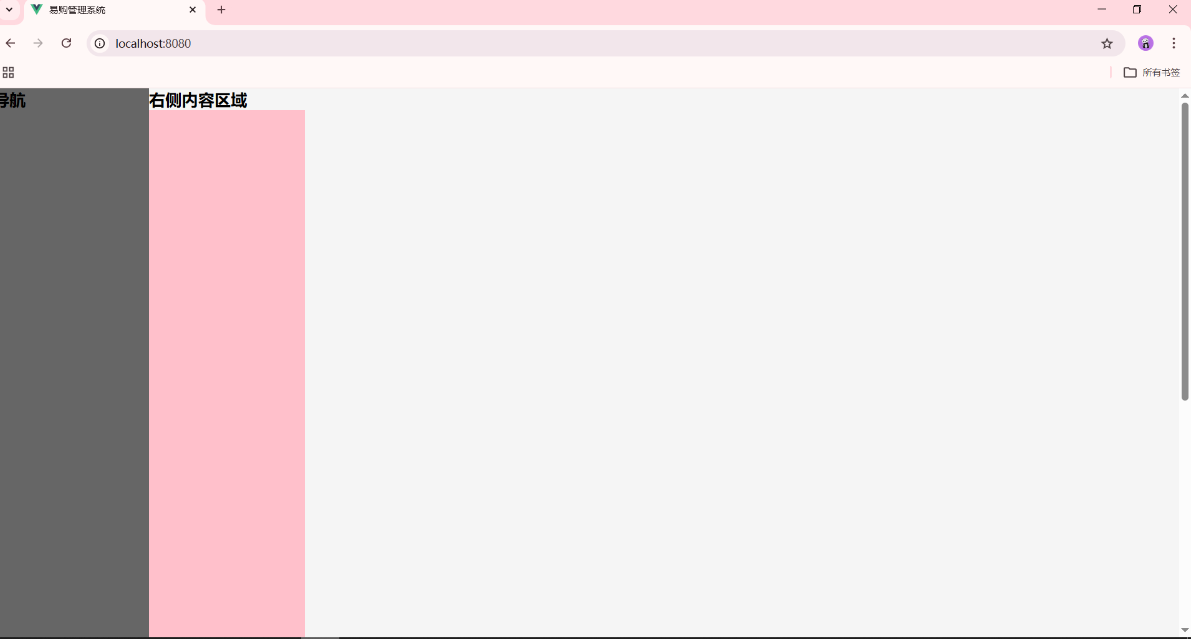
	<body>
		<noscript>
			<strong>We're sorry but <%= htmlWebpackPlugin.options.title %> doesn't work properly without JavaScript
				enabled. Please enable it to continue.</strong>
		</noscript>
		<div id="app"></div>
		<!-- built files will be auto injected -->
	</body>
</html>


2, src/assets/css/iconfont.css

@font-face {
	font-family: "iconfont";
	/* Project id 5071804 */
	src: url('../fonts/iconfont.woff2?t=1763845203530') format('woff2'),
		url('../fonts/iconfont.woff?t=1763845203530') format('woff'),
		url('../fonts/iconfont.ttf?t=1763845203530') format('truetype');
}

.iconfont {
	font-family: "iconfont" !important;
	font-size: 16px;
	font-style: normal;
	-webkit-font-smoothing: antialiased;
	-moz-osx-font-smoothing: grayscale;
}

.icon-shezhi1:before {
	content: "\e684";
}

.icon-bottom-l022x:before {
	content: "\e640";
}

.icon-shangpinguanli-xuanzhong:before {
	content: "\e607";
}

.icon-shangpinguanli:before {
	content: "\e6d1";
}

.icon-qiyeshangpinguanli:before {
	content: "\e604";
}

.icon-shangpinguanli1:before {
	content: "\e69c";
}

.icon-guigecanshu:before {
	content: "\e644";
}

.icon-shezhi:before {
	content: "\e643";
}

.icon-dingdanxinxiicon_weizhi:before {
	content: "\e610";
}

.icon-dingdanxinxi:before {
	content: "\e63f";
}

.icon-icon-service:before {
	content: "\e669";
}

.icon-left-indent:before {
	content: "\e7b7";
}

.icon-right-indent:before {
	content: "\e805";
}

.icon-icon-add-circle:before {
	content: "\e601";
}

.icon-icon_nav:before {
	content: "\e616";
}

.icon-xiugai:before {
	content: "\e63c";
}

.icon-icon-tuichu:before {
	content: "\e60b";
}

.icon-icon_quit:before {
	content: "\e665";
}

.icon-icon-product:before {
	content: "\e6a5";
}

.icon-shanchu:before {
	content: "\e67a";
}

.icon-user_1:before {
	content: "\e659";
}

.icon-a-icon_Productdisplay:before {
	content: "\e629";
}

.icon-icon_add:before {
	content: "\e657";
}

.icon-manage:before {
	content: "\e602";
}

.icon-icon_youxiang:before {
	content: "\e6ec";
}

.icon-icon-shanchu2:before {
	content: "\e603";
}


3, src/assets/css/reset.css
/*@import url(https://at.alicdn.com/t/c/font_5071804_r9oe8ved79f.css);*/

* {
	margin: 0;
	padding: 0;
}

ul {
	list-style: none;
}

a {
	text-decoration: none;
}

img {
	vertical-align: middle;
}

body {
	font-family: '微软雅黑', 'Arial Narrow', Arial, sans-serif;
	font-size: 14px;
	background: #f5f5f5;
}

/*清浮动*/


4, src/plugins/element.js

import Vue from 'vue';
import {
	Pagination,
	Dialog,
	Autocomplete,
	Dropdown,
	DropdownMenu,
	DropdownItem,
	Menu,
	Submenu,
	MenuItem,
	MenuItemGroup,
	Input,
	InputNumber,
	Radio,
	RadioGroup,
	RadioButton,
	Checkbox,
	CheckboxButton,
	CheckboxGroup,
	Switch,
	Select,
	Option,
	OptionGroup,
	Button,
	ButtonGroup,
	Table,
	TableColumn,
	DatePicker,
	TimeSelect,
	TimePicker,
	Popover,
	Tooltip,
	Breadcrumb,
	BreadcrumbItem,
	Form,
	FormItem,
	Tabs,
	TabPane,
	Tag,
	Tree,
	Alert,
	Slider,
	Icon,
	Row,
	Col,
	Upload,
	Progress,
	Spinner,
	Badge,
	Card,
	Rate,
	Steps,
	Step,
	Carousel,
	CarouselItem,
	Collapse,
	CollapseItem,
	Cascader,
	ColorPicker,
	Transfer,
	Container,
	Header,
	Aside,
	Main,
	Footer,
	Timeline,
	TimelineItem,
	Link,
	Divider,
	Image,
	Calendar,
	Backtop,
	PageHeader,
	CascaderPanel,
	Loading,
	MessageBox,
	Message,
	Notification
} from 'element-ui';

Vue.use(Pagination);
Vue.use(Dialog);
Vue.use(Autocomplete);
Vue.use(Dropdown);
Vue.use(DropdownMenu);
Vue.use(DropdownItem);
Vue.use(Menu);
Vue.use(Submenu);
Vue.use(MenuItem);
Vue.use(MenuItemGroup);
Vue.use(Input);
Vue.use(InputNumber);
Vue.use(Radio);
Vue.use(RadioGroup);
Vue.use(RadioButton);
Vue.use(Checkbox);
Vue.use(CheckboxButton);
Vue.use(CheckboxGroup);
Vue.use(Switch);
Vue.use(Select);
Vue.use(Option);
Vue.use(OptionGroup);
Vue.use(Button);
Vue.use(ButtonGroup);
Vue.use(Table);
Vue.use(TableColumn);
Vue.use(DatePicker);
Vue.use(TimeSelect);
Vue.use(TimePicker);
Vue.use(Popover);
Vue.use(Tooltip);
Vue.use(Breadcrumb);
Vue.use(BreadcrumbItem);
Vue.use(Form);
Vue.use(FormItem);
Vue.use(Tabs);
Vue.use(TabPane);
Vue.use(Tag);
Vue.use(Tree);
Vue.use(Alert);
Vue.use(Slider);
Vue.use(Icon);
Vue.use(Row);
Vue.use(Col);
Vue.use(Upload);
Vue.use(Progress);
Vue.use(Spinner);
Vue.use(Badge);
Vue.use(Card);
Vue.use(Rate);
Vue.use(Steps);
Vue.use(Step);
Vue.use(Carousel);
Vue.use(CarouselItem);
Vue.use(Collapse);
Vue.use(CollapseItem);
Vue.use(Cascader);
Vue.use(ColorPicker);
Vue.use(Transfer);
Vue.use(Container);
Vue.use(Header);
Vue.use(Aside);
Vue.use(Main);
Vue.use(Footer);
Vue.use(Timeline);
Vue.use(TimelineItem);
Vue.use(Link);
Vue.use(Divider);
Vue.use(Image);
Vue.use(Calendar);
Vue.use(Backtop);
Vue.use(PageHeader);
Vue.use(CascaderPanel);

Vue.use(Loading.directive);

Vue.prototype.$loading = Loading.service;
Vue.prototype.$msgbox = MessageBox;
Vue.prototype.$alert = MessageBox.alert;
Vue.prototype.$confirm = MessageBox.confirm;
Vue.prototype.$prompt = MessageBox.prompt;
Vue.prototype.$notify = Notification;
Vue.prototype.$message = Message;


5, src/router/index.js
import Vue from 'vue'
import VueRouter from 'vue-router'
import Layout from '../views/Layout/index.vue'
import Home from '../views/Home/index.vue'
import Login from '../views/Login/Login.vue'

// 异步
const Goods = () => import('../views/Goods/Goods.vue')
const Params = () => import('../views/Params/Params.vue')
const Advert = () => import('../views/Advert/Advert.vue')
const Order = () => import('../views/Order/index.vue')
const OrderList = () => import('../views/Order/OrderList/index.vue')
const OrderBack = () => import('../views/Order/OrderBack/index.vue')

Vue.use(VueRouter)

const routes = [{
		path: '',
		component: Layout,
		children: [{
			path: '/',
			name: 'Home',
			component: Home
		}, {
			path: '/goods',
			name: 'Goods',
			component: Goods
		}, {
			path: '/params',
			name: 'Params',
			component: Params
		}, {
			path: '/advert',
			name: 'Advert',
			component: Advert
		}, {
			path: '/order',
			name: 'Order',
			component: Order,
			redirect: '/order/order-list',
			children: [{
				path: 'order-list',
				component: OrderList
			}, {
				path: 'order-back',
				component: OrderBack
			}]
		}]
	},
	{
		path: '/login',
		name: 'Login',
		component: Login,
	}

	// {
	//   path: '/',
	//   name: 'home',
	//   component: HomeView
	// },
	// {
	//   path: '/about',
	//   name: 'about',
	//   // route level code-splitting
	//   // this generates a separate chunk (about.[hash].js) for this route
	//   // which is lazy-loaded when the route is visited.
	//   component: function () {
	//     return import(/* webpackChunkName: "about" */ '../views/AboutView.vue')
	//   }
	// }
]

const router = new VueRouter({
	mode: 'history',
	base: process.env.BASE_URL,
	routes
})

export default router


6, src/store/index.js
import Vue from 'vue'
import Vuex from 'vuex'

Vue.use(Vuex)

export default new Vuex.Store({
  state: {
  },
  getters: {
  },
  mutations: {
  },
  actions: {
  },
  modules: {
  }
})


7, src/views/Advert/Advert.vue
<template>
	<div>
		<h2>广告分类</h2>
	</div>
</template>

<script>
</script>

<style>
</style>


8, src/views/Goods/Goods.vue
<template>
	<div>
		<h2>商品管理</h2>
	</div>
</template>

<script>
</script>

<style>
</style>


9, src/views/Home/index.vue
<template>
	<div>
		<h2>首页</h2>
	</div>
</template>

<script>
</script>

<style>
</style>


10, src/views/Layout/Content.vue

<template>
	<div>
		<div class="header">顶部区域</div>
		<!-- 右侧内容区域 --左侧 路由出口 -->
		<div class="content">
			<!-- 路由出口 -->
			<router-view />
		</div>
	</div>
</template>

<script>
</script>

<style lang="less" scoped>
	.header {
		height: 60px;
		background: skyblue;
	}
</style>


11, src/views/Layout/index.vue
<template>
	<div class="layout">
		<!-- 左侧导航区域 -->
		<MyMenu class="menu" />
		<!-- 右侧内容区域 -->
		<Content class="content" />
	</div>
</template>

<script>
	import MyMenu from './Mymenu.vue'
	import Content from './Content.vue'
	export default {
		components: {
			MyMenu,
			Content
		}
	}
</script>

<style lang="less" scoped>
	.layout {

		.menu {
			width: 200px;
			min-height: 500px;
			background: #666;
			position: fixed;
			top: 0;
			bottom: 0;
		}

		.content {
			margin-left: 200px;
		}
	}
</style>


12, src/views/Layout/Mymenu.vue

<template>
	<div>
		<el-menu default-active="/" class="el-menu-vertical-demo" background-color="#545c64" text-color="#fff"
			active-text-color="#ffd04b" router :collapse="isCollapse">
			<el-menu-item index="/">
				<i class="el-icon-menu"></i>
				<span slot="title">首页</span>
			</el-menu-item>
			<el-menu-item index="/goods">
				<i class="el-icon-document"></i>
				<span slot="title">商品管理</span>
			</el-menu-item>
			<el-menu-item index="/params">
				<i class="el-icon-setting"></i>
				<span slot="title">规格参数</span>
			</el-menu-item>
			<el-menu-item index="/advert">
				<i class="el-icon-setting"></i>
				<span slot="title">广告分类</span>
			</el-menu-item>
			<el-submenu index="/order">
				<template slot="title">
					<i class="el-icon-location"></i>
					<span>订单管理</span>
				</template>
				<el-menu-item-group>
					<template slot="title">订单</template>
					<el-menu-item index="/order/order-list">
						<i class="el-icon-document"></i>
						<span>订单列表</span>
					</el-menu-item>
					<el-menu-item index="/order/order-back">
						<i class="el-icon-setting"></i>
						<span>退货管理</span>
					</el-menu-item>
				</el-menu-item-group>
				<el-menu-item-group>
					<template slot="title">分组一</template>
					<el-menu-item index="5-3">选项1</el-menu-item>
					<el-menu-item index="5-4">选项2</el-menu-item>
				</el-menu-item-group>
				<el-menu-item-group title="分组2">
					<el-menu-item index="5-5">选项3</el-menu-item>
				</el-menu-item-group>
				<el-submenu index="1-4">
					<template slot="title">选项4</template>
					<el-menu-item index="1-4-1">选项1</el-menu-item>
				</el-submenu>
			</el-submenu>
		</el-menu>
	</div>
</template>

<script>
	export default {
		data() {
			return {
				isCollapse: false
			}
		}
	}
</script>

<style>
</style>


13, src/views/Login/Login.vue
<template>
	<div>
		<h2>登录界面</h2>
	</div>
</template>

<script>
</script>

<style>
</style>


14, src/views/Order/index.vue
<template>
	<div>
		<!-- 路由出口 -->
		<router-view />
	</div>
</template>

<script>
</script>

<style>
</style>


15, src/views/Order/OrderBack/index.vue

<template>
	<div>
		<h2>退货管理</h2>
	</div>
</template>

<script>
</script>

<style>
</style>


16, src/views/Order/OrderList/index.vue

<template>
	<div>
		<h2>
			订单列表
		</h2>
	</div>
</template>

<script>
</script>

<style>
</style>


17, src/views/Params/Params.vue

<template>
	<div>
		<h2>规格参数</h2>
	</div>
</template>

<script>
</script>

<style>
</style>


18, src/App.vue
<template>
	<div id="app">
		<router-view />
	</div>
</template>

<script>
	export default {
		name: 'app',
		components: {},
	};
</script>

<style lang="less">
	//
</style>


19, src/main.js
import Vue from 'vue'
import App from './App.vue'
import router from './router'
import store from './store'
import './plugins/element.js'
import './assets/css/reset.css'
import './assets/css/iconfont.css'

Vue.config.productionTip = false

new Vue({
	router,
	store,
	render: function(h) {
		return h(App)
	}
}).$mount('#app')


20, babel.config.js
module.exports = {
	"presets": [
		"@vue/cli-plugin-babel/preset"
	],
	"plugins": [
		[
			"component",
			{
				"libraryName": "element-ui",
				"styleLibraryName": "theme-chalk"
			}
		]
	]
}


21, package.json

{
	"name": "vue-ego",
	"version": "0.1.0",
	"private": true,
	"scripts": {
		"serve": "vue-cli-service serve",
		"build": "vue-cli-service build"
	},
	"dependencies": {
		"axios": "^0.24.0",
		"core-js": "^3.6.5",
		"element-ui": "^2.4.5",
		"less": "^3.0.4",
		"less-loader": "^5.0.0",
		"source-map": "^0.6.0",
		"vue": "^2.6.11",
		"vue-router": "^3.2.0",
		"vuex": "^3.4.0"
	},
	"devDependencies": {
		"@vue/cli-plugin-babel": "~4.5.0",
		"@vue/cli-plugin-router": "~4.5.0",
		"@vue/cli-plugin-vuex": "~4.5.0",
		"@vue/cli-service": "~4.5.0",
		"babel-plugin-component": "^1.1.1",
		"vue-cli-plugin-element": "~1.0.1",
		"vue-template-compiler": "^2.6.11"
	},
	"browserslist": [
		"> 1%",
		"last 2 versions",
		"not dead"
	],
	"babel": {
		"plugins": [
			[
				"component",
				{
					"libraryName": "element-ui",
					"styleLibraryName": "theme-chalk"
				}
			]
		]
	}
}