一、概述
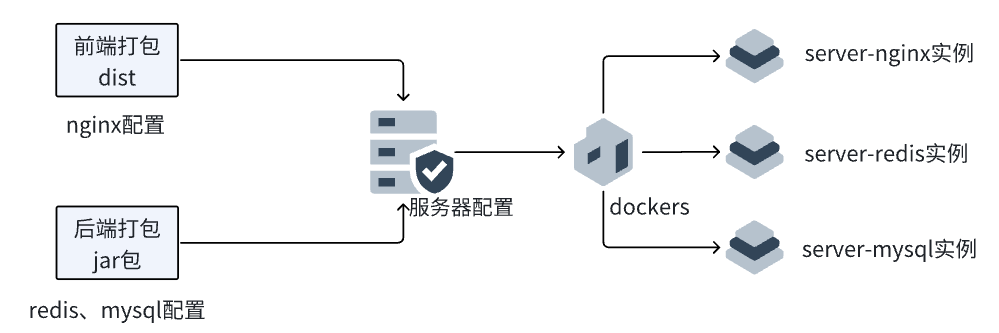
前端打包使用的是生产环境,修改代理前缀和后端接口、前端端口。
后端打包成jar包,修改redis、mysql配置。
云服务器上的mysql、redis、nginx实例创建在dockers容器中,借助dockers保证各个环境不受干扰。
二、前端部署
1.打包
项目打开后,查看README.md查看命令,
举例:npm install安装依赖,npm run dev开发环境本地运行测试,npm run build生产环境打包。
bash
#开发环境  .env.development
# 应用端口
VITE_APP_PORT=9208

# 代理前缀
VITE_APP_BASE_API=/dev-api

# 接口地址  本地测试
VITE_APP_API_URL="http://localhost:17000"

# WebSocket 端点(不配置则关闭),线上 ws://api.youlai.tech/ws ,本地 ws://localhost:8989/ws
VITE_APP_WS_ENDPOINT=

# 启用 Mock 服务
VITE_MOCK_DEV_SERVER=false
bash
#生产环境  .env.production
# 应用端口
VITE_APP_PORT=9208

# 代理前缀
VITE_APP_BASE_API=/api

# 接口地址  连接服务器地址
VITE_APP_API_URL = "http://服务器地址:17000"

# WebSocket 端点(不配置则关闭),线上 ws://api.youlai.tech/ws ,本地 ws://localhost:8989/ws
VITE_APP_WS_ENDPOINT=

# 启用 Mock 服务
VITE_MOCK_DEV_SERVER=false
2.nginx配置
将前端打包dist文件夹放在根目录下,dist文件是解压状态。
bash
# 1.创建配置文件
mkdir -p /opt/project_name/conf.d
cat > /opt/project_name/conf/default.conf << 'EOF'
server {
    listen 17000;
    server_name 服务器地址;

    location / {
        root /usr/share/nginx/html;
        index index.html index.htm;
        try_files $uri $uri/ /index.html;

        location ~* \.(js|css|png|jpg|jpeg|gif|ico|svg|woff|woff2)$ {
            expires 1y;
            add_header Cache-Control "public, immutable";
        }
    }

    location /api/ {
        proxy_pass http://服务器地址:17001;
        proxy_set_header Host $host;
        proxy_set_header X-Real-IP $remote_addr;
        proxy_set_header X-Forwarded-For $proxy_add_x_forwarded_for;
        proxy_set_header X-Forwarded-Proto $scheme;

        proxy_connect_timeout 30s;
        proxy_send_timeout 30s;
        proxy_read_timeout 30s;
    }

    location /health {
        access_log off;
        return 200 "zbgl-new-healthy\n";
        add_header Content-Type text/plain;
    }
}
EOF
bash
# 2.检查文件是否创建成功
ls -la /opt/project_name/conf/default.conf

# 3.查看文件内容
cat /opt/project_name/conf/default.conf

# 4.如果有问题,删除有问题的目录/文件
rm -rf /opt/project_name/conf/default.conf

# 5.创建配置目录
mkdir -p /opt/project_name/conf.d

# 6.复制配置文件到目录
cp /opt/project_name/conf/default.conf /opt/project_name/conf.d/

# 7.如果有,删除之前的容器
docker rm -f zbgl-new-nginx 2>/dev/null

# 8.使用目录挂载启动容器    这里的-p可以理解为前端:后端
docker run -d \
  --name zbgl-new-nginx \
  --restart unless-stopped \
  -p 9208:17000 \
  -v /root/dist_zbgl:/usr/share/nginx/html \
  -v /opt/project_name/conf.d:/etc/nginx/conf.d \
  -v /opt/project_name/logs:/var/log/nginx \
  nginx:alpine
bash
# 总结:
# 日常管理命令
docker restart zbgl-new-nginx                    # 重启容器
docker logs -f zbgl-new-nginx                   # 查看实时日志
docker exec zbgl-new-nginx nginx -s reload      # 重载配置(不重启)

# 更新前端文件(实时生效,无需重启)
# 直接更新 /root/dist/ 目录下的文件即可

# 更新配置
vi /opt/project_name/conf.d/default.conf
docker exec zbgl-new-nginx nginx -t
docker exec zbgl-new-nginx nginx -s reload   #重新加载nginx

# 在服务器本地完整测试
echo "前端访问地址: http://服务器地址:17000/"

# 使用curl详细测试 显示200就成功了
curl -v http://localhost:17000/

# 或者在浏览器中访问
# http://服务器地址:17000/
三、后端部署
本地后端redis、mysql测试成功后,再上传jar包到服务器,本地运行redis和mysql的指令如下:
bash
切换到Redis目录下,运行redis-server redis.windows.conf
运行cmd,命令:net start mysql
项目打包部署
clear、compile、package打好包后,jar包在resources的文件夹里
使用传输软件winscp或Xftp将文件上传至服务器。
注意:①redis和mysql正常运行,后端运行端口没有和其他程序端口起冲突。 ②如果docker容器中redis正常运行,而且端口映射到宿主机上,那么就不用在宿主机上安装redis了。 ③在后端配置文件application.yml中active中的文件,例如application-prod.yml文件中写的redis连的主机应该是127.0.0.1,而且一般情况都是6379端口,密码是123456。 ④如果直接使用java -jar strategy-boot.jar命令,按ctrl+c会直接停掉后端程序,必须让其在后台运行。
bash
#Xshell连接成功服务器后,部署后端过程:
[root@xyycszh111 ~]netstat -tlnp | grep 17000   #检查后端端口是否被占用
tcp6       0      0 :::17000                :::*                    LISTEN      99103/java

[root@xyycszh111 ~]ps aux | grep 99103     # 查看是哪个Java程序

[root@xyycszh111 ~]kill -9 99103 # 停止这个进程

[root@xyycszh111 ~]sleep 2   # 等待2秒

[root@xyycszh111 ~]netstat -tlnp | grep 17000  # 再次检查端口是否释放

[root@xyycszh111 ~]nohup java -jar strategy-boot.jar > strategy-boot.log 2>&1 &
#输出显示: [1] 13523        表明已经在后台成功运行

[root@xyycszh111 ~]ps aux | grep youlai-boot.jar   #查看后端jar包是否运行
#输出显示:root      13523  394  4.7 9098716 575584 pts/0  Sl   21:11   0:43 java -jar strategy-boot.jar
#输出显示:root      13639  0.0  0.0 112820   964 pts/0    S+   21:11   0:00 grep --color=auto strategy-boot.jar
#上述输出说明后端成功运行

[root@xyycszh111 ~]tail -f strategy-boot.log    #输出后端运行日志到strategy-boot.log文件中
#输出日志类似下面内容,说明后端运行成功
2025-12-01T21:11:24.622+08:00  WARN 13523 --- [strategy-boot] [           main] o.s.s.c.a.web.builders.WebSecurity       : You are asking Spring Security to ignore Deferred [Mvc [pattern='/swagger-ui/**'], Ant [pattern='/swagger-ui/**']]. This is not recommended -- please use permitAll via HttpSecurity#authorizeHttpRequests instead.
2025-12-01T21:11:24.622+08:00  WARN 13523 --- [strategy-boot] [           main] o.s.s.c.a.web.builders.WebSecurity       : You are asking Spring Security to ignore Deferred [Mvc [pattern='/swagger-ui.html'], Ant [pattern='/swagger-ui.html']]. This is not recommended -- please use permitAll via HttpSecurity#authorizeHttpRequests instead.
2025-12-01T21:11:24.622+08:00  WARN 13523 --- [strategy-boot] [           main] o.s.s.c.a.web.builders.WebSecurity       : You are asking Spring Security to ignore Deferred [Mvc [pattern='/api/v1/auth/captcha'], Ant [pattern='/api/v1/auth/captcha']]. This is not recommended -- please use permitAll via HttpSecurity#authorizeHttpRequests instead.
2025-12-01T21:11:24.622+08:00  WARN 13523 --- [strategy-boot] [           main] o.s.s.c.a.web.builders.WebSecurity       : You are asking Spring Security to ignore Deferred [Mvc [pattern='/api/v1/auth/refresh-token'], Ant [pattern='/api/v1/auth/refresh-token']]. This is not recommended -- please use permitAll via HttpSecurity#authorizeHttpRequests instead.
2025-12-01T21:11:24.622+08:00  WARN 13523 --- [strategy-boot] [           main] o.s.s.c.a.web.builders.WebSecurity       : You are asking Spring Security to ignore Deferred [Mvc [pattern='/ws/**'], Ant [pattern='/ws/**']]. This is not recommended -- please use permitAll via HttpSecurity#authorizeHttpRequests instead.
2025-12-01T21:11:25.558+08:00  INFO 13523 --- [strategy-boot] [           main] o.s.b.w.embedded.tomcat.TomcatWebServer  : Tomcat started on port 17000 (http) with context path '/'
2025-12-01T21:11:25.560+08:00  INFO 13523 --- [strategy-boot] [           main] o.s.m.s.b.SimpleBrokerMessageHandler     : Starting...
2025-12-01T21:11:25.561+08:00  INFO 13523 --- [strategy-boot] [           main] o.s.m.s.b.SimpleBrokerMessageHandler     : BrokerAvailabilityEvent[available=true, SimpleBrokerMessageHandler [org.springframework.messaging.simp.broker.DefaultSubscriptionRegistry@a9b5c85]]
2025-12-01T21:11:25.561+08:00  INFO 13523 --- [strategy-boot] [           main] o.s.m.s.b.SimpleBrokerMessageHandler     : Started.
2025-12-01T21:11:25.582+08:00  INFO 13523 --- [strategy-boot] [           main] com.youlai.boot.YouLaiBootApplication    : Started StrategyBootApplication in 10.186 seconds (process running for 10.794)
有什么问题,欢迎各位批评指正!