文本分类
-
- 安装前置包
- 数据加载
- 使用表征模型进行文本分类
-
- [1. 使用特定任务模型](#1. 使用特定任务模型)
- [2. 性能评估函数](#2. 性能评估函数)
- 基于嵌入向量的分类方法
-
- [1. 监督分类(使用逻辑回归)](#1. 监督分类(使用逻辑回归))
使用表征模型和生成模型进行文本分类
安装前置包
python
# %%capture
# !pip install transformers sentence-transformers openai
# !pip install -U datasets
数据加载
python
from datasets import load_dataset

# 加载数据集
data = load_dataset("rotten_tomatoes")
data
上述代码直接运行可能会报错
requests.exceptions.SSLError:(MaxRetryError("HTTPSConnectionPool(host='huggingface.co', port=443)
原因是因为网络不能下载,可以引入梯子端口,代理端口的查看方式如下
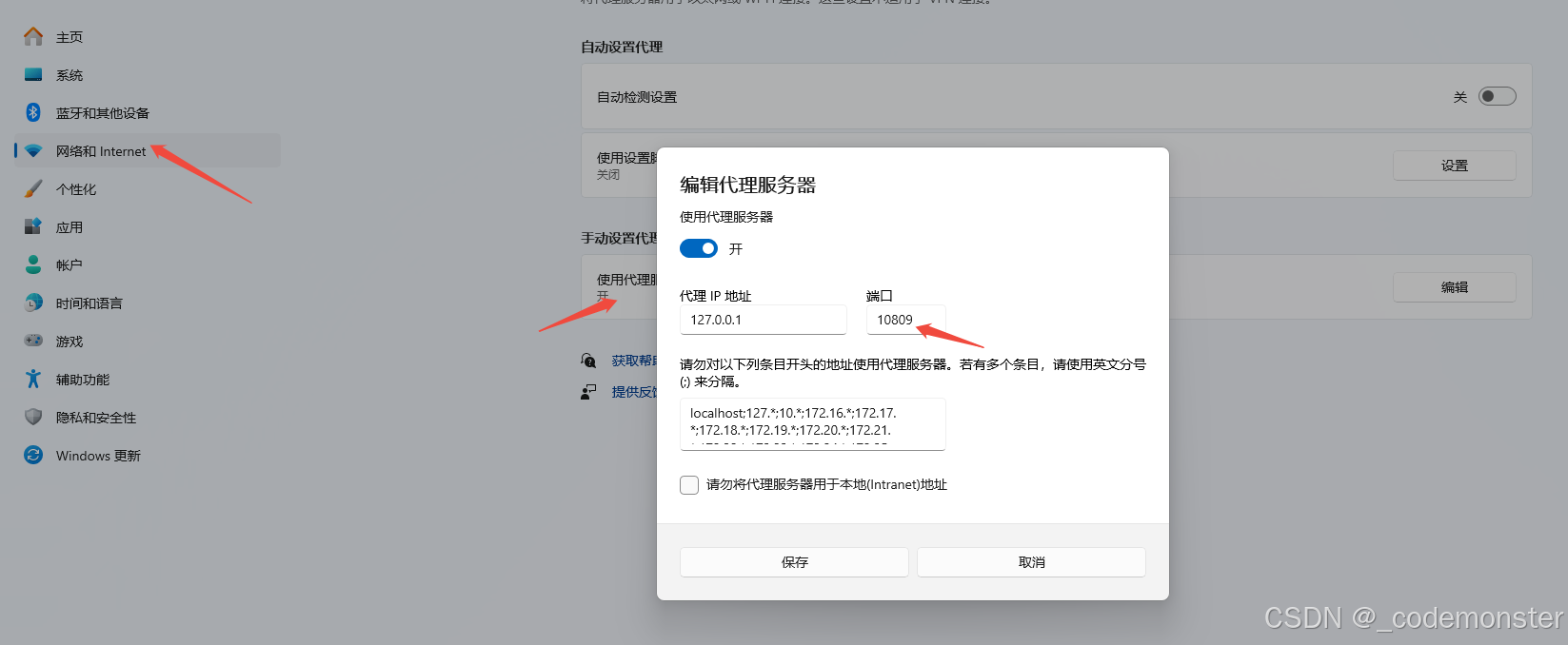
并将缓存地址改为自己有权限的指定地址
python
from datasets import load_dataset

import os
os.environ['HTTP_PROXY'] = 'http://127.0.0.1:10809'
os.environ['HTTPS_PROXY'] = 'http://127.0.0.1:10809'

# Load our data
# data = load_dataset("rotten_tomatoes")

os.environ['HF_HOME'] = 'D:/huggingface_cache'  # 改为你喜欢的目录

# 或者使用数据集加载时的参数
data = load_dataset(
    "rotten_tomatoes",
    cache_dir="D:/huggingface_cache/datasets"
)

data
如果已经将数据rotten_tomatoes下载到本地了,也可以直接用本地地址进行加载
python
from datasets import load_dataset
import os

# Load our data
data = load_dataset("/workspace/huggingface_cache/datasets/rotten_tomatoes")

data
输出:
DatasetDict({
train: Dataset({
features: 'text', 'label',
num_rows: 8530
})
validation: Dataset({
features: 'text', 'label',
num_rows: 1066
})
test: Dataset({
features: 'text', 'label',
num_rows: 1066
})
})
python
# 查看训练集样本
data["train"][0:2]
输出:
{'text': ['the rock is destined to be the 21st century\'s new " conan " and that he\'s going to make a splash even greater than arnold schwarzenegger , jean-claud van damme or steven segal .',
  'things really get weird , though not particularly scary : the movie is all portent and no content .'],
 'label': [1, 0]}
使用表征模型进行文本分类
1. 使用特定任务模型
python
from transformers import pipeline
import numpy as np
from tqdm import tqdm
from transformers.pipelines.pt_utils import KeyDataset

# 加载预训练模型(已针对情感分析进行微调)
model_path = "cardiffnlp/twitter-roberta-base-sentiment-latest"

# 创建推理管道
pipe = pipeline(
    model=model_path,
    tokenizer=model_path,
    task="text-classification",
    return_all_scores=True,
    device="cuda:0" if torch.cuda.is_available() else "cpu"
)
上面代码如果网络不给力的话,可能没办法把模型下载下来,可以在网络行得通的电脑上用下面电脑下载下来后离线加载。
python
from huggingface_hub import snapshot_download
import os
os.environ['HTTP_PROXY'] = 'http://127.0.0.1:10809'
os.environ['HTTPS_PROXY'] = 'http://127.0.0.1:10809'

# 设置模型路径
model_id = "cardiffnlp/twitter-roberta-base-sentiment-latest"
local_dir = "D:/huggingface_cache/models/twitter-roberta-base-sentiment-latest"

# 确保目录存在
os.makedirs(local_dir, exist_ok=True)

# 下载模型(对应 hf download 命令)
print(f"开始下载模型: {model_id}")
print(f"保存到: {local_dir}")

try:
    snapshot_download(
        repo_id=model_id,
        local_dir=local_dir,
        local_dir_use_symlinks=False,  # 不使用符号链接
        force_download=True,           # 强制重新下载
        resume_download=False          # 不续传
    )
    print("✅ 模型下载完成!")

except Exception as e:
    print(f"❌ 下载失败: {e}")
local_dir 改成自己的本地存储路径就行
离线加载
和之前我们做的入门实验一样,不过之前的AutoModelForCausalLM(用于因果语言模型)是用来来加载一个分类模型的。而twitter-roberta-base-sentiment-latest 是一个文本分类模型,应该用 AutoModelForSequenceClassification来进行加载。
python
model_path = "/workspace/models/twitter-roberta-base-sentiment-latest"

import torch
from transformers import AutoModelForSequenceClassification, AutoTokenizer
model = AutoModelForSequenceClassification.from_pretrained(
    model_path,  # 本地路径
    device_map="cuda",
    torch_dtype="auto",
    trust_remote_code=False,
    local_files_only=True  # 关键参数:只使用本地文件
)
tokenizer = AutoTokenizer.from_pretrained(model_path, local_files_only=True)
然后再用加载的模型创建一个文本分类管道
注意这里是text-classification而不是之前的 text-generation 。
python
from transformers import pipeline

# 创建一个文本分类管道
pipe = pipeline(
    model=model_path,
    tokenizer=model_path,
    task="text-classification",
    return_all_scores=True,
    device="cuda:0" if torch.cuda.is_available() else "cpu"
)
推理
python
# 在测试集上进行推理
y_pred = []
for output in tqdm(pipe(KeyDataset(data["test"], "text"),
                        batch_size=32),
                   total=len(data["test"]),
                   desc="模型推理"):
    # 提取负面和正面情感得分
    negative_score = output[0]["score"]
    positive_score = output[2]["score"]
    # 选择得分较高的类别
    assignment = 0 if negative_score > positive_score else 1
    y_pred.append(assignment)
2. 性能评估函数
python
from sklearn.metrics import classification_report

def evaluate_performance(y_true, y_pred):
    """评估分类性能并打印报告"""
    performance = classification_report(
        y_true,
        y_pred,
        target_names=["负面评价", "正面评价"],
        digits=4
    )
    print("分类性能报告:")
    print(performance)

# 评估模型性能
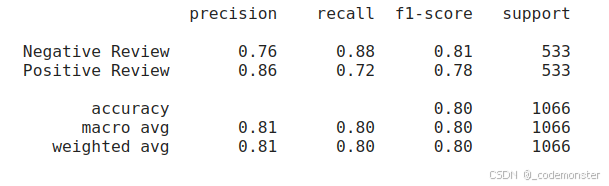
evaluate_performance(data["test"]["label"], y_pred)
输出:
基于嵌入向量的分类方法
在前面的示例中,我们使用了预训练的特定任务模型twitter-roberta-base-sentiment-latest进行情感分析。但如果找不到针对这个特定任务预训练的模型呢?是否需要自己微调表示模型?答案是否定的。如果你有足够的计算资源,可能会有想要自己微调模型的时候。然而,并非每个人都能获得大量的计算资源。这就是通用嵌入模型发挥作用的地方。
我们将通用嵌入模型进行冻结也就是不进行训练,只是用它来提取特征并将输入文本转换为嵌入向量。
1. 监督分类(使用逻辑回归)
补丁1:apply_monkey_patches
python
import sys
import types

def apply_monkey_patches():
    """应用猴子补丁解决所有导入问题"""

    print("应用猴子补丁...")

    # 1. 补丁 torch._six
    import torch

    class TorchSixPatch:
        string_classes = (str,)
        int_classes = int
        def is_integer(self, obj):
            return isinstance(obj, int)

    if not hasattr(torch, '_six'):
        torch._six = types.ModuleType('_six')
        patch = TorchSixPatch()
        torch._six.string_classes = patch.string_classes
        torch._six.int_classes = patch.int_classes
        torch._six.is_integer = patch.is_integer

    # 2. 预导入可能会出问题的模块
    try:
        # 提前导入这些模块以避免循环导入
        import numpy as np
        import pandas as pd
        from typing import Any, Dict, List, Optional, Tuple, Union
    except:
        pass

    # 3. 创建简化版的 trainer 模块
    create_simple_trainer_module()

    print("✅ 猴子补丁应用完成")

def create_simple_trainer_module():
    """创建简化版的 trainer 模块"""

    # 创建模拟的 trainer 模块
    trainer_module = types.ModuleType('transformers.trainer')

    # 添加必要的类和函数
    class TrainerStub:
        def __init__(self, *args, **kwargs):
            pass

    trainer_module.Trainer = TrainerStub
    trainer_module.__version__ = "4.30.0"

    # 注入到 sys.modules
    sys.modules['transformers.trainer'] = trainer_module

    # 也更新 transformers 模块的引用
    import transformers
    transformers.trainer = trainer_module
    transformers.Trainer = TrainerStub

# 在导入任何 transformers 模块之前调用
补丁2:apply_comprehensive_patches
python
import sys
import types
import warnings

# 抑制警告
warnings.filterwarnings('ignore')

def apply_comprehensive_patches():
    """应用全面的兼容性补丁"""

    print("=" * 60)
    print("应用全面的兼容性补丁")
    print("=" * 60)

    # 1. 修复 torch._six
    import torch
    if not hasattr(torch, '_six'):
        print("1. 修复 torch._six...")
        torch._six = types.ModuleType('torch._six')
        torch._six.string_classes = (str, bytes)
        torch._six.int_classes = int
        torch._six.is_integer = lambda x: isinstance(x, int)
        torch._six.PY2 = False
        torch._six.PY3 = True
        print("   ✅ 完成")

    # 2. 修复 transformers.trainer 模块
    print("2. 修复 transformers.trainer...")
    fix_transformers_trainer()

    # 3. 修复其他可能的问题
    print("3. 设置环境变量...")
    import os
    os.environ['TRANSFORMERS_OFFLINE'] = '1'
    os.environ['HF_DATASETS_OFFLINE'] = '1'

    print("✅ 所有补丁应用完成")
    return True

def fix_transformers_trainer():
    """修复 transformers.trainer 模块"""

    # 创建完整的 trainer 模拟模块
    trainer_module = types.ModuleType('transformers.trainer')

    # 添加必要的常量
    trainer_module.TRAINING_ARGS_NAME = "training_args.bin"
    trainer_module.WEIGHTS_NAME = "pytorch_model.bin"
    trainer_module.CONFIG_NAME = "config.json"

    # 添加 Trainer 类(简化版)
    class TrainerStub:
        def __init__(self, *args, **kwargs):
            self.args = kwargs.get('args', None)
            self.model = kwargs.get('model', None)
            self.data_collator = kwargs.get('data_collator', None)

        def train(self):
            print("Trainer.train() - 简化版")
            return None

        def evaluate(self):
            print("Trainer.evaluate() - 简化版")
            return {}

        def predict(self):
            print("Trainer.predict() - 简化版")
            return []

    trainer_module.Trainer = TrainerStub

    # 添加其他必要的类和函数
    trainer_module.set_seed = lambda x: None
    trainer_module.EvalPrediction = type('EvalPrediction', (), {})
    trainer_module.IntervalStrategy = type('IntervalStrategy', (), {
        'NO': 'no',
        'STEPS': 'steps',
        'EPOCH': 'epoch'
    })

    # 添加版本信息
    trainer_module.__version__ = "4.30.0"

    # 注入到 sys.modules
    sys.modules['transformers.trainer'] = trainer_module

    # 更新 transformers 模块
    if 'transformers' in sys.modules:
        import transformers
        transformers.trainer = trainer_module
        transformers.Trainer = TrainerStub
        transformers.trainer.TRAINING_ARGS_NAME = "training_args.bin"

    return trainer_module
加载离线模型
python
apply_monkey_patches()
apply_comprehensive_patches()
from sentence_transformers import SentenceTransformer

# Load model
model = SentenceTransformer('/workspace/models/all-mpnet-base-v2')

# Convert text to embeddings
train_embeddings = model.encode(data["train"]["text"], show_progress_bar=True)
test_embeddings = model.encode(data["test"]["text"], show_progress_bar=True)
apply_monkey_patches()和apply_comprehensive_patches()是两个补丁,由于版本不兼容的问题,可能会报错Failed to import transformers.trainer because of the following error (look up to see its traceback):No module named 'torch._six'以及报错ImportError: cannot import name 'TRAINING_ARGS_NAME' from 'transformers.trainer' (unknown location),这两个补丁是为了解决这两个问题的。
all-mpnet-base-v2充当的就是前面讲的通用嵌入模型进行冻结也就是不进行训练,只是用它来提取特征并将输入文本转换为嵌入向量。
python
print(f"训练集嵌入维度: {train_embeddings.shape}")输出
(8530, 768)
引入逻辑回归分类器对前面得到的向量进行训练
python
# 训练逻辑回归分类器
clf = LogisticRegression(random_state=42, max_iter=1000)
clf.fit(train_embeddings, data["train"]["label"])
预测并评估所训练出来的模型
python
# 预测并评估
y_pred = clf.predict(test_embeddings)
evaluate_performance(data["test"]["label"], y_pred)
输出