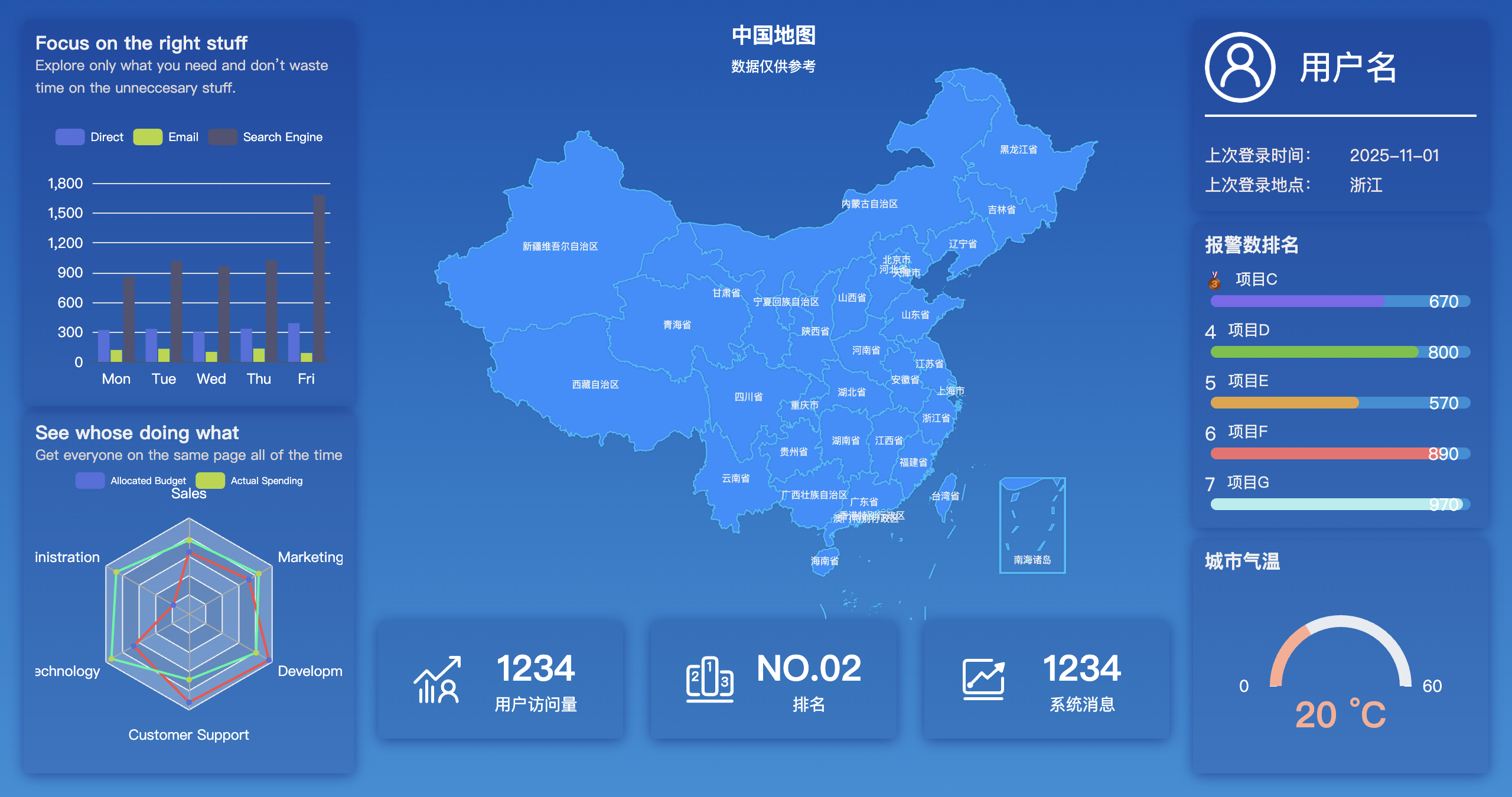
一、布局实现
1. flex进行"左中右"布局
html
<div class="data-container">
    <div class="left">
    </div>
    <div class="right">
    </div>
    <div class="middle">
    </div>
</div>
//css部分
.data-container {
  background: linear-gradient(#0056b1, #248fd8);
  position: flex;
  display: flex;
  /* padding: 0px 10px 10px 10px; */
  height: 100%;
  width: 100%;
}

.left {
  width: 280px;
  background:rgb(147, 144, 238);
  padding: 20px 10px 20px 20px;
  display: flex;
  flex-direction: column;
  justify-content: space-between;
}

.right{
  width:250px;
  padding: 20px 20px 20px 10px;
  background:lightgreen;
  display: flex;
  flex-direction: column;
  justify-content: space-between;
}

.middle {
  flex: 1;
  background:rgb(238, 219, 144);
  padding: 20px 10px 20px 10px;
  display: flex;
  flex-direction: column;
}
2. div划分模块,设计科技感配色
html
<div class="data-container">
    <!-- 数据面板 -->
    <div class="left">
      <div class="card">

      </div>
      <!--  -->
      <div class="card ">

      </div>
    </div>
    <div class="middle">
      <!-- 地图 -->
      <div class="map-chart">

      </div>
      <!--  -->
      <div class="grid" >
        <div class="grid-content grid-con-1 card">

        </div>
        <div class="grid-content grid-con-2 card">

        </div>
        <div class="grid-content grid-con-3 card">

        </div>
      </div>
    </div>
    <div class="right">
      <div class="card right-top">

      </div>
      <div class="card right-mid">
      </div>

      <div class="card right-bottom">

      </div>
    </div>

  </div>

// css

.card {
  border-width: 1px;
  border-color:  rgba(25,25,112,0.4);
  background-color: rgba(25,25,112,0.2);
  box-shadow: 0 2px 12px 0 rgba(18, 45, 136, 0.7);
  padding: 10px;
  border-radius: 5px;
  justify-content: center;
  align-items: center;
  /* margin-top: 10px; */
}
二、echarts中的图表展示
- 地图:
https://blog.csdn.net/qq_44846654/article/details/147929138?spm=1011.2415.3001.5331
- 统一管理图表
html
<!-- components/EchartsMap.vue -->
<template>
  <div ref="chartDom" :style="{'width':width, 'height': height}"></div>
</template>

<script>
// eslint-disable-next-line standard/object-curly-even-spacing
import { ref, onMounted, onBeforeUnmount, watch} from 'vue'
import {BAROPTION, MAPOPTION, RADAROPTION, GAUGEOPTIO} from './defaultOption'
import echarts from '../../plugins/echarts'

export default {
  name: 'MapEchart',
  props: {
    region: {type: String, default: 'china'},
    mapData: { type: Array, default: () => [] }, // 地图数据(如省份值)
    option: { type: Object, default: () => ({}) }, // 自定义配置覆盖
    echartsType: {type: String, default: 'map'}, // such as: map, bar, line...
    width: {type: String},
    height: {type: String}
  },
  setup (props) {
    const chartDom = ref(null)
    let chartInstance = null

    // 初始化图表
    const initChart = () => {
      console.log(props.echartsType)
      if (!chartInstance) {
        chartInstance = echarts.init(chartDom.value)
      }
      let baseOption = null
      if (props.echartsType === 'map') {
        const geoJson = require(`../../mapJson/${props.region}.json`)
        echarts.registerMap(props.region, geoJson)
        baseOption = MAPOPTION
      } else if (props.echartsType === 'bar') {
        baseOption = BAROPTION
      } else if (props.echartsType === 'radar') {
        baseOption = RADAROPTION
      } else if (props.echartsType === 'gauge') {
        baseOption = GAUGEOPTIO
      }
      // 合并外部配置
      chartInstance.setOption(baseOption)
      console.log(baseOption)
    }
    // 响应窗口变化
    const resizeChart = () => {
      if (chartDom.value) {
        chartInstance.resize()
      }
    }

    // 监听数据变化
    watch(() => props.mapData, (newVal) => {
      // chartInstance.setOption({ series: [{ data: newVal }] });
    })

    onMounted(() => {
      initChart()
      window.addEventListener('resize', resizeChart)
    })

    onBeforeUnmount(() => {
      window.removeEventListener('resize', resizeChart)
      // if(chartDom.value){
      //   chartInstance.dispose();
      // }
    })

    return { chartDom }
  }
}
</script>- 可滚动的排行榜