1.导入设置问题
像素ui的导入需要调整ppu值,一般是2的倍数
filter mode 改成point模式
format改成自动或者 rgba32 bit模式
压缩模式改为高质量或者none
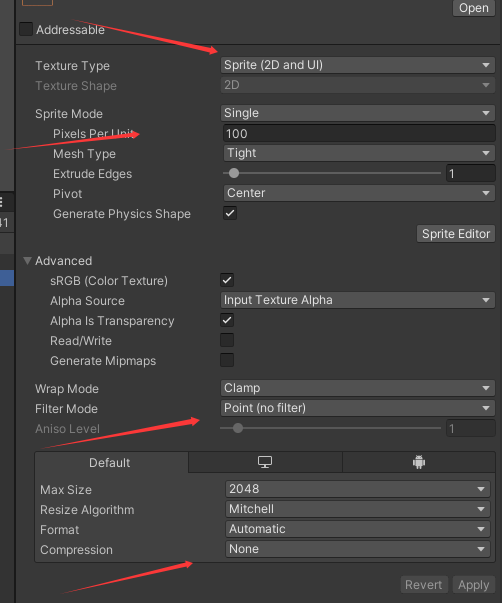
2.ui缩放问题导致像素对不上
ui的缩放需要成整数的倍数的缩放,canvas模式改成scale content screen size 模式进行适配
调整好模板比例后再进行拼ui, ppu也要和图片的导入的ppu进行同步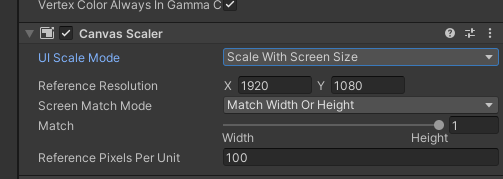
3.效果图和ui拼后的不一样
美术要规范,要在指定的大小范围内进行拼效果,不能随性,图的大小规格要适配参考比例大小
图片导出的时候要仔细,不然图片和效果图之间有出入
4.ui的适配问题
需要调整锚点来控制缩放,根据屏幕的宽高比进行适配
5.脚本适配代码
挂载到canvas下即可,选择适合你的方式
using UnityEngine;
using UnityEngine.UI;
/// <summary>
/// 像素完美 Canvas 自动配置
/// 挂载到 Canvas 上,自动处理不同分辨率适配
/// </summary>
RequireComponent(typeof(Canvas))
RequireComponent(typeof(CanvasScaler))
public class PixelPerfectCanvasSetup : MonoBehaviour
{
Header("基准设置")
Tooltip("基准分辨率(美术资源设计的目标分辨率)")
public Vector2Int baseResolution = new Vector2Int(1920, 1080);
Tooltip("像素每单位(与 Sprite PPU 保持一致)")
public float pixelsPerUnit = 32f;
Header("缩放策略")
Tooltip("缩放模式")
public ScalingMode scalingMode = ScalingMode.IntegerScaling;
Tooltip("屏幕匹配权重(0=宽度优先,1=高度优先,0.5=平衡)")
Range(0f, 1f)
public float matchWidthOrHeight = 0.5f;
Header("像素对齐")
Tooltip("启用像素对齐(避免模糊)")
public bool enablePixelSnapping = true;
Tooltip("运行时动态调整")
public bool updateAtRuntime = true;
private Canvas canvas;
private CanvasScaler canvasScaler;
private int lastScreenWidth;
private int lastScreenHeight;
public enum ScalingMode
{
/// <summary>整数倍缩放(最清晰,但可能有黑边)</summary>
IntegerScaling,
/// <summary>自适应缩放(填满屏幕,可能略微模糊)</summary>
AdaptiveScaling,
/// <summary>固定像素尺寸(不缩放,可能裁剪)</summary>
ConstantPixelSize
}
void Awake()
{
canvas = GetComponent<Canvas>();
canvasScaler = GetComponent<CanvasScaler>();
ApplyPixelPerfectSettings();
}
void Start()
{
lastScreenWidth = Screen.width;
lastScreenHeight = Screen.height;
}
void LateUpdate()
{
if (!updateAtRuntime) return;
// 检测分辨率变化
if (Screen.width != lastScreenWidth || Screen.height != lastScreenHeight)
{
ApplyPixelPerfectSettings();
lastScreenWidth = Screen.width;
lastScreenHeight = Screen.height;
}
}
/// <summary>
/// 应用像素完美设置
/// </summary>
public void ApplyPixelPerfectSettings()
{
canvas.pixelPerfect = true;
switch (scalingMode)
{
case ScalingMode.IntegerScaling:
ApplyIntegerScaling();
break;
case ScalingMode.AdaptiveScaling:
ApplyAdaptiveScaling();
break;
case ScalingMode.ConstantPixelSize:
ApplyConstantPixelSize();
break;
}
Debug.Log($"PixelPerfect 分辨率: {Screen.width}x{Screen.height}, " +
$"缩放: {canvasScaler.scaleFactor:F2}x, " +
$"模式: {scalingMode}");
}
/// <summary>
/// 整数倍缩放(推荐用于像素艺术)
/// 优点:完美清晰
/// 缺点:可能有黑边
/// </summary>
private void ApplyIntegerScaling()
{
canvasScaler.uiScaleMode = CanvasScaler.ScaleMode.ScaleWithScreenSize;
canvasScaler.referenceResolution = baseResolution;
canvasScaler.screenMatchMode = CanvasScaler.ScreenMatchMode.MatchWidthOrHeight;
canvasScaler.matchWidthOrHeight = matchWidthOrHeight;
canvasScaler.referencePixelsPerUnit = pixelsPerUnit;
// 计算整数倍缩放
int scaleX = Mathf.Max(1, Screen.width / baseResolution.x);
int scaleY = Mathf.Max(1, Screen.height / baseResolution.y);
int scale = Mathf.Min(scaleX, scaleY);
// 调整参考分辨率以实现整数倍缩放,确保为偶数避免像素完美渲染警告
int adjustedWidth = Screen.width / scale;
int adjustedHeight = Screen.height / scale;
// 强制转换为偶数(向下取整到最近的偶数)
adjustedWidth = MakeEven(adjustedWidth);
adjustedHeight = MakeEven(adjustedHeight);
Vector2 adjustedResolution = new Vector2(adjustedWidth, adjustedHeight);
canvasScaler.referenceResolution = adjustedResolution;
}
/// <summary>
/// 确保数值为偶数(向下取整到最近的偶数)
/// </summary>
private int MakeEven(int value)
{
return (value / 2) * 2;
}
/// <summary>
/// 自适应缩放(推荐用于混合风格)
/// 优点:填满屏幕
/// 缺点:可能轻微模糊
/// </summary>
private void ApplyAdaptiveScaling()
{
canvasScaler.uiScaleMode = CanvasScaler.ScaleMode.ScaleWithScreenSize;
canvasScaler.referenceResolution = baseResolution;
canvasScaler.screenMatchMode = CanvasScaler.ScreenMatchMode.MatchWidthOrHeight;
canvasScaler.matchWidthOrHeight = matchWidthOrHeight;
canvasScaler.referencePixelsPerUnit = pixelsPerUnit;
}
/// <summary>
/// 固定像素尺寸(不推荐,仅特殊情况)
/// </summary>
private void ApplyConstantPixelSize()
{
canvasScaler.uiScaleMode = CanvasScaler.ScaleMode.ConstantPixelSize;
canvasScaler.scaleFactor = 1f;
canvasScaler.referencePixelsPerUnit = pixelsPerUnit;
}
/// <summary>
/// 获取当前像素缩放比例
/// </summary>
public float GetCurrentScale()
{
return canvasScaler.scaleFactor;
}
/// <summary>
/// 获取整数倍缩放级别
/// </summary>
public int GetIntegerScaleLevel()
{
int scaleX = Mathf.Max(1, Screen.width / baseResolution.x);
int scaleY = Mathf.Max(1, Screen.height / baseResolution.y);
return Mathf.Min(scaleX, scaleY);
}
void OnValidate()
{
// 编辑器中实时预览
if (Application.isPlaying && canvas != null && canvasScaler != null)
{
ApplyPixelPerfectSettings();
}
}
}