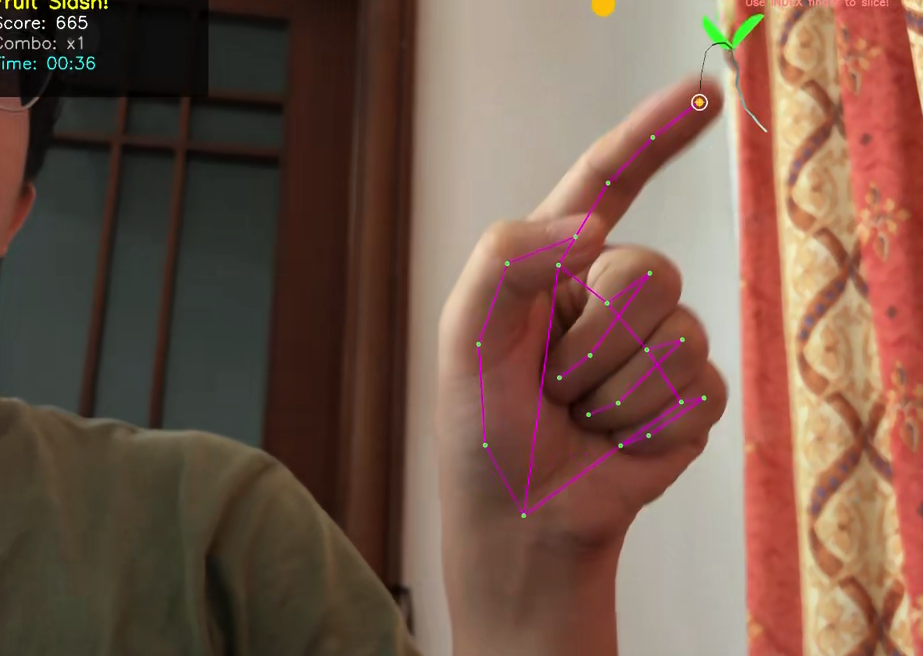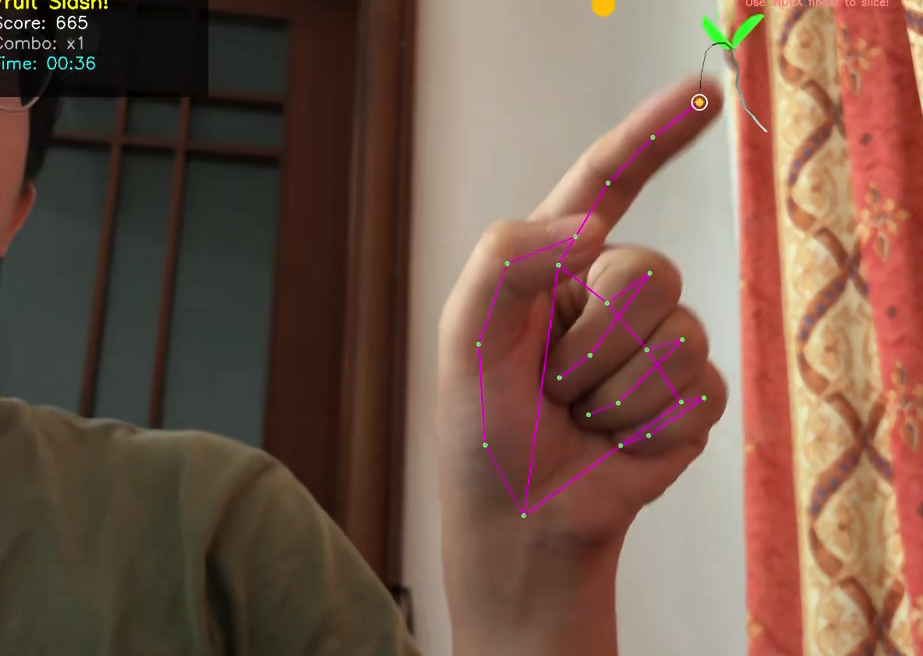
- 环境
mac python10
- 代码
python
import cv2
import mediapipe as mp
import time
import numpy as np
import random
import math
# 初始化MediaPipe解决方案
mp_hands = mp.solutions.hands
mp_face_mesh = mp.solutions.face_mesh
mp_draw = mp.solutions.drawing_utils
# 自定义绘制样式
face_drawing_spec = mp_draw.DrawingSpec(thickness=1, circle_radius=1, color=(0, 255, 0))
hand_drawing_spec = mp_draw.DrawingSpec(thickness=2, circle_radius=3, color=(0, 0, 255))
# 初始化模型
hands = mp_hands.Hands(
static_image_mode=False,
max_num_hands=2,
min_detection_confidence=0.5, # 降低检测阈值,提高灵敏度
min_tracking_confidence=0.3 # 降低跟踪阈值
)
face_mesh = mp_face_mesh.FaceMesh(
static_image_mode=False,
max_num_faces=1,
min_detection_confidence=0.5,
min_tracking_confidence=0.5
)
# 打开摄像头
cap = cv2.VideoCapture(0)
if not cap.isOpened():
print("无法打开摄像头,请检查连接。")
exit()
# 设置摄像头分辨率(适中分辨率以保证性能)
cap.set(cv2.CAP_PROP_FRAME_WIDTH, 720)
cap.set(cv2.CAP_PROP_FRAME_HEIGHT, 720)
print("=== 切水果游戏 ===")
print("游戏规则:")
print("1. 伸出食指作为'刀'来切水果")
print("2. 切中水果得分,错过扣分")
print("3. 保持笑脸可以获得分数加成!")
print("游戏时间:2分钟")
print("控制:")
print("Q - 退出游戏")
print("R - 重新开始游戏")
print("H - 显示/隐藏手部检测")
print("F - 显示/隐藏面部检测")
print("==================")
# 游戏状态
show_hands = True
show_face = False
game_active = True
score = 0
combo = 0
max_combo = 0
game_start_time = time.time()
game_duration = 60 # 游戏时长120秒(2分钟)
show_fireworks = False
fireworks_start_time = 0
fireworks_duration = 5 # 烟花效果持续时间(秒)
# FPS计算
pTime = 0
# 烟花粒子类
class FireworkParticle:
def __init__(self, x, y):
self.x = x
self.y = y
self.color = (
random.randint(150, 255),
random.randint(150, 255),
random.randint(150, 255)
)
self.size = random.randint(2, 6)
self.speed_x = random.uniform(-5, 5)
self.speed_y = random.uniform(-8, -3)
self.life = 100
self.gravity = 0.2
self.trail = []
def update(self):
self.x += self.speed_x
self.y += self.speed_y
self.speed_y += self.gravity
self.life -= 2
# 添加轨迹点
self.trail.append((int(self.x), int(self.y)))
if len(self.trail) > 5:
self.trail.pop(0)
return self.life > 0
def draw(self, frame):
# 绘制轨迹
for i in range(1, len(self.trail)):
alpha = i / len(self.trail)
color = (
int(self.color[0] * alpha),
int(self.color[1] * alpha),
int(self.color[2] * alpha)
)
cv2.line(frame, self.trail[i-1], self.trail[i], color, 1)
# 绘制粒子
cv2.circle(frame, (int(self.x), int(self.y)), self.size, self.color, -1)
cv2.circle(frame, (int(self.x), int(self.y)), self.size, (255, 255, 255), 1)
# 烟花效果
fireworks = []
def create_fireworks_effect(x, y, count=30):
"""在指定位置创建烟花效果"""
for _ in range(count):
fireworks.append(FireworkParticle(x, y))
# 水果类
class Fruit:
def __init__(self, width, height):
self.types = ['apple', 'banana', 'orange', 'watermelon', 'bomb']
self.colors = {
'apple': (0, 0, 255), # 红色
'banana': (0, 200, 255), # 黄色
'orange': (0, 165, 255), # 橙色
'watermelon': (0, 255, 0), # 绿色
'bomb': (100, 100, 100) # 灰色
}
self.type = random.choice(self.types)
self.color = self.colors[self.type]
self.radius = random.randint(20, 45) # 减小最小半径,让小水果更容易识别
# 初始位置(从屏幕顶部随机位置出现)
self.x = random.randint(self.radius, width - self.radius)
self.y = -self.radius
# 速度
self.speed_x = random.uniform(-2.0, 2.0)
self.speed_y = random.uniform(3.0, 6.0)
# 旋转(用于动画效果)
self.angle = 0
self.rotation_speed = random.uniform(-3.0, 3.0)
# 状态
self.sliced = False
self.slice_time = 0
self.slice_animation = 0
# 得分值
self.points = {
'apple': 10,
'banana': 15,
'orange': 20,
'watermelon': 30,
'bomb': -50 # 炸弹扣分
}
self.point_value = self.points[self.type]
# 切割特效颜色
self.slice_color = (
min(255, self.color[0] + 50),
min(255, self.color[1] + 50),
min(255, self.color[2] + 50)
)
def update(self, height, width):
if not self.sliced:
# 更新位置
self.x += self.speed_x
self.y += self.speed_y
# 边界反弹
if self.x <= self.radius or self.x >= width - self.radius:
self.speed_x *= -0.8 # 添加摩擦力
self.x = max(self.radius, min(width - self.radius, self.x))
# 旋转
self.angle += self.rotation_speed
# 检查是否掉出屏幕
if self.y > height + self.radius:
return False # 水果应该被移除
else:
# 切割动画
self.slice_animation += 1
if time.time() - self.slice_time > 1.5: # 1.5秒后消失
return False
return True
def draw(self, frame):
if not self.sliced:
# 绘制水果(带旋转效果)
angle_rad = math.radians(self.angle)
# 绘制水果主体
cv2.circle(frame, (int(self.x), int(self.y)), self.radius, self.color, -1)
# 绘制高光(只对大水果)
if self.radius > 25:
highlight_radius = self.radius // 3
highlight_x = int(self.x - highlight_radius * math.cos(angle_rad))
highlight_y = int(self.y - highlight_radius * math.sin(angle_rad))
cv2.circle(frame, (highlight_x, highlight_y),
highlight_radius // 2, (255, 255, 255), -1)
# 绘制水果细节(只对大水果)
if self.radius > 30:
if self.type == 'apple':
# 苹果梗
cv2.line(frame,
(int(self.x), int(self.y - self.radius)),
(int(self.x), int(self.y - self.radius - 15)),
(80, 40, 0), 2)
cv2.circle(frame, (int(self.x), int(self.y - self.radius - 15)),
2, (100, 50, 0), -1)
elif self.type == 'banana':
# 香蕉曲线
cv2.ellipse(frame, (int(self.x), int(self.y)),
(self.radius-8, self.radius), self.angle, 0, 180, (30, 120, 180), 1)
elif self.type == 'bomb':
# 炸弹引线
cv2.line(frame,
(int(self.x), int(self.y - self.radius)),
(int(self.x + 10), int(self.y - self.radius - 20)),
(50, 50, 50), 2)
cv2.circle(frame, (int(self.x + 10), int(self.y - self.radius - 20)),
2, (200, 0, 0), -1)
else:
# 绘制被切割的水果(两部分)
slice_offset = min(self.slice_animation * 5, 30)
rotation = self.angle + self.slice_animation * 10
# 左半部分(旋转下落)
left_x = int(self.x - slice_offset)
left_y = int(self.y + self.slice_animation * 2)
cv2.ellipse(frame,
(left_x, left_y),
(self.radius, self.radius//2),
rotation, 0, 180, self.slice_color, -1)
# 右半部分(旋转下落)
right_x = int(self.x + slice_offset)
right_y = int(self.y + self.slice_animation * 2)
cv2.ellipse(frame,
(right_x, right_y),
(self.radius, self.radius//2),
-rotation, 180, 360, self.slice_color, -1)
# 绘制果汁溅射效果
for _ in range(max(1, self.radius // 10)): # 根据水果大小决定溅射点数
juice_x = int(self.x) + random.randint(-self.radius, self.radius)
juice_y = int(self.y) + random.randint(-self.radius//2, self.radius//2)
juice_size = random.randint(2, max(3, self.radius//8))
cv2.circle(frame, (juice_x, juice_y), juice_size, self.slice_color, -1)
def check_slice(self, finger_x, finger_y, prev_finger_x, prev_finger_y):
"""检查手指是否切中了水果 - 优化小水果识别"""
if self.sliced:
return False
# 方法1:检查当前手指位置是否在水果内(主要方法)
distance = math.sqrt((finger_x - self.x)**2 + (finger_y - self.y)**2)
# 动态阈值:小水果使用更宽松的阈值
slice_threshold = self.radius * 1.2 # 增加20%的检测范围
# 方法2:检查手指移动路径是否穿过水果(备用方法)
path_sliced = False
if prev_finger_x > 0 and prev_finger_y > 0 and distance > slice_threshold:
# 计算手指移动线段与水果圆心的最短距离
line_length = math.sqrt((finger_x - prev_finger_x)**2 + (finger_y - prev_finger_y)**2)
if line_length > 0:
# 计算点到线段的距离
t = max(0, min(1, ((self.x - prev_finger_x)*(finger_x - prev_finger_x) +
(self.y - prev_finger_y)*(finger_y - prev_finger_y)) / (line_length**2)))
closest_x = prev_finger_x + t * (finger_x - prev_finger_x)
closest_y = prev_finger_y + t * (finger_y - prev_finger_y)
distance_to_path = math.sqrt((self.x - closest_x)**2 + (self.y - closest_y)**2)
# 如果路径穿过水果
if distance_to_path <= slice_threshold:
path_sliced = True
# 如果当前位置或路径穿过水果
if distance <= slice_threshold or path_sliced:
self.sliced = True
self.slice_time = time.time()
return True
return False
# 游戏水果列表
fruits = []
fruit_spawn_rate = 1.2 # 每秒生成水果的概率
# 手指追踪
finger_trail = []
prev_finger_x, prev_finger_y = -1, -1
max_trail_length = 15
def detect_finger_position(hand_landmarks, frame_shape):
"""检测食指指尖位置 - 简化版本"""
h, w, _ = frame_shape
# 食指指尖的索引是8
index_finger_tip = hand_landmarks.landmark[8]
# 转换为像素坐标
x = int(index_finger_tip.x * w)
y = int(index_finger_tip.y * h)
# 由于后面会做镜像翻转,这里需要计算镜像后的x坐标
# 镜像公式:x_mirrored = width - x
x_mirrored = w - x
return x_mirrored, y
def count_extended_fingers_simple(hand_landmarks, frame_shape):
"""计算伸直的手指数量 - 简化但更可靠的版本"""
h, w, _ = frame_shape
# 关键点索引
tip_ids = [4, 8, 12, 16, 20] # 指尖:拇指、食指、中指、无名指、小指
pip_ids = [3, 6, 10, 14, 18] # 第二关节
extended_count = 0
index_finger_extended = False
# 检查拇指(简化逻辑)
thumb_tip = hand_landmarks.landmark[tip_ids[0]]
thumb_pip = hand_landmarks.landmark[pip_ids[0]]
# 如果拇指指尖在PIP关节左侧(对于右手)
if thumb_tip.x < thumb_pip.x:
extended_count += 1
# 检查其他四指
for i in range(1, 5):
tip = hand_landmarks.landmark[tip_ids[i]]
pip = hand_landmarks.landmark[pip_ids[i]]
# 简单判断:如果指尖在PIP关节上方(y坐标更小)
# 添加一些容错空间
if tip.y < pip.y - 0.02: # 减少阈值,提高灵敏度
extended_count += 1
if i == 1: # 食指
index_finger_extended = True
return extended_count, index_finger_extended
def is_index_finger_extended(hand_landmarks):
"""专门检测食指是否伸直 - 更精确的方法"""
# 食指关键点
index_tip = hand_landmarks.landmark[8] # 食指指尖
index_pip = hand_landmarks.landmark[6] # 食指PIP关节
index_mcp = hand_landmarks.landmark[5] # 食指MCP关节
# 计算角度来判断食指是否伸直
# 方法1:检查指尖是否在PIP关节上方
if index_tip.y < index_pip.y:
# 方法2:检查指尖到MCP的距离是否大于PIP到MCP的距离
tip_to_mcp = math.sqrt((index_tip.x - index_mcp.x)**2 + (index_tip.y - index_mcp.y)**2)
pip_to_mcp = math.sqrt((index_pip.x - index_mcp.x)**2 + (index_pip.y - index_mcp.y)**2)
# 如果指尖离MCP比PIP离MCP更远,说明手指伸直
if tip_to_mcp > pip_to_mcp * 1.1:
return True
return False
def detect_expression(face_landmarks, frame_shape):
"""基于面部关键点检测简单表情"""
h, w, _ = frame_shape
landmarks = face_landmarks.landmark
# 嘴部关键点
mouth_top = landmarks[13]
mouth_bottom = landmarks[14]
mouth_top_y = int(mouth_top.y * h)
mouth_bottom_y = int(mouth_bottom.y * h)
mouth_height = abs(mouth_bottom_y - mouth_top_y)
# 嘴角
left_corner = landmarks[61]
right_corner = landmarks[291]
# 表情判断
expression = "Neutral"
color = (200, 200, 200)
is_smiling = False
# 检测微笑
if mouth_height > 15:
if left_corner.y < mouth_top.y and right_corner.y < mouth_top.y:
expression = "Smiling"
color = (0, 255, 255)
is_smiling = True
else:
expression = "Surprised"
color = (255, 0, 0)
return expression, color, is_smiling
def draw_game_info(frame, fps, score, combo, max_combo, time_left, is_smiling, finger_x, finger_y):
"""绘制游戏信息面板"""
h, w = frame.shape[:2]
# 创建半透明信息面板
overlay = frame.copy()
cv2.rectangle(overlay, (10, 10), (450, 220), (0, 0, 0), -1)
frame = cv2.addWeighted(overlay, 0.7, frame, 0.3, 0)
# 显示游戏信息
cv2.putText(frame, f'Fruit Slash!', (20, 45),
cv2.FONT_HERSHEY_SIMPLEX, 1.3, (0, 255, 255), 3)
cv2.putText(frame, f'Score: {score}', (20, 85),
cv2.FONT_HERSHEY_SIMPLEX, 1.1, (255, 255, 255), 2)
combo_color = (0, 255, 0) if combo > 1 else (200, 200, 200)
cv2.putText(frame, f'Combo: x{combo}', (20, 125),
cv2.FONT_HERSHEY_SIMPLEX, 1.1, combo_color, 2)
# 时间显示颜色变化
time_color = (255, 255, 0)
if time_left < 30: # 最后30秒变红色
time_color = (0, 0, 255) if int(time_left) % 2 == 0 else (255, 255, 0)
minutes = int(time_left) // 60
seconds = int(time_left) % 60
cv2.putText(frame, f'Time: {minutes:02d}:{seconds:02d}', (20, 165),
cv2.FONT_HERSHEY_SIMPLEX, 1.1, time_color, 2)
# 表情加成提示
if is_smiling:
cv2.putText(frame, f'Smile Bonus: +{combo*2}', (20, 205),
cv2.FONT_HERSHEY_SIMPLEX, 0.8, (0, 255, 255), 2)
# 游戏提示
cv2.putText(frame, "Use INDEX finger to slice!",
(w-400, 40), cv2.FONT_HERSHEY_SIMPLEX, 0.7, (150, 150, 255), 2)
# 在手指位置绘制"刀"的图标
if finger_x > 0 and finger_y > 0 and 0 <= finger_x < w and 0 <= finger_y < h:
# 绘制刀光效果
for i in range(1, len(finger_trail)):
if i < len(finger_trail) and len(finger_trail[i-1]) == 2 and len(finger_trail[i]) == 2:
x1, y1 = finger_trail[i-1]
x2, y2 = finger_trail[i]
if (0 <= x1 < w and 0 <= y1 < h and
0 <= x2 < w and 0 <= y2 < h):
thickness = max(1, 4 - i // 4)
alpha = 1.0 - (i / len(finger_trail))
color = (
int(255 * alpha),
int(255 * alpha),
int(200 * alpha)
)
try:
cv2.line(frame, (int(x1), int(y1)), (int(x2), int(y2)),
color, thickness)
except:
pass
# 当前手指位置(刀尖)
try:
# 绘制更大的手指指示器,便于瞄准小水果
cv2.circle(frame, (int(finger_x), int(finger_y)), 15, (255, 255, 255), 2)
cv2.circle(frame, (int(finger_x), int(finger_y)), 8, (0, 200, 255), -1)
# 绘制瞄准十字
cv2.line(frame,
(int(finger_x - 10), int(finger_y)),
(int(finger_x + 10), int(finger_y)),
(255, 255, 255), 1)
cv2.line(frame,
(int(finger_x), int(finger_y - 10)),
(int(finger_x), int(finger_y + 10)),
(255, 255, 255), 1)
except:
pass
return frame
def draw_game_over(frame, score, max_combo):
"""绘制游戏结束画面"""
h, w = frame.shape[:2]
# 半透明黑色背景
overlay = frame.copy()
cv2.rectangle(overlay, (0, 0), (w, h), (0, 0, 0), -1)
frame = cv2.addWeighted(overlay, 0.7, frame, 0.3, 0)
# 游戏结束标题
cv2.putText(frame, "GAME OVER!", (w//2 - 180, h//2 - 100),
cv2.FONT_HERSHEY_SIMPLEX, 2.5, (0, 0, 255), 4)
# 得分显示
cv2.putText(frame, f"Final Score: {score}", (w//2 - 150, h//2 - 20),
cv2.FONT_HERSHEY_SIMPLEX, 1.8, (255, 255, 255), 3)
# 最大连击
cv2.putText(frame, f"Max Combo: x{max_combo}", (w//2 - 140, h//2 + 30),
cv2.FONT_HERSHEY_SIMPLEX, 1.5, (0, 255, 255), 3)
# 评价
if score >= 1000:
evaluation = "EXCELLENT! You're a Fruit Ninja Master!"
color = (0, 255, 0)
elif score >= 500:
evaluation = "GREAT! Keep practicing!"
color = (0, 200, 255)
elif score >= 200:
evaluation = "GOOD JOB!"
color = (255, 255, 0)
else:
evaluation = "Nice try! Play again!"
color = (255, 150, 0)
cv2.putText(frame, evaluation, (w//2 - 200, h//2 + 80),
cv2.FONT_HERSHEY_SIMPLEX, 1.2, color, 3)
# 重新开始提示
cv2.putText(frame, "Press 'R' to restart or 'Q' to quit",
(w//2 - 200, h//2 + 140),
cv2.FONT_HERSHEY_SIMPLEX, 0.9, (200, 200, 0), 2)
return frame
# 主游戏循环
print("开始游戏!请伸出食指...")
print("提示:确保手部在摄像头范围内,光照良好")
while True:
success, frame = cap.read()
if not success:
print("无法读取视频流。")
break
# 获取帧尺寸
h, w, _ = frame.shape
# 转换颜色空间(在镜像前处理)
rgb_frame = cv2.cvtColor(frame, cv2.COLOR_BGR2RGB)
# 游戏逻辑
current_time = time.time()
time_left = max(0, game_duration - (current_time - game_start_time))
# 烟花效果逻辑
if show_fireworks:
if current_time - fireworks_start_time < fireworks_duration:
# 更新和绘制烟花
fireworks_to_remove = []
for i, firework in enumerate(fireworks):
if not firework.update():
fireworks_to_remove.append(i)
else:
firework.draw(frame)
# 移除已完成的烟花
for i in sorted(fireworks_to_remove, reverse=True):
fireworks.pop(i)
# 随机添加新烟花
if random.random() < 0.3:
x = random.randint(100, w-100)
y = random.randint(100, h-100)
create_fireworks_effect(x, y, random.randint(20, 40))
else:
show_fireworks = False
fireworks = []
# 生成新水果
if game_active and time_left > 0 and random.random() < fruit_spawn_rate * 0.033:
fruits.append(Fruit(w, h))
# 处理手部检测 - 优化版本
finger_x, finger_y = -1, -1
extended_fingers = 0
is_slicing = False
if show_hands:
hand_results = hands.process(rgb_frame)
if hand_results.multi_hand_landmarks:
for hand_landmarks in hand_results.multi_hand_landmarks:
if show_hands:
# 只绘制关键点和连接线,减少视觉干扰
mp_draw.draw_landmarks(
frame, hand_landmarks, mp_hands.HAND_CONNECTIONS,
mp_draw.DrawingSpec(color=(0, 255, 0), thickness=2),
mp_draw.DrawingSpec(color=(255, 0, 255), thickness=2)
)
# 使用专门的方法检测食指
if is_index_finger_extended(hand_landmarks):
# 检测手指位置
fx, fy = detect_finger_position(hand_landmarks, (h, w, 3))
# 确保手指位置有效
if 0 <= fx < w and 0 <= fy < h:
finger_x, finger_y = fx, fy
is_slicing = True
extended_fingers = 1
# 备用方法:使用简化检测
if not is_slicing:
ext_count, index_extended = count_extended_fingers_simple(hand_landmarks, (h, w, 3))
if index_extended:
fx, fy = detect_finger_position(hand_landmarks, (h, w, 3))
if 0 <= fx < w and 0 <= fy < h:
finger_x, finger_y = fx, fy
is_slicing = True
extended_fingers = ext_count
# 镜像翻转(在手指检测后)
frame = cv2.flip(frame, 1)
# 更新手指轨迹
if is_slicing and finger_x > 0 and finger_y > 0 and 0 <= finger_x < w and 0 <= finger_y < h:
# 在镜像后的坐标系中处理手指位置
finger_trail.append((finger_x, finger_y))
if len(finger_trail) > max_trail_length:
finger_trail.pop(0)
else:
if len(finger_trail) > 0:
# 逐渐清空轨迹
finger_trail = finger_trail[1:] if len(finger_trail) > 1 else []
# 处理面部检测
is_smiling = False
if show_face:
face_results = face_mesh.process(rgb_frame)
if face_results.multi_face_landmarks:
for face_landmarks in face_results.multi_face_landmarks:
if show_face:
# 只绘制面部关键轮廓
mp_draw.draw_landmarks(
frame, face_landmarks, mp_face_mesh.FACEMESH_CONTOURS,
landmark_drawing_spec=None,
connection_drawing_spec=face_drawing_spec
)
# 检测表情
expression, expr_color, smiling = detect_expression(face_landmarks, (h, w, 3))
is_smiling = smiling
# 显示表情标签
cv2.putText(frame, expression, (w//2 - 100, 60),
cv2.FONT_HERSHEY_SIMPLEX, 1.2, expr_color, 2)
# 更新和绘制水果
fruits_to_remove = []
for i, fruit in enumerate(fruits):
# 更新水果状态
if not fruit.update(h, w):
fruits_to_remove.append(i)
continue
# 检查是否被切割
if is_slicing and finger_x > 0 and finger_y > 0:
if fruit.check_slice(finger_x, finger_y, prev_finger_x, prev_finger_y):
# 计算得分
points_earned = fruit.point_value
# 连击加成
if points_earned > 0:
combo += 1
points_earned *= combo
# 微笑加成
if is_smiling:
points_earned += combo * 2
max_combo = max(max_combo, combo)
# 在水果位置创建烟花效果
create_fireworks_effect(int(fruit.x), int(fruit.y),
max(10, fruit.radius//2))
else:
# 切到炸弹,连击中断
combo = 0
# 炸弹爆炸效果
for _ in range(max(10, fruit.radius//2)):
fireworks.append(FireworkParticle(int(fruit.x), int(fruit.y)))
score += points_earned
# 显示得分
display_x = max(50, min(w-150, int(fruit.x)))
display_y = max(50, min(h-50, int(fruit.y - 40)))
score_text = f"+{points_earned}" if points_earned > 0 else f"{points_earned}"
text_color = (0, 255, 0) if points_earned > 0 else (0, 0, 255)
# 得分文本阴影效果
cv2.putText(frame, score_text, (display_x+2, display_y+2),
cv2.FONT_HERSHEY_SIMPLEX, 1.2, (0, 0, 0), 3)
cv2.putText(frame, score_text, (display_x, display_y),
cv2.FONT_HERSHEY_SIMPLEX, 1.2, text_color, 2)
# 绘制水果
fruit.draw(frame)
# 保存当前手指位置作为下一帧的"上一帧位置"
prev_finger_x, prev_finger_y = finger_x, finger_y
# 移除需要删除的水果
for i in sorted(fruits_to_remove, reverse=True):
fruits.pop(i)
# 检查游戏结束
if game_active and time_left <= 0:
game_active = False
show_fireworks = True
fireworks_start_time = current_time
# 创建大量烟花庆祝
for _ in range(5):
x = random.randint(100, w-100)
y = random.randint(100, h-100)
create_fireworks_effect(x, y, random.randint(30, 50))
# 计算FPS
cTime = time.time()
fps = 1 / (cTime - pTime) if (cTime - pTime) > 0 else 0
pTime = cTime
# 绘制游戏界面
if game_active:
frame = draw_game_info(frame, fps, score, combo, max_combo, time_left, is_smiling, finger_x, finger_y)
# 显示手指状态提示
if is_slicing:
cv2.putText(frame, "READY TO SLICE!", (w-300, h-30),
cv2.FONT_HERSHEY_SIMPLEX, 0.8, (0, 255, 0), 2)
else:
cv2.putText(frame, "EXTEND INDEX FINGER", (w-350, h-30),
cv2.FONT_HERSHEY_SIMPLEX, 0.8, (200, 200, 0), 2)
else:
frame = draw_game_over(frame, score, max_combo)
# 显示图像
cv2.imshow('Fruit Slash Game - 2 Minute Challenge!', frame)
# 键盘控制
key = cv2.waitKey(1) & 0xFF
if key == ord('q'): # 退出
break
elif key == ord('r'): # 重新开始游戏
fruits = []
finger_trail = []
fireworks = []
score = 0
combo = 0
max_combo = 0
game_start_time = time.time()
game_active = True
show_fireworks = False
print("游戏重新开始!")
elif key == ord('h'): # 切换手部检测显示
show_hands = not show_hands
print(f"手部检测: {'显示' if show_hands else '隐藏'}")
elif key == ord('f'): # 切换面部检测显示
show_face = not show_face
print(f"面部检测: {'显示' if show_face else '隐藏'}")
elif key == ord('d'): # 调试模式:显示检测信息
print(f"手指状态: 切割={is_slicing}, 坐标=({finger_x}, {finger_y})")
print(f"水果数量: {len(fruits)}")
# 释放资源
cap.release()
cv2.destroyAllWindows()