CARLA自动驾驶仿真环境搭建与DEMO详解
一、概述
1、什么是CARLA?
CARLA是一个开源的自动驾驶仿真平台,由Intel实验室和巴塞罗那自治大学计算机视觉中心共同开发。它基于虚幻引擎(Unreal Engine)构建,为自动驾驶系统的开发、训练和验证提供了一个逼真的虚拟环境。
主要特点:
- 🌟 开源免费:完全开源,社区活跃
- 🚗 逼真环境:高精度的城市环境、车辆模型和传感器模拟
- 🔧 灵活接口:支持Python API,易于集成
- 📊 多种传感器:摄像头、激光雷达、雷达、GPS等
- 🏙️ 多种地图:包括城市、乡村、高速公路等场景
2、为什么需要CARLA?
在真实的自动驾驶系统开发中,面临着诸多挑战:
- 安全风险:实际道路测试存在安全隐患
- 成本高昂:传感器、车辆和维护费用昂贵
- 场景限制:难以复现各种极端情况
- 法规限制:实际测试受法律法规约束
CARLA通过仿真解决了这些问题,让研究人员可以在安全、可控的环境中开发和测试算法。
二、效果
三、环境搭建
1、Ubuntu 22.04 环境(推荐)
1.1、Docker方式(最简单)
bash
# 1. 停止并移除已有的carla容器(如果存在)
docker stop carla
docker rm carla

# 2. 运行新的carla容器
docker run --gpus all --name carla --shm-size=128g -it -e NVIDIA_VISIBLE_DEVICES=all \
    --privileged --net=host -v $PWD:/workspace carlasim/carla:0.9.15 bash

# 3. 在容器内启动CARLA服务器(无界面模式)
./CarlaUE4.sh -RenderOffScreen -nosound
参数解释: 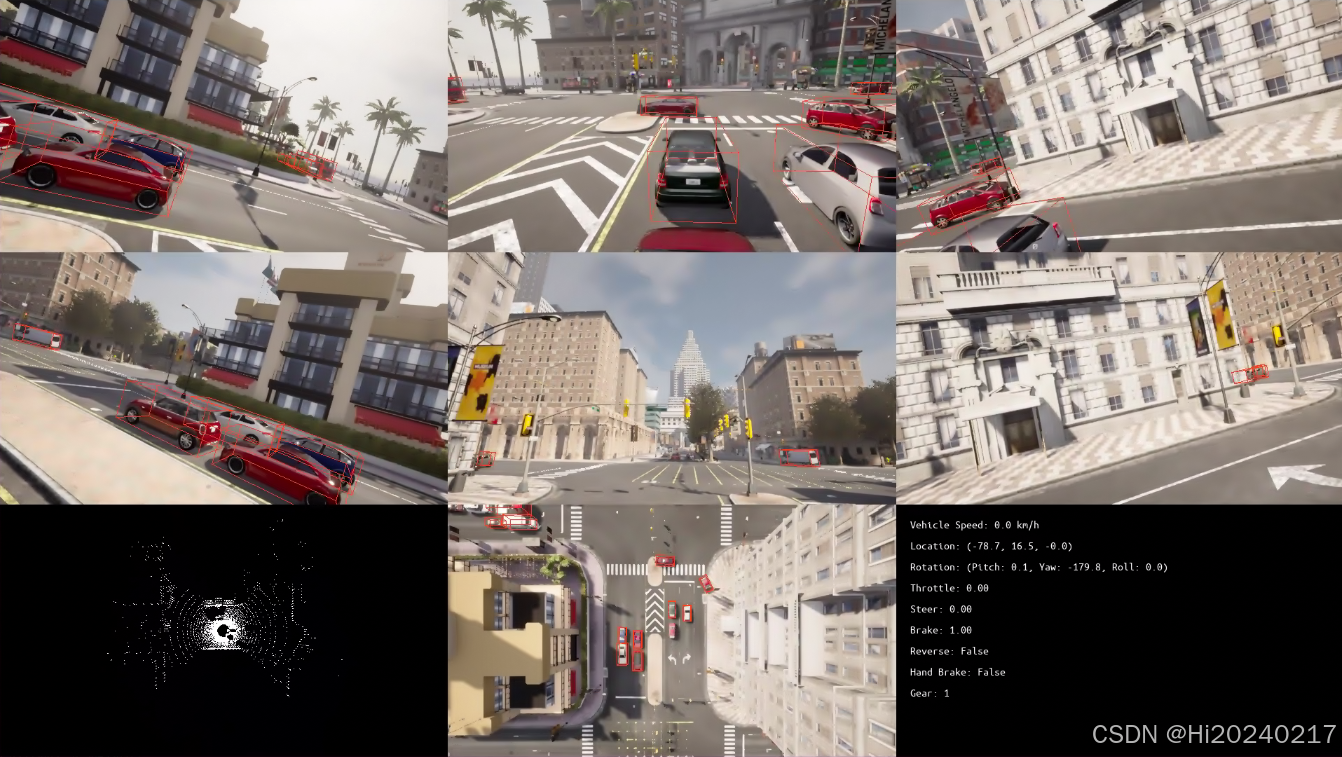
--gpus all:使用所有GPU,CARLA需要GPU加速渲染--shm-size=128g:设置共享内存大小,CARLA需要大量内存--privileged:给予容器特权,访问硬件设备--net=host:使用主机网络,方便通信-v $PWD:/workspace:挂载当前目录到容器的/workspace
2、Windows环境
2.1、Python3.8.0包安装方式
bash
# 安装CARLA Python客户端库
pip install carla==0.9.15

# 安装必要的依赖库
pip install opencv-python==4.12.0.88 pygame==2.6.1
pip install numpy==1.22
四、DEMO程序
1、功能说明
- 检测周围的车辆、行人、交通标志
- 计算它们在各个传感器视野中的位置
- 将3D边界框投影到2D图像上进行可视化
2、运行流程
- 初始化连接:连接到CARLA服务器
- 创建车辆:在随机位置生成主控车辆
- 安装传感器:安装6个摄像头和1个激光雷达
- 启动交通:生成其他交通车辆
- 主循环 :
- 世界更新(tick)
- 传感器数据采集
- 障碍物检测与可视化
- 界面渲染更新
3、传感器类型
3.1、RGB摄像头
- 模拟真实的相机拍摄效果
- 可以调整分辨率、视场角(FOV)
- 输出RGB图像数据
3.2、激光雷达(LiDAR)
- 模拟激光雷达的点云数据
- 可配置通道数、扫描范围、旋转频率
- 输出3D点云数据
4、摄像头布局
python
# 6个相机的安装位置(模拟环视系统)
CAMERA_POS = {
    "camera_front":[0,1],      # 前视
    "camera_right_front":[0,2], # 右前
    "camera_left_front":[0,0],  # 左前
    "camera_rear":[1,1],        # 后视
    "camera_left_rear":[1,0],   # 左后
    "camera_right_rear":[1,2]   # 右后
}
这种布局模拟了自动驾驶车辆常见的环视系统,提供360度的环境感知能力。
5、代码
python
import cv2
import numpy as np
import os
import json
import time
from datetime import datetime
from typing import Tuple, List, Dict
from pyquaternion import Quaternion
import glob
import sys
import carla
import argparse
import random
import math
import weakref
import pygame
from pygame.locals import K_ESCAPE
from pygame.locals import K_q
from scipy.spatial.transform import Rotation as R
from scipy.spatial.transform import Rotation
BB_COLOR = (248, 64, 24)
class DisplayManager:
def __init__(self, grid_size, window_size):
pygame.init()
pygame.font.init()
self.display = pygame.display.set_mode(window_size, pygame.HWSURFACE | pygame.DOUBLEBUF)
self.grid_size = grid_size
self.window_size = window_size
self.sensor_list = []
def get_window_size(self):
return [int(self.window_size[0]), int(self.window_size[1])]
def get_display_size(self):
return [int(self.window_size[0]/self.grid_size[1]), int(self.window_size[1]/self.grid_size[0])]
def get_display_offset(self, gridPos):
dis_size = self.get_display_size()
return [int(gridPos[1] * dis_size[0]), int(gridPos[0] * dis_size[1])]
def add_sensor(self, sensor):
self.sensor_list.append(sensor)
def get_sensor_list(self):
return self.sensor_list
def render(self):
if not self.render_enabled():
return
for s in self.sensor_list:
s.render()
pygame.display.flip()
def destroy(self):
for s in self.sensor_list:
s.destroy()
def render_enabled(self):
return self.display != None
class SensorManager:
def __init__(self, world, display_man, sensor_type, transform, attached, sensor_options, display_pos):
self.surface = None
self.world = world
self.display_man = display_man
self.display_pos = display_pos
self.sensor_type=sensor_type
self.sensor = self.init_sensor(sensor_type, transform, attached, sensor_options)
self.sensor_options = sensor_options
self.display_man.add_sensor(self)
def init_sensor(self, sensor_type, transform, attached, sensor_options):
if sensor_type == 'RGBCamera':
camera_bp = self.world.get_blueprint_library().find('sensor.camera.rgb')
disp_size = self.display_man.get_display_size()
image_size_x = str(disp_size[0])
image_size_y = str(disp_size[1])
camera_bp.set_attribute('image_size_x', image_size_x)
camera_bp.set_attribute('image_size_y', image_size_y)
camera_bp.set_attribute('fov', str(90))
camera = self.world.spawn_actor(camera_bp, transform, attach_to=attached)
camera.listen(self.save_rgb_image)
calibration = np.identity(3)
calibration[0, 2] = disp_size[0] / 2.0
calibration[1, 2] = disp_size[1] / 2.0
calibration[0, 0] = calibration[1, 1] = disp_size[0] / (2.0 * np.tan(90 * np.pi / 360.0))
camera.calibration = calibration
return camera
elif sensor_type == 'LiDAR':
lidar_bp = self.world.get_blueprint_library().find('sensor.lidar.ray_cast')
lidar_bp.set_attribute('range', '100')
lidar_bp.set_attribute('dropoff_general_rate', lidar_bp.get_attribute('dropoff_general_rate').recommended_values[0])
lidar_bp.set_attribute('dropoff_intensity_limit', lidar_bp.get_attribute('dropoff_intensity_limit').recommended_values[0])
lidar_bp.set_attribute('dropoff_zero_intensity', lidar_bp.get_attribute('dropoff_zero_intensity').recommended_values[0])
for key in sensor_options:
lidar_bp.set_attribute(key, sensor_options[key])
lidar = self.world.spawn_actor(lidar_bp, transform, attach_to=attached)
lidar.listen(self.save_lidar_image)
return lidar
else:
return None
def get_sensor(self):
return self.sensor
def draw_bounding_boxes(self, bounding_boxes):
"""
Draws bounding boxes on pygame display.
"""
bb_surface = self.surface
if bb_surface is None:
return
bb_surface.set_colorkey((0, 0, 0))
for bbox in bounding_boxes:
points = [(int(bbox[i, 0]), int(bbox[i, 1])) for i in range(8)]
# draw lines
# base
pygame.draw.line(bb_surface, BB_COLOR, points[0], points[1])
pygame.draw.line(bb_surface, BB_COLOR, points[0], points[1])
pygame.draw.line(bb_surface, BB_COLOR, points[1], points[2])
pygame.draw.line(bb_surface, BB_COLOR, points[2], points[3])
pygame.draw.line(bb_surface, BB_COLOR, points[3], points[0])
# top
pygame.draw.line(bb_surface, BB_COLOR, points[4], points[5])
pygame.draw.line(bb_surface, BB_COLOR, points[5], points[6])
pygame.draw.line(bb_surface, BB_COLOR, points[6], points[7])
pygame.draw.line(bb_surface, BB_COLOR, points[7], points[4])
# base-top
pygame.draw.line(bb_surface, BB_COLOR, points[0], points[4])
pygame.draw.line(bb_surface, BB_COLOR, points[1], points[5])
pygame.draw.line(bb_surface, BB_COLOR, points[2], points[6])
pygame.draw.line(bb_surface, BB_COLOR, points[3], points[7])
def save_rgb_image(self, image):
image.convert(carla.ColorConverter.Raw)
array = np.frombuffer(image.raw_data, dtype=np.dtype("uint8"))
array = np.reshape(array, (image.height, image.width, 4))
array = array[:, :, :3]
array = array[:, :, ::-1]
disp_size = self.display_man.get_display_size()
array=cv2.resize(array, (disp_size[0], disp_size[1]))
self.raw_image=array.copy()
if self.display_man.render_enabled():
self.surface = pygame.surfarray.make_surface(array.swapaxes(0, 1))
def save_lidar_image(self, image):
disp_size = self.display_man.get_display_size()
lidar_range = 2.0*float(self.sensor_options['range'])
points = np.frombuffer(image.raw_data, dtype=np.dtype('f4'))
points = np.reshape(points, (int(points.shape[0] / 4), 4))
lidar_data = np.array(points[:, :2])
lidar_data *= min(disp_size) / lidar_range
lidar_data += (0.5 * disp_size[0], 0.5 * disp_size[1])
lidar_data = np.fabs(lidar_data) # pylint: disable=E1111
lidar_data = lidar_data.astype(np.int32)
lidar_data = np.reshape(lidar_data, (-1, 2))
lidar_img_size = (disp_size[0], disp_size[1], 3)
lidar_img = np.zeros((lidar_img_size), dtype=np.uint8)
lidar_img[tuple(lidar_data.T)] = (255, 255, 255)
if self.display_man.render_enabled():
self.surface = pygame.surfarray.make_surface(lidar_img)
def render(self):
if self.surface is not None:
offset = self.display_man.get_display_offset(self.display_pos)
self.display_man.display.blit(self.surface, offset)
def destroy(self):
self.sensor.destroy()
class VehicleInfoManager:
def __init__(self, world, display_man, vehicle, display_pos):
self.world = world
self.display_man = display_man
self.display_pos = display_pos
self.vehicle = vehicle
# 初始化字体
pygame.font.init()
font_name = 'courier' if os.name == 'nt' else 'mono'
fonts = [x for x in pygame.font.get_fonts() if font_name in x]
default_font = 'ubuntumono'
mono = default_font if default_font in fonts else fonts[0]
mono = pygame.font.match_font(mono)
self.font = pygame.font.Font(mono, 16)
self.sensor_type="VehicleInfoManager"
self.display_man.add_sensor(self)
def render(self):
try:
# 获取车辆信息
transform = self.vehicle.get_transform()
velocity = self.vehicle.get_velocity()
control = self.vehicle.get_control()
# 计算速度(km/h)
speed = 3.6 * math.sqrt(velocity.x**2 + velocity.y**2 + velocity.z**2)
# 获取显示区域的大小和偏移
display_size = self.display_man.get_display_size()
offset = self.display_man.get_display_offset(self.display_pos)
# 创建表面
surface = pygame.Surface(display_size, pygame.SRCALPHA)
surface.fill((0, 0, 0, 150)) # 半透明黑色背景
# 渲染文本
text_lines = [
f"Vehicle Speed: {speed:.1f} km/h",
f"Location: ({transform.location.x:.1f}, {transform.location.y:.1f}, {transform.location.z:.1f})",
f"Rotation: (Pitch: {transform.rotation.pitch:.1f}, Yaw: {transform.rotation.yaw:.1f}, Roll: {transform.rotation.roll:.1f})",
f"Throttle: {control.throttle:.2f}",
f"Steer: {control.steer:.2f}",
f"Brake: {control.brake:.2f}",
f"Reverse: {control.reverse}",
f"Hand Brake: {control.hand_brake}",
f"Gear: {control.gear}"
]
y_offset = 20
for line in text_lines:
text = self.font.render(line, True, (255, 255, 255))
surface.blit(text, (20, y_offset))
y_offset += 30
# 绘制到显示管理器
self.display_man.display.blit(surface, offset)
except Exception as e:
print(f"Error rendering vehicle info: {e}")
def destroy(self):
pass
def create_bb_points(actor):
"""为actor创建3D bounding box点"""
if hasattr(actor, 'bounding_box'):
cords = np.zeros((8, 4))
extent = actor.bounding_box.extent
cords[0, :] = np.array([extent.x, extent.y, -extent.z, 1])
cords[1, :] = np.array([-extent.x, extent.y, -extent.z, 1])
cords[2, :] = np.array([-extent.x, -extent.y, -extent.z, 1])
cords[3, :] = np.array([extent.x, -extent.y, -extent.z, 1])
cords[4, :] = np.array([extent.x, extent.y, extent.z, 1])
cords[5, :] = np.array([-extent.x, extent.y, extent.z, 1])
cords[6, :] = np.array([-extent.x, -extent.y, extent.z, 1])
cords[7, :] = np.array([extent.x, -extent.y, extent.z, 1])
return cords
return None
def apollo_lidar2cam_to_carla_transform(lidar2cam):
"""
将Apollo平台的lidar2cam矩阵转换为CARLA的Transform
Args:
lidar2cam: 4x4变换矩阵,从Apollo激光雷达到相机
Returns:
(location, rotation): 相机相对于雷达的位置和旋转
"""
# 提取旋转和平移
R_apollo = lidar2cam[:3, :3]
t_apollo = lidar2cam[:3, 3]
# Apollo激光雷达到CARLA激光雷达的转换
# Apollo Lidar: X前, Y左, Z上
# CARLA Lidar: X前, Y右, Z上
# 所以需要将Y轴反向
R_apollo_lidar_to_carla_lidar = np.array([
[1, 0, 0], # X轴不变
[0, -1, 0], # Y轴反向
[0, 0, 1] # Z轴不变
])
# Apollo相机到CARLA相机的转换
# 常见Apollo相机坐标系:X右, Y下, Z前
# CARLA相机坐标系:X前, Y右, Z上
# 需要验证您的具体配置
R_apollo_cam_to_carla_cam = np.array([
[0, 0, 1], # Apollo的Z(前) -> CARLA的X(前)
[1, 0, 0], # Apollo的X(右) -> CARLA的Y(右)
[0, -1, 0] # Apollo的Y(下) -> CARLA的Z(上)取反
])
# 计算CARLA坐标系下的变换矩阵
R_carla = R_apollo_cam_to_carla_cam @ R_apollo @ R_apollo_lidar_to_carla_lidar.T
t_carla = R_apollo_cam_to_carla_cam @ t_apollo
# 将旋转矩阵转换为欧拉角
rotation = R.from_matrix(R_carla)
euler_angles = rotation.as_euler('ZYX', degrees=True) # CARLA使用ZYX顺序
# 转换为CARLA的Rotation格式: (pitch, yaw, roll)
# euler_angles顺序: [yaw, pitch, roll] (ZYX)
roll = euler_angles[2] # 绕X轴
yaw = euler_angles[0] # 绕Z轴
pitch = euler_angles[1] # 绕Y轴
# 调整yaw方向:由于从右手系转到左手系,yaw方向会反转
# 在右手系中,正yaw是逆时针(从左看)
# 在左手系中,正yaw是顺时针(从右看)
# 所以需要取反
yaw = -yaw
return t_carla, (pitch, yaw, roll)
camera_configs_str='''
[
{
"camera_external": [
0.0769339508198897,
-0.2200085016053469,
0.9724594728998291,
0.0,
-0.9962485995120333,
0.021797081417668097,
0.08374732958121199,
0.0,
-0.03962190280079179,
-0.9752544008939626,
-0.21750622601526376,
0.0,
-0.05985818412087545,
-0.02006400697329872,
-1.10083029171711,
1.0
]
},
{
"camera_external": [
-0.9236677363748564,
-0.06344835072795686,
0.3779050404136608,
0.0,
-0.37968565503868806,
0.2846895612921289,
-0.8802219362462725,
0.0,
-0.05173699003605453,
-0.9565177261719704,
-0.2870489912555204,
0.0,
0.5485629895545788,
0.02486425266606691,
-1.2679619215543618,
1.0
]
},
{
"camera_external": [
0.9639149065693595,
0.0027616073051752164,
0.26619621788912523,
0.0,
-0.2510631785739221,
-0.3230607045314356,
0.9124686633260406,
0.0,
0.088517417821249,
-0.9463742149449892,
-0.31070969091663997,
0.0,
-0.5956841659726075,
0.028962591874081182,
-1.0325612676086606,
1.0
]
},
{
"camera_external": [
-0.08101152051215454,
0.2911864472551092,
-0.9532300805572891,
0.0,
0.9959281413554327,
-0.014301527871016557,
-0.08900900829055367,
0.0,
-0.03955086346240828,
-0.9565594175144073,
-0.2888421886841946,
0.0,
-0.04908311501294596,
0.07121003220643372,
-1.1817303072419392,
1.0
]
},
{
"camera_external": [
0.8996255182409487,
0.00621075263095839,
-0.43661808652581163,
0.0,
0.421159019810905,
-0.2764118757320042,
0.8638411630538526,
0.0,
-0.11532132049895125,
-0.9610191993431098,
-0.2512828914436995,
0.0,
0.4765084156415575,
-0.04302769576922575,
-1.02887686607957,
1.0
]
},
{
"camera_external": [
-0.9632748484429129,
0.03353001133987921,
-0.2664156615081599,
0.0,
0.2677101747206758,
0.1967963133883053,
-0.9431874009908088,
0.0,
0.0208045357628595,
-0.9798708840333605,
-0.1985452641474292,
0.0,
-0.6243595244819944,
0.025188591843020802,
-1.1158441130296437,
1.0
]
}
]
'''
#with open("00000000.json","r") as f:
# camera_configs=json.load(f)
camera_configs=json.loads(camera_configs_str)
CAMERA_ORDER = [
"camera_front",
"camera_right_front",
"camera_left_front",
"camera_rear",
"camera_left_rear",
"camera_right_rear"
]
CAMERA_POS = {
"camera_front":[0,1],
"camera_right_front":[0,2],
"camera_left_front":[0,0],
"camera_rear":[1,1],
"camera_left_rear":[1,0],
"camera_right_rear":[1,2]
}
client = carla.Client("127.0.0.1", 2000)
client.set_timeout(5.0)
world = client.get_world()
original_settings = world.get_settings()
traffic_manager = client.get_trafficmanager(8000)
settings = world.get_settings()
traffic_manager.set_synchronous_mode(True)
settings.synchronous_mode = True
settings.fixed_delta_seconds = 0.05
world.apply_settings(settings)
traffic_manager.set_synchronous_mode(True)
display_manager = None
vehicle = None
vehicle_list = []
blueprint = random.choice(world.get_blueprint_library().filter("vehicle.audi.a2"))
blueprint.set_attribute('role_name', 'hero')
if blueprint.has_attribute('color'):
color = random.choice(blueprint.get_attribute('color').recommended_values)
blueprint.set_attribute('color', color)
vehicle = None
map = world.get_map()
while vehicle is None:
spawn_points = map.get_spawn_points()
spawn_point = random.choice(spawn_points) if spawn_points else carla.Transform()
vehicle = world.try_spawn_actor(blueprint, spawn_point)
physics_control = vehicle.get_physics_control()
physics_control.use_sweep_wheel_collision = True
vehicle.apply_physics_control(physics_control)
vehicle_list.append(vehicle)
vehicle.set_autopilot(True)
display_manager = DisplayManager(grid_size=[3, 3], window_size=[1920,1080])
# LiDAR传感器安装高度 (z轴坐标)
lidar=SensorManager(world, display_manager, 'LiDAR', carla.Transform(carla.Location(z=3)),
vehicle, {'channels' : '64', 'range' : '100', 'points_per_second': '250000', 'rotation_frequency': '20'},
display_pos=[2, 0])
for i, camera_config in enumerate(camera_configs):
camera_name=CAMERA_ORDER[i]
# 获取相机默认外参
lidar2cam_rt=np.array(camera_config["camera_external"],dtype=np.float32).reshape((4,4), order='F')
if i==0:
print(lidar2cam_rt)
location, rotation = apollo_lidar2cam_to_carla_transform(lidar2cam_rt)
relative_transform = carla.Transform(
carla.Location(x=float(location[0]),
y=float(location[1]),
z=float(location[2])),
carla.Rotation(pitch=float(rotation[0]),
yaw=float(rotation[1]),
roll=float(rotation[2])))
print(i,camera_name,CAMERA_POS[camera_name])
SensorManager(world, display_manager, 'RGBCamera', relative_transform,
lidar.sensor, {}, display_pos=CAMERA_POS[camera_name])
# 全局俯瞰整个地图的相机
SensorManager(world, display_manager, 'RGBCamera', carla.Transform(carla.Location(x=0, y=0, z=50), carla.Rotation(pitch=-90)),
lidar.sensor, {'image_size_x': '1280', 'image_size_y': '720'}, display_pos=[2, 1])
# 将前的速度、转向、刹车等信息 显示在 display_pos=[2, 0]
VehicleInfoManager(world, display_manager, vehicle, display_pos=[2, 2])
actor_list=[]
blueprint_library = world.get_blueprint_library()
# 生成其他交通车辆
for i in range(5):
spawn_point = random.choice(world.get_map().get_spawn_points())
bp = random.choice(blueprint_library.filter('vehicle'))
npc = world.try_spawn_actor(bp, spawn_point)
if npc is not None:
actor_list.append(npc)
npc.set_autopilot(True, traffic_manager.get_port())
print('created %s' % npc.type_id)
call_exit = False
counter=0
while True:
world.tick()
# 获取当前车辆位置周边的车辆、行人、交通灯的bounding box,并转换为雷达坐标系下的坐标
current_location = vehicle.get_location()
# 获取世界中所有的车辆、行人和交通灯
all_actors = world.get_actors()
vehicles = all_actors.filter('vehicle.*')
pedestrians = all_actors.filter('walker.pedestrian.*')
traffic_lights = all_actors.filter('traffic.traffic_light.*')
# 合并所有需要检测的actor
all_detected_actors = list(vehicles) + list(pedestrians) + list(traffic_lights)
# 筛选出50米以内的actor
current_location = vehicle.get_location()
all_cameras = [s for s in display_manager.sensor_list if s.sensor_type == 'RGBCamera']
for camera in all_cameras:
nearby_actors = []
for actor in all_detected_actors:
# 排除自身车辆
if actor.id == vehicle.id:
continue
# 判断是否被遮挡
actor_location = actor.get_location()
distance = current_location.distance(actor_location)
# 筛选出50米以内的actor
if distance <= 50:
# 射线检测判断是否被遮挡
camera_transform = camera.sensor.get_transform()
start_location = camera_transform.location + camera_transform.get_forward_vector() * 0.1 # 稍微偏移避免检测到自身
end_location = actor_location
# 使用CARLA客户端的射线检测API
hit_result = world.cast_ray(start_location, end_location)
hidden=False
for label in ([str(x.label) for x in hit_result]):
if "Building" in label:
hidden= True
break
# 如果射线未击中任何物体或直接击中目标actor,则认为可见
if not hidden:
nearby_actors.append(actor)
lidar_bounding_boxes = []
# 世界坐标系:x=前,y=右,z=上
# 标准相机坐标系(计算机视觉):x=右,y=下,z=前
# 把世界坐标系到标准相机坐标系 还要经过以下变换 x=y; y=-z z=x
rotation_correction = np.asmatrix([[0, 1, 0, 0],
[0, 0, -1, 0],
[1, 0, 0, 0],
[0, 0, 0, 1]])
# <actor>.get_transform().get_matrix() 获取的是actor局部坐标系到世界坐标系的变换矩阵
lidar2world_rt= np.asmatrix(lidar.sensor.get_transform().get_matrix())
# <actor>.get_transform().get_inverse_matrix() 获取的是世界坐标系到actor局部坐标系的变换矩阵
world2camera_rt = np.asmatrix(camera.sensor.get_transform().get_inverse_matrix())
world2camera_rt = rotation_correction @ world2camera_rt
lidar2camera_rt = world2camera_rt @ lidar2world_rt
if counter==0:
print("雷达到第一个相机的变换矩阵:\n", lidar2camera_rt)
world2lidar_rt= np.asmatrix(lidar.sensor.get_transform().get_inverse_matrix())
bounding_boxes=[]
for actor in nearby_actors:
# 也可以直接用actor2camera_rt,这里用最长的路径,经过激光雷达坐标系中转
#actor2world_rt = np.asmatrix(actor.get_transform().get_matrix())
#actor2lidar_rt = world2lidar_rt @ actor2world_rt
#actor2camera_rt = world2camera_rt @ actor2world_rt
# actor的大小是相对于bounding_box.location的
bb_points = create_bb_points(actor)
if bb_points is not None:
# 获取bounding_box到actor局部坐标系的变换矩阵
bb2actor_rt = np.asmatrix(carla.Transform(actor.bounding_box.location).get_matrix())
actor_points = bb2actor_rt @ bb_points.T
# actor_points 为actor局部坐标系下的点
lidar_points = actor2lidar_rt @ actor_points
# 生成雷达坐标系下的点
lidar_bounding_boxes.append({
'actor_id': actor.id,
'actor_type': actor.type_id,
'lidar_points': lidar_points.T
})
# 生成相机坐标系下的点
camera_points= lidar2camera_rt @ lidar_points
# 经过内参变换后,生成图像坐标系下的点
bbox = np.transpose(np.dot(camera.sensor.calibration, camera_points[:3, :]))
# 归一化坐标(除以深度) - 远处的点看起来小,近处的点看起来大
camera_bbox = np.concatenate([bbox[:, 0] / bbox[:, 2], bbox[:, 1] / bbox[:, 2], bbox[:, 2]],axis=1)
bounding_boxes.append(camera_bbox)
bounding_boxes = [bb for bb in bounding_boxes if all(bb[:, 2] > 0)]
# 绘制3d-box(投影到平面后的)
camera.draw_bounding_boxes(bounding_boxes)
counter+=1
display_manager.render()
pygame.display.flip()
for event in pygame.event.get():
if event.type == pygame.QUIT:
call_exit = True
elif event.type == pygame.KEYDOWN:
if event.key == K_ESCAPE or event.key == K_q:
call_exit = True
break
if call_exit:
break
# 清理
if display_manager:
display_manager.destroy()
# 销毁所有actor
for actor in actor_list:
actor.destroy()
client.apply_batch([carla.command.DestroyActor(x) for x in vehicle_list])
world.apply_settings(original_settings)五、实际应用场景
1. 算法开发与测试
- 感知算法(目标检测、语义分割)
- 决策规划算法
- 控制算法
2. 传感器融合研究
- 摄像头与激光雷达数据融合
- 多传感器标定验证
- 时间同步研究
3. 安全性测试
- 极端场景测试(恶劣天气、突发状况)
- 故障注入测试
- 安全边界测试
4. 数据集生成
- 生成带标注的训练数据
- 创建各种场景的数据集
- 数据增强和多样性扩展
六、扩展学习
1、进阶功能
- 自定义地图制作:使用RoadRunner等工具创建自定义场景
- 天气系统控制:动态调整天气条件(雨、雪、雾、昼夜)
- 交通流模拟:使用CARLA的交通管理器模拟复杂交通
- ROS集成:将CARLA与ROS/ROS2集成
- 强化学习环境:搭建DRL训练环境
2、相关工具
- Autoware.Auto:开源自动驾驶栈
- Apollo:百度自动驾驶平台
- LGSVL Simulator:另一款自动驾驶仿真器
- CARLA Challenge:自动驾驶竞赛平台
七、总结
CARLA为自动驾驶研究提供了一个强大而灵活的平台。通过本DEMO,你可以:
- 快速搭建CARLA开发环境
- 理解多传感器系统的集成方式
- 掌握坐标系转换的关键技术
- 实现基本的感知和可视化功能