Windows11中使用VS2022编译运行libevent事件通知网络库
libevent事件通知库介绍
libevent 是一个异步事件通知软件库。libevent API 提供了一种机制,可以在文件描述符上发生特定事件或超时后执行回调函数。此外,libevent 还支持因信号或常规超时而触发的回调。
下载libevent事件通知库源代码
libevent事件通知库源代码目前托管在Github上,其仓库地址为:https://github.com/libevent/libevent,安装git之后,可以通过如下命令获取libevent源代码:
bash
git clone https://github.com/libevent/libevent.git或者
bash
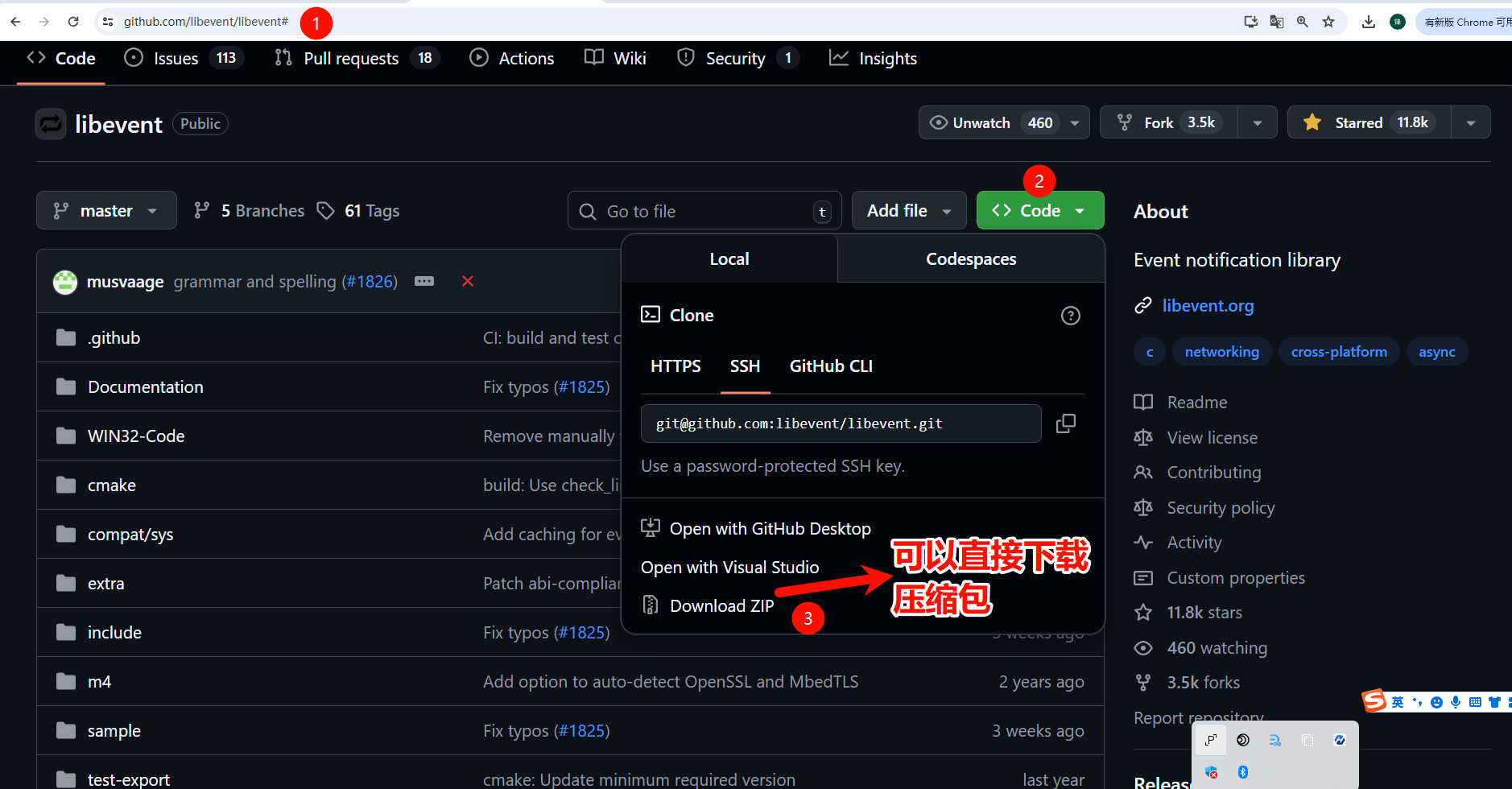
git clone git@github.com:libevent/libevent.git也可以直接下载libevent源代码的zip压缩包,如下图所示:
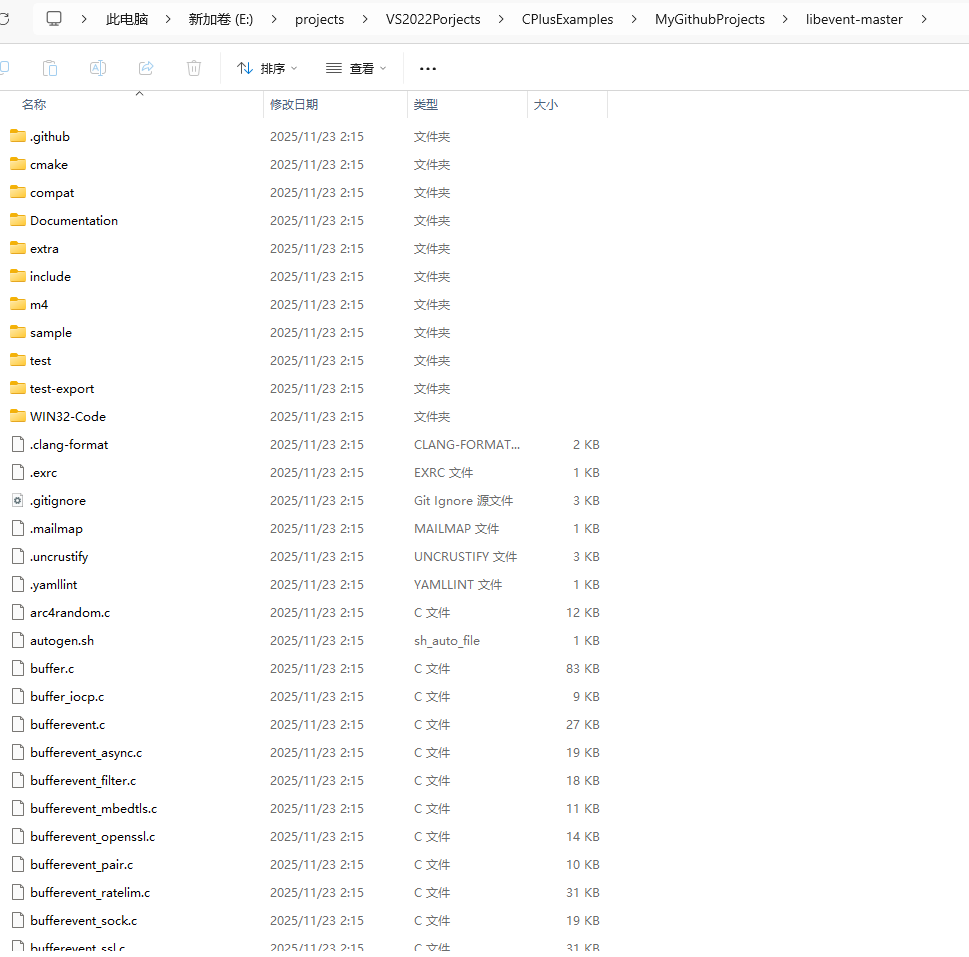
libevent源代码的目录结果如下图所示:
方式1-Windows11中使用CMake和VS2022编译运行libevent库
首先我们需要在Windows11上安装CMake和VS2022,这里不再赘述,CMake地址可以去官网https://cmake.org/下载,VS2022可以去微软官网获取并下载安装。
1.参考官方文档编译libevent库
参考https://github.com/libevent/libevent官网的【CMake (Windows)】,如下图所示:
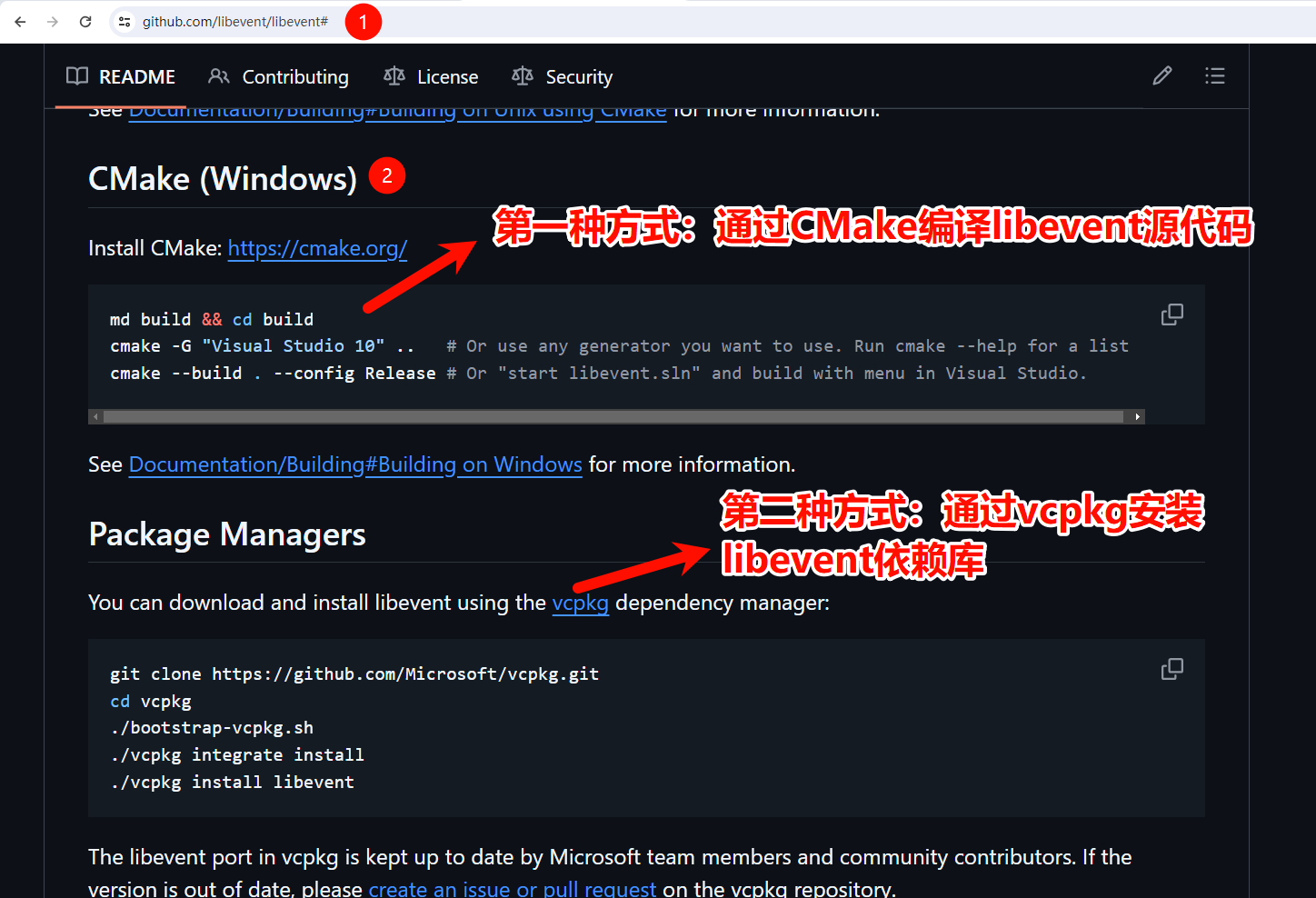
详情可以参考Building on Windows
官方给的使用CMake编译libevent的命令如下:
bash
md build && cd build
cmake -G "Visual Studio 10" ..   # Or use any generator you want to use. Run cmake --help for a list
cmake --build . --config Release # Or "start libevent.sln" and build with menu in Visual Studio.
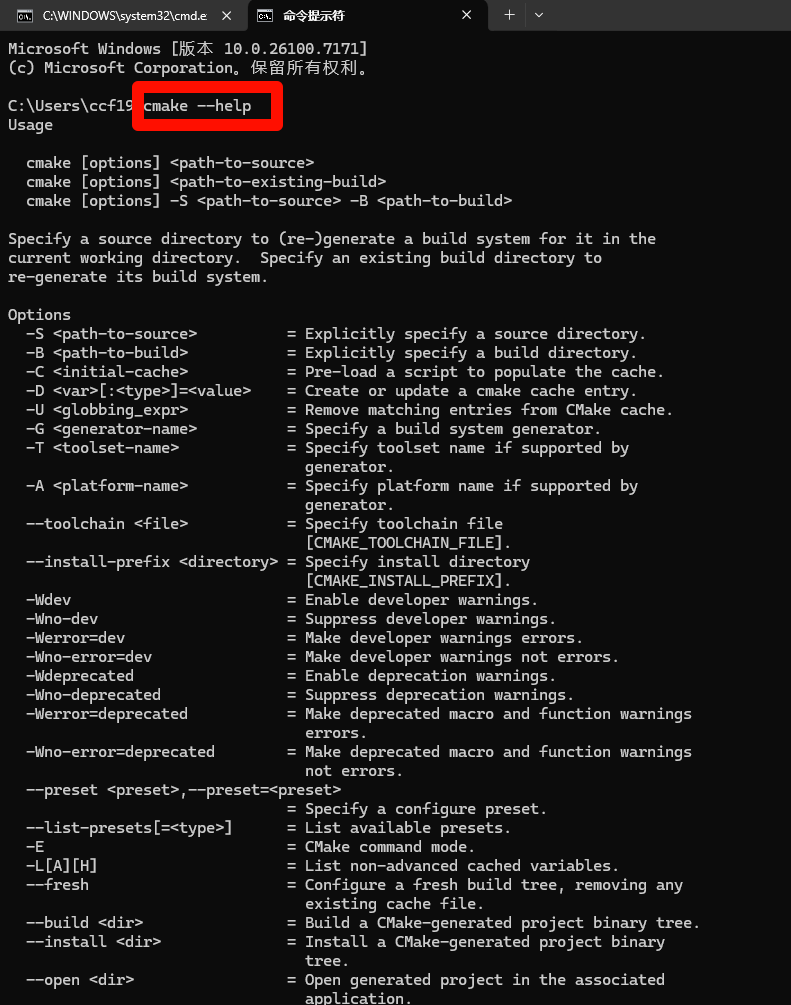
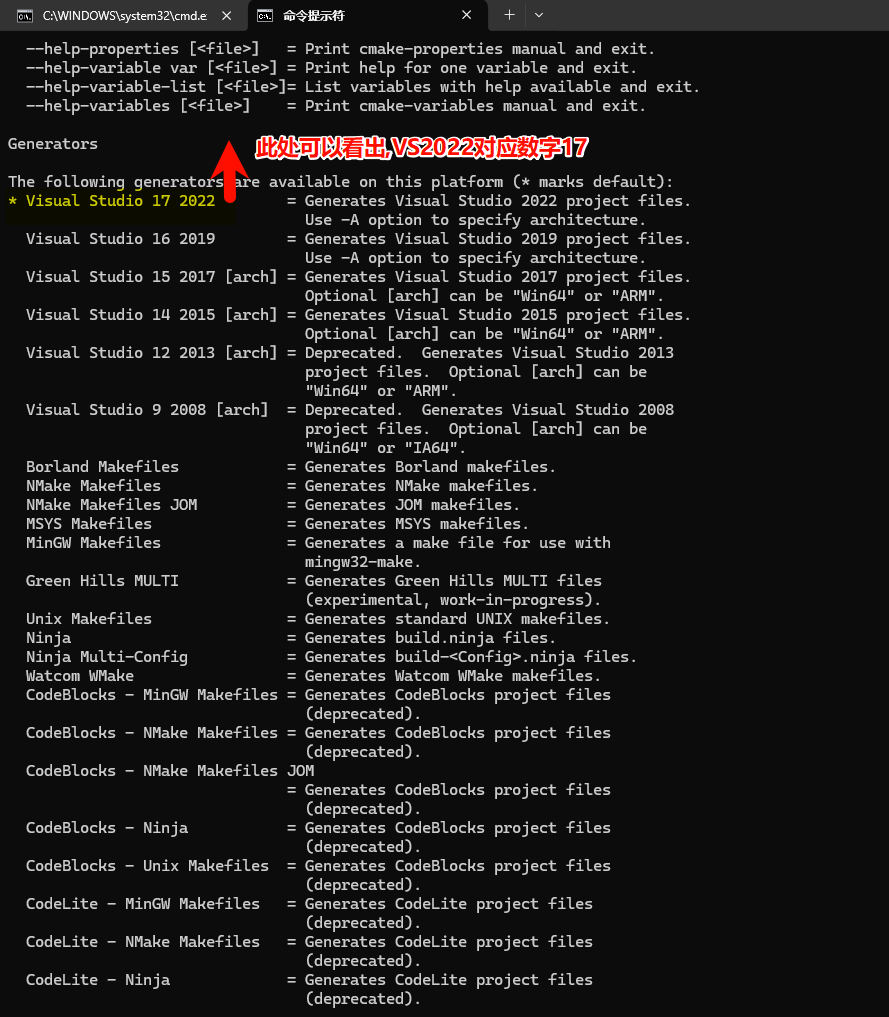
需要注意的是VS2022对应的cmake -G后面的是"Visual Studio 17",这个可以Win+R打开Windows cmd命令行窗口,输入cmake --help查询到,如下图所示:
Visual Studio 版本
我相信大多数人首先看到的是 Visual Studio 的发布年份,因为 Microsoft 官方就是这么宣传的。例如你可以在官网下载页面看到 Visual Studio 2022、Visual Studio 2019 等等。
但其实 Visual Studio 的版本也有一个更加普遍的 major.minor 版本控制方案,主版本号会在每个发布年份递增。例如 VS 2010 是版本 10,VS 2017 是版本 15,VS 2019 是版本 16,VS 2022 是版本 17。所以,如果客户跟你说:"我用的是 15 版本",那就意味着它是 Visual Studio 2017。
请注意,Visual Studio 版本的年份和主要版本之间没有任何关联,只是 Visual Studio 2010 恰好也是版本 10。
当然,除了主版本号,Visual Studio 还有次版本号。下表列出了目前主要版本的对应关系。
| 发布年份 | 实际版本号 |
|---|---|
| Visual Studio 2017 | 15.0 |
| 15.3 | |
| Visual Studio 2019 | 16.0 |
| 16.1 | |
| Visual Studio 2022 | 17.0 |
| 17.1 |
所以我们最终在Windows11上使用CMake命令和VS2022安装libevent库的命令为:
我们在解压后的libevent-master源代码打开Windows cmd命令行,依次执行如下命令:
bash
md build && cd build
cmake -G "Visual Studio 17" ..   # Or use any generator you want to use. Run cmake --help for a list
cmake --build . --config Release # Or "start libevent.sln" and build with menu in Visual Studio.
上述示例中,"..."指的是包含 Libevent 源代码的目录。您可以通过创建其他构建目录,从同一源代码树构建多个版本(具有不同的编译时设置)。
因此,强烈建议在使用 CMake 时采用"外部构建"(out of source)方式(这样做的好处是不会将源代码目录弄乱,可以针对win32/x64,debug/release组合构建出不同平台不同位数的libevent lib动态或静态库),而不是像 autoconf 的默认行为那样采用"内部构建"(in source)方式。
如果你使用的是VS2015、VS2017、VS2026的话,把17改成对应的数字即可。
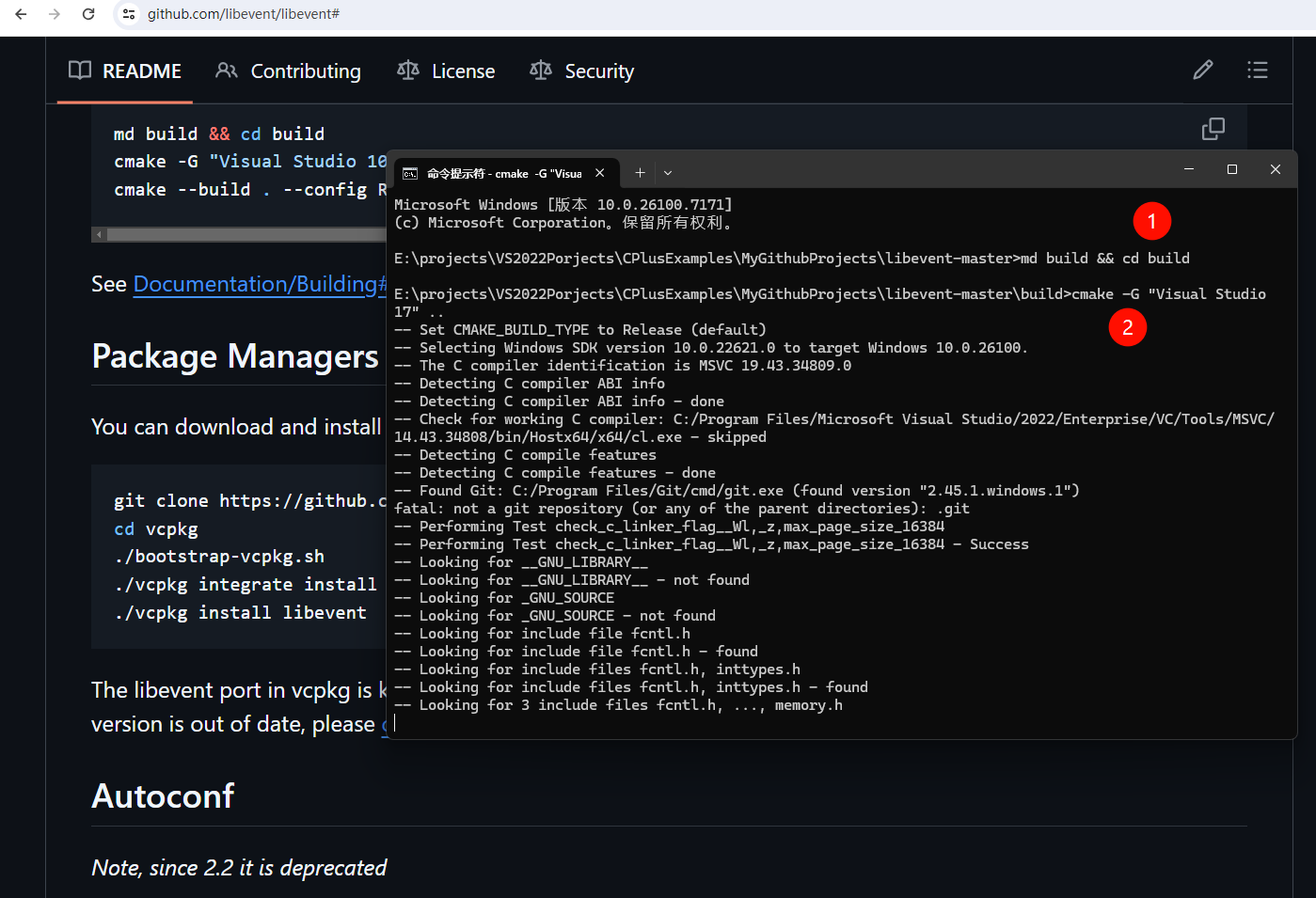
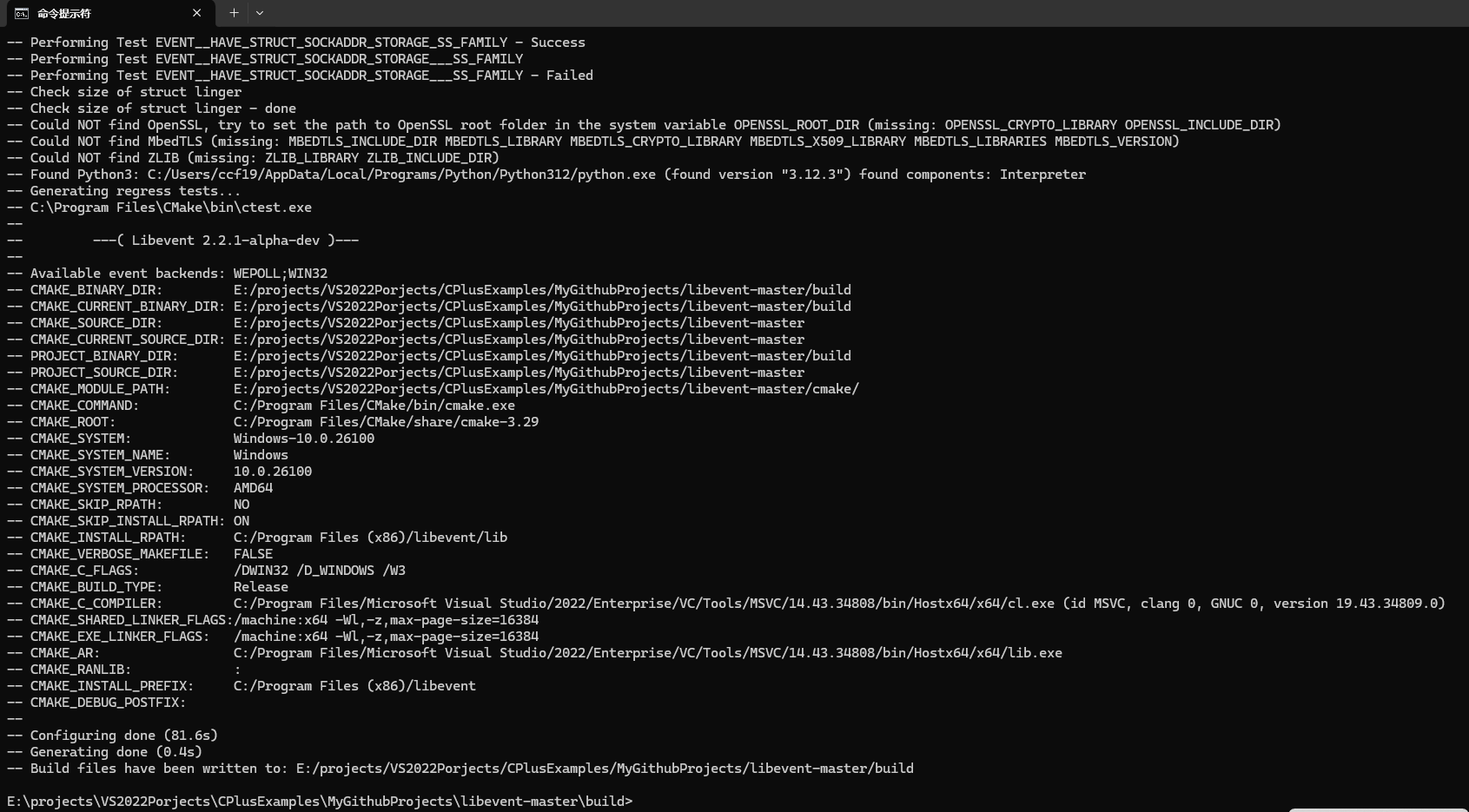
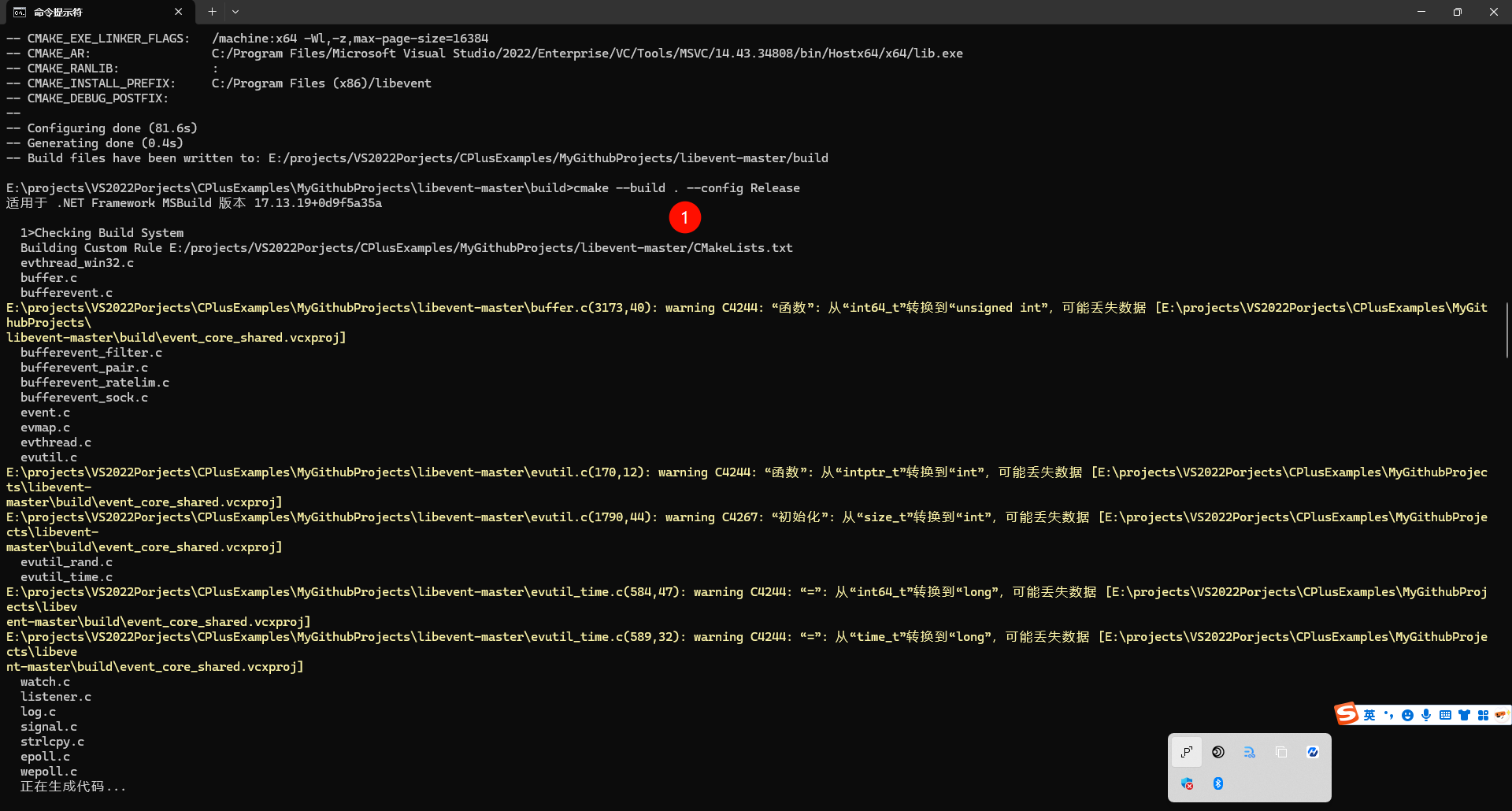
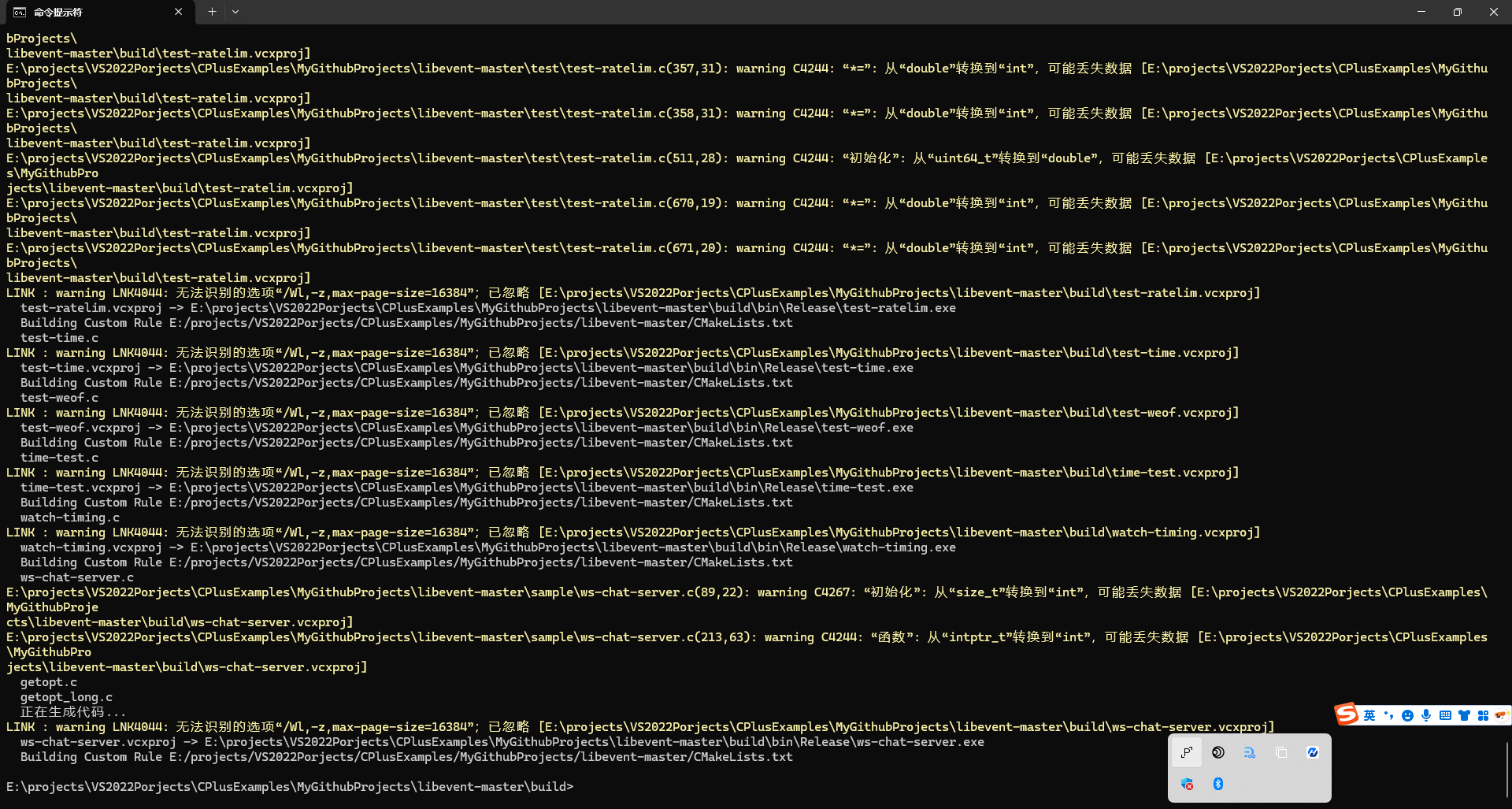
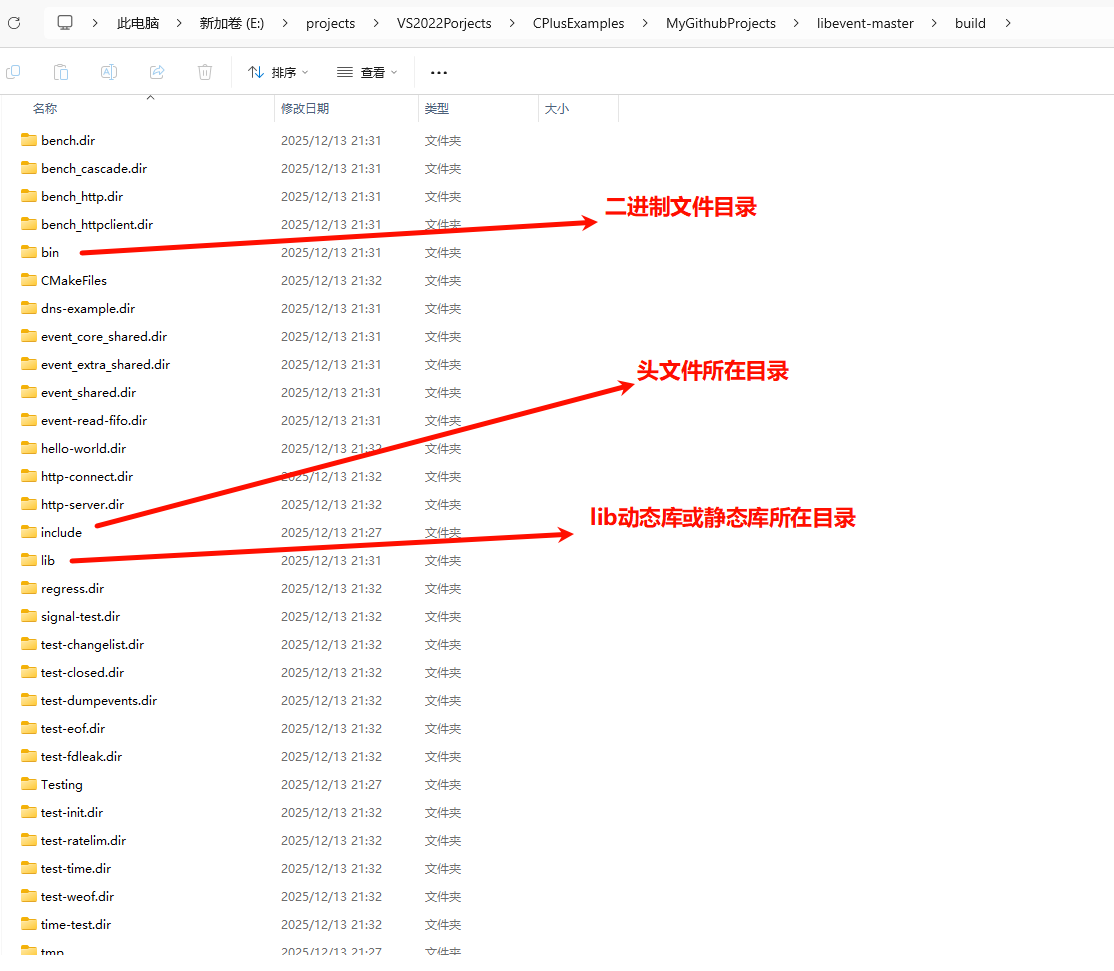
执行完上述命令后,会在例如E:\projects\VS2022Porjects\CPlusExamples\MyGithubProjects\libevent-master\build目录下生成libevent.sln这个VS工程文件,以及include、lib库和bin二进制可执行文件等,如下图所示:
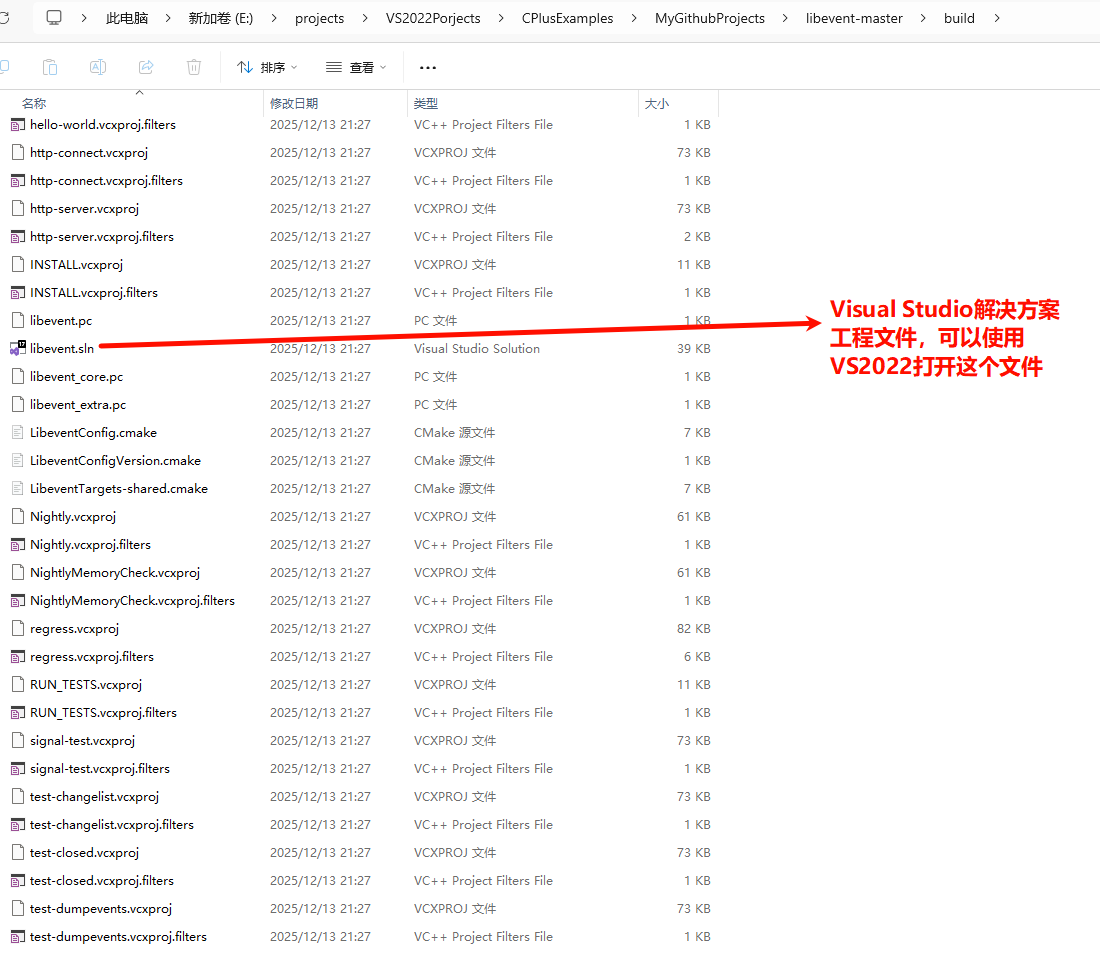
2.使用VS2022打开编译后的libevent项目
使用VS2022打开E:\projects\VS2022Porjects\CPlusExamples\MyGithubProjects\libevent-master\build目录下的libevent.sln解决方案文件,如下图所示:
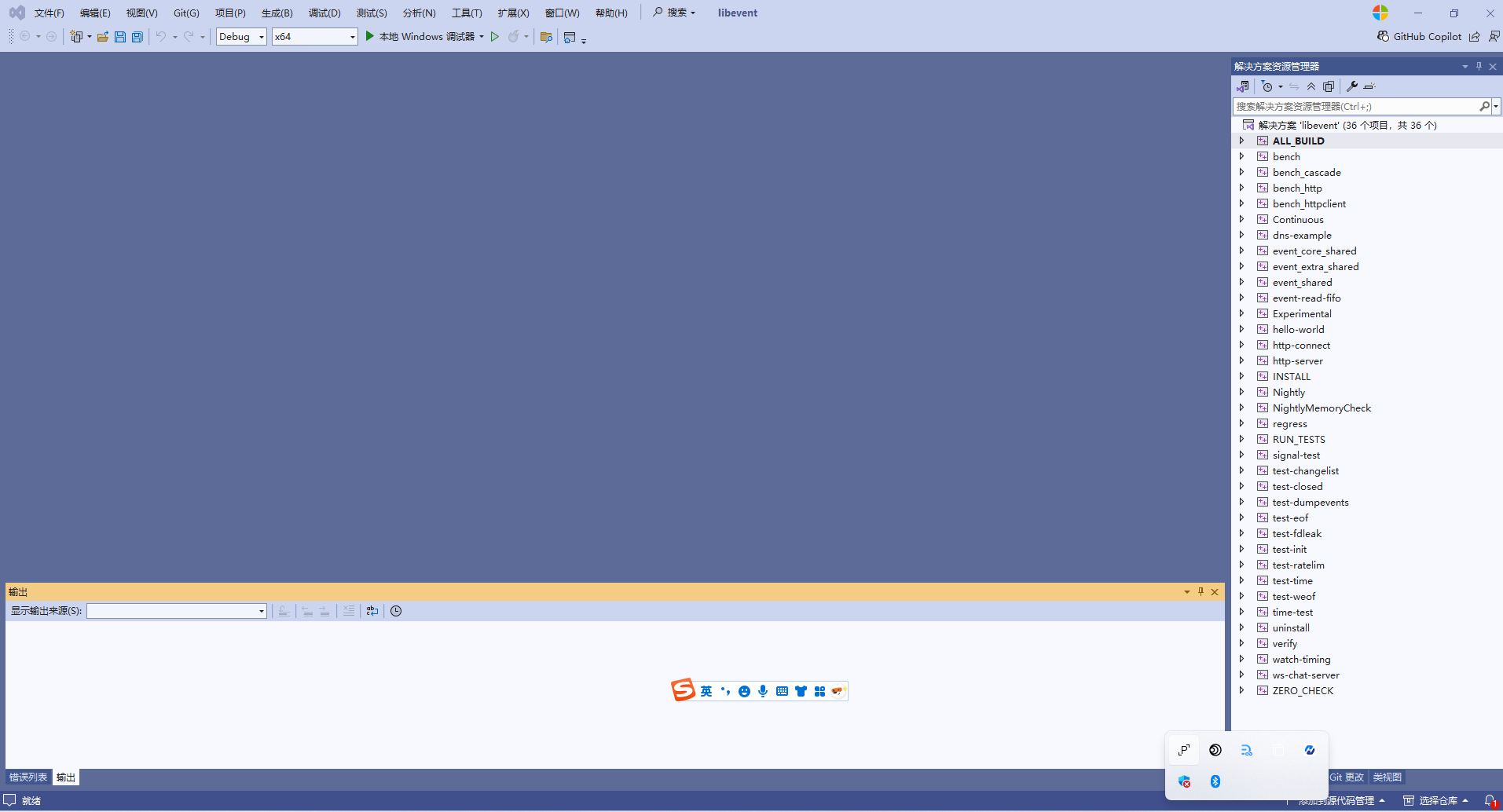
这是一个使用cmake构建的libevent项目,包含需要libevent的示例代码,这里我们先将hello-world设置为启动项目,然后运行,
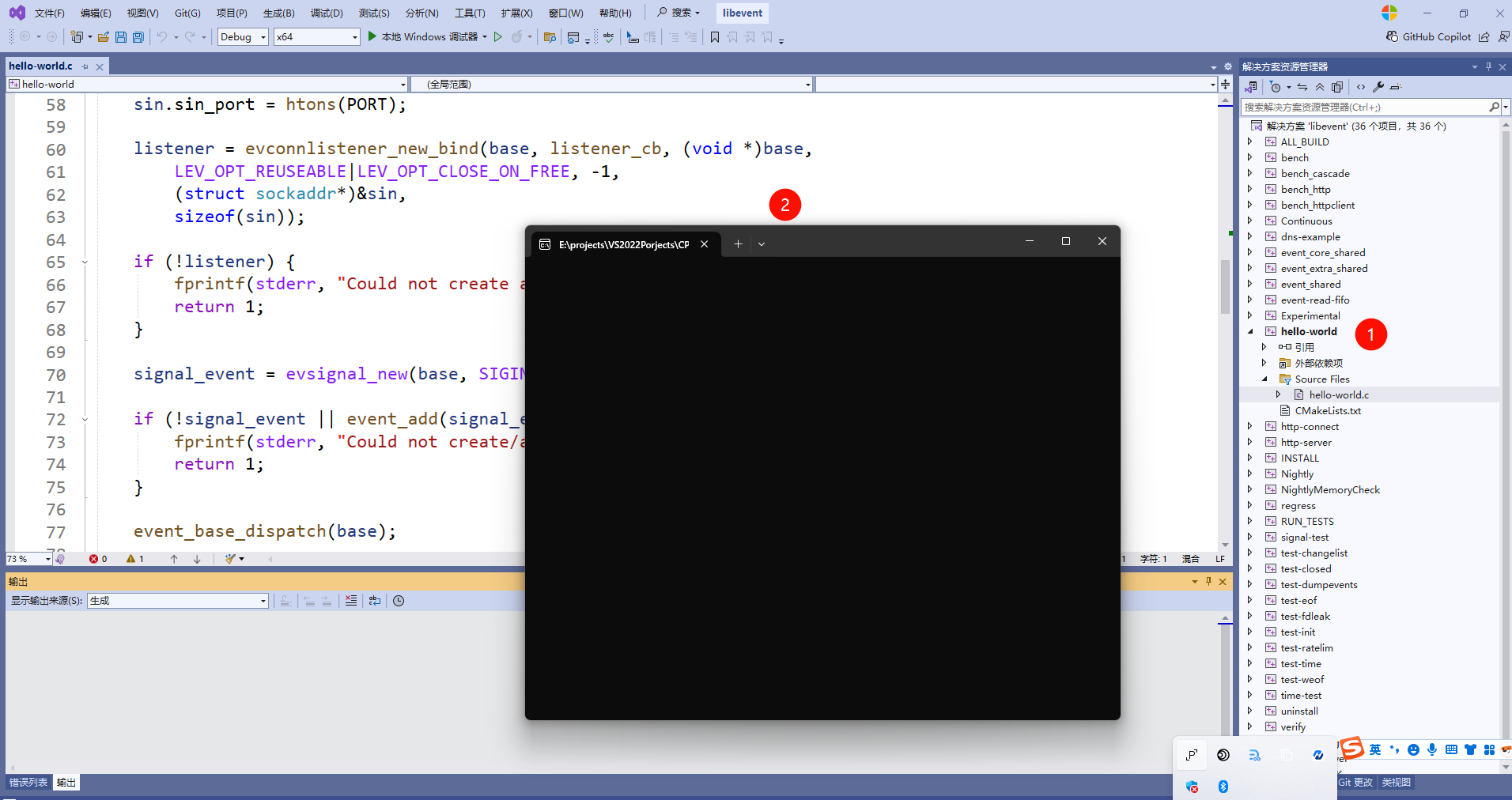
查看hell-world项目的源代码:
cpp
/*
  This example program provides a trivial server program that listens for TCP
  connections on port 9995.  When they arrive, it writes a short message to
  each client connection, and closes each connection once it is flushed.

  Where possible, it exits cleanly in response to a SIGINT (ctrl-c).
*/


#include <string.h>
#include <errno.h>
#include <stdio.h>
#include <signal.h>
#ifndef _WIN32
#include <netinet/in.h>
# ifdef _XOPEN_SOURCE_EXTENDED
#  include <arpa/inet.h>
# endif
#include <sys/socket.h>
#endif

#include <event2/bufferevent.h>
#include <event2/buffer.h>
#include <event2/listener.h>
#include <event2/util.h>
#include <event2/event.h>

static const char MESSAGE[] = "Hello, World!\n";

static const unsigned short PORT = 9995;

static void listener_cb(struct evconnlistener *, evutil_socket_t,
    struct sockaddr *, int socklen, void *);
static void conn_writecb(struct bufferevent *, void *);
static void conn_eventcb(struct bufferevent *, short, void *);
static void signal_cb(evutil_socket_t, short, void *);

int
main(int argc, char **argv)
{
	struct event_base *base;
	struct evconnlistener *listener;
	struct event *signal_event;

	struct sockaddr_in sin = {0};
#ifdef _WIN32
	WSADATA wsa_data;
	WSAStartup(0x0201, &wsa_data);
#endif

	base = event_base_new();
	if (!base) {
		fprintf(stderr, "Could not initialize libevent!\n");
		return 1;
	}

	sin.sin_family = AF_INET;
	sin.sin_port = htons(PORT);

	listener = evconnlistener_new_bind(base, listener_cb, (void *)base,
	    LEV_OPT_REUSEABLE|LEV_OPT_CLOSE_ON_FREE, -1,
	    (struct sockaddr*)&sin,
	    sizeof(sin));

	if (!listener) {
		fprintf(stderr, "Could not create a listener!\n");
		return 1;
	}

	signal_event = evsignal_new(base, SIGINT, signal_cb, (void *)base);

	if (!signal_event || event_add(signal_event, NULL)<0) {
		fprintf(stderr, "Could not create/add a signal event!\n");
		return 1;
	}

	event_base_dispatch(base);

	evconnlistener_free(listener);
	event_free(signal_event);
	event_base_free(base);

	printf("done\n");
	return 0;
}

static void
listener_cb(struct evconnlistener *listener, evutil_socket_t fd,
    struct sockaddr *sa, int socklen, void *user_data)
{
	struct event_base *base = user_data;
	struct bufferevent *bev;

	bev = bufferevent_socket_new(base, fd, BEV_OPT_CLOSE_ON_FREE);
	if (!bev) {
		fprintf(stderr, "Error constructing bufferevent!");
		event_base_loopbreak(base);
		return;
	}
	bufferevent_setcb(bev, NULL, conn_writecb, conn_eventcb, NULL);
	bufferevent_enable(bev, EV_WRITE);
	bufferevent_disable(bev, EV_READ);

	bufferevent_write(bev, MESSAGE, strlen(MESSAGE));
}

static void
conn_writecb(struct bufferevent *bev, void *user_data)
{
	struct evbuffer *output = bufferevent_get_output(bev);
	if (evbuffer_get_length(output) == 0) {
		printf("flushed answer\n");
		bufferevent_free(bev);
	}
}

static void
conn_eventcb(struct bufferevent *bev, short events, void *user_data)
{
	if (events & BEV_EVENT_EOF) {
		printf("Connection closed.\n");
	} else if (events & BEV_EVENT_ERROR) {
		printf("Got an error on the connection: %s\n",
		    strerror(errno));/*XXX win32*/
	}
	/* None of the other events can happen here, since we haven't enabled
	 * timeouts */
	bufferevent_free(bev);
}

static void
signal_cb(evutil_socket_t sig, short events, void *user_data)
{
	struct event_base *base = user_data;
	struct timeval delay = { 2, 0 };

	printf("Caught an interrupt signal; exiting cleanly in two seconds.\n");

	event_base_loopexit(base, &delay);
}
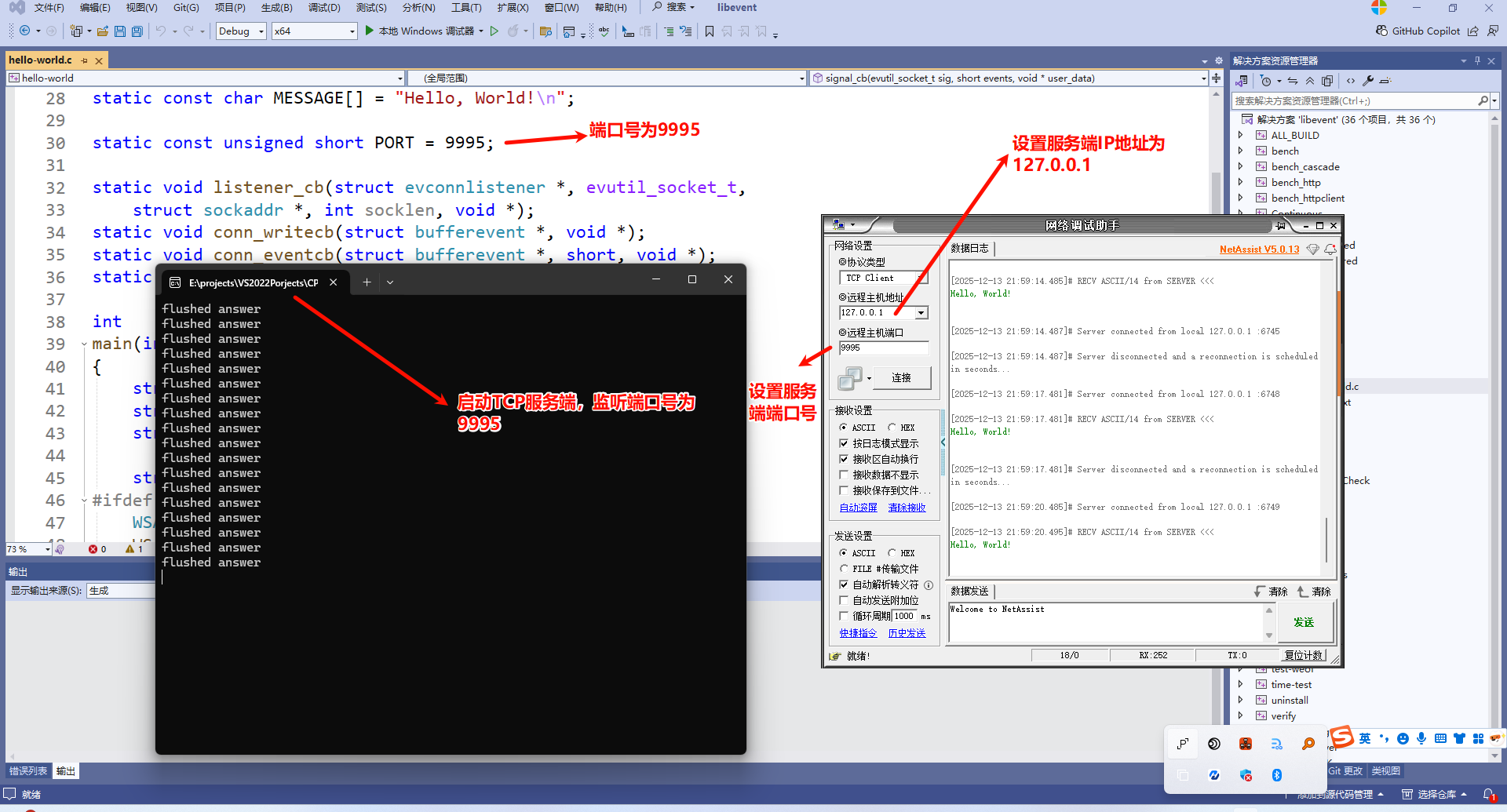
上面代码的作用就是启动一个TCP服务端,本机端口号为9995,有客户端连接时发送"Hello, World!\n"字符串给该客户端,同时可以响应中断信号如Ctrl+C,会打印"Caught an interrupt signal; exiting cleanly in two seconds.\n"字符串,最后会打印done。
先启动完TCP服务端hello-world程序后,使用网络调试助手开启TCP客户端,服务端连接IP地址设置为:127.0.0.1,端口号设置为9995,运行结果如下图所示:
方式2-Windows11中使用vcpkg包管理器和cmake工具编译安装libevent库
众所周知,其他高级开发语言有包管理器,比如C#有nuget,Java有maven和gradle,Python有pip,Node.js有npm和yarn。但是之前C++社区没有一个跨平台的包管理器,为此导致了一个问题:同一套代码比如我编译成win32 debug的程序无法在win64的Windows机器上运行,且debug的lib库和release版的也不兼容。
vcpkg 是跨平台的 C/C++ 包管理器。 快速获取对数千个高质量开放源代码库的访问权限,从而为应用程序提供支持,并在内部共享专用组件的集合。vcpkg 是由 Microsoft 和 C++ 社区维护的免费开源 C/C++ 包管理器,可在 Windows、macOS 和 Linux 上运行。 它是核心的 C++ 工具,使用 C++ 和 CMake 脚本编写。 它旨在解决管理 C/C++ 库的独特难题。
可以从https://github.com/Microsoft/vcpkg微软官方下载vcpkg安装包,从https://cmake.org/download/下载最新的cmake 4.2.1版本(截止2025/12/13号),具体地址为:https://github.com/Kitware/CMake/releases/download/v4.2.1/cmake-4.2.1-windows-x86_64.msi
然后打开git bash命令行窗口,依次运行如下命令:
bash
git clone https://github.com/Microsoft/vcpkg.git
cd vcpkg
./bootstrap-vcpkg.sh
./vcpkg integrate install
./vcpkg install libevent
运行结果如下:
bash
ccf19@havealex MINGW64 /d/env
$ git clone git@github.com:microsoft/vcpkg.git
Cloning into 'vcpkg'...
remote: Enumerating objects: 297809, done.
remote: Counting objects: 100% (608/608), done.
remote: Compressing objects: 100% (289/289), done.
remote: Total 297809 (delta 498), reused 319 (delta 319), pack-reused 297201 (from 5)
Receiving objects: 100% (297809/297809), 93.79 MiB | 22.00 KiB/s, done.
Resolving deltas: 100% (199576/199576), done.
Updating files: 100% (13267/13267), done.

ccf19@havealex MINGW64 /d/env
$ cd vcpkg/

ccf19@havealex MINGW64 /d/env/vcpkg (master)
$ ls
CONTRIBUTING.md     LICENSE.txt    SECURITY.md          ports/     triplets/
CONTRIBUTING_pt.md  NOTICE.txt     bootstrap-vcpkg.bat  scripts/   versions/
CONTRIBUTING_zh.md  NOTICE_pt.txt  bootstrap-vcpkg.sh*  shell.nix
CodeQL.yml          README.md      docs/                toolsrc/

ccf19@havealex MINGW64 /d/env/vcpkg (master)
$ pwd
/d/env/vcpkg

ccf19@havealex MINGW64 /d/env/vcpkg (master)
$ ./bootstrap-vcpkg.sh
Downloading https://github.com/microsoft/vcpkg-tool/releases/download/2025-12-05/vcpkg.exe -> D:\env\vcpkg\vcpkg.exe (using IE proxy: 127.0.0.1:7897)... done.
Validating signature... done.

vcpkg package management program version 2025-12-05-d84fb805651077f4ed3a97b61fbad2b513462f8b

See LICENSE.txt for license information.
Telemetry
---------
vcpkg collects usage data in order to help us improve your experience.
The data collected by Microsoft is anonymous.
You can opt-out of telemetry by re-running the bootstrap-vcpkg script with -disableMetrics,
passing --disable-metrics to vcpkg on the command line,
or by setting the VCPKG_DISABLE_METRICS environment variable.

Read more about vcpkg telemetry at docs/about/privacy.md

ccf19@havealex MINGW64 /d/env/vcpkg (master)
$ ./vcpkg integrate install
Applied user-wide integration for this vcpkg root.
CMake projects should use: "-DCMAKE_TOOLCHAIN_FILE=D:/env/vcpkg/scripts/buildsystems/vcpkg.cmake"

All MSBuild C++ projects can now #include any installed libraries. Linking will be handled automatically. Installing new libraries will make them instantly available.

ccf19@havealex MINGW64 /d/env/vcpkg (master)
$ ./vcpkg search libevent
evpp                     0.7.0#9          A modern C++ network library based on libevent for developing high perform...
getdns[libevent]                          libevent event loop integration
libevent                 2.1.12+20230128#1 An event notification library
libevent[openssl]                         Support for openssl
libevent[thread]                          Support for thread
libeventheader-decode    1.4.0            C++ classes for decoding EventHeader-encoded Linux Tracepoints
libeventheader-decode[tools]              Build user tools: perf-decode
libeventheader-tracepoint 1.4.0           C/C++ interface for generating EventHeader-encoded Linux Tracepoints
libevhtp                 1.2.18#6         Libevhtp was created as a replacement API for Libevent's current HTTP API.
libevhtp[openssl]                         Support SSL for libevhtp
libevhtp[regex]                           Support oniguruma for libevhtp
libevhtp[thread]                          Support thread for libevhtp
libhv                    1.3.3            Libhv is a C/C++ network library similar to libevent/libuv.
libhv[ssl]                                with openssl library
The result may be outdated. Run `git pull` to get the latest results.
If your port is not listed, please open an issue at and/or consider making a pull request.  -  https://github.com/Microsoft/vcpkg/issues

ccf19@havealex MINGW64 /d/env/vcpkg (master)
$ ./vcpkg.exe install libevent
Computing installation plan...
A suitable version of cmake was not found (required v3.31.10).
Downloading https://github.com/Kitware/CMake/releases/download/v3.31.10/cmake-3.31.10-windows-x86_64.zip -> cmake-3.31.10-windows-x86_64.zip
Successfully downloaded cmake-3.31.10-windows-x86_64.zip
Extracting cmake...
A suitable version of 7zip was not found (required v25.1.0).
Downloading https://github.com/ip7z/7zip/releases/download/25.01/7z2501.exe -> 7z2501.7z.exe
Successfully downloaded 7z2501.7z.exe
Extracting 7zip...
A suitable version of 7zr was not found (required v25.1.0).
Downloading https://github.com/ip7z/7zip/releases/download/25.01/7zr.exe -> 7d84fcad-7zr.exe
Successfully downloaded 7d84fcad-7zr.exe
The following packages will be built and installed:
    libevent[core,thread]:x64-windows@2.1.12+20230128#1
  * vcpkg-cmake:x64-windows@2024-04-23
  * vcpkg-cmake-config:x64-windows@2024-05-23
Additional packages (*) will be modified to complete this operation.
Detecting compiler hash for triplet x64-windows...
-- Automatically setting %HTTP(S)_PROXY% environment variables to "127.0.0.1:7897".
A suitable version of powershell-core was not found (required v7.5.4).
Downloading https://github.com/PowerShell/PowerShell/releases/download/v7.5.4/PowerShell-7.5.4-win-x64.zip -> PowerShell-7.5.4-win-x64.zip
Successfully downloaded PowerShell-7.5.4-win-x64.zip
Extracting powershell-core...
error: while detecting compiler information:
The log file content at "D:\env\vcpkg\buildtrees\detect_compiler\stdout-x64-windows.log" is:
-- Found ninja('1.12.1') but at least version 1.13.1 is required! Trying to use internal version if possible!
Downloading https://github.com/ninja-build/ninja/releases/download/v1.13.1/ninja-win.zip -> ninja-win-1.13.1.zip
Successfully downloaded ninja-win-1.13.1.zip
-- Configuring x64-windows
CMake Error at scripts/cmake/vcpkg_execute_required_process.cmake:127 (message):
    Command failed: D:/env/vcpkg/downloads/tools/ninja/1.13.1-windows/ninja.exe -v
    Working Directory: D:/env/vcpkg/buildtrees/detect_compiler/x64-windows-rel/vcpkg-parallel-configure
    Error code: 1
    See logs for more information:
      D:\env\vcpkg\buildtrees\detect_compiler\config-x64-windows-rel-CMakeCache.txt.log
      D:\env\vcpkg\buildtrees\detect_compiler\config-x64-windows-out.log

Call Stack (most recent call first):
  scripts/cmake/vcpkg_configure_cmake.cmake:295 (vcpkg_execute_required_process)
  scripts/detect_compiler/portfile.cmake:18 (vcpkg_configure_cmake)
  scripts/ports.cmake:206 (include)


error: vcpkg was unable to detect the active compiler's information. See above for the CMake failure output.

ccf19@havealex MINGW64 /d/env/vcpkg (master)
$ ./vcpkg.exe install libevent
Computing installation plan...
The following packages will be built and installed:
    libevent[core,thread]:x64-windows@2.1.12+20230128#1
  * vcpkg-cmake:x64-windows@2024-04-23
  * vcpkg-cmake-config:x64-windows@2024-05-23
Additional packages (*) will be modified to complete this operation.
Detecting compiler hash for triplet x64-windows...
-- Automatically setting %HTTP(S)_PROXY% environment variables to "127.0.0.1:7897".
Compiler found: C:/Program Files/Microsoft Visual Studio/2022/Enterprise/VC/Tools/MSVC/14.44.35207/bin/Hostx86/x64/cl.exe
Restored 0 package(s) from C:\Users\ccf19\AppData\Local\vcpkg\archives in 80.9 us. Use --debug to see more details.
Installing 1/3 vcpkg-cmake:x64-windows@2024-04-23...
Building vcpkg-cmake:x64-windows@2024-04-23...
-- Installing: D:/env/vcpkg/packages/vcpkg-cmake_x64-windows/share/vcpkg-cmake/vcpkg_cmake_configure.cmake
-- Installing: D:/env/vcpkg/packages/vcpkg-cmake_x64-windows/share/vcpkg-cmake/vcpkg_cmake_build.cmake
-- Installing: D:/env/vcpkg/packages/vcpkg-cmake_x64-windows/share/vcpkg-cmake/vcpkg_cmake_install.cmake
-- Installing: D:/env/vcpkg/packages/vcpkg-cmake_x64-windows/share/vcpkg-cmake/vcpkg-port-config.cmake
-- Installing: D:/env/vcpkg/packages/vcpkg-cmake_x64-windows/share/vcpkg-cmake/copyright
-- Performing post-build validation
Starting submission of vcpkg-cmake:x64-windows@2024-04-23 to 1 binary cache(s) in the background
Elapsed time to handle vcpkg-cmake:x64-windows: 74.7 ms
vcpkg-cmake:x64-windows package ABI: f9e0de54737dcf239091cc34c26b3fa56c2390f081f3c8a2db7ca6592ff453c5
Installing 2/3 vcpkg-cmake-config:x64-windows@2024-05-23...
Building vcpkg-cmake-config:x64-windows@2024-05-23...
-- Installing: D:/env/vcpkg/packages/vcpkg-cmake-config_x64-windows/share/vcpkg-cmake-config/vcpkg_cmake_config_fixup.cmake
-- Installing: D:/env/vcpkg/packages/vcpkg-cmake-config_x64-windows/share/vcpkg-cmake-config/vcpkg-port-config.cmake
-- Installing: D:/env/vcpkg/packages/vcpkg-cmake-config_x64-windows/share/vcpkg-cmake-config/copyright
-- Skipping post-build validation due to VCPKG_POLICY_EMPTY_PACKAGE
Starting submission of vcpkg-cmake-config:x64-windows@2024-05-23 to 1 binary cache(s) in the background
Elapsed time to handle vcpkg-cmake-config:x64-windows: 65.4 ms
vcpkg-cmake-config:x64-windows package ABI: 1e0b37d7cfcd62a8e0525adcf8d3a3d93ea08883d7e0c56fdcd264dc94594fe7
Completed submission of vcpkg-cmake:x64-windows@2024-04-23 to 1 binary cache(s) in 48.4 ms
Installing 3/3 libevent[core,thread]:x64-windows@2.1.12+20230128#1...
Building libevent[core,thread]:x64-windows@2.1.12+20230128#1...
Downloading https://github.com/libevent/libevent/archive/4d85d28acdbb83bb60e500e9345bab757b64d6d1.tar.gz -> libevent-libevent-4d85d28acdbb83bb60e500e9345bab757b64d6d1.tar.gz
Successfully downloaded libevent-libevent-4d85d28acdbb83bb60e500e9345bab757b64d6d1.tar.gz
-- Extracting source D:/env/vcpkg/downloads/libevent-libevent-4d85d28acdbb83bb60e500e9345bab757b64d6d1.tar.gz
-- Applying patch fix-uwp.patch
-- Applying patch fix-file_path.patch
-- Applying patch fix-LibeventConfig_cmake_in_path.patch
-- Applying patch fix-usage.patch
-- Using source at D:/env/vcpkg/buildtrees/libevent/src/757b64d6d1-bfa17b9727.clean
-- Configuring x64-windows
-- Building x64-windows-dbg
-- Building x64-windows-rel
-- Fixing pkgconfig file: D:/env/vcpkg/packages/libevent_x64-windows/lib/pkgconfig/libevent.pc
-- Fixing pkgconfig file: D:/env/vcpkg/packages/libevent_x64-windows/lib/pkgconfig/libevent_core.pc
-- Fixing pkgconfig file: D:/env/vcpkg/packages/libevent_x64-windows/lib/pkgconfig/libevent_extra.pc
Downloading msys2-mingw-w64-x86_64-pkgconf-1~2.4.3-1-any.pkg.tar.zst, trying https://mirror.msys2.org/mingw/mingw64/mingw-w64-x86_64-pkgconf-1~2.4.3-1-any.pkg.tar.zst
Successfully downloaded msys2-mingw-w64-x86_64-pkgconf-1~2.4.3-1-any.pkg.tar.zst
Downloading msys2-msys2-runtime-3.6.2-2-x86_64.pkg.tar.zst, trying https://mirror.msys2.org/msys/x86_64/msys2-runtime-3.6.2-2-x86_64.pkg.tar.zst
Successfully downloaded msys2-msys2-runtime-3.6.2-2-x86_64.pkg.tar.zst
-- Using msys root at D:/env/vcpkg/downloads/tools/msys2/9272adbcaf19caef
-- Fixing pkgconfig file: D:/env/vcpkg/packages/libevent_x64-windows/debug/lib/pkgconfig/libevent.pc
-- Fixing pkgconfig file: D:/env/vcpkg/packages/libevent_x64-windows/debug/lib/pkgconfig/libevent_core.pc
-- Fixing pkgconfig file: D:/env/vcpkg/packages/libevent_x64-windows/debug/lib/pkgconfig/libevent_extra.pc
-- Installing: D:/env/vcpkg/packages/libevent_x64-windows/share/libevent/copyright
-- Performing post-build validation
Starting submission of libevent[core,thread]:x64-windows@2.1.12+20230128#1 to 1 binary cache(s) in the background
Elapsed time to handle libevent:x64-windows: 1.6 min
libevent:x64-windows package ABI: 42958e3ea7a1cd7311199bf4c49c79e72cb8d5110fce40d0f4bb10bab3d88fb9
Total install time: 1.6 min
Installed contents are licensed to you by owners. Microsoft is not responsible for, nor does it grant any licenses to, third-party packages.
Packages installed in this vcpkg installation declare the following licenses:
BSD-3-Clause
MIT
libevent provides CMake targets:

  # this is heuristically generated, and may not be correct
  find_package(Libevent CONFIG REQUIRED)
  target_link_libraries(main PRIVATE libevent::core libevent::extra)

libevent provides pkg-config modules:

  # libevent is an asynchronous notification event loop library
  libevent

  # libevent_core
  libevent_core

  # libevent_extra
  libevent_extra

Completed submission of vcpkg-cmake-config:x64-windows@2024-05-23 to 1 binary cache(s) in 43.6 ms
Waiting for 1 remaining binary cache submissions...
Completed submission of libevent[core,thread]:x64-windows@2.1.12+20230128#1 to 1 binary cache(s) in 317 ms (1/1)
All requested installations completed successfully in: 1.6 min

ccf19@havealex MINGW64 /d/env/vcpkg (master)
$ pwd
/d/env/vcpkg

ccf19@havealex MINGW64 /d/env/vcpkg (master)
$
注意 :cmake的版本最好在3.31.10以上,建议使用最新的4.2.1版本,不然使用vcpkg安装libevent库可能会时报错。
参考资料
- https://github.com/libevent/libevent
- Building libevent on Windows
- https://www.linuxfromscratch.org/blfs/view/svn/basicnet/libevent.html
- https://github.com/microsoft/vcpkg
C++ Library Manager for Windows, Linux, and MacOS - vcpkg 文档
- vcpkg 概述
- https://vcpkg.io/en/
vcpkg 是一个免费的 C/C++ 包管理器,用于获取和管理库。您可以从 2732 个开源库中进行选择,一步完成下载和构建,或者添加您自己的私有库来简化构建过程。它由 Microsoft C++ 团队和开源贡献者共同维护。