昆明天气数据采集
- 一、前言
- 二、项目背景与目标
- 三、技术选型
- 四、核心代码实现
-
- [1. 配置与初始化](#1. 配置与初始化)
- [2. 网络请求工具函数](#2. 网络请求工具函数)
- [3. 页面解析函数](#3. 页面解析函数)
- [4. 天气数据解析](#4. 天气数据解析)
- [5. 数据保存与主函数](#5. 数据保存与主函数)
- 五、代码运行效果
-
- [1. 运行过程截图](#1. 运行过程截图)
- [2. 部分数据截图](#2. 部分数据截图)
- 六、完整代码
-
- [1. 完整代码](#1. 完整代码)
- [2. 未优化完整代码](#2. 未优化完整代码)
一、前言
在数据分析和机器学习领域,高质量的历史天气数据具有重要的应用价值。本文将介绍如何使用Python编写一个高效的昆明天气数据采集程序,从天气后报网站爬取历史气象数据并保存为CSV格式,方便后续分析使用。
二、项目背景与目标
天气数据包含温度、湿度、风向风力等多种指标,对于农业生产、旅游规划、城市建设等多个领域都有重要参考意义。本项目旨在实现:
- 自动爬取昆明市各行政区的历史天气数据
- 提取日期、昼夜温度、天气类型、风向风力等关键信息
- 将数据规范存储为CSV格式,便于后续处理分析
三、技术选型
本项目主要使用以下Python库:
requests:用于发送HTTP请求,获取网页内容BeautifulSoup:用于解析HTML页面,提取目标数据pandas:用于数据处理和CSV文件保存random和time:实现随机延迟,避免触发网站反爬机制
四、核心代码实现
1. 配置与初始化
首先集中管理配置参数,便于后续维护和修改。
python
import random
import time
from pathlib import Path
from typing import List, Dict, Optional

import pandas as pd
import requests
from bs4 import BeautifulSoup

# 配置参数集中管理
CONFIG = {
    'save_dir': './data',
    'base_url': 'https://www.tianqihoubao.com/lishi/yunnan.htm',
    'user_agent': 'Mozilla/5.0 (Windows NT 10.0; Win64; x64) AppleWebKit/537.36 (KHTML, like Gecko) Chrome/137.0.0.0 Safari/537.36',
    'sleep_range': (0.1, 1.0),  # 随机延迟范围
    'csv_filename': '昆明天气数据.csv'
}

# 请求头配置
HEADERS = {
    'user-agent': CONFIG['user_agent'],
    'accept': 'text/html,application/xhtml+xml,application/xml;q=0.9,image/avif,image/webp,image/apng,*/*;q=0.8,application/signed-exchange;v=b3;q=0.7',
    'accept-language': 'zh-CN,zh;q=0.9',
    'referer': 'https://www.tianqihoubao.com/'
}
2. 网络请求工具函数
为提高代码复用性和健壮性,实现了安全请求相关函数。使用Session对象可以保持会话状态,而safe_request函数则封装了异常处理,确保程序遇到网络问题时不会崩溃。
python
def create_session() -> requests.Session:
    """创建并配置请求会话"""
    session = requests.Session()
    session.headers.update(HEADERS)
    return session


def safe_request(session: requests.Session, url: str) -> Optional[requests.Response]:
    """安全请求函数,包含错误处理"""
    try:
        time.sleep(10)
        response = session.get(url)
        response.raise_for_status()  # 抛出HTTP错误状态码
        response.encoding = response.apparent_encoding
        return response
    except requests.exceptions.RequestException as e:
        print(f"请求 {url} 失败: {str(e)}")
        return None
3. 页面解析函数
解析函数是爬虫的核心,负责从HTML中提取有效信息。这两个函数分别负责解析昆明市各行政区的链接和每个行政区下各月份的天气数据链接。
python
def parse_district_links(soup: BeautifulSoup) -> List[Dict[str, str]]:
    """解析行政区链接和名称"""
    district_tags = soup.select(
        'body > div > div.content-wrapper > div.main-content > div.citychk > dl:nth-child(1) > dd > a'
    )
    return [
        {
            'name': tag.get_text(strip=True),
            'url': f"https://www.tianqihoubao.com{tag.get('href')}"
        }
        for tag in district_tags
    ]


def parse_month_links(soup: BeautifulSoup) -> List[str]:
    """解析月份天气数据链接"""
    month_links = []
    containers = soup.select('.main-content > .card-body')

    for container in containers:
        for tag in container.select('li > a'):
            href = tag.get('href')
            if 'lishi' in href:
                month_url = f"https://www.tianqihoubao.com{href}"
            else:
                month_url = f"https://www.tianqihoubao.com/lishi/{href}"
            month_links.append(month_url)

    return month_links
4. 天气数据解析
最关键的天气数据解析函数,负责提取每日详细气象信息。这个函数仔细处理了各种可能的HTML结构和数据格式,确保提取出完整的日夜天气类型、最高最低温度、风向和风力等信息。
python
def parse_daily_weather(soup: BeautifulSoup, district_name: str) -> List[Dict[str, str]]:
    """解析每日天气数据"""
    weather_data = []
    day_tags = soup.select('.table-responsive > .weather-table > tbody > tr')

    for tag in day_tags:
        link_tag = tag.select_one('td > a')
        if not link_tag:
            continue

        # 提取基础信息
        date = link_tag.get_text(strip=True)
        weather_type = tag.select_one('td:nth-child(2)').get_text(strip=True)
        temperature = tag.select_one('td:nth-child(3)')
        wind_info = tag.select_one('td:nth-child(4)').get_text(strip=True).split('/')

        # 处理可能的格式异常
        if len(wind_info) < 2:
            print(f"风向数据格式异常: {wind_info}")
            continue

        # 拆分日夜数据
        day_type, night_type = weather_type.split('/') if '/' in weather_type else (weather_type, weather_type)

        weather_data.append({
            'city': '昆明',
            'district_name': district_name,
            'date': date,
            'type_day': day_type.strip(),
            'type_night': night_type.strip(),
            'max_temperature': temperature.select_one('.temp-high').get_text(strip=True) if temperature.select_one(
                '.temp-high') else '',
            'min_temperature': temperature.select_one('.temp-low').get_text(strip=True) if temperature.select_one(
                '.temp-low') else '',
            'direction_day': wind_info[0].strip().split(' ')[0] if wind_info[0].strip() else '',
            'wind_force_day': wind_info[0].strip().split(' ')[1] if len(wind_info[0].strip().split(' ')) > 1 else '',
            'direction_night': wind_info[1].strip().split(' ')[0] if wind_info[1].strip() else '',
            'wind_force_night': wind_info[1].strip().split(' ')[1] if len(wind_info[1].strip().split(' ')) > 1 else '',
        })

    return weather_data
5. 数据保存与主函数
最后实现数据保存函数和主流程控制。主函数实现了完整的爬取流程,从获取省份页面开始,到解析行政区,再到每个月份的数据,最后将提取的信息保存到CSV文件中。
python
def save_to_csv(data: List[Dict], save_path: Path) -> None:
    """保存数据到CSV文件"""
    if not data:
        return

    df = pd.DataFrame(data)
    mode = 'a' if save_path.exists() else 'w'
    header = not save_path.exists()

    df.to_csv(
        save_path,
        index=False,
        header=header,
        mode=mode,
        encoding='utf-8-sig'
    )


def main():
    # 初始化保存目录
    save_dir = Path(CONFIG['save_dir'])
    save_dir.mkdir(parents=True, exist_ok=True)
    csv_path = save_dir / CONFIG['csv_filename']

    # 创建会话
    session = create_session()

    # 获取省份页面
    province_response = safe_request(session, CONFIG['base_url'])
    if not province_response:
        print("无法获取省份页面,程序退出")
        return

    # 解析行政区链接
    province_soup = BeautifulSoup(province_response.text, 'lxml')
    districts = parse_district_links(province_soup)
    print(f"发现 {len(districts)} 个行政区")

    # 遍历每个行政区
    for district in districts:
        print(f"处理行政区: {district['name']}")

        # 随机延迟避免被反爬
        time.sleep(random.uniform(*CONFIG['sleep_range']))

        # 获取行政区页面
        district_response = safe_request(session, district['url'])
        if not district_response:
            continue

        # 解析月份链接
        district_soup = BeautifulSoup(district_response.text, 'lxml')
        month_links = parse_month_links(district_soup)

        # 遍历每个月份
        for month_url in month_links:
            print(f"处理月份数据: {month_url}")

            time.sleep(random.uniform(*CONFIG['sleep_range']))

            # 获取月份天气数据
            month_response = safe_request(session, month_url)
            if not month_response:
                continue

            # 解析每日数据
            month_soup = BeautifulSoup(month_response.text, 'lxml')
            daily_data = parse_daily_weather(month_soup, district['name'])

            # 保存数据
            if daily_data:
                save_to_csv(daily_data, csv_path)
                print(f"已保存 {len(daily_data)} 条数据")

    print('昆明天气数据爬取完成')


if __name__ == "__main__":
    main()
五、代码运行效果
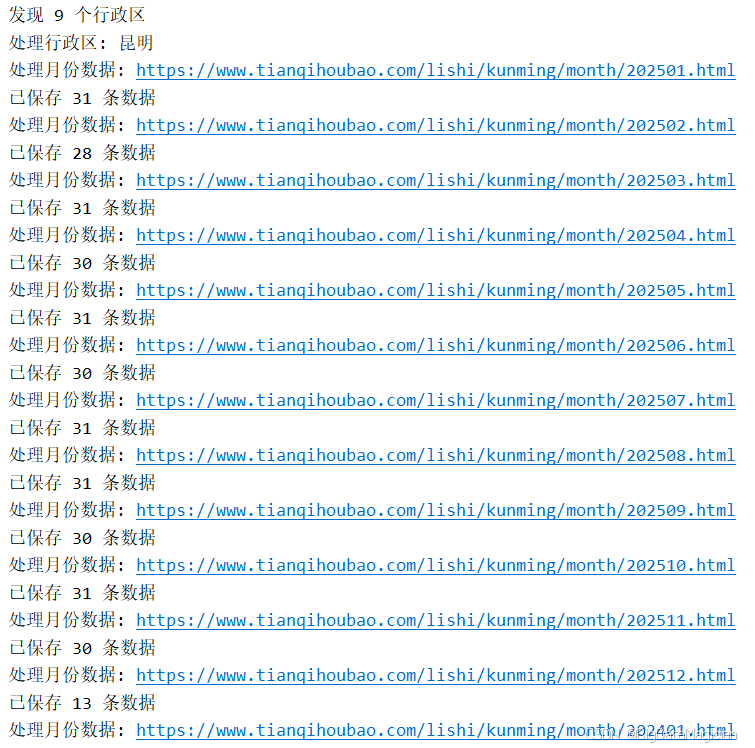
1. 运行过程截图
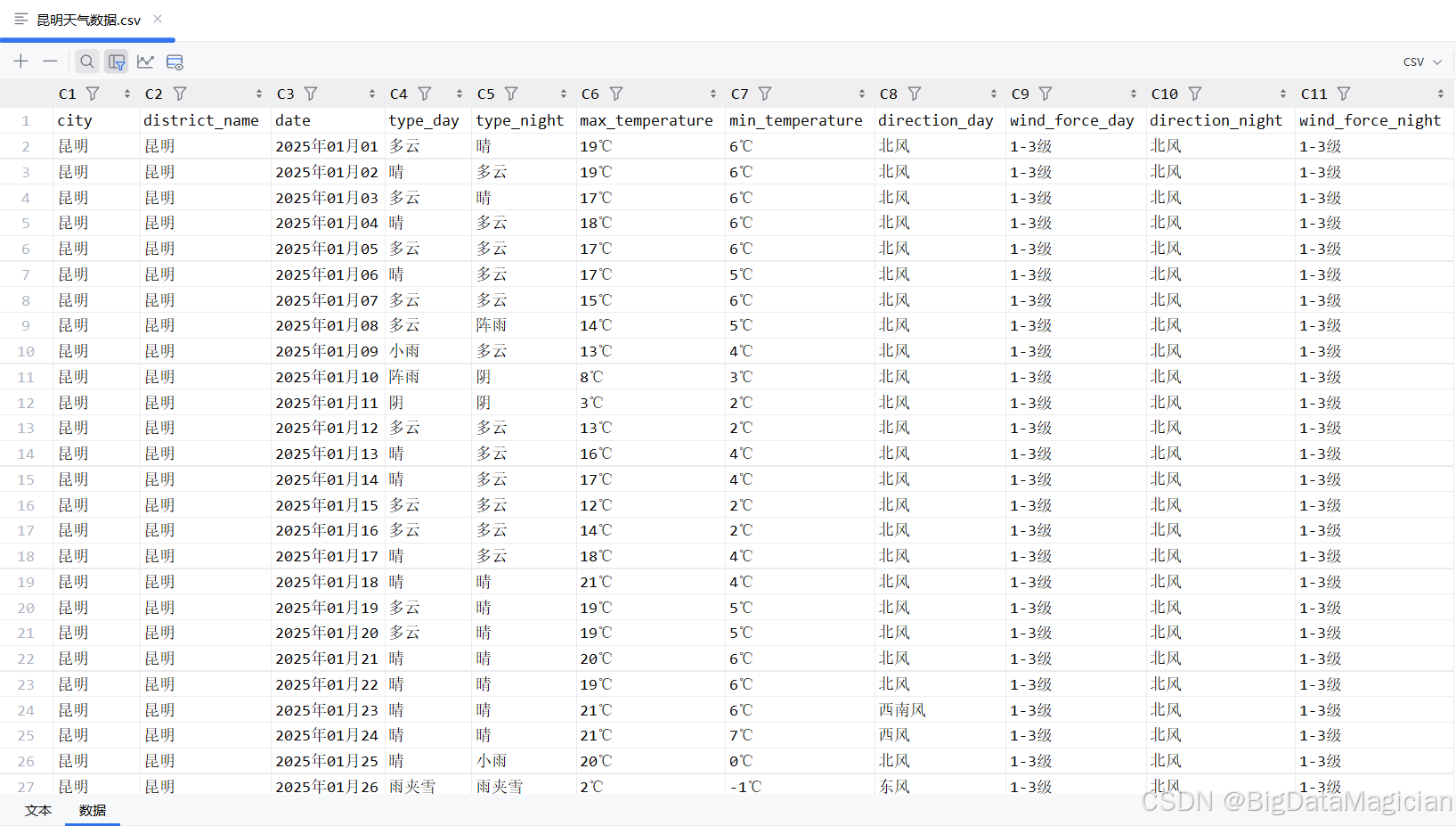
2. 部分数据截图
六、完整代码
1. 完整代码
python
import random
import time
from pathlib import Path
from typing import List, Dict, Optional

import pandas as pd
import requests
from bs4 import BeautifulSoup

# 配置参数集中管理
CONFIG = {
    'save_dir': './data',
    'base_url': 'https://www.tianqihoubao.com/lishi/yunnan.htm',
    'user_agent': 'Mozilla/5.0 (Windows NT 10.0; Win64; x64) AppleWebKit/537.36 (KHTML, like Gecko) Chrome/137.0.0.0 Safari/537.36',
    'sleep_range': (0.1, 1.0),  # 随机延迟范围
    'csv_filename': '昆明天气数据.csv'
}

# 请求头配置
HEADERS = {
    'user-agent': CONFIG['user_agent'],
    'accept': 'text/html,application/xhtml+xml,application/xml;q=0.9,image/avif,image/webp,image/apng,*/*;q=0.8,application/signed-exchange;v=b3;q=0.7',
    'accept-language': 'zh-CN,zh;q=0.9',
    'referer': 'https://www.tianqihoubao.com/'
}


def create_session() -> requests.Session:
    """创建并配置请求会话"""
    session = requests.Session()
    session.headers.update(HEADERS)
    return session


def safe_request(session: requests.Session, url: str) -> Optional[requests.Response]:
    """安全请求函数,包含错误处理"""
    try:
        time.sleep(10)
        response = session.get(url)
        response.raise_for_status()  # 抛出HTTP错误状态码
        response.encoding = response.apparent_encoding
        return response
    except requests.exceptions.RequestException as e:
        print(f"请求 {url} 失败: {str(e)}")
        return None


def parse_district_links(soup: BeautifulSoup) -> List[Dict[str, str]]:
    """解析行政区链接和名称"""
    district_tags = soup.select(
        'body > div > div.content-wrapper > div.main-content > div.citychk > dl:nth-child(1) > dd > a'
    )
    return [
        {
            'name': tag.get_text(strip=True),
            'url': f"https://www.tianqihoubao.com{tag.get('href')}"
        }
        for tag in district_tags
    ]


def parse_month_links(soup: BeautifulSoup) -> List[str]:
    """解析月份天气数据链接"""
    month_links = []
    containers = soup.select('.main-content > .card-body')

    for container in containers:
        for tag in container.select('li > a'):
            href = tag.get('href')
            if 'lishi' in href:
                month_url = f"https://www.tianqihoubao.com{href}"
            else:
                month_url = f"https://www.tianqihoubao.com/lishi/{href}"
            month_links.append(month_url)

    return month_links


def parse_daily_weather(soup: BeautifulSoup, district_name: str) -> List[Dict[str, str]]:
    """解析每日天气数据"""
    weather_data = []
    day_tags = soup.select('.table-responsive > .weather-table > tbody > tr')

    for tag in day_tags:
        link_tag = tag.select_one('td > a')
        if not link_tag:
            continue

        # 提取基础信息
        date = link_tag.get_text(strip=True)
        weather_type = tag.select_one('td:nth-child(2)').get_text(strip=True)
        temperature = tag.select_one('td:nth-child(3)')
        wind_info = tag.select_one('td:nth-child(4)').get_text(strip=True).split('/')

        # 处理可能的格式异常
        if len(wind_info) < 2:
            print(f"风向数据格式异常: {wind_info}")
            continue

        # 拆分日夜数据
        day_type, night_type = weather_type.split('/') if '/' in weather_type else (weather_type, weather_type)

        weather_data.append({
            'city': '昆明',
            'district_name': district_name,
            'date': date,
            'type_day': day_type.strip(),
            'type_night': night_type.strip(),
            'max_temperature': temperature.select_one('.temp-high').get_text(strip=True) if temperature.select_one(
                '.temp-high') else '',
            'min_temperature': temperature.select_one('.temp-low').get_text(strip=True) if temperature.select_one(
                '.temp-low') else '',
            'direction_day': wind_info[0].strip().split(' ')[0] if wind_info[0].strip() else '',
            'wind_force_day': wind_info[0].strip().split(' ')[1] if len(wind_info[0].strip().split(' ')) > 1 else '',
            'direction_night': wind_info[1].strip().split(' ')[0] if wind_info[1].strip() else '',
            'wind_force_night': wind_info[1].strip().split(' ')[1] if len(wind_info[1].strip().split(' ')) > 1 else '',
        })

    return weather_data


def save_to_csv(data: List[Dict], save_path: Path) -> None:
    """保存数据到CSV文件"""
    if not data:
        return

    df = pd.DataFrame(data)
    mode = 'a' if save_path.exists() else 'w'
    header = not save_path.exists()

    df.to_csv(
        save_path,
        index=False,
        header=header,
        mode=mode,
        encoding='utf-8-sig'
    )


def main():
    # 初始化保存目录
    save_dir = Path(CONFIG['save_dir'])
    save_dir.mkdir(parents=True, exist_ok=True)
    csv_path = save_dir / CONFIG['csv_filename']

    # 创建会话
    session = create_session()

    # 获取省份页面
    province_response = safe_request(session, CONFIG['base_url'])
    if not province_response:
        print("无法获取省份页面,程序退出")
        return

    # 解析行政区链接
    province_soup = BeautifulSoup(province_response.text, 'lxml')
    districts = parse_district_links(province_soup)
    print(f"发现 {len(districts)} 个行政区")

    # 遍历每个行政区
    for district in districts:
        print(f"处理行政区: {district['name']}")

        # 随机延迟避免被反爬
        time.sleep(random.uniform(*CONFIG['sleep_range']))

        # 获取行政区页面
        district_response = safe_request(session, district['url'])
        if not district_response:
            continue

        # 解析月份链接
        district_soup = BeautifulSoup(district_response.text, 'lxml')
        month_links = parse_month_links(district_soup)

        # 遍历每个月份
        for month_url in month_links:
            print(f"处理月份数据: {month_url}")

            time.sleep(random.uniform(*CONFIG['sleep_range']))

            # 获取月份天气数据
            month_response = safe_request(session, month_url)
            if not month_response:
                continue

            # 解析每日数据
            month_soup = BeautifulSoup(month_response.text, 'lxml')
            daily_data = parse_daily_weather(month_soup, district['name'])

            # 保存数据
            if daily_data:
                save_to_csv(daily_data, csv_path)
                print(f"已保存 {len(daily_data)} 条数据")

    print('昆明天气数据爬取完成')


if __name__ == "__main__":
    main()
2. 未优化完整代码
python
import time
from pathlib import Path

import numpy as np
import pandas as pd
import requests
from bs4 import BeautifulSoup

# 定义保存路径
save_dir = './data'
# 创建目录
Path(save_dir).mkdir(parents=True, exist_ok=True)
# 天气后报(云南地址)
base_url = 'https://www.tianqihoubao.com/lishi/yunnan.htm'
# 请求头
header = {
    'user-agent': 'Mozilla/5.0 (Windows NT 10.0; Win64; x64) AppleWebKit/537.36 (KHTML, like Gecko) Chrome/137.0.0.0 Safari/537.36',
    'accept': 'text/html,application/xhtml+xml,application/xml;q=0.9,image/avif,image/webp,image/apng,*/*;q=0.8,application/signed-exchange;v=b3;q=0.7',
    'accept-language': 'zh-CN,zh;q=0.9',
    'referer': 'https://www.tianqihoubao.com/'
}
# 初始化session
request_session = requests.Session()
# 设置请求头
request_session.headers.update(header)
# 向天气后报(云南地址)发送请求
province_response = request_session.get(url=base_url)
# 自动选择合适的编码
province_response.encoding = province_response.apparent_encoding
# print(province_response.text)
# 解析网页
province_soup = BeautifulSoup(markup=province_response.text, features='lxml')
# 提取行政区名称,以及对应天气链接
district_tags = province_soup.select(
    'body > div > div.content-wrapper > div.main-content > div.citychk > dl:nth-child(1) > dd > a')
# 循环获取行政区名称和天气链接所在的a标签
for district_tag in district_tags:
    # 提取行政区名称
    district_name = district_tag.get_text(strip=True)
    # 提取行政区名称对应的天气链接
    district_url = 'https://www.tianqihoubao.com' + district_tag.get('href')
    print(f'district_name:{district_name}, district_url:{district_url}')
    # 设置延迟,避免频繁访问
    time.sleep(np.random.uniform(0.1, 1))
    # 向行政区对应天气链接发送请求
    district_response = request_session.get(url=district_url)
    # 自动选择合适的编码
    district_response.encoding = district_response.apparent_encoding
    # 解析网页
    district_soup = BeautifulSoup(markup=district_response.text, features='lxml')
    # 获取所有的card-body标签(年份,每个年份下有12个月的天气链接)
    month_link_container_tags = district_soup.select('.main-content > .card-body')
    # 循环获取每一个card-body标签
    for month_link_container in month_link_container_tags:
        # 获取所有月份的天气链接
        month_link_tags = month_link_container.select('li > a')
        # 提取每个月份对应的天气链接
        for month_link_tag in month_link_tags:
            month_weather_list = []  # 用于保存一个月的天气数据
            month_url = month_link_tag.get('href')
            if 'lishi' in month_url:
                month_url = 'https://www.tianqihoubao.com' + month_url
            else:
                month_url = 'https://www.tianqihoubao.com/lishi/' + month_url
            print(f'month_url:{month_url}')
            # 设置延迟,避免频繁访问
            time.sleep(10)
            time.sleep(np.random.uniform(0.1, 1))
            # 向月份对应天气链接发送请求
            month_response = request_session.get(url=month_url)
            # 自动选择合适的编码
            month_response.encoding = month_response.apparent_encoding
            # 解析网页
            month_soup = BeautifulSoup(markup=month_response.text, features='lxml')
            # 获取所有天数据的标签
            day_weather_tags = month_soup.select('.table-responsive > .weather-table > tbody > tr')
            # 循环获取这个月中每天的tr标签
            for day_weather_tag in day_weather_tags:
                if day_weather_tag.select_one('td > a') is None:
                    continue
                # 提取每天的天气链接
                weather_href = ('https://www.tianqihoubao.com' +
                                day_weather_tag.select_one('td > a').get('href'))
                # 提取日期
                date = day_weather_tag.select_one('td > a').get_text(strip=True)
                # 提取天气类型(多云 / 晴)
                type = day_weather_tag.select_one('td:nth-child(2)').get_text(strip=True)
                type_day = type.split('/')[0].strip()
                type_night = type.split('/')[1].strip()
                # 提取最高和最低气温
                temperature = day_weather_tag.select_one('td:nth-child(3)')
                max_temperature = temperature.select_one('.temp-high').get_text(strip=True)
                min_temperature = temperature.select_one('.temp-low').get_text(strip=True)
                # 提取日间风向和风力
                # (北风 1-3级 / 北风 1-3级)
                wind_and_direction = day_weather_tag.select_one('td:nth-child(4)').get_text(strip=True).split('/')
                direction_day = wind_and_direction[0].strip().split(' ')[0].strip()
                wind_force_day = wind_and_direction[0].strip().split(' ')[1].strip()
                # 提取夜间风向和风力
                direction_night = wind_and_direction[1].strip().split(' ')[0].strip()
                wind_force_night = wind_and_direction[1].strip().split(' ')[1].strip()
                # 把数据保存到字典中
                weather_info_dict = {
                    'city': '昆明',
                    'district_name': district_name,
                    'date': date,
                    'type_day': type_day,
                    'type_night': type_night,
                    'max_temperature': max_temperature,
                    'min_temperature': min_temperature,
                    'direction_day': direction_day,
                    'wind_force_day': wind_force_day,
                    'direction_night': direction_night,
                    'wind_force_night': wind_force_night,
                }
                print(f'weather_info_dict:{weather_info_dict}')
                # 把一天的数据保存到month_weather_list
                month_weather_list.append(weather_info_dict)
            # 循环完成后,把一个月的数据写入csv文件
            if month_weather_list:
                month_weather_df = pd.DataFrame(month_weather_list)
                if Path(save_dir + '/昆明天气数据.csv').exists():
                    month_weather_df.to_csv(save_dir + '/昆明天气数据.csv', index=False,
                                            header=False, mode='a', encoding='utf-8-sig')
                else:
                    month_weather_df.to_csv(save_dir + '/昆明天气数据.csv', index=False,
                                            header=True, encoding='utf-8-sig')
print('昆明天气数据爬取完成')