1.下载github的windows仓库到本地
2.修改 compose.yml
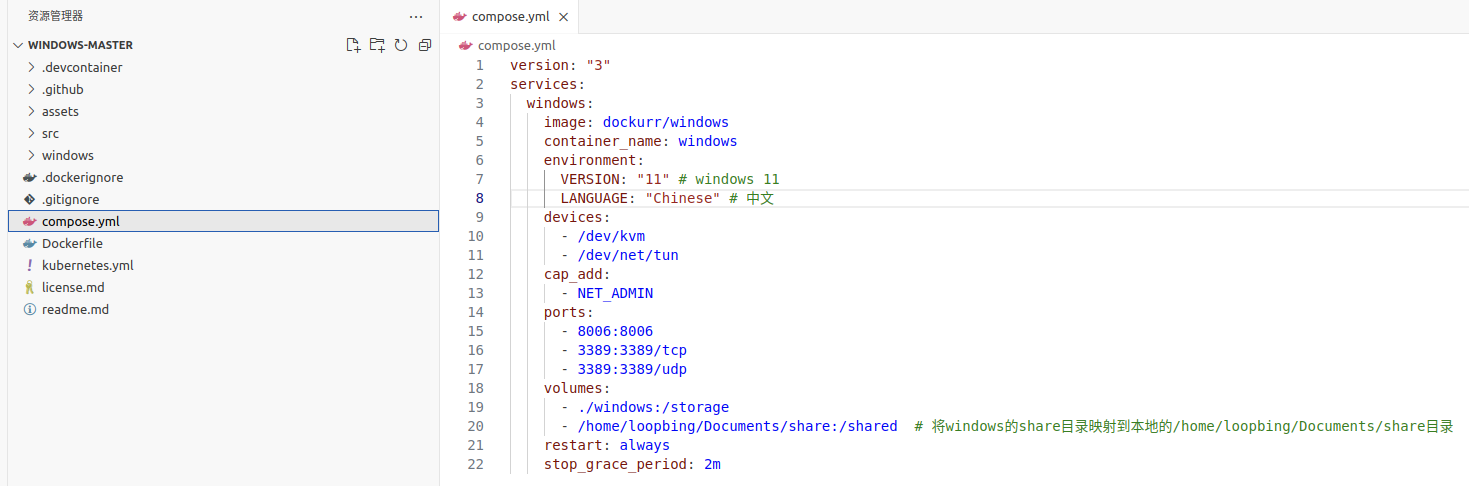
这里对我觉得有用的配置做下展现
| Value | Version | Size |
|---|---|---|
11 |
Windows 11 Pro | 7.2 GB |
11l |
Windows 11 LTSC | 4.7 GB |
11e |
Windows 11 Enterprise | 6.6 GB |
10 |
Windows 10 Pro | 5.7 GB |
10l |
Windows 10 LTSC | 4.6 GB |
10e |
Windows 10 Enterprise | 5.2 GB |
8e |
Windows 8.1 Enterprise | 3.7 GB |
7u |
Windows 7 Ultimate | 3.1 GB |
vu |
Windows Vista Ultimate | 3.0 GB |
xp |
Windows XP Professional | 0.6 GB |
2k |
Windows 2000 Professional | 0.4 GB |
2025 |
Windows Server 2025 | 6.7 GB |
2022 |
Windows Server 2022 | 6.0 GB |
2019 |
Windows Server 2019 | 5.3 GB |
2016 |
Windows Server 2016 | 6.5 GB |
2012 |
Windows Server 2012 | 4.3 GB |
2008 |
Windows Server 2008 | 3.0 GB |
2003 |
Windows Server 2003 | 0.6 GB |
environment:
  LANGUAGE: "French"
可以在下面这些国家选择,注意部分版本不支持中文: 🇦🇪 Arabic, 🇧🇬 Bulgarian, 🇨🇳 Chinese, 🇭🇷 Croatian, 🇨🇿 Czech, 🇩🇰 Danish, 🇳🇱 Dutch, 🇬🇧 English, 🇪🇪 Estonian, 🇫🇮 Finnish, 🇫🇷 French, 🇩🇪 German, 🇬🇷 Greek, 🇮🇱 Hebrew, 🇭🇺 Hungarian, 🇮🇹 Italian, 🇯🇵 Japanese, 🇰🇷 Korean, 🇱🇻 Latvian, 🇱🇹 Lithuanian, 🇳🇴 Norwegian, 🇵🇱 Polish, 🇵🇹 Portuguese, 🇷🇴 Romanian, 🇷🇺 Russian, 🇷🇸 Serbian, 🇸🇰 Slovak, 🇸🇮 Slovenian, 🇪🇸 Spanish, 🇸🇪 Swedish, 🇹🇭 Thai, 🇹🇷 Turkish and 🇺🇦 Ukrainian.
3.构建并运行容器
docker compose build && docker compose up4.如果你对具体的配置感兴趣,请阅读readme.md