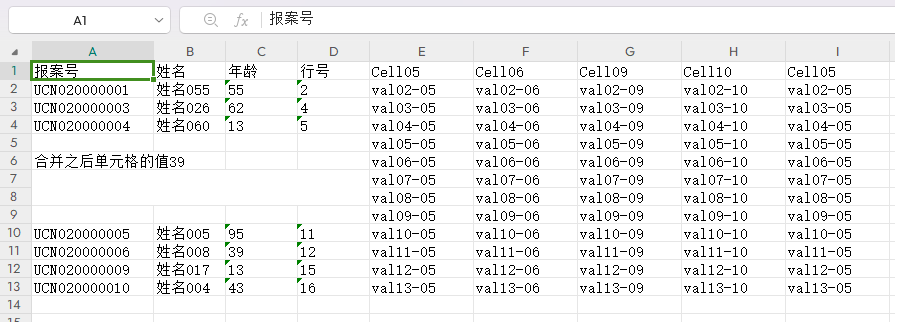
python用openpyxl操作excel-单元格操作
python
import logging
import com.pro001.log.pro_log_config as pro_log_config #参见另一篇博文
from openpyxl import Workbook, load_workbook
from openpyxl.styles import  Font, Alignment, Side, PatternFill, Border
import os
import datetime
import random
import pandas as pd


def create_sn(prefix, output_len=4):
    '''生成含有前缀并至少带指定长度格式的序列号,
    格式:prefix_d0{output_len}1'''
    if output_len < 1:
        output_len = 1
    sn = 0
    while True:
        sn += 1
        if len(str(sn)) > output_len:
            # 当大于指定位数时直接加上位数
            yield f'{prefix}' + str(sn)
        else:
            yield f'{prefix}' + '{:0{}}'.format(sn, output_len)


def excel_cell_operate(base_file_path):
    """ excel文件指定sheet指定单元格操作 """
    try:
        if not os.path.exists(base_file_path):
            os.makedirs(base_file_path)
            logger.error(f'已创建文件路径:{base_file_path}')
        dt_str = datetime.datetime.now().strftime('%Y%m%d_%H%M%S')
        file_path_name = 'F' + dt_str + '.xlsx'
        file_path_name = os.path.join(base_file_path, file_path_name)

        wb =  Workbook()
        # 1,获取第一个sheet对象,并设置为活动sheet
        ws = wb.worksheets[0]
        wb.active = ws

        # 2,单元格写入值
        # 2.1,根据坐标逐个单元格写入值,完成一行数据
        ws['A1'] = '报案号'
        ws['B1'] = '姓名'
        ws['C1'] = '年龄'
        ws['D1'] = '行号'

        # 2.2,根据行列方式逐个单元格写入值一行数据,循环可写入多行数据
        cno = create_sn('UCN02000', 4)
        for i in range(1,5):
            new_max_num = ws.max_row + 1
            ws.cell(row=new_max_num, column=1, value=f'{next(cno)}')
            ws.cell(row=new_max_num, column=2, value=f'姓名{random.randint(1,99):03d}')
            ws.cell(row=new_max_num, column=3, value=str(random.randint(1,99)))
            ws.cell(row=new_max_num, column=4, value=str(new_max_num))

        # 3,读取单元格数据
        # 3.1,根据坐标方式读取单元格数据
        row02_cel01 = ws['A2'].value
        # 3.2,根据行列方式读取单元格数据
        row02_cel02 = ws.cell(row=2, column=2).value
        row02_cel03 = ws.cell(row=2, column=3).value
        row02_cel04 = ws.cell(row=2, column=4).value
        logger.info(f'row02 data:{row02_cel01} - {row02_cel02} - {row02_cel03} - {row02_cel04}')
        # 3.3,遍历当前活动sheet的所有单元格
        max_cell_num = ws.max_column
        max_row_num = ws.max_row
        for row in ws.iter_rows(min_row=2, max_row=max_row_num, min_col=1, max_col=max_cell_num):
            print('row data:', end='')
            for cell in row:
                print(cell.value, end=' - ')
            print('')

        # 4,单元格合并操作
        # 4.1,当前活动sheet中根据坐标合并单元格
        ws.merge_cells('A7:D8')
        ws['A7'] = f'合并之后单元格的值{random.randint(10,100)}'
        # 4.2,根据行列范围合并单元格方式
        ws.merge_cells(start_row=9, start_column=1, end_row=10, end_column=5)
        ws.cell(row=9, column=1, value=f'合并之后单元格的值{random.randint(90,200)}')

        # 5,拆分单元格
        # 5.1,方式一为指定坐标拆分单元格
        #ws.unmerge_cells('A7:D8')
        # 5.2,方式二为指定行列范围单元格
        ws.unmerge_cells(start_row=9, start_column=1, end_row=10, end_column=5)

        # 6,行数据的插入和删除
        # 6.1,在当前活动sheet中某行(如11行)之前插入 1 行数据,
        ws.cell(row=11, column=1, value=f'{next(cno)}')
        ws.cell(row=11, column=2, value=f'姓名{random.randint(1, 20):03d}')
        ws.cell(row=11, column=3, value=str(random.randint(1, 99)))
        ws.cell(row=11, column=4, value=str(11))
        # 6.2,在当前活动sheet中某行(如11行)之后插入 5 行数据,
        # 实际是在 12 行之前插入,插入都是在目标行之前插入,只是改变下标就可看作是目标位的前或后

        for i in range(12, 17):
            ws.cell(row=i, column=1, value=f'{next(cno)}')
            ws.cell(row=i, column=2, value=f'姓名{random.randint(1, 20):03d}')
            ws.cell(row=i, column=3, value=str(random.randint(1, 99)))
            ws.cell(row=i, column=4, value=str(i))
            print(f'第{i}数据:{[cell.value for cell in ws[i]]}')

        # 6.3,删除某行数据,例如第 3 行数据
        print(f'第3行删除前数据:{[cell.value for cell in ws[3]]}')
        ws.delete_rows(idx=3)
        # 6.4,删除多行数据,例如第 12 开始,删除 2 行数据
        print(f'第12行删除前数据:{[cell.value for cell in ws[12]]}')
        print(f'第13行删除前数据:{[cell.value for cell in ws[13]]}')
        ws.delete_rows(idx=12, amount=2)

        # 7,列数据的插入和删除
        # 7.1,在当前活动sheet中某列(如第5列)之前插入 1 列数据,
        ws.insert_cols(idx=5)
        ws.cell(row=1, column=5, value=f'Cell05')
        col_letter = ws.cell(row=1, column=5).column_letter
        ws.column_dimensions[col_letter].width = 13 #设定列宽
        # 初始化第5列数据
        for row_idx in range(2, ws.max_row+1):
            ws.cell(row=row_idx, column=5, value=f'val{row_idx:02d}-05')
        # 7.2,在当前活动sheet中某列(如第5列)之后插入 6 列数据,
        for cel_idx in range(5, 11):
            ws.insert_cols(idx=cel_idx)
            ws.cell(row=1, column=cel_idx, value=f'Cell{cel_idx:02d}')
            col_letter = ws.cell(row=1, column=cel_idx).column_letter
            ws.column_dimensions[col_letter].width = 13 #设定列宽
        # 给新添加的第5-11列进行初始化值
        for row_idx in range(2, ws.max_row+1):
            for col_idx in range(5, 11):
                ws.cell(row=row_idx, column=col_idx, value=f'val{row_idx:02d}-{col_idx:02d}')
                col_letter = ws.cell(row=row_idx, column=cel_idx).column_letter
                ws.column_dimensions[col_letter].width = 13  # 设定列宽
        # 7.3,从第 7 列开始,删除后面 2 列,无 amount 参数则默认删除后面1列
        ws.delete_cols(idx=7, amount=2)

        # 保存wb对象
        wb.save(file_path_name)
        logger.info(f'文件{file_path_name}单元格操作成功!')
    except Exception as e:
        logger.error(f'生成Excel文件见:{file_path_name},单元格操作失败,info:\n{e}')


def main():
    """主函数"""
    base_dir = r'F:\appData\tempExcel'
    excel_cell_operate(base_dir)


if __name__ == '__main__':
    print('-' * 60)
    main()