python用openpyxl操作excel-读取或创建excel
1,读取 excel 文件返回 workbook 对象
python
from openpyxl import Workbook, load_workbook

def excel_read(file_path):
    """ 读取Excel文件返回workbook对象 """
    if not os.path.exists(file_path):
        logger.error(f'文件{file_path}不存在')
        return None
    wb = load_workbook(file_path)
    return wb
2,可创建指定名称,含有多个表sheet名称的excel文件
python
import logging
import com.pro001.log.pro_log_config as pro_log_config
from openpyxl import Workbook, load_workbook
from openpyxl.styles import  Font, Alignment, Side, PatternFill, Border
import os
import datetime
import random
import pandas as pd


def create_sn(prefix, output_len=4):
    '''生成含有前缀并至少带指定长度格式的序列号,
    格式:prefix_d0{output_len}1'''
    if output_len < 1:
        output_len = 1
    sn = 0
    while True:
        sn += 1
        if len(str(sn)) > output_len:
            # 当大于指定位数时直接加上位数
            yield f'{prefix}' + str(sn)
        else:
            yield f'{prefix}' + '{:0{}}'.format(sn, output_len)


def excel_create(file_path, file_name, *sheet_name):
    """ 根据参数创建Excel文件并建立sheet """
    try:
        if not os.path.exists(file_path):
            os.makedirs(file_path)
        if not file_name or not file_name.lower().endswith('.xlsx'):
            file_name = datetime.datetime.now().strftime('%Y%m%d_%H%M%S') + '.xlsx'
        full_file_path = os.path.join(file_path, file_name)
        sn = create_sn('TB', 3)
        sheet_name_list = []
        if not sheet_name:
            sheet_name = next(sn)
        else:
            for item in sheet_name:
                sheet_name_list.append(item)
        # 创建 Workbook 对象,
        wb = Workbook()
        # 创建指定名称的工作表
        for sheet_name in sheet_name_list:
            wb.create_sheet(sheet_name)
        # 删除建立时生产的第一个默认sheet对象
        shnames = wb.sheetnames
        wb.remove(wb[shnames[0]])
        wb.save(full_file_path)

        # 获取wb对象所有的sheet名称
        shnames = wb.sheetnames
        # 关闭wb对象
        wb.close()
        logger.info(f'Excel文件:{full_file_path} 创建成功!')
        logger.info(f'工作表:' + ','.join(shnames))
        return full_file_path
    except Exception as e:
        logger.error(f'Excel文件:{full_file_path} 创建失败!info:\n{e}')


def main():
    """主函数"""
    excel_create(r'F:\appData', '', 'TB01', 'TB02', 'TB03')


if __name__ == '__main__':
    print('-' * 60)
    main()
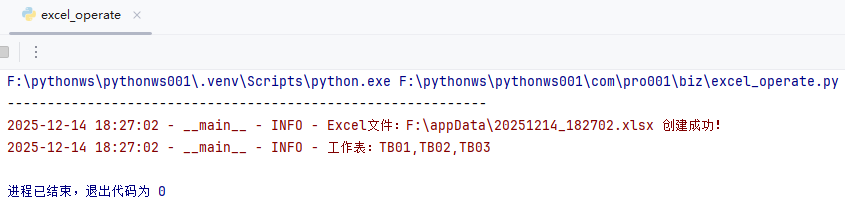
运行结果: