📅 我们继续 50 个小项目挑战!------
DrinkWater组件
仓库地址:https://gitee.com/hhm-hhm/50days50projects.git
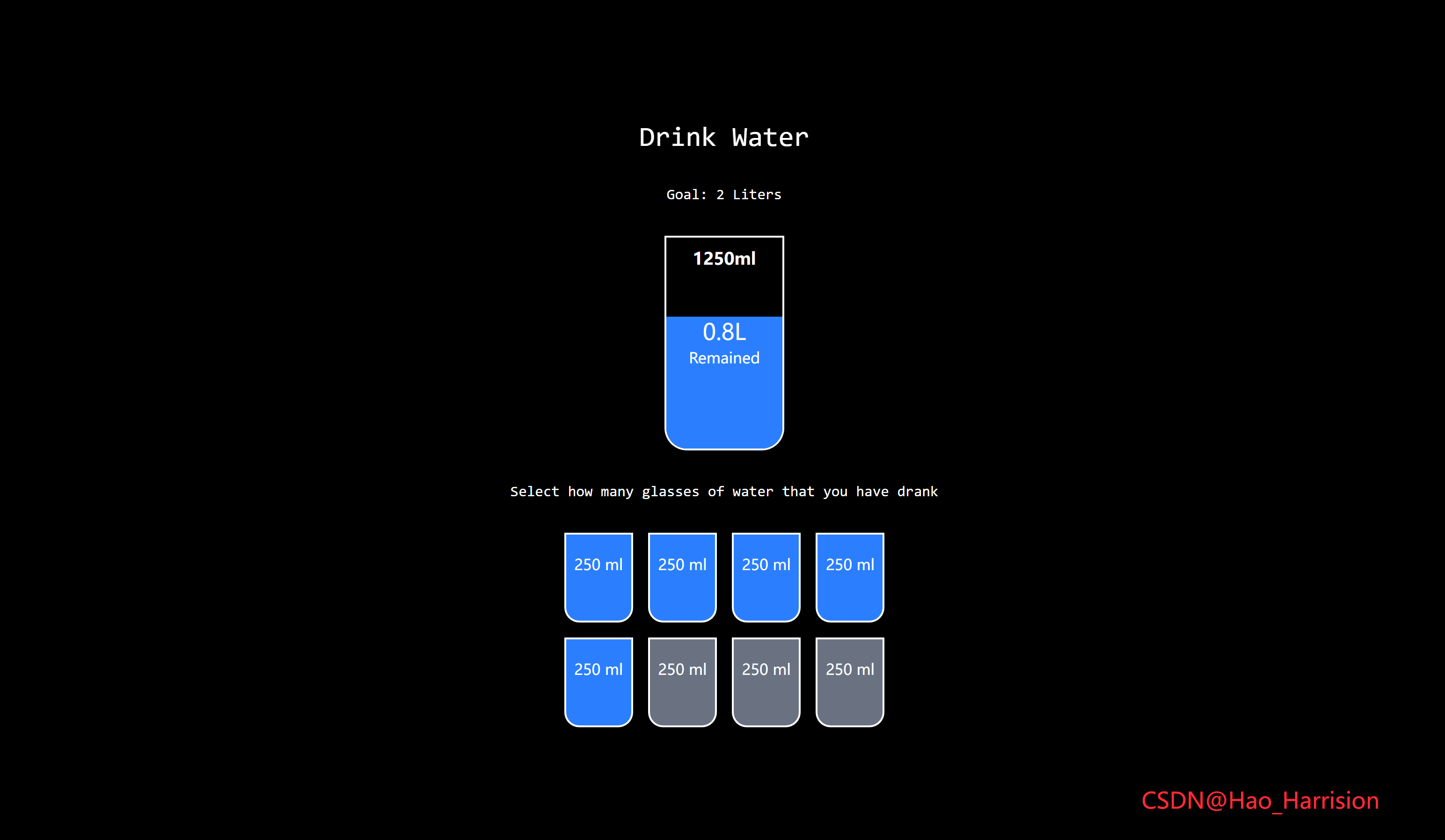
构建一个互动式的"每日喝水进度追踪"组件。用户可以通过点击玻璃杯按钮来更新已喝水量,并实时看到水位上升动画和剩余水量变化。
🌀 组件目标
- 显示每日喝水目标为 2 升(2000ml)
- 每个杯子代表 250ml
- 点击杯子增加当前饮水量
- 动态显示剩余水量和已喝水量
- 使用 TailwindCSS 快速构建现代 UI 界面
- 添加水位上升动画效果
🔧 DrinkWater.tsx组件实现
TypeScript
import React, { useState } from 'react'

const DrinkWater: React.FC = () => {
    const [currentAmount, setCurrentAmount] = useState<number>(0) // 当前喝的杯数(每杯250ml)

    const drink = (amount: number) => {
        setCurrentAmount(amount)
    }

    return (
        <div className="flex h-screen flex-col items-center justify-center gap-8 text-white">
            <h1 className="font-mono text-3xl">Drink Water</h1>
            <h3 className="font-mono">Goal: 2 Liters</h3>

            <div className="relative flex h-1/4 w-32 flex-col items-center justify-center overflow-hidden rounded-b-3xl border-2 text-center">
                {/* 水的进度条 */}
                <div
                    className="absolute right-0 bottom-0 left-0 bg-blue-500 transition-all duration-500 ease-out"
                    style={{ height: `${(currentAmount / 8) * 100}%` }}></div>

                {/* 剩余水量显示 */}
                <div className="relative z-10">
                    <div className="text-2xl">
                        {((2000 - currentAmount * 250) / 1000).toFixed(1)}L
                    </div>
                    <div>Remained</div>
                </div>

                {/* 已喝水量显示 */}
                {currentAmount > 0 && (
                    <div className="absolute top-2 text-lg font-bold">{currentAmount * 250}ml</div>
                )}
            </div>

            <p className="font-mono">Select how many glasses of water that you have drank</p>

            <div className="flex flex-wrap items-center justify-center gap-4">
                {Array.from({ length: 8 }, (_, i) => i + 1).map((item) => (
                    <div
                        key={item}
                        className={`h-24 w-8 basis-1/5 cursor-pointer rounded-b-2xl border-2 pt-5 text-center transition-all duration-300 ease-in-out ${
                            item <= currentAmount ? 'bg-blue-500' : 'bg-gray-500'
                        }`}
                        onClick={() => drink(item)}>
                        250 ml
                    </div>
                ))}
            </div>
            <div className="absolute right-20 bottom-10 text-2xl text-red-500">
                CSDN@Hao_Harrision
            </div>
        </div>
    )
}

export default DrinkWater
✅ 转换说明
| Vue 特性 | React 对应 |
|---|---|
ref(currentAmount) |
useState<number>(0) |
v-for="item in 8" |
Array.from({ length: 8 }, (_, i) => i + 1).map(...) |
:class="[...]" |
使用模板字符串和条件表达式拼接 class |
v-if="currentAmount > 0" |
{currentAmount > 0 && (...)} |
:style="{ height: ... }" |
style={``{ height: ... }} |
<script setup> |
函数组件 + useState |
🎨 TailwindCSS 样式重点讲解
| 类名 | 作用 |
|---|---|
flex, items-center, justify-center |
居中布局整个容器 |
h-screen, flex-col |
全屏高度 + 纵向排列 |
gap-8 |
各元素之间间距为 2rem |
rounded-b-3xl |
底部圆角为 1.5rem |
border-2 |
边框宽度为 2px |
overflow-hidden |
防止水位溢出容器 |
h-24, w-8 |
水杯大小为 6rem × 2rem |
pt-5 |
上内边距为 1.25rem |
transition-all duration-500 |
过渡动画持续时间为 0.5 秒 |
cursor-pointer |
鼠标悬停变为可点击指针 |
text-2xl, text-lg |
不同层级字体大小 |
font-bold, font-mono |
加粗或等宽字体 |
| [🎯 TailwindCSS 样式说明] |
这些类名帮助我们快速构建了一个互动性强、视觉反馈明确的喝水追踪组件。
🦌 路由组件 + 常量定义
router/index.tsx中 children数组中添加子路由
TypeScript
{
    path: '/',
    element: <App />,
    children: [
       ...
      {
                path: '/DrinkWater',
                lazy: () =>
                    import('@/projects/DrinkWater.tsx').then((mod) => ({
                        Component: mod.default,
                    })),
       },
    ],
 },
constants/index.tsx 添加组件预览常量
TypeScript
import demo16Img from '@/assets/pic-demo/demo-16.png'
省略部分....
export const projectList: ProjectItem[] = [
    省略部分....
     {
        id: 16,
        title: 'DrinkWater',
        image: demo16Img,
        link: 'DrinkWater',
    },
🚀 小结
喝水进度追踪组件不仅功能实用,非常适合用于健康类应用、习惯养成类仪表盘或个人追踪页面。
你可以进一步扩展的功能包括:
- 支持本地存储记录每天饮水情况
- 添加"重置今日饮水"按钮
- 支持图表可视化统计趋势
- 支持通知提醒喝水
- 支持主题切换(暗色/亮色)
📅 明日预告: 我们将完成MovieCard组件,一个常见的电影网站常用的卡片式展示,利用tailwindcss可以轻松实现票的布局和排版!🚀
原文链接:https://blog.csdn.net/qq_44808710/article/details/148851310
每天造一个轮子,码力暴涨不是梦!🚀