在 Android 中,要创建一个渐变的 Drawable,你需要创建一个 XML 文件 ,根元素使用 <shape>,并在其中嵌套 <gradient> 标签,这个文件通常放在 res/drawable/ 目录下。
一、Gradient 渐变类型
1.1 基础线性渐变 (Linear Gradient)
这是最常见的渐变,例如从左到右,或从上到下。
文件名: res/drawable/bg_linear_gradient.xml
xml
<?xml version="1.0" encoding="utf-8"?>
<shape xmlns:android="http://schemas.android.com/apk/res/android"
    android:shape="rectangle">

    <!-- 渐变设置 -->
    <gradient
        android:type="linear"
        android:angle="45"
        android:startColor="#FF5722"
        android:centerColor="#FF9800"
        android:endColor="#FFC107" />

    <!-- (可选) 你还可以添加圆角 -->
    <corners android:radius="30dp" />

</shape>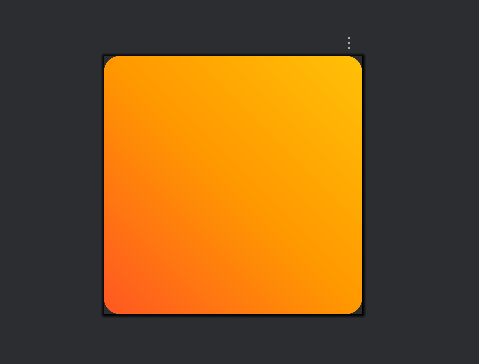
关键属性解释:
android:type: 渐变类型,默认为linear(线性)。android:startColor: 渐变开始的颜色。android:endColor: 渐变结束的颜色。android:centerColor: (可选) 中间过渡的颜色。android:angle: 渐变的方向(仅对线性渐变有效)。- 必须是 45 的倍数。
0: 从左到右90: 从下到上180: 从右到左270: 从上到下
1.2 放射性渐变 (Radial Gradient)
从中心向外扩散的圆形渐变。
文件名: res/drawable/bg_radial_gradient.xml
xml
<?xml version="1.0" encoding="utf-8"?>
<shape xmlns:android="http://schemas.android.com/apk/res/android"
    android:shape="rectangle">

    <gradient
        android:centerColor="#fd1d1d"
        android:centerX="0.5"
        android:centerY="0.5"
        android:endColor="#fcb045"
        android:gradientRadius="500dp"
        android:startColor="#833ab4"
        android:type="radial" />

</shape>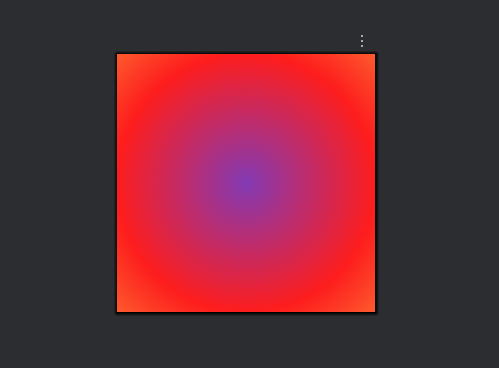
关键属性解释:
android:type="radial": 设置为放射性渐变。android:gradientRadius: (必须) 渐变的半径大小,单位通常是 dp。android:centerX/centerY: 渐变中心的坐标(0.0 - 1.0)。0.5表示在正中间。
1.3 扫描渐变 (Sweep Gradient)
类似雷达扫描的效果。
文件名: res/drawable/bg_sweep_gradient.xml
xml
<?xml version="1.0" encoding="utf-8"?>
<shape xmlns:android="http://schemas.android.com/apk/res/android"
    android:shape="oval"> <!-- 通常配合 oval 形状使用 -->

    <gradient
        android:type="sweep"
        android:startColor="#F44336"
        android:endColor="#2196F3" />

    <!-- (可选) 你还可以添加描边  -->
    <stroke
        android:width="5dp"
        android:color="#FFFFFF" />
</shape>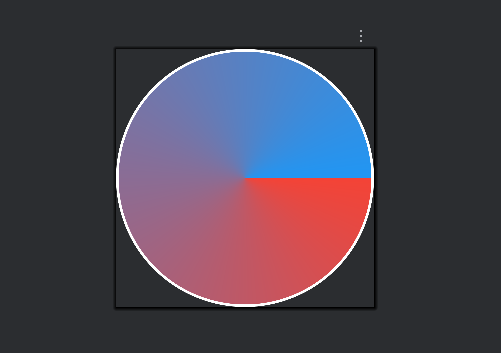
二、Gradient 常用属性速查表
| 属性 | 说明 | 备注 |
|---|---|---|
android:startColor |
起始颜色 | Hex 颜色值 (如 #FFFFFF) |
android:endColor |
结束颜色 | Hex 颜色值 |
android:centerColor |
中间颜色 | 可选,用于三色渐变 |
android:angle |
渐变角度 | 仅 Linear 有效,必须是 45 的倍数 |
android:type |
渐变类型 | linear (默认), radial, sweep |
android:gradientRadius |
渐变半径 | 仅 Radial 有效,必须指定 |
android:centerX |
X轴中心点 | 0.0 ~ 1.0 (0.5 为中心) |
android:centerY |
Y轴中心点 | 0.0 ~ 1.0 (0.5 为中心) |
三、Gradient 渐变的使用
创建好 XML 文件后(假设名为 bg_gradient.xml),你可以像使用普通图片一样将其应用到任何 View 的背景上:
xml
<LinearLayout
    android:layout_width="match_parent"
    android:layout_height="200dp"
    android:background="@drawable/bg_gradient">

    <!-- 或者应用在按钮上 -->
    <Button
        android:layout_width="wrap_content"
        android:layout_height="wrap_content"
        android:background="@drawable/bg_gradient"
        android:text="Gradient Button" />

</LinearLayout>
四、进阶方案
使用 Layer-List 增加层次感:如果你觉得上面的效果太平,可以使用 layer-list。我们可以先铺一层深色背景,再在上面叠加一个"聚光灯"效果,这样看起来更有质感。
xml
<?xml version="1.0" encoding="utf-8"?>
<layer-list xmlns:android="http://schemas.android.com/apk/res/android">

    <!-- 第一层:深色底色 (整个屏幕的基础颜色) -->
    <item>
        <shape android:shape="rectangle">
            <solid android:color="#054990" /> <!-- 极深的蓝色 -->
        </shape>
    </item>

    <!-- 第二层:中间的绿色辉光 -->
    <item>
        <shape android:shape="rectangle">
            <gradient
                android:type="radial"
                android:gradientRadius="600dp"
                android:centerX="0.5"
                android:centerY="0.5"
                android:startColor="#80145597"
                android:endColor="#00000000" />
            <!-- startColor 是半透明的蓝色 (#80...) -->
            <!-- endColor 是全透明 (#00...) 以便融入底色 -->
        </shape>
    </item>

    <!-- 第三层:模拟中心亮白色的光源 -->
    <item>
        <shape android:shape="rectangle">
            <gradient
                android:type="radial"
                android:gradientRadius="300dp"
                android:centerX="0.5"
                android:centerY="0.6"
                android:startColor="#60E0F2F1"
                android:endColor="#00000000" />
            <!-- 中心淡淡的白光,模拟远处出口 -->
        </shape>
    </item>

</layer-list>