在AI视频生成领域,Google Flow凭借其出色的电影级视频质量和专为创作者设计的易用性,已经成为影视制作和内容创作者们的首选工具之一。本文将基于我实际使用Google Flow制作玩具宣传视频的经验,详细介绍这个强大工具的各项功能、使用技巧和注意事项。
一、Google Flow 简介
1.1 什么是Google Flow?
Google Flow 是由Google DeepMind开发的AI电影制作工具,基于最先进的Veo视频生成模型,能够根据用户的文字描述或参考图片/资产,生成高质量的电影级视频内容。
官网地址: https://labs.google/flow
主要特点:
- 支持文生视频(Text-to-Video)
- 支持图生视频(Image-to-Video)及多资产一致性生成
- 视频质量高,物理真实、运动流畅自然,支持原生音频(包括对话和环境音)
- 生成速度较快(通常几分钟,根据模式而定)
- 支持短片段生成(可通过扩展和拼接创建更长叙事)
二、快速上手:第一个视频
2.1 注册与登录
- 访问 https://labs.google/flow 或通过Google AI订阅页面
- 需要订阅Google AI Pro或Ultra计划(Pro提供基本访问,Ultra解锁最高限额和Veo 3高级功能)
- 使用Google账号登录(支持现有Google账号)
- 登录后即可开始使用Flow界面
2.2 界面介绍
Google Flow 的界面非常简洁且专为创意流程设计:
+------------------------------------------+
|         [主页]  [我的项目]  [Flow TV]    |
+------------------------------------------+
|                                          |
|        [提示输入框]                       |
|        请输入场景描述...                   |
|                                          |
|        [上传资产/Ingredients] (可选)     |
|                                          |
|        [Generate 生成]                   |
|                                          |
+------------------------------------------+
三、核心功能详解
3.1 文生视频(Text-to-Video)
功能说明: 纯粹通过文字描述生成视频,无需任何参考图片。
使用场景
- 创意视频制作
- 概念演示
- 场景构想可视化
- 不依赖特定产品/实物的内容
实战案例:制作玩具宣传视频
需求: 制作一个24秒的木质玩具宣传视频,包含圣诞送礼和孩子玩耍场景。
提示词示例:
Photorealistic Christmas morning scene: Caucasian parents (mother and father) smiling and giving a wrapped gift box to their 5-year-old daughter in cozy living room with Christmas tree. Little girl opens the box, discovers the wooden cylinder peg sorting toy with colorful cylindrical pieces, eyes light up with joy, big excited smile, hugs parents happily. Warm indoor lighting, authentic family moment, natural expressions, filmed like real home video, holiday atmosphere, 4K quality关键要素解析:
- 场景设定 -
Christmas morning scene - 人物描述 -
Caucasian parents, 5-year-old daughter - 动作流程 -
giving gift → opens box → hugs parents - 情感表达 -
joy, excited smile, happily - 视觉风格 -
Photorealistic, warm lighting, filmed like home video - 质量要求 -
4K quality
生成效果:
- ✅ 场景真实自然
- ✅ 人物表情生动
- ✅ 动作流畅连贯
- ⚠️ 偶尔会出现手部细节不自然
- ⚠️ 面部特征可能略有变形
3.2 图生视频(Image-to-Video)
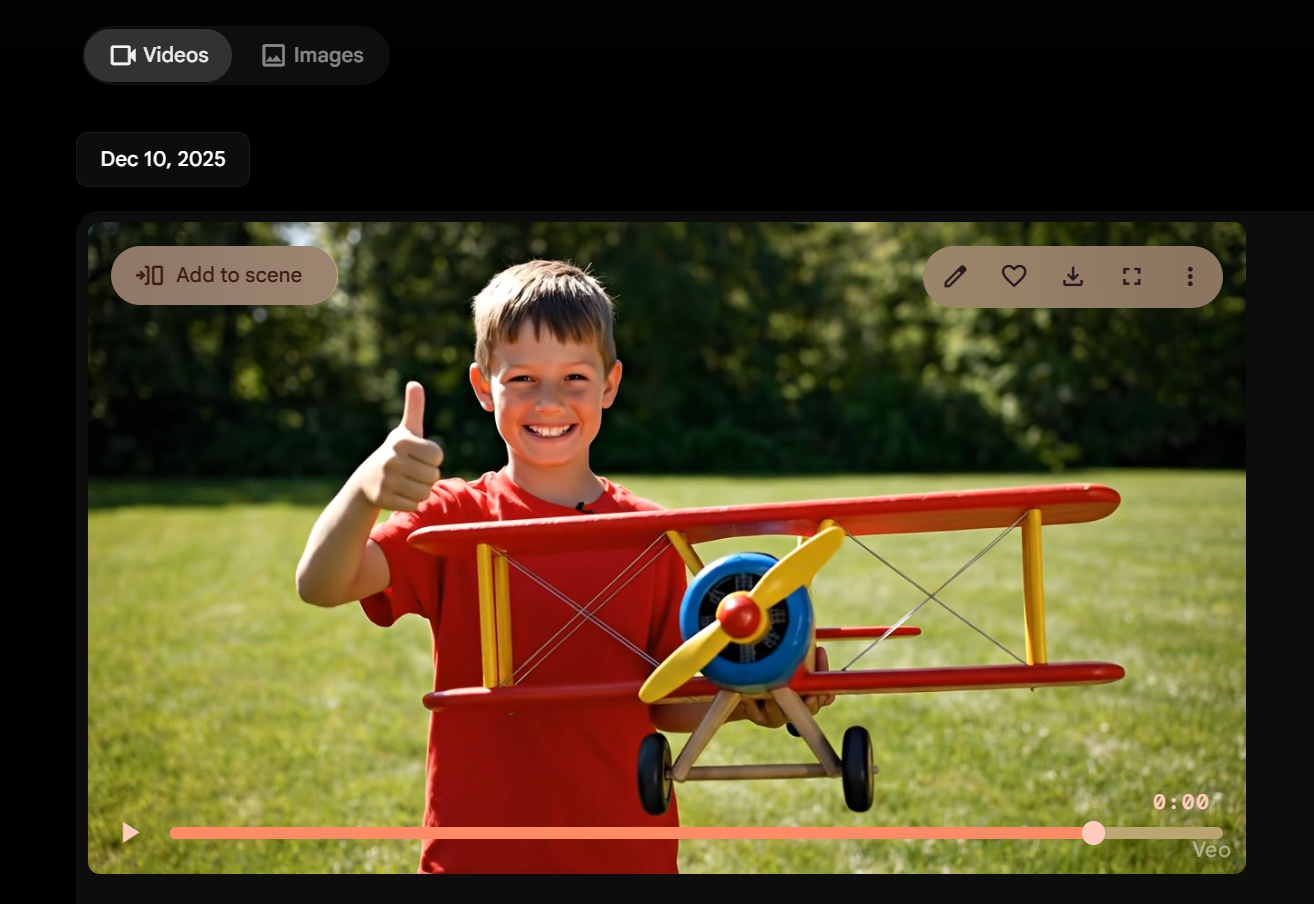
这种程度已经是很逼真的了,我只是给他产品图,这个人和场景都是我用提示词描述
功能说明: 上传一张图片,AI会将其"动起来",生成基于该图片的视频。
重要提醒 ⚠️
上传的图片会直接出现在视频开头,你可以裁剪视频
方案: 分段生成(送礼场景+玩耍场景+产品特写),最后剪辑拼接
图生视频的正确使用场景
✅ 适合:
- 产品360度展示(上传产品静态照,生成旋转视频)
- 人物肖像动态化(让照片中的人"动起来")
- 场景延伸(从一张风景照扩展出镜头运动)
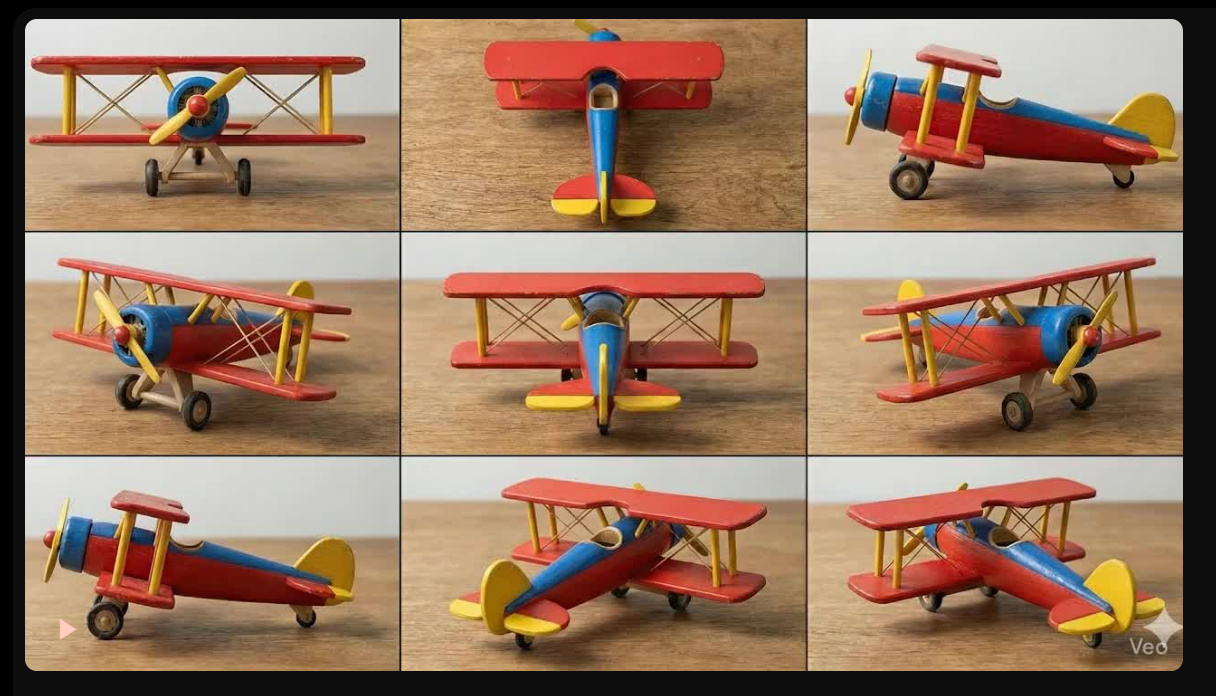
❌ 不适合:
- 作为"风格参考"(目前没有这个功能)
- 仅用于描述产品外观(建议用文字)
3.3 提示词工程(Prompt Engineering)
高质量的提示词是生成优秀视频的关键。以下是我总结的提示词公式:
黄金提示词结构
[视觉风格] + [场景描述] + [人物/物体] + [动作流程] + [情感/氛围] + [光线/色彩] + [技术参数]各部分详解
1. 视觉风格 (必需)
- Photorealistic (照片级真实)
- Cinematic (电影感)
- Documentary style (纪实风格)
- Commercial style (商业广告风格)
- Anime style (动画风格)
2. 场景描述 (必需)
- Christmas morning in cozy living room
- Sunny park with green grass
- Modern bright playroom
- Professional studio with white background
3. 人物/物体 (必需)
人物描述要点:
- 年龄:3-year-old, teenage, elderly
- 种族:Caucasian, Asian, African American
- 外貌:blonde hair, brown eyes
- 服装:casual clothes, formal suit

物体描述要点:
- 尺寸:20x20cm base, 10cm height
- 材质:natural wood, plastic, metal
- 颜色:colorful, bright colors, pastel tones
- 细节:smooth texture, rounded edges
4. 动作流程 (核心)
动作要具体且连贯:
❌ "playing with toy"
✅ "picking up toy, inserting pieces into holes, clapping hands"

时间顺序清晰:
- First... then... finally...
- Starting with... transitioning to... ending with...
5. 情感/氛围 (重要)
- happy and excited
- concentrated and focused
- joyful celebration
- warm family moment
- energetic and fun
6. 光线/色彩 (提升质量)
光线描述:
- soft natural lighting
- warm indoor lighting
- bright daylight
- golden hour sunlight
- studio lighting

色彩风格:
- natural colors
- vibrant and saturated
- soft pastel tones
- high contrast
7. 技术参数 (可选但推荐)
- 4K quality
- cinematic camera movement
- shallow depth of field
- slow motion
- smooth camera pan
3.4 高级技巧:分段生成与拼接
对于超过5秒的视频需求(如我的24秒玩具宣传视频),需要分段生成后拼接。
规划思路
总时长:24秒
- 段1:0-10秒(圣诞送礼场景)
- 段2:11-18秒(男孩玩耍)
- 段3:19-24秒(产品特写)
各段提示词设计
段1提示词(简化版):
Christmas gift giving: Caucasian parents giving wrapped wooden toy to daughter, girl opens gift and hugs parents with joy, Christmas tree background, warm family moment, 10 seconds段2提示词(简化版):
3-year-old boy playing with wooden peg toy on floor, inserting colorful pieces into holes, happy concentration, natural play, 8 seconds段3提示词(简化版):
360 rotation of wooden peg sorting toy, 20x20cm base, cute decorations, product showcase, white background, 6 seconds拼接工具推荐
- 剪映(剪映专业版) - 免费,功能强大
- Adobe Premiere Pro - 专业级
- Final Cut Pro - Mac用户首选
- DaVinci Resolve - 免费且专业
四、常见问题与解决方案
4.1 水印问题
Q:我已经是Flow Pro用户,为什么视频还有水印?
其实是谷歌为了识别是ai生成的视频,强行加上的,没法更改
4.2 生成效果不理想
常见问题及解决方案:
问题1:人物面部变形
原因: AI在处理面部细节时的技术限制,不过这个ai效果很好
解决方案:
✅ 避免极端角度(仰拍、俯拍)
✅ 提示词加入 "natural facial features"
✅ 指定 "realistic skin texture"
✅ 多生成几次选择最好的
问题2:动作不连贯
原因: 提示词中动作描述不够清晰
解决方案:
❌ "child playing"
✅ "child picking up toy, inserting piece, then clapping"

❌ "flying airplane"
✅ "airplane taking off from hand, flying in arc, landing on grass"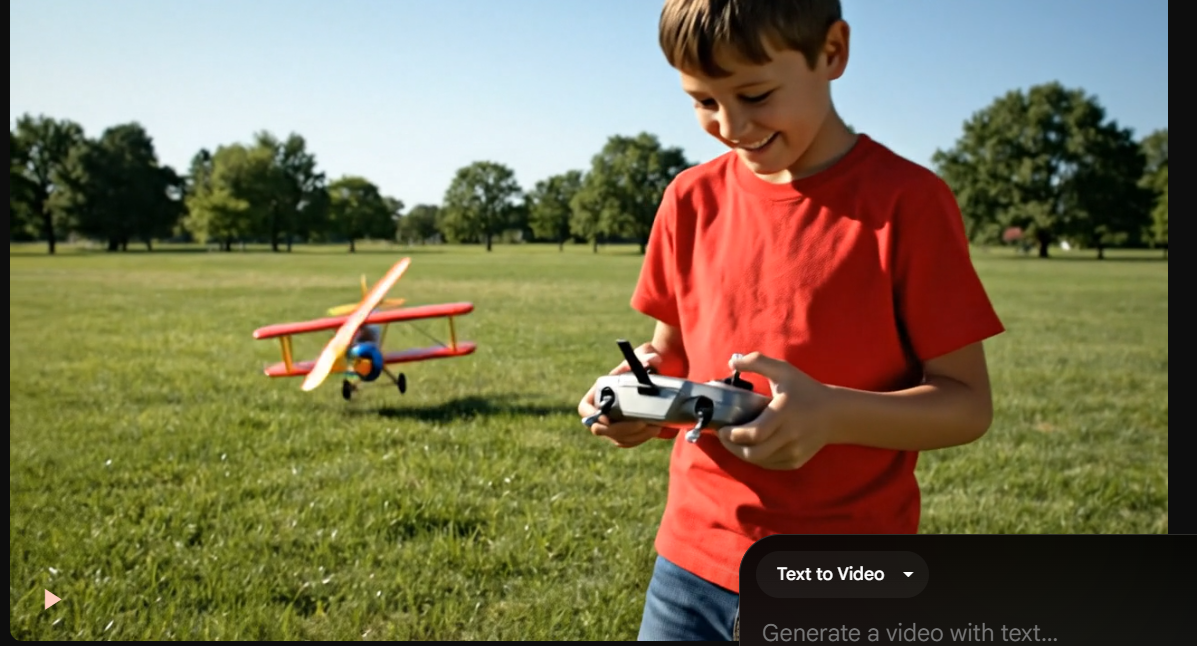
问题3:物体细节错误
原因: AI对特定产品细节的理解有限
实际案例: 我的玩具是平底圆柱形 木块,但AI生成成了尖底胡萝卜形。
解决方案:
提示词要超级具体:
❌ "vegetable shaped pieces"
✅ "cylindrical wooden pegs with FLAT BOTTOMS and green leaf decorations on top"

强调关键特征:
- flat bottom (平底)
- cylindrical shape (圆柱形)
- specific size (20x20cm base)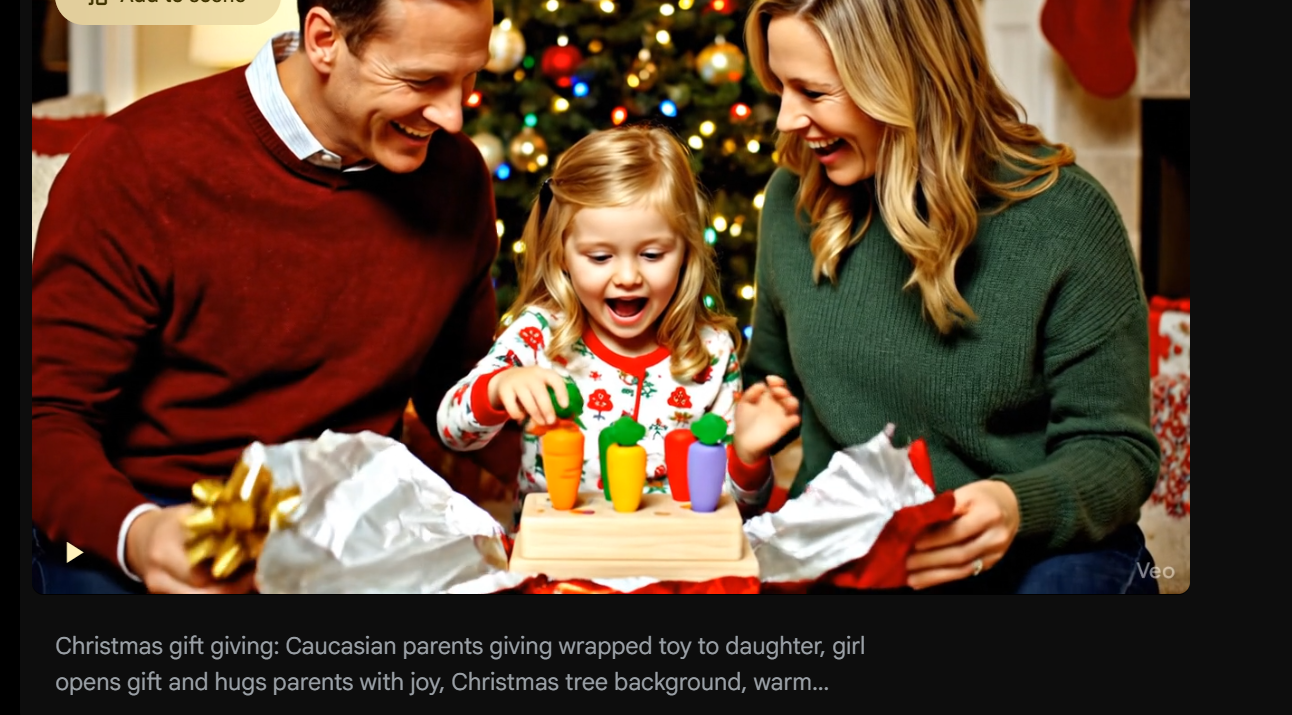
问题4:场景风格不对
原因: 视觉风格关键词使用不当
解决方案:
想要真实感:
✅ Photorealistic
✅ filmed like real home video
✅ documentary style
✅ avoid CGI look

想要商业感:
✅ commercial photography
✅ professional product video
✅ studio lighting
✅ premium quality
4.3 生成速度慢
影响因素:
- 服务器负载(高峰期较慢)
- 账户类型(Pro用户优先队列)
- 视频复杂度
优化建议:
1. 避开美国工作时间(北京时间晚上)
2. 升级Pro账户获得优先权
3. 简化提示词复杂度
4. 分段生成替代长视频
五、实战项目:完整制作流程
让我以制作玩具宣传视频为例,展示完整的工作流程。
5.1 前期规划
项目需求:
- 产品:木质圆柱插孔玩具
- 目标受众:3-6岁儿童家长
- 视频时长:24秒
- 场景:圣诞送礼 + 儿童玩耍
分镜脚本:
[0-10秒] 圣诞送礼
- 场景:温馨客厅,圣诞树
- 人物:欧美父母 + 5岁女儿
- 动作:送礼 → 拆礼 → 拥抱
- 情绪:温馨、喜悦

[11-18秒] 儿童玩耍
- 场景:明亮地板
- 人物:3岁欧美男孩
- 动作:插木块 → 成功 → 拍手
- 情绪:专注、开心

[19-24秒] 产品特写
- 场景:白色背景
- 内容:360度旋转展示
- 叠加文字:尺寸、卖点
5.2 提示词编写
段1:圣诞送礼(0-10秒)
完整提示词:
Photorealistic Christmas morning scene: Caucasian parents (mother and father) smiling and giving a wrapped gift box to their 5-year-old daughter in cozy living room with Christmas tree. Little girl opens the box, discovers the wooden cylinder peg sorting toy with colorful cylindrical pieces (flat bottom with green leaf tops), eyes light up with joy, big excited smile, hugs parents happily. Warm indoor lighting, authentic family moment, natural expressions, filmed like real home video, holiday atmosphere, 4K quality简化版(如果字数限制):
Christmas gift giving: Caucasian parents giving wrapped wooden toy to daughter, girl opens gift and hugs parents with joy, Christmas tree background, warm family moment生成参数:
- 时长:选择 5秒(需生成2次拼接成10秒)
- 不上传参考图片
- 生成次数:2-3次选最佳
预期效果:
- ✅ 圣诞氛围浓厚
- ✅ 家庭温馨感强
- ✅ 孩子表情自然
- ⚠️ 可能需要多次生成选取最佳面部表情
段2:儿童玩耍(11-18秒)
完整提示词:
Photorealistic shot: 3-year-old Caucasian boy sitting on carpet floor, happily playing with wooden cylinder peg sorting toy (20x20cm base, 10cm height), colorful cylindrical wooden pegs with flat bottoms and green leaf decorations on top (yellow, orange, pink, blue, green), child concentrating and inserting pegs into matching round holes on wooden base with cute animal decorations (rabbit, ladybug), successful moment with clapping hands and cheerful expression. Close-up details of toy. Soft natural lighting, authentic toddler play, real toy commercial style, 4K quality关键细节强调:
flat bottoms- 强调平底(避免生成尖底)cylindrical wooden pegs- 强调圆柱形20x20cm base, 10cm height- 明确尺寸green leaf decorations on top- 顶部装饰细节
生成参数:
- 时长:5秒生成2次
- 可上传产品图作参考(但会从产品图开始)
- 建议不上传图,纯文字描述
预期效果:
- ✅ 孩子玩耍动作自然
- ✅ 玩具细节清晰
- ⚠️ 玩具形状可能不完全准确(需多次生成)
段3:产品特写(19-24秒)
完整提示词:
Professional product showcase: Close-up 360-degree rotation of wooden cylinder peg sorting toy, natural wood rectangular base (20x20cm) with 6 round holes, cute printed decorations (white rabbit face, red ladybug, small daisies), colorful cylindrical wooden pegs with flat bottoms and green leaf tops (yellow, orange, pink, blue, green), pink rabbit figurine on top, smooth wood texture, clean white background, studio lighting, text overlay "20×20cm, Height 10cm, Safe Natural Wood, Age 3+", premium toy photography, 4K quality这段最适合上传产品图!
- 因为就是要展示产品本身
- 图片作为第一帧完全符合需求
- 提示词描述360度旋转动作
生成参数:
- 上传产品图片
- 提示词重点描述运动:
360-degree rotation - 时长:5秒
预期效果:
- ✅ 产品清晰展示
- ✅ 旋转流畅
- ✅ 细节可见
5.3 后期处理
视频拼接
使用剪映/Premiere:
1. 导入3段视频
2. 按顺序排列
3. 添加转场效果(溶解/淡入淡出)
4. 调整每段时长(微调至24秒)
添加音效
- 背景音乐:温馨的圣诞/儿童音乐
- 音效:拆礼物声、孩子笑声、拍手声
- 音量:背景音乐-20dB,音效适中
文字叠加
段1:可加品牌Logo(左上角)
段2:无需文字,保持画面干净
段3:产品卖点文字
  - Safe Natural Wood
  - Develops Motor Skills
  - Perfect for Ages 3+
  - 20×20×10cm
色彩调整
- 统一色温(确保三段色调一致)
- 适度提升饱和度(让玩具颜色更鲜艳)
- 增加一点对比度(提升画面质感)
5.4 最终导出
推荐设置:
分辨率:1920×1080 (1080p) 或 3840×2160 (4K)
帧率:30fps(流畅)或 60fps(更流畅)
码率:10-15 Mbps(1080p)/ 35-45 Mbps(4K)
格式:MP4 (H.264编码)
针对不同平台优化:
YouTube/网站:
- 1920×1080, 30fps, MP4

Instagram/TikTok:
- 1080×1920 (竖屏), 30fps, MP4
- 需要裁剪或重新构图

微信/淘宝:
- 压缩至10MB以内
- 保持清晰度前提下降低码率
六、进阶技巧
6.1 镜头运动控制
虽然Luma没有直接的镜头控制参数,但可以通过提示词暗示:
推进镜头:
"camera slowly pushing in"
"zooming into the subject"

环绕镜头:
"camera rotating around the object"
"orbital camera movement"

升降镜头:
"camera rising up"
"crane shot moving down"

跟随镜头:
"camera following the character"
"tracking shot"
实测效果:
- ✅ 推进/拉远效果较好
- ✅ 旋转效果不错
- ⚠️ 复杂运动可能不精确
- ❌ 暂不支持精确轨迹控制
6.2 特殊视觉效果
慢动作:
"slow motion capture"
"ultra slow-mo"

浅景深:
"shallow depth of field"
"bokeh background"
"cinematic blur"

光影效果:
"dramatic lighting"
"volumetric light rays"
"god rays through window"

天气效果:
"light rain falling"
"snow gently drifting"
"morning mist"
6.3 多场景连续性
制作多场景视频时保持连续性的技巧:
视觉连续性:
1. 光线统一
   - 所有场景使用相同光线描述
   - "soft natural daylight" 贯穿全片

2. 色调统一
   - 统一使用 "warm tones" 或 "cool tones"
   - 避免一段冷色调一段暖色调

3. 人物连续
   - 相同人物描述细节一致
   - "3-year-old blonde boy in blue shirt"
动作连续性:
段1结尾 → 段2开头要衔接:
段1: "toy landing on grass"
段2: "toy resting on grass, child reaching for it"
七、商业应用建议
7.1 适用行业
✅ 强推荐:
- 电商产品展示
- 玩具/儿童用品宣传
- 教育培训课程
- 应用/游戏推广
- 概念演示/提案
⚠️ 谨慎使用:
- 新闻/纪录片(真实性要求高)
- 医疗健康(需专业审核)
- 金融理财(监管严格)
- 法律文书(可能不被采纳)
❌ 不建议:
- 假冒真实人物
- 虚假广告
- 政治宣传
- 色情暴力内容
7.2 成本效益分析
传统视频 vs AI生成:
传统真人拍摄:
- 前期:场地租赁、演员、道具
- 拍摄:摄影师、灯光师、化妆师
- 后期:剪辑、调色、特效
💰 总成本:$2,000 - $10,000+
⏱️ 制作周期:1-4周

Luma AI生成:
- 订阅费用:$30/月
- 学习成本:1-2天
- 制作时间:数小时
💰 总成本:$30 + 时间成本
⏱️ 制作周期:1-2天
适合AI的场景:
- ✅ 快速原型/测试
- ✅ 小预算项目
- ✅ 需要多版本迭代
- ✅ 概念验证阶段
仍需真人拍摄:
- 品牌形象片
- 高端产品发布
- 需要真实名人代言
- 监管要求真实拍摄
八、常见错误与避坑指南
8.1 新手常犯的10大错误
错误1:把参考图当"样式参考"
❌ 误解:"我上传产品图只是想让AI知道样子"
✅ 真相:上传的图会成为视频第一帧
💡 解决:不上传图,用文字详细描述
错误2:提示词太简单
❌ "a child playing with toy"
✅ "3-year-old boy happily inserting colorful wooden pegs into matching holes, concentrated expression then big smile"
错误3:期望一次生成完美
现实:通常需要生成3-5次才能得到满意效果
建议:批量生成多个版本,