👨⚕️ 主页: gis分享者
👨⚕️ 感谢各位大佬 点赞👍 收藏⭐ 留言📝 加关注✅!
文章目录
- 一、🍀前言
-
- [1.1 ☘️cannon-es物理引擎](#1.1 ☘️cannon-es物理引擎)
-
- [1.1.1 ☘️核心特性](#1.1.1 ☘️核心特性)
- [1.1.2 ☘️安装](#1.1.2 ☘️安装)
- [1.1.3 ☘️使用示例](#1.1.3 ☘️使用示例)
- 二、🍀生成复杂3D迷宫游戏
-
- [1. ☘️实现思路](#1. ☘️实现思路)
- [2. ☘️代码样例](#2. ☘️代码样例)
一、🍀前言
本文详细介绍如何基于threejs在三维场景中生成复杂3D迷宫游戏。亲测可用。希望能帮助到您。一起学习,加油!加油!
1.1 ☘️cannon-es物理引擎
cannon-es 是一个轻量级的 JavaScript 3D 物理引擎,专为网页端设计,能够高效模拟现实世界中的物理效果,如碰撞检测、重力、刚体动力学和约束等。作为经典物理引擎 cannon.js 的现代分支,cannon-es 在保留核心功能的同时,通过优化代码结构、支持模块化(ESM/CJS)和树摇(Tree Shaking),提升了性能和兼容性,更适合现代前端开发环境。
1.1.1 ☘️核心特性
物理模拟
支持重力、碰撞检测、刚体动力学等基础物理效果。
刚体类型
提供动态刚体(受力和碰撞影响)、静态刚体(固定不动)和运动学刚体(通过速度控制,不受力影响)。
碰撞形状
支持多种几何形状,如球体(Sphere)、立方体(Box)、平面(Plane)、凸多面体(ConvexPolyhedron)、粒子(Particle)、高度场(Heightfield)和三角网格(Trimesh)。
约束系统
支持固定约束、距离约束、点对点约束等,用于限制物体间的相对运动。
材质系统
通过定义摩擦系数和反弹系数,模拟不同材质间的交互效果。
性能优化
支持时间步进控制(fixedStep/step),适合需要精确控制的场景。
1.1.2 ☘️安装
通过 npm 或 yarn 安装 cannon-es:
javascript
npm install cannon-es
# 或
yarn add cannon-es
1.1.3 ☘️使用示例
完整示例代码:
javascript
import * as CANNON from 'cannon-es';

// 创建物理世界
const world = new CANNON.World({
  gravity: new CANNON.Vec3(0, -9.82, 0),
});

// 创建动态球体
const sphereShape = new CANNON.Sphere(1);
const sphereBody = new CANNON.Body({
  mass: 5,
  shape: sphereShape,
  position: new CANNON.Vec3(0, 10, 0),
});
world.addBody(sphereBody);

// 创建静态地面
const groundShape = new CANNON.Plane();
const groundBody = new CANNON.Body({
  type: CANNON.Body.STATIC,
  shape: groundShape,
});
groundBody.quaternion.setFromEuler(-Math.PI / 2, 0, 0);
world.addBody(groundBody);

// 动画循环
function animate() {
  requestAnimationFrame(animate);
  world.fixedStep();
  console.log(`球体Y坐标: ${sphereBody.position.y}`);
}

animate();
结合 Three.js 渲染:
javascript
import * as THREE from 'three';

// 创建Three.js场景、相机和渲染器
const scene = new THREE.Scene();
const camera = new THREE.PerspectiveCamera(75, window.innerWidth / window.innerHeight, 0.1, 1000);
const renderer = new THREE.WebGLRenderer();
renderer.setSize(window.innerWidth, window.innerHeight);
document.body.appendChild(renderer.domElement);

// 创建Three.js球体和地面(与cannon-es中的刚体对应)
const sphereGeometry = new THREE.SphereGeometry(1, 32, 32);
const sphereMaterial = new THREE.MeshBasicMaterial({ color: 0xff0000 });
const sphereMesh = new THREE.Mesh(sphereGeometry, sphereMaterial);
scene.add(sphereMesh);

const groundGeometry = new THREE.PlaneGeometry(20, 20);
const groundMaterial = new THREE.MeshBasicMaterial({ color: 0x00ff00, side: THREE.DoubleSide });
const groundMesh = new THREE.Mesh(groundGeometry, groundMaterial);
groundMesh.rotation.x = -Math.PI / 2;
scene.add(groundMesh);

camera.position.z = 15;

// 动画循环中更新Three.js物体位置
function animate() {
  requestAnimationFrame(animate);

  // 推进物理模拟
  world.fixedStep();

  // 更新Three.js球体位置
  sphereMesh.position.copy(sphereBody.position);
  sphereMesh.quaternion.copy(sphereBody.quaternion);

  renderer.render(scene, camera);
}

animate();
二、🍀生成复杂3D迷宫游戏
1. ☘️实现思路
集成了 Three.js(渲染)、Cannon-es(物理引擎)以及一个自动生成的迷宫算法。具体代码参考代码样例。可以直接运行。
2. ☘️代码样例
html
<!DOCTYPE html>
<html lang="zh">
<head>
    <meta charset="UTF-8">
    <meta name="viewport" content="width=device-width, initial-scale=1.0">
    <title>三维迷宫</title>
    <style>
        body { margin: 0; overflow: hidden; background-color: #1a1a1a; font-family: 'Segoe UI', Tahoma, Geneva, Verdana, sans-serif; }
        #game-ui {
            position: absolute;
            top: 0; left: 0; width: 100%; height: 100%;
            display: flex;
            justify-content: center;
            align-items: center;
            flex-direction: column;
            background: rgba(0,0,0,0.7);
            color: white;
            z-index: 10;
            pointer-events: auto;
        }
        h1 { font-size: 3rem; margin-bottom: 10px; text-shadow: 0 0 10px #00d2ff; }
        p { font-size: 1.2rem; color: #ccc; }
        #start-btn {
            margin-top: 20px;
            padding: 15px 40px;
            font-size: 1.5rem;
            background: #00d2ff;
            border: none;
            border-radius: 30px;
            cursor: pointer;
            color: #000;
            font-weight: bold;
            transition: transform 0.1s;
        }
        #start-btn:hover { transform: scale(1.05); background: #5be0ff; }
        #instructions {
            position: absolute;
            bottom: 20px;
            left: 20px;
            color: rgba(255,255,255,0.5);
            pointer-events: none;
        }
    </style>

    <!-- 配置 Import Map 以从 CDN 加载模块 -->
    <script type="importmap">
    {
        "imports": {
            "three": "https://esm.sh/three@0.160.0",
            "three/addons/": "https://esm.sh/three@0.160.0/examples/jsm/",
            "cannon-es": "https://esm.sh/cannon-es@0.20.0"
        }
    }
    </script>
</head>
<body>
<!-- UI 界面 -->
<div id="game-ui">
    <h1>物理迷宫</h1>
    <p>使用 W A S D 或 方向键 控制小球到达绿色区域</p>
    <button id="start-btn">开始游戏</button>
</div>
<div id="instructions">WASD 移动 | R 重置</div>
<script type="module">
  import * as THREE from 'three';
  import * as CANNON from 'cannon-es';
  // --- 全局变量 ---
  let scene, camera, renderer;
  let world;
  let ballMesh, ballBody;
  let lastCallTime;
  let mazeWidth = 15; // 迷宫宽度 (必须是奇数)
  let mazeHeight = 15; // 迷宫高度 (必须是奇数)
  const wallSize = 2;
  const input = { w: false, a: false, s: false, d: false };
  let isGameRunning = false;
  let goalPosition = new THREE.Vector3();
  // --- 1. 迷宫生成算法 (深度优先搜索) ---
  function generateMaze(width, height) {
    // 初始化全为墙 (1)
    const map = Array(height).fill().map(() => Array(width).fill(1));

    function carve(x, y) {
      const directions = [
        [0, -2], [0, 2], [-2, 0], [2, 0] // 上下左右
      ].sort(() => Math.random() - 0.5); // 随机打乱方向
      directions.forEach(([dx, dy]) => {
        const nx = x + dx;
        const ny = y + dy;
        if (nx > 0 && nx < width && ny > 0 && ny < height && map[ny][nx] === 1) {
          map[y + dy/2][x + dx/2] = 0; // 打通中间的墙
          map[ny][nx] = 0; // 打通目标点
          carve(nx, ny);
        }
      });
    }
    // 起点
    map[1][1] = 0;
    carve(1, 1);

    // 确保终点附近是空的
    map[height-2][width-2] = 0;
    return map;
  }
  // --- 2. 初始化 Three.js 和 Cannon.js ---
  function init() {
    // 渲染器
    renderer = new THREE.WebGLRenderer({ antialias: true });
    renderer.setSize(window.innerWidth, window.innerHeight);
    renderer.shadowMap.enabled = true;
    renderer.shadowMap.type = THREE.PCFSoftShadowMap;
    document.body.appendChild(renderer.domElement);
    // 场景
    scene = new THREE.Scene();
    scene.background = new THREE.Color(0x202025);
    scene.fog = new THREE.Fog(0x202025, 10, 50);
    // 摄像机
    camera = new THREE.PerspectiveCamera(45, window.innerWidth / window.innerHeight, 0.1, 100);
    camera.position.set(0, 20, 10);
    // 灯光
    const ambientLight = new THREE.AmbientLight(0xffffff, 0.4);
    scene.add(ambientLight);
    const dirLight = new THREE.DirectionalLight(0xffffff, 0.8);
    dirLight.position.set(10, 20, 10);
    dirLight.castShadow = true;
    dirLight.shadow.camera.top = 30;
    dirLight.shadow.camera.bottom = -30;
    dirLight.shadow.camera.left = -30;
    dirLight.shadow.camera.right = 30;
    dirLight.shadow.mapSize.width = 2048;
    dirLight.shadow.mapSize.height = 2048;
    scene.add(dirLight);
    // 物理世界
    world = new CANNON.World();
    world.gravity.set(0, -20, 0); // 增加重力让手感更沉稳

    // 物理材质
    const defaultMaterial = new CANNON.Material('default');
    const defaultContact = new CANNON.ContactMaterial(defaultMaterial, defaultMaterial, {
      friction: 0.4,
      restitution: 0.2, // 低反弹
    });
    world.addContactMaterial(defaultContact);
    // 地板
    const floorGeo = new THREE.PlaneGeometry(100, 100);
    const floorMat = new THREE.MeshStandardMaterial({ color: 0x333333 });
    const floorMesh = new THREE.Mesh(floorGeo, floorMat);
    floorMesh.rotation.x = -Math.PI / 2;
    floorMesh.receiveShadow = true;
    scene.add(floorMesh);
    const floorBody = new CANNON.Body({
      mass: 0,
      shape: new CANNON.Plane(),
      material: defaultMaterial
    });
    floorBody.quaternion.setFromEuler(-Math.PI / 2, 0, 0);
    world.addBody(floorBody);
    // 生成迷宫
    createLevel();
    // 事件监听
    window.addEventListener('resize', onWindowResize);
    window.addEventListener('keydown', (e) => handleKey(e, true));
    window.addEventListener('keyup', (e) => handleKey(e, false));

    // 开始循环
    requestAnimationFrame(animate);
  }
  function createLevel() {
    // 清理旧物体 (如果需要重置逻辑,这里可以扩展)

    const map = generateMaze(mazeWidth, mazeHeight);

    // 墙壁材质
    const wallGeo = new THREE.BoxGeometry(wallSize, wallSize * 1.5, wallSize);
    const wallMat = new THREE.MeshStandardMaterial({ color: 0x4a90e2 });

    // 物理墙壁形状
    const wallShape = new CANNON.Box(new CANNON.Vec3(wallSize/2, (wallSize*1.5)/2, wallSize/2));
    const offsetX = -(mazeWidth * wallSize) / 2;
    const offsetZ = -(mazeHeight * wallSize) / 2;
    for(let z=0; z<mazeHeight; z++) {
      for(let x=0; x<mazeWidth; x++) {
        const posX = x * wallSize + offsetX;
        const posZ = z * wallSize + offsetZ;
        if(map[z][x] === 1) {
          // 1. Three.js Mesh
          const mesh = new THREE.Mesh(wallGeo, wallMat);
          mesh.position.set(posX, wallSize * 0.75, posZ);
          mesh.castShadow = true;
          mesh.receiveShadow = true;
          scene.add(mesh);
          // 2. Cannon Body
          const body = new CANNON.Body({ mass: 0 });
          body.addShape(wallShape);
          body.position.set(posX, wallSize * 0.75, posZ);
          world.addBody(body);
        }
      }
    }
    // 创建终点区域 (视觉效果)
    const goalX = (mazeWidth - 2) * wallSize + offsetX;
    const goalZ = (mazeHeight - 2) * wallSize + offsetZ;
    goalPosition.set(goalX, 0, goalZ);
    const goalGeo = new THREE.BoxGeometry(wallSize, 0.1, wallSize);
    const goalMat = new THREE.MeshStandardMaterial({ color: 0x00ff00, emissive: 0x004400 });
    const goalMesh = new THREE.Mesh(goalGeo, goalMat);
    goalMesh.position.set(goalX, 0.05, goalZ);
    scene.add(goalMesh);

    // 放置光柱在终点
    const light = new THREE.PointLight(0x00ff00, 1, 10);
    light.position.set(goalX, 2, goalZ);
    scene.add(light);
    // 创建玩家小球
    createPlayer((1 * wallSize) + offsetX, (1 * wallSize) + offsetZ);
  }
  function createPlayer(x, z) {
    const radius = 0.6;

    // Visual
    const ballGeo = new THREE.SphereGeometry(radius, 32, 32);
    const ballMat = new THREE.MeshStandardMaterial({
      color: 0xff3333,
      roughness: 0.4,
      metalness: 0.3
    });
    ballMesh = new THREE.Mesh(ballGeo, ballMat);
    ballMesh.castShadow = true;
    scene.add(ballMesh);
    // Physics
    const shape = new CANNON.Sphere(radius);
    ballBody = new CANNON.Body({
      mass: 5,
      shape: shape,
      position: new CANNON.Vec3(x, 5, z),
      linearDamping: 0.3, // 阻尼,防止无限滚动
      angularDamping: 0.3
    });
    world.addBody(ballBody);
  }
  // --- 3. 控制与逻辑 ---
  function handleKey(e, pressed) {
    if(e.key.toLowerCase() === 'w' || e.key === 'ArrowUp') input.w = pressed;
    if(e.key.toLowerCase() === 'a' || e.key === 'ArrowLeft') input.a = pressed;
    if(e.key.toLowerCase() === 's' || e.key === 'ArrowDown') input.s = pressed;
    if(e.key.toLowerCase() === 'd' || e.key === 'ArrowRight') input.d = pressed;
    if(e.key.toLowerCase() === 'r' && pressed) location.reload(); // 简单的重置
  }
  function updatePhysics() {
    if (!ballBody) return;
    // 施加力
    const force = 40;
    const vec = new CANNON.Vec3(0,0,0);

    // 相机是斜着的,所以需要稍微转换一下输入方向,这里简化为直接对应世界坐标
    if (input.w) vec.z -= force;
    if (input.s) vec.z += force;
    if (input.a) vec.x -= force;
    if (input.d) vec.x += force;
    ballBody.applyForce(vec, ballBody.position);
    // 检查是否掉落
    if (ballBody.position.y < -10) {
      resetBall();
    }
    // 检查胜利
    const dist = ballBody.position.distanceTo(new CANNON.Vec3(goalPosition.x, goalPosition.y, goalPosition.z));
    if (dist < 1.5) {
      showWin();
    }
  }
  function resetBall() {
    ballBody.position.set(goalPosition.x * -1 + 4, 5, goalPosition.z * -1 + 4); // 简易回到起点附近
    ballBody.velocity.set(0,0,0);
    ballBody.angularVelocity.set(0,0,0);
  }
  function showWin() {
    if(!isGameRunning) return;
    isGameRunning = false;
    document.getElementById('game-ui').style.display = 'flex';
    document.querySelector('h1').innerText = "你赢了!";
    document.getElementById('start-btn').innerText = "再玩一次";
  }
  function onWindowResize() {
    camera.aspect = window.innerWidth / window.innerHeight;
    camera.updateProjectionMatrix();
    renderer.setSize(window.innerWidth, window.innerHeight);
  }
  // --- 4. 游戏循环 ---
  function animate(time) {
    requestAnimationFrame(animate);
    if (!isGameRunning) {
      // 暂停时也可以渲染,但不更新物理
      renderer.render(scene, camera);
      return;
    }
    const dt = lastCallTime ? (time - lastCallTime) / 1000 : 1/60;
    lastCallTime = time;
    // 物理步进 (固定时间步长以保持稳定性)
    world.step(1 / 60);
    updatePhysics();
    // 同步 Mesh 和 Body
    if (ballMesh && ballBody) {
      ballMesh.position.copy(ballBody.position);
      ballMesh.quaternion.copy(ballBody.quaternion);
      // 摄像机平滑跟随
      const offset = new THREE.Vector3(0, 18, 12);
      const targetPos = new THREE.Vector3(ballMesh.position.x, 0, ballMesh.position.z).add(offset);
      camera.position.lerp(targetPos, 0.1);
      camera.lookAt(ballMesh.position);
    }
    renderer.render(scene, camera);
  }
  // --- 5. UI 交互 ---
  const startBtn = document.getElementById('start-btn');
  startBtn.addEventListener('click', () => {
    document.getElementById('game-ui').style.display = 'none';
    if (document.querySelector('h1').innerText === "你赢了!") {
      location.reload();
    }
    isGameRunning = true;
    lastCallTime = performance.now();
  });
  // 启动初始化
  init();
</script>
</body>
</html>
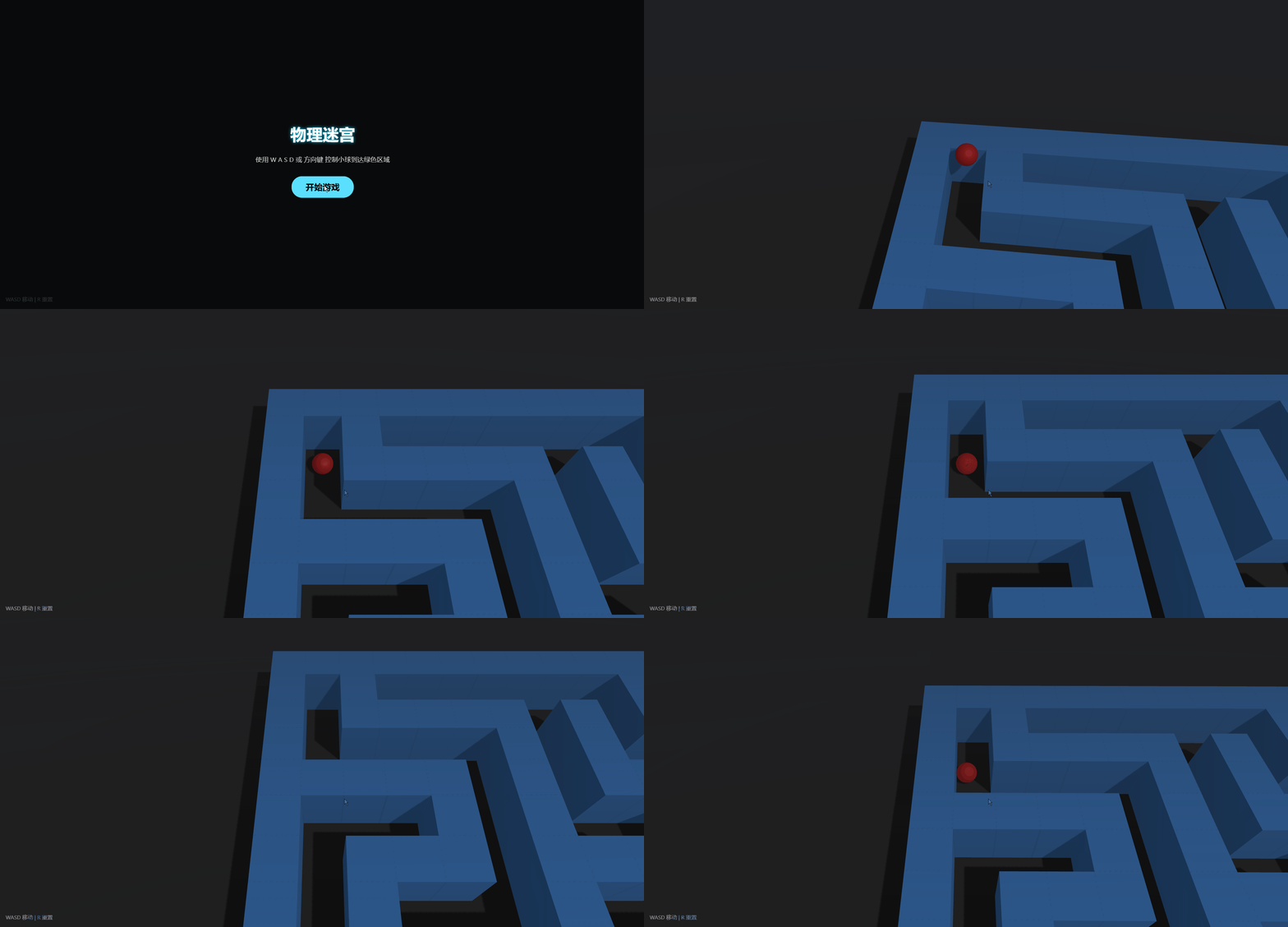
效果如下