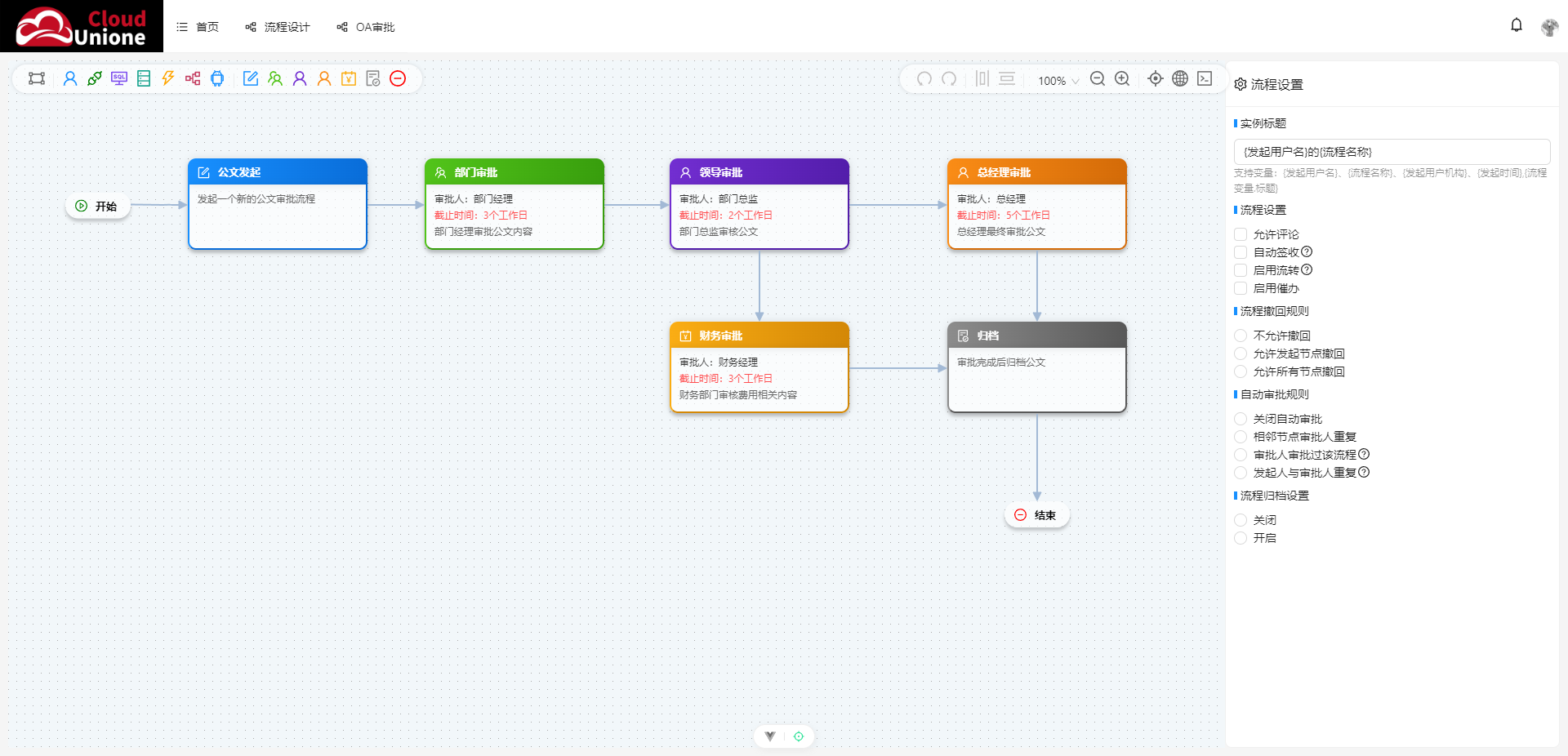
新一代 Workflow 编辑器Unione Flow Editor :OA 审批流程实现案例
Unione Flow Editor 是一款灵活高效的工作流可视化编辑器,支持自定义节点、流程配置与数据联动。本文通过一个完整的 OA 审批流程案例,展示其核心用法,包含编辑器主组件、自定义节点组件及流程数据结构。
一、核心组件与文件结构
案例包含三个核心文件:
oa-editor.vue:编辑器主组件,负责节点注册、工具栏配置及流程数据加载oa-node.vue:OA 审批节点自定义组件,定义节点 UI 与展示逻辑oa-data.json:示例流程数据,描述完整 OA 审批流程的节点与连接关系
二、编辑器主组件(oa-editor.vue)
该组件是流程编辑的核心,负责初始化编辑器、注册自定义节点、配置工具栏,并加载流程数据。
TypeScript
<template>
  <div class="unione-flow-editor">
    <UFEditor ref="editorObj" :value="flowChart" :toolbar="toolbar" model="edit"></UFEditor>
  </div>
</template>
<script setup lang="ts">
import { UFEditor, registerNode, registerOpts } from 'unione-flow-vue'
import type { UFDefine } from 'unione-flow-vue/dist/typing'
import { onMounted, ref } from 'vue'
import flowJsonData from './oa.json'
import Custome from './node/node.vue'
import OaApprovalNode from './node/oa.vue'

defineOptions({
  name: 'DemoIndex',
})

/**
 * 注册自定义节点
 */
registerNode({
  shape: 'custom',                       //节点标识
  component: Custome,                    //节点组件
  icon: 'AndroidOutlined',               //节点图标
  width: 200,                            //节点宽度
  height: 90,                            //节点高度
  data: {                                //节点初始化数据
    title: '自定义节点',
    body: '发起人'
  },
  props: {                                // 节点属性架构  基础信息-base,高级设置-advanced,流程通知-notice,超时设置-time
    // 属性path -> 属性控件定义{}
    // 属性path:false 表示隐藏预设属性 ,eg: time:false 隐藏整个超时设置
    // 属性path:{merge:'override'}        如果属性path已存在,并设置合并方式为 override 表示完全覆盖预设属性,不设置表示合并
    // 属性path:{parent:'xxx.yyy'}        表示将属性path添加到xxx.yyy属性下面,作为子属性
    // 属性path:{after:'xxx.yyy'}         表示将属性path添加到xxx.yyy属性后面,作为兄弟属性
    'base.approve.specify': {
      title: '指定审批人',                 // 属性标题
      name: 'approve.specify',            // 指定属性名称,可覆盖预设名称
      control: 'a-textarea',              // 属性设置控件名称,vue全局注册
      after: 'base.approve.handlerType',  // 指定当前属性显示位置,在base.approve.handlerType后面显示
      props: {                            // 属性设置控件属性
        required: true,
        help: '通过选定的成员,作为审批人'
      },
      event: {
        /**
         * 动态显示/隐藏逻辑
         * @param val       属性值
         * @param formValue 表单值
         * @return true-显示,false-隐藏
         */
        visible: (val: any, formValue: any) => {
          // 根据业务逻辑判断是否显示
          return formValue.approve?.handlerType === 'specify'
        },
        /**
         * 动态设置属性标题
         * @param val       属性值
         * @param formValue 表单值
         * @return 返回性标题
         */
        title: (val: any, formValue: any) => {
          // 根据业务动态显示属性标题
          return '指定审批人'
        },
        /**
         * 校验属性是否必填
         * @param val       属性值
         * @param formValue 表单值
         * @return true-必填,false-非必填
         */
        required: (val: any, formValue: any) => {
          // 根据业务逻辑判断是否必填
          return true
        },
        /**
         * 监听属性值变化
         * @param val       属性值
         * @param formValue 表单值
         */
        change: (val: any, formValue: any) => {
          // 业务处理逻辑
        },
        /**
         * 校验指定审批人是否为空
         * @param val       属性值
         * @param formValue 表单值
         * @returns 校验异常信息 false表示校验通过
         */
        validate: (val: any, formValue: any) => {
          if (!val) {
            return '指定审批人不能为空'
          }
          // 其他复杂业务逻辑
          return false
        }
      }
    },
  }
})

// 注册OA审批节点类型
const oaNodeTypes = [
  {
    shape: 'oa-initiate',
    title: '公文发起',
    icon: 'FormOutlined',
    data: {
      title: '公文发起',
      description: '发起新的公文审批流程',
      formType: 'dynamic'
    }
  },
  {
    shape: 'oa-department',
    title: '部门审批',
    icon: 'TeamOutlined',
    data: {
      title: '部门审批',
      approver: '部门经理',
      deadline: '3个工作日',
      description: '部门负责人审批',
      formType: 'dynamic'
    }
  },
  {
    shape: 'oa-leader',
    title: '分管领导审批',
    icon: 'UserOutlined',
    data: {
      title: '分管领导审批',
      approver: '分管领导',
      deadline: '5个工作日',
      description: '分管领导审批',
      formType: 'dynamic'
    }
  },
  {
    shape: 'oa-general-manager',
    title: '总经理审批',
    icon: 'UserOutlined',
    data: {
      title: '总经理审批',
      approver: '总经理',
      deadline: '7个工作日',
      description: '总经理审批',
      formType: 'dynamic'
    }
  },
  {
    shape: 'oa-finance',
    title: '财务审批',
    icon: 'AccountBookOutlined',
    data: {
      title: '财务审批',
      approver: '财务总监',
      deadline: '3个工作日',
      description: '财务部门审批',
      formType: 'dynamic'
    }
  },
  {
    shape: 'oa-archive',
    title: '归档',
    icon: 'FileDoneOutlined',
    data: {
      title: '归档',
      description: '公文归档保存',
      formType: 'dynamic'
    }
  }
]

// 注册所有OA审批节点
oaNodeTypes.forEach(type => {
  registerNode({
    shape: type.shape,
    component: OaApprovalNode,
    icon: type.icon,
    width: 220,
    height: 113,
    data: type.data,
    props: {
      // 基础信息
      'base.approver': {
        title: '审批人',
        control: 'a-input',
        props: {
          placeholder: '请输入审批人姓名或部门'
        },
        event: {
          visible: (val: any, formValue: any) => {
            // 公文发起和归档节点不需要审批人
            return ['oa-initiate', 'oa-archive'].indexOf(formValue.shape) === -1
          },
          required: (val: any, formValue: any) => {
            return ['oa-initiate', 'oa-archive'].indexOf(formValue.shape) === -1
          }
        }
      },
      'base.deadline': {
        title: '审批期限',
        control: 'a-select',
        props: {
          options: [
            { value: '1', label: '1个工作日' },
            { value: '3', label: '3个工作日' },
            { value: '5', label: '5个工作日' },
            { value: '7', label: '7个工作日' },
            { value: '14', label: '14个工作日' }
          ]
        },
        event: {
          visible: (val: any, formValue: any) => {
            // 公文发起和归档节点不需要审批期限
            return ['oa-initiate', 'oa-archive'].indexOf(formValue.shape) === -1
          }
        }
      },
      'base.description': {
        title: '节点描述',
        control: 'a-textarea',
        props: {
          placeholder: '请输入节点描述信息',
          rows: 3
        }
      },
      // 高级设置
      'advanced.notify.enable': {
        title: '启用通知',
        control: 'a-switch',
        props: {
          defaultChecked: true
        }
      },
      'advanced.notify.type': {
        title: '通知方式',
        control: 'a-checkbox-group',
        props: {
          options: [
            { label: '邮件', value: 'email' },
            { label: '短信', value: 'sms' },
            { label: '系统消息', value: 'system' }
          ]
        },
        event: {
          visible: (val: any, formValue: any) => {
            return formValue.advanced?.notify?.enable === true
          }
        }
      },
      // 流程通知
      'notice.approve': {
        title: '审批通知',
        control: 'a-textarea',
        props: {
          placeholder: '审批通知内容',
          rows: 3
        },
        event: {
          visible: (val: any, formValue: any) => {
            return ['oa-initiate', 'oa-archive'].indexOf(formValue.shape) === -1
          }
        }
      },
      'notice.complete': {
        title: '完成通知',
        control: 'a-textarea',
        props: {
          placeholder: '流程完成通知内容',
          rows: 3
        }
      }
    }
  })
})

/**
 * 注册节点操作
 */
registerOpts({
  name: 'custom',                          //操作名称,和节点标识保持一致
  title: '自定义节点',                      //操作标题
  icon: 'AndroidOutlined',                 //操作图标
  color: '#1890ff',                        //图标颜色
  // click:()=>{                           //点击事件,默认:添加节点,覆盖后仅触发点击事件
  //   alert(22)
  // }
})

// 注册OA审批节点操作
const oaNodeColors: Record<string, string> = {
  'oa-initiate': '#1890ff',
  'oa-department': '#52c41a',
  'oa-leader': '#722ed1',
  'oa-general-manager': '#fa8c16',
  'oa-finance': '#faad14',
  'oa-archive': '#8c8c8c'
}

oaNodeTypes.forEach(type => {
  registerOpts({
    name: type.shape,
    title: type.title,
    icon: type.icon,
    color: oaNodeColors[type.shape] || '#1890ff'
  })
})

/**
 * 注册工具栏
 */
const toolbar = ref<any>([
  { name: 'end', index: 20 },
  {
    widget: 'AndroidOutlined',            //工具栏图标
    name: 'custom',                       //操作名称,和节点标识保持一致
    title: '自定义节点',                   //操作标题
    location: 'left',                     //工具栏位置,left-左侧,right-右侧
    props: {                              //工具栏图标属性
      style: {
        color: '#1890ff',
      }
    },
  },
  // OA审批流程工具栏
  {
    widget: 'a-divider',
    location: 'left',
    props: {
      type: 'vertical',
    }
  },
  ...oaNodeTypes.map(type => ({
    widget: type.icon,
    name: type.shape,
    title: type.title,
    location: 'left',
    props: {
      style: {
        color: oaNodeColors[type.shape] || '#1890ff',
      }
    }
  }))
])

/**
 * 编辑器对象
 * 方法介绍:
 * toJSON:          获取流程图数据
 * fromJSON:        加载流程图数据
 * getNodes:        获取所有节点
 * setActiveNode:   设置当前活动节点
 * onActiveNode:    监听当前活动节点变化
 * onActiveRoute:   监听当前活动路由变化
 * on:              监听事件(event:string,callback)
 * trigger:         触发事件(event:string,data:any)
 */
const editorObj = ref()
/**
 * 流程图表数据
 */
const flowChart = ref<UFDefine>(flowJsonData)
onMounted(() => {


})

</script>
<style lang="less" scoped>
.unione-flow-editor {
  height: 100%;
  overflow: hidden;
}

:deep(.unione-flow-node-opts) {
  width: 140px;
}
</style>核心功能解析:
- 节点注册:通过
registerNode方法注册 OA 专属节点,指定节点标识、UI 组件、默认数据及可配置属性 - 工具栏配置:通过
toolbar定义编辑器左侧工具栏,关联 OA 节点,支持一键添加 - 数据绑定:通过
flowChart绑定流程数据,初始化时加载预设的 OA 审批流程
三、自定义 OA 节点组件(oa-node.vue)
定义 OA 节点的 UI 展示逻辑,包括节点头部(图标、标题、状态)和身体(审批人、期限等信息)。
TypeScript
<template>
  <Node class="unione-flow-node-oa-approval node-box">
    <template #default="{ data, node }">
      <div class="head" :class="`node-${node.shape}`">
        <!-- 直接使用静态图标进行测试 -->
        <component :is="getNodeIcon(node.shape)" class="icon" />
        <span class="title">{{ data.title }}</span>
        <span v-if="data.status" class="status" :class="`status-${data.status}`">{{
          getStatusText(data.status) }}</span>
      </div>
      <div class="body" :class="`node-${node.shape}`">
        <div v-if="data.approver" class="approver">审批人:{{ data.approver }}</div>
        <div v-if="data.deadline" class="deadline">截止时间:{{ data.deadline }}</div>
        <div v-if="data.description" class="description">{{ data.description }}</div>
      </div>
    </template>
  </Node>
</template>
<script setup lang="ts">
import { Node } from 'unione-flow-vue'
import { inject } from 'vue';
import {
  FormOutlined,
  TeamOutlined,
  UserOutlined,
  AccountBookOutlined,
  FileDoneOutlined,
  CheckCircleOutlined
} from '@ant-design/icons-vue'

defineOptions({
  name: 'UnioneFlowNodeOaApproval',
})

/**
 * 获得流程图编辑器对象
 */
const flowGraph = inject<Function>('flowGraph')

/**
 * 节点颜色映射
 */
const oaNodeColors: Record<string, string> = {
  'oa-initiate': '#1890ff',
  'oa-department': '#52c41a',
  'oa-leader': '#722ed1',
  'oa-general-manager': '#fa8c16',
  'oa-finance': '#faad14',
  'oa-archive': '#8c8c8c'
}

/**
 * 根据节点类型获取图标
 */
const getNodeIcon = (nodeType: string) => {
  switch (nodeType) {
    case 'oa-initiate':
      return FormOutlined
    case 'oa-department':
      return TeamOutlined
    case 'oa-leader':
      return UserOutlined
    case 'oa-general-manager':
      return UserOutlined
    case 'oa-finance':
      return AccountBookOutlined
    case 'oa-archive':
      return FileDoneOutlined
    default:
      return FormOutlined
  }
}

/**
 * 获取状态文本
 */
const getStatusText = (status: string) => {
  const statusMap: Record<string, string> = {
    'pending': '待审批',
    'running': '审批中',
    'completed': '已完成',
    'rejected': '已拒绝',
    'backed': '已退回'
  }
  return statusMap[status] || '未知状态'
}
</script>
<style lang="less" scoped>
.unione-flow-node-oa-approval {
  width: 220px;
  background-color: #FFFFFF98;
  border-radius: 10px;

  .head {
    display: flex;
    flex-direction: row;
    padding: 5px 10px;
    background-image: linear-gradient(to right, #1890ff, #096dd9);
    box-shadow: 0px 0px 10px 0px rgba(0, 0, 0, 0.1);
    border-top: solid 2px transparent;
    border-top-left-radius: 10px;
    border-top-right-radius: 10px;
    height: 32px;
    /* 添加固定高度 */
    align-items: center;
    /* 确保内容垂直居中 */

    .icon {
      color: #fff;
      width: 20px;
      height: 20px;
      margin-right: 5px;
      font-weight: bold;
    }

    .title {
      font-size: 13px;
      font-weight: bold;
      color: #fff;
    }
  }

  .body {
    height: 80px;
    padding: 8px 10px;
    box-shadow: 0px 0px 10px 0px rgba(0, 0, 0, 0.1);
    border-bottom-left-radius: 10px;
    border-bottom-right-radius: 10px;
    font-size: 12px;
    line-height: 1.5;
    overflow-y: auto;
    /* 当内容超出时显示垂直滚动条 */

    .approver {
      color: #333;
      margin-bottom: 2px;
    }

    .deadline {
      color: #ff4d4f;
      margin-bottom: 2px;
    }

    .description {
      color: #666;
      margin-bottom: 2px;
    }
  }

  .head .status {
    font-size: 11px;
    padding: 2px 6px;
    border-radius: 10px;
    margin-left: 5px;
  }

  .head .status-pending {
    background-color: #faad14;
    color: #fff;
  }

  .head .status-running {
    background-color: #1890ff;
    color: #fff;
  }

  .head .status-completed {
    background-color: #52c41a;
    color: #fff;
  }

  .head .status-rejected {
    background-color: #f5222d;
    color: #fff;
  }

  .head .status-backed {
    background-color: #fa8c16;
    color: #fff;
  }

  // OA节点类型样式
  .head.node-oa-initiate {
    background-image: linear-gradient(to right, #1890ff, #096dd9);
    border-left: solid 2px #1890ff;
    border-right: solid 2px #096dd9;
  }

  .body.node-oa-initiate {
    border-left: solid 2px #1890ff;
    border-right: solid 2px #096dd9;
    border-bottom: solid 2px #096dd9;
  }

  .head.node-oa-department {
    background-image: linear-gradient(to right, #52c41a, #389e0d);
    border-left: solid 2px #52c41a;
    border-right: solid 2px #389e0d;
  }

  .body.node-oa-department {
    border-left: solid 2px #52c41a;
    border-right: solid 2px #389e0d;
    border-bottom: solid 2px #389e0d;
  }

  .head.node-oa-leader {
    background-image: linear-gradient(to right, #722ed1, #531dab);
    border-left: solid 2px #722ed1;
    border-right: solid 2px #531dab;
  }

  .body.node-oa-leader {
    border-left: solid 2px #722ed1;
    border-right: solid 2px #531dab;
    border-bottom: solid 2px #531dab;
  }

  .head.node-oa-general-manager {
    background-image: linear-gradient(to right, #fa8c16, #d46b08);
    border-left: solid 2px #fa8c16;
    border-right: solid 2px #d46b08;
  }

  .body.node-oa-general-manager {
    border-left: solid 2px #fa8c16;
    border-right: solid 2px #d46b08;
    border-bottom: solid 2px #d46b08;
  }

  .head.node-oa-finance {
    background-image: linear-gradient(to right, #faad14, #d48806);
    border-left: solid 2px #faad14;
    border-right: solid 2px #d48806;
  }

  .body.node-oa-finance {
    border-left: solid 2px #faad14;
    border-right: solid 2px #d48806;
    border-bottom: solid 2px #d48806;
  }

  .head.node-oa-archive {
    background-image: linear-gradient(to right, #8c8c8c, #595959);
    border-left: solid 2px #8c8c8c;
    border-right: solid 2px #595959;
  }

  .body.node-oa-archive {
    border-left: solid 2px #8c8c8c;
    border-right: solid 2px #595959;
    border-bottom: solid 2px #595959;
  }
}
</style>核心功能解析:
- 动态图标:通过
getNodeIcon根据节点类型(如oa-department)显示对应图标 - 状态展示:支持显示审批状态(待审批 / 审批中 / 已完成等),并通过样式区分
- 差异化样式:不同节点类型(如部门审批、财务审批)使用专属渐变颜色,直观区分节点角色
四、流程数据结构(oa-data.json)
描述完整 OA 审批流程的节点信息与连接关系,可直接被编辑器加载。
javascript
{
  "nodes": [
    {
      "data": {
        "title": "开始",
        "sn": "start"
      },
      "sn": "start",
      "types": "start",
      "title": "开始",
      "attr": {
        "parent": "group1",
        "position": {
          "x": 69.99999999999977,
          "y": 161.5
        },
        "size": {
          "width": 80,
          "height": 30
        }
      }
    },
    {
      "data": {
        "title": "公文发起",
        "description": "发起一个新的公文审批流程",
        "formType": "dynamic",
        "sn": "node-1"
      },
      "sn": "node-1",
      "types": "oa-initiate",
      "title": "公文发起",
      "attr": {
        "position": {
          "x": 220,
          "y": 120
        },
        "size": {
          "width": 220,
          "height": 113
        }
      }
    },
    {
      "data": {
        "title": "部门审批",
        "approver": "部门经理",
        "deadline": "3个工作日",
        "description": "部门经理审批公文内容",
        "formType": "dynamic",
        "sn": "node-2"
      },
      "sn": "node-2",
      "types": "oa-department",
      "title": "部门审批",
      "attr": {
        "position": {
          "x": 510,
          "y": 120
        },
        "size": {
          "width": 220,
          "height": 113
        }
      }
    },
    {
      "data": {
        "title": "领导审批",
        "approver": "部门总监",
        "deadline": "2个工作日",
        "description": "部门总监审核公文",
        "formType": "dynamic",
        "sn": "node-3"
      },
      "sn": "node-3",
      "types": "oa-leader",
      "title": "领导审批",
      "attr": {
        "position": {
          "x": 810,
          "y": 120
        },
        "size": {
          "width": 220,
          "height": 113
        }
      }
    },
    {
      "data": {
        "title": "总经理审批",
        "approver": "总经理",
        "deadline": "5个工作日",
        "description": "总经理最终审批公文",
        "formType": "dynamic",
        "sn": "node-4"
      },
      "sn": "node-4",
      "types": "oa-general-manager",
      "title": "总经理审批",
      "attr": {
        "position": {
          "x": 1150,
          "y": 120
        },
        "size": {
          "width": 220,
          "height": 113
        }
      }
    },
    {
      "data": {
        "title": "财务审批",
        "approver": "财务经理",
        "deadline": "3个工作日",
        "description": "财务部门审核费用相关内容",
        "formType": "dynamic",
        "sn": "node-5"
      },
      "sn": "node-5",
      "types": "oa-finance",
      "title": "财务审批",
      "attr": {
        "position": {
          "x": 810,
          "y": 320
        },
        "size": {
          "width": 220,
          "height": 113
        }
      }
    },
    {
      "data": {
        "title": "归档",
        "description": "审批完成后归档公文",
        "formType": "dynamic",
        "sn": "node-6"
      },
      "sn": "node-6",
      "types": "oa-archive",
      "title": "归档",
      "attr": {
        "position": {
          "x": 1150,
          "y": 320
        },
        "size": {
          "width": 220,
          "height": 113
        }
      }
    },
    {
      "data": {
        "title": "结束",
        "sn": "d89c29cc-ab3c-4895-9f4e-beaca5a78e73"
      },
      "sn": "d89c29cc-ab3c-4895-9f4e-beaca5a78e73",
      "types": "end",
      "title": "结束",
      "attr": {
        "position": {
          "x": 1220,
          "y": 540
        },
        "size": {
          "width": 80,
          "height": 30
        }
      }
    }
  ],
  "routes": [
    {
      "data": {
        "title": "发起 -> 部门审批",
        "sn": "route-1"
      },
      "sn": "route-1",
      "title": "发起 -> 部门审批",
      "attr": {
        "source": {
          "cell": "node-1",
          "port": "right"
        },
        "target": {
          "cell": "node-2",
          "port": "left"
        }
      }
    },
    {
      "data": {
        "title": "部门审批 -> 领导审批",
        "sn": "route-2"
      },
      "sn": "route-2",
      "title": "部门审批 -> 领导审批",
      "attr": {
        "source": {
          "cell": "node-2",
          "port": "right"
        },
        "target": {
          "cell": "node-3",
          "port": "left"
        }
      }
    },
    {
      "data": {
        "title": "领导审批 -> 总经理审批",
        "sn": "route-3"
      },
      "sn": "route-3",
      "title": "领导审批 -> 总经理审批",
      "attr": {
        "source": {
          "cell": "node-3",
          "port": "right"
        },
        "target": {
          "cell": "node-4",
          "port": "left"
        }
      }
    },
    {
      "data": {
        "title": "领导审批 -> 财务审批",
        "sn": "route-4"
      },
      "sn": "route-4",
      "title": "领导审批 -> 财务审批",
      "attr": {
        "source": {
          "cell": "node-3",
          "port": "bottom"
        },
        "target": {
          "cell": "node-5",
          "port": "top"
        }
      }
    },
    {
      "data": {
        "title": "总经理审批 -> 归档",
        "sn": "route-5"
      },
      "sn": "route-5",
      "title": "总经理审批 -> 归档",
      "attr": {
        "source": {
          "cell": "node-4",
          "port": "bottom"
        },
        "target": {
          "cell": "node-6",
          "port": "top"
        }
      }
    },
    {
      "data": {
        "title": "财务审批 -> 归档",
        "sn": "route-6"
      },
      "sn": "route-6",
      "title": "财务审批 -> 归档",
      "attr": {
        "source": {
          "cell": "node-5",
          "port": "right"
        },
        "target": {
          "cell": "node-6",
          "port": "left"
        }
      }
    },
    {
      "sn": "b20aa483-961a-475b-86f8-6930b701e857",
      "attr": {
        "source": {
          "cell": "node-6",
          "port": "bottom"
        },
        "target": {
          "cell": "d89c29cc-ab3c-4895-9f4e-beaca5a78e73",
          "port": "top"
        }
      }
    },
    {
      "sn": "b8fb5a28-d066-4226-a103-5085dec4c116",
      "attr": {
        "source": {
          "cell": "start",
          "port": "right"
        },
        "target": {
          "cell": "node-1",
          "port": "left"
        }
      }
    }
  ],
  "setting": {
    "title": "{发起用户名}的{流程名称}"
  }
}数据结构解析:
nodes:数组,包含所有节点信息,每个节点通过types关联注册的节点类型routes:数组,描述节点间的连接关系,通过source和target指定连接的节点与端口setting:流程全局配置,如流程标题
五、总结
通过 Unione Flow Editor 实现 OA 审批流程的核心优势:
- 高度自定义:支持自定义节点 UI、属性配置及交互逻辑
- 可视化编辑:通过工具栏快速添加节点,拖拽连接流程,降低使用门槛
- 数据驱动:流程数据与 UI 分离,便于存储、传输与二次加工
如需扩展更多节点类型(如 "人事审批"),只需新增节点配置并注册,即可快速扩展流程能力。
项目地址github :https://github.com/unione-cloud/unione-flow-editor
项目地址gitee :https://gitee.com/unione-cloud/unione-flow-editor