概述
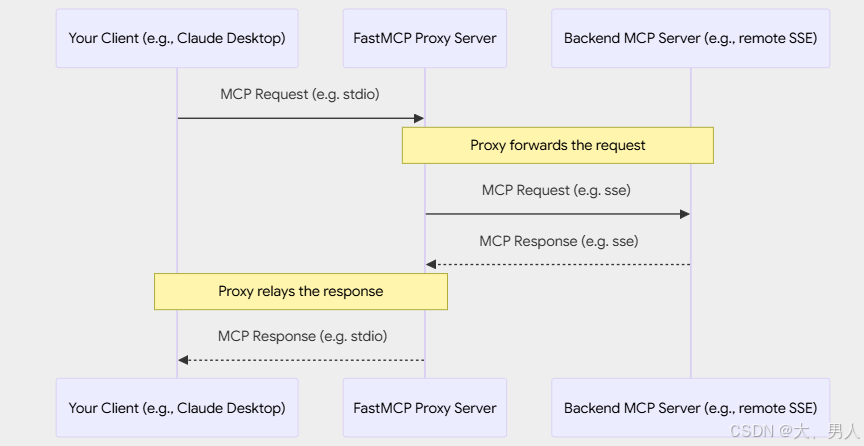
FastMCP的代理,就是给其他 MCP 服务器当个中间人,转发请求&转发响应。
FastMCP 提供了强大的代理功能,使得一个 FastMCP 服务器实例可以作为另一个 MCP 服务器(该服务器可以是远程的、运行在不同传输协议上的,甚至可以是另一个 FastMCP 实例)的前端。
这是通过 FastMCP.as_proxy () 类方法实现的。
一、什么是代理
代理是指设置一个 FastMCP 服务器,该服务器不直接实现工具或资源。相反,当它收到请求(如 tools/call 或 resources/read)时,会将该请求转发给其它 MCP 服务器,并接收响应,然后将该响应回复给原始客户端。
主要优势
- 会话隔离:每个请求都有自己的独立会话,确保并发操作的安全性
- 传输桥接:通过不同的传输方式暴露在一种传输方式上运行的服务器
- 高级 MCP 功能:自动转发采样、启发、日志记录和进度信息
- 安全性:充当后端服务器的受控网关
- 简洁性:即使后端位置或传输方式发生变化,也只需单一端点
性能考量
使用代理服务器时,尤其是连接到基于 HTTP 的后端服务器时,要注意延迟可能会很显著。
像list_tools ()这样的操作可能需要数百毫秒,而本地工具只需 1-2 毫秒。
挂载代理服务器时,这种延迟会影响父服务器上的所有操作,而不仅仅是与被代理工具的交互。
如果你的使用场景要求低延迟,可以考虑在启动时使用import_server ()来复制工具,而不是在运行时对它们进行代理。
二、快速开始
创建代理的推荐方式是使用 ProxyClient,它提供完整的 MCP 功能支持,并具有自动会话隔离功能:
后端服务(as_proxy_backend_server.py")
必须以标准输入输出模式启动,代理时才可以使用ProxyClient("as_proxy_backend_server.py")。
python
# coding=utf-8
'''
@File    :proxy_mcp.py
@Author  :juxuan2
@Date    :2025/12/17 14:49
'''
from fastmcp import FastMCP
import asyncio

# Define subservers
weather_mcp = FastMCP(name="WeatherService")

@weather_mcp.tool
def get_forecast(city: str) -> dict:
    """Get weather forecast."""
    return {"city": city, "forecast": "Sunny"}

@weather_mcp.resource("data://cities/supported")
def list_supported_cities() -> list[str]:
    """List cities with weather support."""
    return ["London", "Paris", "Tokyo"]

# Define main server
main_mcp = FastMCP(name="MainApp")

# Import subserver
async def setup():
    await main_mcp.import_server(weather_mcp, prefix="weather")

# Result: main_mcp now contains prefixed components:
# - Tool: "weather_get_forecast"
# - Resource: "data://weather/cities/supported"

if __name__ == "__main__":
    asyncio.run(setup())
    main_mcp.run()
代理服务(as_proxy_mcp_server.py)
python
# coding=utf-8
'''
@File    :proxy_mcp_client2.py
@Author  :juxuan2
@Date    :2025/12/17 15:45
'''
from fastmcp import FastMCP
from fastmcp.server.proxy import ProxyClient

# Create a proxy with full MCP feature support
proxy = FastMCP.as_proxy(
    ProxyClient("as_proxy_backend_server.py"),
    name="MyProxy"
)

# Run the proxy (e.g., via stdio for Claude Desktop)
if __name__ == "__main__":
    proxy.run(
        transport="http",  # 使用HTTP传输
        host="127.0.0.1",  # 绑定本地地址,外部访问可改为 0.0.0.0
        port=8000,  # 服务端口
    )
客户端服务(as_proxy_mcp_client.py)
python
import asyncio
from fastmcp import Client

client = Client("http://localhost:8000/mcp")

async def call():
    async with client:
        result = await client.call_tool("weather_get_forecast", {"city":"西安"})
        print(result)

        result = await client.read_resource("data://weather/cities/supported")
        print(result)

asyncio.run(call())
一次配置、全程受用
- 安全的并发请求处理
- 高级 MCP 功能(采样、启发等)的自动转发
- 防止上下文混合的会话隔离
- 与所有 MCP 客户端的完全兼容性
您还可以将 FastMCP 客户端传输(或可推断为传输的参数)传递给 as_proxy ()。这将自动为您创建一个 ProxyClient 实例。
最后,您可以将常规的 FastMCP 客户端实例传递给 as_proxy ()。这适用于许多使用场景,但如果服务器调用了采样或启发等高级 MCP 功能,可能会出现问题。
三、会话隔离与并发
FastMCP 代理提供会话隔离,以确保安全的并发操作。会话策略取决于代理的配置方式:
Fresh Sessions
当你传递一个断开连接的客户端(这是正常情况)时,每个请求都会获得自己独立的后端会话:
python
from fastmcp.server.proxy import ProxyClient

# Each request creates a fresh backend session (recommended)
proxy = FastMCP.as_proxy(ProxyClient("backend_server.py"))

# Multiple clients can use this proxy simultaneously without interference:
# - Client A calls a tool -> gets isolated backend session
# - Client B calls a tool -> gets different isolated backend session
# - No context mixing between requests
Session Reuse with Connected Clients
当你传递一个已连接的客户端时,代理将为所有请求重用该会话:
python
from fastmcp import Client

# Create and connect a client
async with Client("backend_server.py") as connected_client:
    # This proxy will reuse the connected session for all requests
    proxy = FastMCP.as_proxy(connected_client)

    # ⚠️ Warning: All requests share the same backend session
    # This may cause context mixing in concurrent scenarios
重要提示:在多个客户端并发请求时使用共享会话可能会导致上下文混淆和竞争条件。这种方法仅应在单线程场景中使用,或者在你有明确同步机制的情况下使用。
四、桥接传输
一个常见的用例是桥接传输 ------ 通过不同的传输方式暴露在一种传输方式上运行的服务器。
例如,通过标准输入输出使远程的 SSE 服务器在本地可用:
python
from fastmcp import FastMCP
from fastmcp.server.proxy import ProxyClient

# Bridge remote SSE server to local stdio
remote_proxy = FastMCP.as_proxy(
    ProxyClient("http://example.com/mcp/sse"),
    name="Remote-to-Local Bridge"
)

# Run locally via stdio for Claude Desktop
if __name__ == "__main__":
    remote_proxy.run()  # Defaults to stdio transport
或者通过 HTTP 暴露本地服务器以进行远程访问:
python
# Bridge local server to HTTP
local_proxy = FastMCP.as_proxy(
    ProxyClient("local_server.py"),
    name="Local-to-HTTP Bridge"
)

# Run via HTTP for remote clients
if __name__ == "__main__":
    local_proxy.run(transport="http", host="0.0.0.0", port=8080)
五、高级MCP特性
ProxyClient 会自动在后端服务器和连接到代理的客户端之间转发高级 MCP 协议功能,确保完全的 MCP 兼容性。
支持的功能
- 根目录:将文件系统根目录访问请求转发给客户端
- 采样:将大语言模型补全请求从后端转发给客户端
- 启发:将用户输入请求转发给客户端
- 日志记录:将日志消息从后端转发至客户端
- 进度:在长时间操作期间转发进度通知
python
from fastmcp.server.proxy import ProxyClient

# ProxyClient automatically handles all these features
backend = ProxyClient("advanced_backend.py")
proxy = FastMCP.as_proxy(backend)

# When the backend server:
# - Requests LLM sampling -> forwarded to your client
# - Logs messages -> appear in your client
# - Reports progress -> shown in your client
# - Needs user input -> prompts your client
5.1 自定义功能支持
你可以通过为特定处理器传递 None 来有选择地禁用转发:
python
# Disable sampling but keep other features
backend = ProxyClient(
    "backend_server.py",
    sampling_handler=None,  # Disable LLM sampling forwarding
    log_handler=None        # Disable log forwarding
)
当你直接将传输字符串与 FastMCP.as_proxy () 一起使用时,它会在内部自动创建一个ProxyClient,以确保全面的功能支持。
六、基于配置的代理
你可以直接根据遵循 MCPConfig 模式的配置字典创建代理。这对于快速设置连接远程服务器的代理非常有用,无需手动配置每个连接细节。
python
from fastmcp import FastMCP

# Create a proxy directly from a config dictionary
config = {
   "mcpServers": {
       "default": {  # For single server configs, 'default' is commonly used
           "url": "https://example.com/mcp",
           "transport": "http"
       }
   }
}

# Create a proxy to the configured server (auto-creates ProxyClient)
proxy = FastMCP.as_proxy(config, name="Config-Based Proxy")

# Run the proxy with stdio transport for local access
if __name__ == "__main__":
   proxy.run()
MCPConfig 格式遵循一种新兴的 MCP 服务器配置标准,并且可能会随着该规范的成熟而发展。尽管 FastMCP 旨在保持与未来版本的兼容性,但请注意,字段名称或结构可能会发生变化。
6.1 多服务器配置
你可以通过在配置中指定多个条目来创建一个指向多个服务器的代理。这些条目会自动以其配置名称作为前缀进行挂载:
python
# Multi-server configuration
config = {
    "mcpServers": {
        "weather": {
            "url": "https://weather-api.example.com/mcp",
            "transport": "http"
        },
        "calendar": {
            "url": "https://calendar-api.example.com/mcp",
            "transport": "http"
        }
    }
}

# Create a unified proxy to multiple servers
composite_proxy = FastMCP.as_proxy(config, name="Composite Proxy")

# Tools, resources, prompts, and templates are accessible with prefixes:
# - Tools: weather_get_forecast, calendar_add_event
# - Prompts: weather_daily_summary, calendar_quick_add
# - Resources: weather://weather/icons/sunny, calendar://calendar/events/today
# - Templates: weather://weather/locations/{id}, calendar://calendar/events/{date}
组件前缀
- 代理一个或多个服务器时,组件名称的前缀方式与挂载和导入时相同:
- 工具:
{prefix}_{tool_name} - 提示词:
{prefix}_{prompt_name} - 资源:
protocol://{prefix}/path/to/resource(默认路径格式) - 资源模板:
protocol://{prefix}/...
无论你处于以下哪种情况,这些规则都统一适用:
- 在另一台服务器上挂载代理
- 通过
MCPConfig创建多服务器代理 - 直接使用
FastMCP.as_proxy ()
七、镜像组件
当你从代理服务器访问工具、资源或提示词时,它们是从远程服务器 "镜像" 过来的。镜像组件无法直接修改,因为它们反映的是远程服务器的状态。例如,你不能简单地 "禁用" 一个镜像组件。
不过,你可以创建一个镜像组件的副本,并将其存储为新的本地定义组件。本地组件总是优先于镜像组件,因为代理服务器在尝试连接远程服务器之前,会先检查自己的注册表。
因此,要启用或禁用代理工具、资源或提示词,你应该先创建一个本地副本并将其添加到你自己的服务器中。以下是针对工具执行此操作的示例:
python
# Create your own server
my_server = FastMCP("MyServer")

# Get a proxy server
proxy = FastMCP.as_proxy("backend_server.py")

# Get mirrored components from proxy
mirrored_tool = await proxy.get_tool("useful_tool")

# Create a local copy that you can modify
local_tool = mirrored_tool.copy()

# Add the local copy to your server
my_server.add_tool(local_tool)

# Now you can disable YOUR copy
local_tool.disable()
八、FastMCPProxy类
在内部,FastMCP.as_proxy () 会使用 FastMCPProxy 类。通常情况下,你无需直接与此类进行交互,但如果有高级场景需要,它是可以使用的。
python
from fastmcp.server.proxy import FastMCPProxy, ProxyClient

# Provide a client factory for explicit session control
def create_client():
    return ProxyClient("backend_server.py")

proxy = FastMCPProxy(client_factory=create_client)
参数
- client_factory:一个可调用对象,调用时会返回一个 Client 实例。这使你能够完全控制会话的创建和重用策略。
8.1 显式会话管理
FastMCPProxy 需要明确的会话管理 ------ 不会执行自动检测。你必须选择你的会话策略:
python
# Share session across all requests (be careful with concurrency)
shared_client = ProxyClient("backend_server.py")
def shared_session_factory():
    return shared_client

proxy = FastMCPProxy(client_factory=shared_session_factory)

# Create fresh sessions per request (recommended)
def fresh_session_factory():
    return ProxyClient("backend_server.py")

proxy = FastMCPProxy(client_factory=fresh_session_factory)
对于自动会话策略选择,请改用便捷方法 FastMCP.as_proxy ()。
python
# Custom factory with specific configuration
def custom_client_factory():
    client = ProxyClient("backend_server.py")
    # Add any custom configuration here
    return client

proxy = FastMCPProxy(client_factory=custom_client_factory)