这个也是一个经典的问题了,我是想复现,再进行修改,因为我不使用yolo作为检测,但要先搞清楚检测框是怎么送入slam的,所以先复现各位大佬们的。主要参考:
https://github.com/JinYoung6/orbslam_addsemantic
https://blog.csdn.net/jiny_yang/article/details/116308845
(这个博主其实还实现了python和c++的通信,实时读取检测框,这个也是我后面要实现的,但是我要通过ros来实现)
感谢大佬们的工作!!
在这个之前最好先去跑一下官方orbslam2,把环境啥的配好,可以参照我之前的文章。
我的系统:ubuntu20.04, ROs Noetic
一、编译
有报错的话,找这个:
https://blog.csdn.net/weixin_52519143/article/details/127000332
其实报错还是来源于opencv的版本问题,因为现在大多数人都用opencv4了,orbslam还是用的opencv3,导致很多函数头文件都不匹配,还有cmakelist里的find不匹配,改下版本就好了,按照报错一个个修改就好了。(这已经是我改的第二次了,之前还改了一个ros版本的,QAQ,熟能生巧了)。后续要是调试完了,我会把改完后的代码放在github
cd your path
chmod +x build.sh
./build.sh
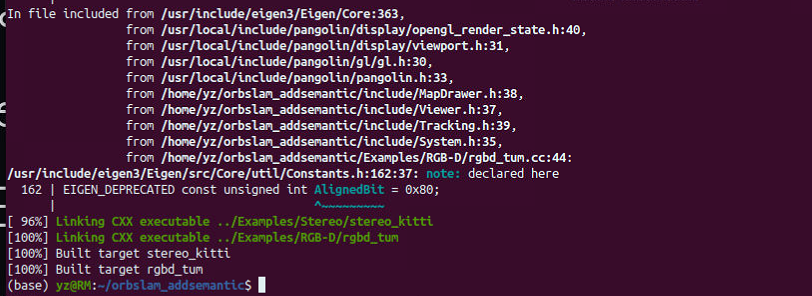
编译成功:
二、运行
1. 匹配RGB和深度图
使用TUM数据集
官方associate.py,将深度图与rgb图的时间戳匹配,我做了修改解决python2和python3语法不兼容问题,这是修改后的版本
#!/usr/bin/python
# Software License Agreement (BSD License)
#
# Copyright (c) 2013, Juergen Sturm, TUM
# All rights reserved.
#
# Redistribution and use in source and binary forms, with or without
# modification, are permitted provided that the following conditions
# are met:
#
#  * Redistributions of source code must retain the above copyright
#    notice, this list of conditions and the following disclaimer.
#  * Redistributions in binary form must reproduce the above
#    copyright notice, this list of conditions and the following
#    disclaimer in the documentation and/or other materials provided
#    with the distribution.
#  * Neither the name of TUM nor the names of its
#    contributors may be used to endorse or promote products derived
#    from this software without specific prior written permission.
#
# THIS SOFTWARE IS PROVIDED BY THE COPYRIGHT HOLDERS AND CONTRIBUTORS
# "AS IS" AND ANY EXPRESS OR IMPLIED WARRANTIES, INCLUDING, BUT NOT
# LIMITED TO, THE IMPLIED WARRANTIES OF MERCHANTABILITY AND FITNESS
# FOR A PARTICULAR PURPOSE ARE DISCLAIMED. IN NO EVENT SHALL THE
# COPYRIGHT OWNER OR CONTRIBUTORS BE LIABLE FOR ANY DIRECT, INDIRECT,
# INCIDENTAL, SPECIAL, EXEMPLARY, OR CONSEQUENTIAL DAMAGES (INCLUDING,
# BUT NOT LIMITED TO, PROCUREMENT OF SUBSTITUTE GOODS OR SERVICES;
# LOSS OF USE, DATA, OR PROFITS; OR BUSINESS INTERRUPTION) HOWEVER
# CAUSED AND ON ANY THEORY OF LIABILITY, WHETHER IN CONTRACT, STRICT
# LIABILITY, OR TORT (INCLUDING NEGLIGENCE OR OTHERWISE) ARISING IN
# ANY WAY OUT OF THE USE OF THIS SOFTWARE, EVEN IF ADVISED OF THE
# POSSIBILITY OF SUCH DAMAGE.
#
# Requirements:
# sudo apt-get install python-argparse

"""
The Kinect provides the color and depth images in an un-synchronized way. This means that the set of time stamps from the color images do not intersect with those of the depth images. Therefore, we need some way of associating color images to depth images.

For this purpose, you can use the ''associate.py'' script. It reads the time stamps from the rgb.txt file and the depth.txt file, and joins them by finding the best matches.
"""

import argparse
import sys
import os
import numpy


def read_file_list(filename):
    """
    Reads a trajectory from a text file.

    File format:
    The file format is "stamp d1 d2 d3 ...", where stamp denotes the time stamp (to be matched)
    and "d1 d2 d3.." is arbitary data (e.g., a 3D position and 3D orientation) associated to this timestamp.

    Input:
    filename -- File name

    Output:
    dict -- dictionary of (stamp,data) tuples

    """
    file = open(filename)
    data = file.read()
    lines = data.replace(","," ").replace("\t"," ").split("\n")
    list = [[v.strip() for v in line.split(" ") if v.strip()!=""] for line in lines if len(line)>0 and line[0]!="#"]
    list = [(float(l[0]),l[1:]) for l in list if len(l)>1]
    return dict(list)

def associate(first_list, second_list,offset,max_difference):
    """
    Associate two dictionaries of (stamp,data). As the time stamps never match exactly, we aim
    to find the closest match for every input tuple.

    Input:
    first_list -- first dictionary of (stamp,data) tuples
    second_list -- second dictionary of (stamp,data) tuples
    offset -- time offset between both dictionaries (e.g., to model the delay between the sensors)
    max_difference -- search radius for candidate generation

    Output:
    matches -- list of matched tuples ((stamp1,data1),(stamp2,data2))

    """
    first_keys = list(first_list.keys())
    second_keys = list(second_list.keys())

    potential_matches = [(abs(a - (b + offset)), a, b)
                         for a in first_keys
                         for b in second_keys
                         if abs(a - (b + offset)) < max_difference]
    potential_matches.sort()
    matches = []
    for diff, a, b in potential_matches:
        if a in first_keys and b in second_keys:
            first_keys.remove(a)
            second_keys.remove(b)
            matches.append((a, b))

    matches.sort()
    return matches

if __name__ == '__main__':

    # parse command line
    parser = argparse.ArgumentParser(description='''
    This script takes two data files with timestamps and associates them
    ''')
    parser.add_argument('first_file', help='first text file (format: timestamp data)')
    parser.add_argument('second_file', help='second text file (format: timestamp data)')
    parser.add_argument('--first_only', help='only output associated lines from first file', action='store_true')
    parser.add_argument('--offset', help='time offset added to the timestamps of the second file (default: 0.0)',default=0.0)
    parser.add_argument('--max_difference', help='maximally allowed time difference for matching entries (default: 0.02)',default=0.02)
    args = parser.parse_args()

    first_list = read_file_list(args.first_file)
    second_list = read_file_list(args.second_file)

    matches = associate(first_list, second_list,float(args.offset),float(args.max_difference))

    if args.first_only:
        for a,b in matches:
            print("%f %s"%(a," ".join(first_list[a])))
    else:
        for a,b in matches:
            print("%f %s %f %s"%(a," ".join(first_list[a]),b-float(args.offset)," ".join(second_list[b])))
运行命令:
python associate.py /home/yz/orbslam_addsemantic/dataset/TUM/rgbd_dataset_freiburg3_walking_xyz/rgb.txt /home/yz/orbslam_addsemantic/dataset/TUM/rgbd_dataset_freiburg3_walking_xyz/depth.txt > /home/yz/orbslam_addsemantic/dataset/TUM/rgbd_dataset_freiburg3_walking_xyz/walking_xyz_associations.txt

记得改为你自己的路径
2. 运行
./Examples/RGB-D/rgbd_tum Vocabulary/ORBvoc.txt Examples/RGB-D/TUM3.yaml /home/yz/orbslam_addsemantic/dataset/TUM/rgbd_dataset_freiburg3_walking_xyz /home/yz/orbslam_addsemantic/dataset/TUM/rgbd_dataset_freiburg3_walking_xyz/walking_xyz_associations.txt /home/yz/orbslam_addsemantic/detect_result/TUM_f3xyz_yolov5m/detect_result/

记得改为自己的路径
这里会出现一个经典报错:
New map created with 310 points Segmentation fault (core dumped)核心已转储
解决方案:
一是:
在frame.cc中第1162行左右 const float d = imDepth.at<float>(v,u);修改为:

        if(v<0 || u<0)
            continue;
const float d = imDepth.at<float>(v,u);二是:https://github.com/raulmur/ORB_SLAM2/issues/341
删除掉ORBSLAM的cmakelists中的 -march=native 以及 g2o 的cmakelists中的-march=native
重新执行ORBSLAM目录下的./build.sh 。之前我就是忘记了g2o 的cmakelists,导致一直没找到原因,哈哈。
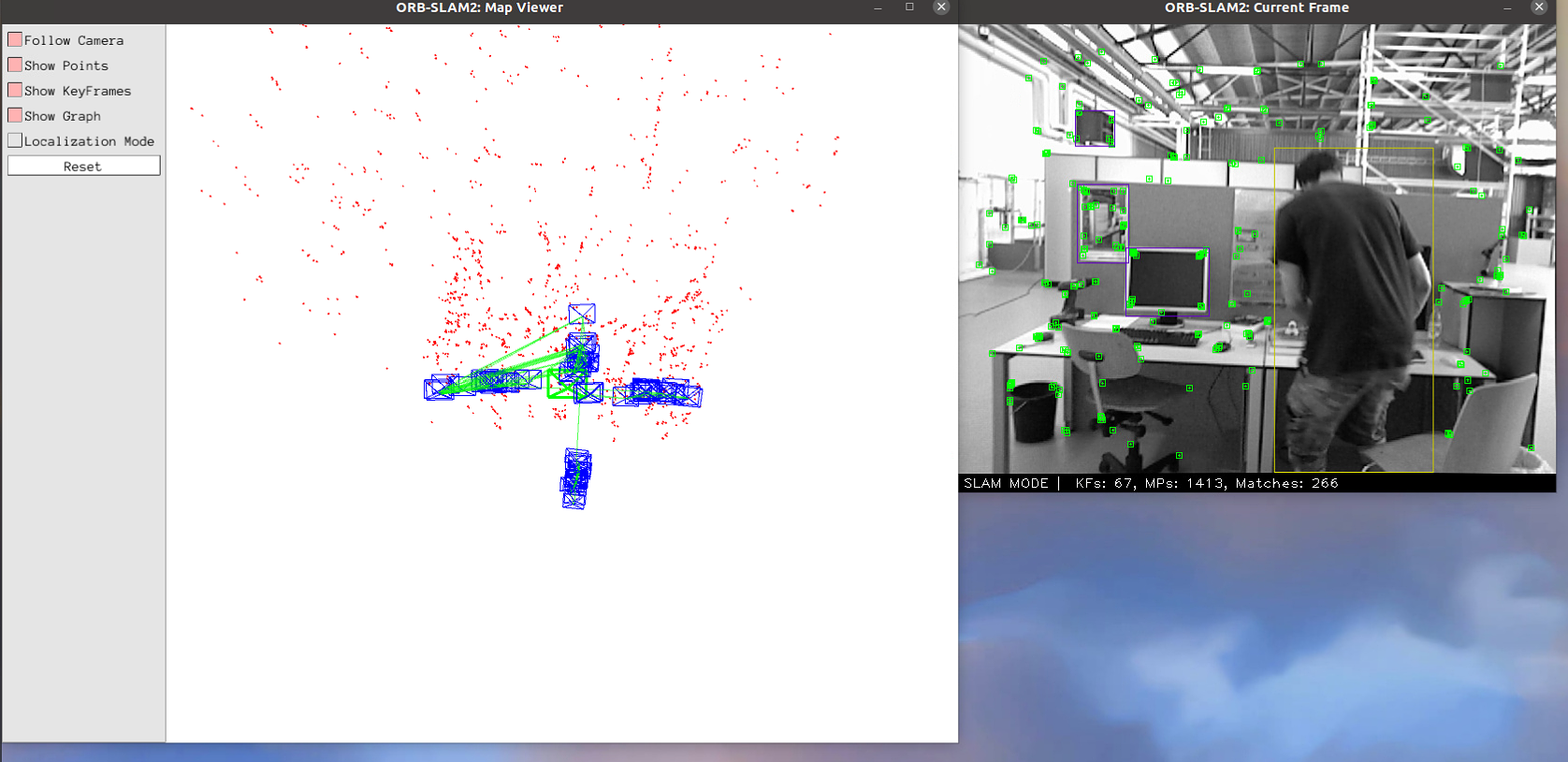
现在可以运行了:可以看到行人动态点被剔除了
感谢大佬们的贡献,救我狗命。
接下来我会找找这里面是怎么把检测框送到slam中,然后去做相应的修改