博主介绍 :黄菊华老师《Vue.js入门与商城开发实战》《微信小程序商城开发》图书作者,CSDN博客专家,在线教育专家,CSDN钻石讲师;专注网站制作、小程序开发、软件开发和大学生毕业设计教育、辅导。
最近致力于区块链的研究,涉及metamask钱包、ganache、web3、支持多链的钱包应用、去中心化应用(DApp)、去中心化交易所(DEX)、DeFi协议前端、智能合约部署和管理工具、区块和交易查询系统等!!!
如果需要联系我,可以在CSDN网站查询黄菊华老师的,在文章末尾可以获取联系方式
说明
这个页面提供了一个全面展示web3.eth模块的解决方案,具有以下特点:
-
最新Web3版本:使用CDN引用了最新的Web3.js版本
-
现代化UI设计:采用了渐变色彩、卡片式布局、平滑过渡动画等现代设计元素
-
详细的模块展示:通过标签页分类展示了web3.eth的核心方法、账户模块、合约模块、网络模块、个人模块和工具方法
-
交互演示功能:提供了多个实用的交互功能,包括获取账户余额、查询最新区块、获取燃气价格和网络信息
-
响应式设计:适配各种屏幕尺寸,从移动设备到桌面设备都能良好显示
-
用户友好体验:添加了加载状态、成功提示、错误处理等用户体验优化
-
钱包连接功能:支持MetaMask钱包连接,显示账户信息和网络状态
使用方法:
- 通过HTTP服务器(如Python内置服务器或VS Code Live Server)打开此页面
- 点击"连接钱包"按钮连接MetaMask钱包
- 浏览不同的标签页,查看web3.eth的各种方法和功能
- 尝试使用页面下方的交互按钮,体验实际的区块链操作
这个页面不仅展示了web3.eth的功能,还提供了实际的交互体验,帮助您更好地理解和使用Web3.js库进行以太坊开发。
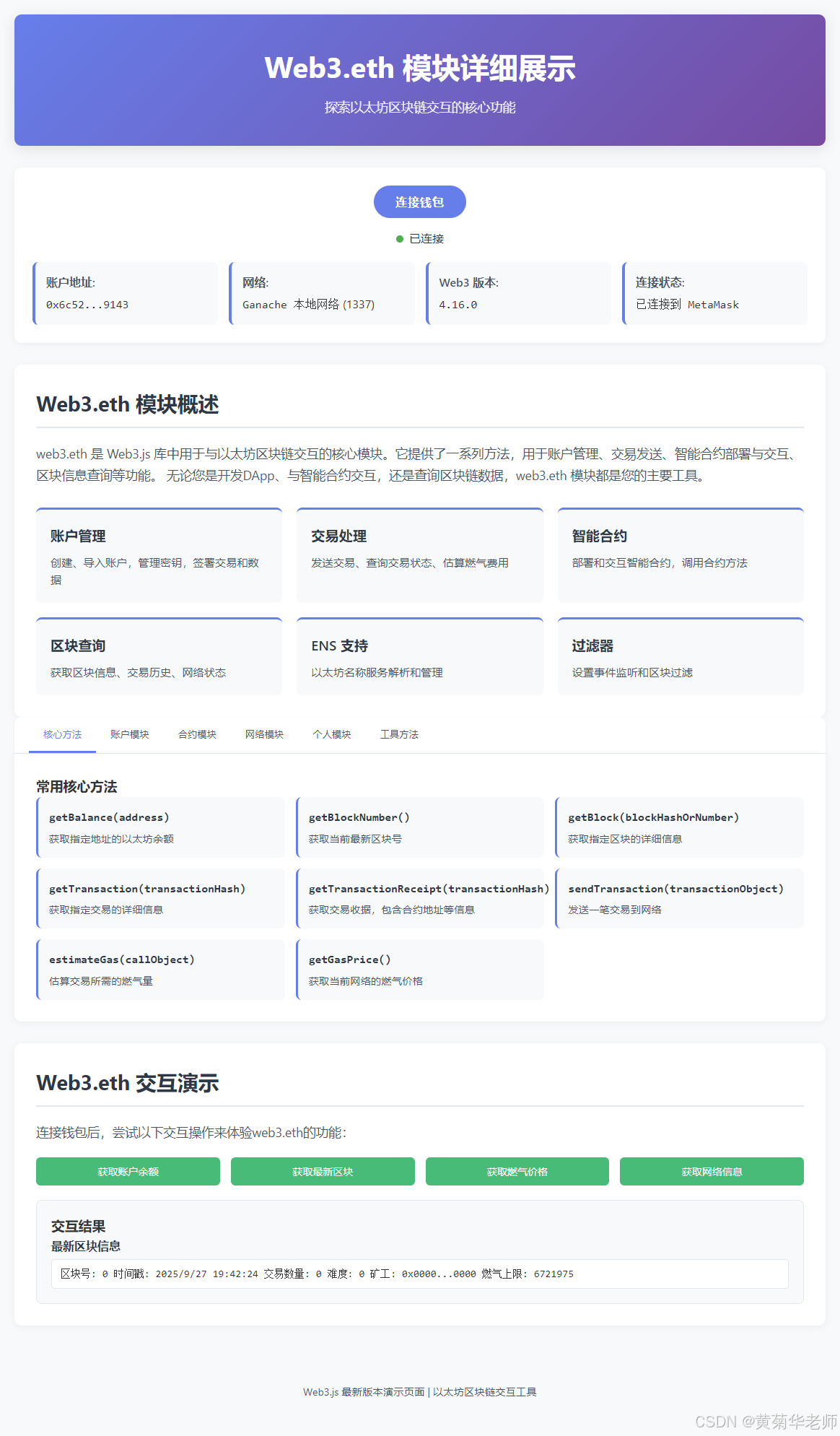
完整的页面效果图
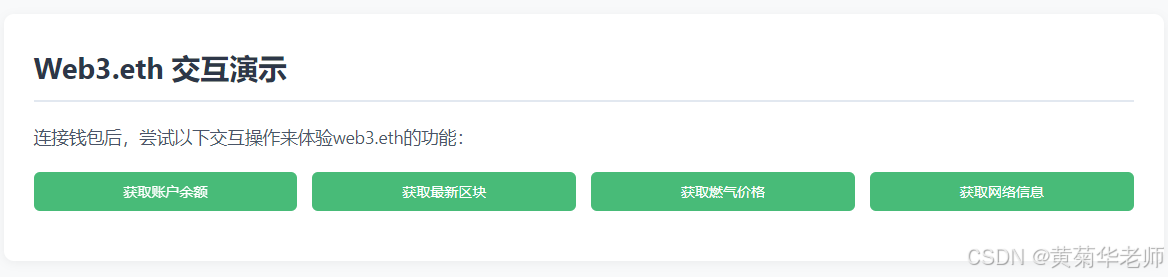
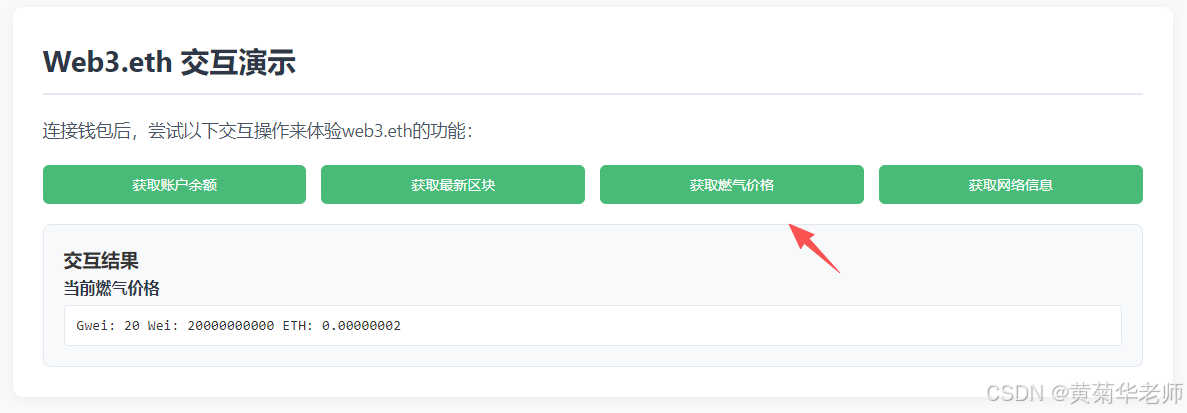
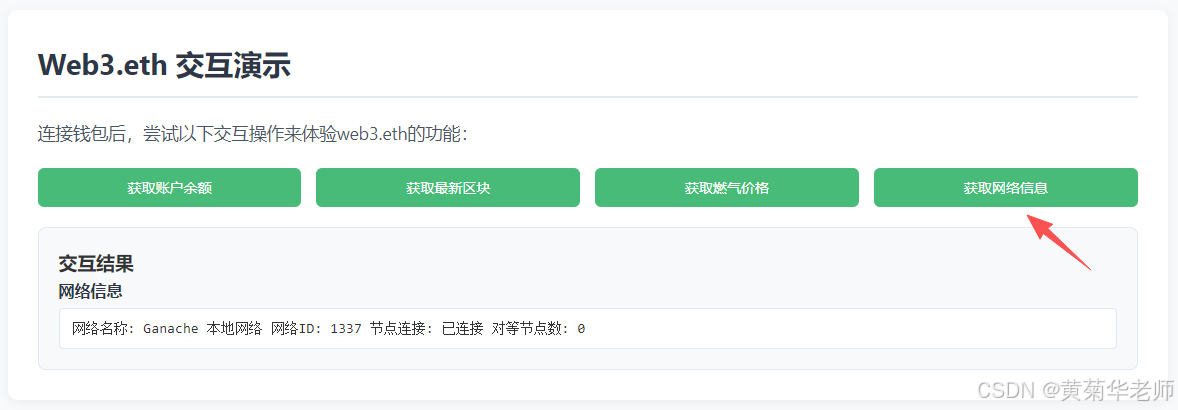
操作的效果图
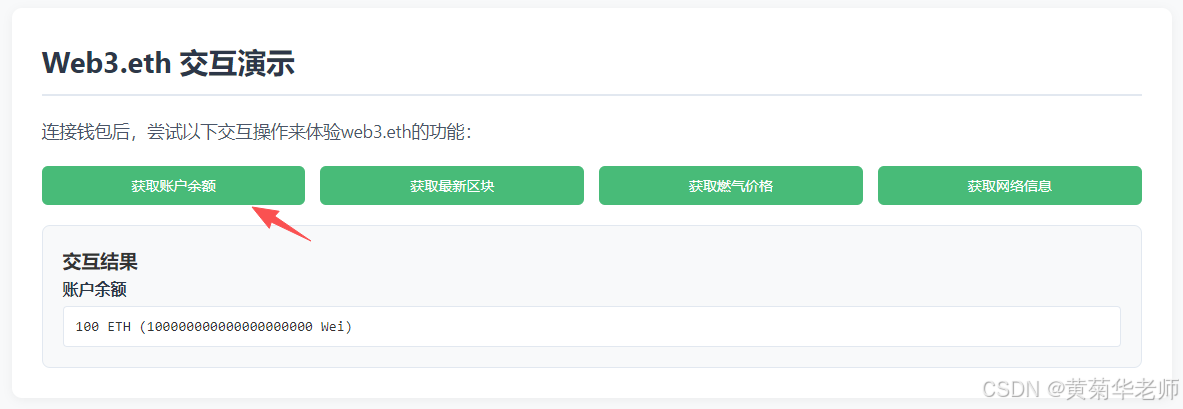
获取账户余额
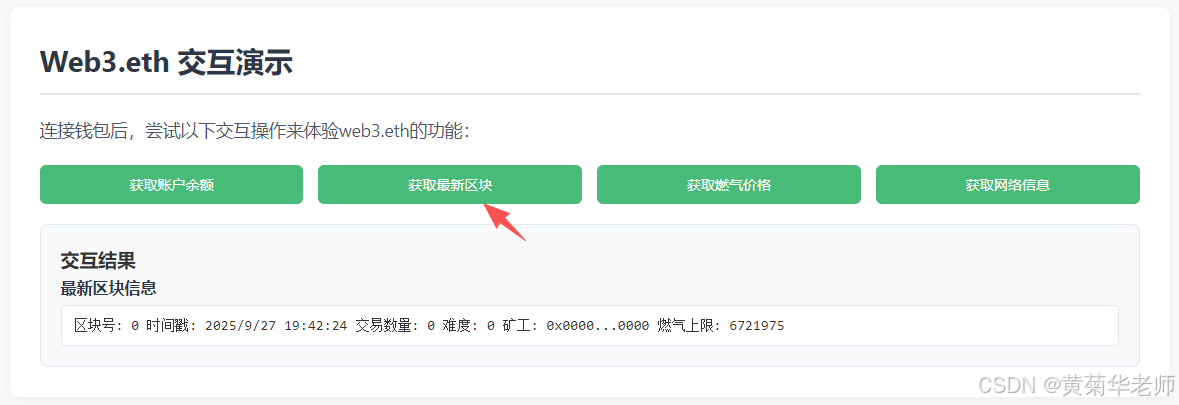
获取最新区块
获取燃气价格
获取网络信息
源代码
html
<!DOCTYPE html>
<html lang="zh-CN">
<head>
<meta charset="UTF-8">
<meta name="viewport" content="width=device-width, initial-scale=1.0">
<title>Web3.eth 模块详细展示</title>
<!-- 使用最新的Web3版本 -->
<script src="https://cdn.jsdelivr.net/npm/web3@latest/dist/web3.min.js"></script>
</style>
</head>
<body>
<div class="container">
<header>
<h1>Web3.eth 模块详细展示</h1>
<p class="subtitle">探索以太坊区块链交互的核心功能</p>
</header>
<!-- 钱包连接区域 -->
<div class="wallet-section">
<button id="connectWalletBtn" class="connect-btn">连接钱包</button>
<div id="walletStatus" style="margin-top: 15px;">
<span class="status-indicator status-disconnected"></span>未连接钱包
</div>
<div id="walletInfo" class="wallet-info" style="display: none;">
<div class="info-item">
<span class="info-label">账户地址:</span>
<span class="info-value" id="accountAddress"></span>
</div>
<div class="info-item">
<span class="info-label">网络:</span>
<span class="info-value" id="networkName"></span> (<span id="networkId"></span>)
</div>
<div class="info-item">
<span class="info-label">Web3 版本:</span>
<span class="info-value" id="web3Version">加载中...</span>
</div>
<div class="info-item">
<span class="info-label">连接状态:</span>
<span class="info-value" id="connectionStatus">已连接</span>
</div>
</div>
</div>
<!-- Web3.eth 概述 -->
<div class="eth-overview">
<h2>Web3.eth 模块概述</h2>
<p class="eth-description">
web3.eth 是 Web3.js 库中用于与以太坊区块链交互的核心模块。它提供了一系列方法,用于账户管理、交易发送、智能合约部署与交互、区块信息查询等功能。
无论您是开发DApp、与智能合约交互,还是查询区块链数据,web3.eth 模块都是您的主要工具。
</p>
<div class="feature-grid">
<div class="feature-card">
<div class="feature-title">账户管理</div>
<div class="feature-desc">创建、导入账户,管理密钥,签署交易和数据</div>
</div>
<div class="feature-card">
<div class="feature-title">交易处理</div>
<div class="feature-desc">发送交易、查询交易状态、估算燃气费用</div>
</div>
<div class="feature-card">
<div class="feature-title">智能合约</div>
<div class="feature-desc">部署和交互智能合约,调用合约方法</div>
</div>
<div class="feature-card">
<div class="feature-title">区块查询</div>
<div class="feature-desc">获取区块信息、交易历史、网络状态</div>
</div>
<div class="feature-card">
<div class="feature-title">ENS 支持</div>
<div class="feature-desc">以太坊名称服务解析和管理</div>
</div>
<div class="feature-card">
<div class="feature-title">过滤器</div>
<div class="feature-desc">设置事件监听和区块过滤</div>
</div>
</div>
</div>
<!-- Web3.eth 详细模块 -->
<div class="modules-section">
<div class="modules-tabs">
<button class="tab-button active" data-tab="methods">核心方法</button>
<button class="tab-button" data-tab="accounts">账户模块</button>
<button class="tab-button" data-tab="contract">合约模块</button>
<button class="tab-button" data-tab="net">网络模块</button>
<button class="tab-button" data-tab="personal">个人模块</button>
<button class="tab-button" data-tab="utils">工具方法</button>
</div>
<!-- 核心方法 Tab -->
<div id="methods" class="tab-content active">
<h3>常用核心方法</h3>
<div class="method-list">
<div class="method-item">
<div class="method-name">getBalance(address)</div>
<div class="method-desc">获取指定地址的以太坊余额</div>
</div>
<div class="method-item">
<div class="method-name">getBlockNumber()</div>
<div class="method-desc">获取当前最新区块号</div>
</div>
<div class="method-item">
<div class="method-name">getBlock(blockHashOrNumber)</div>
<div class="method-desc">获取指定区块的详细信息</div>
</div>
<div class="method-item">
<div class="method-name">getTransaction(transactionHash)</div>
<div class="method-desc">获取指定交易的详细信息</div>
</div>
<div class="method-item">
<div class="method-name">getTransactionReceipt(transactionHash)</div>
<div class="method-desc">获取交易收据,包含合约地址等信息</div>
</div>
<div class="method-item">
<div class="method-name">sendTransaction(transactionObject)</div>
<div class="method-desc">发送一笔交易到网络</div>
</div>
<div class="method-item">
<div class="method-name">estimateGas(callObject)</div>
<div class="method-desc">估算交易所需的燃气量</div>
</div>
<div class="method-item">
<div class="method-name">getGasPrice()</div>
<div class="method-desc">获取当前网络的燃气价格</div>
</div>
</div>
</div>
<!-- 账户模块 Tab -->
<div id="accounts" class="tab-content">
<h3>账户管理方法</h3>
<div class="method-list">
<div class="method-item">
<div class="method-name">accounts.create()</div>
<div class="method-desc">创建新的以太坊账户</div>
</div>
<div class="method-item">
<div class="method-name">accounts.wallet.add(privateKey)</div>
<div class="method-desc">将私钥添加到钱包</div>
</div>
<div class="method-item">
<div class="method-name">accounts.signTransaction(tx, privateKey)</div>
<div class="method-desc">使用私钥签署交易</div>
</div>
<div class="method-item">
<div class="method-name">accounts.recover(message, signature)</div>
<div class="method-desc">从签名中恢复账户地址</div>
</div>
</div>
</div>
<!-- 合约模块 Tab -->
<div id="contract" class="tab-content">
<h3>智能合约方法</h3>
<div class="method-list">
<div class="method-item">
<div class="method-name">Contract(abi, address)</div>
<div class="method-desc">创建合约实例</div>
</div>
<div class="method-item">
<div class="method-name">contract.methods</div>
<div class="method-desc">访问合约的所有方法</div>
</div>
<div class="method-item">
<div class="method-name">contract.deploy(options)</div>
<div class="method-desc">部署新合约</div>
</div>
<div class="method-item">
<div class="method-name">contract.events</div>
<div class="method-desc">访问合约的所有事件</div>
</div>
</div>
</div>
<!-- 网络模块 Tab -->
<div id="net" class="tab-content">
<h3>网络相关方法</h3>
<div class="method-list">
<div class="method-item">
<div class="method-name">net.getId()</div>
<div class="method-desc">获取当前网络ID</div>
</div>
<div class="method-item">
<div class="method-name">net.isListening()</div>
<div class="method-desc">检查是否连接到节点</div>
</div>
<div class="method-item">
<div class="method-name">net.getPeerCount()</div>
<div class="method-desc">获取连接的节点数量</div>
</div>
</div>
</div>
<!-- 个人模块 Tab -->
<div id="personal" class="tab-content">
<h3>个人管理方法</h3>
<div class="method-list">
<div class="method-item">
<div class="method-name">personal.newAccount(password)</div>
<div class="method-desc">创建新账户并设置密码</div>
</div>
<div class="method-item">
<div class="method-name">personal.unlockAccount(address, password)</div>
<div class="method-desc">解锁账户以进行交易</div>
</div>
<div class="method-item">
<div class="method-name">personal.sign(data, address)</div>
<div class="method-desc">使用账户签署数据</div>
</div>
</div>
</div>
<!-- 工具方法 Tab -->
<div id="utils" class="tab-content">
<h3>实用工具方法</h3>
<div class="method-list">
<div class="method-item">
<div class="method-name">utils.toWei(amount, unit)</div>
<div class="method-desc">将以太币单位转换为Wei</div>
</div>
<div class="method-item">
<div class="method-name">utils.fromWei(amount, unit)</div>
<div class="method-desc">将Wei转换为其他以太币单位</div>
</div>
<div class="method-item">
<div class="method-name">utils.isAddress(address)</div>
<div class="method-desc">验证地址是否有效</div>
</div>
<div class="method-item">
<div class="method-name">utils.sha3(string)</div>
<div class="method-desc">计算字符串的SHA3哈希值</div>
</div>
</div>
</div>
</div>
<!-- 交互演示区域 -->
<div class="interactive-section">
<h2>Web3.eth 交互演示</h2>
<p class="eth-description">连接钱包后,尝试以下交互操作来体验web3.eth的功能:</p>
<div class="action-buttons">
<button class="action-btn" id="getBalanceBtn">获取账户余额</button>
<button class="action-btn" id="getBlockBtn">获取最新区块</button>
<button class="action-btn" id="getGasPriceBtn">获取燃气价格</button>
<button class="action-btn" id="getNetworkBtn">获取网络信息</button>
</div>
<div id="resultsSection" class="results-section" style="display: none;">
<h3>交互结果</h3>
<div id="resultsContainer"></div>
</div>
<div id="errorContainer" class="error-message" style="display: none;"></div>
</div>
<footer>
<p>Web3.js 最新版本演示页面 | 以太坊区块链交互工具</p>
</footer>
</div>
<script>
let web3 = null;
let currentAccount = null;
// 初始化页面
window.addEventListener('load', async () => {
// 检查 MetaMask 是否安装
if (typeof window.ethereum !== 'undefined') {
console.log('MetaMask 已安装');
document.getElementById('connectWalletBtn').addEventListener('click', connectWallet);
// 显示 Web3 版本信息
try {
if (window.Web3 && window.Web3.version) {
document.getElementById('web3Version').textContent = window.Web3.version;
} else {
// 尝试直接从web3实例获取版本
if (typeof Web3 !== 'undefined') {
const tempWeb3 = new Web3();
if (tempWeb3.version && tempWeb3.version.api) {
document.getElementById('web3Version').textContent = tempWeb3.version.api;
} else {
document.getElementById('web3Version').textContent = '4.x (版本信息获取失败)';
}
} else {
document.getElementById('web3Version').textContent = '未知版本';
}
}
} catch (e) {
document.getElementById('web3Version').textContent = '无法获取版本';
}
// 自动检测已连接的钱包
try {
const accounts = await ethereum.request({ method: 'eth_accounts' });
if (accounts.length > 0) {
currentAccount = accounts[0];
initWeb3();
updateWalletInfo();
}
} catch (error) {
console.error('自动检测钱包失败:', error);
}
} else {
showError('未检测到 MetaMask 钱包。请安装 MetaMask 浏览器插件后刷新页面。');
document.getElementById('connectWalletBtn').disabled = true;
}
// 设置标签页切换
document.querySelectorAll('.tab-button').forEach(button => {
button.addEventListener('click', () => {
// 移除所有活动状态
document.querySelectorAll('.tab-button').forEach(btn => btn.classList.remove('active'));
document.querySelectorAll('.tab-content').forEach(content => content.classList.remove('active'));
// 添加当前活动状态
button.classList.add('active');
const tabId = button.getAttribute('data-tab');
document.getElementById(tabId).classList.add('active');
});
});
// 设置交互按钮事件
document.getElementById('getBalanceBtn').addEventListener('click', getAccountBalance);
document.getElementById('getBlockBtn').addEventListener('click', getLatestBlock);
document.getElementById('getGasPriceBtn').addEventListener('click', getCurrentGasPrice);
document.getElementById('getNetworkBtn').addEventListener('click', getNetworkInfo);
});
// 连接钱包
async function connectWallet() {
try {
showLoading();
const accounts = await ethereum.request({ method: 'eth_requestAccounts' });
currentAccount = accounts[0];
initWeb3();
updateWalletInfo();
showSuccess('钱包连接成功!');
} catch (error) {
console.error('连接钱包失败:', error);
showError('连接钱包失败: ' + error.message);
} finally {
hideLoading();
}
}
// 初始化 Web3
function initWeb3() {
try {
if (window.ethereum) {
web3 = new Web3(window.ethereum);
// 监听账户变化
ethereum.on('accountsChanged', (accounts) => {
if (accounts.length > 0) {
currentAccount = accounts[0];
updateWalletInfo();
} else {
currentAccount = null;
updateWalletInfo();
showError('钱包已断开连接');
}
});
// 监听网络变化
ethereum.on('chainChanged', (chainId) => {
updateWalletInfo();
showSuccess('网络已切换');
});
}
} catch (error) {
console.error('Web3 初始化失败:', error);
showError('Web3 初始化失败: ' + error.message);
}
}
// 更新钱包信息
async function updateWalletInfo() {
if (currentAccount && web3) {
try {
// 获取网络信息
let networkId;
try {
networkId = await web3.eth.getChainId();
} catch {
networkId = await web3.eth.net.getId();
}
const networkName = getNetworkName(networkId);
document.getElementById('walletStatus').innerHTML =
'<span class="status-indicator status-connected"></span>已连接';
document.getElementById('accountAddress').textContent = formatAddress(currentAccount);
document.getElementById('networkId').textContent = networkId;
document.getElementById('networkName').textContent = networkName;
document.getElementById('walletInfo').style.display = 'grid';
document.getElementById('connectionStatus').textContent = '已连接到 MetaMask';
} catch (error) {
console.error('更新钱包信息失败:', error);
}
} else {
document.getElementById('walletStatus').innerHTML =
'<span class="status-indicator status-disconnected"></span>未连接钱包';
document.getElementById('walletInfo').style.display = 'none';
document.getElementById('connectionStatus').textContent = '未连接';
}
}
// 获取账户余额
async function getAccountBalance() {
if (!web3 || !currentAccount) {
showError('请先连接钱包');
return;
}
try {
showLoading();
const balanceWei = await web3.eth.getBalance(currentAccount);
const balanceEth = web3.utils.fromWei(balanceWei, 'ether');
showResult('账户余额', `${balanceEth} ETH (${balanceWei} Wei)`);
} catch (error) {
console.error('获取余额失败:', error);
showError('获取余额失败: ' + error.message);
} finally {
hideLoading();
}
}
// 获取最新区块
async function getLatestBlock() {
if (!web3) {
showError('请先连接钱包');
return;
}
try {
showLoading();
// 获取区块号
const blockNumber = await web3.eth.getBlockNumber();
// 确保blockNumber被正确转换
const safeBlockNumber = typeof blockNumber === 'bigint' ? blockNumber.toString() : blockNumber;
// 获取区块信息
const block = await web3.eth.getBlock(safeBlockNumber);
// 确保所有BigInt类型的值被正确转换为字符串
const blockNumberStr = typeof block.number === 'bigint' ? block.number.toString() : block.number;
const difficultyStr = typeof block.difficulty === 'bigint' ? block.difficulty.toString() : block.difficulty;
const timestampStr = typeof block.timestamp === 'bigint' ? block.timestamp.toString() : block.timestamp;
const gasLimitStr = typeof block.gasLimit === 'bigint' ? block.gasLimit.toString() : block.gasLimit;
// 安全创建时间戳
const timestamp = parseInt(timestampStr);
const dateStr = isNaN(timestamp) ? '无效时间戳' : new Date(timestamp * 1000).toLocaleString();
// 安全构建区块信息字符串
const blockInfo = `区块号: ${blockNumberStr}\n时间戳: ${dateStr}\n交易数量: ${block.transactions.length}\n难度: ${difficultyStr}\n矿工: ${formatAddress(block.miner)}\n燃气上限: ${gasLimitStr}`;
showResult('最新区块信息', blockInfo);
} catch (error) {
console.error('获取区块失败:', error);
showError('获取区块失败: ' + error.message);
} finally {
hideLoading();
}
}
// 获取当前燃气价格
async function getCurrentGasPrice() {
if (!web3) {
showError('请先连接钱包');
return;
}
try {
showLoading();
const gasPriceWei = await web3.eth.getGasPrice();
const gasPriceGwei = web3.utils.fromWei(gasPriceWei, 'gwei');
const gasPriceEth = web3.utils.fromWei(gasPriceWei, 'ether');
const gasInfo = `Gwei: ${gasPriceGwei}\nWei: ${gasPriceWei}\nETH: ${gasPriceEth}`;
showResult('当前燃气价格', gasInfo);
} catch (error) {
console.error('获取燃气价格失败:', error);
showError('获取燃气价格失败: ' + error.message);
} finally {
hideLoading();
}
}
// 获取网络信息
async function getNetworkInfo() {
if (!web3) {
showError('请先连接钱包');
return;
}
try {
showLoading();
let networkId;
try {
networkId = await web3.eth.getChainId();
} catch {
networkId = await web3.eth.net.getId();
}
const isListening = await web3.eth.net.isListening();
const peerCount = await web3.eth.net.getPeerCount();
const networkName = getNetworkName(networkId);
const networkInfo = `网络名称: ${networkName}\n网络ID: ${networkId}\n节点连接: ${isListening ? '已连接' : '未连接'}\n对等节点数: ${peerCount}`;
showResult('网络信息', networkInfo);
} catch (error) {
console.error('获取网络信息失败:', error);
showError('获取网络信息失败: ' + error.message);
} finally {
hideLoading();
}
}
// 辅助函数:获取网络名称
function getNetworkName(networkId) {
const networks = {
1: '以太坊主网',
3: 'Ropsten 测试网',
4: 'Rinkeby 测试网',
5: 'Goerli 测试网',
42: 'Kovan 测试网',
1337: 'Ganache 本地网络',
11155111: 'Sepolia 测试网'
};
return networks[networkId] || '未知网络';
}
// 辅助函数:格式化地址显示
function formatAddress(address) {
return address.substring(0, 6) + '...' + address.substring(address.length - 4);
}
// 显示错误信息
function showError(message) {
const errorContainer = document.getElementById('errorContainer');
errorContainer.textContent = message;
errorContainer.style.display = 'block';
// 5秒后自动隐藏错误信息
setTimeout(() => {
errorContainer.style.display = 'none';
}, 5000);
}
// 显示成功信息
function showSuccess(message) {
const successMessage = document.createElement('div');
successMessage.className = 'success-message';
successMessage.textContent = message;
const container = document.querySelector('.container');
const header = document.querySelector('header');
container.insertBefore(successMessage, header.nextSibling);
// 3秒后自动移除成功信息
setTimeout(() => {
successMessage.remove();
}, 3000);
}
// 显示加载状态
function showLoading() {
document.querySelectorAll('.action-btn').forEach(btn => {
btn.disabled = true;
btn.innerHTML = '加载中...';
});
}
// 隐藏加载状态
function hideLoading() {
document.querySelectorAll('.action-btn').forEach(btn => {
btn.disabled = false;
});
document.getElementById('getBalanceBtn').innerHTML = '获取账户余额';
document.getElementById('getBlockBtn').innerHTML = '获取最新区块';
document.getElementById('getGasPriceBtn').innerHTML = '获取燃气价格';
document.getElementById('getNetworkBtn').innerHTML = '获取网络信息';
}
// 显示交互结果
function showResult(label, value) {
const resultsSection = document.getElementById('resultsSection');
const resultsContainer = document.getElementById('resultsContainer');
// 清空之前的结果
resultsContainer.innerHTML = '';
// 创建新的结果项
const resultItem = document.createElement('div');
resultItem.className = 'result-item';
const resultLabel = document.createElement('div');
resultLabel.className = 'result-label';
resultLabel.textContent = label;
const resultValue = document.createElement('div');
resultValue.className = 'result-value';
resultValue.textContent = value;
resultItem.appendChild(resultLabel);
resultItem.appendChild(resultValue);
resultsContainer.appendChild(resultItem);
// 显示结果区域
resultsSection.style.display = 'block';
// 滚动到结果区域
resultsSection.scrollIntoView({ behavior: 'smooth', block: 'start' });
}
</script>
</body>
</html>