环境说明
软件版本说明:
- .net 10
- garnet-server 1.0.91
- Microsoft.Garnet 1.0.91
两种安装方式:
- 宿主机使用
.NET Tool安装 - Docker 容器化运行,https://microsoft.github.io/garnet/docs/welcome/releases#docker
容器化方式请查看官方文档,此处以 .net tool 方式为例。
- 在宿主机安装
garnet-server:
bash
dotnet tool install --global garnet-server --version 1.0.91输出信息:
text
可使用以下命令调用工具: garnet-server
已成功安装工具"garnet-server"(版本"1.0.91")。
查看更最多帮助信息:
bash
garnet-server --help
GarnetServer
Copyright (c) Microsoft Corporation
--port (Default: 6379) Port to run server on
--bind Whitespace or comma separated
string of IP addresses to
bind server to (default: any)
--cluster-announce-port (Default: 0) Port that this node
advertises to other nodes to
connect to for gossiping.
--cluster-announce-ip IP address that this node
advertises to other nodes to
connect to for gossiping.
-m, --memory (Default: "16g") Total log memory used in
bytes (rounds down to power
of 2)
-p, --page (Default: "32m") Size of each page in bytes
(rounds down to power of 2)
-s, --segment (Default: "1g") Size of each log segment in
bytes on disk (rounds down to
power of 2)
-i, --index (Default: "128m") Start size of hash index in
bytes (rounds down to power
of 2)
--index-max-size Max size of hash index in
bytes (rounds down to power
of 2)
--mutable-percent (Default: 90) Percentage of log memory that
is kept mutable
--readcache (Default: False) Enables read cache for faster
access to on-disk records.
--readcache-memory (Default: "1g") Total read cache log memory
used in bytes (rounds down to
power of 2)
--readcache-page (Default: "32m") Size of each read cache page
in bytes (rounds down to
power of 2)
--obj-heap-memory Object store heap memory size
in bytes (Sum of size taken
up by all object instances in
the heap)
--obj-log-memory (Default: "32m") Object store log memory used
in bytes (Size of only the
log with references to heap
objects, excludes size of
heap memory consumed by the
objects themselves referred
to from the log)
--obj-page (Default: "4k") Size of each object store
page in bytes (rounds down to
power of 2)
--obj-segment (Default: "32m") Size of each object store log
segment in bytes on disk
(rounds down to power of 2)
--obj-index (Default: "16m") Start size of object store
hash index in bytes (rounds
down to power of 2)
--obj-index-max-size Max size of object store hash
index in bytes (rounds down
to power of 2)
--obj-mutable-percent (Default: 90) Percentage of object store
log memory that is kept
mutable
--obj-readcache (Default: False) Enables object store read
cache for faster access to
on-disk records.
--obj-readcache-log-memory (Default: "32m") Total object store read cache
log memory used in bytes
(rounds down to power of 2)
--obj-readcache-page (Default: "1m") Size of each object store
read cache page in bytes
(rounds down to power of 2)
--obj-readcache-heap-memory Object store read cache heap
memory size in bytes (Sum of
size taken up by all object
instances in the heap)
--storage-tier (Default: False) Enable tiering of records
(hybrid log) to storage, to
support a larger-than-memory
store. Use --logdir to
specify storage directory.
--copy-reads-to-tail (Default: False) When records are read from
the main store's in-memory
immutable region or storage
device, copy them to the tail
of the log.
--obj-copy-reads-to-tail (Default: False) When records are read from
the object store's in-memory
immutable region or storage
device, copy them to the tail
of the log.
-l, --logdir Storage directory for tiered
records (hybrid log), if
storage tiering
(--storage-tier) is enabled.
Uses current directory if
unspecified.
-c, --checkpointdir Storage directory for
checkpoints. Uses logdir if
unspecified.
-r, --recover (Default: False) Recover from latest
checkpoint and log, if
present.
--no-pubsub (Default: False) Disable pub/sub feature on
server.
--incsnap (Default: False) Enable incremental snapshots.
--pubsub-pagesize (Default: "4k") Page size of log used for
pub/sub (rounds down to power
of 2)
--no-obj (Default: False) Disable support for data
structure objects.
--cluster (Default: False) Enable cluster.
--clean-cluster-config (Default: False) Start with clean cluster
config.
--pmt (Default: 1) Number of parallel migrate
tasks to spawn when SLOTS or
SLOTSRANGE option is used.
--fast-migrate (Default: False) When migrating slots 1. write
directly to network buffer to
avoid unecessary copies, 2.
do not wait for ack from
target before sending next
batch of keys.
--auth (Default: NoAuth) Authentication mode of
Garnet. This impacts how AUTH
command is processed and how
clients are authenticated
against Garnet. Value
options: NoAuth, Password,
Aad, ACL
--password Authentication string for
password authentication.
--cluster-username Username to authenticate
intra-cluster communication
with.
--cluster-password Password to authenticate
intra-cluster communication
with.
--acl-file External ACL user file.
--aad-authority (Default: "https://login.microsoftonline.com") The authority of AAD
authentication.
--aad-audiences The audiences of AAD token
for AAD authentication.
Should be a comma separated
string.
--aad-issuers The issuers of AAD token for
AAD authentication. Should be
a comma separated string.
--aad-authorized-app-ids The authorized client app Ids
for AAD authentication.
Should be a comma separated
string.
--aad-validate-acl-username (Default: False) Only valid for AclWithAAD
mode. Validates username -
expected to be OID of client
app or a valid group's object
id of which the client is
part of.
--aof (Default: False) Enable write ahead logging
(append-only file).
--aof-memory (Default: "64m") Total AOF memory buffer used
in bytes (rounds down to
power of 2) - spills to disk
after this limit
--aof-page-size (Default: "4m") Size of each AOF page in
bytes(rounds down to power of
2)
--aof-commit-freq (Default: 0) Write ahead logging
(append-only file) commit
issue frequency in
milliseconds. 0 = issue an
immediate commit per
operation, -1 = manually
issue commits using COMMITAOF
command
--aof-commit-wait (Default: False) Wait for AOF to flush the
commit before returning
results to client. Warning:
will greatly increase
operation latency.
--aof-size-limit Maximum size of AOF (rounds
down to power of 2) after
which unsafe truncation will
be applied. Left empty AOF
will grow without bound
unless a checkpoint is taken
--aof-size-limit-enforce-frequency (Default: 5) Frequency (in secs) of
execution of the
AutoCheckpointBasedOnAofSizeL
imit background task.
--aof-refresh-freq (Default: 10) AOF replication (safe tail
address) refresh frequency in
milliseconds. 0 = auto
refresh after every enqueue.
--subscriber-refresh-freq (Default: 0) Subscriber (safe tail
address) refresh frequency in
milliseconds (for pub-sub). 0
= auto refresh after every
enqueue.
--compaction-freq (Default: 0) Background hybrid log
compaction frequency in
seconds. 0 = disabled
(compaction performed before
checkpointing instead)
--expired-object-collection-freq (Default: 0) Frequency in seconds for the
background task to perform
object collection which
removes expired members
within object from memory. 0
= disabled. Use the HCOLLECT
and ZCOLLECT API to collect
on-demand.
--compaction-type (Default: None) Hybrid log compaction type.
Value options: None - no
compaction, Shift - shift
begin address without
compaction (data loss), Scan
- scan old pages and move
live records to tail (no data
loss), Lookup - lookup each
record in compaction range,
for record liveness checking
using hash chain (no data
loss)
--compaction-force-delete (Default: False) Forcefully delete the
inactive segments immediately
after the compaction strategy
(type) is applied. If false,
take a checkpoint to actually
delete the older data files
from disk.
--compaction-max-segments (Default: 32) Number of log segments
created on disk before
compaction triggers.
--obj-compaction-max-segments (Default: 32) Number of object store log
segments created on disk
before compaction triggers.
--lua (Default: False) Enable Lua scripts on server.
--lua-transaction-mode (Default: False) Run Lua scripts as a
transaction (lock keys - run
script - unlock keys).
--gossip-sp (Default: 100) Percent of cluster nodes to
gossip with at each gossip
iteration.
--gossip-delay (Default: 5) Cluster mode gossip protocol
per node sleep (in seconds)
delay to send updated config.
--cluster-timeout (Default: 60) Cluster node timeout is the
amount of seconds a node must
be unreachable.
--cluster-config-flush-frequency (Default: 0) How frequently to flush
cluster config unto disk to
persist updates. =-1: never
(memory only), =0:
immediately (every update
performs flush), >0:
frequency in ms
--cluster-tls-client-target-host (Default: "GarnetTest") Name for the client target
host when using TLS
connections in cluster mode.
--server-certificate-required (Default: True) Whether server TLS
certificate is required by
clients established on the
server side, e.g., for
cluster gossip and
replication.
--tls (Default: False) Enable TLS.
--cert-file-name TLS certificate file name
(example: testcert.pfx).
--cert-password TLS certificate password
(example: placeholder).
--cert-subject-name TLS certificate subject name.
--cert-refresh-freq (Default: 0) TLS certificate refresh
frequency in seconds (0 to
disable).
--client-certificate-required (Default: True) Whether client TLS
certificate is required by
the server.
--certificate-revocation-check-mode (Default: NoCheck) Certificate revocation check
mode for certificate
validation (NoCheck, Online,
Offline).
--issuer-certificate-path Full path of file with issuer
certificate for validation.
If empty or null, validation
against issuer will not be
performed.
--latency-monitor (Default: False) Track latency of various
events.
--slowlog-log-slower-than (Default: 0) Threshold (microseconds) for
logging command in the slow
log. 0 to disable.
--slowlog-max-len (Default: 128) Maximum number of slow log
entries to keep.
--metrics-sampling-freq (Default: 0) Metrics sampling frequency in
seconds. Value of 0 disables
metrics monitor task.
-q Enabling quiet mode does not
print server version and text
art.
--logger-level (Default: Warning) Logging level. Value options:
Trace, Debug, Information,
Warning, Error, Critical,
None
--logger-freq (Default: 5) Frequency (in seconds) of
logging (used for tracking
progress of long running
operations e.g. migration)
--disable-console-logger (Default: False) Disable console logger.
--file-logger Enable file logger and write
to the specified path.
--minthreads (Default: 0) Minimum worker threads in
thread pool, 0 uses the
system default.
--maxthreads (Default: 0) Maximum worker threads in
thread pool, 0 uses the
system default.
--miniothreads (Default: 0) Minimum IO completion threads
in thread pool, 0 uses the
system default.
--maxiothreads (Default: 0) Maximum IO completion threads
in thread pool, 0 uses the
system default.
--network-connection-limit (Default: -1) Maximum number of
simultaneously active network
connections.
--use-azure-storage (Default: False) Use Azure Page Blobs for
storage instead of local
storage.
--storage-service-uri The URI to use when
establishing connection to
Azure Blobs Storage.
--storage-managed-identity The managed identity to use
when establishing connection
to Azure Blobs Storage.
--storage-string The connection string to use
when establishing connection
to Azure Blobs Storage.
--checkpoint-throttle-delay (Default: 0) Whether and by how much
should we throttle the disk
IO for checkpoints: -1 -
disable throttling; >= 0 -
run checkpoint flush in
separate task, sleep for
specified time after each
WriteAsync
--fast-commit (Default: True) Use FastCommit when writing
AOF.
--fast-commit-throttle (Default: 1000) Throttle FastCommit to write
metadata once every K
commits.
--network-send-throttle (Default: 8) Throttle the maximum
outstanding network sends per
session.
--sg-get (Default: False) Whether we use scatter gather
IO for MGET or a batch of
contiguous GET operations -
useful to saturate disk
random read IO.
--replica-sync-delay (Default: 5) Whether and by how much
(milliseconds) should we
throttle the replica sync: 0
- disable throttling
--replica-offset-max-lag (Default: -1) Throttle ClusterAppendLog
when replica.AOFTailAddress -
ReplicationOffset >
ReplicationOffsetMaxLag. 0:
Synchronous replay, >=1:
background replay with
specified lag, -1: infinite
lag
--main-memory-replication (Default: False) Use main-memory replication
model.
--fast-aof-truncate (Default: False) Use fast-aof-truncate
replication model.
--on-demand-checkpoint (Default: True) Used with main-memory
replication model. Take on
demand checkpoint to avoid
missing data when attaching
--repl-diskless-sync (Default: False) Whether diskless replication
is enabled or not.
--repl-diskless-sync-delay (Default: 5) Delay in diskless replication
sync in seconds. =0:
Immediately start diskless
replication sync.
--repl-attach-timeout (Default: 60) Timeout in seconds for
replication attach operation.
--repl-sync-timeout (Default: 5) Timeout in seconds for
replication sync operations.
--repl-diskless-sync-full-sync-aof-threshold AOF replay size threshold for
diskless replication, beyond
which we will perform a full
sync even if a partial sync
is possible. Defaults to AOF
memory size if not specified.
--aof-null-device (Default: False) With main-memory replication,
use null device for AOF.
Ensures no disk IO, but can
cause data loss during
replication.
--config-import-path Import (load) configuration
options from the provided
path
--config-import-format (Default: GarnetConf) Format of configuration
options in path specified by
config-import-path
--config-export-format (Default: GarnetConf) Format to export
configuration options to path
specified by
config-export-path
--use-azure-storage-for-config-import (Default: false) Use Azure
storage to import config file
--config-export-path Export (save) current
configuration options to the
provided path
--use-azure-storage-for-config-export (Default: false) Use Azure
storage to export config file
--use-native-device-linux (Default: False) DEPRECATED: use DeviceType
(--device-type) of Native
instead.
--device-type (Default: Default) Device type (Default, Native,
RandomAccess, FileStream,
AzureStorage, Null)
--reviv-bin-record-sizes #,#,...,#: For the main
store, the sizes of records
in each revivification bin,
in order of increasing size.
Supersedes the default
--reviv; cannot be used with
--reviv-in-chain-only
--reviv-bin-record-counts #,#,...,#: For the main
store, the number of records
in each bin: Default (not
specified): If
reviv-bin-record-sizes is
specified, each bin is 256
records # (one value): If
reviv-bin-record-sizes is
specified, then all bins have
this number of records, else
error #,#,...,# (multiple
values): If
reviv-bin-record-sizes is
specified, then it must be
the same size as that array,
else error
Supersedes the default
--reviv; cannot be used with
--reviv-in-chain-only
--reviv-fraction (Default: 1) #: Fraction of mutable
in-memory log space, from the
highest log address down to
the read-only region, that is
eligible for revivification.
Applies to both main and
object store.
--reviv (Default: False) A shortcut to specify
revivification with default
power-of-2-sized bins.
This default can be
overridden by
--reviv-in-chain-only (Default: False) or by
the combination of
reviv-bin-record-sizes and
reviv-bin-record-counts.
--reviv-search-next-higher-bins (Default: 0) Search this number of
next-higher bins if the
search cannot be satisfied in
the best-fitting bin.
Requires --reviv or the
combination of
rconeviv-bin-record-sizes and
reviv-bin-record-counts
--reviv-bin-best-fit-scan-limit (Default: 0) Number of records to scan for
best fit after finding first
fit. Requires --reviv or
the combination of
reviv-bin-record-sizes and
reviv-bin-record-counts 0:
Use first fit #: Limit
scan to this many records
after first fit, up to the
record count of the bin
--reviv-in-chain-only (Default: False) Revivify tombstoned records
in tag chains only (do not
use free list). Cannot be
used with
reviv-bin-record-sizes or
reviv-bin-record-counts.
Propagates to object store by
default.
--reviv-obj-bin-record-count (Default: 256) Number of records in the
single free record bin for
the object store. The Object
store has only a single bin,
unlike the main store.
Ignored unless the main store
is using the free record
list.
--object-scan-count-limit (Default: 1000) Limit of items to return in
one iteration of *SCAN
command
--enable-debug-command (Default: No) Enable DEBUG command for
'no', 'local' or 'all'
connections
--enable-module-command (Default: No) Enable MODULE command for
'no', 'local' or 'all'
connections. Command can only
load from paths listed in
ExtensionBinPaths
--protected-mode (Default: True) Enable protected mode.
--extension-bin-paths List of directories on server
from which custom command
binaries can be loaded by
admin users. MODULE command
also requires
enable-module-command to be
set
--loadmodulecs List of modules to be loaded
--extension-allow-unsigned (Default: False) Allow loading custom commands
from digitally unsigned
assemblies (not recommended)
--index-resize-freq (Default: 60) Index resize check frequency
in seconds
--index-resize-threshold (Default: 50) Overflow bucket count over
total index size in
percentage to trigger index
resize
--fail-on-recovery-error (Default: False) Server bootup should fail if
errors happen during bootup
of AOF and checkpointing
--skip-rdb-restore-checksum-validation (Default: False) Skip RDB restore checksum
validation
--lua-memory-management-mode (Default: Native) Memory management mode for
Lua scripts, must be set to
Tracked or Managed to impose
script limits
--lua-script-memory-limit Memory limit for a Lua
instances while running a
script,
lua-memory-management-mode
must be set to something
other than Native to use this
flag
--lua-script-timeout (Default: 0) Timeout for a Lua instance
while running a script,
specified in positive
milliseconds (0 = disabled)
--lua-logging-mode (Default: Enable) Behavior of redis.log(...)
when called from Lua scripts.
Defaults to Enable.
--lua-allowed-functions (Default: System.Collections.Generic.HashSet`1[System.String]) If set, restricts the
functions available in Lua
scripts to given list.
--unixsocket Unix socket address path to
bind server to
--unixsocketperm (Default: 0) Unix socket permissions in
octal (Unix platforms only)
--max-databases (Default: 16) Max number of logical
databases allowed in a single
Garnet server instance
--expired-key-deletion-scan-freq (Default: -1) Frequency of background scan
for expired key deletion, in
seconds
--cluster-replication-reestablishment-timeout (Default: 0)
--cluster-replica-resume-with-data (Default: False) If a Cluster Replica resumes
with data, allow it to be
served prior to a Primary
being available
--help Display this help screen.
--version Display version information.
value pos. 0启动 Garent server 执行命令:
bash
garnet-server显示如下信息:
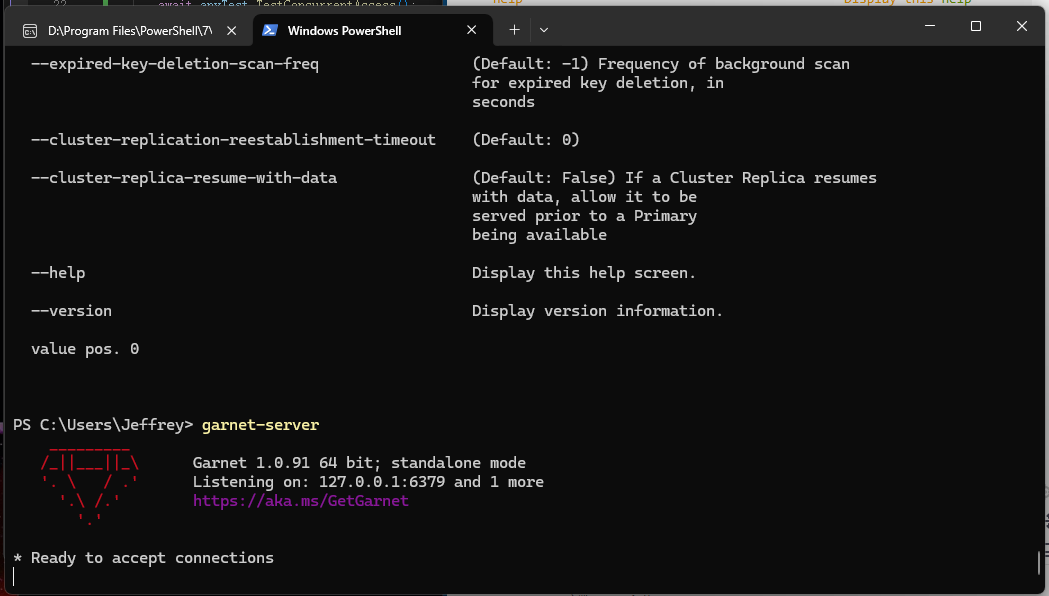
特别说明:启动 garnet server 时,开启支持 lua 脚本
依据 garnet-server 命令行参数帮助文档,要启用 Lua 脚本支持,您可以按照以下方式启动 Garnet Server:
bash
garnet-server --lua或者如果您想要更详细的配置,例如设置 Lua 脚本的超时时间或内存限制,可以使用如下选项:
bash
garnet-server --lua --lua-script-timeout 5000 --lua-script-memory-limit 1048576以下是与 Lua 相关的几个重要参数说明:
--lua: 启用服务器上的Lua脚本功能。--lua-transaction-mode: 将Lua脚本作为事务运行(锁定键 - 运行脚本 - 解锁键)。--lua-script-timeout: 设置Lua实例运行脚本的超时时间(以毫秒为单位),0 表示禁用。--lua-script-memory-limit: 设置Lua脚本实例的内存限制。--lua-memory-management-mode: 设置Lua脚本的内存管理模式,必须设为 Tracked 或 Managed 才能施加脚本限制。
这些选项允许您根据需要定制 Lua 脚本的行为和资源限制。
如何遇到如下类似错误信息:
bash
PS C:\Users\Jeffrey> garnet-server --lua --lua-script-timeout 5000 --lua-script-memory-limit 1048576
01::02::09 info: ArgParser[0] Configuration import from embedded resource succeeded. Path: defaults.conf.
01::02::09 info: ArgParser[0] Configuration file path not specified. Using default values with command-line switches.
01::02::09 fail: ArgParser[0] LuaScriptMemoryLimit cannot be set with LuaMemoryManagementMode has value 'Native'
01::02::09 fail: ArgParser[0] Configuration validation failed.
Unable to initialize server due to exception: Encountered an error when initializing Garnet server. Please see log messages above for more details.
错误原因:
- 上面命令时设置了
--lua-script-memory-limit和默认的--lua-memory-management-mode(默认值为Native) - 当内存管理模式为
Native时,不允许设置脚本内存限制
解决方案:
- 需要显式指定
--lua-memory-management-mode为Tracked或Managed,才能使用--lua-script-memory-limit参数:
bash
garnet-server --lua --lua-script-timeout 5000 --lua-memory-management-mode Tracked --lua-script-memory-limit 1048576- 或者使用
Managed模式:
bash
garnet-server --lua --lua-script-timeout 5000 --lua-memory-management-mode Managed --lua-script-memory-limit 1048576- 使用
docker容器化运行:
bash
docker run -d --name garnet \
-p 6380:6379 \
ghcr.io/microsoft/garnet:1.0.91 \
garnet-server \
--lua \
--lua-script-timeout 5000 \
--lua-memory-management-mode Managed \
--lua-script-memory-limit 1048576- 容器化运行
garnet显示信息:
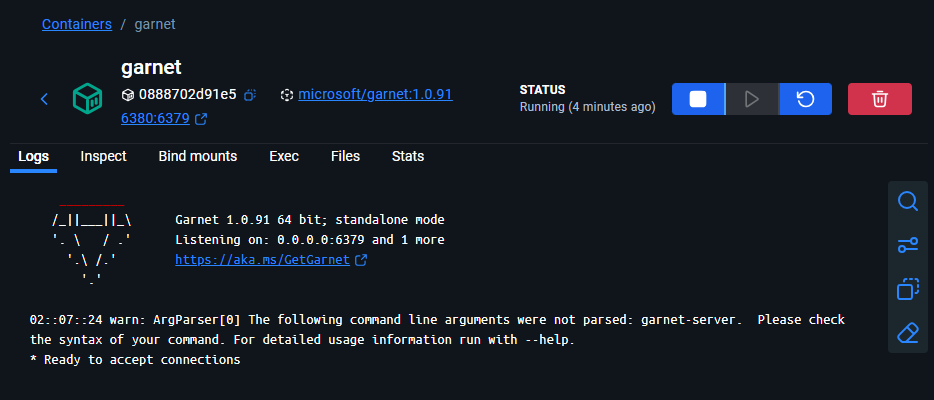
参数说明:
--lua: 启用Lua脚本支持--lua-script-timeout 5000: 设置Lua脚本执行超时时间为5000 毫秒--lua-memory-management-mode Tracked|Managed: 设置Lua内存管理模式为Tracked 或 Managed,这样才能应用内存限制--lua-script-memory-limit 1048576: 设置每个Lua脚本实例的内存限制为1MB(1048576字节)
这样配置后,Garnet Server 应该能够正常启动并支持带有内存和时间限制的 Lua 脚本功能。

除了上面使用命令设置 Lua 配置项,还可以通过 C# 代码定义方式:
csharp
using Garnet.server;

// 在配置 Garnet 服务器时,确保启用了 Lua 脚本支持
// 正确的配置方式 - 设置 LuaOptions
var serverOptions = new GarnetServerOptions
{
    LuaOptions = new LuaOptions(
        memoryMode: LuaMemoryManagementMode.Managed,
        memoryLimit: "10MB",
        timeout: TimeSpan.FromSeconds(30),
        logMode: LuaLoggingMode.Enable,
        allowedFunctions: [
            "redis.call",
            "redis.pcall",
            "redis.log"
            // 添加其他需要的函数
        ]
    )
};
更多信息,请查看 Garnet 官方文档:
代码实现
- 分布式🔒接口定义
IDistributedLock
csharp
namespace Ai4c.OperationsCenter.Abstraction.DistributedLock;

public interface IDistributedLock
{
    /// <summary>
    /// 尝试获取锁
    /// </summary>
    /// <param name="timeout">等待超时时间</param>
    /// <returns>是否成功获取锁</returns>
    Task<bool> TryAcquireAsync(TimeSpan timeout = default, CancellationToken cancellationToken = default);

    /// <summary>
    /// 释放锁
    /// </summary>
    /// <returns></returns>
    ValueTask ReleaseAsync();
}- 扩展方法用于
TimeSpan计算
csharp
public static class TimeSpanExtensions
{
    public static TimeSpan Multiply(this TimeSpan timeSpan, double factor)
    {
        return TimeSpan.FromTicks((long)(timeSpan.Ticks * factor));
    }
}- 基于
Garnet的分布式锁实现GarnetDistributedLock
csharp
using Ai4c.OperationsCenter.Abstraction.DistributedLock;
using Garnet.client;

namespace Ai4c.OperationsCenter.Core.DistributedLock;

// 使用 IAsyncDisposable 对象符合现代化 .net 异步编程
public class GarnetDistributedLock(GarnetClient client, string lockKey, TimeSpan expiry)
    : IDistributedLock, IAsyncDisposable
{
    private readonly string _lockValue = Guid.CreateVersion7().ToString();
    private readonly CancellationTokenSource _renewalCts = new();
    private Task? _renewalTask;
    private bool _isLocked = false;

    /// <summary>
    /// 尝试获取锁
    /// </summary>
    /// <param name="timeout">等待超时时间</param>
    /// <param name="cancellationToken">取消令牌</param>
    /// <returns>是否成功获取锁</returns>
    public async Task<bool> TryAcquireAsync(TimeSpan timeout = default, CancellationToken cancellationToken = default)
    {
        var startTime = DateTimeOffset.UtcNow;
        var delayBetweenRetries = TimeSpan.FromMilliseconds(50);

        // 合并外部取消令牌和内部取消令牌
        using var linkedCts = CancellationTokenSource.CreateLinkedTokenSource(cancellationToken, _renewalCts.Token);

        while (!linkedCts.Token.IsCancellationRequested)
        {
            // 使用 SET 命令的 NX 和 EX 选项尝试获取锁
            // NX: 只有键不存在时才设置
            // EX: 设置过期时间
            var result = await client.ExecuteForStringResultAsync(
                "SET",
                [lockKey, _lockValue, "NX", "EX", ((int)expiry.TotalSeconds).ToString()]
            );

            if (result != null)
            {
                _isLocked = true;
                // 启动自动续期任务
                await StartRenewalTaskAsync(linkedCts.Token);
                return true;
            }

            // 检查是否超时
            if (timeout != default && DateTimeOffset.UtcNow - startTime > timeout)
            {
                return false;
            }

            // 等待下次重试,同时响应取消请求
            try
            {
                await Task.Delay(delayBetweenRetries, linkedCts.Token);
            }
            catch (OperationCanceledException)
            {
                // 如果被取消,直接返回false
                return false;
            }
        }

        return false;
    }

    /// <summary>
    /// 释放锁
    /// </summary>
    public async ValueTask ReleaseAsync()
    {
        if (!_isLocked) return;

        // 使用 Lua 脚本安全地释放锁,确保只有持有锁的客户端才能释放
        const string script = @"
            if redis.call('get', KEYS[1]) == ARGV[1] then
                return redis.call('del', KEYS[1])
            else
                return 0
            end";

        try
        {
            await client.ExecuteForStringResultAsync(
                "EVAL",
                [script, "1", lockKey, _lockValue]
            );
        }
        finally
        {
            _isLocked = false;
            await _renewalCts.CancelAsync();
        }
    }

    /// <summary>
    /// 启动锁自动续期任务(异步方法)
    /// </summary>
    private async Task StartRenewalTaskAsync(CancellationToken cancellationToken)
    {
        _renewalTask = Task.Run(async () =>
        {
            try
            {
                while (!cancellationToken.IsCancellationRequested)
                {
                    // 在锁过期前续期(提前1/3时间续期)
                    await Task.Delay(expiry.Multiply(0.66), cancellationToken);

                    if (_isLocked)
                    {
                        // 续期锁
                        await client.ExecuteForStringResultAsync(
                            "EXPIRE",
                            [lockKey, ((int)expiry.TotalSeconds).ToString()]
                        );
                    }
                }
            }
            catch (OperationCanceledException)
            {
                // 任务被取消,正常退出
                await Console.Out.WriteLineAsync("任务被取消,正常退出");
            }
        }, cancellationToken);
    }

    /// <summary>
    /// 异步释放资源
    /// </summary>
    public async ValueTask DisposeAsync()
    {
        if (_isLocked)
        {
            await ReleaseAsync();
        }

        await _renewalCts.CancelAsync();
        if (_renewalTask != null)
        {
            try
            {
                await _renewalTask;
            }
            catch (OperationCanceledException)
            {
                // 忽略取消异常
                await Console.Out.WriteLineAsync("任务被取消,正常释放资源");
            }
        }
        _renewalCts?.Dispose();
    }
}
使用 DateTimeOffset 的优势:
- 明确包含时区信息(
UTC) - 避免因时区不同导致的时间计算错误
- 更适合分布式系统中的时间比较
- 提供更准确的时间戳信息
这样修改后,代码在分布式环境中会更加可靠,特别是在跨时区部署的应用场景中。
如何使用 ?
以下是使用 GarnetDistributedLock 的完整测试演示:
csharp
using System;
using System.Threading.Tasks;
using Garnet.client;
using Ai4c.OperationsCenter.Core.DistributedLock;

class Program
{
    static async Task Main(string[] args)
    {
        // 初始化 Garnet 客户端
        var client = new GarnetClient("127.0.0.1", 6379);
        await client.ConnectAsync();

        Console.WriteLine("已连接到 Garnet 服务器");

        try
        {
            // 运行各种测试
            await TestBasicLockFunctionality(client);
            await TestConcurrentAccess(client);
            await TestLockTimeout(client);
            await TestAutomaticRenewal(client);
        }
        finally
        {
            client.Dispose();
        }
    }

    /// <summary>
    /// 测试基本锁功能
    /// </summary>
    static async Task TestBasicLockFunctionality(GarnetClient client)
    {
        Console.WriteLine("\n=== 测试基本锁功能 ===");

        await using var distributedLock = new GarnetDistributedLock(client, "basic_test_lock", TimeSpan.FromSeconds(10));

        var acquired = await distributedLock.TryAcquireAsync(TimeSpan.FromSeconds(5));
        if (acquired)
        {
            Console.WriteLine("✓ 成功获取锁");

            // 模拟业务处理
            await Task.Delay(2000);
            Console.WriteLine("✓ 业务处理完成");

            // 锁会在 using 语句结束时自动释放
        }
        else
        {
            Console.WriteLine("✗ 获取锁失败或超时");
        }
    }

    /// <summary>
    /// 测试并发访问控制
    /// </summary>
    static async Task TestConcurrentAccess(GarnetClient client)
    {
        Console.WriteLine("\n=== 测试并发访问控制 ===");

        int sharedCounter = 0;
        var tasks = new Task[5];
        var startTime = DateTime.Now;

        // 创建多个并发任务竞争同一个锁
        for (int i = 0; i < 5; i++)
        {
            int taskId = i;
            tasks[i] = Task.Run(async () =>
            {
                await using var distLock = new GarnetDistributedLock(client, "concurrent_test_lock", TimeSpan.FromSeconds(5));

                var acquired = await distLock.TryAcquireAsync(TimeSpan.FromSeconds(3));
                if (acquired)
                {
                    Console.WriteLine($"✓ 任务 {taskId} 获取到锁 at {DateTime.Now:ss.fff}");

                    // 模拟临界区操作 - 增加共享计数器
                    int current = sharedCounter;
                    await Task.Delay(500); // 模拟处理时间
                    sharedCounter = current + 1;

                    Console.WriteLine($"✓ 任务 {taskId} 完成操作,当前计数: {sharedCounter} at {DateTime.Now:ss.fff}");
                }
                else
                {
                    Console.WriteLine($"✗ 任务 {taskId} 未能获取到锁 at {DateTime.Now:ss.fff}");
                }
            });
        }

        await Task.WhenAll(tasks);
        var duration = DateTime.Now - startTime;

        Console.WriteLine($"最终计数结果: {sharedCounter} (期望值: 5)");
        Console.WriteLine($"总耗时: {duration.TotalSeconds:F2} 秒");

        // 验证所有任务都获得了锁(计数应该等于任务数)
        if (sharedCounter == 5)
        {
            Console.WriteLine("✓ 并发控制测试通过:所有任务都正确获得了锁");
        }
        else
        {
            Console.WriteLine("✗ 并发控制测试失败:部分任务未能获得锁");
        }
    }

    /// <summary>
    /// 测试锁超时功能
    /// </summary>
    static async Task TestLockTimeout(GarnetClient client)
    {
        Console.WriteLine("\n=== 测试锁超时功能 ===");

        // 先获取一个锁并保持一段时间
        await using var firstLock = new GarnetDistributedLock(client, "timeout_test_lock", TimeSpan.FromSeconds(10));
        var firstAcquired = await firstLock.TryAcquireAsync();

        if (firstAcquired)
        {
            Console.WriteLine("✓ 第一个客户端成功获取锁");

            // 尝试让另一个客户端获取同一个锁,但设置较短的超时时间
            var secondLockTask = Task.Run(async () =>
            {
                await using var secondLock = new GarnetDistributedLock(client, "timeout_test_lock", TimeSpan.FromSeconds(5));
                var secondAcquired = await secondLock.TryAcquireAsync(TimeSpan.FromSeconds(2));

                if (secondAcquired)
                {
                    Console.WriteLine("✓ 第二个客户端获取锁");
                    return true;
                }
                else
                {
                    Console.WriteLine("✓ 第二个客户端在超时时间内未能获取锁(预期行为)");
                    return false;
                }
            });

            // 等待第二个客户端尝试获取锁
            var secondResult = await secondLockTask;

            // 释放第一个锁
            Console.WriteLine("第一个客户端释放锁");
        }
    }

    /// <summary>
    /// 测试锁自动续期功能
    /// </summary>
    static async Task TestAutomaticRenewal(GarnetClient client)
    {
        Console.WriteLine("\n=== 测试锁自动续期功能 ===");

        // 设置很短的过期时间,但执行较长的任务来测试自动续期
        await using var distributedLock = new GarnetDistributedLock(client, "renewal_test_lock", TimeSpan.FromSeconds(3));

        var acquired = await distributedLock.TryAcquireAsync();
        if (acquired)
        {
            Console.WriteLine("✓ 获取锁成功,开始长时间任务...");

            // 执行比锁过期时间更长的任务
            // 由于自动续期功能,锁不会过期
            await Task.Delay(TimeSpan.FromSeconds(8));

            Console.WriteLine("✓ 长时间任务完成,锁仍然有效");
        }
        else
        {
            Console.WriteLine("✗ 获取锁失败");
        }
    }
}
另外,我们还可以创建一个更详细的测试来验证锁的安全性和可靠性:
csharp
using System;
using System.Collections.Generic;
using System.Threading.Tasks;
using Garnet.client;
using Ai4c.OperationsCenter.Core.DistributedLock;

/// <summary>
/// 分布式锁压力测试类
/// </summary>
public class DistributedLockStressTest
{
    private readonly GarnetClient _client;

    public DistributedLockStressTest(GarnetClient client)
    {
        _client = client;
    }

    /// <summary>
    /// 执行压力测试
    /// </summary>
    public async Task RunStressTest()
    {
        Console.WriteLine("\n=== 开始分布式锁压力测试 ===");

        const int threadCount = 10;
        const int operationsPerThread = 100;
        const string lockKey = "stress_test_lock";

        // 任务完成会自动释放锁🔒
        await using var distLock = new GarnetDistributedLock(_client, lockKey, TimeSpan.FromSeconds(5));

        var tasks = new List<Task>();
        var successCount = 0;
        var failureCount = 0;
        var sharedResource = 0;

        var startTime = DateTimeOffset.UtcNow;

        // 创建多个并发任务
        for (int i = 0; i < threadCount; i++)
        {
            int threadId = i;
            var task = Task.Run(async () =>
            {
                for (int j = 0; j < operationsPerThread; j++)
                {
                    var acquired = await distLock.TryAcquireAsync(TimeSpan.FromMilliseconds(100));
                    if (acquired)
                    {
                        // 临界区操作
                        var currentValue = sharedResource;
                        await Task.Delay(1); // 模拟工作负载
                        sharedResource = currentValue + 1;

                        Interlocked.Increment(ref successCount);
                    }
                    else
                    {
                        Interlocked.Increment(ref failureCount);
                    }
                }
            });

            tasks.Add(task);
        }

        // 等待所有任务完成
        await Task.WhenAll(tasks);
        // 释放锁(等效上面方法)
        //await distLock.ReleaseAsync();

        var endTime = DateTimeOffset.UtcNow;
        var duration = endTime - startTime;

        Console.WriteLine($"测试完成:");
        Console.WriteLine($"  总操作数: {threadCount * operationsPerThread}");
        Console.WriteLine($"  成功获取锁: {successCount}");
        Console.WriteLine($"  获取锁失败: {failureCount}");
        Console.WriteLine($"  最终共享资源值: {sharedResource}");
        Console.WriteLine($"  执行时间: {duration.TotalSeconds:F2} 秒");
        Console.WriteLine($"  平均每秒操作数: {(threadCount * operationsPerThread) / duration.TotalSeconds:F2}");

        // 验证结果
        if (sharedResource == successCount)
        {
            Console.WriteLine("✓ 压力测试通过:没有数据竞争");
        }
        else
        {
            Console.WriteLine("✗ 压力测试失败:存在数据竞争");
        }
    }
}

// 在 Main 方法中添加压力测试
class ExtendedProgram
{
    static async Task Main(string[] args)
    {
        var client = new GarnetClient("127.0.0.1", 6379);
        await client.ConnectAsync();

        Console.WriteLine("已连接到 Garnet 服务器");

        try
        {
            // 运行基础测试
            await TestBasicScenarios(client);

            // 运行压力测试
            var stressTest = new DistributedLockStressTest(client);
            await stressTest.RunStressTest();
        }
        finally
        {
            client.Dispose();
        }
    }

    static async Task TestBasicScenarios(GarnetClient client)
    {
        Console.WriteLine("=== 基础功能测试 ===");

        // 测试锁的基本功能
        await using var lock1 = new GarnetDistributedLock(client, "test_lock", TimeSpan.FromSeconds(5));
        var acquired = await lock1.TryAcquireAsync();
        Console.WriteLine($"获取锁: {acquired}");

        if (acquired)
        {
            // 尝试再次获取同一个锁应该失败
            await using var lock2 = new GarnetDistributedLock(client, "test_lock", TimeSpan.FromSeconds(5));
            var acquired2 = await lock2.TryAcquireAsync(TimeSpan.FromMilliseconds(100));
            Console.WriteLine($"重复获取锁: {acquired2} (应为 False)");
        }
    }
}
测试用例
- 测试基本锁功能
bash
Hello, Garnet!
已连接到 Garnet 服务器

=== 测试基本锁功能 ===
? 成功获取锁
? 业务处理完成- 基础功能测试
bash
Hello, Garnet!
已连接到 Garnet 服务器
=== 基础功能测试 ===
获取锁: True
重复获取锁: False (应为 False)- 测试并发访问控制
bash
Hello, Garnet!
已连接到 Garnet 服务器

=== 测试并发访问控制 ===
? 任务 4 获取到锁 at 19.101
? 任务 4 完成操作,当前计数: 1 at 19.641
? 任务 0 获取到锁 at 19.657
? 任务 0 完成操作,当前计数: 2 at 20.157
? 任务 3 获取到锁 at 20.222
? 任务 3 完成操作,当前计数: 3 at 20.734
? 任务 2 获取到锁 at 20.783
? 任务 2 完成操作,当前计数: 4 at 21.283
? 任务 1 获取到锁 at 21.344
? 任务 1 完成操作,当前计数: 5 at 21.855- 测试锁超时功能
bash
Hello, Garnet!
已连接到 Garnet 服务器

=== 测试锁超时功能 ===
? 第一个客户端成功获取锁
? 第二个客户端在超时时间内未能获取锁(预期行为)
第一个客户端释放锁- 测试锁自动续期功能
bash
Hello, Garnet!
已连接到 Garnet 服务器

=== 测试锁自动续期功能 ===
? 获取锁成功,开始长时间任务...
? 长时间任务完成,锁仍然有效- 分布式锁压力测试
bash
Hello, Garnet!
已连接到 Garnet 服务器

=== 开始分布式锁压力测试 ===
测试完成:
  总操作数: 1000
  成功获取锁: 1
  获取锁失败: 999
  最终共享资源值: 1
  执行时间: 12.47 秒
  平均每秒操作数: 80.22
? 压力测试通过:没有数据竞争- 压力测试截图:
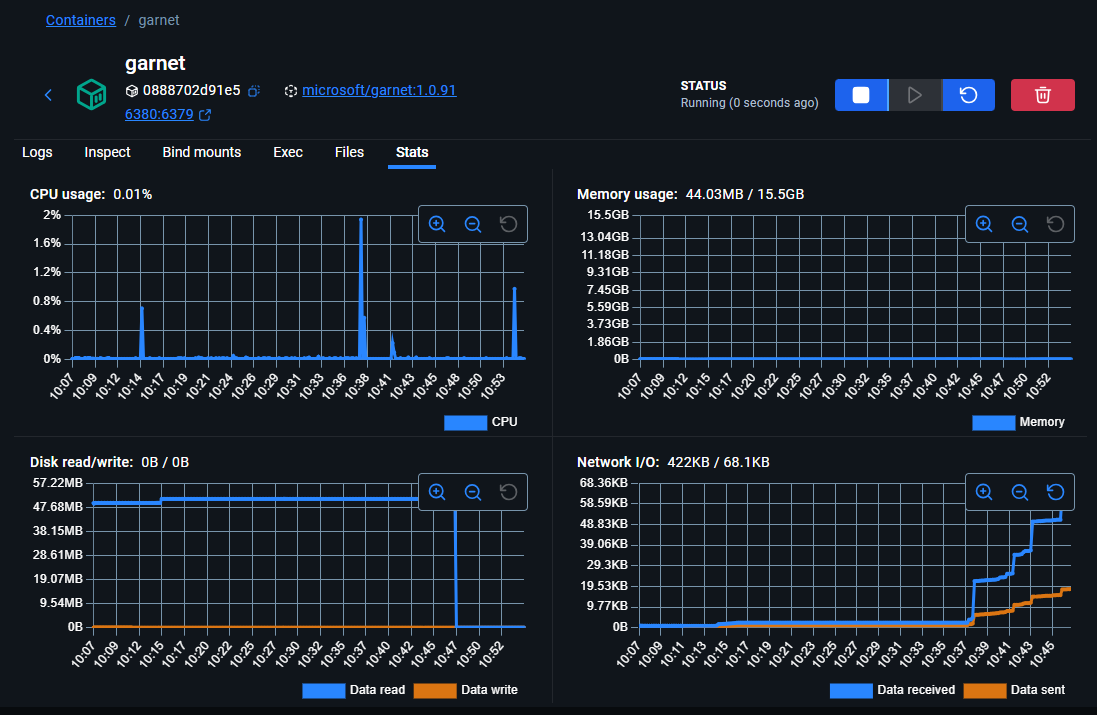
以上测试仅供参考,感兴趣的小伙伴可自行测试,依据不同环境的电脑配置规格,测试效果也会有所差异化。
这些测试验证了以下功能:
- 基本锁功能:能够正确获取和释放锁
- 并发控制:多个客户端竞争同一把锁时的互斥性
- 超时机制:在指定时间内无法获取锁时正确超时
- 自动续期:长时间持有锁时自动延长过期时间
- 压力测试:高并发场景下的稳定性和正确性
运行这些测试可以帮助验证 GarnetDistributedLock 实现的正确性和可靠性。