4.1 ArkUI 方舟UI框架
巩固夯实弹性布局相关语法
父 display: flex justify-content: center align-items:center
父加display:flex 子flex1
基本结构
html head body .... ....
- 项目结构
h
xxxx.vue
<template><template>
<script setup></script>
<style lang="scss"></style>
xxxx.ets
@Entry           // 路由访问
@Component   // 他就是一个单独的页面  术语组件 (切记这个组件只能导出导入,不能通过路由单独访问)
struct 组件名 { // 切记struct是固定格式
    // 数据
     // ...
     // 数据
     build() {
            这里面写布局代码   UI层
     }
}
Column、Row 线性布局
@Entry
@Component
struct Index {
build() {
// 一、build中必须有一个根元素
// Text('学鸿蒙 找千锋1')
// Text('学鸿蒙 找千锋2')
// 二、Column包括的元素在垂直方向排列
// Column() {
// Text('学鸿蒙 找千锋1')
// Text('学鸿蒙 找千锋2')
// }
// 三、Row包括的元素在水平向排列
// Row() {
// Text('学鸿蒙 找千锋1')
// Text('学鸿蒙 找千锋2')
// }
// 四、子元素排列对齐方式属性
// - 主轴:子元素默认排列方向, 交叉轴垂直于主轴
// - 主轴:Column 垂直方向、Row 水平方向
// - .justifyContent() 主轴方向
// - .alignItems() 交叉轴方向
// Row() {
// Text('学鸿蒙 找千锋1')
// Text('学鸿蒙 找千锋2')
// }
// .justifyContent(FlexAlign.Center)
// .alignItems(VerticalAlign.Center)
}
}Image
html 写标签/写属性
<img src="" width="" height="" />arkts 写组件/写属性
Image(src: string|Resource)
    .width(100)
    .height(100)
    .broderRadius(10)
1 Image('互联网地址')
2 Image($r('app.media.test1'))
"requestPermissions": [
  {"name": "ohos.permission.INTERNET"}
],
Text
html 写标签
<span>hello</span>
<div>hello</div>
<h1>hello</h1>
arkts 写组件/写属性
Text(content: string)
    .fontSize(30)
    .fontColor('#000')
TextInput
html 写标签
<input typet="text" placeholder="请输入内容" value="默认数据" />arkts 写组件/写属性
TextInput( { 名字:数据, 名字:数据 } )
留心1:写的是花括号
留心2:名字:数据 多个之间逗号隔开 名字不是随便写的鸿蒙规定好了 具体有哪些后期带你看手册 今天快速入门
TextInput({placeholder?:"请输入内容", text?:"默认数据"})
 .width('100%')
 .height(50)
 .backgroundColor('#000')
 .borderRadius(0)
Button
html 写标签
<button>内容</button>arkts 写组件/写属性
Button() {
Image(图片).width()
}
Button(label?: ResourceStr)
.width('100%')
.height(50)
.type(ButtonType.Normal)
.onclick(() => {
})知识点小结
一、简介
二、搭建开发环境
三、初探项目开发 =》 需求写京东商城商品详情页鸿蒙版 需要布局的一些语法
Column或者Row() { // 线性布局必须加宽度高度才可以设置对齐方式
Text(内容)......
Image(图片互联网地址) ets和resource同级module.json5
"requestPermissions": [
{"name": "ohos.permission.INTERNET"}
],
Image(图片本地地址) $r('app.media.xxxxxx')
TextInput().borderRadius(0)
Button('各种按钮').type(ButtonType.Normal)
}
.fontSize/fontColor/fontWeight()
.width/height/backgroundColor()
.margin/padding/border()
=> .margin/padding(10) .margin({top:10,bottom:10})
=> .border({ width: 1, style: BorderStyle.Dashed, color: Color.Red, })
=> .border({ width: {top:2}, style: BorderStyle.Dashed, color: Color.Red, })
.其他属性()
更多语法晚上手册挨个练习
https://developer.huawei.com/consumer/cn/doc/harmonyos-guides-V5/arkts-common-components-button-V5
4.2 ArkTS 方舟编程语言
语法演变
ArkTS是HarmonyOS优选的应用高级开发语言。
ArkTS提供了声明式UI范式、状态管理支持等相应的能力,让开发者可以以更简洁、更自然的方式开发应用。
class 类名 {
    public 属性名:类型 =  数据

    函数名() {}

    // ....
}
演变升级
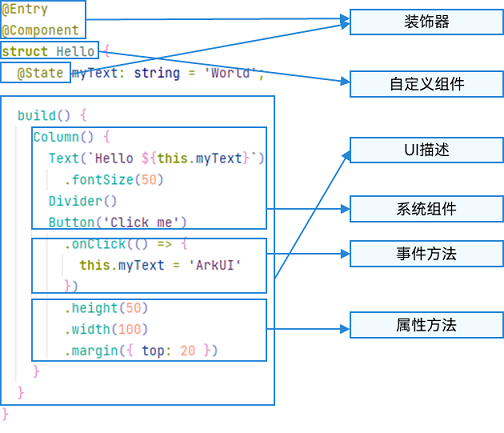
@Entry              带路由的,没有这个后期只能导出使用
@Component    这是个组件
struct 组件名 {
    // 普通数据
    public 属性名:类型 =  数据
    // 响应式数据  ->  视图层build里面  this.响应式名     this.响应式名 = 数据
    @State 属性名:类型 =  数据

    函数名() {}

    // 这里面写结构、样式
    build() {
        Text(内容)
            .css属性名()
            ...
            .事件类型小驼峰(处理函数 推荐写箭头函数)
            .onClick(() => {
                console.log('hello')
            })
    }

    // ....
}- 综合案例京东商品详情页收藏点击切换颜色
// # 商品详情页收藏思路
// 1 声明状态 collect 布尔类型
// 修饰符 属性名:类型 = 数据
// 2 视图判断 true黄色 false 灰色
// 3 加点击事件切换状态
@State collect:boolean = false
重点迁移说明
- 禁止使用对象字面量限制类型
class Data1Type {
a: number = 0
b: number = 0
}
// const data1: {a:number,b:number} = {a:1,b:2}
const data1: Data1Type = { a: 1, b: 2 }学习问:interface和class类型限制有什么区别
回答:inteface仅仅类型限制 class可以赋值初始数据(留心class得设置默认值)
- 禁止使用解构赋值
// const {a,b} = {a:1,b:2}
const obj = {a:1,b:2}
const a = obj.a
const b = obj.b- 禁用call、apply
function fn() {

}
fn.apply()- 禁止使用索引访问
interface ObjType {
a:number
b:number
// [k:string]:number
}
const data: ObjType = {
a:11,
b:22
}
console.log(data['a'])欢迎加入课程班级,考取鸿蒙认证: