3D模型生成服务-tripo ai
一、获取api-key
点击tripo ai aky获取api-key,查看使用文档,有免费生成的积分,每个月送300积分
二、经验分享
经过我的尝试发现,它的生成3D模型接口,图片来源有3种方式:第一种先使用upload(api.tripo3d.ai/v2/openapi/...)接口上传得到一个file_token、第二种使用upload STS(api.tripo3d.ai/v2/openapi/...%25E6%258E%25A5%25E5%258F%25A3%25E5%25BE%2597%25E5%2588%25B0%25E5%25AF%25B9%25E8%25B1%25A1%25E5%25AD%2598%25E5%2582%25A8%25E7%259A%2584%25E4%25BF%25A1%25E6%2581%25AF%25E5%2590%258E%25E7%25BB%25AD%25E4%25BD%25BF%25E7%2594%25A8%25E3%2580%2581%25E7%25AC%25AC%25E4%25B8%2589%25E7%25A7%258D%25E7%259B%25B4%25E6%258E%25A5%25E6%258F%2590%25E4%25BE%259B%25E5%259B%25BE%25E7%2589%2587%25E7%259A%2584url%25EF%25BC%258C%25E6%2588%2591%25E6%259C%2580%25E6%258E%25A8%25E8%258D%2590%25E7%259A%2584%25E6%2598%25AF%25E7%25AC%25AC%25E4%25B8%2589%25E7%25A7%258D%25EF%25BC%258C%25E5%259B%25A0%25E4%25B8%25BA%25E5%258F%25AF%25E4%25BB%25A5%25E5%25B0%2591%25E5%258F%2591%25E9%2580%2581%25E4%25B8%2580%25E4%25B8%25AA%25E8%25AF%25B7%25E6%25B1%2582%25E3%2580%2582 "https://api.tripo3d.ai/v2/openapi/upload/sts/token)%E6%8E%A5%E5%8F%A3%E5%BE%97%E5%88%B0%E5%AF%B9%E8%B1%A1%E5%AD%98%E5%82%A8%E7%9A%84%E4%BF%A1%E6%81%AF%E5%90%8E%E7%BB%AD%E4%BD%BF%E7%94%A8%E3%80%81%E7%AC%AC%E4%B8%89%E7%A7%8D%E7%9B%B4%E6%8E%A5%E6%8F%90%E4%BE%9B%E5%9B%BE%E7%89%87%E7%9A%84url%EF%BC%8C%E6%88%91%E6%9C%80%E6%8E%A8%E8%8D%90%E7%9A%84%E6%98%AF%E7%AC%AC%E4%B8%89%E7%A7%8D%EF%BC%8C%E5%9B%A0%E4%B8%BA%E5%8F%AF%E4%BB%A5%E5%B0%91%E5%8F%91%E9%80%81%E4%B8%80%E4%B8%AA%E8%AF%B7%E6%B1%82%E3%80%82")
三、最终确定方案
如果没有对象存储服务的话,就要老老实实走三个步骤:上传图片、创建3D模型生成任务和查询任务进度
四、接口解析讲解
上传图片(可选):
ini
import requests

# 把刚刚申请好的api-key替换填充
api_key = "tsk_***"
url = "https://api.tripo3d.ai/v2/openapi/upload/sts"

headers = {"Authorization": f"Bearer {api_key}"}

file_path = 'cat.jpeg'with open(file_path, 'rb') as f:
    files = {'file': (file_path, f, 'image/jpeg')}
    response = requests.post(url, headers=headers, files=files)print(response.json())
json
{"code": 0,"data": {"image_token": "xxxxxxxxxxx"}}
// 这个image_token,后面填入模型生成接口的file_token中- 特别说明:文件格式仅支持webp/jpeg,图片像素支持在20px到6000px之间的,推荐超过256px最好
生成模型接口,有4种,分别是图生模型、文字生模型、多文件生成模型和改进模型,此处只讲解图生模型
图生3D模型请求参数解析
json
{
    "type": "image_to_model", // 必填字段,对应生成模型的任务类型
    "model_version": "v3.0-20250812", // 非必填参数,默认为v2.5-20250123
    "file": {
        "type": "jpg" // 建议填充
        "file-token": "xxxxxxxxxxxxxxxxxxxx" // 把刚刚得到的image_token填进去
        // 补充说明一点,file-token、url、object这个三个方式是互斥的,只会有一个生效
        // 也就是说,我现在选了file-token方式后面的file参数填什么都没用了
        "url": "https://img-baofun.zhhainiao.com/fs/a9c93a228f6ffb86e1f70beec553422b.jpg"
         //直接可以访问到的图片地址
         "object": {
             "bucket": "tripo-data" //通常为tripo-data,当然你也可以自己定义,确保你的对象存储桶中一定要有这个目录
             "key": "xxxxxxxxxxxxxx" //把在之前在upload STS接口中拿到的session_token放进去
         }
    },
    "model_seed": 84848, // 是个整数就行,不写它就随机选择,该种子控制几何生成过程,确保在使用相同种子时生成相同的模型,是个随机数保持一致即可
    "enable_image_autofix": false // 默认为false,true的话效果更好,但代价是耗时更长
    // 以下参数只针对,模型版本大于v2.0-20240919以上的,低于这个版本的填了也没用
    "face_limit": 1000, // 是个整数,默认不填的话会自适应面数限制
    "texture": true, // 默认为true,表明带有纹理
    "pbr": true, // 默认为true,表示为物理渲染,一旦设置为这个前面的纹理设置将会失效
    "texture_seed": 838383,//也是个整数,随机数不设置的话就默认生成,如果你想要不同纹理模型就自己调整纹理种子,但是模型种子要保持不变
    "texture_alignment": "original_image", //纹理对齐,默认为original_image,可以填入两个参数,选择original_image的话就会优先保证与源图像视觉效果
    // geometry,在几何模式下,会先考虑3D结构准确性
    "texture_quality": "standard", //默认为标准(standard),还有另一个参数为detailed,会提高纹理的清晰度,更加逼真地显示复杂部件
    "auto_size": false, // 该设置会自动把模型缩放为现实真实世界比例尺寸,单位为米。默认值为false
    "orientation": "default", //默认就是default,也可以设置为与原始图像对齐(align_image)
    "quad": false, // 默认为false,一旦启用此项,前面的面数设置将会失效,并且强制输出为FBX模型
    "compress": "meshopt", // 应用于纹理的压缩类型,除了默认meshopt 网状压缩之外,还有几何压缩(geometry)
    "smart_low_poly": false, // 默认为false,打印3D模型复杂度低的就开启这个效果最好,太过于复杂的就不要开启了
    "generate_parts": false, // 默认为false,和texture、pbr等互斥,如果仅仅只是生成部件的话,需要把texture、pbr都设置为true
    // 以下参数为模型版本大于v3.0-20250812,才可以使用
    "geometry_quality": "standard" // 设置为detailed,将提供最复杂、最逼真的模型,标准模式下是对细节和速度的平衡
    // 换句话说,想要细节,就选detailed,想要速度,就选standard
}
python
import requests
import json

api_key = "tsk_***"
url = "https://api.tripo3d.ai/v2/openapi/task"

data = {"type": "image_to_model","file": {"type": "jpg","file_token": "***"}}

headers = {"Content-Type": "application/json","Authorization": f"Bearer {api_key}"}

response = requests.post(url, headers=headers, json=data)print(response.json())
json
{"code": 0,"data": {"task_id": "1ec04ced-4b87-44f6-a296-beee80777941"}}查询任务接口,不管是调用了什么类型生成接口,都要在这里查询任务进度
响应参数解析
json
{
    "task_id": "xxxxxxxxxxxxxxx", //任务唯一标识
    "type": "image_to_model", // 与你创建了什么模型任务,这里以图生模型为例
    "status": "success", // 状态分为两种,一种是中间态(queued、running),另一种是最终态(success、failed、banned、expired、cancelled、unknown)
    // 特别说明:失败、过期和未知这三种状态,需要拿任务id去咨询技术服务团队
    // 如果是被禁用了,就想想自己玩了什么骚操作,建议也向技术团队咨询一下
    // 如果是取消了,我也没遇过
    "input": {}, // 输入对象因使用者而有所不同
    "ouput": { // 注意3D模型或者图片的下载时间喔,只有5分钟
        "model": "xxxxxxxxx", // 模型下载地址
        "base_model": "xxxxx", // 基础模型下载地址
        "pbr_model": "xxxxxxxx", //pbr模型下载地址
        "generated_image": "xxxxxxxxx", //生成图像的URL
        "rendered_image": "xxx", // 模型预览的URL
    },
    "progress": 0-100, // 进度条,用于用户页显示
    "create_time": 148894989438, // 创建的时间戳
}
python
import requests

api_key = "tsk_***"
task_id = "xxxxxxxxx"
url = f"https://api.tripo3d.ai/v2/openapi/task/{task_id}"

headers = {"Authorization": f"Bearer {api_key}"}

response = requests.get(url, headers=headers)print(response.json())
json
{
"code": 0,
"data": {
    "task_id": "xxxxxxxxxxxxxxx",
    "type": "text_to_model",
    "status": "running",
    "input": {"prompt": "a small cat"},
    "output": {},
    "progress": 99,
    "create_time": 1709048933
 }
}
最终demo
python
import requests
import time
import random
from typing import Optional, Dict, Any

# ===================== 配置项 =====================
API_KEY = "tsk_xxxxxxxxxxxxxxxxxx"  # 替换为你的真实API Key
IMAGE_FILE_PATH = "doro.webp"  # 图片路径
TASK_POLL_INTERVAL = 5  # 轮询间隔(秒)
TIMEOUT_SECONDS = 300  # 任务超时时间(5分钟)

# 模型生成参数配置(根据需求调整)
MODEL_CONFIG = {
    "type": "image_to_model",
    "model_version": "v3.0-20250812",  # 使用v3版本
    "file": {
        "type": "webp",  # 图片类型
        "file_token": ""  # 上传图片后填充
    },
    "model_seed": 1000,  # 随机模型种子
    "enable_image_autofix": True,  # 开启图片自动修复(效果更好)
    # v2.0+ 版本参数
    # "face_limit": 2000,  # 面数限制
    "texture": True,  # 启用纹理(pbr为false时生效)
    "pbr": False,  # 关闭PBR,使用普通纹理
    "texture_seed": 1000,  # 纹理种子
    "texture_alignment": "original_image",  # 优先保证视觉效果
    "texture_quality": "detailed",  # 高清纹理
    "auto_size": False,  # 不自动缩放尺寸
    "orientation": "default",  # 默认朝向
    "quad": False,  # 不强制FBX格式
    # "compress": "meshopt",  # 网状压缩
    "smart_low_poly": False,  # 不启用低多边形优化
    "generate_parts": False,  # 不生成部件
    # v3.0+ 版本参数
    "geometry_quality": "detailed"  # 高精度几何模型
}


# ===================== 核心函数 =====================
class TripoAIClient:
    def __init__(self, api_key: str):
        self.api_key = api_key
        self.headers = {
            "Authorization": f"Bearer {self.api_key}",
            "Content-Type": "application/json"
        }
        self.session = requests.Session()  # 复用会话,提升性能

    def upload_image(self, file_path: str) -> Optional[str]:
        """
        上传图片并获取image_token
        :param file_path: 本地图片路径
        :return: image_token或None
        """
        url = "https://api.tripo3d.ai/v2/openapi/upload/sts"

        # 检测文件是否存在
        if not os.path.exists(file_path):
            print(f"错误:图片文件 {file_path} 不存在")
            return None

        # 获取文件类型
        file_ext = os.path.splitext(file_path)[1].lstrip('.').lower()
        content_type = f"image/{file_ext}"

        try:
            print(f"正在上传图片:{file_path}")
            with open(file_path, 'rb') as f:
                files = {'file': (os.path.basename(file_path), f, content_type)}
                # 上传不需要Content-Type: application/json
                upload_headers = {"Authorization": f"Bearer {self.api_key}"}
                response = self.session.post(
                    url,
                    headers=upload_headers,
                    files=files,
                    timeout=30
                )

            response.raise_for_status()  # 抛出HTTP错误
            result = response.json()

            if result.get("code") == 0 and "image_token" in result.get("data", {}):
                image_token = result["data"]["image_token"]
                print(f"图片上传成功,image_token:{image_token}")
                return image_token
            else:
                print(f"图片上传失败:{result}")
                return None

        except requests.exceptions.RequestException as e:
            print(f"图片上传请求异常:{str(e)}")
            return None

    def create_model_task(self, image_token: str) -> Optional[str]:
        """
        创建3D模型生成任务
        :param image_token: 上传图片返回的token
        :return: task_id或None
        """
        url = "https://api.tripo3d.ai/v2/openapi/task"

        # 填充file_token
        MODEL_CONFIG["file"]["file_token"] = image_token

        try:
            print(f"正在创建3D模型生成任务,配置:{MODEL_CONFIG}")
            response = self.session.post(
                url,
                headers=self.headers,
                json=MODEL_CONFIG,
                timeout=30
            )

            response.raise_for_status()
            result = response.json()

            if result.get("code") == 0 and "task_id" in result.get("data", {}):
                task_id = result["data"]["task_id"]
                print(f"任务创建成功,task_id:{task_id}")
                return task_id
            else:
                print(f"任务创建失败:{result}")
                return None

        except requests.exceptions.RequestException as e:
            print(f"创建任务请求异常:{str(e)}")
            return None

    def query_task_status(self, task_id: str) -> Dict[str, Any]:
        """
        查询任务状态
        :param task_id: 任务ID
        :return: 任务状态信息
        """
        url = f"https://api.tripo3d.ai/v2/openapi/task/{task_id}"

        try:
            response = self.session.get(
                url,
                headers=self.headers,
                timeout=30
            )

            response.raise_for_status()
            return response.json()

        except requests.exceptions.RequestException as e:
            print(f"查询任务状态异常:{str(e)}")
            return {"code": -1, "error": str(e)}

    def poll_task_until_complete(self, task_id: str) -> Optional[Dict[str, Any]]:
        """
        轮询任务直到完成/失败/超时
        :param task_id: 任务ID
        :return: 最终任务结果或None
        """
        start_time = time.time()
        final_status = ["success", "failed", "banned", "expired", "cancelled", "unknown"]

        print(f"\n开始轮询任务状态(间隔{TASK_POLL_INTERVAL}秒),task_id:{task_id}")
        print("-" * 50)

        while True:
            # 检查超时
            elapsed = time.time() - start_time
            if elapsed > TIMEOUT_SECONDS:
                print(f"任务超时({TIMEOUT_SECONDS}秒),终止轮询")
                return None

            # 查询状态
            result = self.query_task_status(task_id)

            if result.get("code") != 0:
                print(f"查询失败:{result.get('error', '未知错误')}")
                time.sleep(TASK_POLL_INTERVAL)
                continue

            data = result.get("data", {})
            status = data.get("status", "unknown")
            progress = data.get("progress", 0)

            print(f"当前状态:{status} | 进度:{progress}% | 耗时:{int(elapsed)}秒")

            # 检查是否为最终状态
            if status in final_status:
                print("-" * 50)
                if status == "success":
                    print("任务执行成功!")
                    print(f"pbr模型下载地址:{data.get('output', {}).get('pbr_model', '无')}")
                    print(f"基础模型下载地址:{data.get('output', {}).get('base_model', '无')}")
                    print(f"模型下载地址:{data.get('output', {}).get('model', '无')}")
                    print(f"预览图片地址:{data.get('output', {}).get('rendered_image', '无')}")
                    print(f"注意:下载链接有效期为5分钟,请及时保存!")
                else:
                    print(f"任务结束,状态:{status}")
                    if status in ["failed", "expired", "unknown"]:
                        print(f"请联系技术团队,提供task_id:{task_id} 排查问题")

                return data

            # 继续轮询
            time.sleep(TASK_POLL_INTERVAL)


# ===================== 主流程 =====================
def main():
    # 初始化客户端
    client = TripoAIClient(API_KEY)

    # 1. 上传图片
    image_token = client.upload_image(IMAGE_FILE_PATH)
    if not image_token:
        print("图片上传失败,终止流程")
        return

    # 2. 创建生成任务
    task_id = client.create_model_task(image_token)
    if not task_id:
        print("创建任务失败,终止流程")
        return

    # task_id = "xxxxxxxxx"
    # 3. 轮询任务进度
    final_result = client.poll_task_until_complete(task_id)
    if final_result and final_result.get("status") == "success":
        # 可以在这里添加下载模型的逻辑
        print("\n3D模型生成完成!所有结果已展示,请及时下载。")
    else:
        print("\n3D模型生成失败或超时。")


if __name__ == "__main__":
    # 确保导入os模块
    import os

    main()
最终在控制台下载模型生成结构和模型预览图
分享成品:
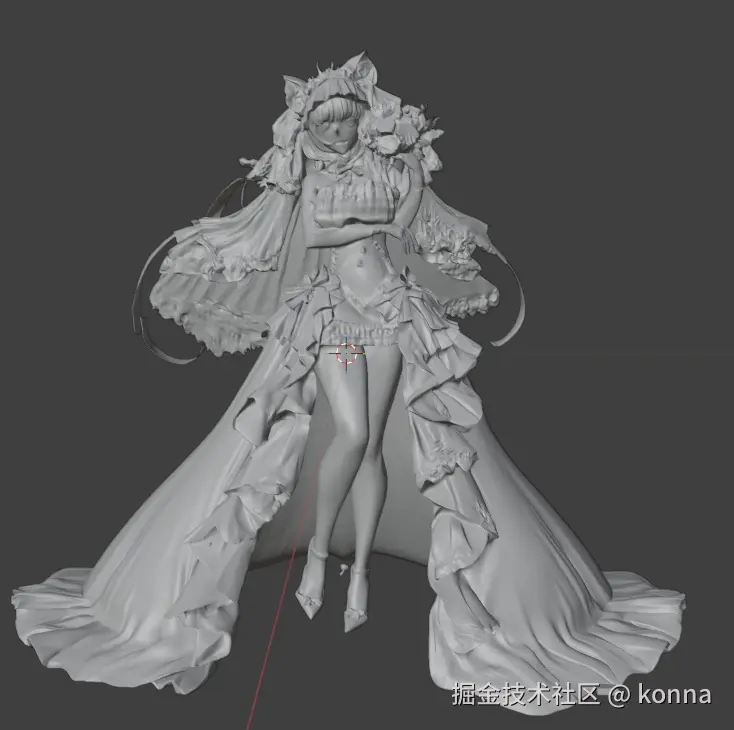
桃乐丝大概花费了120积分,单单模型都有50多MB
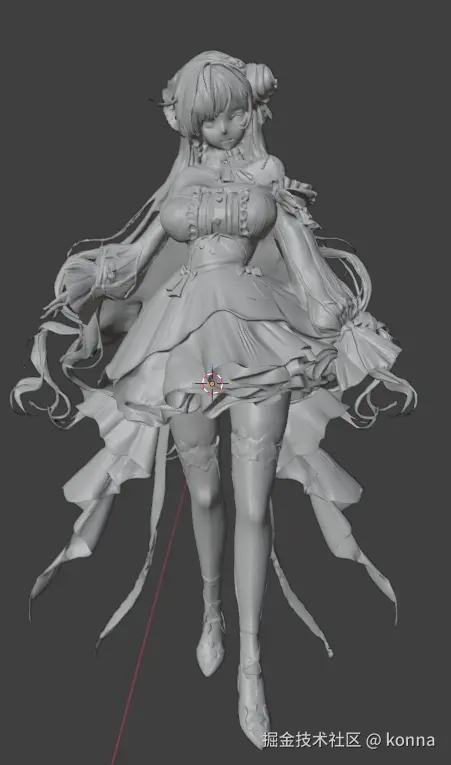
还有个重要的事忘记说了,启动最终程序的时候,需要开启梯子
欢迎大家在评论区一起讨论,一起分享3D模型!!!