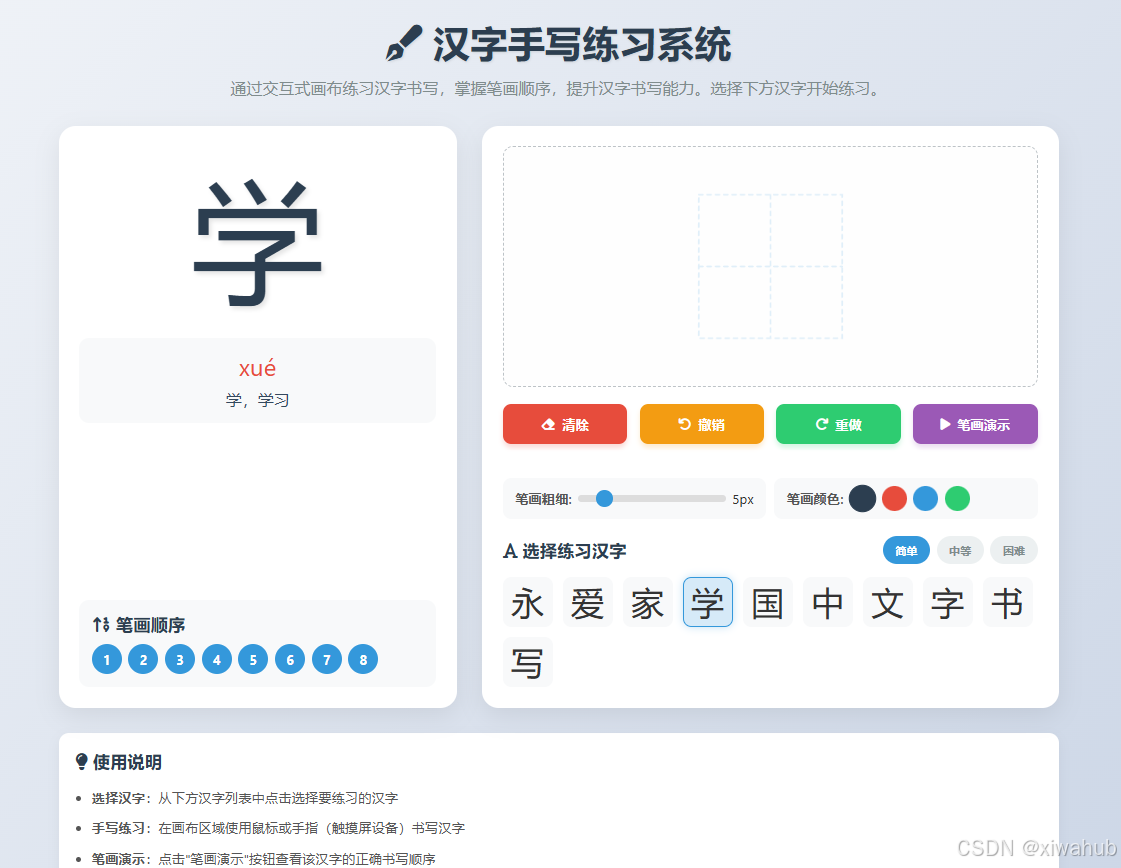
<!DOCTYPE html>
<html lang="zh-CN">
<head>
<meta charset="UTF-8">
<meta name="viewport" content="width=device-width, initial-scale=1.0">
<title>汉字手写练习系统</title>
<link rel="stylesheet" href="https://cdnjs.cloudflare.com/ajax/libs/font-awesome/6.4.0/css/all.min.css">
<style>
* {
margin: 0;
padding: 0;
box-sizing: border-box;
font-family: 'Segoe UI', 'Microsoft YaHei', sans-serif;
}
body {
background: linear-gradient(135deg, #f5f7fa 0%, #c3cfe2 100%);
min-height: 100vh;
display: flex;
flex-direction: column;
align-items: center;
padding: 20px;
color: #333;
}
.container {
max-width: 1200px;
width: 100%;
margin: 0 auto;
}
header {
text-align: center;
margin-bottom: 30px;
width: 100%;
}
h1 {
color: #2c3e50;
font-size: 2.8rem;
margin-bottom: 10px;
text-shadow: 1px 1px 3px rgba(0,0,0,0.1);
}
.subtitle {
color: #7f8c8d;
font-size: 1.2rem;
max-width: 800px;
margin: 0 auto 20px;
line-height: 1.6;
}
.main-content {
display: flex;
flex-wrap: wrap;
gap: 30px;
justify-content: center;
}
.left-panel {
flex: 1;
min-width: 300px;
background-color: white;
border-radius: 20px;
padding: 25px;
box-shadow: 0 10px 30px rgba(0, 0, 0, 0.08);
display: flex;
flex-direction: column;
}
.character-display {
text-align: center;
margin-bottom: 30px;
}
.character {
font-size: 10rem;
color: #2c3e50;
margin-bottom: 15px;
text-shadow: 3px 3px 5px rgba(0,0,0,0.1);
min-height: 160px;
display: flex;
align-items: center;
justify-content: center;
}
.character-info {
background-color: #f8f9fa;
padding: 15px;
border-radius: 12px;
margin-bottom: 20px;
}
.pinyin {
font-size: 1.8rem;
color: #e74c3c;
margin-bottom: 8px;
}
.meaning {
font-size: 1.2rem;
color: #34495e;
}
.stroke-info {
background-color: #f8f9fa;
padding: 15px;
border-radius: 12px;
margin-top: auto;
}
.stroke-info h3 {
color: #2c3e50;
margin-bottom: 10px;
font-size: 1.3rem;
}
.stroke-order {
display: flex;
flex-wrap: wrap;
gap: 8px;
margin-top: 10px;
}
.stroke-number {
width: 36px;
height: 36px;
background-color: #3498db;
color: white;
border-radius: 50%;
display: flex;
align-items: center;
justify-content: center;
font-weight: bold;
}
.right-panel {
flex: 1.5;
min-width: 350px;
background-color: white;
border-radius: 20px;
padding: 25px;
box-shadow: 0 10px 30px rgba(0, 0, 0, 0.08);
display: flex;
flex-direction: column;
}
.canvas-container {
flex-grow: 1;
border-radius: 12px;
overflow: hidden;
border: 2px dashed #bdc3c7;
position: relative;
background-color: #fefefe;
margin-bottom: 20px;
}
#practiceCanvas {
width: 100%;
height: 100%;
display: block;
cursor: crosshair;
touch-action: none;
}
.tools {
display: flex;
flex-wrap: wrap;
gap: 15px;
margin-bottom: 25px;
}
.tool-btn {
flex: 1;
min-width: 120px;
padding: 14px 10px;
border: none;
border-radius: 10px;
background-color: #3498db;
color: white;
font-size: 1rem;
font-weight: 600;
cursor: pointer;
display: flex;
align-items: center;
justify-content: center;
gap: 8px;
transition: all 0.3s ease;
box-shadow: 0 4px 6px rgba(50, 150, 250, 0.2);
}
.tool-btn:hover {
transform: translateY(-3px);
box-shadow: 0 6px 8px rgba(50, 150, 250, 0.3);
}
.tool-btn:active {
transform: translateY(0);
}
.clear-btn {
background-color: #e74c3c;
box-shadow: 0 4px 6px rgba(231, 76, 60, 0.2);
}
.undo-btn {
background-color: #f39c12;
box-shadow: 0 4px 6px rgba(243, 156, 18, 0.2);
}
.redo-btn {
background-color: #2ecc71;
box-shadow: 0 4px 6px rgba(46, 204, 113, 0.2);
}
.stroke-demo-btn {
background-color: #9b59b6;
box-shadow: 0 4px 6px rgba(155, 89, 182, 0.2);
}
.character-selector {
margin-top: 20px;
}
.selector-header {
display: flex;
justify-content: space-between;
align-items: center;
margin-bottom: 15px;
}
.selector-header h3 {
color: #2c3e50;
font-size: 1.3rem;
}
.difficulty {
display: flex;
gap: 8px;
}
.difficulty-btn {
padding: 8px 15px;
border-radius: 20px;
border: none;
background-color: #ecf0f1;
color: #7f8c8d;
font-weight: 600;
cursor: pointer;
transition: all 0.2s;
}
.difficulty-btn.active {
background-color: #3498db;
color: white;
}
.character-list {
display: flex;
flex-wrap: wrap;
gap: 12px;
margin-top: 10px;
}
.char-option {
width: 60px;
height: 60px;
display: flex;
align-items: center;
justify-content: center;
font-size: 2.5rem;
background-color: #f8f9fa;
border-radius: 10px;
cursor: pointer;
transition: all 0.2s;
border: 2px solid transparent;
}
.char-option:hover {
background-color: #e3f2fd;
transform: scale(1.05);
}
.char-option.selected {
background-color: #d6eaf8;
border-color: #3498db;
box-shadow: 0 0 10px rgba(52, 152, 219, 0.3);
}
footer {
margin-top: 40px;
text-align: center;
color: #7f8c8d;
font-size: 0.9rem;
width: 100%;
padding: 20px;
}
.instructions {
background-color: white;
border-radius: 12px;
padding: 20px;
margin-top: 30px;
box-shadow: 0 5px 15px rgba(0, 0, 0, 0.05);
}
.instructions h3 {
color: #2c3e50;
margin-bottom: 15px;
font-size: 1.3rem;
}
.instructions ul {
padding-left: 20px;
color: #555;
line-height: 1.8;
}
.instructions li {
margin-bottom: 8px;
}
@media (max-width: 768px) {
.main-content {
flex-direction: column;
}
.character {
font-size: 8rem;
min-height: 120px;
}
.tool-btn {
min-width: 100px;
padding: 12px 8px;
font-size: 0.9rem;
}
.char-option {
width: 50px;
height: 50px;
font-size: 2rem;
}
}
.canvas-controls {
display: flex;
gap: 10px;
margin-top: 15px;
}
.control-group {
display: flex;
align-items: center;
gap: 8px;
background-color: #f8f9fa;
padding: 10px 15px;
border-radius: 10px;
flex: 1;
}
.control-label {
font-weight: 600;
color: #555;
white-space: nowrap;
}
.slider {
flex: 1;
height: 8px;
-webkit-appearance: none;
appearance: none;
background: #ddd;
border-radius: 4px;
outline: none;
}
.slider::-webkit-slider-thumb {
-webkit-appearance: none;
appearance: none;
width: 20px;
height: 20px;
border-radius: 50%;
background: #3498db;
cursor: pointer;
}
.color-option {
width: 30px;
height: 30px;
border-radius: 50%;
cursor: pointer;
border: 2px solid transparent;
}
.color-option.selected {
border-color: #2c3e50;
transform: scale(1.1);
}
.drawing-guide {
position: absolute;
top: 0;
left: 0;
width: 100%;
height: 100%;
pointer-events: none;
opacity: 0.15;
z-index: 1;
}
</style>
</head>
<body>
<div class="container">
<header>
<h1><i class="fas fa-pen-fancy"></i> 汉字手写练习系统</h1>
<p class="subtitle">通过交互式画布练习汉字书写,掌握笔画顺序,提升汉字书写能力。选择下方汉字开始练习。</p>
</header>
<div class="main-content">
<div class="left-panel">
<div class="character-display">
<div class="character" id="currentChar">永</div>
<div class="character-info">
<div class="pinyin" id="pinyinDisplay">yǒng</div>
<div class="meaning" id="meaningDisplay">永恒,永远</div>
</div>
</div>
<div class="stroke-info">
<h3><i class="fas fa-sort-numeric-up"></i> 笔画顺序</h3>
<div class="stroke-order" id="strokeOrder">
<!-- 笔画顺序会通过JS动态生成 -->
</div>
</div>
</div>
<div class="right-panel">
<div class="canvas-container">
<canvas id="practiceCanvas"></canvas>
<canvas class="drawing-guide" id="drawingGuide"></canvas>
</div>
<div class="tools">
<button class="tool-btn clear-btn" id="clearBtn">
<i class="fas fa-eraser"></i> 清除
</button>
<button class="tool-btn undo-btn" id="undoBtn">
<i class="fas fa-undo"></i> 撤销
</button>
<button class="tool-btn redo-btn" id="redoBtn">
<i class="fas fa-redo"></i> 重做
</button>
<button class="tool-btn stroke-demo-btn" id="demoBtn">
<i class="fas fa-play"></i> 笔画演示
</button>
</div>
<div class="canvas-controls">
<div class="control-group">
<span class="control-label">笔画粗细:</span>
<input type="range" min="1" max="30" value="5" class="slider" id="brushSize">
<span id="brushSizeValue">5px</span>
</div>
<div class="control-group">
<span class="control-label">笔画颜色:</span>
<div class="color-option selected" style="background-color: #2c3e50;" data-color="#2c3e50"></div>
<div class="color-option" style="background-color: #e74c3c;" data-color="#e74c3c"></div>
<div class="color-option" style="background-color: #3498db;" data-color="#3498db"></div>
<div class="color-option" style="background-color: #2ecc71;" data-color="#2ecc71"></div>
</div>
</div>
<div class="character-selector">
<div class="selector-header">
<h3><i class="fas fa-font"></i> 选择练习汉字</h3>
<div class="difficulty">
<button class="difficulty-btn active" data-level="easy">简单</button>
<button class="difficulty-btn" data-level="medium">中等</button>
<button class="difficulty-btn" data-level="hard">困难</button>
</div>
</div>
<div class="character-list" id="characterList">
<!-- 汉字列表会通过JS动态生成 -->
</div>
</div>
</div>
</div>
<div class="instructions">
<h3><i class="fas fa-lightbulb"></i> 使用说明</h3>
<ul>
<li><strong>选择汉字</strong>:从下方汉字列表中点击选择要练习的汉字</li>
<li><strong>手写练习</strong>:在画布区域使用鼠标或手指(触摸屏设备)书写汉字</li>
<li><strong>笔画演示</strong>:点击"笔画演示"按钮查看该汉字的正确书写顺序</li>
<li><strong>调整设置</strong>:使用笔画粗细滑块和颜色选择器调整书写样式</li>
<li><strong>撤销/重做</strong>:使用撤销和重做按钮修改您的书写</li>
<li><strong>难度选择</strong>:通过顶部难度按钮切换不同复杂度的汉字</li>
</ul>
</div>
<footer>
<p>汉字手写练习系统 © 2023 | 设计用于汉字书写学习与练习</p>
<p>支持鼠标、触摸笔及手指触摸书写</p>
</footer>
</div>
<script>
// 汉字数据
const characters = {
easy: [
{ char: '一', pinyin: 'yī', meaning: '一,一个', strokes: 1 },
{ char: '二', pinyin: 'èr', meaning: '二,两个', strokes: 2 },
{ char: '三', pinyin: 'sān', meaning: '三,三个', strokes: 3 },
{ char: '十', pinyin: 'shí', meaning: '十,十个', strokes: 2 },
{ char: '人', pinyin: 'rén', meaning: '人,人类', strokes: 2 },
{ char: '口', pinyin: 'kǒu', meaning: '口,嘴巴', strokes: 3 },
{ char: '日', pinyin: 'rì', meaning: '日,太阳', strokes: 4 },
{ char: '月', pinyin: 'yuè', meaning: '月,月亮', strokes: 4 },
{ char: '山', pinyin: 'shān', meaning: '山,山脉', strokes: 3 },
{ char: '水', pinyin: 'shuǐ', meaning: '水,水流', strokes: 4 }
],
medium: [
{ char: '永', pinyin: 'yǒng', meaning: '永恒,永远', strokes: 5 },
{ char: '爱', pinyin: 'ài', meaning: '爱,爱情', strokes: 10 },
{ char: '家', pinyin: 'jiā', meaning: '家,家庭', strokes: 10 },
{ char: '学', pinyin: 'xué', meaning: '学,学习', strokes: 8 },
{ char: '国', pinyin: 'guó', meaning: '国,国家', strokes: 8 },
{ char: '中', pinyin: 'zhōng', meaning: '中,中心', strokes: 4 },
{ char: '文', pinyin: 'wén', meaning: '文,文字', strokes: 4 },
{ char: '字', pinyin: 'zì', meaning: '字,汉字', strokes: 6 },
{ char: '书', pinyin: 'shū', meaning: '书,书写', strokes: 4 },
{ char: '写', pinyin: 'xiě', meaning: '写,书写', strokes: 5 }
],
hard: [
{ char: '鑫', pinyin: 'xīn', meaning: '财富兴盛', strokes: 24 },
{ char: '焱', pinyin: 'yàn', meaning: '火焰,火花', strokes: 12 },
{ char: '淼', pinyin: 'miǎo', meaning: '水势浩大', strokes: 12 },
{ char: '森', pinyin: 'sēn', meaning: '森林,树木众多', strokes: 12 },
{ char: '众', pinyin: 'zhòng', meaning: '众多,群众', strokes: 6 },
{ char: '龘', pinyin: 'dá', meaning: '龙飞之貌', strokes: 48 },
{ char: '燚', pinyin: 'yì', meaning: '火势猛烈', strokes: 16 },
{ char: '㵘', pinyin: 'màn', meaning: '水势浩大', strokes: 16 },
{ char: '䨺', pinyin: 'duì', meaning: '云层深厚', strokes: 24 },
{ char: '矗', pinyin: 'chù', meaning: '直立,高耸', strokes: 24 }
]
};
// 当前选中的汉字
let currentCharacter = characters.medium[0];
let currentDifficulty = 'medium';
// 画布相关变量
let canvas, ctx, guideCanvas, guideCtx;
let isDrawing = false;
let lastX = 0;
let lastY = 0;
let currentColor = '#2c3e50';
let currentBrushSize = 5;
// 撤销/重做栈
let undoStack = [];
let redoStack = [];
let maxUndoSteps = 20;
// 初始化
document.addEventListener('DOMContentLoaded', function() {
// 获取DOM元素
canvas = document.getElementById('practiceCanvas');
ctx = canvas.getContext('2d');
guideCanvas = document.getElementById('drawingGuide');
guideCtx = guideCanvas.getContext('2d');
// 设置画布尺寸
resizeCanvases();
window.addEventListener('resize', resizeCanvases);
// 初始化汉字列表
initCharacterList();
updateCharacterDisplay();
// 设置笔画顺序
updateStrokeOrder();
// 事件监听器
setupEventListeners();
// 绘制引导线
drawGuide();
});
// 调整画布尺寸
function resizeCanvases() {
const container = canvas.parentElement;
const width = container.clientWidth;
const height = container.clientHeight;
canvas.width = width;
canvas.height = height;
guideCanvas.width = width;
guideCanvas.height = height;
// 重新绘制引导线
drawGuide();
}
// 初始化汉字列表
function initCharacterList() {
const characterList = document.getElementById('characterList');
characterList.innerHTML = '';
const difficultyChars = characters[currentDifficulty];
difficultyChars.forEach((char, index) => {
const charElement = document.createElement('div');
charElement.className = index === 0 ? 'char-option selected' : 'char-option';
charElement.textContent = char.char;
charElement.dataset.index = index;
charElement.addEventListener('click', function() {
// 移除之前选中的
document.querySelectorAll('.char-option.selected').forEach(el => {
el.classList.remove('selected');
});
// 选中当前
this.classList.add('selected');
// 更新当前汉字
currentCharacter = char;
updateCharacterDisplay();
updateStrokeOrder();
drawGuide();
clearCanvas();
});
characterList.appendChild(charElement);
});
}
// 更新汉字显示
function updateCharacterDisplay() {
document.getElementById('currentChar').textContent = currentCharacter.char;
document.getElementById('pinyinDisplay').textContent = currentCharacter.pinyin;
document.getElementById('meaningDisplay').textContent = currentCharacter.meaning;
}
// 更新笔画顺序显示
function updateStrokeOrder() {
const strokeOrder = document.getElementById('strokeOrder');
strokeOrder.innerHTML = '';
for (let i = 1; i <= currentCharacter.strokes; i++) {
const strokeNumber = document.createElement('div');
strokeNumber.className = 'stroke-number';
strokeNumber.textContent = i;
strokeOrder.appendChild(strokeNumber);
}
}
// 绘制汉字引导线
function drawGuide() {
guideCtx.clearRect(0, 0, guideCanvas.width, guideCanvas.height);
// 设置引导线样式
guideCtx.strokeStyle = '#3498db';
guideCtx.lineWidth = 2;
guideCtx.setLineDash([5, 5]);
guideCtx.lineCap = 'round';
// 根据汉字绘制不同的引导线
const centerX = guideCanvas.width / 2;
const centerY = guideCanvas.height / 2;
const size = Math.min(guideCanvas.width, guideCanvas.height) * 0.6;
switch(currentCharacter.char) {
case '永':
// 绘制"永"字八法引导线
drawYongGuide(centerX, centerY, size);
break;
case '人':
drawPersonGuide(centerX, centerY, size);
break;
case '山':
drawMountainGuide(centerX, centerY, size);
break;
case '水':
drawWaterGuide(centerX, centerY, size);
break;
case '日':
drawSunGuide(centerX, centerY, size);
break;
case '月':
drawMoonGuide(centerX, centerY, size);
break;
default:
// 默认绘制田字格
drawGridGuide(centerX, centerY, size);
}
}
// 绘制田字格引导线
function drawGridGuide(centerX, centerY, size) {
const halfSize = size / 2;
// 外框
guideCtx.strokeRect(centerX - halfSize, centerY - halfSize, size, size);
// 横中线
guideCtx.beginPath();
guideCtx.moveTo(centerX - halfSize, centerY);
guideCtx.lineTo(centerX + halfSize, centerY);
guideCtx.stroke();
// 竖中线
guideCtx.beginPath();
guideCtx.moveTo(centerX, centerY - halfSize);
guideCtx.lineTo(centerX, centerY + halfSize);
guideCtx.stroke();
}
// 绘制"永"字引导线
function drawYongGuide(centerX, centerY, size) {
const halfSize = size / 2;
// 绘制田字格
drawGridGuide(centerX, centerY, size);
// 绘制"永"字的笔画引导点
guideCtx.setLineDash([]);
guideCtx.fillStyle = '#e74c3c';
// 点
guideCtx.beginPath();
guideCtx.arc(centerX, centerY - halfSize * 0.7, 5, 0, Math.PI * 2);
guideCtx.fill();
// 横
guideCtx.beginPath();
guideCtx.arc(centerX - halfSize * 0.3, centerY - halfSize * 0.4, 5, 0, Math.PI * 2);
guideCtx.fill();
// 竖钩
guideCtx.beginPath();
guideCtx.arc(centerX, centerY, 5, 0, Math.PI * 2);
guideCtx.fill();
// 撇
guideCtx.beginPath();
guideCtx.arc(centerX - halfSize * 0.3, centerY + halfSize * 0.2, 5, 0, Math.PI * 2);
guideCtx.fill();
// 捺
guideCtx.beginPath();
guideCtx.arc(centerX + halfSize * 0.3, centerY + halfSize * 0.2, 5, 0, Math.PI * 2);
guideCtx.fill();
}
// 绘制"人"字引导线
function drawPersonGuide(centerX, centerY, size) {
const halfSize = size / 2;
// 绘制田字格
drawGridGuide(centerX, centerY, size);
// 绘制"人"字的笔画引导点
guideCtx.setLineDash([]);
guideCtx.fillStyle = '#e74c3c';
// 撇起点
guideCtx.beginPath();
guideCtx.arc(centerX, centerY - halfSize * 0.3, 5, 0, Math.PI * 2);
guideCtx.fill();
// 撇终点
guideCtx.beginPath();
guideCtx.arc(centerX - halfSize * 0.4, centerY + halfSize * 0.4, 5, 0, Math.PI * 2);
guideCtx.fill();
// 捺终点
guideCtx.beginPath();
guideCtx.arc(centerX + halfSize * 0.4, centerY + halfSize * 0.4, 5, 0, Math.PI * 2);
guideCtx.fill();
}
// 绘制"山"字引导线
function drawMountainGuide(centerX, centerY, size) {
const halfSize = size / 2;
// 绘制田字格
drawGridGuide(centerX, centerY, size);
// 绘制"山"字的笔画引导点
guideCtx.setLineDash([]);
guideCtx.fillStyle = '#e74c3c';
// 竖起点
guideCtx.beginPath();
guideCtx.arc(centerX, centerY - halfSize * 0.6, 5, 0, Math.PI * 2);
guideCtx.fill();
// 竖终点
guideCtx.beginPath();
guideCtx.arc(centerX, centerY + halfSize * 0.6, 5, 0, Math.PI * 2);
guideCtx.fill();
// 左竖起点
guideCtx.beginPath();
guideCtx.arc(centerX - halfSize * 0.4, centerY - halfSize * 0.2, 5, 0, Math.PI * 2);
guideCtx.fill();
// 左竖终点
guideCtx.beginPath();
guideCtx.arc(centerX - halfSize * 0.4, centerY + halfSize * 0.6, 5, 0, Math.PI * 2);
guideCtx.fill();
// 右竖起点
guideCtx.beginPath();
guideCtx.arc(centerX + halfSize * 0.4, centerY - halfSize * 0.2, 5, 0, Math.PI * 2);
guideCtx.fill();
// 右竖终点
guideCtx.beginPath();
guideCtx.arc(centerX + halfSize * 0.4, centerY + halfSize * 0.6, 5, 0, Math.PI * 2);
guideCtx.fill();
}
// 绘制"水"字引导线
function drawWaterGuide(centerX, centerY, size) {
const halfSize = size / 2;
// 绘制田字格
drawGridGuide(centerX, centerY, size);
// 绘制"水"字的笔画引导点
guideCtx.setLineDash([]);
guideCtx.fillStyle = '#e74c3c';
// 竖钩起点
guideCtx.beginPath();
guideCtx.arc(centerX, centerY - halfSize * 0.7, 5, 0, Math.PI * 2);
guideCtx.fill();
// 竖钩终点
guideCtx.beginPath();
guideCtx.arc(centerX, centerY + halfSize * 0.7, 5, 0, Math.PI * 2);
guideCtx.fill();
// 横撇起点
guideCtx.beginPath();
guideCtx.arc(centerX - halfSize * 0.3, centerY - halfSize * 0.3, 5, 0, Math.PI * 2);
guideCtx.fill();
// 横撇终点
guideCtx.beginPath();
guideCtx.arc(centerX - halfSize * 0.5, centerY + halfSize * 0.1, 5, 0, Math.PI * 2);
guideCtx.fill();
// 撇起点
guideCtx.beginPath();
guideCtx.arc(centerX + halfSize * 0.2, centerY - halfSize * 0.1, 5, 0, Math.PI * 2);
guideCtx.fill();
// 撇终点
guideCtx.beginPath();
guideCtx.arc(centerX + halfSize * 0.1, centerY + halfSize * 0.5, 5, 0, Math.PI * 2);
guideCtx.fill();
// 捺起点
guideCtx.beginPath();
guideCtx.arc(centerX + halfSize * 0.1, centerY - halfSize * 0.1, 5, 0, Math.PI * 2);
guideCtx.fill();
// 捺终点
guideCtx.beginPath();
guideCtx.arc(centerX + halfSize * 0.5, centerY + halfSize * 0.5, 5, 0, Math.PI * 2);
guideCtx.fill();
}
// 绘制"日"字引导线
function drawSunGuide(centerX, centerY, size) {
const halfSize = size / 2;
// 绘制田字格
drawGridGuide(centerX, centerY, size);
// 绘制"日"字的笔画引导点
guideCtx.setLineDash([]);
guideCtx.fillStyle = '#e74c3c';
// 外框四个角
const points = [
{x: centerX - halfSize * 0.4, y: centerY - halfSize * 0.6},
{x: centerX + halfSize * 0.4, y: centerY - halfSize * 0.6},
{x: centerX + halfSize * 0.4, y: centerY + halfSize * 0.6},
{x: centerX - halfSize * 0.4, y: centerY + halfSize * 0.6}
];
points.forEach(point => {
guideCtx.beginPath();
guideCtx.arc(point.x, point.y, 5, 0, Math.PI * 2);
guideCtx.fill();
});
// 中间横的起点和终点
guideCtx.beginPath();
guideCtx.arc(centerX - halfSize * 0.4, centerY, 5, 0, Math.PI * 2);
guideCtx.fill();
guideCtx.beginPath();
guideCtx.arc(centerX + halfSize * 0.4, centerY, 5, 0, Math.PI * 2);
guideCtx.fill();
}
// 绘制"月"字引导线
function drawMoonGuide(centerX, centerY, size) {
const halfSize = size / 2;
// 绘制田字格
drawGridGuide(centerX, centerY, size);
// 绘制"月"字的笔画引导点
guideCtx.setLineDash([]);
guideCtx.fillStyle = '#e74c3c';
// 外框四个角
const points = [
{x: centerX - halfSize * 0.3, y: centerY - halfSize * 0.6},
{x: centerX + halfSize * 0.5, y: centerY - halfSize * 0.6},
{x: centerX + halfSize * 0.5, y: centerY + halfSize * 0.6},
{x: centerX - halfSize * 0.3, y: centerY + halfSize * 0.6}
];
points.forEach(point => {
guideCtx.beginPath();
guideCtx.arc(point.x, point.y, 5, 0, Math.PI * 2);
guideCtx.fill();
});
// 中间两横的起点和终点
guideCtx.beginPath();
guideCtx.arc(centerX - halfSize * 0.3, centerY - halfSize * 0.2, 5, 0, Math.PI * 2);
guideCtx.fill();
guideCtx.beginPath();
guideCtx.arc(centerX + halfSize * 0.5, centerY - halfSize * 0.2, 5, 0, Math.PI * 2);
guideCtx.fill();
guideCtx.beginPath();
guideCtx.arc(centerX - halfSize * 0.3, centerY + halfSize * 0.2, 5, 0, Math.PI * 2);
guideCtx.fill();
guideCtx.beginPath();
guideCtx.arc(centerX + halfSize * 0.5, centerY + halfSize * 0.2, 5, 0, Math.PI * 2);
guideCtx.fill();
}
// 设置事件监听器
function setupEventListeners() {
// 画布绘制事件
canvas.addEventListener('mousedown', startDrawing);
canvas.addEventListener('mousemove', draw);
canvas.addEventListener('mouseup', stopDrawing);
canvas.addEventListener('mouseout', stopDrawing);
// 触摸事件支持
canvas.addEventListener('touchstart', handleTouchStart);
canvas.addEventListener('touchmove', handleTouchMove);
canvas.addEventListener('touchend', handleTouchEnd);
// 按钮事件
document.getElementById('clearBtn').addEventListener('click', clearCanvas);
document.getElementById('undoBtn').addEventListener('click', undo);
document.getElementById('redoBtn').addEventListener('click', redo);
document.getElementById('demoBtn').addEventListener('click', playStrokeDemo);
// 笔画粗细滑块
const brushSize = document.getElementById('brushSize');
const brushSizeValue = document.getElementById('brushSizeValue');
brushSize.addEventListener('input', function() {
currentBrushSize = this.value;
brushSizeValue.textContent = this.value + 'px';
});
// 颜色选择
document.querySelectorAll('.color-option').forEach(option => {
option.addEventListener('click', function() {
document.querySelectorAll('.color-option').forEach(opt => {
opt.classList.remove('selected');
});
this.classList.add('selected');
currentColor = this.dataset.color;
});
});
// 难度选择
document.querySelectorAll('.difficulty-btn').forEach(btn => {
btn.addEventListener('click', function() {
document.querySelectorAll('.difficulty-btn').forEach(b => {
b.classList.remove('active');
});
this.classList.add('active');
currentDifficulty = this.dataset.level;
currentCharacter = characters[currentDifficulty][0];
initCharacterList();
updateCharacterDisplay();
updateStrokeOrder();
drawGuide();
clearCanvas();
});
});
}
// 开始绘制
function startDrawing(e) {
isDrawing = true;
[lastX, lastY] = getCoordinates(e);
// 保存当前状态到撤销栈
saveState();
}
// 绘制中
function draw(e) {
if (!isDrawing) return;
e.preventDefault();
const [x, y] = getCoordinates(e);
// 设置绘制样式
ctx.strokeStyle = currentColor;
ctx.lineWidth = currentBrushSize;
ctx.lineCap = 'round';
ctx.lineJoin = 'round';
// 开始绘制
ctx.beginPath();
ctx.moveTo(lastX, lastY);
ctx.lineTo(x, y);
ctx.stroke();
[lastX, lastY] = [x, y];
}
// 停止绘制
function stopDrawing() {
isDrawing = false;
}
// 触摸事件处理
function handleTouchStart(e) {
e.preventDefault();
const touch = e.touches[0];
startDrawing(touch);
}
function handleTouchMove(e) {
e.preventDefault();
const touch = e.touches[0];
draw(touch);
}
function handleTouchEnd(e) {
e.preventDefault();
stopDrawing();
}
// 获取坐标
function getCoordinates(e) {
const rect = canvas.getBoundingClientRect();
let x, y;
if (e.type.includes('mouse')) {
x = e.clientX - rect.left;
y = e.clientY - rect.top;
} else {
// 触摸事件
x = e.touches[0].clientX - rect.left;
y = e.touches[0].clientY - rect.top;
}
return [x, y];
}
// 清除画布
function clearCanvas() {
ctx.clearRect(0, 0, canvas.width, canvas.height);
undoStack = [];
redoStack = [];
}
// 保存状态到撤销栈
function saveState() {
// 获取当前画布图像数据
const imageData = ctx.getImageData(0, 0, canvas.width, canvas.height);
undoStack.push(imageData);
// 限制撤销栈大小
if (undoStack.length > maxUndoSteps) {
undoStack.shift();
}
// 清空重做栈
redoStack = [];
}
// 撤销
function undo() {
if (undoStack.length > 0) {
// 将当前状态保存到重做栈
const currentState = ctx.getImageData(0, 0, canvas.width, canvas.height);
redoStack.push(currentState);
// 恢复上一个状态
const prevState = undoStack.pop();
ctx.putImageData(prevState, 0, 0);
}
}
// 重做
function redo() {
if (redoStack.length > 0) {
// 将当前状态保存到撤销栈
const currentState = ctx.getImageData(0, 0, canvas.width, canvas.height);
undoStack.push(currentState);
// 恢复重做状态
const nextState = redoStack.pop();
ctx.putImageData(nextState, 0, 0);
}
}
// 播放笔画演示
function playStrokeDemo() {
// 清除画布
clearCanvas();
// 获取画布中心位置
const centerX = canvas.width / 2;
const centerY = canvas.height / 2;
const size = Math.min(canvas.width, canvas.height) * 0.4;
// 根据当前汉字播放不同的演示动画
switch(currentCharacter.char) {
case '永':
animateYong(centerX, centerY, size);
break;
case '人':
animatePerson(centerX, centerY, size);
break;
case '山':
animateMountain(centerX, centerY, size);
break;
default:
// 默认动画:显示汉字轮廓
showCharacterOutline();
}
}
// 动画演示"永"字
function animateYong(centerX, centerY, size) {
const halfSize = size / 2;
// 设置动画样式
ctx.strokeStyle = '#e74c3c';
ctx.lineWidth = 8;
ctx.lineCap = 'round';
// 笔画动画序列
const strokes = [
// 点
{points: [{x: centerX, y: centerY - halfSize * 0.7}]},
// 横
{points: [
{x: centerX - halfSize * 0.3, y: centerY - halfSize * 0.4},
{x: centerX + halfSize * 0.3, y: centerY - halfSize * 0.4}
]},
// 竖钩
{points: [
{x: centerX, y: centerY - halfSize * 0.4},
{x: centerX, y: centerY + halfSize * 0.6}
]},
// 撇
{points: [
{x: centerX, y: centerY},
{x: centerX - halfSize * 0.4, y: centerY + halfSize * 0.5}
]},
// 捺
{points: [
{x: centerX, y: centerY},
{x: centerX + halfSize * 0.4, y: centerY + halfSize * 0.5}
]}
];
animateStrokes(strokes);
}
// 动画演示"人"字
function animatePerson(centerX, centerY, size) {
const halfSize = size / 2;
// 设置动画样式
ctx.strokeStyle = '#e74c3c';
ctx.lineWidth = 8;
ctx.lineCap = 'round';
// 笔画动画序列
const strokes = [
// 撇
{points: [
{x: centerX, y: centerY - halfSize * 0.3},
{x: centerX - halfSize * 0.4, y: centerY + halfSize * 0.4}
]},
// 捺
{points: [
{x: centerX, y: centerY - halfSize * 0.3},
{x: centerX + halfSize * 0.4, y: centerY + halfSize * 0.4}
]}
];
animateStrokes(strokes);
}
// 动画演示"山"字
function animateMountain(centerX, centerY, size) {
const halfSize = size / 2;
// 设置动画样式
ctx.strokeStyle = '#e74c3c';
ctx.lineWidth = 8;
ctx.lineCap = 'round';
// 笔画动画序列
const strokes = [
// 中间竖
{points: [
{x: centerX, y: centerY - halfSize * 0.6},
{x: centerX, y: centerY + halfSize * 0.6}
]},
// 左竖
{points: [
{x: centerX - halfSize * 0.4, y: centerY - halfSize * 0.2},
{x: centerX - halfSize * 0.4, y: centerY + halfSize * 0.6}
]},
// 右竖
{points: [
{x: centerX + halfSize * 0.4, y: centerY - halfSize * 0.2},
{x: centerX + halfSize * 0.4, y: centerY + halfSize * 0.6}
]}
];
animateStrokes(strokes);
}
// 通用笔画动画函数
function animateStrokes(strokes) {
let strokeIndex = 0;
let pointIndex = 0;
let progress = 0;
function animate() {
if (strokeIndex >= strokes.length) return;
const stroke = strokes[strokeIndex];
const points = stroke.points;
if (pointIndex < points.length - 1) {
const startPoint = points[pointIndex];
const endPoint = points[pointIndex + 1];
// 计算当前进度对应的点
const currentX = startPoint.x + (endPoint.x - startPoint.x) * progress;
const currentY = startPoint.y + (endPoint.y - startPoint.y) * progress;
// 如果是该笔画的第一点,移动画笔
if (progress === 0) {
ctx.beginPath();
ctx.moveTo(startPoint.x, startPoint.y);
}
// 绘制到当前点
ctx.lineTo(currentX, currentY);
ctx.stroke();
// 更新进度
progress += 0.05;
// 如果完成当前线段,移动到下一个线段
if (progress >= 1) {
progress = 0;
pointIndex++;
// 如果完成所有线段,移动到下一个笔画
if (pointIndex >= points.length - 1) {
pointIndex = 0;
strokeIndex++;
// 高亮显示当前笔画编号
highlightStrokeNumber(strokeIndex);
}
}
requestAnimationFrame(animate);
}
}
// 开始动画
animate();
}
// 显示汉字轮廓
function showCharacterOutline() {
// 在画布中心显示汉字轮廓
ctx.font = `bold ${Math.min(canvas.width, canvas.height) * 0.6}px serif`;
ctx.textAlign = 'center';
ctx.textBaseline = 'middle';
ctx.fillStyle = 'rgba(231, 76, 60, 0.1)';
ctx.fillText(currentCharacter.char, canvas.width / 2, canvas.height / 2);
// 描边
ctx.lineWidth = 2;
ctx.strokeStyle = 'rgba(231, 76, 60, 0.3)';
ctx.strokeText(currentCharacter.char, canvas.width / 2, canvas.height / 2);
}
// 高亮显示当前笔画编号
function highlightStrokeNumber(strokeIndex) {
const strokeNumbers = document.querySelectorAll('.stroke-number');
// 重置所有笔画编号样式
strokeNumbers.forEach(number => {
number.style.backgroundColor = '#3498db';
number.style.transform = 'scale(1)';
});
// 高亮当前笔画
if (strokeIndex < strokeNumbers.length) {
strokeNumbers[strokeIndex].style.backgroundColor = '#e74c3c';
strokeNumbers[strokeIndex].style.transform = 'scale(1.2)';
}
}
</script>
</body>
</html>