前言
最近上架的两款应用都增加了华为账号登录,可以说,极大方便了用户登录操作,也降低了自身的业务复杂度,因为不在考虑注册,找回密码等业务,只依赖华为账号即可,所以,开发起来,效率上就提高了很多。
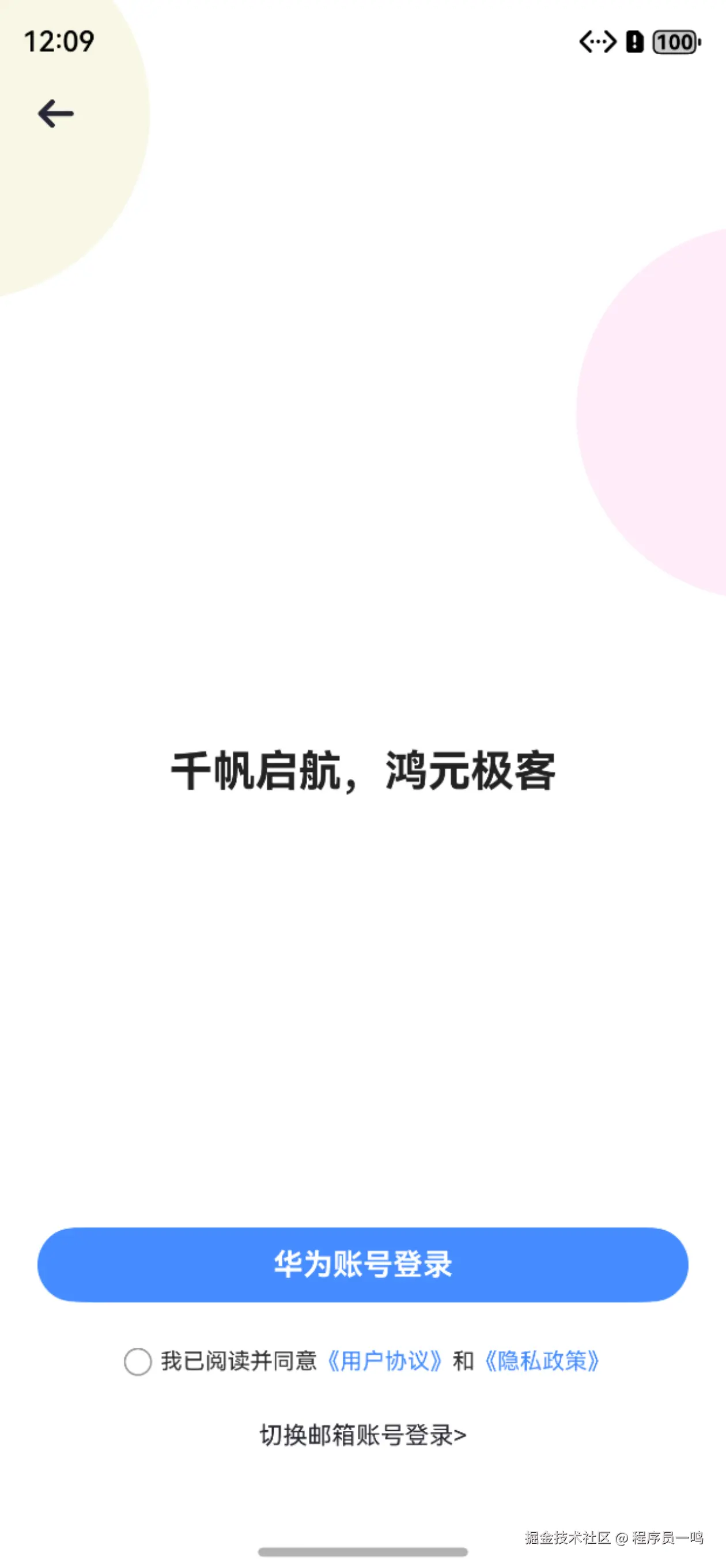
可能有的同学会有疑问,为什么是华为账号登录,而不是华为账号一键登录,这里需要解释的是,目前华为账号一键登录不支持个人开发者,所以,没办法,只能用官方推荐的华为账号或者静默登录。

需要说明的是,如果你的业务中,存在和用户交互的功能,建议使用,如果只是简单的单机应用,并没有和用户直接操作相关的,建议不使用,因为,没必要。
开发前提
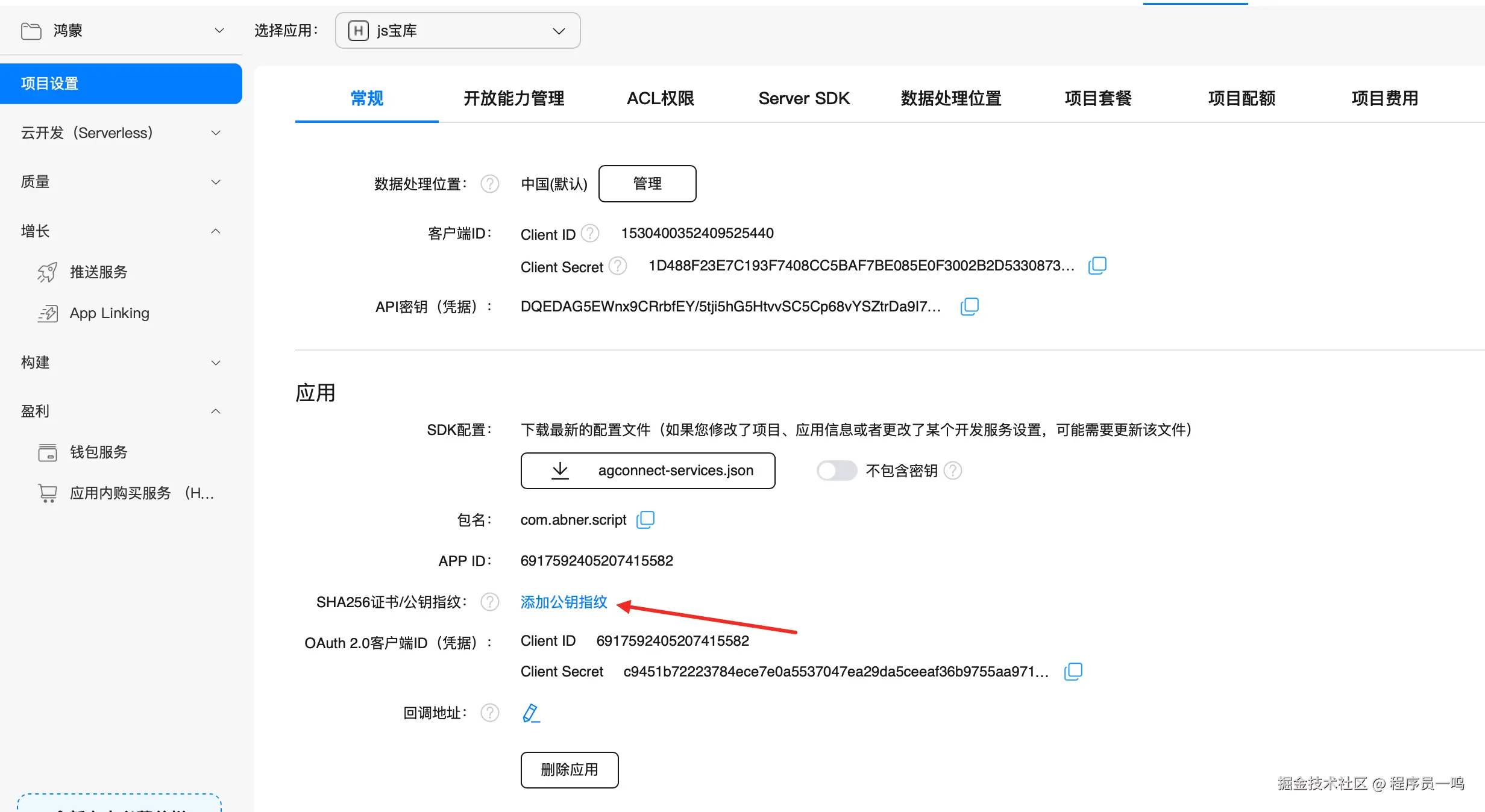
华为账号有一个开发前提,无论你是正式还是测试,一定要在 AppGallery Connect后台配置自己的公钥指纹,否则点击是报错的,公钥指纹,就是你所创建的发布证书或者测试证书。
确认是否需要配置Client ID
如果在项目配置中,看到Client ID和APP ID相同,则无需配置Client ID,否则需要按下一步配置Client ID。
在工程中entry模块的module.json5文件中,新增metadata,配置name为client_id,value为上一步获取的Client ID的值,如下所示:
TypeScript
"module": {
  "name": "<name>",
  "type": "entry",
  "description": "<description>",
  "mainElement": "<mainElement>",
  "deviceTypes": [],
  "pages": "<pages>",
  "abilities": [],
  "metadata": [ // 配置信息如下
    {
      "name": "client_id",
      "value": "xxxxx" // 将上一步获取到的Client ID赋值给value,请注意不要使用其他方式设置value值
    }
  ]
 }
华为账号登录
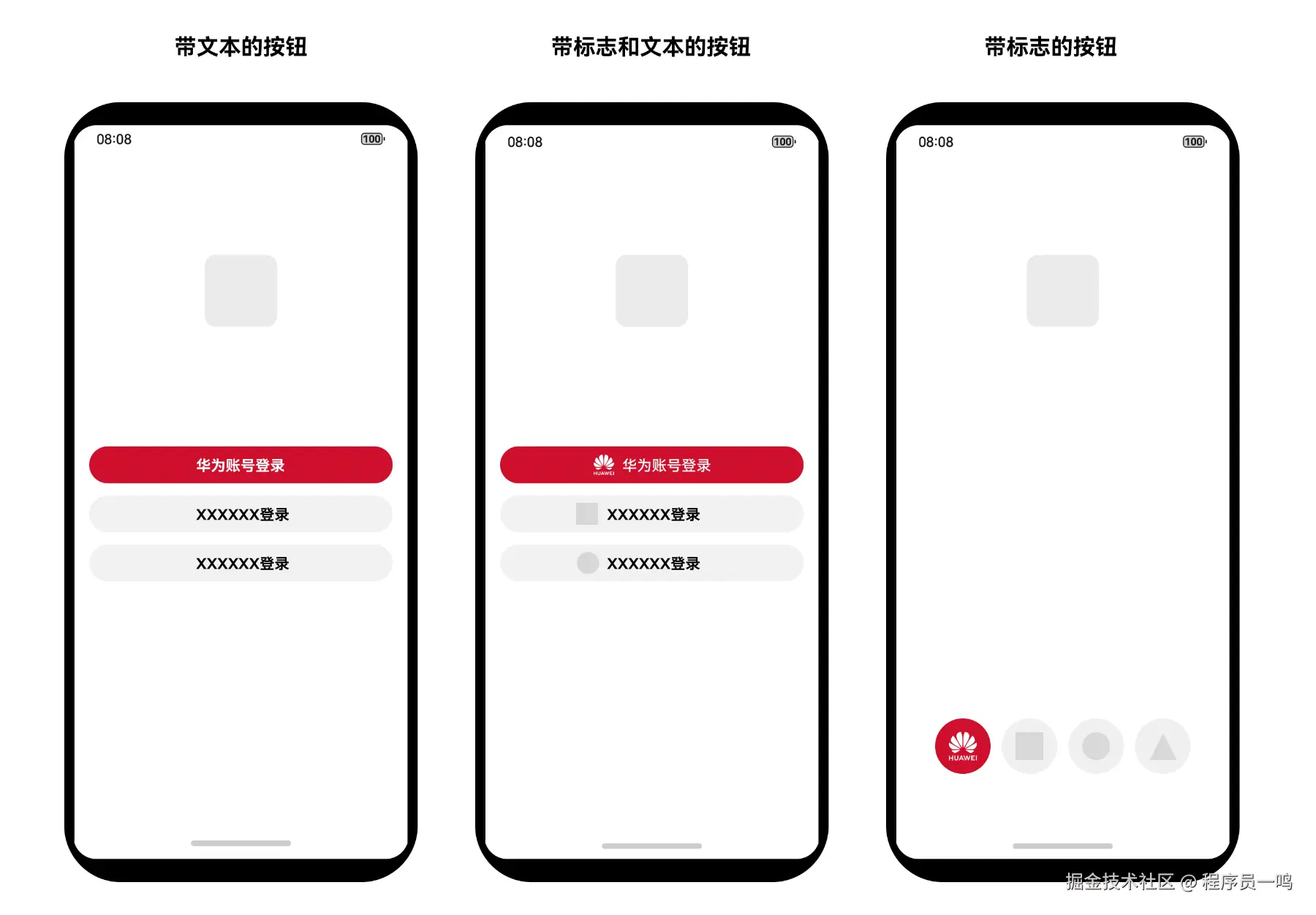
华为账号登录,有两种方式,一种是使用官方提供的登录按钮,一种是自己定义的按钮,无论哪种方式,都必须要遵循官方的设计规范;华为账号登录按钮包含文本、标志和文本、标志三种样式,以满足应用对界面风格一致性和灵活性的要求。
使用官方按钮
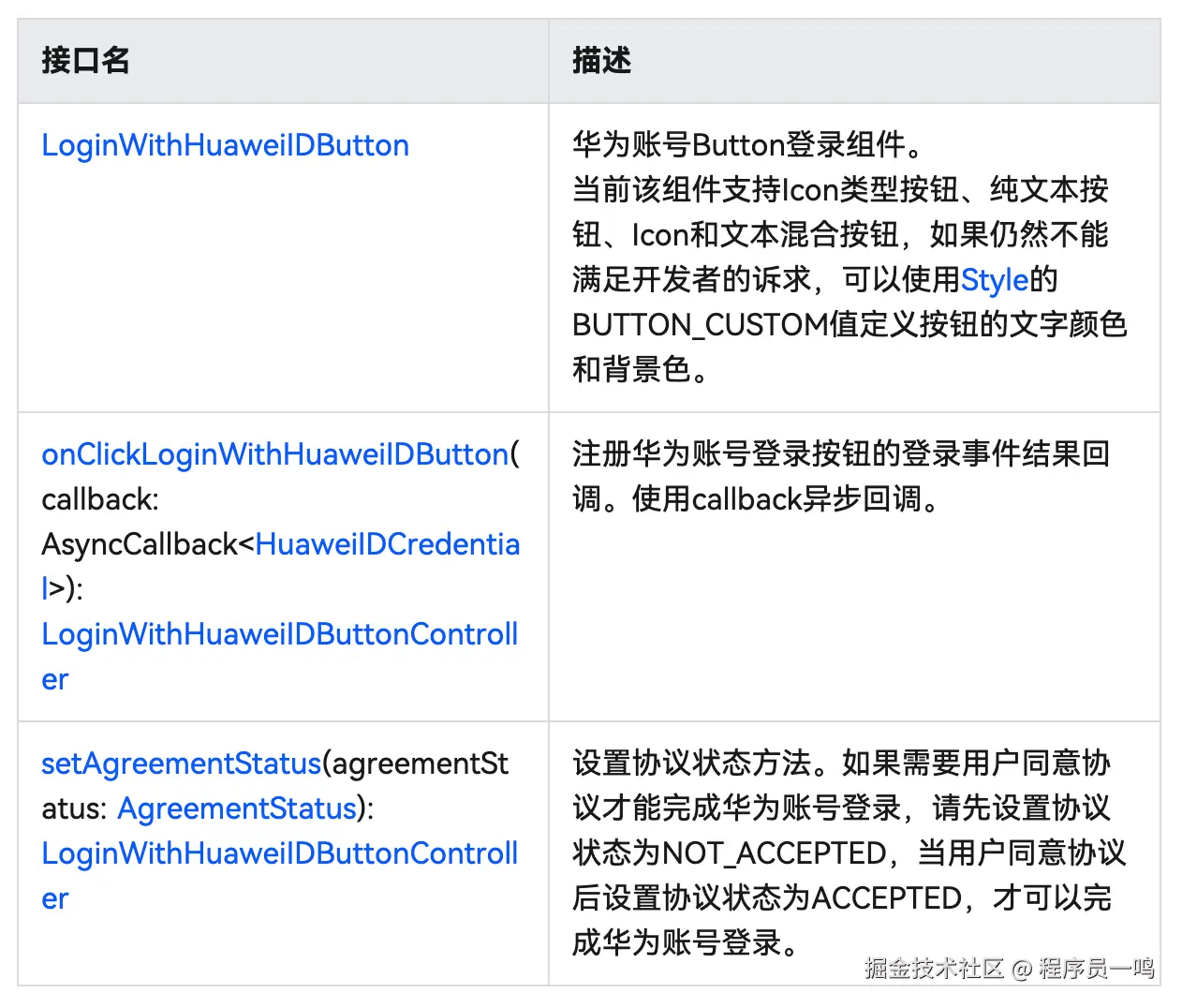
使用官方的组件比较简单,直接使用即可。
完整案例
完全是官方的案例,没什么好说的,具体的组件摆放,自己设置即可。
TypeScript
import { loginComponentManager, LoginWithHuaweiIDButton } from '@kit.AccountKit';
import hilog from '@ohos.hilog';

@Entry
@Component
struct Index {
  // 构造LoginWithHuaweiIDButton组件的控制器
  controller: loginComponentManager.LoginWithHuaweiIDButtonController =
    new loginComponentManager.LoginWithHuaweiIDButtonController()
      .onClickLoginWithHuaweiIDButton((error: BusinessError<void>,
        response: loginComponentManager.HuaweiIDCredential) => {
        if (error) {
          this.dealAllError(error);
          return;
        }

        if (response) {
          hilog.info(0x0000, 'testTag', 'Succeeded in getting response.');
          const authCode = response.authorizationCode;
          // 开发者处理authCode
        }
      });

  // 错误处理
  dealAllError(error: BusinessError<void>): void {
    hilog.error(0x0000, 'testTag',
      `Failed to login, errorCode is ${error.code}, errorMessage is ${error.message}`);
    // 在应用登录涉及UI交互场景下,建议按照如下错误码指导提示用户
    if (error.code === ErrorCode.ERROR_CODE_LOGIN_OUT) {
      // 用户未登录华为账号,请登录华为账号并重试或者尝试使用其他方式登录
    } else if (error.code === ErrorCode.ERROR_CODE_NETWORK_ERROR) {
      // 网络异常,请检查当前网络状态并重试或者尝试使用其他方式登录
    } else if (error.code === ErrorCode.ERROR_CODE_INTERNAL_ERROR) {
      // 登录失败,请尝试使用其他方式登录
    } else if (error.code === ErrorCode.ERROR_CODE_USER_CANCEL) {
      // 用户取消授权
    } else if (error.code === ErrorCode.ERROR_CODE_SYSTEM_SERVICE) {
      // 系统服务异常,请稍后重试或者尝试使用其他方式登录
    } else if (error.code === ErrorCode.ERROR_CODE_REQUEST_REFUSE) {
      // 重复请求,应用无需处理
    } else if (error.code === ErrorCode.ERROR_CODE_AGREEMENT_STATUS_NOT_ACCEPTED) {
      // 用户未同意协议
    } else {
      // 应用登录失败,请尝试使用其他方式登录
    }
  }

  build() {
    RelativeContainer() {
      LoginWithHuaweiIDButton({
        params: {
          // LoginWithHuaweiIDButton支持的样式
          style: loginComponentManager.Style.BUTTON_RED,
          // 账号登录按钮在登录过程中展示加载态
          extraStyle: {
            buttonStyle: new loginComponentManager.ButtonStyle().loadingStyle({
              show: true
            })
          },
          // LoginWithHuaweiIDButton的边框圆角半径
          borderRadius: 24,
          // LoginWithHuaweiIDButton支持的登录类型
          loginType: loginComponentManager.LoginType.ID,
          // LoginWithHuaweiIDButton支持按钮的样式跟随系统深浅色模式切换
          supportDarkMode: true
        },
        controller: this.controller
      })
        .width("100%")
        .height(40)
        .alignRules({
          center: { anchor: '__container__', align: VerticalAlign.Center },
          middle: { anchor: '__container__', align: HorizontalAlign.Center }
        })
    }
    .height('100%')
    .width('100%')
  }
}

export enum ErrorCode {
  // 账号未登录
  ERROR_CODE_LOGIN_OUT = 1001502001,
  // 网络错误
  ERROR_CODE_NETWORK_ERROR = 1001502005,
  // 内部错误
  ERROR_CODE_INTERNAL_ERROR = 1001502009,
  // 用户取消授权
  ERROR_CODE_USER_CANCEL = 1001502012,
  // 系统服务异常
  ERROR_CODE_SYSTEM_SERVICE = 12300001,
  // 重复请求
  ERROR_CODE_REQUEST_REFUSE = 1001500002,
  // 用户未同意用户协议
  ERROR_CODE_AGREEMENT_STATUS_NOT_ACCEPTED = 1005300001
}
使用自定义按钮
自定义按钮,和以上的代码没什么大的区别,唯独是需要自己触发登录请求逻辑,登录成功之后,就可以拿到华为账号的相关信息,接着就可以上传到服务端或者存储到本地,做一些其他的操作,有一点需要注意,有可能avatarUri头像返回为undefined,你可以做判断后,等于一个默认的头像。
TypeScript
 /**
   *AUTHOR:AbnerMing
   *INTRODUCE:登录
   */
  private doLogin() {

    // 创建授权请求,并设置参数
    const authRequest = new authentication.HuaweiIDProvider().createAuthorizationWithHuaweiIDRequest();
    // 获取头像昵称需要传如下scope
    authRequest.scopes = ['profile'];
    // 若开发者需要进行服务端开发以获取头像昵称,则需传如下permission获取authorizationCode
    authRequest.permissions = ['serviceauthcode'];
    // 用户是否需要登录授权,该值为true且用户未登录或未授权时,会拉起用户登录或授权页面
    authRequest.forceAuthorization = true;
    // 用于防跨站点请求伪造
    authRequest.state = util.generateRandomUUID();
    // 执行授权请求
    try {
      // 此示例为代码片段,实际需在自定义组件实例中使用,以获取UIContext对象作为函数入参
      const controller = new authentication.AuthenticationController(this.getUIContext().getHostContext());
      controller.executeRequest(authRequest).then((data) => {
        const authorizationWithHuaweiIDResponse = data as authentication.AuthorizationWithHuaweiIDResponse;
        const state = authorizationWithHuaweiIDResponse.state;
        if (state && authRequest.state !== state) {
          hilog.error(0x0000, 'testTag', `Failed to authorize. The state is different, response state: ${state}`);
          return;
        }
        const authorizationWithHuaweiIDCredential = authorizationWithHuaweiIDResponse?.data;
        let avatarUri = authorizationWithHuaweiIDCredential?.avatarUri;
        const nickName = authorizationWithHuaweiIDCredential?.nickName;
        // 开发者处理avatarUri, nickName
        const unionID = authorizationWithHuaweiIDCredential?.unionID;
        // 涉及服务端开发以获取头像昵称场景,开发者处理authorizationCode
        //这里进行接口请求,上传到自己服务器,如果需要的情况下


      }).catch((err: BusinessError) => {
        this.dealAllError(err);
      });
    } catch (error) {
      this.dealAllError(error);
    }
  }

  // 错误处理
  dealAllError(error: BusinessError): void {
    // 在应用登录涉及UI交互场景下,建议按照如下错误码指导提示用户
    if (error.code === ErrorCode.ERROR_CODE_LOGIN_OUT) {
      // 用户未登录华为账号,请登录华为账号并重试或者尝试使用其他方式登录
    } else if (error.code === ErrorCode.ERROR_CODE_NETWORK_ERROR) {
      // 网络异常,请检查当前网络状态并重试或者尝试使用其他方式登录
    } else if (error.code === ErrorCode.ERROR_CODE_INTERNAL_ERROR) {
      // 登录失败,请尝试使用其他方式登录
    } else if (error.code === ErrorCode.ERROR_CODE_USER_CANCEL) {
      // 用户取消授权
    } else if (error.code === ErrorCode.ERROR_CODE_SYSTEM_SERVICE) {
      // 系统服务异常,请稍后重试或者尝试使用其他方式登录
    } else if (error.code === ErrorCode.ERROR_CODE_REQUEST_REFUSE) {
      // 重复请求,应用无需处理
    } else {
      // 应用登录失败,请尝试使用其他方式登录
    }
  }
静默登录
静默登录一般常用于在应用卸载重装、用户换机等场景,如登录的华为账号与应用重装、换机前一致,应用可通过Account Kit提供的静默登录方式即不需要用户点击登录/注册按钮,即可获取用户的身份标识UnionID/OpenID,完成用户的静默登录。
TypeScript
login(){
    // 创建登录请求,并设置参数
    const loginRequest = new authentication.HuaweiIDProvider().createLoginWithHuaweiIDRequest();
    // false表示静默登录
    loginRequest.forceLogin = false;
    // 用于防跨站点请求伪造
    loginRequest.state = util.generateRandomUUID();
    // 执行登录请求
    try {
      const controller = new authentication.AuthenticationController();
      controller.executeRequest(loginRequest).then((response: authentication.LoginWithHuaweiIDResponse) => {
        const loginWithHuaweiIDResponse = response as authentication.LoginWithHuaweiIDResponse;
        const state = loginWithHuaweiIDResponse.state;
        if (state && loginRequest.state !== state) {
          hilog.error(0x0000, 'testTag', `Failed to login. The state is different, response state: ${state}`);
          return;
        }
        hilog.info(0x0000, 'testTag', 'Succeeded in logging in.');
        const loginWithHuaweiIDCredential = loginWithHuaweiIDResponse?.data;
        const code = loginWithHuaweiIDCredential?.authorizationCode;
        //  处理code  都自己的接口,或其他操作
      }).catch((error: BusinessError) => {
        dealAllError(error);
      })
    } catch (error) {
      dealAllError(error);
    }
  }
相关总结
华为账号登录,满足了个人开发者的用户登录需求,可以说,极大的提高了开发效率和应用的便捷性,不在为账号体系而发愁,但是,有一点需要注意,应用端的账号登录需要和服务端的账号体系打通,否则只是单纯的登录,无法实现用户之间的交互。