背景
有学员在学习SurfaceFlinger相关课程时候,就问过经常在SurfaceFlinger中看到某个Layer有自己的显示bounds区域,而且还有好几个和bounds相关的变量,也不太清楚这个bounds计算是怎么计算出来的,对这块的理解比较疑惑,希望马哥可以搞个文章解释一下。

核心代码部分:
相关变量
cpp
    // Cached properties computed from drawing state
    // Effective transform taking into account parent transforms and any parent scaling, which is
    // a transform from the current layer coordinate space to display(screen) coordinate space.
    ui::Transform mEffectiveTransform;

    // Bounds of the layer before any transformation is applied and before it has been cropped
    // by its parents.
    FloatRect mSourceBounds;

    // Bounds of the layer in layer space. This is the mSourceBounds cropped by its layer crop and
    // its parent bounds.
    FloatRect mBounds;

    // Layer bounds in screen space.
    FloatRect mScreenBounds;
这里其实因为也注释很详细,这里简单中文解释如下:
mSourceBounds:图像原本有多大
mBounds:图像能显示多少,因为可能会经过被裁剪crop遮挡,或者parent区域限制
mEffectiveTransform:图像摆在哪里、怎么摆,是否有偏移放大等操作
mScreenBounds:屏幕上看到图像在哪、有多大
bash
原始内容 (mSourceBounds)
    ↓ 裁剪1:自身裁剪crop
    ↓ 裁剪2:父边界约束(不能超出父层)
裁剪后内容 (mBounds)
    ↓ 应用变换矩阵 (mEffectiveTransform)
屏幕上的最终位置 (mScreenBounds)
使用这些变量场景主要是在computeBounds方法进行Layer的bounds计算时候,所以只有深入剖析computeBounds才可以更加深入理解这些变量。
cpp
void Layer::computeBounds(FloatRect parentBounds, ui::Transform parentTransform,
                          float parentShadowRadius) {
    const State& s(getDrawingState());

//当前获取Layer的transform,由parentTransform和DrawingState共同相差决定,父亲transform会影响子Layer
    // Calculate effective layer transform
    mEffectiveTransform = parentTransform * getActiveTransform(s);

    // Transform parent bounds to layer space
    parentBounds = getActiveTransform(s).inverse().transform(parentBounds);
//计算当前Layer sourcebound可以简单认为是自身buffer区域,但是没有buffer那就用parentBounds
    // Calculate source bounds
    mSourceBounds = computeSourceBounds(parentBounds);

    // Calculate bounds by croping diplay frame with layer crop and parent bounds
    FloatRect bounds = mSourceBounds;
    //获取是否有裁剪
    const Rect layerCrop = getCrop(s);
    if (!layerCrop.isEmpty()) {
    //如果设置了crop裁剪bound那么会与sourceBounds进行相交处理
        bounds = mSourceBounds.intersect(layerCrop.toFloatRect());
    }

    //上面计算得出的bounds还需要与parent的Bounds进行相交处理,故不可以超过父Layer的bounds大小
    bounds = bounds.intersect(parentBounds);
//赋值给Layer的成员变量mBounds
    mBounds = bounds;
    //mBounds只是说显示Layer的bounds大小范围,但是显示的坐标是最后确定靠以下的transform确定
    mScreenBounds = mEffectiveTransform.transform(mBounds);

//省略部分
    //接下来需要调用Layer的孩子分别调用computeBounds进行bounds计算
    for (const sp<Layer>& child : mDrawingChildren) {
    //可以看到这里直接传递的是mEffectiveTransform作为parentTransform
        child->computeBounds(mBounds, mEffectiveTransform, childShadowRadius);
    }

//省略部分
}
上面注释已经写的比较详细,这里对一些方法也进行额外补充解释。
看看这里的computeSourceBounds方法
cpp
FloatRect Layer::computeSourceBounds(const FloatRect& parentBounds) const {
//这里可以看到对于非buffer的layer是直接使用父亲的,比如task
    if (mBufferInfo.mBuffer == nullptr) {
        return parentBounds;
    }

    return getBufferSize(getDrawingState()).toFloatRect();
}
可以得出当前Layer只有有buffer的SourceBounds才会自己的buffer的bounds,不然都是parentBounds。
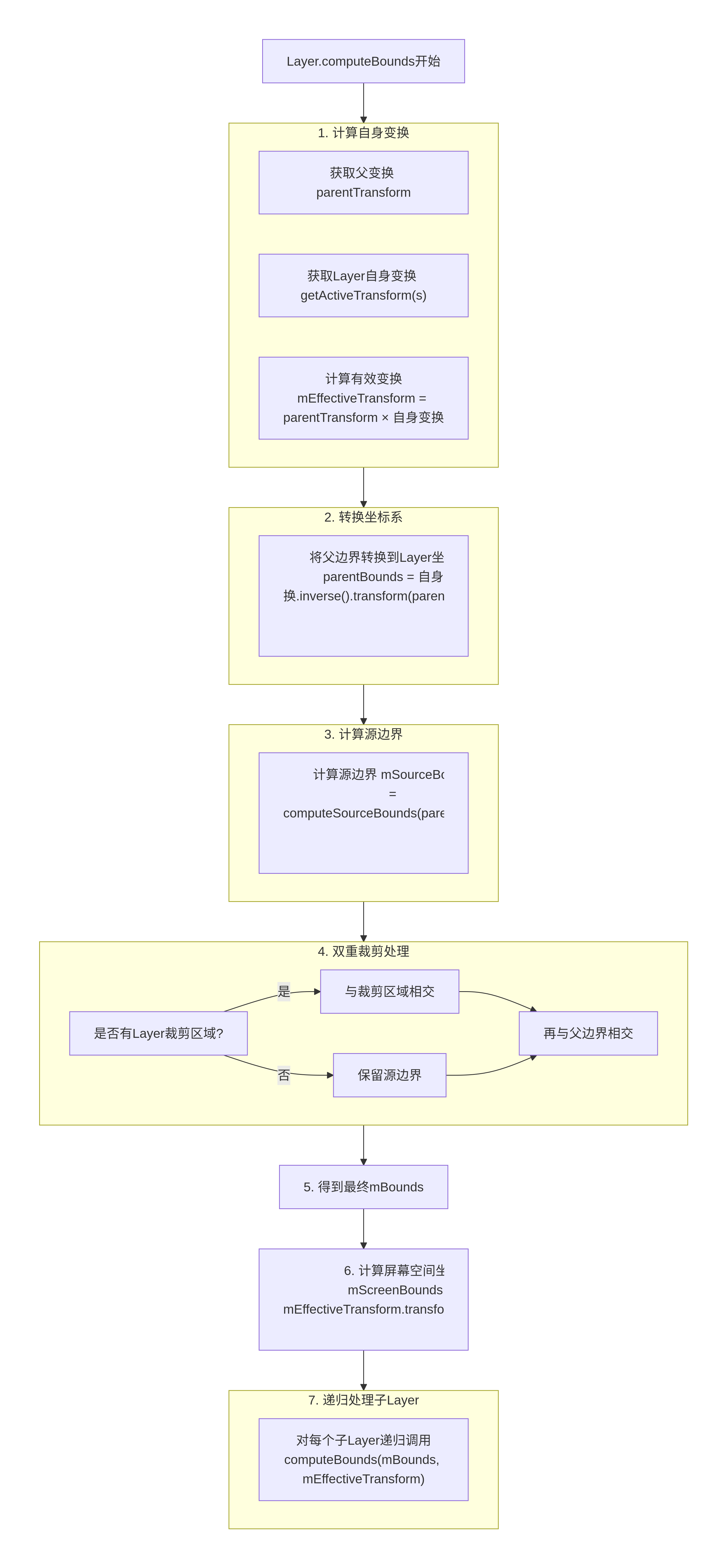 看完这些代码,大家可能已经比较熟悉,但是还希望有一个案例可以更加形象的说明就好了。
案例举例
一、简单案例设定
假设:
屏幕坐标系:
原点在左上角,x向右,y向下。
父Layer(比如是一个全屏的窗口):
父Layer的变换:没有变换,即单位矩阵。
父Layer的边界:整个屏幕,假设为 (0, 0, 1000, 1000)。
子Layer(当前Layer):
子Layer自身变换:没有缩放和旋转,只有平移,比如向右下角平移(200, 300)。
子Layer的Buffer大小(内容大小):(0, 0, 400, 300)。
子Layer没有设置裁剪区域(layerCrop为空)。
二、计算过程
步骤1:计算有效变换矩阵
父变换parentTransform:单位矩阵
子层自身变换getActiveTransform(s):平移(200,300)
mEffectiveTransform = 父变换 × 子层自身变换 = 平移(200,300)
步骤2:将父边界转换到子层局部坐标系
子层自身变换的逆矩阵:平移(-200, -300)
父边界parentBounds: (0,0,1000,1000)
转换后:平移(-200,-300).transform( (0,0,1000,1000) ) = (-200,-300,800,700)
注意:这里我们假设变换只影响顶点,实际上变换矩阵会作用于每个点,但平移变换只是将矩形偏移。
步骤3:计算源边界(mSourceBounds)
调用computeSourceBounds,传入转换后的父边界(-200,-300,800,700)
由于子层有Buffer,大小为(0,0,400,300),所以mSourceBounds = (0,0,400,300)
步骤4:第一层裁剪(Layer自身Crop)
layerCrop为空,所以跳过,bounds = mSourceBounds = (0,0,400,300)
步骤5:第二层裁剪(父边界约束)
bounds与转换后的父边界相交:
(0,0,400,300) 与 (-200,-300,800,700) 相交 = (0,0,400,300)
因为子层的源边界完全在转换后的父边界内,所以不变。
步骤6:得到最终mBounds
mBounds = (0,0,400,300)
步骤7:计算屏幕边界(mScreenBounds)
mScreenBounds = mEffectiveTransform.transform(mBounds)
= 平移(200,300).transform( (0,0,400,300) )
= (200,300,600,600)
三、结果解释
子Layer在自己的局部坐标系中,它的可显示区域是(0,0,400,300),即整个Buffer。
在屏幕坐标系中,由于子Layer平移了(200,300),所以它的显示区域变为(200,300,600,600)。
四、考虑有裁剪的情况
假设其他条件不变,子Layer设置了一个裁剪区域:
layerCrop = (50,50,350,250) // 注意:这个裁剪区域是在子层局部坐标系中
那么步骤4变为:
bounds = mSourceBounds.intersect(layerCrop.toFloatRect())
= (0,0,400,300) 与 (50,50,350,250) 相交
= (50,50,350,250)
步骤5:
bounds与转换后的父边界相交:
(50,50,350,250) 与 (-200,-300,800,700) 相交 = (50,50,350,250)
步骤6:
mBounds = (50,50,350,250)
步骤7:
mScreenBounds = 平移(200,300).transform( (50,50,350,250) )
= (250,350,550,550)
这样,子Layer在屏幕上只显示了(250,350)到(550,550)的区域,即被裁剪后的部分。
五、考虑子Layer超出父边界的情况
假设子Layer的平移量更大,比如平移(900,900),其他条件不变(无裁剪)。
步骤2:
转换后的父边界:平移(-900,-900).transform( (0,0,1000,1000) ) = (-900,-900,100,100)
步骤3:不变,mSourceBounds = (0,0,400,300)
步骤4:不变,bounds = (0,0,400,300)
步骤5:与转换后的父边界相交
(0,0,400,300) 与 (-900,-900,100,100) 相交 = (0,0,100,100)
注意:因为转换后的父边界在子层坐标系中只有(-900,-900)到(100,100)的区域,所以相交后只有(0,0,100,100)部分可见。
步骤6:
mBounds = (0,0,100,100)
步骤7:
cpp
mScreenBounds = 平移(900,900).transform( (0,0,100,100) )
              = (900,900,1000,1000)
这样,子Layer只有左上角(0,0)到(100,100)的部分被显示在屏幕的(900,900)到(1000,1000)区域,其余部分被父边界裁剪掉了。
六、总结
通过这个简单案例,我们可以看到computeBounds的核心思想:
通过逆变换将父边界转换到子层坐标系,以便在同一个坐标系中进行裁剪。
子层的内容(源边界)先与自身的裁剪区域相交,再与父边界相交,得到最终在子层坐标系中的边界(mBounds)。
然后通过有效变换将mBounds变换到屏幕坐标系,得到屏幕上的实际显示区域(mScreenBounds)。
这样的设计保证了每一层都只显示在父层允许的范围内,并且可以方便地应用自身的裁剪。