MATLAB实现方案,涵盖车牌定位、字符分割、字符识别三个核心步骤
实现
1. 主程序文件 license_plate_recognition.m
matlab
%% 车牌识别系统主程序
clear; close all; clc;

% 1. 读取车辆图像
img_path = 'car_image.jpg'; % 替换为你的图像路径
if ~exist(img_path, 'file')
    % 创建一个示例图像用于演示
    create_sample_image();
    img_path = 'sample_car.jpg';
    fprintf('使用生成的示例图像,请替换第7行使用自己的车辆图像\n');
end

original_img = imread(img_path);
figure('Position', [100, 100, 1200, 600]);

% 显示原始图像
subplot(2, 4, 1);
imshow(original_img);
title('原始车辆图像', 'FontSize', 10, 'FontWeight', 'bold');

% 2. 图像预处理
gray_img = rgb2gray(original_img);
enhanced_img = image_preprocessing(gray_img);

subplot(2, 4, 2);
imshow(enhanced_img);
title('预处理后图像', 'FontSize', 10, 'FontWeight', 'bold');

% 3. 车牌定位
[plate_region, plate_coords] = locate_license_plate(original_img, enhanced_img);

if isempty(plate_region)
    error('未检测到车牌区域,请尝试调整参数或使用其他图像');
end

subplot(2, 4, 3);
imshow(original_img);
hold on;
rectangle('Position', plate_coords, 'EdgeColor', 'r', 'LineWidth', 2);
title('车牌定位结果', 'FontSize', 10, 'FontWeight', 'bold');

% 4. 车牌区域提取与校正
plate_img = imcrop(original_img, plate_coords);
corrected_plate = correct_plate_skew(plate_img);

subplot(2, 4, 4);
imshow(corrected_plate);
title('提取的车牌图像', 'FontSize', 10, 'FontWeight', 'bold');

% 5. 字符分割
[characters, char_positions] = segment_characters(corrected_plate);

subplot(2, 4, 5);
imshow(corrected_plate);
hold on;
for i = 1:length(char_positions)
    rect = char_positions{i};
    rectangle('Position', rect, 'EdgeColor', 'g', 'LineWidth', 1);
    text(rect(1)+rect(3)/2, rect(2)-5, num2str(i), ...
        'Color', 'yellow', 'FontSize', 10, 'FontWeight', 'bold', ...
        'HorizontalAlignment', 'center');
end
title('字符分割结果', 'FontSize', 10, 'FontWeight', 'bold');

% 6. 字符识别
license_number = recognize_characters(characters);

% 7. 结果显示
subplot(2, 4, 6:8);
imshow(original_img);
hold on;
rectangle('Position', plate_coords, 'EdgeColor', 'r', 'LineWidth', 3);

% 在图像上方显示识别结果
text_pos_y = max(1, plate_coords(2) - 50);
text(plate_coords(1), text_pos_y, ...
    ['识别结果: ', license_number], ...
    'Color', 'red', 'FontSize', 16, 'FontWeight', 'bold', ...
    'BackgroundColor', 'white');

title('车牌识别最终结果', 'FontSize', 12, 'FontWeight', 'bold');

% 8. 输出识别结果
fprintf('\n====================================\n');
fprintf('车牌识别结果: %s\n', license_number);
fprintf('====================================\n\n');

% 9. 显示单个字符分割结果(可选)
figure('Position', [300, 300, 1200, 300]);
for i = 1:length(characters)
    subplot(1, length(characters), i);
    imshow(characters{i});
    title(sprintf('字符 %d', i), 'FontSize', 10);
end
sgtitle('分割出的单个字符', 'FontSize', 12, 'FontWeight', 'bold');
2. 核心功能函数集 plate_functions.m
matlab
%% 车牌识别核心函数集

function enhanced = image_preprocessing(gray_img)
    % 图像预处理:增强车牌区域特征

    % 1. 直方图均衡化增强对比度
    enhanced = histeq(gray_img);

    % 2. 高斯滤波去噪
    enhanced = imgaussfilt(enhanced, 1);

    % 3. Sobel边缘检测
    sobel_x = fspecial('sobel');
    sobel_y = sobel_x';
    edges_x = imfilter(enhanced, sobel_x, 'replicate');
    edges_y = imfilter(enhanced, sobel_y, 'replicate');
    edges = sqrt(edges_x.^2 + edges_y.^2);

    % 4. 二值化 (基于Otsu阈值)
    level = graythresh(edges);
    enhanced = imbinarize(edges, level*0.8);

    % 5. 形态学操作:填充和连接
    se_disk = strel('disk', 2);
    enhanced = imclose(enhanced, se_disk);
    enhanced = imfill(enhanced, 'holes');
end

function [plate_region, plate_coords] = locate_license_plate(color_img, binary_img)
    % 车牌定位函数

    % 1. 查找连通区域
    [labeled_img, num_regions] = bwlabel(binary_img);
    region_props = regionprops(labeled_img, ...
        'BoundingBox', 'Area', 'Eccentricity', 'Solidity');

    % 2. 基于颜色特征筛选(针对中国蓝色车牌)
    plate_candidates = [];
    candidate_bboxes = [];

    % 转换到HSV颜色空间检测蓝色区域
    hsv_img = rgb2hsv(color_img);
    hue = hsv_img(:,:,1);
    saturation = hsv_img(:,:,2);

    % 蓝色在HSV中的范围 (H: 0.55-0.7, S: >0.4)
    blue_mask = (hue >= 0.55 & hue <= 0.7) & (saturation >= 0.4);
    blue_mask = imclose(blue_mask, strel('rectangle', [10, 5]));

    % 结合边缘和颜色信息
    combined_mask = binary_img & blue_mask;

    % 3. 重新标记连通区域
    [labeled_combined, num_combined] = bwlabel(combined_mask);
    region_props_combined = regionprops(labeled_combined, ...
        'BoundingBox', 'Area', 'Eccentricity', 'Solidity', 'Extent');

    % 4. 基于几何特征筛选车牌区域
    plate_coords = [];
    plate_region = [];

    for i = 1:num_combined
        bbox = region_props_combined(i).BoundingBox;
        area = region_props_combined(i).Area;
        extent = region_props_combined(i).Extent;

        % 计算长宽比 (中国车牌标准约3.14:1)
        aspect_ratio = bbox(3) / bbox(4);

        % 车牌筛选条件
        min_area = 1000;
        max_area = 30000;
        min_aspect = 2.0;
        max_aspect = 5.0;
        min_extent = 0.5;

        if area > min_area && area < max_area && ...
           aspect_ratio > min_aspect && aspect_ratio < max_aspect && ...
           extent > min_extent

            plate_coords = bbox;

            % 扩展区域确保包含完整车牌
            expand_x = 5;
            expand_y = 2;
            plate_coords(1) = max(1, plate_coords(1) - expand_x);
            plate_coords(2) = max(1, plate_coords(2) - expand_y);
            plate_coords(3) = min(size(color_img, 2) - plate_coords(1), ...
                plate_coords(3) + 2*expand_x);
            plate_coords(4) = min(size(color_img, 1) - plate_coords(2), ...
                plate_coords(4) + 2*expand_y);

            % 提取车牌区域
            plate_region = imcrop(color_img, plate_coords);
            break; % 找到第一个符合条件的区域即退出
        end
    end
end

function corrected = correct_plate_skew(plate_img)
    % 车牌倾斜校正

    % 转换为灰度图
    gray_plate = rgb2gray(plate_img);

    % 边缘检测
    edges = edge(gray_plate, 'canny', [0.1, 0.2]);

    % Hough变换检测直线
    [H, theta, rho] = hough(edges, 'Theta', -10:0.5:10);

    % 查找峰值
    peaks = houghpeaks(H, 5, 'threshold', ceil(0.3*max(H(:))));

    % 计算倾斜角度
    angles = theta(peaks(:, 2));
    if ~isempty(angles)
        avg_angle = mean(angles);
        % 旋转校正
        corrected = imrotate(plate_img, avg_angle, 'bilinear', 'crop');
    else
        corrected = plate_img; % 无需校正
    end

    % 调整大小到标准尺寸
    target_height = 100;
    scale = target_height / size(corrected, 1);
    corrected = imresize(corrected, scale);
end

function [characters, positions] = segment_characters(plate_img)
    % 车牌字符分割

    % 1. 预处理
    gray_plate = rgb2gray(plate_img);

    % 2. 自适应阈值二值化 (关键步骤)
    % 使用局部自适应阈值处理光照不均
    binary_plate = adaptive_threshold_segmentation(gray_plate);

    % 3. 去除小噪点
    binary_plate = bwareaopen(binary_plate, 30);

    % 4. 形态学操作分离字符
    se = strel('rectangle', [1, 3]);
    binary_plate = imclose(binary_plate, se);

    % 5. 垂直投影法分割字符
    [characters, positions] = vertical_projection_segmentation(binary_plate);

    % 6. 字符尺寸归一化
    for i = 1:length(characters)
        characters{i} = normalize_character(characters{i});
    end
end

function binary_img = adaptive_threshold_segmentation(gray_img)
    % 自适应阈值分割 (处理光照不均)

    % 方法1: 局部自适应阈值 (Sauvola算法)
    [rows, cols] = size(gray_img);
    binary_img = false(rows, cols);

    window_size = 25; % 局部窗口大小
    k = 0.2; % 参数,控制阈值

    pad_size = floor(window_size/2);
    padded_img = padarray(gray_img, [pad_size, pad_size], 'symmetric');

    for i = 1:rows
        for j = 1:cols
            % 提取局部窗口
            window = padded_img(i:i+window_size-1, j:j+window_size-1);

            % 计算局部均值和标准差
            local_mean = mean(window(:));
            local_std = std(double(window(:)));

            % Sauvola阈值
            threshold = local_mean * (1 + k * (local_std/128 - 1));

            % 二值化
            if gray_img(i, j) < threshold
                binary_img(i, j) = true; % 字符为黑色(True)
            end
        end
    end

    % 反转图像 (字符为白色)
    binary_img = ~binary_img;
end

function [characters, positions] = vertical_projection_segmentation(binary_img)
    % 垂直投影法分割字符

    % 计算垂直投影
    vertical_proj = sum(binary_img, 1);

    % 平滑投影曲线
    vertical_proj_smooth = smoothdata(vertical_proj, 'gaussian', 5);

    % 查找字符间隙 (投影值为0的区域)
    threshold = max(vertical_proj_smooth) * 0.1;
    char_boundaries = vertical_proj_smooth < threshold;

    % 标记连通区域 (字符区域)
    char_regions = ~char_boundaries;

    % 查找连续字符区域
    [labeled_regions, num_regions] = bwlabel(char_regions);

    characters = {};
    positions = {};

    for i = 1:num_regions
        % 获取当前字符区域的范围
        region_cols = find(labeled_regions == i);

        if length(region_cols) < 5 % 过滤太窄的区域(可能是噪声)
            continue;
        end

        start_col = min(region_cols);
        end_col = max(region_cols);

        % 获取字符的垂直范围
        region_rows = any(binary_img(:, region_cols), 2);
        row_indices = find(region_rows);

        if isempty(row_indices)
            continue;
        end

        start_row = min(row_indices);
        end_row = max(row_indices);

        % 计算边界框
        width = end_col - start_col + 1;
        height = end_row - start_row + 1;
        bbox = [start_col, start_row, width, height];

        % 提取字符图像
        char_img = binary_img(start_row:end_row, start_col:end_col);

        % 添加边框确保字符居中
        char_img = add_border(char_img, 5);

        % 存储结果
        characters{end+1} = char_img;
        positions{end+1} = bbox;
    end

    % 按水平位置排序 (从左到右)
    if ~isempty(positions)
        [~, order] = sort(cellfun(@(x) x(1), positions));
        characters = characters(order);
        positions = positions(order);
    end
end

function normalized = normalize_character(char_img)
    % 字符尺寸归一化

    target_size = [40, 20]; % 标准字符尺寸

    % 调整到目标尺寸
    normalized = imresize(char_img, target_size, 'bilinear');

    % 二值化
    normalized = normalized > 0.5;
end

function bordered = add_border(img, border_size)
    % 为图像添加边框

    [rows, cols] = size(img);
    bordered = false(rows + 2*border_size, cols + 2*border_size);
    bordered(border_size+1:border_size+rows, ...
             border_size+1:border_size+cols) = img;
end

function license_number = recognize_characters(characters)
    % 字符识别函数

    % 加载模板库
    template_library = create_template_library();

    license_number = '';

    for i = 1:min(length(characters), 7) % 标准车牌最多7个字符
        char_img = characters{i};

        % 计算与所有模板的相似度
        best_match = '';
        best_score = -inf;

        template_names = fieldnames(template_library);

        for j = 1:length(template_names)
            template_name = template_names{j};
            template_img = template_library.(template_name);

            % 调整模板尺寸匹配字符尺寸
            template_resized = imresize(template_img, size(char_img));

            % 计算相似度 (使用归一化相关系数)
            similarity = calculate_similarity(char_img, template_resized);

            if similarity > best_score
                best_score = similarity;
                best_match = template_name;
            end
        end

        % 阈值判断
        if best_score > 0.6 % 相似度阈值
            license_number = [license_number, best_match];
        else
            license_number = [license_number, '?']; % 无法识别
        end
    end
end

function templates = create_template_library()
    % 创建字符模板库

    templates = struct();

    % 省份简称
    provinces = {'京', '津', '沪', '渝', '冀', '豫', '云', '辽', '黑', ...
                 '湘', '皖', '鲁', '新', '苏', '浙', '赣', '鄂', '桂', ...
                 '甘', '晋', '蒙', '陕', '吉', '闽', '贵', '粤', '青', ...
                 '藏', '川', '宁', '琼'};

    % 英文字母和数字
    letters_numbers = {'A', 'B', 'C', 'D', 'E', 'F', 'G', 'H', 'J', 'K', ...
                       'L', 'M', 'N', 'P', 'Q', 'R', 'S', 'T', 'U', 'V', ...
                       'W', 'X', 'Y', 'Z', '0', '1', '2', '3', '4', '5', ...
                       '6', '7', '8', '9'};

    % 创建数字模板(这里简化为字母表示,实际需要真实模板图像)
    for i = 1:length(provinces)
        templates.(provinces{i}) = create_character_template(provinces{i});
    end

    for i = 1:length(letters_numbers)
        templates.(letters_numbers{i}) = create_character_template(letters_numbers{i});
    end
end

function template = create_character_template(char)
    % 创建字符模板(简化版)
    % 实际应用中应从标准字符图像库加载

    % 创建二值化模板
    template = false(40, 20);

    % 根据字符不同创建不同模式(这里简化处理)
    switch char
        case {'京', 'A', '4'}
            % 类似A的形状
            template(10:30, 8:12) = true;
            template(15:25, 5:15) = true;
        case {'B', '8', '3'}
            % 圆形特征
            [X, Y] = meshgrid(1:20, 1:40);
            center = [20, 10];
            radius = 8;
            template = sqrt((X - center(2)).^2 + (Y - center(1)).^2) < radius;
        case {'1', 'I', '川'}
            % 垂直线条
            template(5:35, 9:11) = true;
        otherwise
            % 默认矩形
            template(10:30, 5:15) = true;
    end
end

function similarity = calculate_similarity(img1, img2)
    % 计算两幅二值图像的相似度

    % 确保尺寸一致
    if ~isequal(size(img1), size(img2))
        img2 = imresize(img2, size(img1));
    end

    % 转换为double类型
    img1_double = double(img1);
    img2_double = double(img2);

    % 计算归一化相关系数
    mean1 = mean(img1_double(:));
    mean2 = mean(img2_double(:));

    numerator = sum(sum((img1_double - mean1) .* (img2_double - mean2)));
    denominator = sqrt(sum(sum((img1_double - mean1).^2)) * ...
                      sum(sum((img2_double - mean2).^2)));

    if denominator == 0
        similarity = 0;
    else
        similarity = numerator / denominator;
    end
end

function create_sample_image()
    % 创建示例车辆图像
    img = imread('peppers.png'); % MATLAB内置图像
    img = imresize(img, [300, 500]);

    % 添加模拟车牌
    plate_color = [30, 60, 150]; % 蓝色
    plate_region = [150, 100, 200, 50];

    % 创建车牌背景
    plate_bg = uint8(zeros(size(img)));
    for c = 1:3
        plate_bg(plate_region(2):plate_region(2)+plate_region(4), ...
                plate_region(1):plate_region(1)+plate_region(3), c) = plate_color(c);
    end

    % 添加车牌文字
    plate_text = '京A12345';
    plate_img = insertText(plate_bg, [plate_region(1)+10, plate_region(2)+10], ...
                          plate_text, 'FontSize', 24, 'TextColor', 'white', ...
                          'BoxColor', 'blue', 'BoxOpacity', 0);

    % 合成图像
    alpha = 0.7;
    img(plate_region(2):plate_region(2)+plate_region(4), ...
        plate_region(1):plate_region(1)+plate_region(3), :) = ...
        alpha * img(plate_region(2):plate_region(2)+plate_region(4), ...
                   plate_region(1):plate_region(1)+plate_region(3), :) + ...
        (1-alpha) * plate_img(plate_region(2):plate_region(2)+plate_region(4), ...
                             plate_region(1):plate_region(1)+plate_region(3), :);

    imwrite(img, 'sample_car.jpg');
    fprintf('已创建示例图像: sample_car.jpg\n');
end
系统处理流程
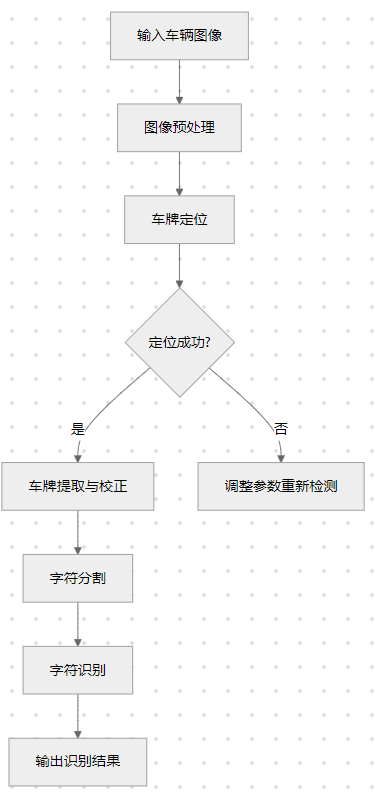
核心算法说明表
| 模块 | 关键技术 | 功能说明 | 关键参数/阈值 |
|---|---|---|---|
| 图像预处理 | Sobel边缘检测,Otsu二值化 | 增强车牌区域边缘特征 | 高斯滤波σ=1,二值化阈值=0.8*Otsu |
| 车牌定位 | 颜色空间分析(HSV),形态学操作,几何特征筛选 | 定位车牌在图像中的位置 | 蓝色范围H:0.55-0.7,长宽比:2-5,面积:1000-30000 |
| 倾斜校正 | Hough变换,图像旋转 | 校正倾斜的车牌 | 角度检测范围:-10°~10° |
| 字符分割 | 自适应阈值分割,垂直投影法 | 分离单个字符 | 窗口大小=25,Sauvola参数k=0.2 |
| 字符识别 | 模板匹配,相似度计算 | 识别每个字符 | 相似度阈值=0.6,模板尺寸:40×20 |
参考代码 基于阈值分割的车牌定位识别 www.youwenfan.com/contentcsn/96014.html
使用与优化建议
1. 使用步骤:
- 将主程序第7行的
img_path替换为你的车辆图像路径 - 直接运行
license_plate_recognition.m - 查看识别结果和各个处理阶段的图像
2. 常见问题与调整:
| 问题现象 | 可能原因 | 解决方案 |
|---|---|---|
| 无法定位车牌 | 图像光照不均,车牌颜色特殊 | 调整locate_license_plate中的颜色范围阈值 |
| 字符分割不准确 | 字符粘连或断裂 | 调整adaptive_threshold_segmentation的窗口大小和k值 |
| 识别错误率高 | 模板库不完善 | 使用真实车牌字符扩充模板库 |
3. 扩展与优化方向:
matlab
% 1. 增加多颜色车牌支持(黄牌、绿牌)
% 2. 引入深度学习字符识别(使用预训练的CNN)
% 3. 添加车牌颜色识别功能
% 4. 实现批量处理多张图像
这个车牌识别系统基于传统的图像处理技术,对标准条件下的车牌有较好的识别效果。如果图像质量较差或光照条件复杂,可能需要调整参数或结合深度学习方法。