文章目录
前言
Thymeleaf是一个现代化的服务器端Java模板引擎,专门用于Web开发。与传统的JSP不同,Thymeleaf模板可以直接在浏览器中打开查看 ,无需启动服务器,这让前后端协作变得更加顺畅。
个人主页:艺杯羹
系列专栏:SpringBoot
核心优势
- 双模式运行:既是静态模板(设计师可用),也是动态页面(程序员可用)
- 自然模板:不破坏HTML结构,保留原始标签属性
- 与Spring完美集成:Spring Boot官方推荐的模板引擎
- 强大的表达式 :支持复杂的条件判断、循环、数据操作
快速开始
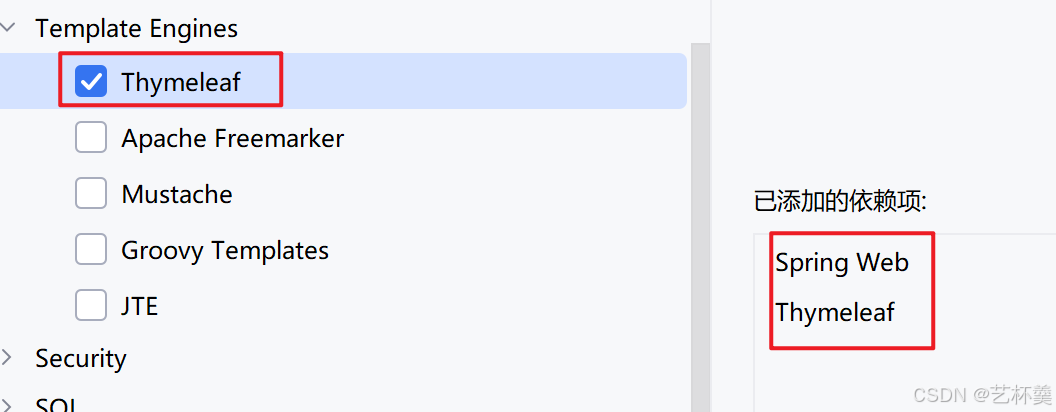
1. 添加依赖
xml
<dependency>
    <groupId>org.springframework.boot</groupId>
    <artifactId>spring-boot-starter-thymeleaf</artifactId>
</dependency>
<dependency>
    <groupId>org.springframework.boot</groupId>
    <artifactId>spring-boot-starter-web</artifactId>
</dependency>
2. 基本模板示例
html
<!DOCTYPE html>
<html lang="en" xmlns:th="http://www.thymeleaf.org">
<head>
    <meta charset="UTF-8">
    <title>Thymeleaf示例</title>
</head>
<body>
    <!-- 动态显示后端传来的数据 -->
    <h2 th:text="${message}">这里是静态占位文本</h2>
</body>
</html>
3. 控制器代码
java
@Controller
public class HomeController {
    @GetMapping("/home")
    public String home(Model model) {
        model.addAttribute("message", "欢迎使用Thymeleaf!");
        return "home"; // 对应templates/home.html
    }
}
核心语法速览
1. 变量输出

html
<!-- 文本内容 -->
<p th:text="${user.name}">默认用户名</p>

<!-- 表单值 -->
<input type="text" th:value="${user.email}">
2. 字符串操作(内置对象)
html
<!-- 判断是否为空 -->
<span th:text="${#strings.isEmpty(name)}"></span>

<!-- 获取长度 -->
<span th:text="${#strings.length(name)}"></span>

<!-- 转换为大写 -->
<span th:text="${#strings.toUpperCase(name)}"></span>
3. 日期格式化
html
<!-- 默认格式 -->
<p th:text="${#dates.format(date)}"></p>

<!-- 自定义格式 -->
<p th:text="${#dates.format(date, 'yyyy-MM-dd HH:mm')}"></p>

<!-- 提取日期部分 -->
年:<span th:text="${#dates.year(date)}"></span>
月:<span th:text="${#dates.month(date)}"></span>
4. 条件判断
html
<!-- if语句 -->
<div th:if="${user.age >= 18}">
    成年人内容
</div>

<!-- switch语句 -->
<div th:switch="${user.role}">
    <p th:case="'admin'">管理员</p>
    <p th:case="'user'">普通用户</p>
    <p th:case="*">未知角色</p>
</div>
5. 循环遍历(重点!)
遍历列表
html
<table>
    <tr th:each="user : ${userList}">
        <td th:text="${user.id}"></td>
        <td th:text="${user.name}"></td>
    </tr>
</table>
遍历Map
html
<table>
    <tr th:each="entry : ${userMap}">
        <td th:text="${entry.key}"></td>    <!-- 键 -->
        <td th:text="${entry.value.name}"></td>  <!-- 值中的属性 -->
    </tr>
</table>
使用状态变量
html
<tr th:each="user, status : ${users}">
    <td th:text="${status.index}"></td>     <!-- 索引(从0开始) -->
    <td th:text="${status.count}"></td>     <!-- 计数(从1开始) -->
    <td th:text="${status.first}"></td>     <!-- 是否第一条 -->
    <td th:text="${status.last}"></td>      <!-- 是否最后一条 -->
</tr>
6. 获取域对象数据
html
Request数据:<span th:text="${requestData}"></span>
Session数据:<span th:text="${session.sessionData}"></span>
Application数据:<span th:text="${application.appData}"></span>
7. URL链接(重要!)
静态链接
html
<a th:href="@{https://www.baidu.com}">百度</a>带参数的链接
html
<!-- 方式一:查询参数 -->
<a th:href="@{/user/profile(id=1, name='张三')}">用户资料</a>

<!-- 方式二:RESTful风格 -->
<a th:href="@{/user/{id}/{name}(id=${userId}, name=${userName})}">用户详情</a>

<!-- 动态拼接 -->
<a th:href="@{'/search?keyword=' + ${keyword}}">搜索</a>
实用配置
在application.yml中配置Thymeleaf:
yaml
spring:
  thymeleaf:
    prefix: classpath:/templates/  # 模板文件位置
    suffix: .html                  # 文件后缀
    cache: false                   # 开发时设为false,关闭缓存
    encoding: UTF-8                # 编码格式
实际应用场景
场景1:用户列表页面
html
<!DOCTYPE html>
<html xmlns:th="http://www.thymeleaf.org">
<body>
    <h2>用户列表</h2>
    <table border="1">
        <tr>
            <th>序号</th><th>姓名</th><th>年龄</th><th>操作</th>
        </tr>
        <tr th:each="user, stat : ${users}">
            <td th:text="${stat.count}"></td>
            <td th:text="${user.name}"></td>
            <td>
                <span th:if="${user.age >= 18}">成年</span>
                <span th:unless="${user.age >= 18}">未成年</span>
            </td>
            <td>
                <a th:href="@{/user/edit/{id}(id=${user.id})}">编辑</a>
            </td>
        </tr>
    </table>
</body>
</html>
场景2:表单回显
html
<form>
    <input type="text"
           th:value="${user.name}"
           th:class="${#strings.isEmpty(user.name)} ? 'error' : ''">
    <span th:if="${#strings.isEmpty(user.name)}">姓名不能为空</span>
</form>
最佳实践建议
- 命名空间别忘记 :
xmlns:th="http://www.thymeleaf.org" - 关闭缓存开发 :开发阶段设置
spring.thymeleaf.cache=false - 善用状态变量 :循环时利用
status对象获取索引等信息 - 优先使用内置对象 :如
#strings、#dates,减少后端逻辑 - URL写法要规范 :使用
@{...}语法,支持RESTful风格 - 保持模板简洁:复杂逻辑尽量放后端,前端只做展示
常见问题
Q:为什么我的页面不显示动态数据?
A:检查控制器是否添加了@Controller注解,模型数据是否正确传递。
Q:静态资源(CSS/JS)无法加载?
A:确保资源放在src/main/resources/static/目录下,使用相对路径引用。
Q:如何判断对象为空?
A:使用th:if="${obj != null}"或th:unless="${obj == null}"
总结
Thymeleaf让Spring Boot的视图层开发变得简单而强大。记住几个关键点:
- 所有Thymeleaf属性以
th:开头 - 表达式使用
${...}获取变量,#{...}获取消息 - 内置对象让字符串、日期操作变得简单
- URL使用
@{...},支持各种参数传递方式
| 属性 | 作用 | 示例 |
|---|---|---|
| th:text | 设置标签文本内容 | <span th:text="${msg}">默认值</span> |
| th:value | 设置表单元素值 | <input th:value="${user.name}"> |
| th:if | 条件判断显示 | <div th:if="${user != null}">用户存在</div> |
| th:unless | 条件判断隐藏 | <div th:unless="${user.age < 18}">成年人</div> |
| th:each | 循环遍历 | <tr th:each="item : ${list}"> |
| th:href | 动态链接 | <a th:href="@{/user/{id}(id=${userId})}"> |
| th:src | 动态资源路径 | <img th:src="@{/images/logo.png}"> |
| th:class | 动态CSS类 | <div th:class="${active} ? 'active' : ''"> |
掌握这些核心功能,你就能高效开发出功能丰富的动态页面了。从简单的变量显示到复杂的表格渲染,Thymeleaf都能优雅应对。