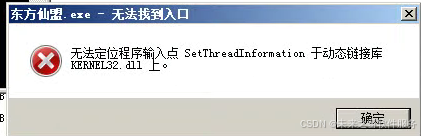
一、函数支持的系统版本
SetThreadInformation是 Windows 系统的一个内核相关 API,它的支持情况如下:
- 最低支持的客户端版本 :Windows 10 版本 1607(即周年更新版,内部版本 14393)
- 最低支持的服务器版本:Windows Server 2016
- 不支持的系统版本:Windows 7、Windows 8/8.1、Windows 10 1607 之前的版本、Windows Server 2008/2012/2012 R2 等早期服务器系统
二、补充说明
-
头文件与库依赖 使用这个函数时,需要包含 Windows 的头文件
processthreadsapi.h,并且链接Kernel32.lib库(这是 Windows 系统的标准库,通常编译器会自动链接)。 -
函数使用的注意事项 该函数需要特定的权限,且第二个参数
ThreadInformationClass(线程信息类)目前仅支持ThreadMemoryPriority(值为 0)这一个选项,用于设置线程的内存优先级。示例代码如下:cpp
运行
#include <windows.h> #include <processthreadsapi.h> #include <iostream> int main() { // 获取当前线程的句柄 HANDLE hThread = GetCurrentThread(); if (hThread == NULL) { std::cerr << "获取线程句柄失败,错误码:" << GetLastError() << std::endl; return 1; } // 设置线程的内存优先级为MEMORY_PRIORITY_NORMAL(值为5) MEMORY_PRIORITY_INFORMATION memPriority = { MEMORY_PRIORITY_NORMAL }; BOOL result = SetThreadInformation( hThread, ThreadMemoryPriority, // 仅支持该信息类 &memPriority, sizeof(memPriority) ); if (result) { std::cout << "线程内存优先级设置成功" << std::endl; } else { std::cerr << "设置失败,错误码:" << GetLastError() << std::endl; } return 0; } -
兼容性判断 如果你的程序需要兼容旧版 Windows 系统,可以在运行时通过
GetVersionEx或VerifyVersionInfo函数判断系统版本,或者通过GetProcAddress检查Kernel32.dll中是否存在SetThreadInformation函数,避免程序在不支持的系统上崩溃。
阿雪技术观
让我们积极投身于技术共享的浪潮中,不仅仅是作为受益者,更要成为贡献者。无论是分享自己的代码、撰写技术博客,还是参与开源项目的维护和改进,每一个小小的举动都可能成为推动技术进步的巨大力量
Embrace open source and sharing, witness the miracle of technological progress, and enjoy the happy times of humanity! Let's actively join the wave of technology sharing. Not only as beneficiaries, but also as contributors. Whether sharing our own code, writing technical blogs, or participating in the maintenance and improvement of open source projects, every small action may become a huge force driving technological progrss.