目录
1.核心头文件与基础类
标准 C++ 中操作文件的核心是 <fstream> 头文件提供的流类,主要分为文本文件 和二进制文件两种操作方式。包含的头文件:
cpp
#include <fstream>  // 核心:文件流
#include <iostream> // 控制台输出(辅助)
#include <string>   // 处理字符串(辅助)
using namespace std; // 简化代码,实际项目可按需省略
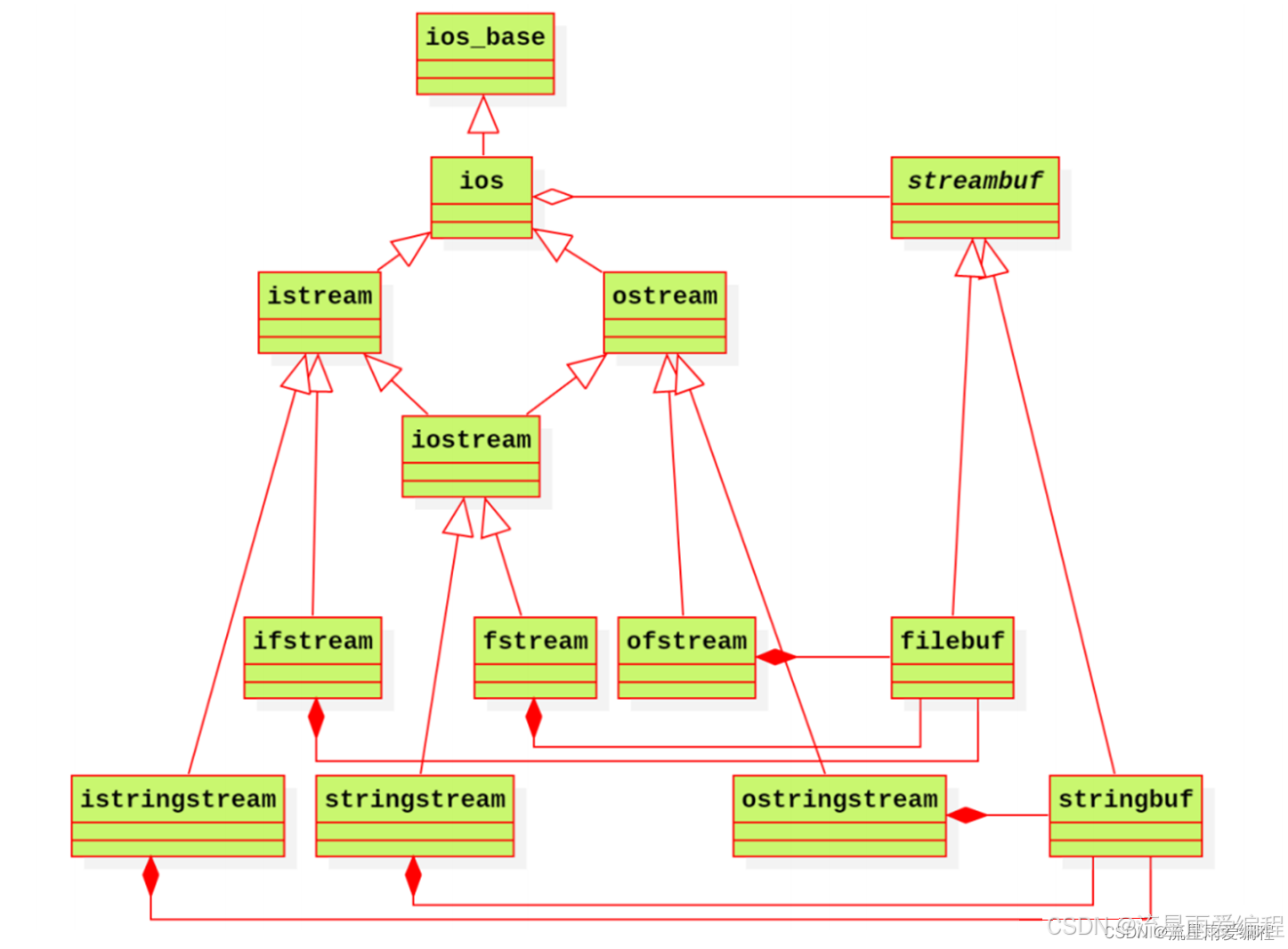
<fstream> 提供三个核心类:
| 类名 | 功能 | 继承自 |
|---|---|---|
ifstream |
只读文件(输入流) | istream |
ofstream |
只写文件(输出流) | ostream |
fstream |
读写文件(双向流) | iostream |
2.文件打开模式
通过 open() 函数或流对象构造函数指定打开模式(可组合使用,用 | 分隔):
| 模式常量 | 含义 |
|---|---|
ios::in |
以读 模式打开(ifstream 默认),文件不存在则失败 |
ios::out |
以写 模式打开(ofstream 默认),文件不存在则创建,存在则清空 |
ios::app |
追加模式(写操作只在文件末尾),需配合 ios::out |
ios::trunc |
截断模式(清空文件内容),ios::out 默认包含此模式 |
ios::binary |
二进制模式(默认是文本模式,文本模式会自动转换换行符:\n ↔ \r\n) |
ios::ate |
打开后将文件指针定位到末尾(可重新定位指针) |
3.文件操作
3.1.文本文件操作
文本文件以字符 / 字符串为单位读写,支持 <<(写)、>>(读)、getline()(读整行)等操作。
写文本文件:
cpp
// 方式1:构造函数直接打开(推荐)
ofstream ofs("test.txt", ios::out); // ios::out 可省略(ofstream 默认)
if (!ofs.is_open()) { // 检查文件是否打开成功
    cerr << "文件打开失败!" << endl;
    return 1;
}

// 写入内容(支持多类型,如字符串、数字)
ofs << "姓名:张三" << endl;
ofs << "年龄:20" << endl;
ofs << "分数:95.5" << endl;

ofs.close(); // 显式关闭(析构函数也会自动关闭,建议显式关闭)

// 方式2:先创建对象,再用open()打开
ofstream ofs2;
ofs2.open("test_append.txt", ios::out | ios::app); // 追加模式
ofs2 << "追加的内容" << endl;
ofs2.close();
读文本文件:
cpp
// 读文件(按空格/换行分割)
ifstream ifs("test.txt", ios::in);
if (!ifs.is_open()) {
    cerr << "文件打开失败!" << endl;
    return 1;
}

// 方式1:>> 运算符(自动跳过空格/换行,不适合含空格的整行)
string key;
string value;
while (ifs >> key >> value) { // 直到文件末尾
    cout << key << ":" << value << endl;
}
ifs.close();

// 方式2:getline() 读整行(适合含空格的内容)
ifstream ifs2("test.txt", ios::in);
string line;
while (getline(ifs2, line)) { // 逐行读取,直到EOF
    cout << line << endl;
}
ifs2.close();

// 方式3:get() 读单个字符
ifstream ifs3("test.txt", ios::in);
char ch;
while ((ch = ifs3.get()) != EOF) { // EOF:文件结束符
    cout << ch;
}
ifs3.close();配合std::stringstream读取文件全部内容:
cpp
#include <sstream>
#include <fstream>  // 核心:文件流
#include <string>

std::string  getFileData(const std::string& path)
{
    std::ifstream stream(path);
    std::stringstream  buffer;
    buffer << stream.rdbuf();
    return buffer.c_str();
}
3.2.二进制文件操作
二进制文件以字节为单位读写,需指定 ios::binary 模式,使用 write()(写)和 read()(读)成员函数。
写二进制文件:
cpp
// 定义结构体(示例)
struct Student {
    char name[20]; // 用char数组避免string的二进制序列化问题
    int age;
    float score;
};

// 写二进制文件
Student s = {"李四", 21, 88.8};
ofstream ofs("student.bin", ios::out | ios::binary);
if (!ofs.is_open()) {
    cerr << "文件打开失败!" << endl;
    return 1;
}

// write(数据地址, 数据字节数)
ofs.write(reinterpret_cast<const char*>(&s), sizeof(Student));
ofs.close();
读二进制文件
cpp
// 读二进制文件
Student s_read;
ifstream ifs("student.bin", ios::in | ios::binary);
if (!ifs.is_open()) {
    cerr << "文件打开失败!" << endl;
    return 1;
}

// read(数据地址, 数据字节数)
ifs.read(reinterpret_cast<char*>(&s_read), sizeof(Student));
cout << "姓名:" << s_read.name << endl;
cout << "年龄:" << s_read.age << endl;
cout << "分数:" << s_read.score << endl;
ifs.close();
3.3.文件指针定位
件指针(文件位置指示器)用于指定读写位置,核心函数:
| 函数 | 作用 | 适用流 |
|---|---|---|
seekg() |
移动读指针位置 | ifstream/fstream |
seekp() |
移动写指针位置 | ofstream/fstream |
tellg() |
获取读指针当前位置 | ifstream/fstream |
tellp() |
获取写指针当前位置 | ofstream/fstream |
参数格式:seekg(偏移量, 起始位置),起始位置可选:
ios::beg:文件开头(默认)ios::cur:当前指针位置ios::end:文件末尾
示例:修改二进制文件指定内容:
cpp
fstream fs("student.bin", ios::in | ios::out | ios::binary);
if (!fs.is_open()) {
    cerr << "文件打开失败!" << endl;
    return 1;
}

// 将指针移动到age字段(跳过name的20字节)
fs.seekp(20, ios::beg);
int new_age = 22;
fs.write(reinterpret_cast<const char*>(&new_age), sizeof(int));

// 重新定位指针,读取修改后的数据
fs.seekg(0, ios::beg);
Student s_modify;
fs.read(reinterpret_cast<char*>(&s_modify), sizeof(Student));
cout << "修改后年龄:" << s_modify.age << endl; // 输出22

fs.close();
3.4.错误处理
文件操作需检查状态,核心状态函数:
| 函数 | 含义 |
|---|---|
is_open() |
检查文件是否成功打开(最常用) |
eof() |
检查是否到达文件末尾(End of File) |
fail() |
检查逻辑错误(如格式错误、文件不存在),无严重错误时可恢复 |
bad() |
检查严重错误(如硬件故障、文件损坏),不可恢复 |
good() |
检查流是否处于正常状态(!eof () && !fail () && !bad ()) |
clear() |
重置流的状态标志(如处理 eof 后重置,继续操作) |
示例:错误处理
cpp
ifstream ifs("nonexist.txt", ios::in);
if (!ifs.is_open()) {
    cerr << "文件不存在!" << endl;
}

// 模拟读失败
string str;
ifs >> str;
if (ifs.fail()) {
    cerr << "读操作失败!" << endl;
    ifs.clear(); // 重置状态
}

ifs.close();
4.注意事项
- 文本模式 vs 二进制模式 :
- 文本模式:自动转换换行符(Windows 下
\n→\r\n,读取时反向转换); - 二进制模式:无转换,适合存储图片、视频、结构体等二进制数据。
- 文本模式:自动转换换行符(Windows 下
- 字符串序列化 :二进制文件中避免直接写入
std::string(含指针),建议用固定长度 char 数组或手动序列化。 - 编码问题:文本文件读写中文时,需保证编码一致(如 UTF-8、GBK),避免乱码。
- 资源释放 :流对象析构时会自动关闭文件,但显式调用
close()可及时释放文件句柄(尤其频繁操作文件时)。 - 路径问题 :文件路径支持相对路径(
./test.txt)和绝对路径(C:/data/test.txt),注意 Windows 路径分隔符用\\或/。
5.总结
标准 C++ 文件操作的核心是:
- 选择合适的流类(
ifstream/ofstream/fstream); - 指定正确的打开模式(文本 / 二进制、读 / 写 / 追加);
- 用对应方法读写(文本:
<</>>/getline();二进制:write()/read()); - 检查文件状态并处理错误;
- 按需定位文件指针,完成复杂读写。