本文提供了一个相对名次算法的Python实现和可视化教学工具。Python代码使用字典和排序将运动员分数转换为奖牌名次(金、银、铜牌)或数字排名。HTML部分展示了一个交互式教学界面,包含代码高亮、变量跟踪和分步执行功能,帮助学习者理解算法流程。界面采用现代化设计,具有代码区、变量区和控制按钮,支持输入自定义分数进行可视化学习。
前提,信息成绩是独一无二的
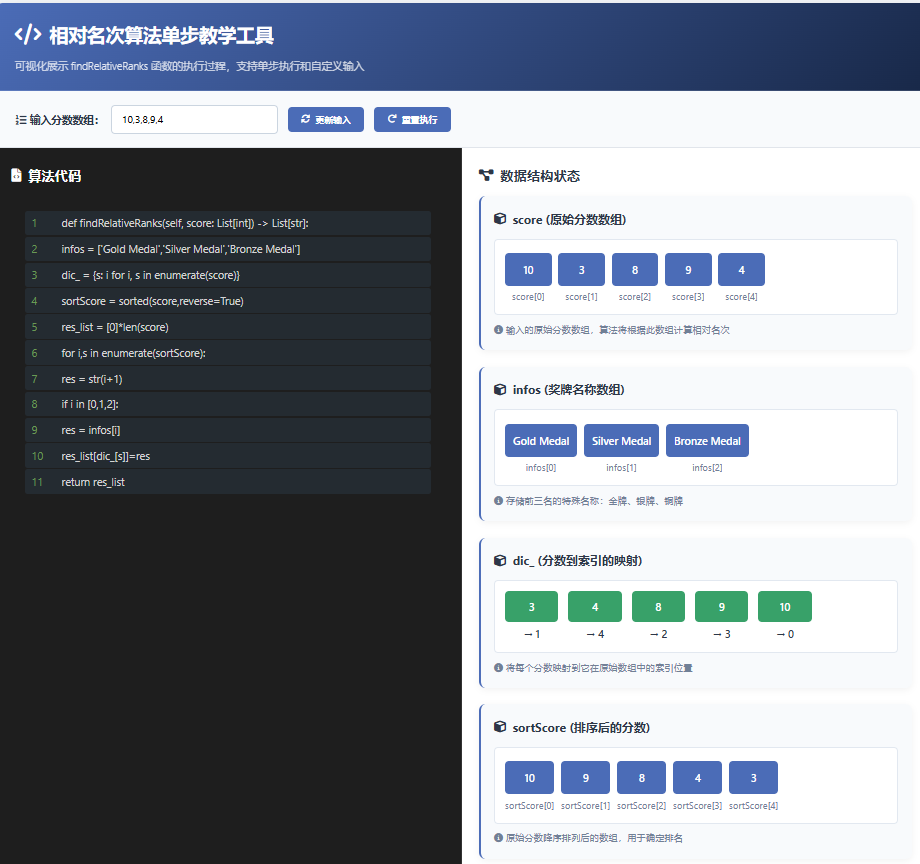

python
class Solution:
    def findRelativeRanks(self, score: List[int]) -> List[str]:
        infos = ['Gold Medal','Silver Medal','Bronze Medal']
        dic_ = {s: i for i, s in enumerate(score)}
        sortScore = sorted(score,reverse=True)
        res_list = [0]*len(score)
        for i,s in enumerate(sortScore):
            res = str(i+1)
            if i in [0,1,2]:
                res = infos[i]
            res_list[dic_[s]]=res
        return res_list
html
<!DOCTYPE html>
<html lang="zh-CN">
<head>
<meta charset="UTF-8">
<meta name="viewport" content="width=device-width, initial-scale=1.0">
<title>相对名次算法单步教学工具</title>
<link rel="stylesheet" href="https://cdnjs.cloudflare.com/ajax/libs/font-awesome/6.0.0/css/all.min.css">
<style>
* {
margin: 0;
padding: 0;
box-sizing: border-box;
font-family: 'Segoe UI', Tahoma, Geneva, Verdana, sans-serif;
}
body {
background-color: #f5f7fa;
color: #333;
line-height: 1.6;
padding: 20px;
}
.container {
max-width: 1400px;
margin: 0 auto;
background-color: white;
border-radius: 12px;
box-shadow: 0 5px 25px rgba(0, 0, 0, 0.1);
overflow: hidden;
}
header {
background: linear-gradient(135deg, #4b6cb7 0%, #182848 100%);
color: white;
padding: 25px 30px;
border-bottom: 1px solid rgba(255, 255, 255, 0.1);
}
h1 {
font-size: 28px;
margin-bottom: 10px;
display: flex;
align-items: center;
gap: 12px;
}
h1 i {
font-size: 32px;
}
.subtitle {
font-size: 16px;
opacity: 0.85;
font-weight: 300;
}
.input-section {
padding: 20px 30px;
background-color: #f8fafc;
border-bottom: 1px solid #e1e5eb;
}
.input-row {
display: flex;
align-items: center;
gap: 15px;
flex-wrap: wrap;
}
.input-group {
display: flex;
align-items: center;
gap: 10px;
}
label {
font-weight: 600;
color: #2d3748;
}
input {
padding: 10px 15px;
border: 1px solid #cbd5e0;
border-radius: 6px;
width: 250px;
font-size: 15px;
}
button {
padding: 10px 20px;
background-color: #4b6cb7;
color: white;
border: none;
border-radius: 6px;
cursor: pointer;
font-weight: 600;
transition: all 0.3s ease;
display: flex;
align-items: center;
gap: 8px;
}
button:hover {
background-color: #3a5795;
transform: translateY(-2px);
}
button:disabled {
background-color: #a0aec0;
cursor: not-allowed;
transform: none;
}
.content {
display: flex;
min-height: 600px;
}
.code-section {
flex: 1;
padding: 25px;
background-color: #1e1e1e;
color: #d4d4d4;
overflow-y: auto;
border-right: 1px solid #333;
}
.code-section h3 {
color: white;
margin-bottom: 15px;
font-size: 20px;
display: flex;
align-items: center;
gap: 10px;
}
.code-container {
background-color: #1e1e1e;
border-radius: 8px;
padding: 20px;
font-family: 'Consolas', 'Monaco', monospace;
font-size: 16px;
line-height: 1.8;
overflow-x: auto;
}
.code-line {
padding: 4px 10px;
border-radius: 4px;
margin: 2px 0;
transition: all 0.3s ease;
display: flex;
}
.line-number {
display: inline-block;
width: 30px;
color: #6a9955;
user-select: none;
margin-right: 15px;
}
.active-line {
background-color: #264f78;
box-shadow: 0 0 0 1px #569cd6;
}
.executed-line {
background-color: rgba(86, 156, 214, 0.1);
}
.variable-section {
flex: 1;
padding: 25px;
background-color: white;
overflow-y: auto;
}
.variable-section h3 {
color: #2d3748;
margin-bottom: 15px;
font-size: 20px;
display: flex;
align-items: center;
gap: 10px;
}
.variables-container {
display: flex;
flex-direction: column;
gap: 25px;
}
.variable-card {
background-color: #f8fafc;
border-radius: 10px;
padding: 20px;
border-left: 4px solid #4b6cb7;
box-shadow: 0 3px 10px rgba(0, 0, 0, 0.05);
}
.variable-title {
font-weight: 700;
color: #2d3748;
margin-bottom: 15px;
font-size: 18px;
display: flex;
align-items: center;
gap: 10px;
}
.variable-content {
font-family: 'Consolas', 'Monaco', monospace;
background-color: white;
padding: 15px;
border-radius: 6px;
border: 1px solid #e2e8f0;
min-height: 60px;
overflow-x: auto;
}
.array-display {
display: flex;
flex-wrap: wrap;
gap: 10px;
margin-top: 5px;
}
.array-item {
display: flex;
flex-direction: column;
align-items: center;
min-width: 70px;
}
.array-value {
background-color: #4b6cb7;
color: white;
padding: 12px;
border-radius: 6px;
font-weight: 600;
font-size: 16px;
width: 100%;
text-align: center;
}
.array-index {
margin-top: 5px;
color: #718096;
font-size: 14px;
}
.dictionary-display {
display: flex;
flex-wrap: wrap;
gap: 15px;
}
.dict-item {
display: flex;
flex-direction: column;
align-items: center;
min-width: 80px;
}
.dict-key {
background-color: #38a169;
color: white;
padding: 10px;
border-radius: 6px;
font-weight: 600;
font-size: 16px;
width: 100%;
text-align: center;
}
.dict-value {
margin-top: 5px;
color: #2d3748;
font-weight: 600;
}
.explanation-section {
margin-top: 25px;
padding: 20px;
background-color: #f0f9ff;
border-radius: 10px;
border-left: 4px solid #3b82f6;
}
.explanation-title {
font-weight: 700;
color: #1e40af;
margin-bottom: 10px;
font-size: 18px;
display: flex;
align-items: center;
gap: 10px;
}
.explanation-text {
color: #1e293b;
font-size: 16px;
line-height: 1.7;
}
.controls {
padding: 25px 30px;
background-color: #f8fafc;
border-top: 1px solid #e1e5eb;
display: flex;
justify-content: center;
gap: 15px;
}
.step-info {
padding: 15px;
background-color: #e6fffa;
border-radius: 8px;
margin-top: 20px;
border-left: 4px solid #38b2ac;
}
.step-title {
font-weight: 700;
color: #234e52;
margin-bottom: 8px;
}
.step-desc {
color: #234e52;
}
.highlight {
background-color: #fffacd;
padding: 2px 4px;
border-radius: 3px;
font-weight: 600;
}
@media (max-width: 1100px) {
.content {
flex-direction: column;
}
.code-section {
border-right: none;
border-bottom: 1px solid #333;
}
}
@media (max-width: 768px) {
.input-row {
flex-direction: column;
align-items: flex-start;
gap: 15px;
}
input {
width: 100%;
}
.array-display, .dictionary-display {
justify-content: center;
}
}
</style>
</head>
<body>
<div class="container">
<header>
<h1><i class="fas fa-code"></i> 相对名次算法单步教学工具</h1>
<p class="subtitle">可视化展示 findRelativeRanks 函数的执行过程,支持单步执行和自定义输入</p>
</header>
<div class="input-section">
<div class="input-row">
<div class="input-group">
<label for="score-input"><i class="fas fa-list-ol"></i> 输入分数数组:</label>
<input type="text" id="score-input" value="10,3,8,9,4" placeholder="例如:10,3,8,9,4">
</div>
<button id="update-btn">
<i class="fas fa-sync-alt"></i> 更新输入
</button>
<button id="reset-btn">
<i class="fas fa-redo"></i> 重置执行
</button>
</div>
</div>
<div class="content">
<div class="code-section">
<h3><i class="fas fa-file-code"></i> 算法代码</h3>
<div class="code-container" id="code-container">
<!-- 代码将通过JavaScript动态生成 -->
</div>
</div>
<div class="variable-section">
<h3><i class="fas fa-project-diagram"></i> 数据结构状态</h3>
<div class="variables-container" id="variables-container">
<!-- 变量状态将通过JavaScript动态生成 -->
</div>
<div class="explanation-section">
<div class="explanation-title"><i class="fas fa-lightbulb"></i> 当前步骤说明</div>
<div class="explanation-text" id="explanation-text">
点击"下一步"开始执行算法...
</div>
</div>
<div class="step-info" id="step-info">
<div class="step-title">算法思路</div>
<div class="step-desc">
这个算法的核心思想是:先创建一个分数到原始索引的映射字典,然后对分数进行降序排序,最后根据排序结果给每个分数分配名次(前3名使用特殊奖牌名称)。
</div>
</div>
</div>
</div>
<div class="controls">
<button id="prev-btn">
<i class="fas fa-step-backward"></i> 上一步
</button>
<button id="next-btn">
<i class="fas fa-step-forward"></i> 下一步
</button>
<button id="auto-step-btn">
<i class="fas fa-play"></i> 自动执行
</button>
</div>
</div>
<script>
// 算法代码行
const codeLines = [
"def findRelativeRanks(self, score: List[int]) -> List[str]:",
" infos = ['Gold Medal','Silver Medal','Bronze Medal']",
" dic_ = {s: i for i, s in enumerate(score)}",
" sortScore = sorted(score,reverse=True)",
" res_list = [0]*len(score)",
" for i,s in enumerate(sortScore):",
" res = str(i+1)",
" if i in [0,1,2]:",
" res = infos[i]",
" res_list[dic_[s]]=res",
" return res_list"
];
// 步骤说明
const stepExplanations = [
"函数开始,定义奖牌名称数组 infos",
"创建字典 dic_,将分数映射到它们在原始数组中的索引",
"对分数进行降序排序,得到 sortScore 数组",
"创建结果数组 res_list,初始化为与输入相同长度的零数组",
"开始遍历排序后的分数数组 sortScore",
"将当前排名转换为字符串(i+1,因为索引从0开始)",
"检查当前索引i是否在前3名内(0,1,2)",
"如果是前3名,将对应的奖牌名称赋给res",
"使用字典dic_找到原始索引,将结果赋给res_list的对应位置",
"循环结束后返回结果数组res_list"
];
// 算法执行状态
let executionState = {
currentStep: -1,
scores: [10, 3, 8, 9, 4],
infos: [],
dic_: {},
sortScore: [],
res_list: [],
i: null,
s: null,
res: null,
executedSteps: new Set()
};
// 初始化页面
function initializePage() {
renderCode();
renderVariables();
updateExplanation();
updateButtons();
}
// 渲染代码区域
function renderCode() {
const codeContainer = document.getElementById('code-container');
codeContainer.innerHTML = '';
codeLines.forEach((line, index) => {
const codeLine = document.createElement('div');
codeLine.className = 'code-line';
if (executionState.currentStep === index) {
codeLine.classList.add('active-line');
} else if (executionState.executedSteps.has(index)) {
codeLine.classList.add('executed-line');
}
codeLine.innerHTML = `
<span class="line-number">${index + 1}</span>
<span>${escapeHtml(line)}</span>
`;
codeContainer.appendChild(codeLine);
});
}
// 渲染变量区域
function renderVariables() {
const variablesContainer = document.getElementById('variables-container');
// 清空容器
variablesContainer.innerHTML = '';
// 分数数组
variablesContainer.appendChild(createVariableCard(
"score (原始分数数组)",
createArrayDisplay(executionState.scores, false, "score"),
"输入的原始分数数组,算法将根据此数组计算相对名次"
));
// infos 数组
if (executionState.currentStep >= 0) {
variablesContainer.appendChild(createVariableCard(
"infos (奖牌名称数组)",
createArrayDisplay(executionState.infos, false, "infos"),
"存储前三名的特殊名称:金牌、银牌、铜牌"
));
}
// 字典 dic_
if (executionState.currentStep >= 1) {
variablesContainer.appendChild(createVariableCard(
"dic_ (分数到索引的映射)",
createDictionaryDisplay(executionState.dic_),
"将每个分数映射到它在原始数组中的索引位置"
));
}
// 排序后的数组
if (executionState.currentStep >= 2) {
variablesContainer.appendChild(createVariableCard(
"sortScore (排序后的分数)",
createArrayDisplay(executionState.sortScore, false, "sortScore"),
"原始分数降序排列后的数组,用于确定排名"
));
}
// 结果数组
if (executionState.currentStep >= 3) {
variablesContainer.appendChild(createVariableCard(
"res_list (结果数组)",
createArrayDisplay(executionState.res_list, true, "res_list"),
"存储最终结果,每个原始分数对应的名次"
));
}
// 循环变量
if (executionState.currentStep >= 4) {
const loopVars = [];
if (executionState.i !== null) {
loopVars.push(`i (当前索引): <span class="highlight">${executionState.i}</span>`);
}
if (executionState.s !== null) {
loopVars.push(`s (当前分数): <span class="highlight">${executionState.s}</span>`);
}
if (executionState.res !== null) {
loopVars.push(`res (当前名次): <span class="highlight">"${executionState.res}"</span>`);
}
if (loopVars.length > 0) {
variablesContainer.appendChild(createVariableCard(
"循环变量",
`<div style="display: flex; flex-direction: column; gap: 10px;">${loopVars.join('<br>')}</div>`,
"当前循环迭代中的变量值"
));
}
}
}
// 创建变量卡片
function createVariableCard(title, content, description) {
const card = document.createElement('div');
card.className = 'variable-card';
card.innerHTML = `
<div class="variable-title"><i class="fas fa-cube"></i> ${title}</div>
<div class="variable-content">${content}</div>
<div style="margin-top: 10px; color: #718096; font-size: 14px;">
<i class="fas fa-info-circle"></i> ${description}
</div>
`;
return card;
}
// 创建数组显示
function createArrayDisplay(array, isResult = false, arrayName = "") {
if (!array || array.length === 0) {
return '<div style="color: #a0aec0; font-style: italic;">(空数组)</div>';
}
let html = '<div class="array-display">';
array.forEach((value, index) => {
// 如果是结果数组且当前步骤正在处理这个索引,高亮显示
let highlightClass = "";
if (isResult && executionState.currentStep >= 8 && executionState.dic_[executionState.s] === index) {
highlightClass = " style='background-color: #fbbf24;'";
}
html += `
<div class="array-item">
<div class="array-value"${highlightClass}>${value}</div>
<div class="array-index">${arrayName}[${index}]</div>
</div>
`;
});
html += '</div>';
return html;
}
// 创建字典显示
function createDictionaryDisplay(dict) {
if (!dict || Object.keys(dict).length === 0) {
return '<div style="color: #a0aec0; font-style: italic;">(空字典)</div>';
}
let html = '<div class="dictionary-display">';
Object.entries(dict).forEach(([key, value]) => {
html += `
<div class="dict-item">
<div class="dict-key">${key}</div>
<div class="dict-value">→ ${value}</div>
</div>
`;
});
html += '</div>';
return html;
}
// 更新步骤说明
function updateExplanation() {
const explanationText = document.getElementById('explanation-text');
if (executionState.currentStep < 0) {
explanationText.innerHTML = "点击\"下一步\"开始执行算法...";
return;
}
if (executionState.currentStep >= stepExplanations.length) {
explanationText.innerHTML = "算法执行完成!所有分数已分配名次。";
return;
}
explanationText.innerHTML = stepExplanations[executionState.currentStep];
}
// 执行下一步
function nextStep() {
if (executionState.currentStep >= codeLines.length) {
return;
}
executionState.currentStep++;
executionState.executedSteps.add(executionState.currentStep);
// 根据当前步骤更新状态
switch (executionState.currentStep) {
case 0:
executionState.infos = ['Gold Medal', 'Silver Medal', 'Bronze Medal'];
break;
case 1:
// 创建分数到索引的映射
executionState.dic_ = {};
executionState.scores.forEach((score, index) => {
executionState.dic_[score] = index;
});
break;
case 2:
// 对分数进行降序排序
executionState.sortScore = [...executionState.scores].sort((a, b) => b - a);
break;
case 3:
// 初始化结果数组
executionState.res_list = new Array(executionState.scores.length).fill(0);
break;
case 4:
// 开始循环,初始化循环变量
executionState.i = 0;
executionState.s = executionState.sortScore[0];
break;
case 5:
// 计算当前排名
executionState.res = String(executionState.i + 1);
break;
case 6:
// 检查是否为前三名
break;
case 7:
// 如果是前三名,使用奖牌名称
if (executionState.i < 3) {
executionState.res = executionState.infos[executionState.i];
}
break;
case 8:
// 将结果放入正确位置
executionState.res_list[executionState.dic_[executionState.s]] = executionState.res;
// 准备下一次循环
executionState.i++;
// 如果还有更多元素,继续循环
if (executionState.i < executionState.sortScore.length) {
executionState.s = executionState.sortScore[executionState.i];
// 回退到步骤5继续循环
executionState.currentStep = 4;
executionState.executedSteps.add(5);
executionState.executedSteps.add(6);
executionState.executedSteps.add(7);
executionState.executedSteps.add(8);
}
break;
case 9:
// 返回结果(算法结束)
break;
}
renderCode();
renderVariables();
updateExplanation();
updateButtons();
}
// 执行上一步
function prevStep() {
if (executionState.currentStep < 0) {
return;
}
// 从已执行步骤中移除当前步骤
executionState.executedSteps.delete(executionState.currentStep);
// 回退状态
switch (executionState.currentStep) {
case 0:
executionState.infos = [];
break;
case 1:
executionState.dic_ = {};
break;
case 2:
executionState.sortScore = [];
break;
case 3:
executionState.res_list = [];
break;
case 4:
// 如果i为0,说明是第一次进入循环
if (executionState.i === 0) {
executionState.i = null;
executionState.s = null;
} else {
// 否则需要处理循环回退逻辑
executionState.i--;
executionState.s = executionState.sortScore[executionState.i];
// 我们需要重新设置当前步骤为8,以便下一次prevStep可以正确处理
executionState.currentStep = 8;
executionState.executedSteps.delete(5);
executionState.executedSteps.delete(6);
executionState.executedSteps.delete(7);
executionState.executedSteps.delete(8);
renderCode();
renderVariables();
updateExplanation();
updateButtons();
return;
}
break;
case 5:
executionState.res = null;
break;
case 6:
// 无状态变化
break;
case 7:
// 无状态变化
break;
case 8:
// 回退res_list的变化
executionState.res_list[executionState.dic_[executionState.s]] = 0;
// 回退循环变量
executionState.i--;
if (executionState.i >= 0) {
executionState.s = executionState.sortScore[executionState.i];
}
// 我们需要重新设置当前步骤为4,以便下一次prevStep可以正确处理
executionState.currentStep = 4;
executionState.executedSteps.delete(5);
executionState.executedSteps.delete(6);
executionState.executedSteps.delete(7);
executionState.executedSteps.delete(8);
renderCode();
renderVariables();
updateExplanation();
updateButtons();
return;
}
executionState.currentStep--;
renderCode();
renderVariables();
updateExplanation();
updateButtons();
}
// 更新按钮状态
function updateButtons() {
document.getElementById('prev-btn').disabled = executionState.currentStep <= 0;
document.getElementById('next-btn').disabled = executionState.currentStep >= codeLines.length;
if (executionState.currentStep >= codeLines.length) {
document.getElementById('next-btn').innerHTML = '<i class="fas fa-check"></i> 已完成';
} else {
document.getElementById('next-btn').innerHTML = '<i class="fas fa-step-forward"></i> 下一步';
}
}
// 自动执行
let autoStepInterval = null;
function toggleAutoStep() {
const autoStepBtn = document.getElementById('auto-step-btn');
if (autoStepInterval) {
clearInterval(autoStepInterval);
autoStepInterval = null;
autoStepBtn.innerHTML = '<i class="fas fa-play"></i> 自动执行';
autoStepBtn.style.backgroundColor = '#4b6cb7';
} else {
autoStepInterval = setInterval(() => {
if (executionState.currentStep >= codeLines.length) {
toggleAutoStep();
return;
}
nextStep();
}, 1500);
autoStepBtn.innerHTML = '<i class="fas fa-stop"></i> 停止';
autoStepBtn.style.backgroundColor = '#e53e3e';
}
}
// 重置执行状态
function resetExecution() {
executionState = {
currentStep: -1,
scores: executionState.scores, // 保留当前分数
infos: [],
dic_: {},
sortScore: [],
res_list: [],
i: null,
s: null,
res: null,
executedSteps: new Set()
};
if (autoStepInterval) {
clearInterval(autoStepInterval);
autoStepInterval = null;
document.getElementById('auto-step-btn').innerHTML = '<i class="fas fa-play"></i> 自动执行';
document.getElementById('auto-step-btn').style.backgroundColor = '#4b6cb7';
}
renderCode();
renderVariables();
updateExplanation();
updateButtons();
}
// 更新分数输入
function updateScores() {
const scoreInput = document.getElementById('score-input').value;
try {
// 解析输入,支持逗号或空格分隔
const scores = scoreInput.split(/[,,\s]+/).map(s => {
const num = parseInt(s.trim());
if (isNaN(num)) throw new Error('包含非数字内容');
return num;
});
if (scores.length === 0) throw new Error('请输入至少一个分数');
executionState.scores = scores;
// 重置执行状态
resetExecution();
// 显示成功消息
showTemporaryMessage('分数已更新!', 'success');
} catch (error) {
showTemporaryMessage('输入无效,请使用逗号或空格分隔数字', 'error');
}
}
// 显示临时消息
function showTemporaryMessage(message, type) {
// 移除可能已存在的消息
const existingMessage = document.querySelector('.temp-message');
if (existingMessage) existingMessage.remove();
// 创建消息元素
const messageEl = document.createElement('div');
messageEl.className = `temp-message ${type}`;
messageEl.textContent = message;
// 样式
messageEl.style.cssText = `
position: fixed;
top: 20px;
right: 20px;
padding: 15px 20px;
background-color: ${type === 'success' ? '#38a169' : '#e53e3e'};
color: white;
border-radius: 6px;
box-shadow: 0 4px 12px rgba(0, 0, 0, 0.15);
z-index: 1000;
font-weight: 600;
animation: slideIn 0.3s ease;
`;
// 添加动画
const style = document.createElement('style');
style.textContent = `
@keyframes slideIn {
from { transform: translateX(100%); opacity: 0; }
to { transform: translateX(0); opacity: 1; }
}
@keyframes fadeOut {
from { opacity: 1; }
to { opacity: 0; }
}
`;
document.head.appendChild(style);
document.body.appendChild(messageEl);
// 3秒后移除
setTimeout(() => {
messageEl.style.animation = 'fadeOut 0.5s ease';
setTimeout(() => {
if (messageEl.parentNode) {
messageEl.parentNode.removeChild(messageEl);
}
}, 500);
}, 3000);
}
// HTML转义
function escapeHtml(text) {
const div = document.createElement('div');
div.textContent = text;
return div.innerHTML;
}
// 初始化事件监听器
function initEventListeners() {
document.getElementById('next-btn').addEventListener('click', nextStep);
document.getElementById('prev-btn').addEventListener('click', prevStep);
document.getElementById('auto-step-btn').addEventListener('click', toggleAutoStep);
document.getElementById('reset-btn').addEventListener('click', resetExecution);
document.getElementById('update-btn').addEventListener('click', updateScores);
// 输入框支持按Enter键更新
document.getElementById('score-input').addEventListener('keyup', (event) => {
if (event.key === 'Enter') {
updateScores();
}
});
}
// 页面加载完成后初始化
document.addEventListener('DOMContentLoaded', () => {
initializePage();
initEventListeners();
});
</script>
</body>
</html>