OSPF路由协议单区域配置
实验任务
一个中小型网络,采用三层网络结构,即包含接入层、汇聚层和核心层三层。需要对网络设备进行恰当的配置,其中的三层交换机SW1和路由器RT1采用OSPF动态路由技术,并配置默认路由;路由器RT2采用静态路由技术,并配置默认路由,模拟因特网的工作。全部设备配置完成后,必须确保网络内每台设备能相互通信,并且内网主机都能访问因特网站点。
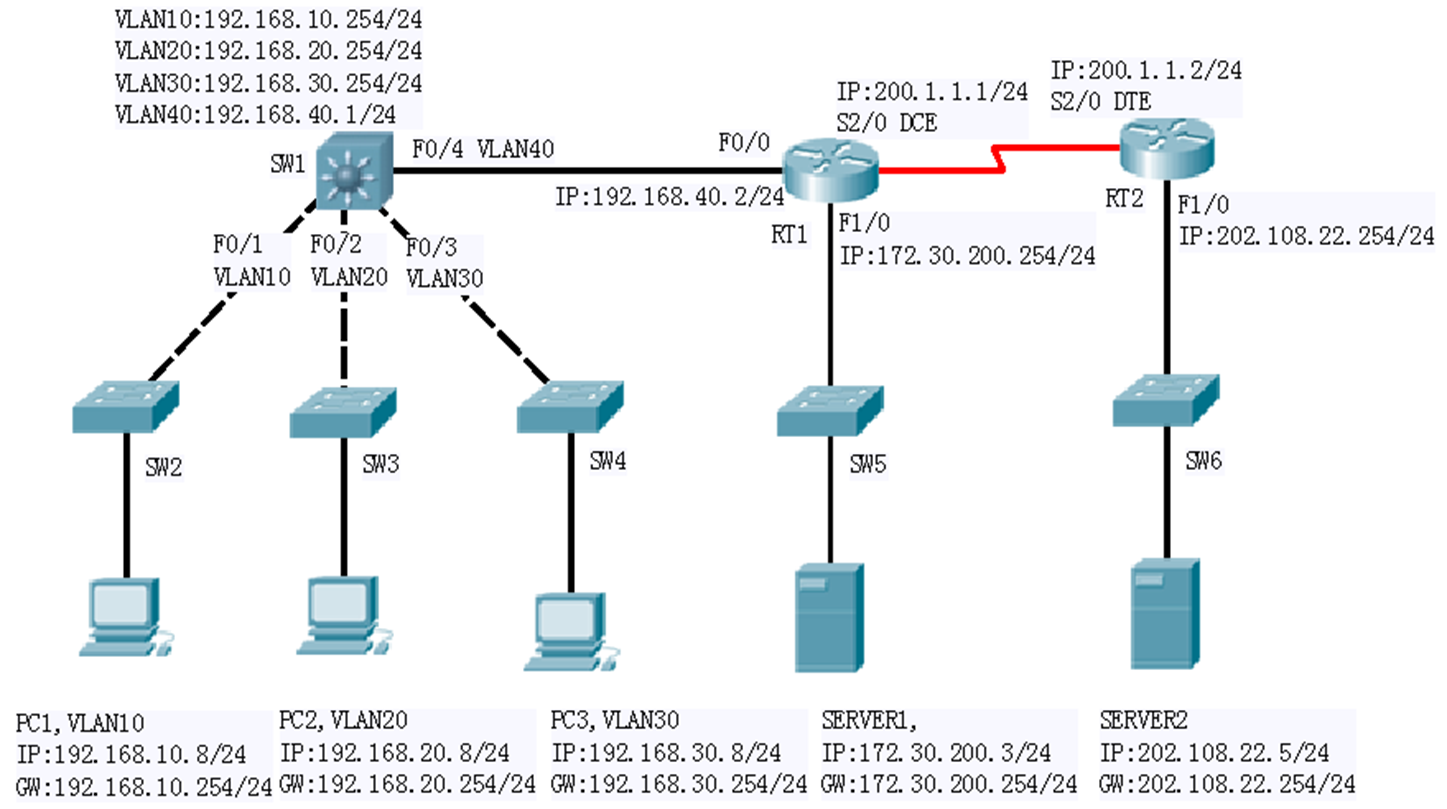
步骤1.在三层交换机SW1上创建VLAN,将相应端口加入VLAN,并配置交换虚拟接口(SVI)地址。
SW1(config)#vlan 10
SW1(config-vlan)#exi
SW1(config)#vlan 20
SW1(config-vlan)#exi
SW1(config)#vlan 30
SW1(config-vlan)#exi
SW1(config)#vlan 40
SW1(config-vlan)#exi


interface FastEthernet0/1
 switchport access vlan 10
 switchport mode access
!
interface FastEthernet0/2
 switchport access vlan 20
 switchport mode access
!
interface FastEthernet0/3
 switchport access vlan 30
 switchport mode access
!
interface FastEthernet0/4
 switchport access vlan 40
 switchport mode access


 interface Vlan10
 ip address 192.168.10.254 255.255.255.0
!
interface Vlan20
 ip address 192.168.20.254 255.255.255.0
!
interface Vlan30
 ip address 192.168.30.254 255.255.255.0
!
interface Vlan40
 ip address 192.168.40.1 255.255.255.0
!
步骤2.配置路由器名称、端口IP地址和串行口DCE的时钟。
hostname RT1

interface GigabitEthernet0/0
 ip address 192.168.40.2 255.255.255.0

!
interface GigabitEthernet0/1
 ip address 172.30.200.254 255.255.255.0


 interface Serial0/3/1
 ip address 200.1.1.1 255.255.255.0
 clock rate 64000

hostname RT2

interface GigabitEthernet0/0
 ip address 202.108.22.254 255.255.255.0


 interface Serial0/3/1
 ip address 200.1.1.2 255.255.255.0
步骤3.在三层交换机SW1、路由器RT1上配置单区域OSPF路由协议。
SW1:
router ospf 100
 network 192.168.10.0 0.0.0.255 area 0
 network 192.168.20.0 0.0.0.255 area 0
 network 192.168.30.0 0.0.0.255 area 0
 network 192.168.40.0 0.0.0.255 area 0

RT1:
router ospf 200
 network 192.168.40.0 0.0.0.255 area 0
 network 172.30.200.0 0.0.0.255 area 0
 network 200.1.1.0 0.0.0.255 area 0
步骤4.在三层交换机SW1、路由器RT1和RT2上配置默认路由。
SW1:
SW1(config)#ip route 0.0.0.0 0.0.0.0 200.1.1.2

RT1:
RT1(config)#ip route 0.0.0.0 0.0.0.0 200.1.1.2

RT2:
RT2(config)#ip route 0.0.0.0 0.0.0.0 200.1.1.1
步骤5.在三层交换机SW1、路由器RT1和RT2上查看路由表和接口参数。
SW1:
SW1#show ip route
Codes: C - connected, S - static, I - IGRP, R - RIP, M - mobile, B - BGP
       D - EIGRP, EX - EIGRP external, O - OSPF, IA - OSPF inter area
       N1 - OSPF NSSA external type 1, N2 - OSPF NSSA external type 2
       E1 - OSPF external type 1, E2 - OSPF external type 2, E - EGP
       i - IS-IS, L1 - IS-IS level-1, L2 - IS-IS level-2, ia - IS-IS inter area
       * - candidate default, U - per-user static route, o - ODR
       P - periodic downloaded static route

Gateway of last resort is 200.1.1.2 to network 0.0.0.0

     172.30.0.0/24 is subnetted, 1 subnets
O       172.30.200.0 [110/2] via 192.168.40.2, 00:05:36, Vlan40
C    192.168.10.0/24 is directly connected, Vlan10
C    192.168.20.0/24 is directly connected, Vlan20
C    192.168.30.0/24 is directly connected, Vlan30
C    192.168.40.0/24 is directly connected, Vlan40
O    200.1.1.0/24 [110/65] via 192.168.40.2, 00:05:36, Vlan40
S*   0.0.0.0/0 [1/0] via 200.1.1.2
RT1:
RT1#show ip route
Codes: L - local, C - connected, S - static, R - RIP, M - mobile, B - BGP
       D - EIGRP, EX - EIGRP external, O - OSPF, IA - OSPF inter area
       N1 - OSPF NSSA external type 1, N2 - OSPF NSSA external type 2
       E1 - OSPF external type 1, E2 - OSPF external type 2, E - EGP
       i - IS-IS, L1 - IS-IS level-1, L2 - IS-IS level-2, ia - IS-IS inter area
       * - candidate default, U - per-user static route, o - ODR
       P - periodic downloaded static route

Gateway of last resort is 200.1.1.2 to network 0.0.0.0

     172.30.0.0/16 is variably subnetted, 2 subnets, 2 masks
C       172.30.200.0/24 is directly connected, GigabitEthernet0/1
L       172.30.200.254/32 is directly connected, GigabitEthernet0/1
O    192.168.10.0/24 [110/2] via 192.168.40.1, 00:06:51, GigabitEthernet0/0
O    192.168.20.0/24 [110/2] via 192.168.40.1, 00:06:51, GigabitEthernet0/0
O    192.168.30.0/24 [110/2] via 192.168.40.1, 00:06:51, GigabitEthernet0/0
     192.168.40.0/24 is variably subnetted, 2 subnets, 2 masks
C       192.168.40.0/24 is directly connected, GigabitEthernet0/0
L       192.168.40.2/32 is directly connected, GigabitEthernet0/0
     200.1.1.0/24 is variably subnetted, 2 subnets, 2 masks
C       200.1.1.0/24 is directly connected, Serial0/3/1
L       200.1.1.1/32 is directly connected, Serial0/3/1
S*   0.0.0.0/0 [1/0] via 200.1.1.2


RT1# show ip ospf
 Routing Process "ospf 200" with ID 200.1.1.1
 Supports only single TOS(TOS0) routes
 Supports opaque LSA
 SPF schedule delay 5 secs, Hold time between two SPFs 10 secs
 Minimum LSA interval 5 secs. Minimum LSA arrival 1 secs
 Number of external LSA 0. Checksum Sum 0x000000
 Number of opaque AS LSA 0. Checksum Sum 0x000000
 Number of DCbitless external and opaque AS LSA 0
 Number of DoNotAge external and opaque AS LSA 0
 Number of areas in this router is 1. 1 normal 0 stub 0 nssa
 External flood list length 0
    Area BACKBONE(0)
        Number of interfaces in this area is 3
        Area has no authentication
        SPF algorithm executed 6 times
        Area ranges are
        Number of LSA 3. Checksum Sum 0x01da71
        Number of opaque link LSA 0. Checksum Sum 0x000000
        Number of DCbitless LSA 0
        Number of indication LSA 0
        Number of DoNotAge LSA 0
        Flood list length 0


RT1# show ip ospf interface

GigabitEthernet0/0 is up, line protocol is up
  Internet address is 192.168.40.2/24, Area 0
  Process ID 200, Router ID 200.1.1.1, Network Type BROADCAST, Cost: 1
  Transmit Delay is 1 sec, State DR, Priority 1
  Designated Router (ID) 200.1.1.1, Interface address 192.168.40.2
  Backup Designated Router (ID) 192.168.40.1, Interface address 192.168.40.1
  Timer intervals configured, Hello 10, Dead 40, Wait 40, Retransmit 5
    Hello due in 00:00:02
  Index 1/1, flood queue length 0
  Next 0x0(0)/0x0(0)
  Last flood scan length is 1, maximum is 1
  Last flood scan time is 0 msec, maximum is 0 msec
  Neighbor Count is 1, Adjacent neighbor count is 1
    Adjacent with neighbor 192.168.40.1  (Backup Designated Router)
  Suppress hello for 0 neighbor(s)
GigabitEthernet0/1 is up, line protocol is up
  Internet address is 172.30.200.254/24, Area 0
  Process ID 200, Router ID 200.1.1.1, Network Type BROADCAST, Cost: 1
  Transmit Delay is 1 sec, State DR, Priority 1
  Designated Router (ID) 200.1.1.1, Interface address 172.30.200.254
  No backup designated router on this network
  Timer intervals configured, Hello 10, Dead 40, Wait 40, Retransmit 5
    Hello due in 00:00:02
  Index 2/2, flood queue length 0
  Next 0x0(0)/0x0(0)
  Last flood scan length is 1, maximum is 1
  Last flood scan time is 0 msec, maximum is 0 msec
  Neighbor Count is 0, Adjacent neighbor count is 0
  Suppress hello for 0 neighbor(s)
Serial0/3/1 is up, line protocol is up
  Internet address is 200.1.1.1/24, Area 0
  Process ID 200, Router ID 200.1.1.1, Network Type POINT-TO-POINT, Cost: 64
  Transmit Delay is 1 sec, State POINT-TO-POINT,
  Timer intervals configured, Hello 10, Dead 40, Wait 40, Retransmit 5
    Hello due in 00:00:03
  Index 3/3, flood queue length 0
  Next 0x0(0)/0x0(0)
  Last flood scan length is 1, maximum is 1
  Last flood scan time is 0 msec, maximum is 0 msec
  Suppress hello for 0 neighbor(s)


  RT1#show ip ospf neighbor detail
 Neighbor 192.168.40.1, interface address 192.168.40.1
    In the area 0 via interface GigabitEthernet0/0
    Neighbor priority is 1, State is FULL, 5 state changes
    DR is 192.168.40.2 BDR is 192.168.40.1
    Options is 0x00
    Dead timer due in 00:00:39
    Neighbor is up for 00:10:20
    Index 1/1, retransmission queue length 0, number of retransmission 0
    First 0x0(0)/0x0(0) Next 0x0(0)/0x0(0)
    Last retransmission scan length is 0, maximum is 1
    Last retransmission scan time is 0 msec, maximum is 0 msec


    RT1#show ip ospf database
            OSPF Router with ID (200.1.1.1) (Process ID 200)

                Router Link States (Area 0)

Link ID         ADV Router      Age         Seq#       Checksum Link count
200.1.1.1       200.1.1.1       657         0x80000008 0x00a52a 3
192.168.40.1    192.168.40.1    648         0x80000008 0x005403 4

                Net Link States (Area 0)
Link ID         ADV Router      Age         Seq#       Checksum
192.168.40.2    200.1.1.1       657         0x80000001 0x00e144


RT1#show ip route
Codes: L - local, C - connected, S - static, R - RIP, M - mobile, B - BGP
       D - EIGRP, EX - EIGRP external, O - OSPF, IA - OSPF inter area
       N1 - OSPF NSSA external type 1, N2 - OSPF NSSA external type 2
       E1 - OSPF external type 1, E2 - OSPF external type 2, E - EGP
       i - IS-IS, L1 - IS-IS level-1, L2 - IS-IS level-2, ia - IS-IS inter area
       * - candidate default, U - per-user static route, o - ODR
       P - periodic downloaded static route

Gateway of last resort is 200.1.1.2 to network 0.0.0.0

     172.30.0.0/16 is variably subnetted, 2 subnets, 2 masks
C       172.30.200.0/24 is directly connected, GigabitEthernet0/1
L       172.30.200.254/32 is directly connected, GigabitEthernet0/1
O    192.168.10.0/24 [110/2] via 192.168.40.1, 00:11:20, GigabitEthernet0/0
O    192.168.20.0/24 [110/2] via 192.168.40.1, 00:11:20, GigabitEthernet0/0
O    192.168.30.0/24 [110/2] via 192.168.40.1, 00:11:20, GigabitEthernet0/0
     192.168.40.0/24 is variably subnetted, 2 subnets, 2 masks
C       192.168.40.0/24 is directly connected, GigabitEthernet0/0
L       192.168.40.2/32 is directly connected, GigabitEthernet0/0
     200.1.1.0/24 is variably subnetted, 2 subnets, 2 masks
C       200.1.1.0/24 is directly connected, Serial0/3/1
L       200.1.1.1/32 is directly connected, Serial0/3/1
S*   0.0.0.0/0 [1/0] via 200.1.1.2
步骤6.测试网络连通性。
步骤7.用debug命令观察路由器接收链路状态更新包。
SW1#debug ip ospf events
OSPF events debugging is on
SW1#
00:07:20: OSPF: Rcv hello from 200.1.1.1 area 0 from Vlan40 192.168.40.2
00:07:20: OSPF: End of hello processing
00:07:30: OSPF: Rcv hello from 200.1.1.1 area 0 from Vlan40 192.168.40.2
00:07:30: OSPF: End of hello processing


RT1#debug ip ospf events
OSPF events debugging is on
RT1#
00:08:40: OSPF: Rcv hello from 192.168.40.1 area 0 from GigabitEthernet0/0 192.168.40.1
00:08:40: OSPF: End of hello processing
00:08:50: OSPF: Rcv hello from 192.168.40.1 area 0 from GigabitEthernet0/0 192.168.40.1
00:08:50: OSPF: End of hello processing