目录
1,QT线程简介,QThread
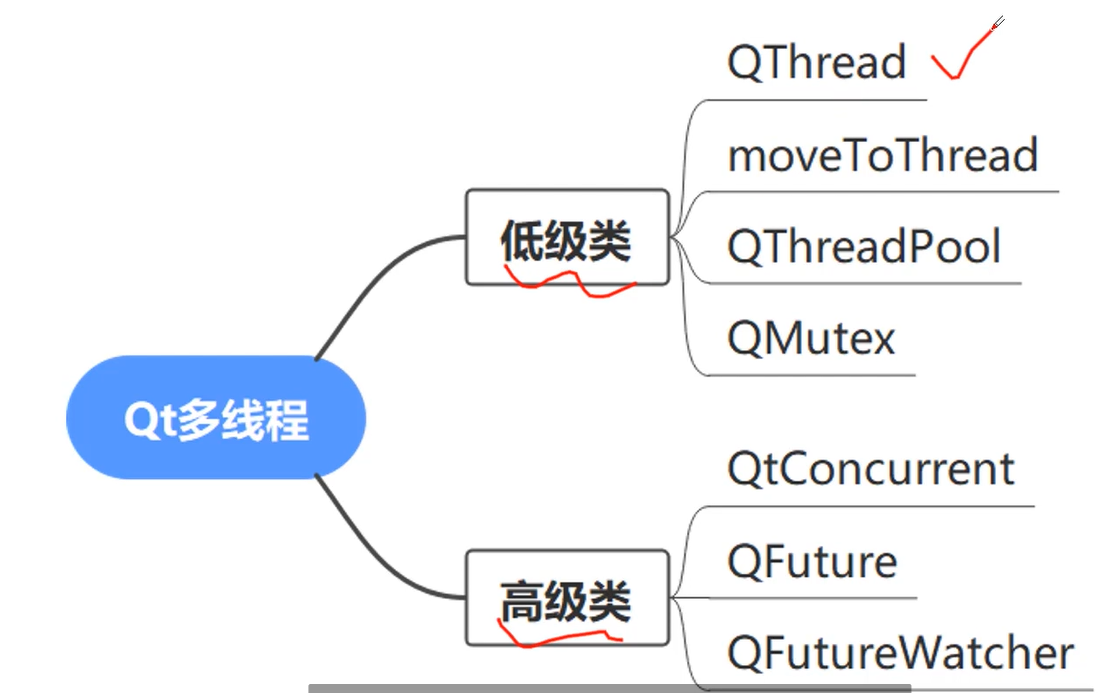
QThread类表示线程
继承QThread,重写 run 方法。
- 调用 start 开始执行。
mythread.h
javascript
#ifndef MY_THREAD_H
#define MY_THREAD_H

#include<QThread>
#include<QDebug>

class  MyThread:public QThread
{
    Q_OBJECT
public:
    MyThread(QObject* parent = nullptr);
    void run()override;
};

#endif //MY_THREAD_H
mythread...cpp
javascript
#include"mythread.h"

MyThread::MyThread(QObject* parent):QThread(parent)
{

}


void MyThread::run()
{
   //模拟数据库查询
    qDebug()<<"当前线程ID = "<<this->currentThreadId();
   for(int i = 0;i<5;i++)
   {
       qDebug()<<"正在查询数据库";
       sleep(1);
   }
   qDebug()<<"查询结束";
}
widget.cpp
javascript
#include "widget.h"
#include "ui_widget.h"

Widget::Widget(QWidget *parent)
    : QWidget(parent)
    , ui(new Ui::Widget)
{
    ui->setupUi(this);
    MyThread* th = new MyThread(this);
    th->start();
}- 线程停止执行 。
我们可以在 run 函数中设置停止标志位,然后实现 stop() 函数来设置标志位达到线程停止的目的。
wait() 函数 。它的作用是阻塞调用线程,直到目标QThread对象完成执行(即其run()函数返回)。
更推荐的方式是使用信号和槽机制来处理线程完成的通知。QThread在完成执行时会发出finished() 信号
利用 wait() 函数
javascript
void  MyThread::stop()
{
   is_stop = true;
   bool ok = wait(10);
   if(ok)
   {
      qDebug()<<"线程已经结束";
   }

}
利用结束时的 finished() 信号
javascript
class MyThread : public QThread {
public:
    void run() override {
        std::cout << "Thread is running" << std::endl;
        QThread::sleep(2);
        std::cout << "Thread finished" << std::endl;
    }
};

int main(int argc, char *argv[]) {
    QCoreApplication a(argc, argv);
    MyThread thread;
    QObject::connect(&thread, &MyThread::finished, []() {
        std::cout << "Main thread continues" << std::endl;
    });
    thread.start();
    return a.exec();
}
2,moveToThread
moveToThread 原理介绍
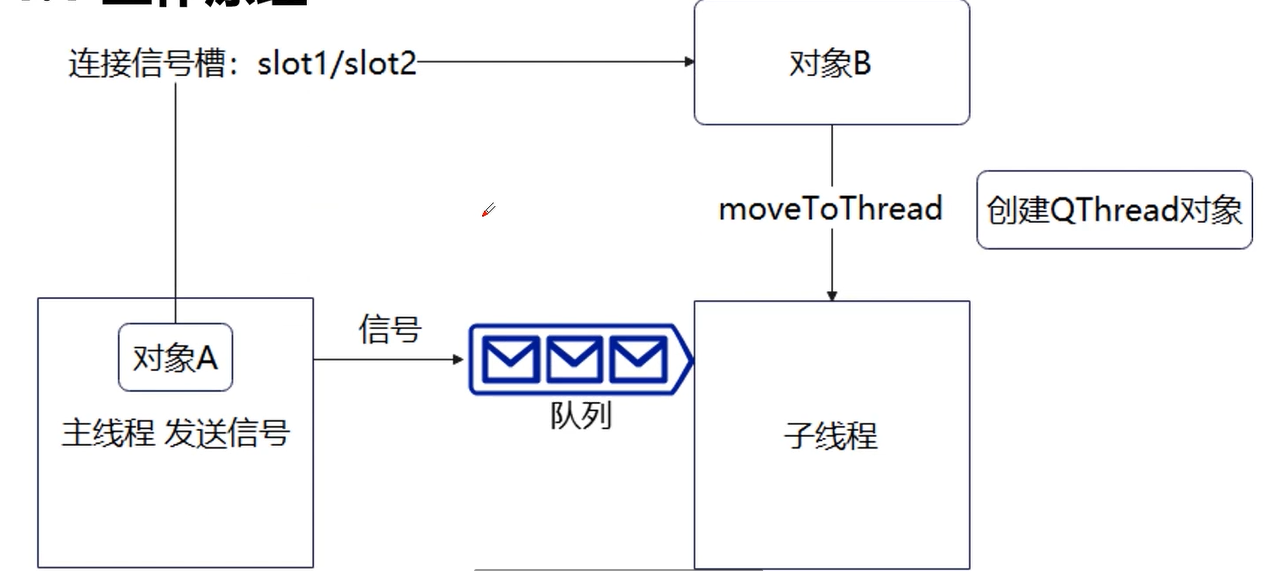
如上图所示为 moveToThread 的工作原理。
当我们想要让 对象B 的某个函数运行在子线程时,我们首先创建QThread对象,然后调用
moveToThread 函数,QThread对象作为moveToThread函数的参数。
然后我们可以让对象A 与对象B 进行槽函数的绑定,绑定之后,对象A 通过发信号的方式给对象B 发送数据,对象B 的子线程就可以获取到这些数据。
...
函数原型:
javascript
void QObject::moveToThread(QThread* targetThread);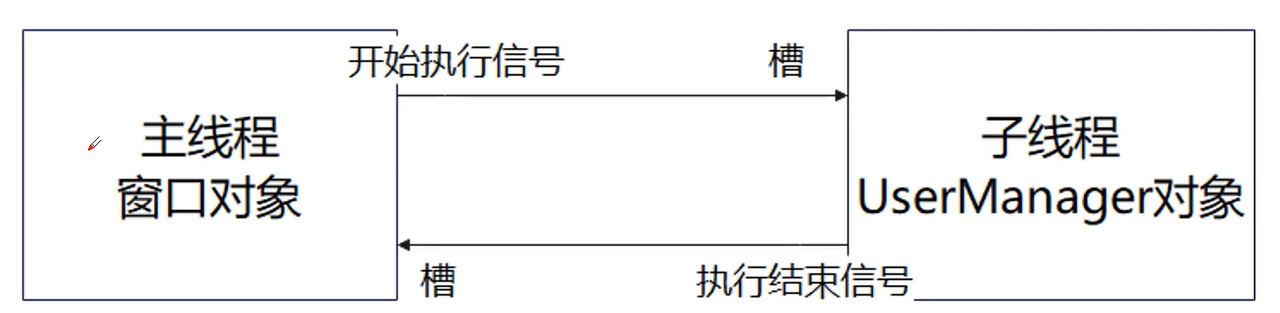
javascript
#include <QCoreApplication>
#include <QObject>
#include <QThread>
#include <QDebug>
#include <QTimer>

// 工作对象类
class Worker : public QObject
{
    Q_OBJECT
public:
    explicit Worker(QObject *parent = nullptr) : QObject(parent) {}
signals:
    void resultReady(const QString &result);

public slots:
    void doWork()
    {
        QString result;
        // 模拟一些耗时操作
        for (int i = 0; i < 1000000000; ++i) {
            result += "a";
        }
        emit resultReady(result);
    }
};

int main(int argc, char *argv[])
{
    QCoreApplication a(argc, argv);

    // 创建工作对象和线程对象
    Worker worker;
    QThread workerThread;

    // 将工作对象移动到新线程
    worker.moveToThread(&workerThread);

    // 连接线程启动信号到工作对象的工作槽函数
    QObject::connect(&workerThread, &QThread::started, &worker, &Worker::doWork);

    // 连接工作对象的结果信号到主线程的槽函数
    QObject::connect(&worker, &Worker::resultReady, [&a](const QString &result) {
        qDebug() << "Result:" << result;
        a.quit();
    });

    // 连接工作对象的销毁信号到线程的退出信号
    QObject::connect(&worker, &Worker::destroyed, &workerThread, &QThread::quit);

    // 连接线程的finished信号到线程的deleteLater()槽函数
    QObject::connect(&workerThread, &QThread::finished, &workerThread, &QThread::deleteLater);

    // 启动线程
    workerThread.start();

    return a.exec();
}
先调用 moveToThread 函数 : worker.moveToThread(&workerThread);
将 workerThread 的 started信号 连接到 worker 的 doWork 槽函数,这样当线程启动时,工作对象就开始执行任务。