需要修改的文件是:\springboot\src\main\java\com\example\controller的WeatherController.java文件
javascript
//WeatherController.java
@RestController
@RequestMapping("/weather")
public class WeatherController {

    @Value("${amap.weather.key}") // 从配置文件读取 key
    private String amapKey;

    // 简化:直接传 adcode(推荐)
    @GetMapping("/getWeather")
    public ResponseEntity<String> getWeather(
            @RequestParam String city,      // 这里建议传 adcode,如 "310000"
            @RequestParam String key) {     // 或者直接用配置的 key,不从前端传

        // 安全起见:不要让前端传 key!应由后端固定使用自己的 key
        String url = "https://restapi.amap.com/v3/weather/weatherInfo" +
                     "?key=" + amapKey +
                     "&city=" + city +
                     "&extensions=base";

        try {
            RestTemplate restTemplate = new RestTemplate();
            String response = restTemplate.getForObject(url, String.class);
            return ResponseEntity.ok(response);
        } catch (Exception e) {
            return ResponseEntity.status(500).body("{\"code\":\"500\",\"msg\":\"调用高德API失败\"}");
        }
    }
}
在运行java -jar qicai-1.0.jar之后访问http://localhost:9090/swagger-ui.html#/weather-controller
得到如下网站界面:
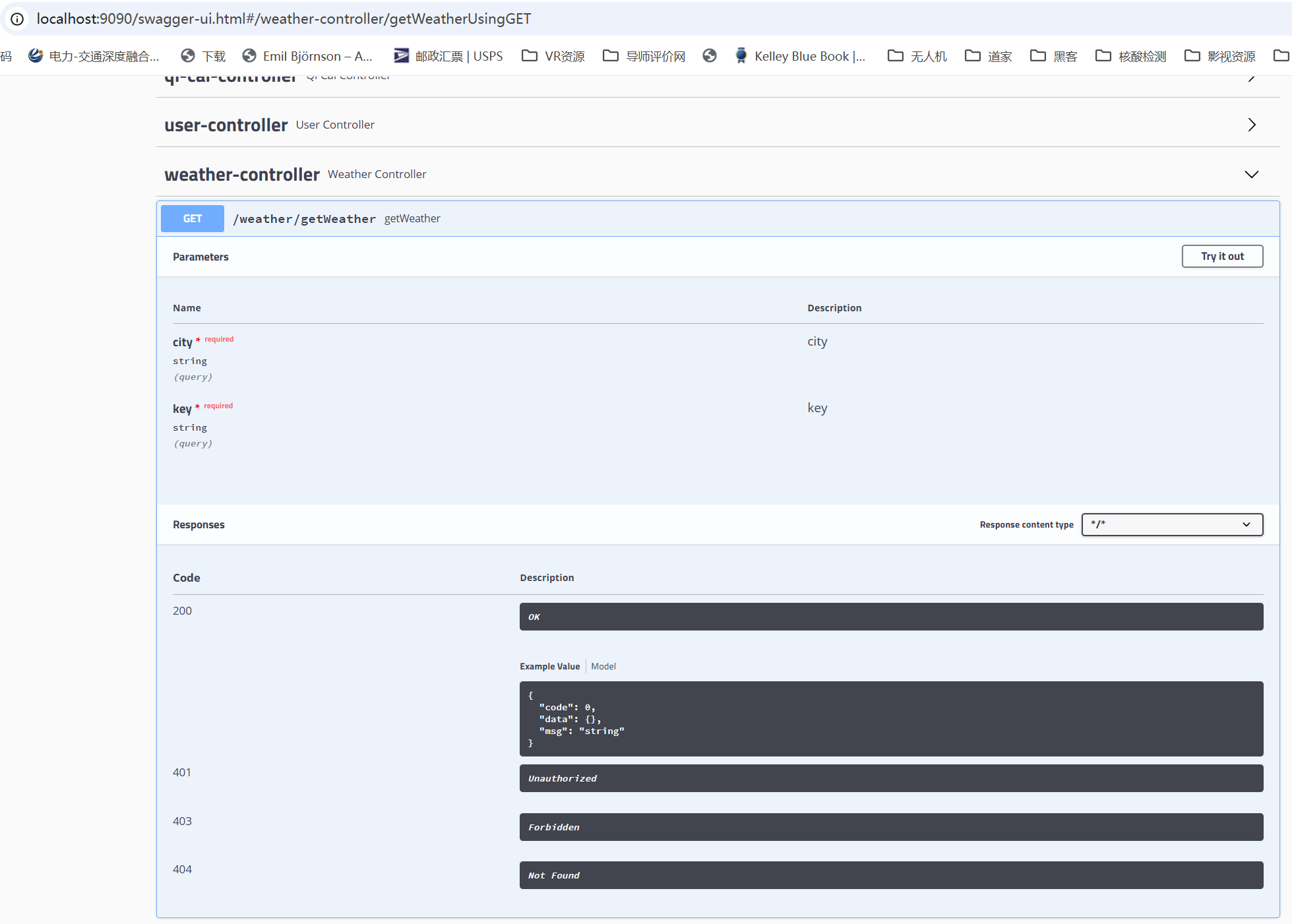
自行申请高德地图api之后填入key,填入city的代号,可以测试此处weather的api是否可用,此处显示"请求成功",在鸿蒙应用中才会显示相关的天气信息。
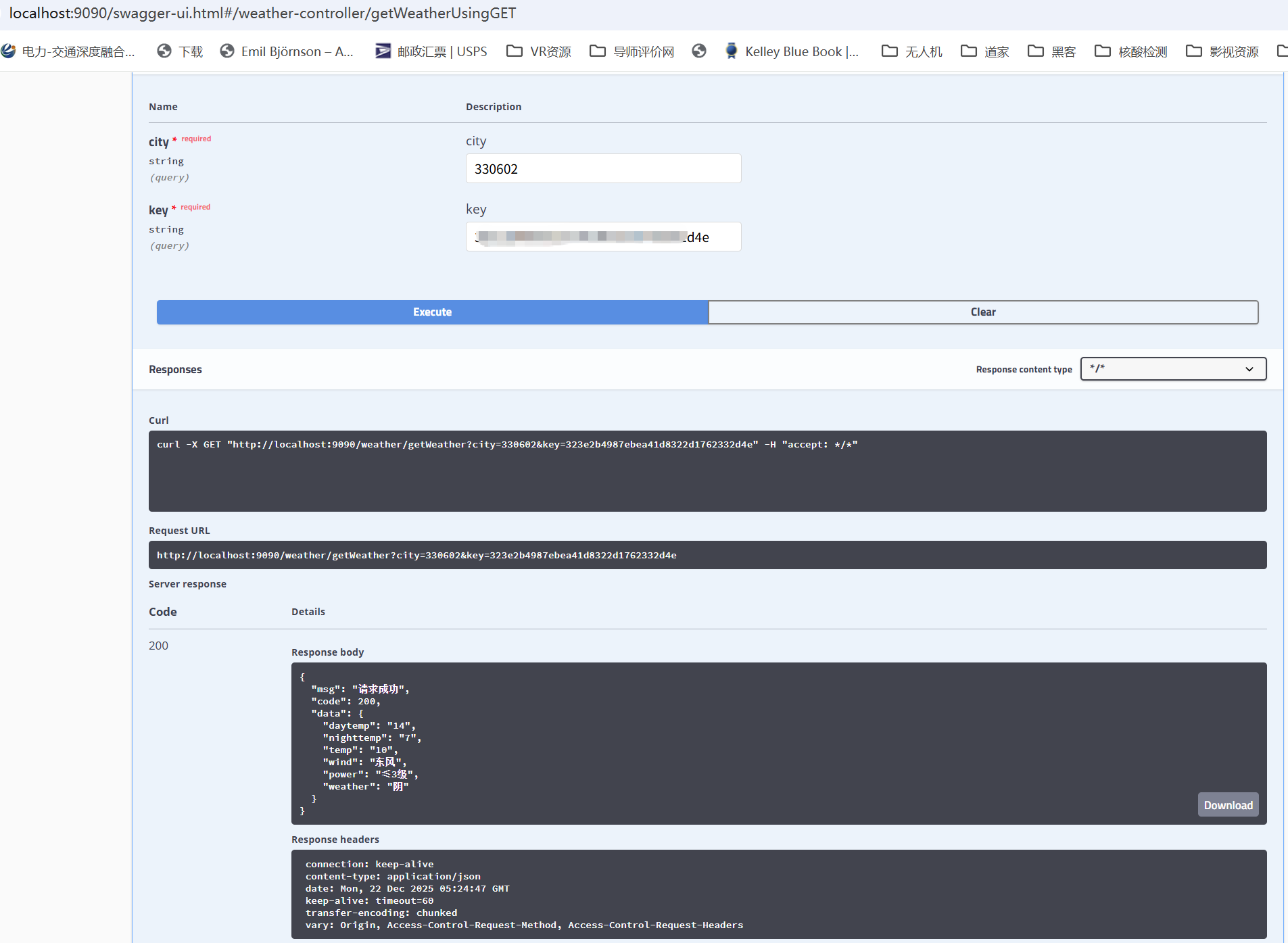
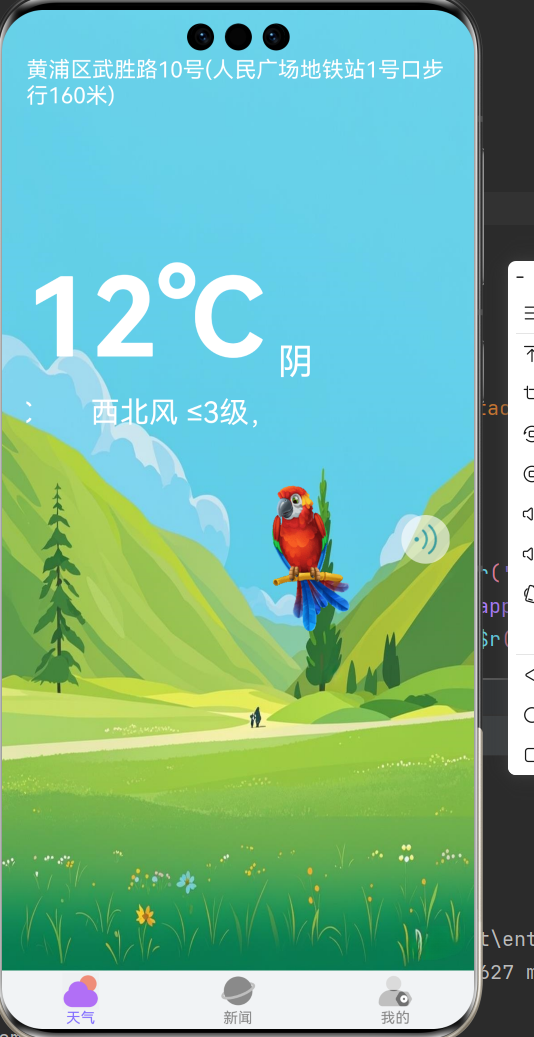
得到的结果如下:
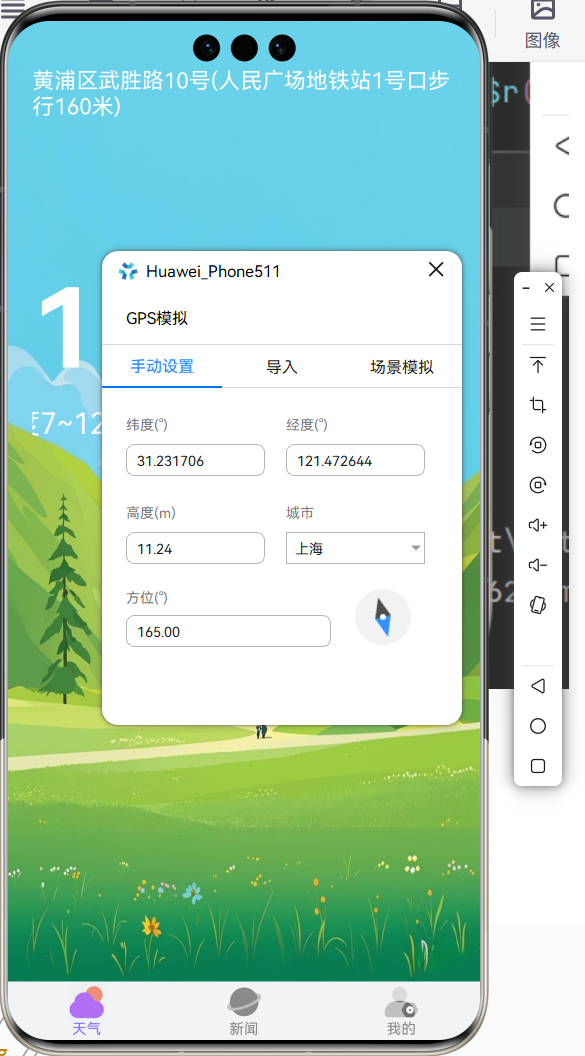
当然这其中也要先打开虚拟器中的位置:
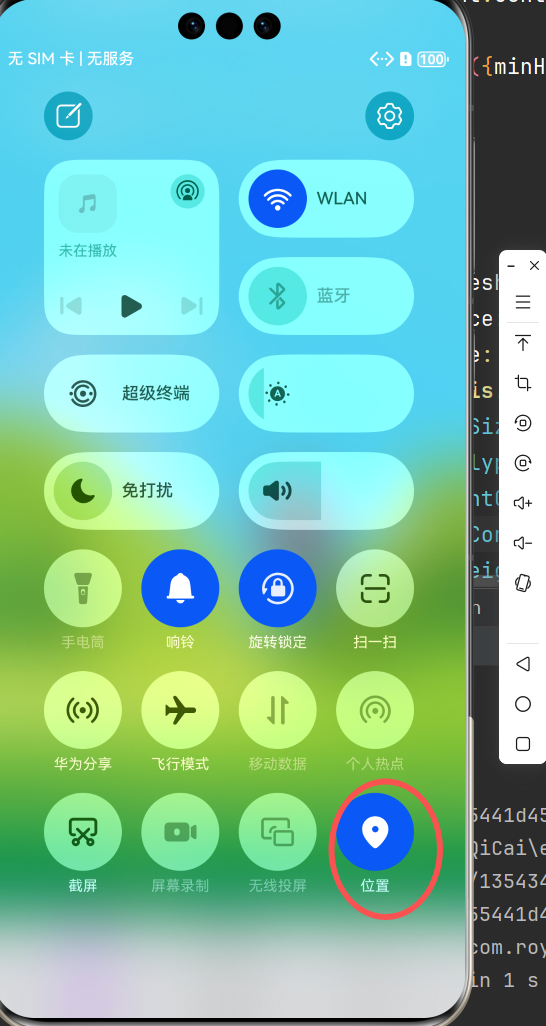
细节代码如下:
获取天气的WeatherDetailVO类:
TypeScript
// WeatherDetailVO.ets
export class WeatherDetailVO {
  daytemp: string // 最高温度
  nighttemp: string // 最低温度
  temp: string // 实时温度
  wind: string // 风向
  power: string // 风力
  weather: string // 天气描述

  constructor(daytemp?: string, nighttemp?: string, temp?: string, wind?: string, power?: string, weather?: string) {
    this.daytemp = daytemp ?? ''
    this.nighttemp = nighttemp ?? ''
    this.temp = temp ?? ''
    this.wind = wind ?? ''
    this.power = power ?? ''
    this.weather = weather ?? ''
  }

}
indexweather.ets如下:
TypeScript
import { STATUS_BAR_HEIGHT } from '../../entryability/EntryAbility'
import { BaseUtils } from '../../utils/BaseUtils'
import { geoLocationManager } from '@kit.LocationKit';
import { promptAction } from '@kit.ArkUI';
import { BusinessError } from '@kit.BasicServicesKit';
import { HttpUtil } from '../../utils/http/HttpUtil';
import { Urls } from '../../utils/http/Urls';
import { WeatherDetailVO } from '../../vo/WeatherDetailVO';

@Preview
@Component
export struct IndexWeatherPage {

  @State bgImg: Resource = $r('app.media.bg_weather_qing')

  @State isRefreshing: boolean = false

  @State animationStatus: AnimationStatus = AnimationStatus.Initial

  @State address: string = '定位中'
  // 定位区域编码
  @State areaCode: string = '110000'
  // 天气详情
  @State weather: WeatherDetailVO = new WeatherDetailVO()

  aboutToAppear(): void {
    try {
      // 由于模拟器没无法获取定位,会出现错误,导致APP崩溃。
      // 所以需要使用try...catch语句
      this.getLocationAndWeather()
    } catch (e) {
      promptAction.showToast({
        message: JSON.stringify(e),
        duration: 2000
      });
    }
  }

  // 获取定位和天气
  getLocationAndWeather() {
    let request: geoLocationManager.SingleLocationRequest = {
      locatingPriority: 0x502,
      locatingTimeoutMs: 1000 * 10
    };
    geoLocationManager.getCurrentLocation(request).then((location: geoLocationManager.Location) => {
      geoLocationManager.getAddressesFromLocation({latitude: location.latitude, longitude: location.longitude})
        .then((addressArray: Array<geoLocationManager.GeoAddress>) => {
          this.address = addressArray[0].placeName ?? addressArray[0].locality ?? ''
          this.address = this.address.replace(addressArray[0].administrativeArea!,  "")
            .replace(addressArray[0].subAdministrativeArea!, "")// 将省份替换成空字符串
          console.log('定位地址', JSON.stringify(addressArray))
          // 获取天气
          //let localCode = '330602'
          // 处理天气接口需要的6位地理编码
          let localCode = addressArray[0]?.descriptions![1].substring(0, 6) ?? ''
          this.getWeather(localCode)
        })

    }).catch((err: BusinessError) => {
      promptAction.showToast({
        message: JSON.stringify(err),
        duration: 2000
      });
    });
  }

  /**
   * 获取天气详情
   */
  async getWeather(code: string) {
    let params: Record<string, string> = {
      'key': '********', //此处更换成自己的高德api
      'city': code
    }
    let result = await HttpUtil.get(Urls.GET_WEATHER, params)
    this.isRefreshing = false
    if (result.success) {
      this.weather = result.toObject<WeatherDetailVO>()
    } else {
      promptAction.showToast({message: '天气获取失败'})
    }
  }

/*  *//**
   * 获取天气详情
   * @param local 地址代码
   *//*
  async getWeather(local: string) {
    let params: Record<string, string> = { 'local': local }
    let result = await HttpUtil.get(Urls.GET_WEATHER, params)
    this.isRefreshing = false
    if (result.success) {
      this.weather = result.toObject<WeatherDetailVO>()
    } else {
      promptAction.showToast({message: '天气获取失败'})
    }
  }*/

  @Builder
  customRefreshComponent() {
    Stack() {
      Row() {
        LoadingProgress().height(32)
        Text("刷新中...").fontSize(16).margin({left:20})
      }
      .alignItems(VerticalAlign.Center)
    }
    .align(Alignment.Center)
    .clip(true)
    .constraintSize({minHeight:32}) // 设置最小高度约束保证自定义组件高度随刷新区域高度变化时自定义组件高度不会低于minHeight
    .width("100%")
  }

  build() {
    Column() {
      Refresh({refreshing: $$this.isRefreshing, builder: this.customRefreshComponent()}) {
        Column({space: 10}) {
          Row({space: 10}) {
            Text(this.address)
              .fontSize(18).fontColor(Color.White)
            SymbolGlyph($r('sys.symbol.location_up_fill'))
                .fontColor([Color.White])
          }.justifyContent(FlexAlign.Start)
          Blank().height(100)
          Row({space: 10}) {
            Text(`${this.weather.temp}℃`)
              .fontSize(90)
              .fontWeight(FontWeight.Bold)
              .fontColor(Color.White)

            Text(`${this.weather.weather}`)
              .fontSize(30)
              .fontColor(Color.White)
          }
          .alignItems(VerticalAlign.Bottom)
          Text(`${this.weather.wind} ${this.weather.power},温度${this.weather.nighttemp}~${this.weather.daytemp} ℃`)
            .fontSize(24)
            .fontColor(Color.White)
            .textOverflow({ overflow: TextOverflow.MARQUEE })
            .width(200)

          Row() {
            Image($r('app.media.gif_cartoon_bird'))
              .size({width: 160, height: 160})

            Button() {
              Row() {
                ImageAnimator()
                  .images([
                    {
                      src: $r('app.media.ic_wave3'),
                      duration: 500
                    },
                    {
                      src: $r('app.media.ic_wave1'),
                      duration: 500
                    },
                    {
                      src: $r('app.media.ic_wave2'),
                      duration: 500
                    },
                  ])
                  .state(this.animationStatus)
                  .width(30)
                  .height(30)
                  .iterations(-1)
              }
            }.onClick(async () => {
              if (this.animationStatus == AnimationStatus.Initial) {
                this.animationStatus = AnimationStatus.Running
                let avPlayer = await BaseUtils.playAudio(getContext(this), 'weather_bg_music.mp3')
                setTimeout(() => {
                  BaseUtils.say(`你好,七彩天气为您播报。当前,${this.address},${this.weather.weather},实时温度 ${this.weather.temp}摄氏度,${this.weather.wind} ${this.weather.power}。今天,最高温度${this.weather.daytemp}度,最低温度${this.weather.nighttemp}度。`, (requestId) => {
                    setTimeout(() => {
                      avPlayer.stop()
                      this.animationStatus = AnimationStatus.Initial
                    }, 2000)
                  })
                }, 5000)
              }
            })
            .padding(5)
            .backgroundColor(Color.White)
            .opacity(0.6)
          }.alignSelf(ItemAlign.End)
        }
        .alignItems(HorizontalAlign.Start)
        .width('100%')
      }
      .onStateChange((refreshStatus: RefreshStatus) => {
        console.info('Refresh onStatueChange state is ' + refreshStatus)
      })
      .onOffsetChange((value: number) => {
        console.info('Refresh onOffsetChange offset:' + value)
      })
      .onRefreshing(async () => {
        try {
          await this.getLocationAndWeather()
        } catch (e) {

        }
      })
      .refreshOffset(64)
      .pullToRefresh(true)

    }
    .padding({top: STATUS_BAR_HEIGHT, left: 20, right: 20})
    .backgroundImage(this.bgImg)
    .backgroundImageSize(ImageSize.FILL)
    .size({width: '100%', height: '100%'})
  }
}