在 Thymeleaf 中,访问域对象(如请求域、会话域和应用域)主要通过以下方式实现:
一、变量表达式 ${} 访问域对象
(1) 请求域(Request Scope)
通过 request.setAttribute("key", value) 存储的数据,使用 ${key} 访问:
<p th:text="${name}"></p>
<!-- 获取 request.setAttribute("name", "张三") 的值 -->
MyServlet类
java
package org.hlx.servlet;

import jakarta.servlet.ServletException;
import jakarta.servlet.annotation.WebServlet;
import jakarta.servlet.http.HttpServlet;
import jakarta.servlet.http.HttpServletRequest;
import jakarta.servlet.http.HttpServletResponse;
import org.hlx.thymeleaf.CustomTemplateEngine;

import java.io.IOException;

@WebServlet("/my")
public class MyServlet extends HttpServlet {
    @Override
    protected void doGet(HttpServletRequest req, HttpServletResponse resp) throws ServletException, IOException {
        System.out.println("doGet()方法执行...");
        // 获取模板引擎对象
        CustomTemplateEngine templateEngine = CustomTemplateEngine.getInstance(req);
        // 创建数据模型,即将要传递给Thymeleaf的数据
        req.setAttribute("name", "张三");
        req.setAttribute("age", 20);

        // 处理请求并响应结果
        templateEngine.processTemplate("my", req, resp);
    }

   protected void doPost(HttpServletRequest req, HttpServletResponse resp) throws ServletException, IOException {
        doGet(req, resp);
    }
}
my.html页面
html
<!DOCTYPE html>
<!--导入thymeleaf命名空间-->
<html lang="en" xmlns:th="http://www.thymeleaf.org">
<head>
    <meta charset="UTF-8">
    <title>首页</title>
</head>
<body>
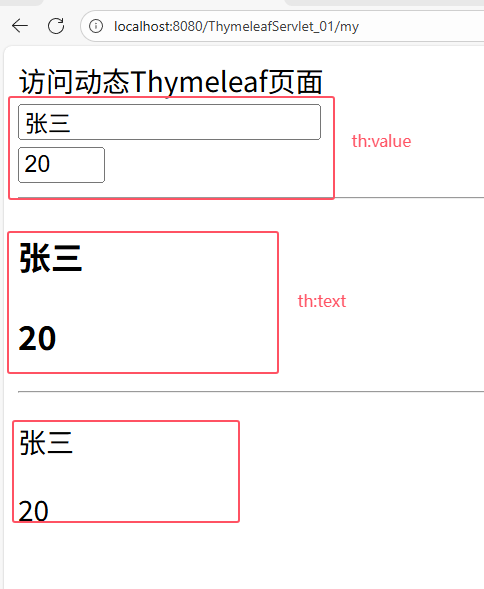
 <div th:text="访问动态Thymeleaf页面">欢迎访问首页</div>
  <!-- 请求域取值-->

 <!-- (1) 表单元素都是value-->
 <input type="text" th:value="${name}"><br/>
 <input type="text" th:value="${age}" size="2">

 <hr/>
<!--  (2) p,h3等标签就是text-->
<h3 th:text="${name}"></h3>
<h3 th:text="${age}"></h3>

<hr/>
 <!-- (3) 双大括号 [[...]] 在 HTML标签内直接嵌入动态内容,并且会自动转义 HTML 标签-->
 <p>[[${name}]]</p>
 <p>[[${age}]]</p>

</body>
</html>
运行效果:
(2) 会话域(Session Scope)
通过 session.setAttribute("key", value) 存储的数据,同样使用 ${key} 访问:
<p th:text="${userRole}"></p>
<!-- 获取 session.setAttribute("userRole", "管理员") 的值 -->
(3)应用域(Application Scope)
通过 application.setAttribute("key", value) 存储的数据,使用 ${key} 访问:
<p th:text="${appConfig}"></p>
<!-- 获取 application.setAttribute("appConfig", "v1.0") 的值 -->
IndexServlet类
java
package org.hlx.servlet;

import jakarta.servlet.ServletContext;
import jakarta.servlet.ServletException;
import jakarta.servlet.annotation.WebServlet;
import jakarta.servlet.http.HttpServlet;
import jakarta.servlet.http.HttpServletRequest;
import jakarta.servlet.http.HttpServletResponse;
import jakarta.servlet.http.HttpSession;
import org.hlx.thymeleaf.CustomTemplateEngine;
import org.thymeleaf.context.Context;

import java.io.IOException;
import java.util.*;

@WebServlet("/index")
public class IndexServlet  extends HttpServlet {
    @Override
    protected void doGet(HttpServletRequest req, HttpServletResponse resp) throws ServletException, IOException {
        System.out.println("doGet()方法执行...");
        // 获取模板引擎对象
        CustomTemplateEngine templateEngine = CustomTemplateEngine.getInstance(req);

        //会话对象
        HttpSession session = req.getSession();
        //集合对象
        List<String> list =Arrays.asList("张三", "李四", "王五", "赵六", "孙七");
//        List<String> list =new ArrayList<>();
        //将集合对象存入会话
        session.setAttribute("list", list);

        //应用域取值
        ServletContext application = req.getServletContext();
        application.setAttribute("applist", list);


        // 处理请求并响应结果
        templateEngine.processTemplate("index", req, resp);

    }

    @Override
    protected void doPost(HttpServletRequest req, HttpServletResponse resp) throws ServletException, IOException {
        doGet(req, resp);
    }
}
index.html页面
html
<!DOCTYPE html>
<!--导入thymeleaf包-->
<html lang="en" xmlns:th="http://www.thymeleaf.org">
<head>
    <meta charset="UTF-8">
    <title>主页</title>
    <style type="text/css">
        table, tr, td {
            margin: 0px;
            padding: 0px;
        }

        table {
            border: 1px solid #000;
            width: 30%;
            margin: auto;
            /*边框合并*/
            border-collapse: collapse;
        }

        tr {
            height: 30px;
            text-align: center;
        }

        td {
            border: 1px solid #715757;
        }

        /* 偶数行变色 */
        tr:nth-child(even) {
            background-color: #f3dcdc;
        }

        /* 奇数行变色 */
        tr:nth-child(odd) {
            background-color: #b0b9e4;
        }


    </style>

</head>
<body>
<table>
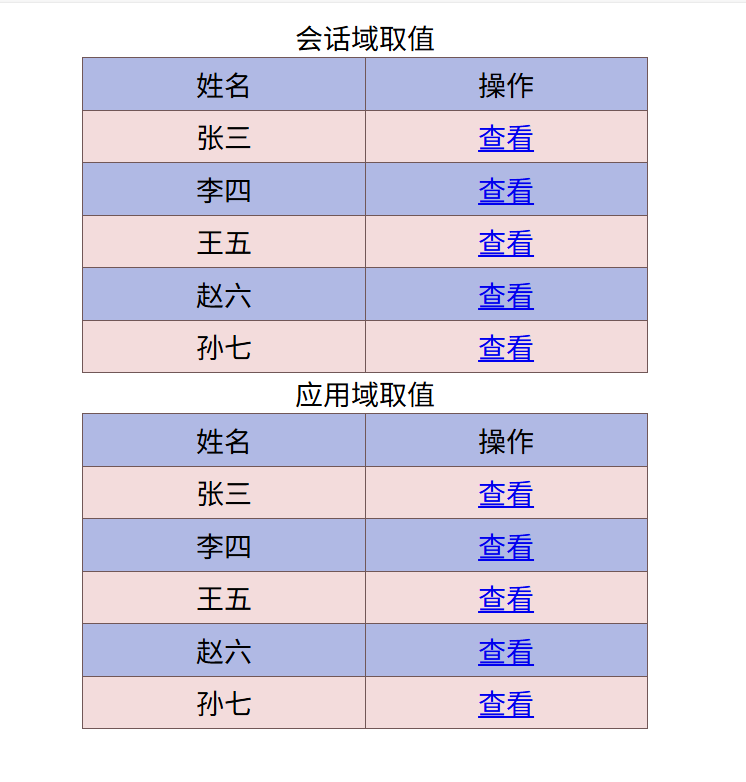
    <caption>会话域取值</caption>
    <tr>
        <td>姓名</td>
        <td>操作</td>
    </tr>
    <!-- 判断是否为空-->
    <tr th:if="${#lists.isEmpty(session.list)}">
        <td colspan="2">暂无数据</td>
    </tr>
    <!--    会话域取值::取值时前面一定要加session.-->
    <tr th:unless="${#lists.isEmpty(session.list)}" th:each="item : ${session.list}">
        <td th:text="${item}"></td>
        <td><a th:href="@{/my}">查看</a></td>
    </tr>

</table>

<!-- 应用域取值-->
<table>
    <caption>应用域取值</caption>
    <tr>
        <td>姓名</td>
        <td>操作</td>
    </tr>
    <tr th:if="${#lists.isEmpty(application.applist)}">
        <td colspan="2">暂无数据</td>
    </tr>
    <!-- 应用域取值-->
    <tr th:unless="${#lists.isEmpty(application.applist)}" th:each="item : ${application.applist}">
        <td th:text="${item}"></td>
        <td><a th:href="@{/my}">查看</a></td>
    </tr>
</table>


</body>
</html>
运行效果
二、 内置对象访问域对象
#request 访问请求域
通过 #request.getAttribute("key") 获取请求域数据:
<p th:text="${#request.getAttribute('username')}"></p>
#session 访问会话域
通过 #session.getAttribute("key") 获取会话域数据:
<p th:text="${#session.getAttribute('sessname')}"></p>
**#application 访问应用域**
通过 #application.getAttribute("key") 获取应用域数据:
<p th:text="${#application.getAttribute('appname')}"></p>
三、 获取请求参数
- 通过
${param.key}获取 URL 参数
<p th:text="${param.q0}"></p> <!-- 获取 ?q=Thymeleaf 的值 -->
http://localhost:8080/ThymeleafServlet_01/your?username=zhang
html
<h3 th:text="${param.username}"></h3>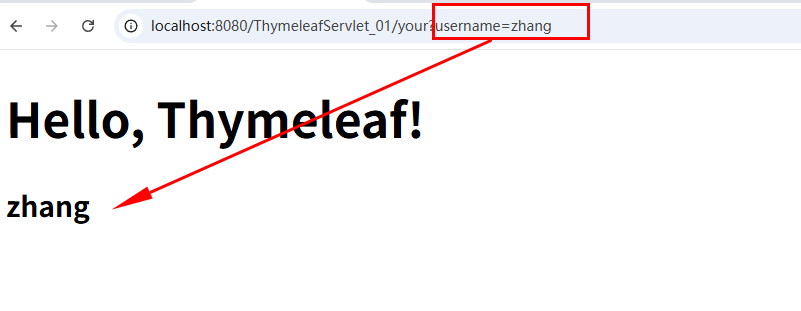
- 通过
#httpServletRequest获取参数
<p th:text="${#httpServletRequest.getParameter('q')}"></p>
注意事项
- 优先级:请求域 > 会话域 > 应用域。若多个域存在同名变量,优先使用请求域。
- 转义处理 :默认情况下,Thymeleaf 会自动转义 HTML 标签(如
<script>),避免 XSS 攻击。- 动态路径 :使用
@{/path}自动拼接上下文路径,适用于不同环境部署。通过以上方式,Thymeleaf 可以灵活地从不同域对象中获取数据,并在页面中动态渲染内容。