基础操作
- 本质上是通过占位符进行内容替换
- 本文章仅操作docx格式的文档
.doc (Word 97-2003): 使用OLE2格式,对应POI的 HWPF 组件
.docx (Word 2007+): 使用OOXML格式,对应POI的 XWPF 组件
基础操作_模板部分
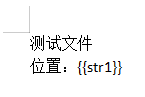
- 将模板放入resources 资源目录下,自定义文件夹中,例如:templet/word_template/demo_template.docx
代码部分
-
maven
xml<!-- 用于生成word版报告 --> <dependency> <groupId>com.deepoove</groupId> <artifactId>poi-tl</artifactId> <version>1.12.1</version> </dependency> -
处理过程
java// 模板文件 String templateFilePath = "templet/word_template/demo_template.docx"; // 读取模板文件 InputStream templateIn = getClass().getClassLoader().getResourceAsStream(templateFilePath); // 插入文本数据 Map<String, Object> templateData = new HashMap<String, Object>(); templateData.put("str1", "替换成功"); // 生成模板文件 XWPFTemplate template = XWPFTemplate.compile(templateIn).render(templateData); // 写入数据并关闭流 template.writeAndClose(new FileOutputStream("D:/output.docx")); templateIn.close(); -
此时,文件便下载到了 D:/output.docx 的位置。
-
若为Web
java
public void pgdExport(HttpServletResponse response) throws IOException {

        // 模板文件
        String templateFilePath = "templet/word_template/demo_template.docx";
        // 读取模板文件
        InputStream templateIn = getClass().getClassLoader().getResourceAsStream(templateFilePath);

        // 插入文本数据
        Map<String, Object> templateData = new HashMap<String, Object>();
        templateData.put("str1", "替换成功");

        // 生成模板文件
        XWPFTemplate template = XWPFTemplate.compile(templateIn).render(templateData);
        ServletOutputStream outputStream = response.getOutputStream();

        // 防止文件以及文件名乱码
        String fileName = "文件名.docx";
        String encodedFileName = URLEncoder.encode(fileName, "UTF-8").replaceAll("\\+", "%20");
        response.setContentType("application/vnd.openxmlformats-officedocument.wordprocessingml.document");
        response.setHeader("Content-Disposition", "attachment; filename=\"" + encodedFileName + "\"; filename*=utf-8''" + encodedFileName);
        response.setCharacterEncoding("UTF-8");

			  // 写入数据并关闭流
        template.writeAndClose(outputStream);
        templateIn.close();
    }
js
// 前端js代码
// 如果此接口需要被鉴权,那么需要后端同时从Params中获取token,然后前端拼接token传递,否则此方法无法使用
// 需要注意跨域问题
window.location.href =  '你的接口地址';
插入图片
- 模板:占位符格式是{{@xxxx}}
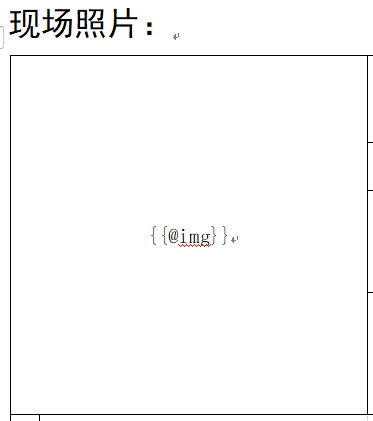
- 代码
java
import com.deepoove.poi.XWPFTemplate;
import com.deepoove.poi.data.PictureType;
import com.deepoove.poi.data.Pictures;

templateData.put("img", Pictures.ofStream(in, PictureType.JPEG).size(300, 300).create());