目录
-
- [🎄 技术揭秘:如何用 Three.js 打造 3D 粒子变形圣诞体验](#🎄 技术揭秘:如何用 Three.js 打造 3D 粒子变形圣诞体验)
- [1. 界面设计与 CSS 美学 (Glassmorphism)](#1. 界面设计与 CSS 美学 (Glassmorphism))
- [2. 核心技术:Three.js 粒子系统](#2. 核心技术:Three.js 粒子系统)
-
- [BufferGeometry 的威力](#BufferGeometry 的威力)
- 发光材质
- [3. 数学之美:粒子形状生成算法](#3. 数学之美:粒子形状生成算法)
-
- [🎄 螺旋圣诞树](#🎄 螺旋圣诞树)
- [🎁 礼物盒](#🎁 礼物盒)
- [🎅 抽象圣诞老人](#🎅 抽象圣诞老人)
- [4. 灵魂注入:Tween.js 变形动画](#4. 灵魂注入:Tween.js 变形动画)
- 完整代码
- [5. 总结](#5. 总结)
专栏导读
🌸 欢迎来到Python办公自动化专栏---Python处理办公问题,解放您的双手
🏳️🌈 个人博客主页:请点击------> 个人的博客主页 求收藏
🏳️🌈 Github主页:请点击------> Github主页 求Star⭐
🏳️🌈 知乎主页:请点击------> 知乎主页 求关注
🏳️🌈 CSDN博客主页:请点击------> CSDN的博客主页 求关注
👍 该系列文章专栏:请点击------>Python办公自动化专栏 求订阅
🕷 此外还有爬虫专栏:请点击------>Python爬虫基础专栏 求订阅
📕 此外还有python基础专栏:请点击------>Python基础学习专栏 求订阅
文章作者技术和水平有限,如果文中出现错误,希望大家能指正🙏
❤️ 欢迎各位佬关注! ❤️
🎄 技术揭秘:如何用 Three.js 打造 3D 粒子变形圣诞体验
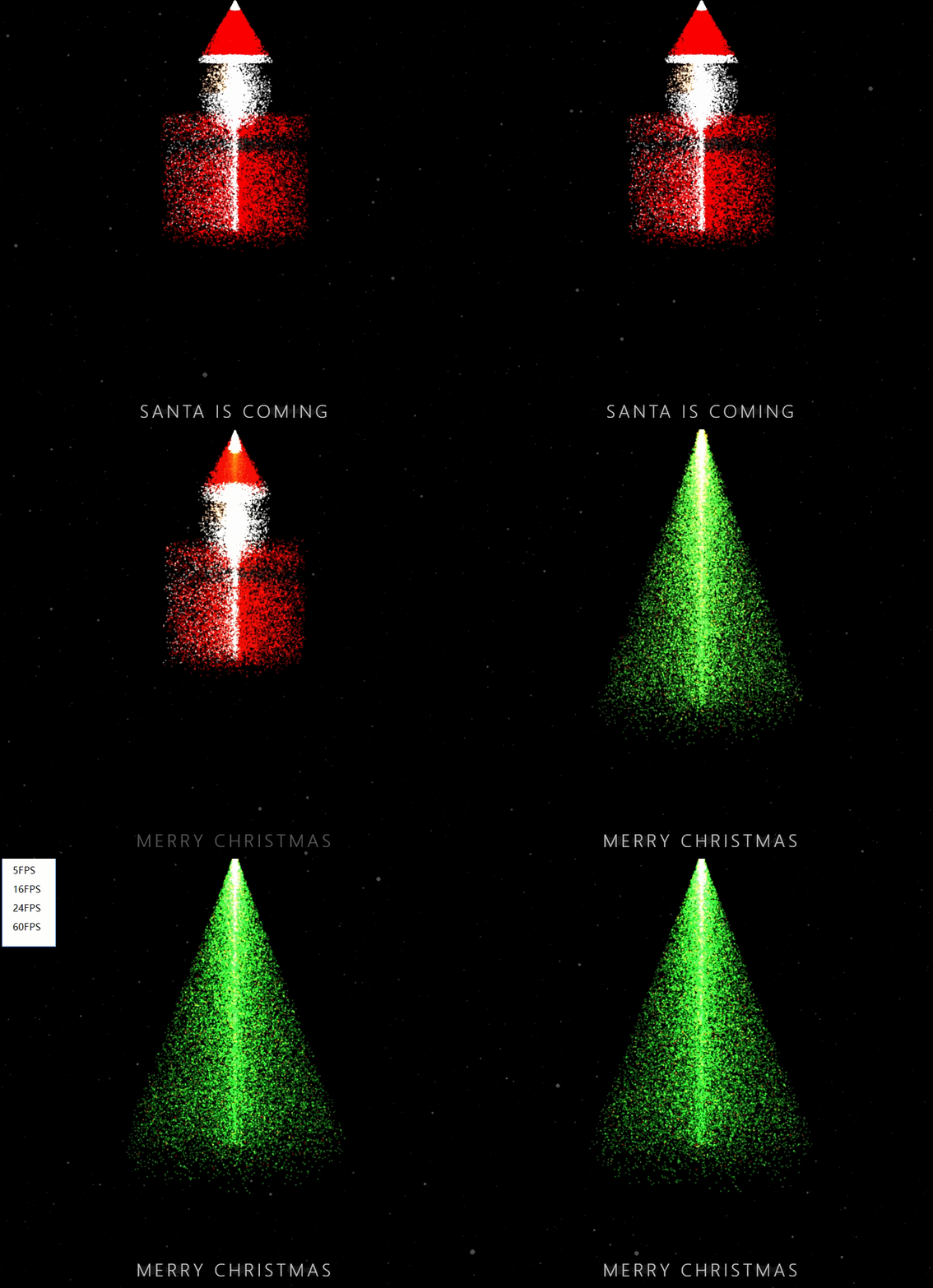
在这个项目中,我们探索了如何使用 Three.js 和 Tween.js 创建一个充满节日氛围的 3D 互动网页。不仅仅是简单的 3D 模型展示,我们实现了一个由 30,000 个独立粒子组成的系统,这些粒子可以在不同的形态(圣诞树、礼物盒、糖果手杖、圣诞老人)之间平滑流体变形。
本文将详细拆解其背后的技术实现,从 CSS 界面设计到 3D 粒子数学生成算法。
1. 界面设计与 CSS 美学 (Glassmorphism)
虽然核心是 3D,但 UI 的质感决定了第一印象。为了不抢占 3D 场景的视觉焦点,我们采用了 磨砂玻璃 (Glassmorphism) 风格的 UI 设计。
沉浸式背景
首先,我们确保 Canvas 占满全屏,并使用深邃的黑色背景来衬托发光的粒子。
css
body {
    margin: 0;
    overflow: hidden;
    background-color: #000; /* 纯黑背景,极致对比 */
    font-family: 'Segoe UI', sans-serif;
}

#canvas-container {
    position: absolute;
    top: 0; left: 0;
    width: 100%; height: 100%;
    z-index: 1;
}
磨砂玻璃按钮
控制按钮采用了半透明模糊效果,使其看起来悬浮在 3D 场景之上。
css
.btn {
    background: rgba(255, 255, 255, 0.1); /* 极低的透明度 */
    border: 1px solid rgba(255, 255, 255, 0.3); /* 细微的边框 */
    color: white;
    padding: 8px 16px;
    border-radius: 20px;
    backdrop-filter: blur(5px); /* 关键:背景模糊 */
    transition: all 0.3s;
}

.btn:hover, .btn.active {
    background: rgba(255, 255, 255, 0.3); /* 激活状态更亮 */
    border-color: white;
    box-shadow: 0 0 15px rgba(255, 255, 255, 0.3); /* 发光效果 */
}
2. 核心技术:Three.js 粒子系统
我们没有使用传统的 Mesh(网格),而是使用了 THREE.Points。这是因为我们需要控制每一个"点"的移动,从而实现变形效果。
BufferGeometry 的威力
为了渲染 30,000 个粒子并保持 60FPS 的流畅度,必须使用 BufferGeometry。它直接操作 GPU 显存,比普通的 Geometry 快得多。
javascript
const geometry = new THREE.BufferGeometry();
const positions = new Float32Array(particleCount * 3); // x, y, z
const colors = new Float32Array(particleCount * 3);    // r, g, b

// ... 填充数组数据 ...

geometry.setAttribute('position', new THREE.BufferAttribute(positions, 3));
geometry.setAttribute('color', new THREE.BufferAttribute(colors, 3));
发光材质
为了让粒子看起来像节日彩灯,我们使用了 THREE.AdditiveBlending(叠加混合模式)。当多个粒子重叠时,亮度会叠加,产生耀眼的光晕效果。
javascript
const material = new THREE.PointsMaterial({
    size: 4,
    map: texture, // 圆形渐变纹理
    vertexColors: true, // 允许每个粒子有不同颜色
    blending: THREE.AdditiveBlending, // 叠加发光
    depthTest: false, // 关闭深度测试,避免粒子互相遮挡产生的黑边
    transparent: true
});
3. 数学之美:粒子形状生成算法
项目的核心难点在于如何计算出不同形状的粒子坐标。我们预先计算了四种形态的坐标数据。
🎄 螺旋圣诞树
利用圆锥体方程加上螺旋偏移。
javascript
// 核心逻辑
const y = (Math.random() * 200) - 100; // 高度
const maxRadius = 80 * (1 - (y + 100) / 200); // 半径随高度减小
const angle = y * 0.1 + Math.random() * Math.PI * 2; // 螺旋角度
const x = maxRadius * Math.cos(angle);
const z = maxRadius * Math.sin(angle);
🎁 礼物盒
在一个立方体的表面随机采样点。
javascript
const size = 60;
// 随机选择立方体的 6 个面之一,然后随机生成该面上的 UV 坐标
// 另外,通过坐标判断是否在"丝带"区域(十字交叉),如果是则染成金色。
🎅 抽象圣诞老人
这是最复杂的形状,由多个几何体组合而成:
- 身体:底部的红色圆柱/球体混合。
- 腰带:黑色圆环。
- 头部:皮肤色的球体。
- 胡子:白色的半球体区域。
- 帽子:顶部的红色圆锥 + 白色绒球。
通过 if-else 逻辑判断粒子的随机位置属于身体的哪个部分,从而分配坐标和颜色。
4. 灵魂注入:Tween.js 变形动画
有了起始坐标(圣诞树)和目标坐标(例如礼物盒),我们不需要销毁重建粒子,而是让现有的粒子飞过去。
这里使用了 Tween.js 来驱动一个从 0 到 1 的进度因子 t。
javascript
const tweenObj = { t: 0 };

new TWEEN.Tween(tweenObj)
    .to({ t: 1 }, 2000) // 2秒动画
    .easing(TWEEN.Easing.Exponential.InOut) // 缓动函数,两头慢中间快
    .onUpdate(() => {
        const t = tweenObj.t;
        // 线性插值 (Lerp)
        currentPos = startPos + (targetPos - startPos) * t;
        currentColor = startColor + (targetColor - startColor) * t;

        // 通知 GPU 更新数据
        geometry.attributes.position.needsUpdate = true;
        geometry.attributes.color.needsUpdate = true;
    })
    .start();
完整代码
html
<!DOCTYPE html>
<html lang="zh-CN">
<head>
<meta charset="UTF-8">
<meta name="viewport" content="width=device-width, initial-scale=1.0">
<title>3D 粒子圣诞变换</title>
<style>
body {
margin: 0;
overflow: hidden;
background-color: #000;
font-family: 'Segoe UI', Tahoma, Geneva, Verdana, sans-serif;
}
#canvas-container {
position: absolute;
top: 0;
left: 0;
width: 100%;
height: 100%;
z-index: 1;
}
#overlay-text {
position: absolute;
bottom: 40px;
width: 100%;
text-align: center;
z-index: 10;
pointer-events: none;
color: rgba(255, 255, 255, 0.8);
font-weight: 300;
letter-spacing: 4px;
font-size: 24px;
text-shadow: 0 0 10px rgba(255,255,255,0.5);
transition: opacity 1s;
}
#loading {
position: absolute;
top: 50%;
left: 50%;
transform: translate(-50%, -50%);
color: rgba(255,255,255,0.5);
font-size: 14px;
pointer-events: none;
z-index: 5;
letter-spacing: 2px;
}
.controls {
position: absolute;
top: 20px;
right: 20px;
z-index: 20;
display: flex;
gap: 10px;
}
.btn {
background: rgba(255, 255, 255, 0.1);
border: 1px solid rgba(255, 255, 255, 0.3);
color: white;
padding: 8px 16px;
cursor: pointer;
border-radius: 20px;
backdrop-filter: blur(5px);
transition: all 0.3s;
font-size: 12px;
}
.btn:hover, .btn.active {
background: rgba(255, 255, 255, 0.3);
border-color: white;
}
</style>
</head>
<body>
<div id="canvas-container"></div>
<div id="overlay-text">MERRY CHRISTMAS</div>
<div id="loading">Loading 3D Assets...</div>
<div class="controls">
<button class="btn" onclick="manualSwitch(0)">圣诞树</button>
<button class="btn" onclick="manualSwitch(1)">礼物盒</button>
<button class="btn" onclick="manualSwitch(2)">糖果手杖</button>
<button class="btn" onclick="manualSwitch(3)">圣诞老人</button>
</div>
<!-- Three.js -->
<script src="https://cdnjs.cloudflare.com/ajax/libs/three.js/r128/three.min.js"></script>
<script src="https://cdnjs.cloudflare.com/ajax/libs/three.js/r128/examples/js/controls/OrbitControls.js"></script>
<!-- Tween.js for smoother animations -->
<script src="https://cdnjs.cloudflare.com/ajax/libs/tween.js/18.6.4/tween.umd.js"></script>
<script>
let scene, camera, renderer, controls;
let particleSystem;
let particleCount = 30000;
let currentShape = 0; // 0: Tree, 1: Gift, 2: Candy, 3: Santa
let shapes = []; // Stores {positions, colors} for each shape
let time = 0;
let autoSwitchTimer;
// Constants
const COLOR_GREEN = new THREE.Color(0x0f9b0f);
const COLOR_LIGHT_GREEN = new THREE.Color(0x37c937);
const COLOR_RED = new THREE.Color(0xff0000);
const COLOR_GOLD = new THREE.Color(0xffd700);
const COLOR_WHITE = new THREE.Color(0xffffff);
const COLOR_SKIN = new THREE.Color(0xffccaa);
const COLOR_BLACK = new THREE.Color(0x111111);
function init() {
const container = document.getElementById('canvas-container');
document.getElementById('loading').style.display = 'none';
scene = new THREE.Scene();
scene.fog = new THREE.FogExp2(0x000000, 0.0008);
camera = new THREE.PerspectiveCamera(55, window.innerWidth / window.innerHeight, 2, 2000);
camera.position.set(0, 50, 400);
camera.lookAt(0, 0, 0);
renderer = new THREE.WebGLRenderer({ antialias: true, alpha: true });
renderer.setPixelRatio(window.devicePixelRatio);
renderer.setSize(window.innerWidth, window.innerHeight);
container.appendChild(renderer.domElement);
if (THREE.OrbitControls) {
controls = new THREE.OrbitControls(camera, renderer.domElement);
controls.enableDamping = true;
controls.dampingFactor = 0.05;
controls.autoRotate = true;
controls.autoRotateSpeed = 1.0;
controls.enableZoom = true;
}
// 1. Pre-calculate all shapes
generateShapes();
// 2. Create Particle System with initial shape (Tree)
createParticleSystem();
// 3. Create Snow (Background)
createSnow();
window.addEventListener('resize', onWindowResize, false);
animate();
// Start auto-switch cycle
startAutoSwitch();
}
function generateShapes() {
shapes.push(generateTreeData());
shapes.push(generateGiftData());
shapes.push(generateCandyData());
shapes.push(generateSantaData());
}
// --- Shape Generators ---
function generateTreeData() {
const positions = [];
const colors = [];
for (let i = 0; i < particleCount; i++) {
const y = (Math.random() * 200) - 100;
const percent = (y + 100) / 200;
const maxRadius = 80 * (1 - percent);
const r = Math.random() * maxRadius;
const angle = Math.random() * Math.PI * 2 * 15 + y * 0.1;
const x = r * Math.cos(angle);
const z = r * Math.sin(angle);
positions.push(x, y, z);
// Colors
if (Math.random() < 0.05) {
const c = Math.random() < 0.5 ? COLOR_RED : COLOR_GOLD;
colors.push(c.r, c.g, c.b);
} else if (y > 95) { // Star at top
colors.push(1, 0.9, 0.2);
} else {
const c = COLOR_GREEN.clone().lerp(COLOR_LIGHT_GREEN, Math.random());
colors.push(c.r, c.g, c.b);
}
}
return { positions, colors };
}
function generateGiftData() {
const positions = [];
const colors = [];
const size = 60; // Box size
for (let i = 0; i < particleCount; i++) {
// Random point on cube surface
let x, y, z;
const face = Math.floor(Math.random() * 6);
const u = (Math.random() * 2 - 1) * size;
const v = (Math.random() * 2 - 1) * size;
switch(face) {
case 0: x = size; y = u; z = v; break;
case 1: x = -size; y = u; z = v; break;
case 2: y = size; x = u; z = v; break;
case 3: y = -size; x = u; z = v; break;
case 4: z = size; x = u; y = v; break;
case 5: z = -size; x = u; y = v; break;
}
positions.push(x, y, z);
// Ribbon check (Cross shape)
const ribbonWidth = 15;
let isRibbon = false;
if (Math.abs(x) < ribbonWidth || Math.abs(y) < ribbonWidth || Math.abs(z) < ribbonWidth) {
isRibbon = true;
}
if (isRibbon) {
colors.push(COLOR_GOLD.r, COLOR_GOLD.g, COLOR_GOLD.b);
} else {
colors.push(COLOR_RED.r, COLOR_RED.g, COLOR_RED.b);
}
}
return { positions, colors };
}
function generateCandyData() {
const positions = [];
const colors = [];
for (let i = 0; i < particleCount; i++) {
const t = i / particleCount; // 0 to 1
// Candy Cane shape: Line up, then curve
let x, y, z;
const height = 180;
const radius = 12;
// We'll distribute particles along the tube volume
// A cane has a straight part and a curved part
const segment = Math.random();
let tubeX, tubeY, tubeZ;
if (segment < 0.7) {
// Straight part
tubeY = (Math.random() * 140) - 70;
tubeX = 0;
tubeZ = 0;
} else {
// Curved part (Top hook)
const angle = (Math.random() * Math.PI); // 0 to 180 degrees
const hookRadius = 35;
tubeY = 70 + hookRadius * Math.sin(angle);
tubeX = -hookRadius + hookRadius * Math.cos(angle); // Hook to the left
tubeZ = 0;
}
// Add thickness
const r = Math.random() * radius;
const theta = Math.random() * Math.PI * 2;
// Simple tube displacement
x = tubeX + r * Math.cos(theta);
y = tubeY + r * Math.sin(theta); // Approximate for hook
z = tubeZ + r * Math.sin(theta); // Approximate
// Better orientation for hook needed?
// For simplicity, let's just do a spiral stripe coloring on this form
positions.push(x, y, z);
// Stripe logic based on height/angle
// Map position to a linear value to create stripes
const stripeVal = y + x * 0.5;
if (Math.sin(stripeVal * 0.1) > 0) {
colors.push(COLOR_RED.r, COLOR_RED.g, COLOR_RED.b);
} else {
colors.push(COLOR_WHITE.r, COLOR_WHITE.g, COLOR_WHITE.b);
}
}
return { positions, colors };
}
function generateSantaData() {
const positions = [];
const colors = [];
for (let i = 0; i < particleCount; i++) {
let x, y, z, r, g, b;
const part = Math.random();
if (part < 0.4) {
// Body (Red Coat) - Bottom Sphere/Cylinder
const radius = 50 * Math.random();
const theta = Math.random() * Math.PI * 2;
const height = Math.random() * 80 - 60; // -60 to 20
x = radius * Math.cos(theta);
z = radius * Math.sin(theta);
y = height;
// Belt check
if (y > -5 && y < 5) {
r=0.1; g=0.1; b=0.1; // Black belt
} else {
r=1; g=0; b=0; // Red coat
}
// Buttons
if (z > radius - 5 && Math.abs(x) < 5 && y > -60 && y < 20) {
r=1; g=1; b=1; // White buttons
}
} else if (part < 0.6) {
// Head (Skin + Beard)
const radius = 25 * Math.random();
const theta = Math.random() * Math.PI * 2;
const phi = Math.random() * Math.PI;
x = radius * Math.sin(phi) * Math.cos(theta);
z = radius * Math.sin(phi) * Math.sin(theta);
y = radius * Math.cos(phi) + 35; // Center at 35
// Face direction is +Z
if (z > 5 && y < 35) {
r=1; g=1; b=1; // White Beard
} else if (z > 5 && y >= 35) {
r=1; g=0.8; b=0.6; // Skin
// Eyes
if (z > 15 && y > 38 && y < 42 && Math.abs(x) > 5 && Math.abs(x) < 12) {
r=0; g=0; b=0;
}
} else {
r=1; g=1; b=1; // Hair/Beard back
}
} else {
// Hat (Cone)
const h = Math.random() * 40; // 0 to 40
const maxR = 26 * (1 - h/40);
const rad = Math.random() * maxR;
const theta = Math.random() * Math.PI * 2;
x = rad * Math.cos(theta);
z = rad * Math.sin(theta);
y = h + 55; // Start at top of head
// Pom-pom at tip
if (h > 35) {
r=1; g=1; b=1;
} else if (h < 5) {
r=1; g=1; b=1; // Hat rim
} else {
r=1; g=0; b=0; // Red Hat
}
}
positions.push(x, y, z);
colors.push(r, g, b);
}
return { positions, colors };
}
// --- System Logic ---
function createParticleSystem() {
const geometry = new THREE.BufferGeometry();
// Initial Positions (Tree)
const initialData = shapes[0];
// We need 2 buffers: current position (for render) and target position (for tweening, logically handled)
// Actually, we can just tween the attribute array values directly.
const positions = new Float32Array(initialData.positions);
const colors = new Float32Array(initialData.colors);
geometry.setAttribute('position', new THREE.BufferAttribute(positions, 3));
geometry.setAttribute('color', new THREE.BufferAttribute(colors, 3));
// Texture
const canvas = document.createElement('canvas');
canvas.width = 32;
canvas.height = 32;
const context = canvas.getContext('2d');
const gradient = context.createRadialGradient(16, 16, 0, 16, 16, 16);
gradient.addColorStop(0, 'rgba(255,255,255,1)');
gradient.addColorStop(0.2, 'rgba(255,255,255,0.8)');
gradient.addColorStop(0.5, 'rgba(255,255,255,0.2)');
gradient.addColorStop(1, 'rgba(0,0,0,0)');
context.fillStyle = gradient;
context.fillRect(0, 0, 32, 32);
const texture = new THREE.CanvasTexture(canvas);
const material = new THREE.PointsMaterial({
size: 4,
map: texture,
vertexColors: true,
blending: THREE.AdditiveBlending,
depthTest: false,
transparent: true
});
particleSystem = new THREE.Points(geometry, material);
scene.add(particleSystem);
}
function createSnow() {
const geometry = new THREE.BufferGeometry();
const positions = [];
for (let i = 0; i < 3000; i++) {
positions.push(
Math.random() * 1000 - 500,
Math.random() * 1000 - 500,
Math.random() * 1000 - 500
);
}
geometry.setAttribute('position', new THREE.Float32BufferAttribute(positions, 3));
const canvas = document.createElement('canvas');
canvas.width = 16;
canvas.height = 16;
const ctx = canvas.getContext('2d');
ctx.beginPath();
ctx.arc(8, 8, 8, 0, 2 * Math.PI);
ctx.fillStyle = 'rgba(255,255,255,0.6)';
ctx.fill();
const texture = new THREE.CanvasTexture(canvas);
const material = new THREE.PointsMaterial({
size: 2,
map: texture,
color: 0xffffff,
blending: THREE.AdditiveBlending,
depthTest: false,
transparent: true,
opacity: 0.5
});
const snow = new THREE.Points(geometry, material);
snow.name = "snow";
scene.add(snow);
}
// --- Transition Logic ---
function morphTo(shapeIndex) {
if (shapeIndex === currentShape) return;
const targetData = shapes[shapeIndex];
const geometry = particleSystem.geometry;
const currentPositions = geometry.attributes.position.array;
const currentColors = geometry.attributes.color.array;
// Update Text
const titles = ["MERRY CHRISTMAS", "HAPPY HOLIDAYS", "SWEET DREAMS", "SANTA IS COMING"];
const overlay = document.getElementById('overlay-text');
overlay.style.opacity = 0;
setTimeout(() => {
overlay.innerText = titles[shapeIndex];
overlay.style.opacity = 1;
}, 500);
// Tween Positions
const tweenObj = { t: 0 };
// Create a copy of start positions/colors to interpolate from
const startPositions = Float32Array.from(currentPositions);
const startColors = Float32Array.from(currentColors);
new TWEEN.Tween(tweenObj)
.to({ t: 1 }, 2000) // 2 seconds duration
.easing(TWEEN.Easing.Exponential.InOut)
.onUpdate(() => {
const t = tweenObj.t;
for (let i = 0; i < particleCount; i++) {
// Lerp Position
currentPositions[i*3] = startPositions[i*3] + (targetData.positions[i*3] - startPositions[i*3]) * t;
currentPositions[i*3+1] = startPositions[i*3+1] + (targetData.positions[i*3+1] - startPositions[i*3+1]) * t;
currentPositions[i*3+2] = startPositions[i*3+2] + (targetData.positions[i*3+2] - startPositions[i*3+2]) * t;
// Lerp Color
currentColors[i*3] = startColors[i*3] + (targetData.colors[i*3] - startColors[i*3]) * t;
currentColors[i*3+1] = startColors[i*3+1] + (targetData.colors[i*3+1] - startColors[i*3+1]) * t;
currentColors[i*3+2] = startColors[i*3+2] + (targetData.colors[i*3+2] - startColors[i*3+2]) * t;
}
geometry.attributes.position.needsUpdate = true;
geometry.attributes.color.needsUpdate = true;
})
.start();
currentShape = shapeIndex;
updateButtons();
}
function updateButtons() {
const btns = document.querySelectorAll('.btn');
btns.forEach((btn, idx) => {
if(idx === currentShape) btn.classList.add('active');
else btn.classList.remove('active');
});
}
function manualSwitch(index) {
clearInterval(autoSwitchTimer); // Stop auto switch if user interacts
morphTo(index);
// Restart auto switch after delay
autoSwitchTimer = setInterval(nextShape, 8000);
}
function nextShape() {
let next = (currentShape + 1) % shapes.length;
morphTo(next);
}
function startAutoSwitch() {
updateButtons();
autoSwitchTimer = setInterval(nextShape, 6000); // Switch every 6 seconds
}
function onWindowResize() {
camera.aspect = window.innerWidth / window.innerHeight;
camera.updateProjectionMatrix();
renderer.setSize(window.innerWidth, window.innerHeight);
}
function animate() {
requestAnimationFrame(animate);
time += 0.005;
TWEEN.update();
if (controls) controls.update();
else scene.rotation.y += 0.005;
// Snow animation
const snow = scene.getObjectByName("snow");
if (snow) {
const positions = snow.geometry.attributes.position.array;
for (let i = 1; i < positions.length; i += 3) {
positions[i] -= 0.7;
if (positions[i] < -500) positions[i] = 500;
}
snow.geometry.attributes.position.needsUpdate = true;
snow.rotation.y = Math.sin(time * 0.5) * 0.05;
}
renderer.render(scene, camera);
}
init();
</script>
</body>
</html>5. 总结
这个项目展示了前端图形学的魅力:
- 数学构建几何形态。
- 物理(简单的)模拟粒子运动。
- 设计提升视觉体验。
通过将这三者结合,我们在浏览器中创造了一个无需下载、即开即用的 3D 节日贺卡。
结尾
希望对初学者有帮助;致力于办公自动化的小小程序员一枚
希望能得到大家的【❤️一个免费关注❤️】感谢!
求个 🤞 关注 🤞 +❤️ 喜欢 ❤️ +👍 收藏 👍
此外还有办公自动化专栏,欢迎大家订阅:Python办公自动化专栏
此外还有爬虫专栏,欢迎大家订阅:Python爬虫基础专栏
此外还有Python基础专栏,欢迎大家订阅:Python基础学习专栏