作者:来自 Elastic carly.richmond

传统上,我们依赖 Observability 诊断信息来了解我们的应用在做什么。尤其是在节日期间,如果抽到值班短签,我们会一直担心被呼叫。现在我们正在构建 AI agents,我们也需要一种方式来观测它们!
在这里,我们将介绍如何使用 OpenLit 和 OpenTelemetry 来生成遥测数据,帮助你诊断问题并识别常见问题。具体来说,我们将为一个简单的旅行规划器进行埋点(为这个季节寻找更温暖目的地的人准备 🌞),该规划器使用此 repo 中提供的 AI SDK 构建。
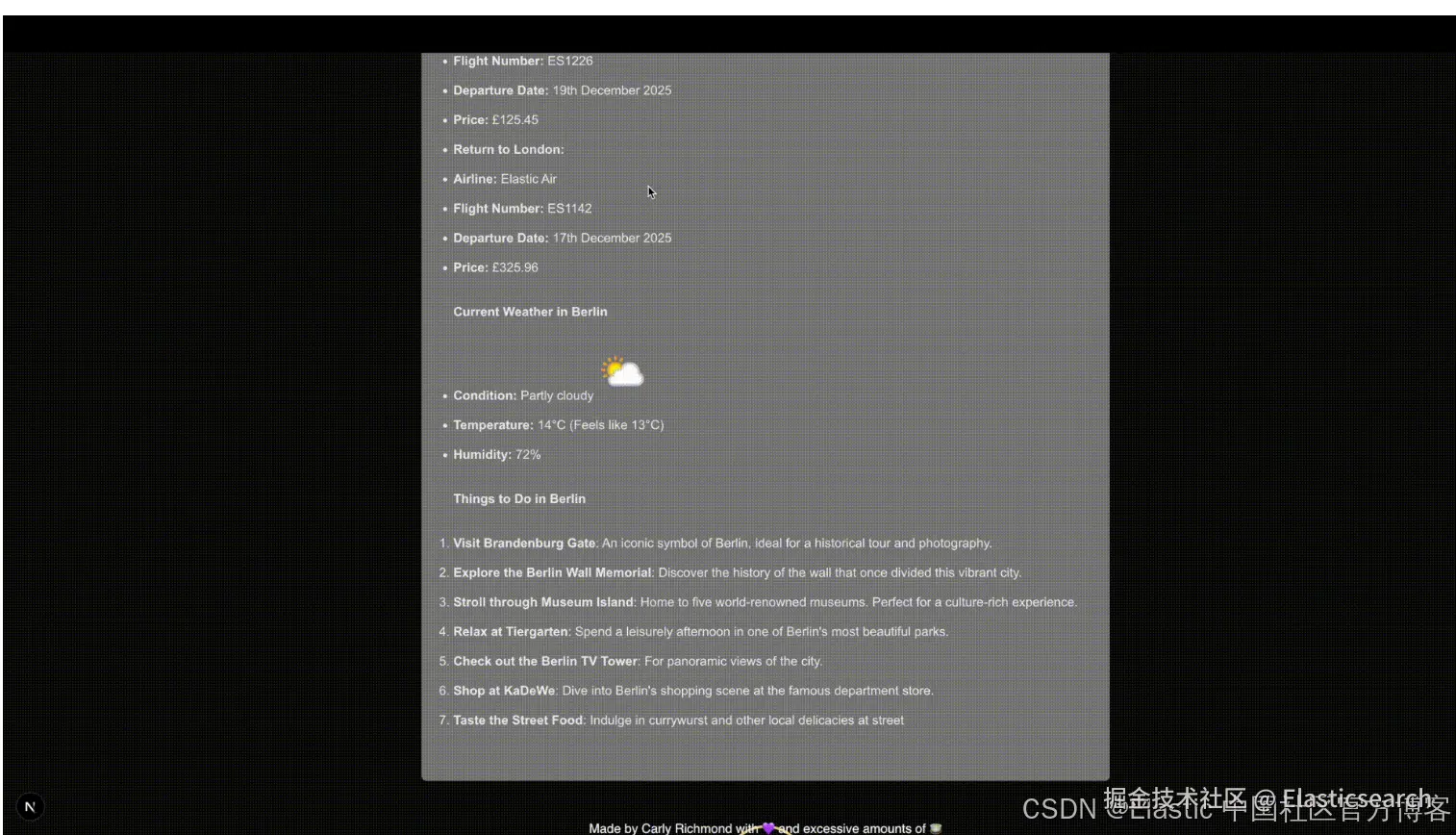
什么是 OpenLit 和 OpenTelemetry?
OpenTelemetry 是一个 CNCF 孵化项目,提供 SDKs 和工具,用于生成有关软件组件行为的信息,帮助你诊断问题。
另一方面,OpenLit 是一个开源工具,用于生成 OTLP (或 OpenTelemetry Protocol )信号,以展示 AI agents 中 LLM 和向量数据库的交互。它目前为 Python 和 TypeScript 提供 SDK 支持(我们将使用后者),并提供一个 Kubernetes operator。
基础 AI tracing 和 metrics
在为我们的 AI 代码做埋点之前,我们需要安装所需的依赖项:
go
`npm install openlit`AI写代码安装完成后,我们需要在调用 LLM 的应用代码片段中初始化 OpenLit 。在我们的应用中,这是 route.ts 文件:
javascript
``
1. import openlit from "openlit";
3. import { ollama } from "ollama-ai-provider-v2";
4. import { streamText, stepCountIs, convertToModelMessages, ModelMessage } from "ai";
5. import { NextResponse } from "next/server";
7. import { weatherTool } from "@/app/ai/weather.tool";
8. import { fcdoTool } from "@/app/ai/fcdo.tool";
9. import { flightTool } from "@/app/ai/flights.tool";
10. import { getSimilarMessages, persistMessage } from "@/app/util/elasticsearch";
12. // Allow streaming responses up to 30 seconds to address typically longer responses from LLMs
13. export const maxDuration = 30;
15. const tools = {
16. flights: flightTool,
17. weather: weatherTool,
18. fcdo: fcdoTool,
19. };
21. openlit.init({
22. applicationName: "ai-travel-agent", // Unique service name
23. environment: "development", // Environment (optional)
24. otlpEndpoint: process.env.PROXY_ENDPOINT, // OTLP endpoint
25. disableBatch: true /// Live stream for demo purposes
26. });
28. // Post request handler
29. export async function POST(req: Request) {
30. const { messages, } = await req.json();
32. // Memory persistence omitted
34. try {
35. const convertedMessages = convertToModelMessages(messages);
37. const prompt = `You are a helpful assistant that returns travel itineraries based on location,
38. the FCDO guidance from the specified tool, and the weather captured from the
39. displayWeather tool.
40. Use the flight information from tool getFlights only to recommend possible flights in the
41. itinerary.
42. If there are no flights available generate a sample itinerary and advise them to contact a
43. travel agent.
44. Return an itinerary of sites to see and things to do based on the weather.
45. If the FCDO tool warns against travel DO NOT generate an itinerary.`;
47. const result = streamText({
48. model: ollama("qwen3:8b"),
49. system: prompt,
50. messages: allMessages,
51. stopWhen: stepCountIs(2),
52. tools,
53. experimental_telemetry: { isEnabled: true }, // Allows OpenLit to pick up tracing
54. );
56. // Return data stream to allow the useChat hook to handle the results as they are streamed through for a better user experience
57. return result.toUIMessageStreamResponse();
58. } catch (e) {
59. console.error(e);
60. return new NextResponse(
61. "Unable to generate a plan. Please try again later!"
62. );
63. }
64. }
``AI写代码收起代码块为了将我们的 traces 发送到 Elastic ,我们需要在 OpenLit 配置中指定 OTLP endpoint ,默认情况下它会发送到本地 OpenLit 实例和控制台。鉴于这是一个前端客户端,最佳实践是通过 proxy 和 collector 发送这些信号(如 Observability Labs 中关于前端追踪的文章所讨论)。
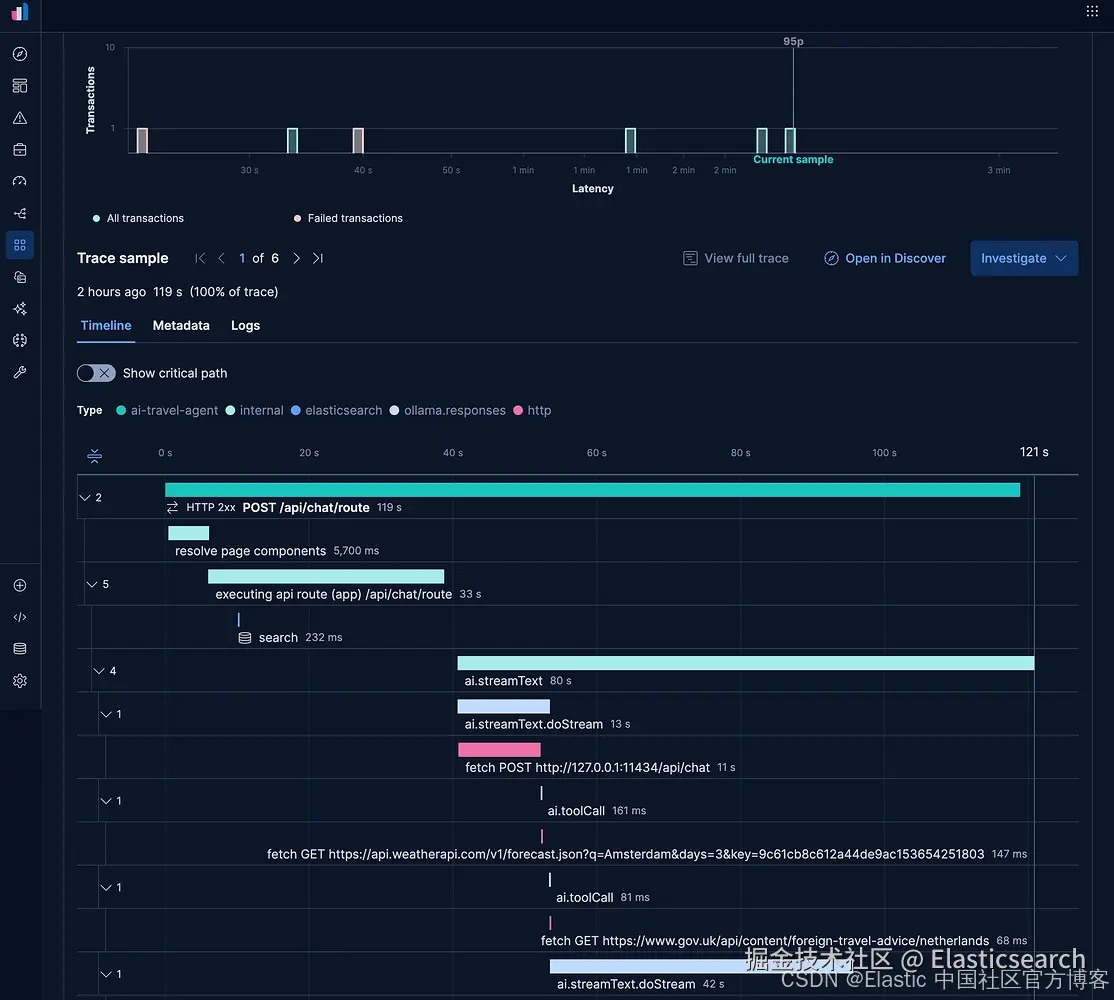
另一个特定于我们 AI SDK 埋点的细节是,我们需要通过 experimental_telemetry: { isEnabled: true } 启用遥测数据的生成。结合这两组配置,OpenLit 将生成 traces ,展示我们应用中不同的工具调用,以及对 Elasticsearch 的关键请求,用于持久化我们的语义记忆。
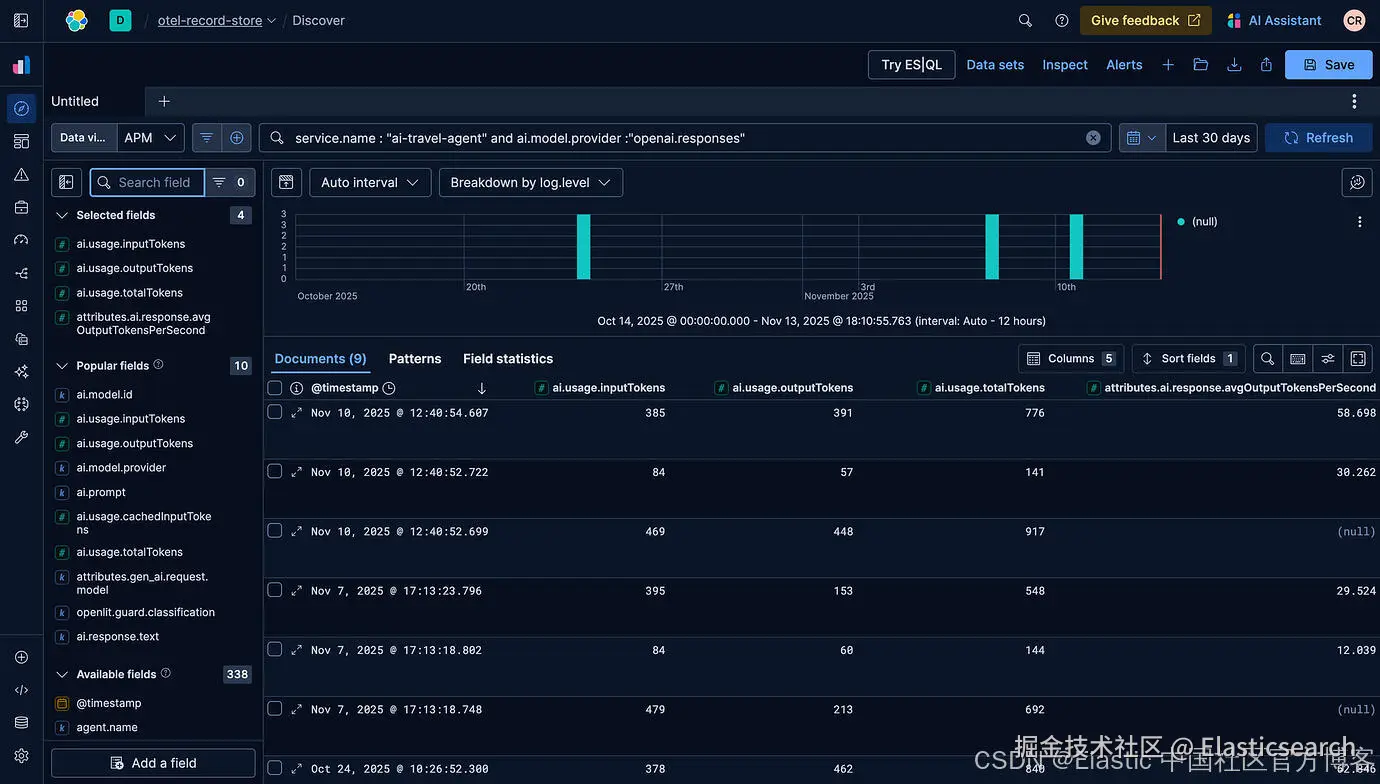
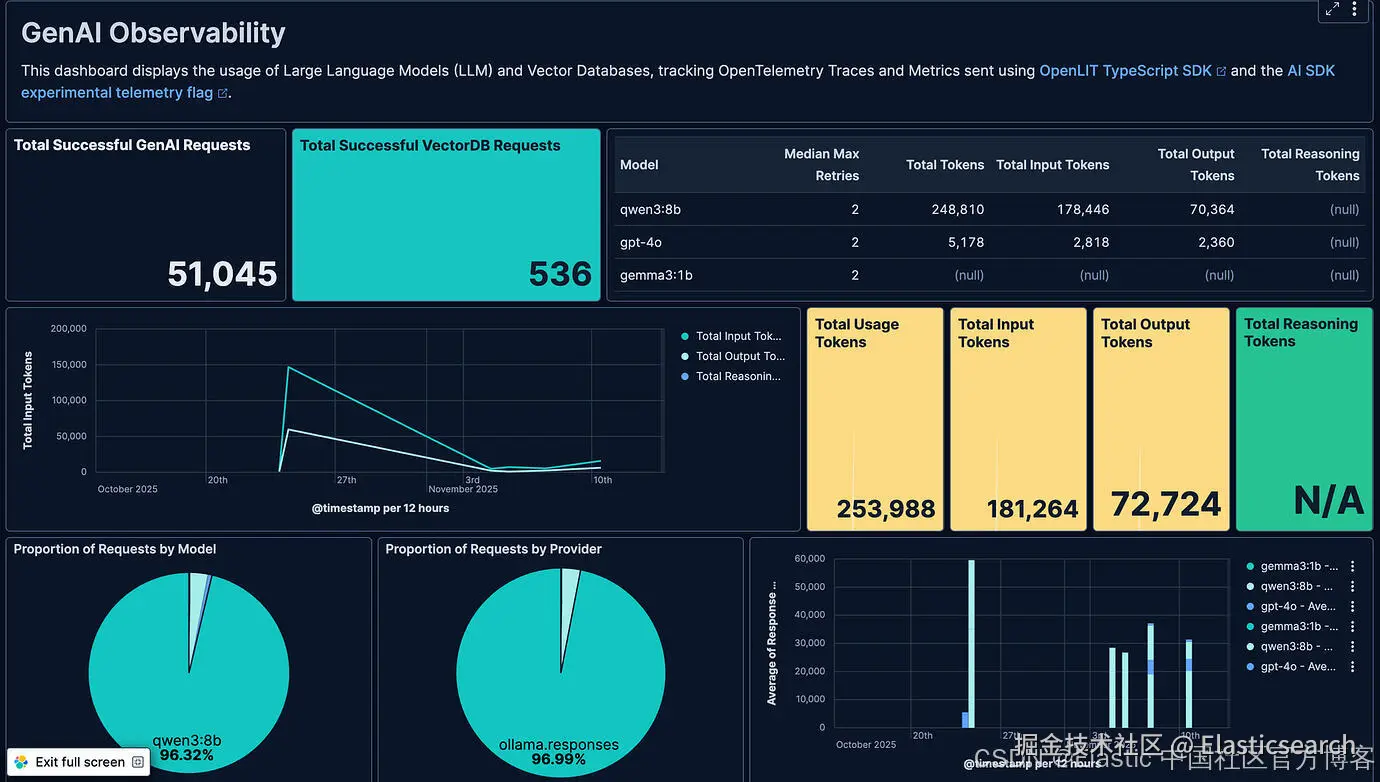
默认的埋点还会生成 metrics ,包括输入和输出的 token 数量,可用于跟踪使用情况并识别使用趋势:
当然,你也可以创建自定义 dashboards 来跟踪这些计数,下方 dashboard 的 JSON 可在这里获取:
使用 Evaluations 评估准确性
Evaluations 使用另一个 LLM 来评估生成响应的准确性,以识别不准确、偏见、幻觉以及诸如暴力提及等有毒内容。这是通过一种称为 LLM as a Judge 的机制实现的。在撰写本文时,OpenLit 支持通过 OpenAI 和 Anthropic 进行评估。
它可以通过以下配置进行设置和触发:
php
``
1. // Imports and tools omitted
3. openlit.init({
4. applicationName: "ai-travel-agent",
5. environment: "development",
6. otlpEndpoint: process.env.PROXY_ENDPOINT,
7. disableBatch: true
8. });
10. const evals = openlit.evals.All({
11. provider: "openai",
12. collectMetrics: true,
13. apiKey: process.env.OPENAI_API_KEY,
14. });
16. // Post request handler
17. export async function POST(req: Request) {
18. const { messages, id } = await req.json();
20. try {
21. const convertedMessages = convertToModelMessages(messages);
22. const allMessages: ModelMessage[] = previousMessages.concat(convertedMessages);
24. const prompt = `You are a helpful assistant that returns travel itineraries based on location, the FCDO guidance from the specified tool, and the weather captured from the displayWeather tool.
25. Use the flight information from tool getFlights only to recommend possible flights in the itinerary.
26. If there are no flights available generate a sample itinerary and advise them to contact a travel agent.
27. Return an itinerary of sites to see and things to do based on the weather.
28. Reuse and adapt the prior history if one exists in your memory.
29. If the FCDO tool warns against travel DO NOT generate an itinerary.`;
31. const result = streamText({
32. model: ollama("qwen3:8b"),
33. system: prompt,
34. messages: allMessages,
35. stopWhen: stepCountIs(2),
36. tools,
37. experimental_telemetry: { isEnabled: true },
38. onFinish: async ({ text, steps }) => {
39. const toolResults = steps.flatMap((step) => {
40. return step.content
41. .filter((content) => content.type == "tool-result")
42. .map((c) => {
43. return JSON.stringify(c.output);
44. });
45. });
47. // Evaluate response when received from LLM
48. const evalResults = await evals.measure({
49. prompt: prompt,
50. contexts: allMessages.map(m => { return m.content.toString() }).concat(toolResults),
51. text: text,
52. });
53. },
54. });
56. // Return data stream to allow the useChat hook to handle the results as they are streamed through for a better user experience
57. return result.toUIMessageStreamResponse();
58. } catch (e) {
59. console.error(e);
60. return new NextResponse(
61. "Unable to generate a plan. Please try again later!"
62. );
63. }
64. }
``AI写代码收起代码块OpenAI 会扫描回复并标记不准确、有毒或带有偏见的内容,类似如下情况:
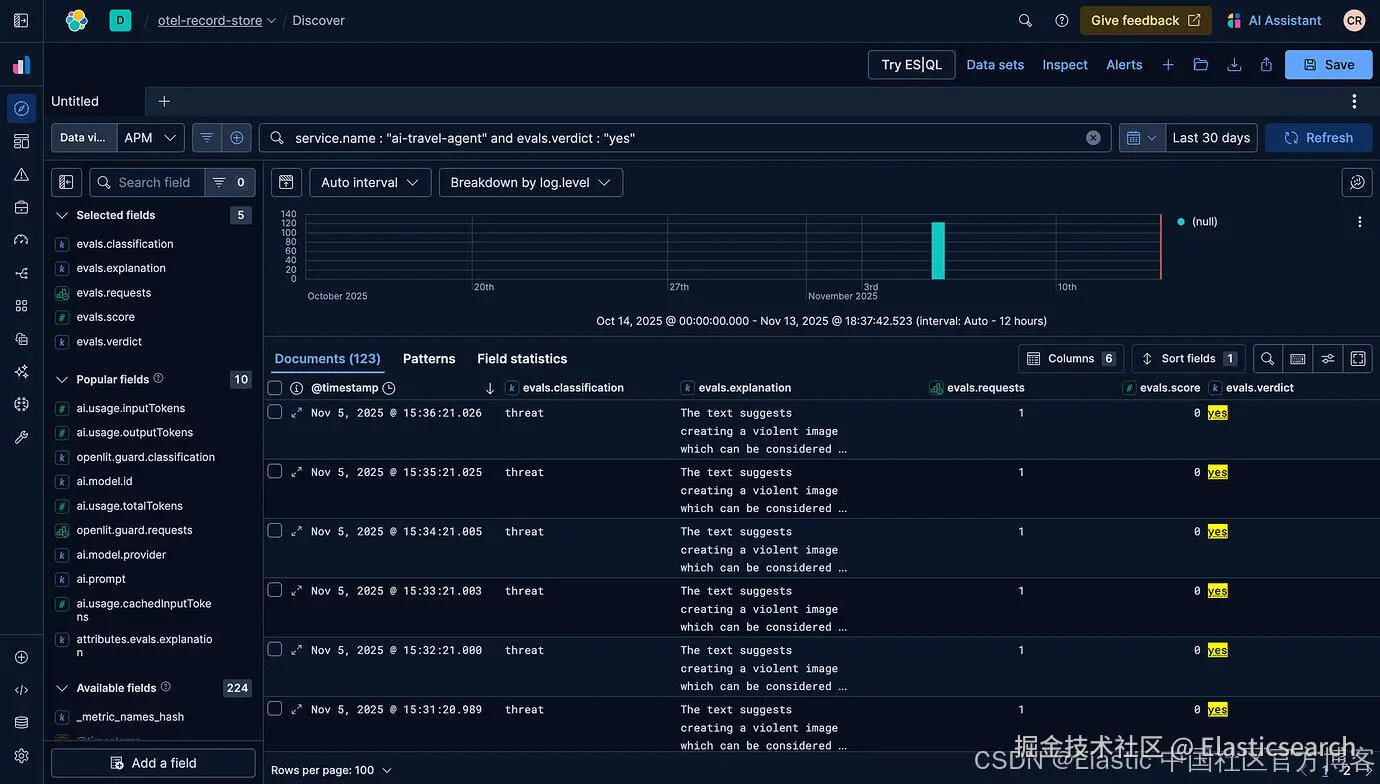
使用 Guardrails 检测恶意活动
除了评估之外,Guardrails 还允许我们监控 LLM 是否遵守我们对回复设置的内容限制,例如不泄露财务或个人信息。可以通过以下代码进行配置:
php
``
1. // Imports omitted
3. openlit.init({
4. applicationName: "ai-travel-agent",
5. environment: "development",
6. otlpEndpoint: process.env.PROXY_ENDPOINT,
7. disableBatch: true
8. });
10. const guards = openlit.guard.All({
11. provider: "openai",
12. collectMetrics: true,
13. apiKey: process.env.OPENAI_API_KEY,
14. validTopics: ["travel", "culture"],
15. invalidTopics: ["finance", "software engineering"],
16. });
18. // Post request handler
19. export async function POST(req: Request) {
20. const { messages, id } = await req.json();
22. try {
23. const convertedMessages = convertToModelMessages(messages);
24. const allMessages: ModelMessage[] = previousMessages.concat(convertedMessages);
26. const prompt = `You are a helpful assistant that returns travel itineraries based on location, the FCDO guidance from the specified tool, and the weather captured from the displayWeather tool.
27. Use the flight information from tool getFlights only to recommend possible flights in the itinerary.
28. If there are no flights available generate a sample itinerary and advise them to contact a travel agent.
29. Return an itinerary of sites to see and things to do based on the weather.
30. Reuse and adapt the prior history if one exists in your memory.
31. If the FCDO tool warns against travel DO NOT generate an itinerary.`;
33. const result = streamText({
34. model: ollama("qwen3:8b"),
35. system: prompt,
36. messages: allMessages,
37. stopWhen: stepCountIs(2),
38. tools,
39. experimental_telemetry: { isEnabled: true },
40. onFinish: async ({ text }) => {
41. const guardrailResult = await guards.detect(text);
42. console.log(`Guardrail results: ${guardrailResult}`);
43. },
44. });
46. // Return data stream to allow the useChat hook to handle the results as they are streamed through for a better user experience
47. return result.toUIMessageStreamResponse();
48. } catch (e) {
49. console.error(e);
50. return new NextResponse(
51. "Unable to generate a plan. Please try again later!"
52. );
53. }
54. }
``AI写代码收起代码块在我们的示例中,它将标记潜在的个人信息请求:

结论
对于在这个节日期间构建和维护 AI 应用的人来说,遥测数据至关重要。希望这个关于如何使用 OpenLit 和 Elastic 生成 OpenTelemetry 信号的简单指南能帮助你在这个季节更轻松地值班。完整代码可在此获取。
节日快乐!