基本语法:

注意事项;
1.SELECT指定查询哪些列的数据
2.COLUNM指定列名
- * 号代表查询所有列
4.FROM指定查询哪张表
5.DISTINCT可选,指显示结果时,是否去掉重复数据
sql
#创建新的表
CREATE TABLE student(
	id INT NOT NULL DEFAULT 1,
	NAME VARCHAR(20) NOT NULL DEFAULT '',
	chinese FLOAT NOT NULL DEFAULT 0.0,
	english FLOAT NOT NULL DEFAULT 0.0,
	math FLOAT NOT NULL DEFAULT 0.0
);

INSERT INTO student(id,NAME,chinese,english,math) VALUES(1,'刘备',89,78,90);
INSERT INTO student(id,NAME,chinese,english,math) VALUES(2,'张飞',67,98,56);
INSERT INTO student(id,NAME,chinese,english,math) VALUES(3,'宋江',87,78,77);
INSERT INTO student(id,NAME,chinese,english,math) VALUES(4,'关羽',88,98,90);
INSERT INTO student(id,NAME,chinese,english,math) VALUES(5,'赵云',82,84,67);
INSERT INTO student(id,NAME,chinese,english,math) VALUES(6,'欧阳锋',55,85,45);
INSERT INTO student(id,NAME,chinese,english,math) VALUES(7,'黄蓉',75,65,30);

#查询表中所有学生的信息
SELECT * FROM student
#查询表中所有学生的姓名和对应的英语成绩
SELECT `name`,english FROM student;
#过滤表中重复数据DISTINCT
SELECT DISTINCT english FROM student
#要查询的记录,每个字段都相同,才会去重
SELECT DISTINCT `name`,english FROM student#这样写只有当name和english同时相同才会去重
使用表达式对查询的列进行运算:

在SELECT语句中可使用as语句:

sql
#统计每个学生的总分
SELECT `name`,(chinese+english+math)FROM student;
#在所有学生总分加10分
SELECT `name`,(chinese+english+math+10)FROM student;
#使用别名 (AS + 别名)表示学生分数(chinese+english+math)
SELECT `name` AS '学生姓名',(chinese+english+math+10) AS total_score FROM student;
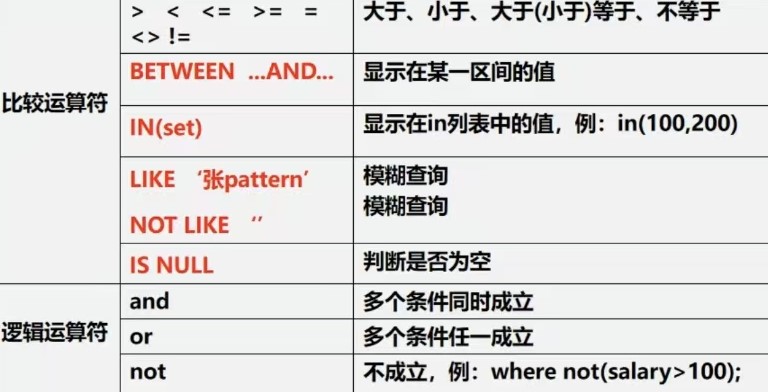
WHERE子句中常用的运算符:
sql
#创建新的表
CREATE TABLE student(
	id INT NOT NULL DEFAULT 1,
	NAME VARCHAR(20) NOT NULL DEFAULT '',
	chinese FLOAT NOT NULL DEFAULT 0.0,
	english FLOAT NOT NULL DEFAULT 0.0,
	math FLOAT NOT NULL DEFAULT 0.0
);

INSERT INTO student(id,NAME,chinese,english,math) VALUES(1,'刘备',89,78,90);
INSERT INTO student(id,NAME,chinese,english,math) VALUES(2,'张飞',67,98,56);
INSERT INTO student(id,NAME,chinese,english,math) VALUES(3,'宋江',87,78,77);
INSERT INTO student(id,NAME,chinese,english,math) VALUES(4,'关羽',88,98,90);
INSERT INTO student(id,NAME,chinese,english,math) VALUES(5,'赵云',82,84,67);
INSERT INTO student(id,NAME,chinese,english,math) VALUES(6,'欧阳锋',55,85,45);
INSERT INTO student(id,NAME,chinese,english,math) VALUES(7,'黄蓉',75,65,50);

#使用where语句进行过滤查询
#查询姓名为赵云的学生成绩
SELECT * FROM student WHERE `name` = '赵云';
#查询英语成绩大于90分的同学
SELECT * FROM student WHERE english > 90;
#查询总分大于200分的同学
SELECT * FROM student WHERE (english+chinese+math) > 200;
#查询math大于60,且(and)english大于90的学生成绩
SELECT * FROM student WHERE english > 90 AND math > 60;
#查询总分大于200分,并且 数学成绩小于语文成绩的姓张的学生
SELECT * FROM student WHERE (english+chinese+math) > 200 AND math < chinese AND `name` LIKE '张%';
# %代表名字以张开头的就可以

#查询英语分数在80-90之间的同学
SELECT * FROM student WHERE english BETWEEN 80 AND 90;
#查询数学分数为89,90,91的同学
SELECT * FROM student WHERE math IN(89,90,91);
#查询所有姓李的学生成绩
SELECT * FROM student WHERE `name` LIKE '李%';
#查询数学>80,语文>80的同学
SELECT * FROM student WHERE chinese > 80 AND math > 80;
#查询语文在70-80之间的同学
SELECT * FROM student WHERE chinese BETWEEN 70 AND 80;
#查询总分为189,190,191的同学
SELECT * FROM student WHERE (english+chinese+math)IN(189,190,191);
#查询所有姓李或宋的学生成绩
SELECT * FROM student WHERE `name` LIKE '宋%' OR `name` LIKE '李&';
#查询数学比语文多30分的同学
SELECT * FROM student WHERE(math - chinese) > 30;
使用ORDER BY字句排序查询结果:

1.ORDER BY指定排序的列,排序的列既可以是表中的列名,也可以是SELECT语句后指定的列名
2.ASC 升序(默认) DESC 降序
3.ORDER BY子句应位于SELECT语句的结尾
sql
#对数学成绩排序后输出(升序)
SELECT * FROM student ORDER BY math;
#对总分按从高到低的顺序输出(降序)
SELECT (math+chinese+english)AS total_score FROM student ORDER BY total_score DESC;
#对姓李的学生成绩排序输出(升序)
SELECT (math+chinese+english)AS total_score FROM student WHERE `name` LIKE '李%' ORDER BY total_score;